Anomaly Detection
On RequestThis feature is only available in all applicable AWS regions. It is not available on Google Cloud and Microsoft Azure. To enable it, contact us.
Anomaly detection identifies records whose vector embeddings differ substantially from the broader data distribution. Use this job to find unusual records that may represent data-quality issues, rare cases, processing errors, or samples that require further review.
Overview
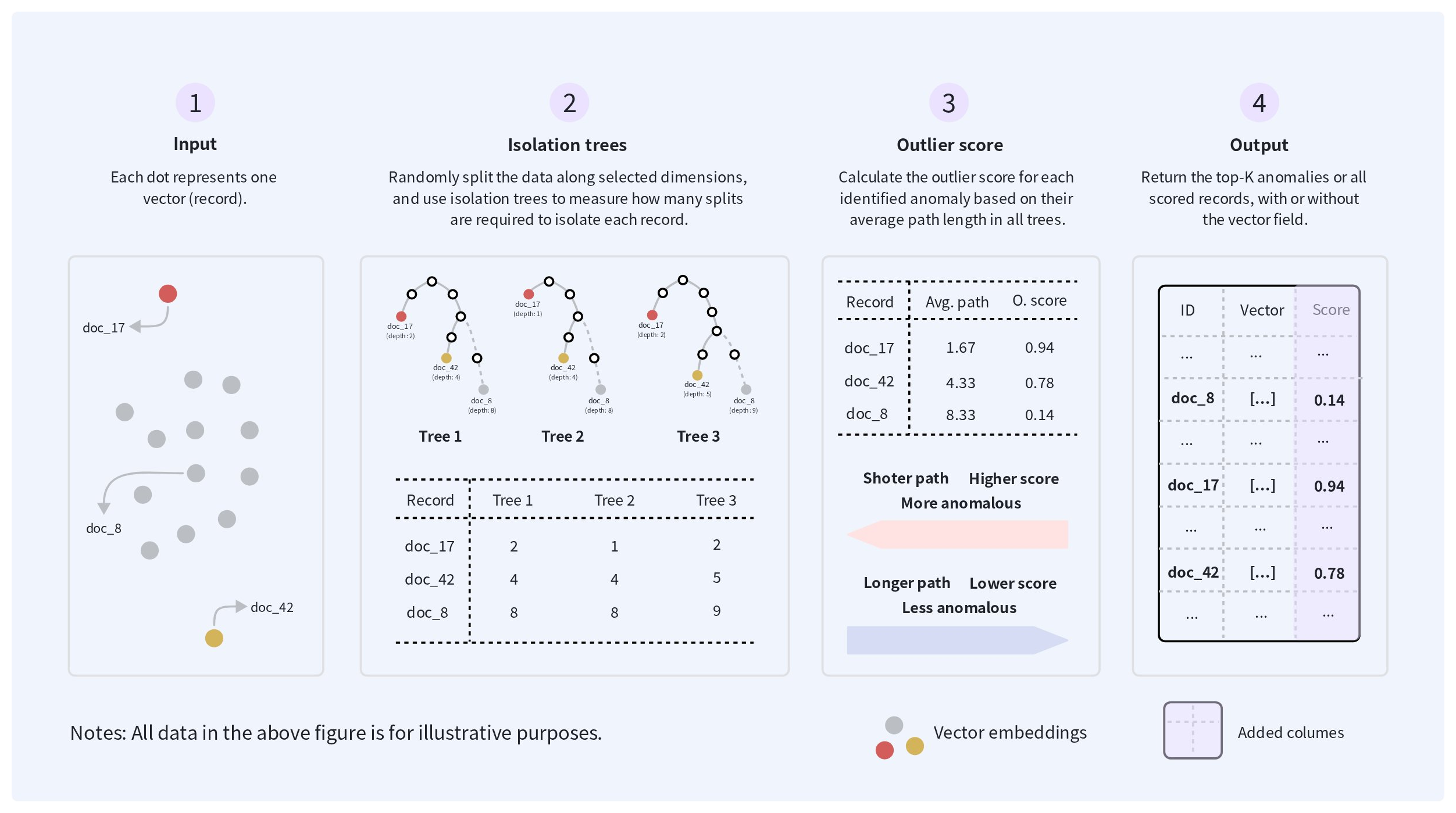
The following diagram shows how an anomaly detection job uses Isolation Forest to score vector records and return either the highest-scoring records or the full scored dataset.
Isolation Forest requires a minimum of 368 records in the inspected dataset.
How anomalies are identified
As shown in the diagram above, the job uses Isolation Forest to identify records that differ from the broader vector distribution. To build each isolation tree, it repeatedly selects a random vector dimension and a random split value, progressively separating the records into smaller groups. Records located away from dense regions typically require fewer splits to reach a leaf, while records in densely populated regions tend to have longer paths. This behavior allows the job to distinguish records that are isolated after only a few splits from records that remain grouped with many nearby records through deeper levels of the trees.
Understand the anomaly score
For each record, the job calculates the average path length across all isolation trees and converts it into an outlier_score. A shorter average path produces a higher score, while a longer average path produces a lower score. A higher score means that a record is more unusual relative to the other records in the dataset; it does not necessarily mean that the record is incorrect or should be removed.
Review the highest-scoring records to determine whether they represent data-quality issues, rare but valid cases, or expected variation.
Choose how many records to return
Use topK to return only the records with the highest outlier_score values. For example, setting topK to 100 returns the 100 highest-scoring records. If topK is omitted, the output includes all records and their anomaly scores.
Choose whether to retain the vector field
Use outputWithFeatures to control whether the analyzed vector field is included in the output. The default value is true. When it is set to false, the vector field is excluded; specifying primaryKeyField is recommended so that each output record can still be traced back to the source data.
Before you start
Before creating an anomaly detection job, ensure that:
-
All input files use compatible schemas and contain the vector field to analyze.
-
All vectors in that field use the same type and dimension and were generated using the same embedding model and preprocessing method.
When outputWithFeatures is set to false, consider specifying primaryKeyField so that each output record can be traced back to the source data.
For the general requirements for running Spark batch jobs, including authentication, supported file formats, input files, and output behavior, see Spark Batch Jobs.
Create an anomaly detection job
Create an anomaly detection job by specifying the input and output locations, the vector field to analyze, the number of records to return, and whether the vector field should be retained in the output. The job runs asynchronously and returns a job ID that you can use to monitor its status.
Prepare an idempotency key.
An idempotency key is a unique string that remains unchanged when retrying the same job request. For details, refer to Idempotent submission.
Prepare the request payload.
export payload='{
  "description": "inspecting anomalous product",
  "regionId": "aws-us-west-2",
  "input": {
    "type": "volume",
    "volumeName": "product-data",
    "path": "input/products.parquet",
    "format": "parquet"
  },
  "output": {
    "type": "volume",
    "volumeName": "product-data",
    "path": "output/product-anomalies.parquet",
    "format": "parquet"
  },
  "primaryKeyField": "id",
  "vectorField": "embedding",
  "topK": 100,
  "outputWithFeatures": true,
  "resourceSize": "MEDIUM",
  "timeoutSeconds": 7200
}'
The following table lists the job-specific parameters.
| Parameter | Required | Description |
|---|---|---|
vectorField | Yes | The vector field used for anomaly detection. Supported representations include array<float>, numeric arrays, Spark vectors, and comma-separated strings. |
primaryKeyField | No | The input field used to identify records in the output. Recommended when outputWithFeatures is set to false. |
topK | No | The maximum number of records to return, ordered by outlier_score from highest to lowest. The value must be a positive integer. If omitted, the job returns all scored records. |
outputWithFeatures | No | Whether to retain the vector field in the output. Default: true. When set to false, the vector field is excluded. |
Submit the payload.
export API_KEY="xxxxxxxxxxxxxxxxxxxxxxxxxxxxxxxxxxxxxxxxxxx"

curl --request POST \
    --url "https://api.cloud.zilliz.com/v2/projects/{projectId}/jobs/anomaly-detection" \
    --header "Authorization: Bearer ${API_KEY}" \
    --header "Idempotency-Key: spark-job-20260730-004" \
    --header "Content-Type: application/json" \
    --data "${payload}"
The request returns after the job is created. The response includes a job ID that you can use to monitor its progress. The following example shows a successful response:
{
  "code": 0,
  "data": {
    "jobId": "job-xxxxxxxx",
    "projectId": "proj-xxxxxxxx",
    "type": "SPARK",
    "description": "inspecting anomalous product",
    "status": "PENDING",
    "regionId": "aws-us-west-2",
    "clusterId": "in-xxxxxxxx",
    "createdAt": null,
    "startedAt": null,
    "finishedAt": null,
    "durationSeconds": null
  }
}
Monitor the job
After submitting the request, use the returned job ID to monitor the job until it reaches a terminal state. You can view the job status and details, list existing jobs, or cancel the job while it is still in a cancelable state.
When the job succeeds, verify that the expected output is available at the path specified in the request.
For instructions, job states, and state transitions, see Manage Spark Batch Jobs.
Understand and validate the output
The output of an anomaly detection job contains either the highest-scoring records or all scored records, depending on whether topK is specified. Each output record includes an outlier_score.
| Field | Description |
|---|---|
outlier_score | The anomaly score assigned to the record. Higher values indicate that the record is more unusual relative to the other records in the dataset. |
The output also depends on the following settings:
-
If
topKis specified, the output contains up to topK records with the highestoutlier_scorevalues. -
If
topKis omitted, the output contains all scored records. -
If
outputWithFeaturesistrue, the vector field is retained. -
If
outputWithFeaturesisfalse, the vector field is excluded.
After the job succeeds, verify that:
-
The output files exist at the configured Volume path.
-
Each output record contains an
outlier_score. -
If
topKwas specified, the output contains at most the requested number of records. -
If
topKwas omitted, all valid input records are present in the output. -
The presence or absence of the vector field matches
outputWithFeatures. -
If
primaryKeyFieldwas specified, each output record can be traced back to the corresponding input record. -
A sample of the highest-scoring records is reviewed to determine whether they represent data-quality issues, rare but valid cases, or expected variation.
Next steps
Review the highest-scoring records to determine whether they represent data-quality issues, rare but valid cases, or records that require further processing. Based on the results, you can correct or remove invalid data, preserve meaningful edge cases, or route selected records for manual review.
To explore the broader structure of the vector data, use K-Means Clustering. To identify semantically redundant records, use Vector Similarity Deduplication.