Access Logs Overview
This feature is available only with the Enterprise plan or higher, and BYOC deployments.
In high-volume workloads, understanding which data is accessed most frequently is critical for optimization decisions such as index tuning or partition strategy. Without visibility into query patterns, these decisions rely on guesswork.
Access Logs give you that visibility. When enabled on a Zilliz Cloud cluster, the access log pipeline captures query activities and delivers it as structured log files to your own object storage. You can then load these logs into a data warehouse and aggregate by entity ID to identify hot data, slow queries, and usage trends.
-
This release logs search- or query-class actions only: Search, HybridSearch, and Query. Support for the full action list is planned for a future release.
-
Audit log and access log are mutually exclusive in this release — only one can be enabled at a time.
How the pipeline works
The access log pipeline has two phases: collection on the Zilliz Cloud side and analysis on yours.
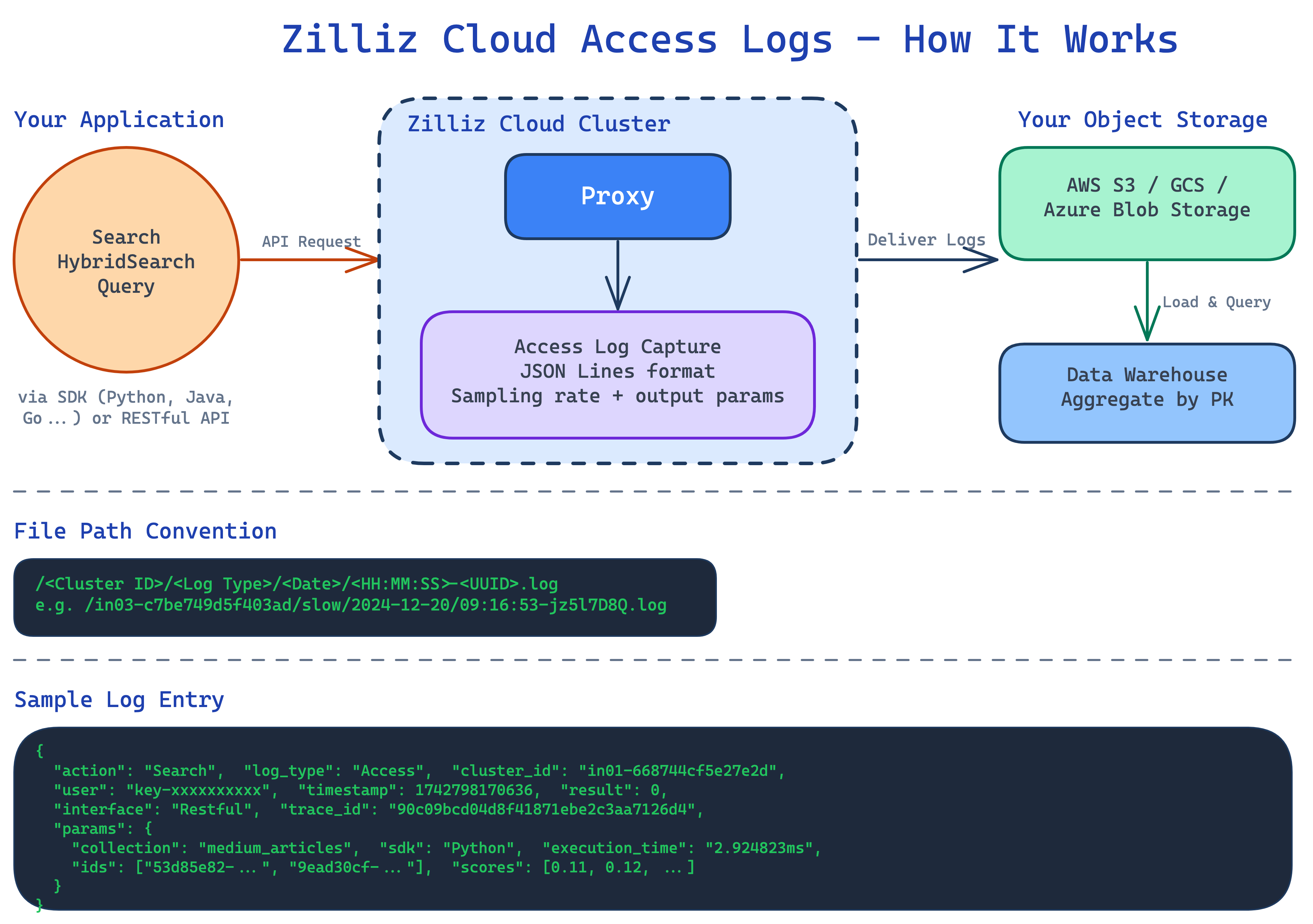
Zilliz Cloud collects and delivers logs
When you enable Access Logs on a cluster, Zilliz Cloud begins capturing query activities at the proxy layer. You configure two settings at the cluster level:
-
Sample rate: Control what percentage of requests are logged. The value ranges from 0 to 100 and represents the percentage of requests that are randomly sampled and written to access logs. For example, if you set the sample rate to 1, approximately 1% of requests will produce access log entries. For high‑volume workloads, a lower sample rate can reduce log storage costs while still providing enough data to analyze access patterns.
-
Output fields: Control which additional response fields are included in each access log entry. Common options are:
-
params.result_pks: Records the list of primary key IDs returned in the query result. This lets you aggregate by entity later to identify hot data and access frequency. -
params.result_scores: Records the similarity score for each ID inparams.result_pks, helping you understand which results were high‑confidence matches and which were borderline matches.
-
Logs are written in JSON Lines format (one JSON object per line) and delivered automatically to the object storage bucket you configured during setup. Each file follows a predictable path convention:
/<Cluster ID>/<Log type>/<Date>/<HH:MM:SS>-<UUID>.log
For example: /inxx-xxxxxxxxxxxxxxx/access/2024-12-20/09:16:53-jz5l7D8Q.log
For more information on parameters, refer to Access Log Reference.
You analyze the logs
Because logs arrive as standard JSON Lines files in your own bucket, you can process them with any tool that reads JSON. Each log entry contains structured fields including action, cluster_id, timestamp, and params.result_pks (the list of primary keys in the query result).
The general analysis approach is:
-
Load the JSON Lines files into a data warehouse or analytics tool.
-
Parse the
actionandparams.result_pksfields from each entry. -
Aggregate by primary key across a time window to surface access frequency.
The result is a heat map of your data, which entities are queried most often, through which actions, and at what times.
Reliability and billing
The access log pipeline is designed around a core principle: logging never degrades query performance.
Non-blocking guarantee
Access log collection never delays or blocks user requests. If the system must choose between completing a query and writing a log entry, the query always wins.
Graceful degradation
Under extreme load, the system may drop access log entries to preserve query throughput. This means access logs provide a best-effort record of query activity rather than a guaranteed complete record.
What's next
-
Configure Access Logs: Enable access logs, adjust sampling rate and output params, or disable logging.
-
Access Log Reference: Full field schema, complete action list, and file path conventions.