Advance Pay
Zilliz Cloud accepts advance pay (bank transfer) as the payment method in alternative to adding a credit card or subscribing on AWS Marketplace.
To manage payment method, you must be an Organization Owner or Organization Billing Admin.
Add funds to Advance Pay
Currently, you can only contact us to add funds to your Advance Pay balance.
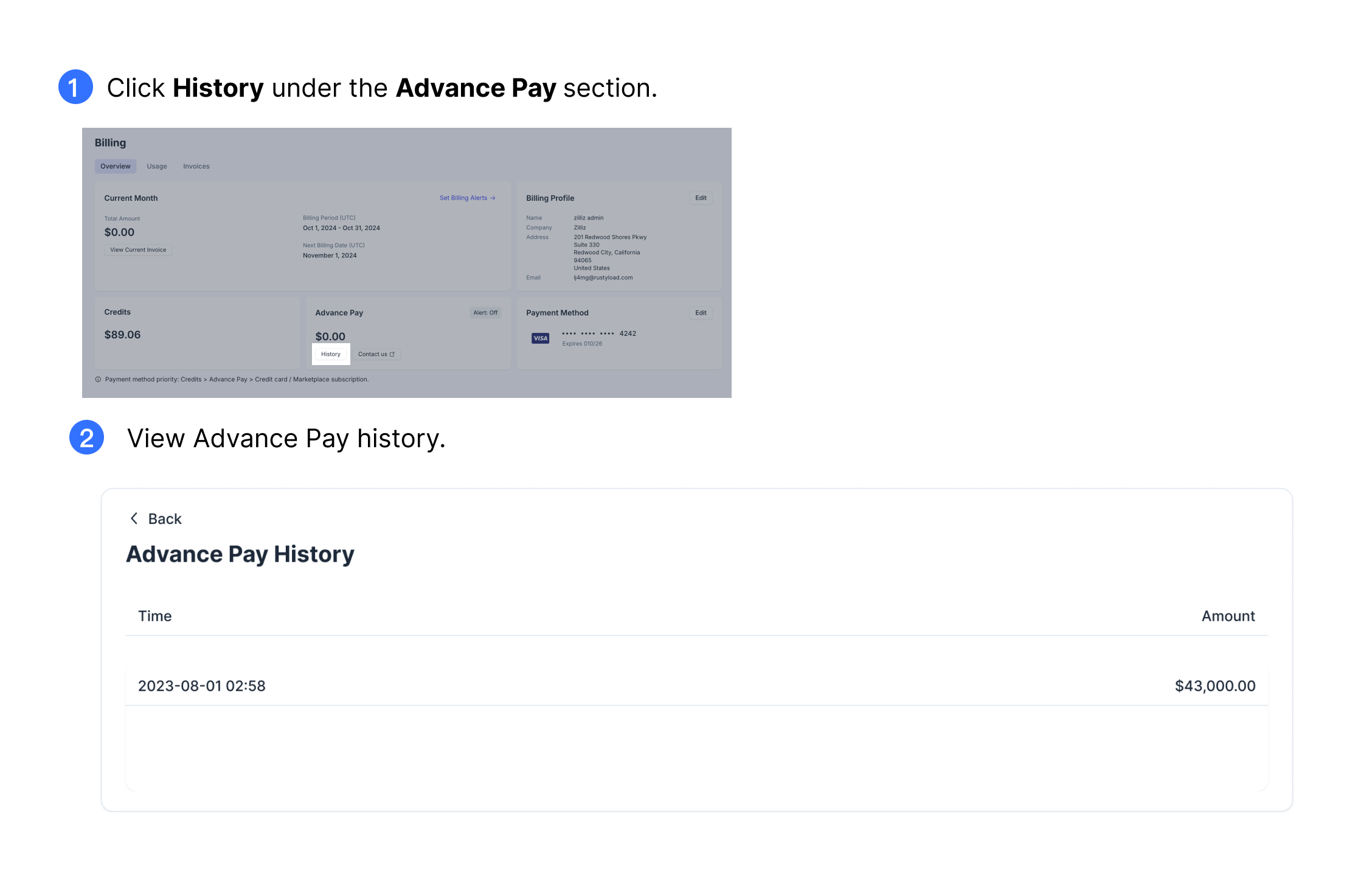
View Advance Pay history
To view your bank transfer history, click Billing on the top navigation bar or on the left navigation pane. Then click History under the Advance Pay section. On the Bank Transfer History page, you can view all the details of all past transfers, including the time when you made the transfer, the amount of funds you added, etc.
Set monitor for Advance Pay balance
By default, monitoring for advance pay balance is disabled. However, you can enable it to receive notifications when the Advance Pay balance is less than the amount you specified in the monitoring conditions. For more information, refer to Manage Organization Alerts.
Refund Advance Pay funds
Currently, Zilliz Cloud does not support refunds on the web console. To get a refund, please contact us and submit a request at the Zilliz Cloud support portal.