Connect to Global Cluster
This feature is available only on Business Critical (SaaS) and BYOC deployments.
This feature is available in all AWS regions and in the following Google Cloud regions: gcp-us-central1 and gcp-us-east4. It is not available on Microsoft Azure.
After your global cluster is running, connect to it using an endpoint and an authentication token. This page covers the two endpoint types, when to use each, and how routing behaves during switchover and failover.
Choose an endpoint type
A global cluster provides two ways to connect:
-
Via a global endpoint
-
Via the public or private endpoints of the primary or secondary cluster in a global cluster
The following table compares the two connection endpoints.
| Global endpoint | The endpoint of a primary or secondary cluster | |
|---|---|---|
| Write routing | Automatically routed to the primary cluster | Only the primary's public endpoint accepts writes |
| Read routing | Routed to the primary cluster (Intelligent routing to the nearest available cluster based on latency will be supported soon.) | Reads go to the specific cluster you connect to |
| Switchover / Failover | Re-routes automatically — no code changes | You must update your connection to point to the new primary |
| Private Link | Not supported (requires public internet) | Supported. |
| Best for | Production applications that need automatic failover and latency-based routing | Direct access to a specific cluster (e.g., environment replication, testing, debugging) |
It is recommended to use the global endpoint for production workloads. It eliminates the need to handle endpoint changes in your application code during switchover or failover.
Get your endpoint and token
Navigate to your global cluster or target cluster:
-
For the global endpoint: Go to the Global Cluster page.
-
For a public endpoint: Go to the Cluster Details page of the specific primary or secondary cluster.
On the Connect card, copy the Global Endpoint or Public Endpoint.
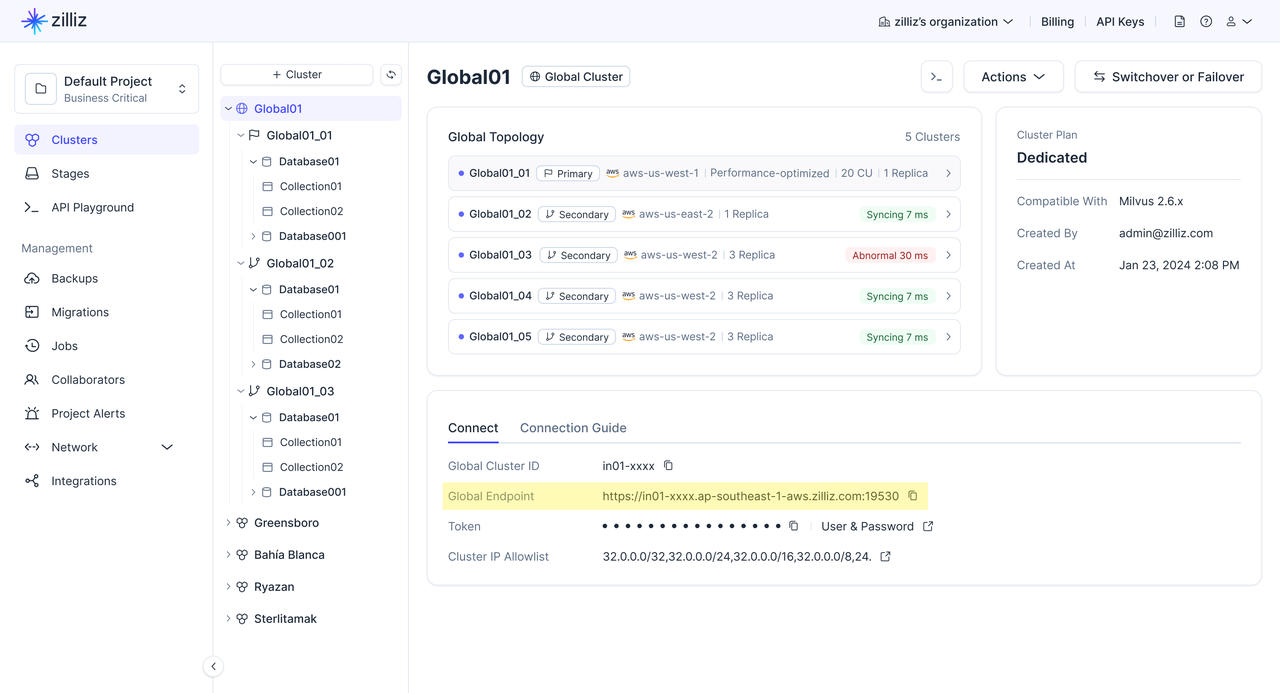
Prepare your authentication token. This can be either an API key or a cluster credential (username:password).
Connect using the global endpoint
The global endpoint is a single URL that always routes requests to the current primary cluster in the global cluster.
If a switchover or failover occurs, Zilliz Cloud automatically updates the global endpoint to point to the new primary cluster. This lets your application continue using the same endpoint without manually changing the cluster URI.
Zilliz Cloud supports connecting to the global endpoint through both SDKs and RESTful APIs. For production applications, we recommend using an SDK client.
Why SDK connections are recommended over RESTful API connections?
SDK clients can retrieve the global cluster topology, including the endpoint list, primary and secondary roles, and cluster health. With this information, SDK clients can react faster when the primary cluster changes. SDK clients will also support read/write splitting in the future, where write requests are routed to the primary cluster and eligible read requests are routed based on the global cluster topology.
However, RESTful API connections do not maintain global cluster topology information. As a result, RESTful API connections may take longer to switch to the new primary cluster after a switchover or failover. For the same reason, RESTful API connections cannot support read/write splitting.
The following table compares SDK connection with RESTful API connection.
| Dimension | SDK connection | RESTful API connection |
|---|---|---|
| Best for | Production applications that need faster recovery during role changes and future read/write splitting. | Lightweight scripts, simple REST integrations, and one-off administrative operations. |
| Topology awareness | Retrieves global cluster topology, including the endpoint list, primary and secondary roles, and cluster health. | Does not maintain global cluster topology information. |
| Primary change handling | Can react faster, usually within seconds, when the primary cluster changes after a switchover or failover. | May take longer, usually minutes, to switch to the new primary because the client does not maintain topology information. |
| Read/write splitting | Will be supported soon. | Not supported |
Check SDK Version
Before you start, ensure you have installed SDKs and also ensure your SDK meets the minimum version requirement.
| SDK | Minimum Version |
|---|---|
| Python | 2.6.9 |
| Java | 2.6.14 |
Connection guide
- Python
- Java
- Go
- Rust
- C++
- NodeJS
- CSharp
- cURL
from pymilvus import MilvusClient

# Use the global endpoint for automatic routing
client = MilvusClient(
    uri="YOUR_GLOBAL_ENDPOINT",  # Global endpoint from the console
    token="YOUR_CLUSTER_TOKEN"   # API key or username:password
)
import io.milvus.v2.client.MilvusClientV2;
import io.milvus.v2.client.ConnectConfig;

// Use the global endpoint for automatic routing
ConnectConfig connectConfig = ConnectConfig.builder()
    .uri("YOUR_GLOBAL_ENDPOINT")  // Global endpoint from the console
    .token("YOUR_CLUSTER_TOKEN")  // API key or username:password
    .build();

MilvusClientV2 client = new MilvusClientV2(connectConfig);
import (
    "context"
    "log"

    "github.com/milvus-io/milvus/client/v3/milvusclient"
)

// Use the global endpoint for automatic routing
client, err := milvusclient.New(context.Background(), &milvusclient.ClientConfig{
    Address: "YOUR_GLOBAL_ENDPOINT", // Global endpoint from the console
    APIKey:  "YOUR_CLUSTER_TOKEN",   // API key or username:password
})
if err != nil {
    log.Fatal(err)
}
use milvus::v2::error::Result;
use milvus::v2::prelude::*;

#[tokio::main]
async fn main() -> Result<()> {
    // Use the global endpoint for automatic routing
    let config = ConnectConfig::new().uri("YOUR_GLOBAL_ENDPOINT").token("YOUR_CLUSTER_TOKEN");
    let client = ClientV2::new(&config).await?;
    Ok(())
}
#include "milvus/MilvusClientV2.h"
#include <iostream>

// Use the global endpoint for automatic routing
auto client = milvus::MilvusClientV2::Create();
auto status = client->Connect(milvus::ConnectParam("YOUR_GLOBAL_ENDPOINT").WithToken("YOUR_CLUSTER_TOKEN"));
if (!status.IsOk()) {
    std::cout << status.Message() << std::endl;
}
const { MilvusClient } = require("@zilliz/milvus2-sdk-node");

// Use the global endpoint for automatic routing
const client = new MilvusClient({
    address: "YOUR_GLOBAL_ENDPOINT",  // Global endpoint from the console
    token: "YOUR_CLUSTER_TOKEN"  // API key or username:password
});
using Milvus.Client.V2;
using Milvus.Client.V2.Requests.Collection;
using Milvus.Client.V2.Requests.Dml;
using Milvus.Client.V2.Requests.Dql;
using Milvus.Client.V2.Requests.Index;
using Milvus.Client.V2.Types;

// Use the global endpoint for automatic routing
var client = new MilvusClientV2(new ConnectConfig
{
    Uri = "YOUR_GLOBAL_ENDPOINT",  // Global endpoint from the console
    Username = "YOUR_CLUSTER_TOKEN" // API key or username:password
});
curl --request POST \
  --url "${CLUSTER_ENDPOINT}/v2/vectordb/collections/list" \
  --header "Authorization: Bearer ${TOKEN}" \
  --header "Content-Type: application/json" \
  -d '{}'
Connect using a public endpoint
Each cluster in the global cluster has its own public endpoint. Use this when you need to target a specific cluster directly.
- Python
- Java
- Go
- Rust
- C++
- NodeJS
- CSharp
- cURL
from pymilvus import MilvusClient

# Connect directly to a specific cluster
client = MilvusClient(
    uri="YOUR_CLUSTER_PUBLIC_ENDPOINT",  # Public endpoint of a specific cluster
    token="YOUR_CLUSTER_TOKEN" # API key or username:password
)
import io.milvus.v2.client.MilvusClientV2;
import io.milvus.v2.client.ConnectConfig;

// Connect directly to a specific cluster
ConnectConfig connectConfig = ConnectConfig.builder()
    .uri("YOUR_CLUSTER_PUBLIC_ENDPOINT")  // Public endpoint of a specific cluster
    .token("YOUR_CLUSTER_TOKEN")  // API key or username:password
    .build();

MilvusClientV2 client = new MilvusClientV2(connectConfig);
import (
    "context"
    "log"

    "github.com/milvus-io/milvus/client/v3/milvusclient"
)

// Connect directly to a specific cluster
client, err := milvusclient.New(context.Background(), &milvusclient.ClientConfig{
    Address: "YOUR_CLUSTER_PUBLIC_ENDPOINT", // Public endpoint of a specific cluster
    APIKey:  "YOUR_CLUSTER_TOKEN",           // API key or username:password
})
if err != nil {
    log.Fatal(err)
}
use milvus::v2::error::Result;
use milvus::v2::prelude::*;

#[tokio::main]
async fn main() -> Result<()> {
    // Connect directly to a specific cluster
    let config = ConnectConfig::new().uri("YOUR_CLUSTER_PUBLIC_ENDPOINT").token("YOUR_CLUSTER_TOKEN");
    let client = ClientV2::new(&config).await?;
    Ok(())
}
#include "milvus/MilvusClientV2.h"
#include <iostream>

// Connect directly to a specific cluster
auto client = milvus::MilvusClientV2::Create();
auto status = client->Connect(milvus::ConnectParam("YOUR_CLUSTER_PUBLIC_ENDPOINT").WithToken("YOUR_CLUSTER_TOKEN"));
if (!status.IsOk()) {
    std::cout << status.Message() << std::endl;
}
const { MilvusClient } = require("@zilliz/milvus2-sdk-node")

// Connect directly to a specific cluster
const client = new MilvusClient({
    address: "YOUR_CLUSTER_PUBLIC_ENDPOINT",  // Public endpoint of a specific cluster
    token: "YOUR_CLUSTER_TOKEN"  // API key or username:password
})
using Milvus.Client.V2;
using Milvus.Client.V2.Requests.Collection;
using Milvus.Client.V2.Requests.Dml;
using Milvus.Client.V2.Requests.Dql;
using Milvus.Client.V2.Requests.Index;
using Milvus.Client.V2.Types;

// Connect directly to a specific cluster
var client = new MilvusClientV2(new ConnectConfig
{
    Uri = "YOUR_CLUSTER_PUBLIC_ENDPOINT",  // Public endpoint of a specific cluster
    Username = "YOUR_CLUSTER_TOKEN"        // API key or username:password
});
curl --request POST \
  --url "${CLUSTER_ENDPOINT}/v2/vectordb/collections/list" \
  --header "Authorization: Bearer ${TOKEN}" \
  --header "Content-Type: application/json" \
  -d '{}'
When using public endpoints, only the primary cluster's public endpoint accepts write operations. Writing to a secondary cluster's public endpoint will fail.
Routing behavior
During normal operation
| Request type | Global endpoint | Public endpoint |
|---|---|---|
| Write (insert, upsert, delete) | Routed to the primary cluster | Only accepted on the primary cluster's endpoint |
| Read (search, query) | Routed to the primary cluster (Intelligent routing to the nearest available cluster based on latency will be supported soon.) | Served by the specific cluster you connect to |
During and after switchover / failover
| Scenario | Global endpoint | Public endpoint |
|---|---|---|
| Switchover in progress | Writes briefly paused, then resume on the new primary. Reads continue. | No change to endpoints. Old primary becomes secondary. |
| Failover in progress | Writes unavailable until new primary is promoted. Reads continue on secondaries. | Old primary's endpoint becomes unreachable. |
| After completion | Automatically routes to the new primary. No code changes. | Update your code to use the new primary's public endpoint for writes. |
SDK automatic reconnection
When using the global endpoint, the Zilliz Cloud SDKs handle endpoint re-routing during switchover and failover. Your application does not need to implement retry logic for the routing change itself. However, writes that are in-flight at the moment of the switch may receive a transient error — standard retry logic in your application will handle these cases.