Monitor Global Cluster
This feature is available only on Business Critical (SaaS) and BYOC deployments.
This feature is available in all AWS regions and in the following Google Cloud regions: gcp-us-central1 and gcp-us-east4. It is not available on Microsoft Azure.
This page explains how to monitor the health, replication status, and performance of your global cluster.
Global topology
The Global Topology card on the global cluster page provides a real-time view of your global cluster's structure and health.
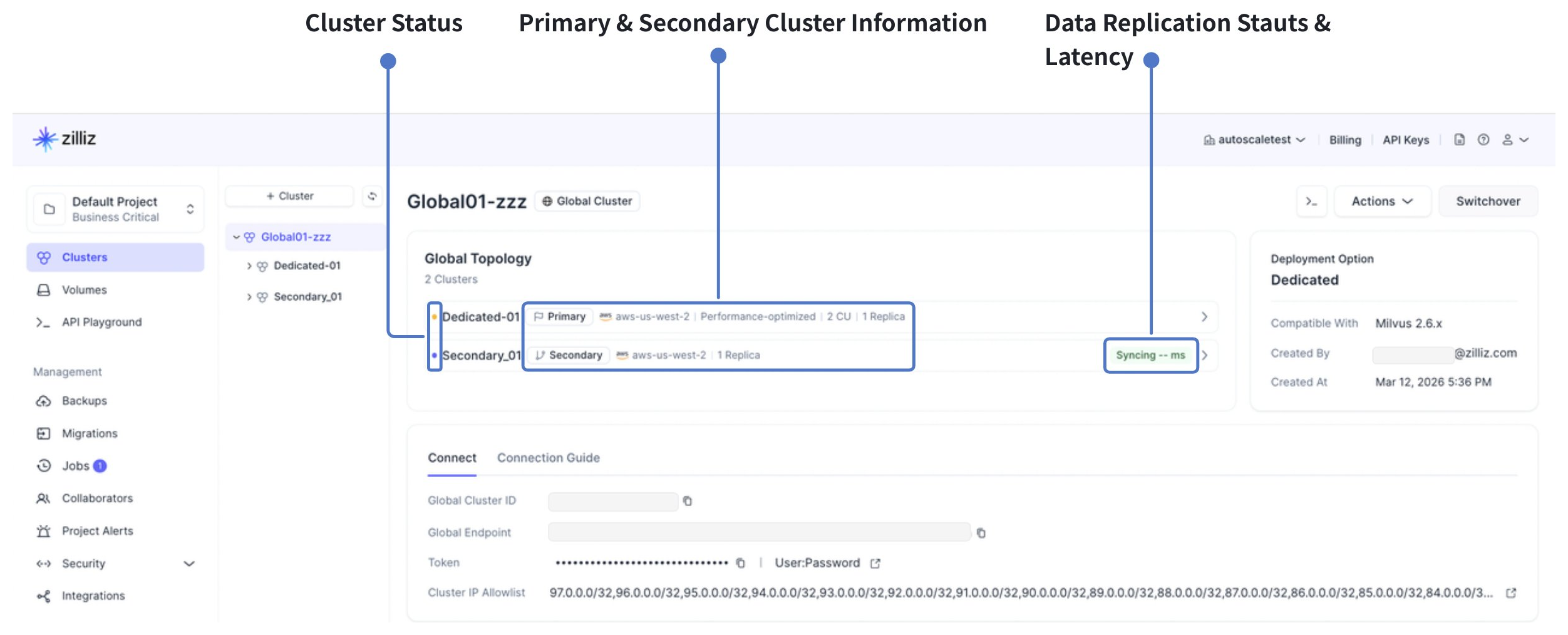
The global topology card displays:
-
The primary cluster and all secondary clusters with their regions, replica count information
-
The current status of each cluster
-
Synchronization status and lag between the primary and each secondary cluster
Use this view to verify that all secondary clusters are synchronized and healthy before performing operations such as switchovers.
Cluster status
Each individual cluster in a global cluster reports one of the following statuses:
| Status | Description | Action |
|---|---|---|
| CREATING | The cluster is being provisioned. Also applies to secondary clusters being rebuilt or auto-recreated after a failover. | Wait for provisioning to complete. |
| RUNNING | The cluster is operating normally. | None. |
| ABNORMAL | An issue has been detected with the primary cluster. | Investigate the issue. If the primary is unreachable, consider initiating a failover. Contact support if needed. |
| SWITCHING | A switchover or failover is in progress. The primary role is being transferred. | Wait for the operation to complete. Do not initiate additional switchovers. |
Synchronization lag
Synchronization lag measures the delay between a write committed on the primary cluster and that write becoming available on a secondary cluster. You can monitor the synchronization lag for each secondary cluster on the Global Topology tab.
-
Under normal conditions, Synchronization lag is typically a few seconds.
-
Lag may temporarily increase during heavy write workloads or large bulk imports.
The following table explains Synchronization lag levels and recommended actions.
| Synchronization lag | Implication |
|---|---|
| < 5 seconds | Normal. Secondary clusters are nearly up to date. |
| 5–30 seconds | Elevated. Switchover is still permitted. Monitor for sustained increases. |
| > 30 seconds | Switchover is blocked. Investigate write load or secondary cluster health. Resolves the root cause before attempting a switchover. |
| > 180 seconds | Critical. Failover RPO risk is significant. Immediate investigation required. |
If you perform a failover while synchronization lag is high, the new primary cluster may be missing recent writes. The amount of potential data loss (RPO) equals the synchronization lag at the time of failover.
Cluster metrics and alerts
Each cluster in a global cluster — both primary and secondary — exposes the same metrics as a regular Dedicated cluster. You can view these metrics on the cluster details page, create alerts for these metrics, or export them to an external monitoring system. For details, see Metrics Reference.