RTREE
The RTREE index is a tree-based data structure that accelerates queries on GEOMETRY fields in Zilliz Cloud. If your collection stores geometric objects such as points, lines, or polygans in Well-known text (WKT) format and you want to accelerate spatial filtering, RTREE is an ideal choice.
How it works
Zilliz Cloud uses an RTREE index to efficiently organize and filter geometry data, following a two-phase process:
Phase 1: Build the index
-
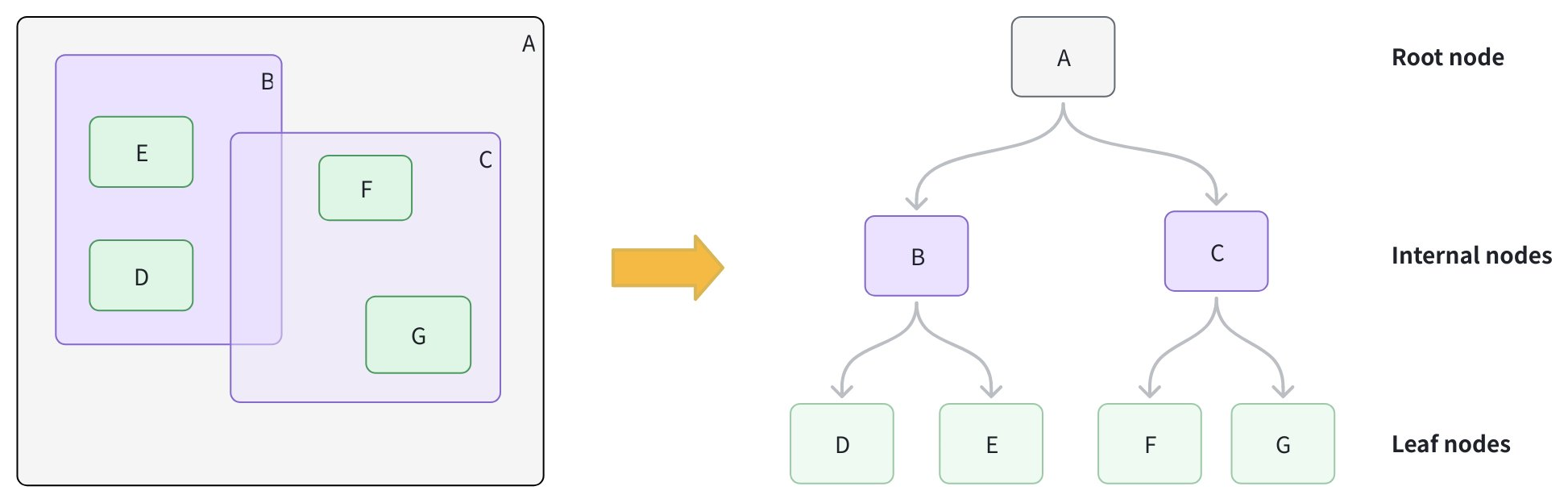
Create leaf nodes: For each geometry object, calculate its Minimum Bounding Rectangle (MBR), which is the smallest rectangle that fully contains the object, and store it as a leaf node.
-
Group into larger boxes: Cluster nearby leaf nodes together and wrap each group with a new MBR, forming internal nodes. For example, group B contains D and E; group C contains F and G.
-
Add the root node: Add a root node whose MBR covers all internal groups, resulting in a height-balanced tree structure.
Phase 2: Accelerate queries
-
Form the query MBR: Calculate the MBR for your query geometry.
-
Prune branches: Starting at the root, compare the query MBR to each internal node. Skip any branches whose MBR does not intersect with the query MBR.
-
Collect candidates: Descend into intersecting branches to gather candidate leaf nodes.
-
Exact match: For each candidate, perform an exact spatial predicate to determine true matches.
Create an RTREE index
You can create an RTREE index on a GEOMETRY field defined in your collection schema.
- Python
- Java
- Go
- Rust
- C++
- NodeJS
- CSharp
- cURL
from pymilvus import MilvusClient

client = MilvusClient(uri="YOUR_CLUSTER_ENDPOINT") # Replace with your server address

# Assume you have defined a GEOMETRY field named "geo" in your collection schema

# Prepare index parameters
index_params = client.prepare_index_params()

# Add RTREE index on the "geo" field
index_params.add_index(
    field_name="geo",
    index_type="RTREE",      # Spatial index for GEOMETRY
    index_name="rtree_geo",  # Optional, name your index
    params={}                # No extra params needed
)

# Create the index on the collection
client.create_index(
    collection_name="geo_demo",
    index_params=index_params
)
import io.milvus.v2.client.ConnectConfig;
import io.milvus.v2.client.MilvusClientV2;
import io.milvus.v2.common.IndexParam;
import io.milvus.v2.service.index.request.CreateIndexReq;
import java.util.Collections;

MilvusClientV2 client = new MilvusClientV2(ConnectConfig.builder()
        .uri("YOUR_CLUSTER_ENDPOINT")
        .token("YOUR_CLUSTER_TOKEN")
        .build());

IndexParam indexParam = IndexParam.builder()
        .fieldName("geo")
        .indexName("rtree_geo")
        .indexType(IndexParam.IndexType.RTREE)
        .build();

client.createIndex(CreateIndexReq.builder()
        .collectionName("geo_demo")
        .indexParams(Collections.singletonList(indexParam))
        .build());
import (
    "context"
    "fmt"

    "github.com/milvus-io/milvus/client/v3/index"
    "github.com/milvus-io/milvus/client/v3/milvusclient"
)

ctx := context.Background()

cli, err := milvusclient.New(ctx, &milvusclient.ClientConfig{
    Address: "YOUR_CLUSTER_ENDPOINT",
    APIKey:  "YOUR_CLUSTER_TOKEN",
})
if err != nil {
    fmt.Println(err.Error())
    // handle error
}
defer cli.Close(ctx)

_, err = cli.CreateIndex(ctx, milvusclient.NewCreateIndexOption("geo_demo", "geo", index.NewRTreeIndex()).
    WithIndexName("rtree_geo"))
if err != nil {
    fmt.Println(err.Error())
}
use milvus::v2::prelude::*;

let config = ConnectConfig::new().uri("YOUR_CLUSTER_ENDPOINT").token("YOUR_CLUSTER_TOKEN");
let client = ClientV2::new(&config).await?;

let index_params = vec![
    IndexParam::new()
        .field_name("geo")
        .index_name("rtree_geo")
        .index_type(IndexType::Rtree),
];

let create_index_req = CreateIndexRequest::builder()
    .collection_name("geo_demo")
    .index_params(index_params)
    .build()?;

client.create_index(create_index_req).await?;
#include "milvus/MilvusClientV2.h"
#include <iostream>

auto client = milvus::MilvusClientV2::Create();

milvus::ConnectParam connect_param{"YOUR_CLUSTER_ENDPOINT", "YOUR_CLUSTER_TOKEN"};
auto status = client->Connect(connect_param);
if (!status.IsOk()) {
    std::cout << status.Message() << std::endl;
}

milvus::IndexDesc index("geo", "rtree_geo", milvus::IndexType::RTREE);

status = client->CreateIndex(milvus::CreateIndexRequest()
                                 .WithCollectionName("geo_demo")
                                 .WithIndexes({index}));
if (!status.IsOk()) {
    std::cout << status.Message() << std::endl;
}
import { MilvusClient, IndexType } from "@zilliz/milvus2-sdk-node";

const client = new MilvusClient({ address: "YOUR_CLUSTER_ENDPOINT", token: "YOUR_CLUSTER_TOKEN" });

await client.createIndex({
    collection_name: "geo_demo",
    field_name: "geo",
    index_type: IndexType.RTREE,
    index_name: "rtree_geo",
    params: {},
});
using Milvus.Client.V2;
using Milvus.Client.V2.Requests.Index;
using Milvus.Client.V2.Types;

var config = new ConnectConfig
{
    Uri = "YOUR_CLUSTER_ENDPOINT"
};
using var client = new MilvusClientV2(config);
await client.ConnectAsync();

// Assume you have defined a GEOMETRY field named "geo" in your collection schema

// Prepare index parameters
var indexParam = new IndexParam(
    fieldName: "geo",
    indexName: "rtree_geo",
    indexType: IndexType.Rtree);

await client.CreateIndexAsync(new CreateIndexReq
{
    CollectionName = "geo_demo",
    Indexes = [indexParam]
});
export CLUSTER_ENDPOINT="YOUR_CLUSTER_ENDPOINT"
export TOKEN="YOUR_CLUSTER_TOKEN"

curl --request POST \
--url "${CLUSTER_ENDPOINT}/v2/vectordb/indexes/create" \
--header "Authorization: Bearer ${TOKEN}" \
--header "Content-Type: application/json" \
-d '{
    "collectionName": "geo_demo",
    "indexParams": [
        {
            "fieldName": "geo",
            "indexName": "rtree_geo",
            "indexType": "RTREE",
            "metricType": "",
            "params": {}
        }
    ]
}'
Query with RTREE
You filter with geometry operators in the filter expression. When an RTREE exists on the target GEOMETRY field, Zilliz Cloud uses it to prune candidates automatically. Without the index, the filter falls back to a full scan.
For a full list of available geometry-specific operators, refer to Geometry Operators.
Example 1: Filter only
Find all geometric objects within a given polygon:
- Python
- Java
- Go
- Rust
- C++
- NodeJS
- CSharp
- cURL
filter_expr = "ST_WITHIN(geo, 'POLYGON ((0 0, 10 0, 10 10, 0 10, 0 0))')"

res = client.query(
    collection_name="geo_demo",
    filter=filter_expr,
    output_fields=["id", "geo"],
    limit=10
)
print(res)   # Expected: a list of rows where geo is entirely inside the polygon
import io.milvus.v2.service.vector.request.QueryReq;
import io.milvus.v2.service.vector.response.QueryResp;
import java.util.Arrays;

String filter_expr = "ST_WITHIN(geo, 'POLYGON ((0 0, 10 0, 10 10, 0 10, 0 0))')";

QueryResp resp = client.query(QueryReq.builder()
        .collectionName("geo_demo")
        .filter(filter_expr)
        .outputFields(Arrays.asList("id", "geo"))
        .limit(10)
        .build());
System.out.println(resp);
import (
    "context"
    "fmt"

    "github.com/milvus-io/milvus/client/v3/milvusclient"
)

filter_expr := "ST_WITHIN(geo, 'POLYGON ((0 0, 10 0, 10 10, 0 10, 0 0))')"

_, err = cli.Query(ctx, milvusclient.NewQueryOption("geo_demo").
    WithFilter(filter_expr).
    WithOutputFields("id", "geo").
    WithLimit(10))
if err != nil {
    fmt.Println(err.Error())
}
use milvus::v2::prelude::*;

let filter_expr = "ST_WITHIN(geo, 'POLYGON ((0 0, 10 0, 10 10, 0 10, 0 0))')";

let query_req = QueryRequest::builder()
    .collection_name("geo_demo")
    .filter(filter_expr)
    .output_fields(vec!["id", "geo"])
    .limit(10)
    .build()?;

let res = client.query(query_req).await?;
println!("{:?}", res.results());
#include <iostream>
#include <string>

std::string filter_expr = "ST_WITHIN(geo, 'POLYGON ((0 0, 10 0, 10 10, 0 10, 0 0))')";

milvus::QueryResponse response;
status = client->Query(milvus::QueryRequest()
                           .WithCollectionName("geo_demo")
                           .WithFilter(filter_expr)
                           .WithOutputFields({"id", "geo"})
                           .WithLimit(10),
                       response);
if (!status.IsOk()) {
    std::cout << status.Message() << std::endl;
}
const filter_expr = "ST_WITHIN(geo, 'POLYGON ((0 0, 10 0, 10 10, 0 10, 0 0))')";

const res = await client.query({
    collection_name: "geo_demo",
    filter: filter_expr,
    output_fields: ["id", "geo"],
    limit: 10,
});
console.log(res);
using Milvus.Client.V2.Requests.Dql;

string filterExpr = "ST_WITHIN(geo, 'POLYGON ((0 0, 10 0, 10 10, 0 10, 0 0))')";

QueryResp res = await client.QueryAsync(new QueryReq
{
    CollectionName = "geo_demo",
    Expression = filterExpr,
    Parameters = new QueryParameters
    {
        OutputFields = { "id", "geo" },
        Limit = 10
    }
});
export CLUSTER_ENDPOINT="YOUR_CLUSTER_ENDPOINT"
export TOKEN="YOUR_CLUSTER_TOKEN"

curl --request POST \
--url "${CLUSTER_ENDPOINT}/v2/vectordb/entities/query" \
--header "Authorization: Bearer ${TOKEN}" \
--header "Content-Type: application/json" \
-d @- <<'EOF'
{
    "collectionName": "geo_demo",
    "filter": "ST_WITHIN(geo, 'POLYGON ((0 0, 10 0, 10 10, 0 10, 0 0))')",
    "outputFields": ["id", "geo"],
    "limit": 10
}
EOF
Example 2: Vector search + spatial filter
Find the nearest vectors that also intersect a line:
- Python
- Java
- Go
- Rust
- C++
- NodeJS
- CSharp
- cURL
# Assume you've also created an index on "vec" and loaded the collection.
query_vec = [[0.1, 0.2, 0.3, 0.4, 0.5]]
filter_expr = "ST_INTERSECTS(geo, 'LINESTRING (1 1, 2 2)')"

hits = client.search(
    collection_name="geo_demo",
    data=query_vec,
    limit=5,
    filter=filter_expr,
    output_fields=["id", "geo"]
)
print(hits)  # Expected: top-k by vector similarity among rows whose geo intersects the line
import io.milvus.v2.service.vector.request.SearchReq;
import io.milvus.v2.service.vector.request.data.FloatVec;
import io.milvus.v2.service.vector.response.SearchResp;
import java.util.Arrays;
import java.util.Collections;

float[] query_vec = {0.1f, 0.2f, 0.3f, 0.4f, 0.5f};
String filter_expr = "ST_INTERSECTS(geo, 'LINESTRING (1 1, 2 2)')";

SearchResp resp = client.search(SearchReq.builder()
        .collectionName("geo_demo")
        .data(Collections.singletonList(new FloatVec(query_vec)))
        .topK(5)
        .filter(filter_expr)
        .outputFields(Arrays.asList("id", "geo"))
        .build());
System.out.println(resp);
import (
    "context"
    "fmt"

    "github.com/milvus-io/milvus/client/v3/entity"
    "github.com/milvus-io/milvus/client/v3/milvusclient"
)

query_vec := []entity.Vector{entity.FloatVector{0.1, 0.2, 0.3, 0.4, 0.5}}
filter_expr := "ST_INTERSECTS(geo, 'LINESTRING (1 1, 2 2)')"

_, err = cli.Search(ctx, milvusclient.NewSearchOption("geo_demo", 5, query_vec).
    WithFilter(filter_expr).
    WithOutputFields("id", "geo"))
if err != nil {
    fmt.Println(err.Error())
}
use milvus::v2::prelude::*;

let query_vec = vec![0.1f32, 0.2, 0.3, 0.4, 0.5];
let filter_expr = "ST_INTERSECTS(geo, 'LINESTRING (1 1, 2 2)')";

let search_req = SearchRequest::builder()
    .collection_name("geo_demo")
    .vector_field("vec")
    .vectors(SearchVectors::Float(vec![query_vec]))
    .filter(filter_expr)
    .output_fields(vec!["id", "geo"])
    .limit(5)
    .build()?;

let res = client.search(search_req).await?;
println!("{:?}", res.results());
#include <iostream>
#include <vector>
#include <string>

std::vector<float> query_vec = {0.1f, 0.2f, 0.3f, 0.4f, 0.5f};
std::string filter_expr = "ST_INTERSECTS(geo, 'LINESTRING (1 1, 2 2)')";

milvus::SearchResponse response;
status = client->Search(milvus::SearchRequest()
                            .WithCollectionName("geo_demo")
                            .WithLimit(5)
                            .WithAnnsField("vec")
                            .WithFilter(filter_expr)
                            .WithOutputFields({"id", "geo"})
                            .AddFloatVector(query_vec),
                        response);
if (!status.IsOk()) {
    std::cout << status.Message() << std::endl;
}
const query_vec = [0.1, 0.2, 0.3, 0.4, 0.5];
const filter_expr = "ST_INTERSECTS(geo, 'LINESTRING (1 1, 2 2)')";

const res = await client.search({
    collection_name: "geo_demo",
    anns_field: "vec",
    data: [query_vec],
    limit: 5,
    filter: filter_expr,
    output_fields: ["id", "geo"],
});
console.log(res);
using Milvus.Client.V2.Requests.Dql;
using Milvus.Client.V2.Responses.Dql;
using Milvus.Client.V2.Types;

// Assume you've also created an index on "vec" and loaded the collection.
var queryVec = new ReadOnlyMemory<float>(new[] { 0.1f, 0.2f, 0.3f, 0.4f, 0.5f });
string filterExpr = "ST_INTERSECTS(geo, 'LINESTRING (1 1, 2 2)')";

SearchResp hits = await client.SearchAsync(new SearchReq
{
    CollectionName = "geo_demo",
    Vectors = [queryVec],
    VectorFieldName = "vec",
    MetricType = MetricType.L2,
    Limit = 5,
    Parameters = new SearchParameters
    {
        Expression = filterExpr
    }
});
export CLUSTER_ENDPOINT="YOUR_CLUSTER_ENDPOINT"
export TOKEN="YOUR_CLUSTER_TOKEN"

curl --request POST \
--url "${CLUSTER_ENDPOINT}/v2/vectordb/entities/search" \
--header "Authorization: Bearer ${TOKEN}" \
--header "Content-Type: application/json" \
-d @- <<'EOF'
{
    "collectionName": "geo_demo",
    "annsField": "vec",
    "data": [[0.1, 0.2, 0.3, 0.4, 0.5]],
    "limit": 5,
    "filter": "ST_INTERSECTS(geo, 'LINESTRING (1 1, 2 2)')",
    "outputFields": ["id", "geo"]
}
EOF
For more information on how to use a GEOMETRY field, refer to Geometry Field.
Drop an index
Use the drop_index() method to remove an existing index from a collection.
In your cluster compatible with Milvus v2.6.x, you can drop a scalar index directly once it’s no longer needed—no need to release the collection first.
- Python
- Java
- Go
- Rust
- C++
- NodeJS
- CSharp
- cURL
client.drop_index(
    collection_name="geo_demo",   # Name of the collection
    index_name="rtree_geo" # Name of the index to drop
)
import io.milvus.v2.service.index.request.DropIndexReq;

client.dropIndex(DropIndexReq.builder()
        .collectionName("geo_demo")
        .indexName("rtree_geo")
        .build());
import (
    "context"
    "fmt"

    "github.com/milvus-io/milvus/client/v3/milvusclient"
)

err = cli.DropIndex(ctx, milvusclient.NewDropIndexOption("geo_demo", "rtree_geo"))
if err != nil {
    fmt.Println(err.Error())
}
use milvus::v2::prelude::*;

let drop_index_req = DropIndexRequest::builder()
    .collection_name("geo_demo")
    .index_name("rtree_geo")
    .build()?;

client.drop_index(drop_index_req).await?;
status = client->DropIndex(milvus::DropIndexRequest()
                               .WithCollectionName("geo_demo")
                               .WithIndexName("rtree_geo"));
if (!status.IsOk()) {
    std::cout << status.Message() << std::endl;
}
await client.dropIndex({
    collection_name: "geo_demo",
    index_name: "rtree_geo",
});
using Milvus.Client.V2.Requests.Index;

await client.DropIndexAsync(new DropIndexReq
{
    CollectionName = "geo_demo", // Name of the collection
    IndexName = "rtree_geo" // Name of the index to drop
});
export CLUSTER_ENDPOINT="YOUR_CLUSTER_ENDPOINT"
export TOKEN="YOUR_CLUSTER_TOKEN"

curl --request POST \
--url "${CLUSTER_ENDPOINT}/v2/vectordb/indexes/drop" \
--header "Authorization: Bearer ${TOKEN}" \
--header "Content-Type: application/json" \
-d '{
    "collectionName": "geo_demo",
    "indexName": "rtree_geo"
}'