Upsert Entities
The upsert operation provides a convenient way to insert or update entities in a collection.
Overview
You can use upsert to either insert a new entity or update an existing one, depending on whether the primary key provided in the upsert request exists in the collection. If the primary key is not found, an insert operation occurs. Otherwise, an update operation will be performed.
An upsert request combines an insert and a delete. When an upsert request for an existing entity is received, Zilliz Cloud inserts the data carried in the request payload and deletes the existing entity with the original primary key specified in the data at the same time.
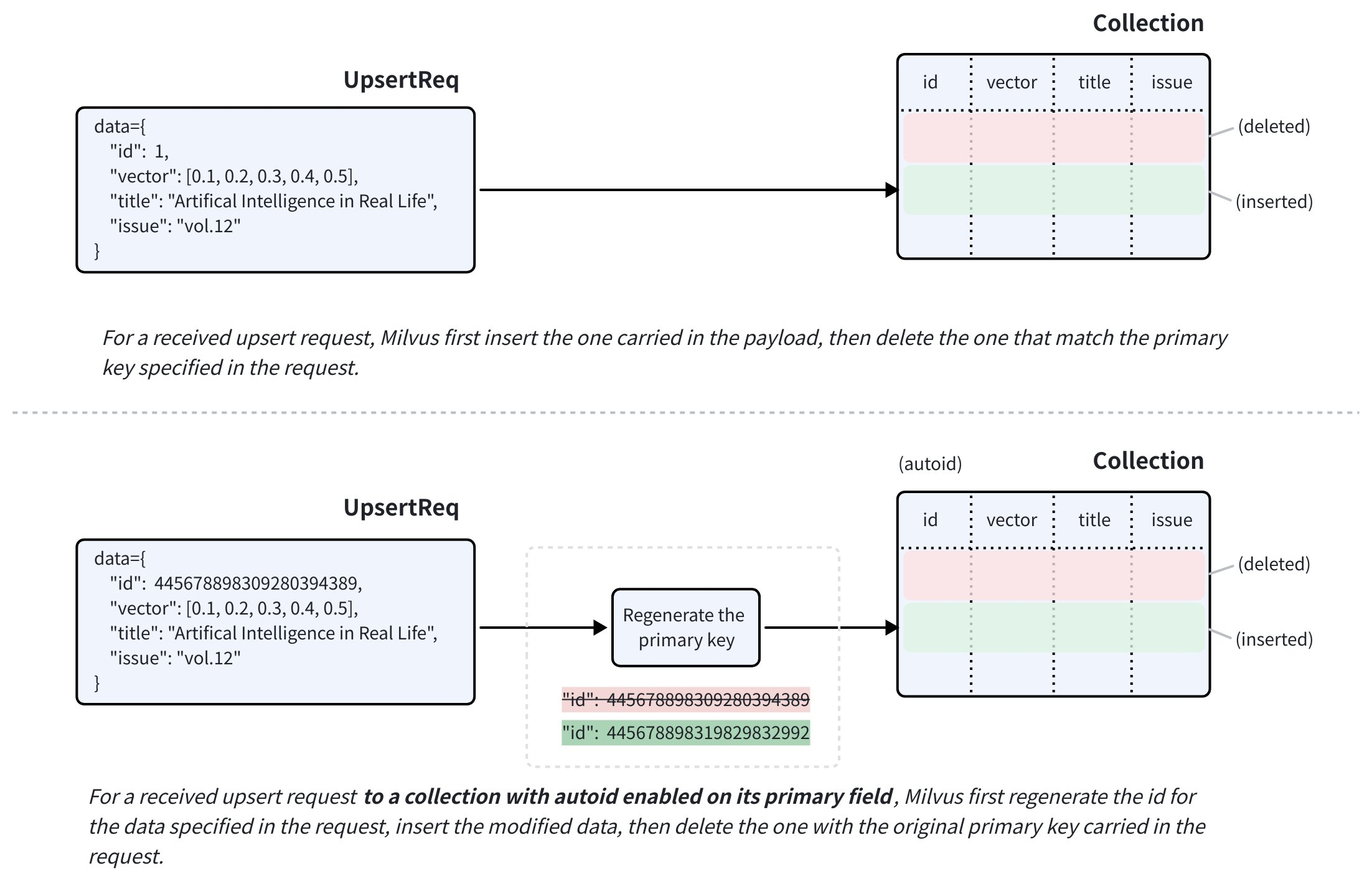
If the target collection has autoID enabled on its primary field, the upsert request must still include the primary key of the target entity. Zilliz Cloud uses the provided primary key to locate the entity to replace, and generates a new primary key for the data carried in the request payload before inserting it.
For fields with nullable enabled, you can omit them in the upsert request if they do not require any updates.
Upsert in merge mode
Use merge mode to update specific fields of an existing entity while keeping the other fields unchanged.
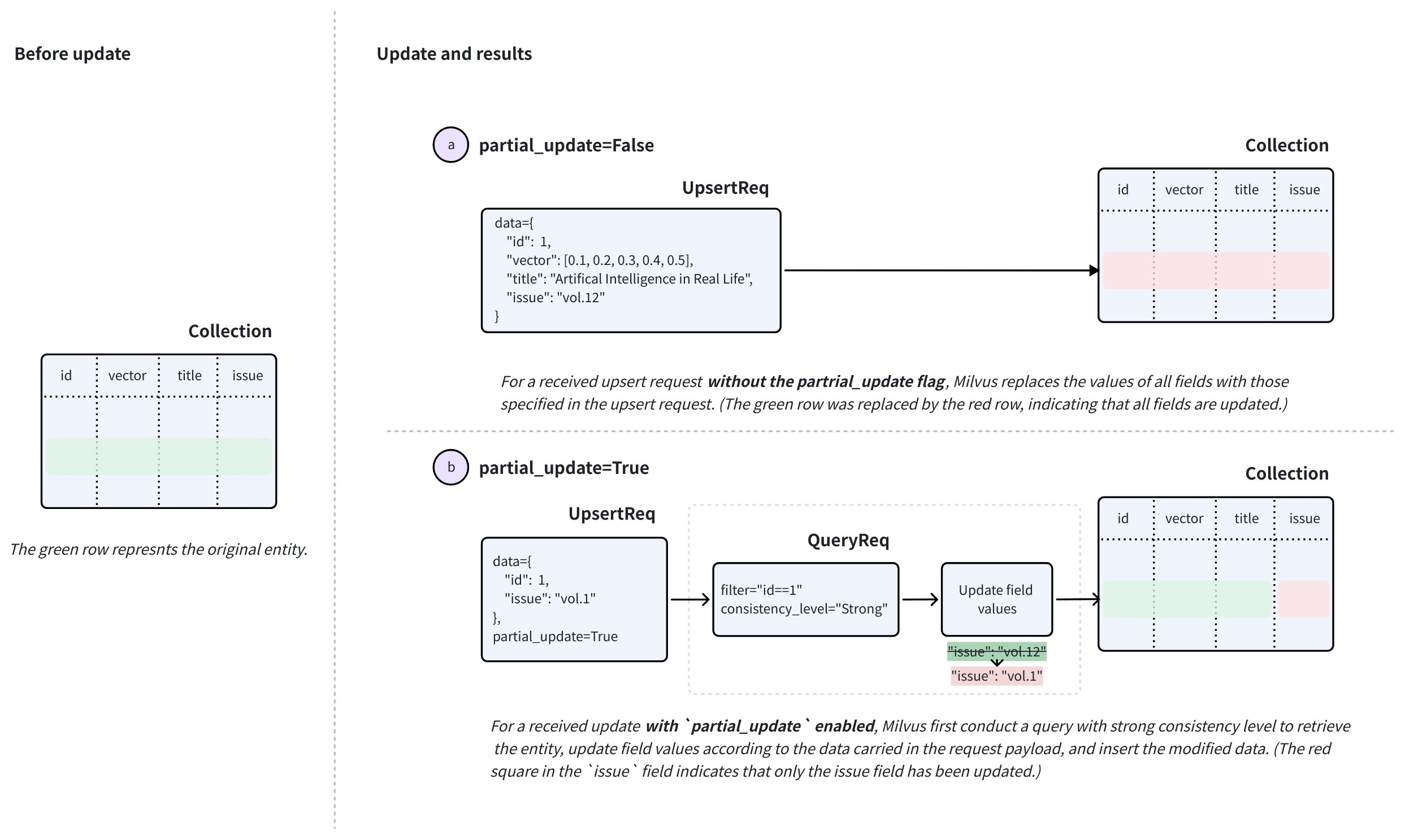
Set partial_update=True and provide the primary key and the fields you want to update.
Zilliz Cloud retrieves the existing entity with a strong-consistency query, merges your changes with the stored data, inserts the merged entity, and deletes the old entity.
Updating an existing entity in merge mode preserves its primary key, even when autoID is enabled. If the primary key does not exist, Zilliz Cloud attempts to insert a new entity. You must provide all fields to insert the new entity; otherwise, the request fails with a missing-field error.
If a partial update fails with a missing-field error, check whether the target entity exists. Without an existing entity, Zilliz Cloud cannot retrieve the values of fields you omitted.
For new entities, use insert or an upsert in override mode. Use merge mode for subsequent updates to individual fields.
For ARRAY fields, merge mode supports two operators: ARRAY_APPEND and ARRAY_REMOVE. These operators let you append elements to or remove matching elements from an existing ARRAY field, without first querying the entity to retrieve its current value. For details, see Upsert ARRAY fields with partial-update operators.
Update field values
To update the field values of an existing entity, use upsert in merge mode. In this mode, only the fields included in the request are updated — all other fields retain their existing values.
Upsert behaviors: special notes
There are several special notes you should consider before using the merge feature. The following cases assume that you have a collection with two scalar fields named title and issue, along with a primary key id and a vector field called vector.
-
Upsert fields with
nullableenabled.Suppose that the
issuefield can be null. When you upsert these fields, note that:-
If you omit the
issuefield in theupsertrequest and disablepartial_update, theissuefield will be updated tonullinstead of retaining its original value. -
To preserve the original value of the
issuefield, you need either to enablepartial_updateand omit theissuefield or include theissuefield with its original value in theupsertrequest.
-
-
Upsert keys in the dynamic field.
Suppose that you have enabled the dynamic key in the example collection, and the key-value pairs in the dynamic field of an entity are similar to
{"author": "John", "year": 2020, "tags": ["fiction"]}.When you upsert the entity with keys, such as
author,year, ortags, or add other keys, note that:-
If you upsert with
partial_updatedisabled, the default behavior is to override. It means that the value of the dynamic field will be overridden by all non-schema-defined fields included in the request and their values.For example, if the data included in the request is
{"author": "Jane", "genre": "fantasy"}, the key-value pairs in the dynamic field of the target entity will be updated to that. -
If you upsert with
partial_updateenabled, the default behavior is to merge. It means that the value of the dynamic field will merge with all non-schema-defined fields included in the request and their values.For example, if the data included in the request is
{"author": "John", "year": 2020, "tags": ["fiction"]}, the key-value pairs in the dynamic field of the target entity will become{"author": "John", "year": 2020, "tags": ["fiction"], "genre": "fantasy"}after the upsert.
-
-
Upsert a JSON field.
Suppose that the example collection has a schema-defined JSON field named
extras, and the key-value pairs in this JSON field of an entity are similar to{"author": "John", "year": 2020, "tags": ["fiction"]}.When you upsert the
extrasfield of an entity with modified JSON data, note that the JSON field is treated as a whole, and you cannot update individual keys selectively. In other words, the JSON field DOES NOT support upsert in merge mode. -
Upsert an
ARRAYfield.By default, an
ARRAYfield in merge mode follows REPLACE semantics: the value carried in the request overwrites the existing array. For finer-grained updates, Zilliz Cloud also supports two operators:-
ARRAY_APPENDappends the elements in the request payload to the existing array. -
ARRAY_REMOVEremoves every element from the existing array that matches a value in the request payload.
For operator syntax, supported element types, and other constraints, see Upsert array fields with partial-update operators.
-
-
Upsert a StructArray field.
Upserting a StructArray field in an entity overwrites the field value. To do so, you need to provide a list of dictionaries, each of which contains all subfields defined in the struct schema, even when you perform the upsert in merge mode.
For details, refer to Upsert StructArray field in merge mode.
Limits & Restrictions
Based on the above content, there are several limits and restrictions to follow:
-
The
upsertrequest must always include the primary keys of the target entities, even whenautoIDis enabled. ForautoIDcollections, primary-key handling depends on the upsert mode:-
In override mode, the primary key identifies the existing entity to replace, and Milvus generates a new primary key for the replacement entity.
-
In merge mode, updating an existing entity preserves its primary key. If the primary key does not exist, Zilliz Cloud attempts to insert a new entity. You must provide all fields to insert the new entity; otherwise, the request fails with a missing-field error.
-
-
The target collection must be loaded and available for queries.
-
All fields specified in the request must exist in the schema of the target collection.
-
The values of all fields specified in the request must match the data types defined in the schema.
-
For any field derived from another using functions, Zilliz Cloud will remove the derived field during the upsert to allow recalculation.
Upsert entities in a collection
In this section, we will upsert entities into a collection named my_collection. This collection has only two fields, named id, vector, title, and issue. The id field is the primary field, while the title and issue fields are scalar fields.
The three entities, if exists in the collection, will be overridden by those included the upsert request.
- Python
- Java
- Go
- Rust
- C++
- NodeJS
- cURL
from pymilvus import MilvusClient

client = MilvusClient(
    uri="YOUR_CLUSTER_ENDPOINT",
    token="YOUR_CLUSTER_TOKEN"
)

data=[
    {
        "id": 0,
        "vector": [-0.619954382375778, 0.4479436794798608, -0.17493894838751745, -0.4248030059917294, -0.8648452746018911],
        "title": "Artificial Intelligence in Real Life",
        "issue": "vol.12"
    }, {
        "id": 1,
        "vector": [0.4762662251462588, -0.6942502138717026, -0.4490002642657902, -0.628696575798281, 0.9660395877041965],
        "title": "Hollow Man",
        "issue": "vol.19"
    }, {
        "id": 2,
        "vector": [-0.8864122635045097, 0.9260170474445351, 0.801326976181461, 0.6383943392381306, 0.7563037341572827],
        "title": "Treasure Hunt in Missouri",
        "issue": "vol.12"
    }
]

res = client.upsert(
    collection_name='my_collection',
    data=data
)

print(res)

# Output
# {'upsert_count': 3}
import com.google.gson.Gson;
import com.google.gson.JsonObject;
import io.milvus.v2.client.ConnectConfig;
import io.milvus.v2.client.MilvusClientV2;
import io.milvus.v2.service.vector.request.UpsertReq;
import io.milvus.v2.service.vector.response.UpsertResp;
import java.util.*;

MilvusClientV2 client = new MilvusClientV2(ConnectConfig.builder()

        .uri("YOUR_CLUSTER_ENDPOINT")

        .token("YOUR_CLUSTER_TOKEN")

        .build());

Gson gson = new Gson();

List<JsonObject> data = Arrays.asList(

        gson.fromJson("{\"id\": 0, \"vector\": [-0.619954382375778, 0.4479436794798608, -0.17493894838751745, -0.4248030059917294, -0.8648452746018911], \"title\": \"Artificial Intelligence in Real Life\", \"issue\": \"vol.12\"}", JsonObject.class),
        gson.fromJson("{\"id\": 1, \"vector\": [0.4762662251462588, -0.6942502138717026, -0.4490002642657902, -0.628696575798281, 0.9660395877041965], \"title\": \"Hollow Man\", \"issue\": \"vol.19\"}", JsonObject.class),
        gson.fromJson("{\"id\": 2, \"vector\": [-0.8864122635045097, 0.9260170474445351, 0.801326976181461, 0.6383943392381306, 0.7563037341572827], \"title\": \"Treasure Hunt in Missouri\", \"issue\": \"vol.12\"}", JsonObject.class)
);

UpsertReq upsertReq = UpsertReq.builder()

        .collectionName("my_collection")

        .data(data)

        .build();

UpsertResp upsertResp = client.upsert(upsertReq);

System.out.println(upsertResp);

// Output:

//

// UpsertResp(upsertCnt=3)
import (
    "context"
    "fmt"

    "github.com/milvus-io/milvus/client/v3/column"
    "github.com/milvus-io/milvus/client/v3/milvusclient"
)

ctx := context.Background()

milvusAddr := "YOUR_CLUSTER_ENDPOINT"

client, err := milvusclient.New(ctx, &milvusclient.ClientConfig{
    Address: milvusAddr,
})

if err != nil {
    fmt.Println(err.Error())

    // handle error
}

defer client.Close(ctx)

titleColumn := column.NewColumnVarChar("title", []string{
    "Artificial Intelligence in Real Life", "Hollow Man", "Treasure Hunt in Missouri",
})

issueColumn := column.NewColumnVarChar("issue", []string{
    "vol.12", "vol.19", "vol.12",
})

_, err = client.Upsert(ctx, milvusclient.NewColumnBasedInsertOption("my_collection").

    WithInt64Column("id", []int64{0, 1, 2}).

    WithFloatVectorColumn("vector", 5, [][]float32{
        {-0.619954382375778, 0.4479436794798608, -0.17493894838751745, -0.4248030059917294, -0.8648452746018911},
        {0.4762662251462588, -0.6942502138717026, -0.4490002642657902, -0.628696575798281, 0.9660395877041965},
        {-0.8864122635045097, 0.9260170474445351, 0.801326976181461, 0.6383943392381306, 0.7563037341572827},
    }).

    WithColumns(titleColumn, issueColumn),
)

if err != nil {
    fmt.Println(err.Error())

    // handle err
}
use milvus::v2::prelude::*;

let config = ConnectConfig::new().uri("YOUR_CLUSTER_ENDPOINT").token("YOUR_CLUSTER_TOKEN");

let client = ClientV2::new(&config).await?;

client

    .upsert(

        UpsertRequest::builder()

            .insert(

                InsertRequest::builder()

                    .collection_name("my_collection")

                    .columns(vec![

                        FieldData::Int64 {
                            name: "id".into(),
                            values: vec![0i64, 1, 2],
                        },
                        FieldData::FloatVector {
                            name: "vector".into(),
                            values: vec![
                                vec![-0.619954382375778, 0.4479436794798608, -0.17493894838751745, -0.4248030059917294, -0.8648452746018911],
                                vec![0.4762662251462588, -0.6942502138717026, -0.4490002642657902, -0.628696575798281, 0.9660395877041965],
                                vec![-0.8864122635045097, 0.9260170474445351, 0.801326976181461, 0.6383943392381306, 0.7563037341572827],
                            ],
                        },
                        FieldData::VarChar {
                            name: "title".into(),
                            values: vec![
                                "Artificial Intelligence in Real Life".into(),
                                "Hollow Man".into(),
                                "Treasure Hunt in Missouri".into(),
                            ],
                        },
                        FieldData::VarChar {
                            name: "issue".into(),
                            values: vec!["vol.12".into(), "vol.19".into(), "vol.12".into()],
                        },
                    ])

                    .build()?,
            )

            .build()?,
    )

    .await?;
#include "milvus/MilvusClientV2.h"

auto client = milvus::MilvusClientV2::Create();

milvus::ConnectParam connect_param{"YOUR_CLUSTER_ENDPOINT", "YOUR_CLUSTER_TOKEN"};
auto status = client->Connect(connect_param);
if (!status.IsOk()) {
    std::cout << status.Message() << std::endl;
}

milvus::EntityRows data = {
    {{"id", 0}, {"vector", std::vector<float>{-0.619954382375778, 0.4479436794798608, -0.17493894838751745, -0.4248030059917294, -0.8648452746018911}}, {"title", "Artificial Intelligence in Real Life"}, {"issue", "vol.12"}},
    {{"id", 1}, {"vector", std::vector<float>{0.4762662251462588, -0.6942502138717026, -0.4490002642657902, -0.628696575798281, 0.9660395877041965}}, {"title", "Hollow Man"}, {"issue", "vol.19"}},
    {{"id", 2}, {"vector", std::vector<float>{-0.8864122635045097, 0.9260170474445351, 0.801326976181461, 0.6383943392381306, 0.7563037341572827}}, {"title", "Treasure Hunt in Missouri"}, {"issue", "vol.12"}}
};

milvus::UpsertResponse resp_upsert;
status = client->Upsert(milvus::UpsertRequest()
                            .WithCollectionName("my_collection")
                            .WithRowsData(std::move(data)),
                        resp_upsert);
if (!status.IsOk()) {
    std::cout << status.Message() << std::endl;
}
import { MilvusClient, DataType } from "@zilliz/milvus2-sdk-node";

const address = "YOUR_CLUSTER_ENDPOINT";
const token = "YOUR_CLUSTER_TOKEN";
const client = new MilvusClient({address, token});

const data = [
    {id: 0, vector: [-0.619954382375778, 0.4479436794798608, -0.17493894838751745, -0.4248030059917294, -0.8648452746018911], title: "Artificial Intelligence in Real Life", issue: "vol.12"},
    {id: 1, vector: [0.4762662251462588, -0.6942502138717026, -0.4490002642657902, -0.628696575798281, 0.9660395877041965], title: "Hollow Man", issue: "vol.19"},
    {id: 2, vector: [-0.8864122635045097, 0.9260170474445351, 0.801326976181461, 0.6383943392381306, 0.7563037341572827], title: "Treasure Hunt in Missouri", issue: "vol.12"},
]

const res = await client.upsert({
    collection_name: "my_collection",
    data: data,
})

console.log(res.upsert_cnt)

// Output
//
// 3
//
export CLUSTER_ENDPOINT="YOUR_CLUSTER_ENDPOINT"

export TOKEN="YOUR_CLUSTER_TOKEN"

curl --request POST \

--url "${CLUSTER_ENDPOINT}/v2/vectordb/entities/upsert" \

--header "Authorization: Bearer ${TOKEN}" \

--header "Content-Type: application/json" \

--header "Request-Timeout: 10" \

-d '{
    "data": [
        {"id": 0, "vector": [-0.619954382375778, 0.4479436794798608, -0.17493894838751745, -0.4248030059917294, -0.8648452746018911], "title": "Artificial Intelligence in Real Life", "issue": "vol.12"},
        {"id": 1, "vector": [0.4762662251462588, -0.6942502138717026, -0.4490002642657902, -0.628696575798281, 0.9660395877041965], "title": "Hollow Man", "issue": "vol.19"},
        {"id": 2, "vector": [-0.8864122635045097, 0.9260170474445351, 0.801326976181461, 0.6383943392381306, 0.7563037341572827], "title": "Treasure Hunt in Missouri", "issue": "vol.12"}
    ],
    "collectionName": "my_collection"
}'

# {
#     "code": 0,
#     "data": {
#         "upsertCount": 3,
#         "upsertIds": [
#             0,
#             1,
#             2,
#         ]
#     }
# }
Upsert entities in a partition
You can also upsert entities into a specified partition. The following code snippets assume that you have a partition named PartitionA in your collection.
The three entities, if exists in the partition, will be overridden by those included in the request.
- Python
- Java
- Go
- Rust
- C++
- NodeJS
- cURL
data=[
    {
        "id": 10,
        "vector": [0.06998888224297328, 0.8582816610326578, -0.9657938677934292, 0.6527905683627726, -0.8668460657158576],
        "title": "Layour Design Reference",
        "issue": "vol.34"
    },
    {
        "id": 11,
        "vector": [0.6060703043917468, -0.3765080534566074, -0.7710758854987239, 0.36993888322346136, 0.5507513364206531],
        "title": "Doraemon and His Friends",
        "issue": "vol.2"
    },
    {
        "id": 12,
        "vector": [-0.9041813104515337, -0.9610546012461163, 0.20033003106083358, 0.11842506351635174, 0.8327356724591011],
        "title": "Pikkachu and Pokemon",
        "issue": "vol.12"
    },
]

res = client.upsert(
    collection_name="my_collection",
    data=data,
    partition_name="partitionA"
)

print(res)

# Output
# {'upsert_count': 3}
import com.google.gson.Gson;
import com.google.gson.JsonObject;
import io.milvus.v2.service.vector.request.UpsertReq;
import io.milvus.v2.service.vector.response.UpsertResp;
import java.util.Arrays;
import java.util.List;

Gson gson = new Gson();

List<JsonObject> data = Arrays.asList(

        gson.fromJson("{\"id\": 10, \"vector\": [0.06998888224297328, 0.8582816610326578, -0.9657938677934292, 0.6527905683627726, -0.8668460657158576], \"title\": \"Layour Design Reference\", \"issue\": \"vol.34\"}", JsonObject.class),
        gson.fromJson("{\"id\": 11, \"vector\": [0.6060703043917468, -0.3765080534566074, -0.7710758854987239, 0.36993888322346136, 0.5507513364206531], \"title\": \"Doraemon and His Friends\", \"issue\": \"vol.2\"}", JsonObject.class),
        gson.fromJson("{\"id\": 12, \"vector\": [-0.9041813104515337, -0.9610546012461163, 0.20033003106083358, 0.11842506351635174, 0.8327356724591011], \"title\": \"Pikkachu and Pokemon\", \"issue\": \"vol.12\"}", JsonObject.class)
);

UpsertReq upsertReq = UpsertReq.builder()

        .collectionName("my_collection")

        .partitionName("partitionA")

        .data(data)

        .build();

UpsertResp upsertResp = client.upsert(upsertReq);

System.out.println(upsertResp);

// Output:

//

// UpsertResp(upsertCnt=3)
import (
    "context"
    "fmt"

    "github.com/milvus-io/milvus/client/v3/column"
    "github.com/milvus-io/milvus/client/v3/milvusclient"
)

ctx := context.Background()

milvusAddr := "YOUR_CLUSTER_ENDPOINT"

client, err := milvusclient.New(ctx, &milvusclient.ClientConfig{
    Address: milvusAddr,
})

if err != nil {
    fmt.Println(err.Error())

    // handle error
}

defer client.Close(ctx)

titleColumn := column.NewColumnVarChar("title", []string{
    "Layour Design Reference", "Doraemon and His Friends", "Pikkachu and Pokemon",
})

issueColumn := column.NewColumnVarChar("issue", []string{
    "vol.34", "vol.2", "vol.12",
})

_, err = client.Upsert(ctx, milvusclient.NewColumnBasedInsertOption("my_collection").

    WithPartition("partitionA").

    WithInt64Column("id", []int64{10, 11, 12}).

    WithFloatVectorColumn("vector", 5, [][]float32{
        {0.06998888224297328, 0.8582816610326578, -0.9657938677934292, 0.6527905683627726, -0.8668460657158576},
        {0.6060703043917468, -0.3765080534566074, -0.7710758854987239, 0.36993888322346136, 0.5507513364206531},
        {-0.9041813104515337, -0.9610546012461163, 0.20033003106083358, 0.11842506351635174, 0.8327356724591011},
    }).

    WithColumns(titleColumn, issueColumn),
)

if err != nil {
    fmt.Println(err.Error())

    // handle err
}
use milvus::v2::prelude::*;

let config = ConnectConfig::new().uri("YOUR_CLUSTER_ENDPOINT").token("YOUR_CLUSTER_TOKEN");

let client = ClientV2::new(&config).await?;

client

    .upsert(

        UpsertRequest::builder()

            .insert(

                InsertRequest::builder()

                    .collection_name("my_collection")

                    .partition_name("partitionA")

                    .columns(vec![

                        FieldData::Int64 {
                            name: "id".into(),
                            values: vec![10i64, 11, 12],
                        },
                        FieldData::FloatVector {
                            name: "vector".into(),
                            values: vec![
                                vec![0.06998888224297328, 0.8582816610326578, -0.9657938677934292, 0.6527905683627726, -0.8668460657158576],
                                vec![0.6060703043917468, -0.3765080534566074, -0.7710758854987239, 0.36993888322346136, 0.5507513364206531],
                                vec![-0.9041813104515337, -0.9610546012461163, 0.20033003106083358, 0.11842506351635174, 0.8327356724591011],
                            ],
                        },
                        FieldData::VarChar {
                            name: "title".into(),
                            values: vec![
                                "Layour Design Reference".into(),
                                "Doraemon and His Friends".into(),
                                "Pikkachu and Pokemon".into(),
                            ],
                        },
                        FieldData::VarChar {
                            name: "issue".into(),
                            values: vec!["vol.34".into(), "vol.2".into(), "vol.12".into()],
                        },
                    ])

                    .build()?,
            )

            .build()?,
    )

    .await?;
#include <iostream>
#include "milvus/MilvusClientV2.h"

auto client = milvus::MilvusClientV2::Create();

milvus::ConnectParam connect_param{"YOUR_CLUSTER_ENDPOINT", "YOUR_CLUSTER_TOKEN"};

auto status = client->Connect(connect_param);

if (!status.IsOk()) {
    std::cout << status.Message() << std::endl;
}

milvus::EntityRows data = {
    {{"id", 10}, {"vector", std::vector<float>{0.06998888224297328, 0.8582816610326578, -0.9657938677934292, 0.6527905683627726, -0.8668460657158576}}, {"title", "Layour Design Reference"}, {"issue", "vol.34"}},
    {{"id", 11}, {"vector", std::vector<float>{0.6060703043917468, -0.3765080534566074, -0.7710758854987239, 0.36993888322346136, 0.5507513364206531}}, {"title", "Doraemon and His Friends"}, {"issue", "vol.2"}},
    {{"id", 12}, {"vector", std::vector<float>{-0.9041813104515337, -0.9610546012461163, 0.20033003106083358, 0.11842506351635174, 0.8327356724591011}}, {"title", "Pikkachu and Pokemon"}, {"issue", "vol.12"}}
};

milvus::UpsertResponse resp_upsert;

status = client->Upsert(milvus::UpsertRequest()

                            .WithCollectionName("my_collection")

                            .WithPartitionName("partitionA")

                            .WithRowsData(std::move(data)),
                        resp_upsert);

if (!status.IsOk()) {
    std::cout << status.Message() << std::endl;
}
import { MilvusClient, DataType } from "@zilliz/milvus2-sdk-node";

// 6. Upsert data in partitions
const data = [
    {id: 10, vector: [0.06998888224297328, 0.8582816610326578, -0.9657938677934292, 0.6527905683627726, -0.8668460657158576], title: "Layour Design Reference", issue: "vol.34"},
    {id: 11, vector: [0.6060703043917468, -0.3765080534566074, -0.7710758854987239, 0.36993888322346136, 0.5507513364206531], title: "Doraemon and His Friends", issue: "vol.2"},
    {id: 12, vector: [-0.9041813104515337, -0.9610546012461163, 0.20033003106083358, 0.11842506351635174, 0.8327356724591011], title: "Pikkachu and Pokemon", issue: "vol.12"},
]

const res = await client.upsert({
    collection_name: "my_collection",
    data: data,
    partition_name: "partitionA"
})

console.log(res.upsert_cnt)

// Output
//
// 3
//
export CLUSTER_ENDPOINT="YOUR_CLUSTER_ENDPOINT"

export TOKEN="YOUR_CLUSTER_TOKEN"

curl --request POST \

--url "${CLUSTER_ENDPOINT}/v2/vectordb/entities/upsert" \

--header "Authorization: Bearer ${TOKEN}" \

--header "Content-Type: application/json" \

--header "Request-Timeout: 10" \

-d '{
    "data": [
        {"id": 10, "vector": [0.06998888224297328, 0.8582816610326578, -0.9657938677934292, 0.6527905683627726, -0.8668460657158576], "title": "Layour Design Reference", "issue": "vol.34"},
        {"id": 11, "vector": [0.6060703043917468, -0.3765080534566074, -0.7710758854987239, 0.36993888322346136, 0.5507513364206531], "title": "Doraemon and His Friends", "issue": "vol.2"},
        {"id": 12, "vector": [-0.9041813104515337, -0.9610546012461163, 0.20033003106083358, 0.11842506351635174, 0.8327356724591011], "title": "Pikkachu and Pokemon", "issue": "vol.12"}
    ],
    "collectionName": "my_collection",
    "partitionName": "partitionA"
}'

# {
#     "code": 0,
#     "data": {
#         "upsertCount": 3,
#         "upsertIds": [
#             10,
#             11,
#             12,
#         ]
#     }
# }
Upsert entities in merge mode
The following example updates only the issue field of the entities with primary keys 1 and 2 in my_collection. Before running it, ensure that both entities already exist. Their other fields retain their current values.
When performing an upsert in merge mode, ensure that the entities involved in the request have the same set of fields. Suppose there are two or more entities to be upserted, as shown in the following code snippet, it is important that they include identical fields to prevent errors and maintain data integrity.
- Python
- Java
- Go
- Rust
- C++
- NodeJS
- cURL
data=[
    {
        "id": 1,
        "issue": "vol.14"
    },
    {
        "id": 2,
        "issue": "vol.7"
    }
]

res = client.upsert(
    collection_name="my_collection",
    data=data,
    partial_update=True
)

print(res)

# Output
# {'upsert_count': 2}
import com.google.gson.JsonObject;
import io.milvus.v2.service.vector.request.UpsertReq;
import io.milvus.v2.service.vector.response.UpsertResp;
import java.util.Arrays;

JsonObject row1 = new JsonObject();

row1.addProperty("id", 1);

row1.addProperty("issue", "vol.14");

JsonObject row2 = new JsonObject();

row2.addProperty("id", 2);

row2.addProperty("issue", "vol.7");

UpsertReq upsertReq = UpsertReq.builder()

        .collectionName("my_collection")

        .data(Arrays.asList(row1, row2))

        .partialUpdate(true)

        .build();

UpsertResp upsertResp = client.upsert(upsertReq);

System.out.println(upsertResp);

// Output:

//

// UpsertResp(upsertCnt=2)
import (
    "context"
    "fmt"

    "github.com/milvus-io/milvus/client/v3/column"
    "github.com/milvus-io/milvus/client/v3/milvusclient"
)

ctx := context.Background()

milvusAddr := "YOUR_CLUSTER_ENDPOINT"

client, err := milvusclient.New(ctx, &milvusclient.ClientConfig{
    Address: milvusAddr,
})

if err != nil {
    fmt.Println(err.Error())

    // handle error
}

defer client.Close(ctx)

pkColumn := column.NewColumnInt64("id", []int64{1, 2})

issueColumn := column.NewColumnVarChar("issue", []string{
    "vol.14", "vol.7",
})

_, err = client.Upsert(ctx, milvusclient.NewColumnBasedInsertOption("my_collection").

    WithColumns(pkColumn, issueColumn).

    WithPartialUpdate(true),
)

if err != nil {
    fmt.Println(err.Error())

    // handle err
}
use milvus::v2::prelude::*;

let config = ConnectConfig::new().uri("YOUR_CLUSTER_ENDPOINT").token("YOUR_CLUSTER_TOKEN");

let client = ClientV2::new(&config).await?;

client

    .upsert(

        UpsertRequest::builder()

            .insert(

                InsertRequest::builder()

                    .collection_name("my_collection")

                    .columns(vec![

                        FieldData::Int64 {
                            name: "id".into(),
                            values: vec![1i64, 2],
                        },
                        FieldData::VarChar {
                            name: "issue".into(),
                            values: vec!["vol.14".into(), "vol.7".into()],
                        },
                    ])

                    .build()?,
            )

            .partial_update(true)

            .build()?,
    )

    .await?;
#include <iostream>
#include "milvus/MilvusClientV2.h"

auto client = milvus::MilvusClientV2::Create();

milvus::ConnectParam connect_param{"YOUR_CLUSTER_ENDPOINT", "YOUR_CLUSTER_TOKEN"};

auto status = client->Connect(connect_param);

if (!status.IsOk()) {
    std::cout << status.Message() << std::endl;
}

milvus::EntityRows data = {{{"id", 1}, {"issue", "vol.14"}},
                           {{"id", 2}, {"issue", "vol.7"}}};

milvus::UpsertResponse resp_upsert;

status = client->Upsert(milvus::UpsertRequest()

                            .WithCollectionName("my_collection")

                            .WithRowsData(std::move(data))

                            .WithPartialUpdate(true),
                        resp_upsert);

if (!status.IsOk()) {
    std::cout << status.Message() << std::endl;
}
const data=[
    {
        "id": 1,
        "issue": "vol.14"
    },
    {
        "id": 2,
        "issue": "vol.7"
    }
];

const res = await client.upsert({
    collection_name: "my_collection",
    data,
    partial_update: true
});

console.log(res)

// Output
//
// 2
//
export CLUSTER_ENDPOINT="YOUR_CLUSTER_ENDPOINT"
export TOKEN="YOUR_CLUSTER_TOKEN"

export COLLECTION_NAME="my_collection"
export UPSERT_DATA='[
  {
    "id": 1,
    "issue": "vol.14"
  },
  {
    "id": 2,
    "issue": "vol.7"
  }
]'

curl -X POST "YOUR_CLUSTER_ENDPOINT/v2/vectordb/entities/upsert" \
  -H "Content-Type: application/json" \
  -H "Authorization: Bearer ${TOKEN}" \
  -H "Request-Timeout: 10" \
  -d "{
    \"collectionName\": \"${COLLECTION_NAME}\",
    \"data\": ${UPSERT_DATA},
    \"partialUpdate\": true
  }"

# {
#     "code": 0,
#     "data": {
#         "upsertCount": 2,
#         "upsertIds": [
#              3,
#             12,
#         ]
#     }
# }
Upsert ARRAY fields in merge mode
Before introducing partial-update operators (ARRAY_APPEND and ARRAY_REMOVE), updating part of an ARRAY field required a client-side read-modify-write flow: query the existing array, change it in application code, and upsert the full replacement value. Partial-update operators let you send only the elements to append or remove, which reduces client-side logic and avoids the extra read before the upsert.
Suppose the entity with primary key 1 already has tags = ["new", "trial"]. Before partial-update operators, adding element "premium" to an array required upserting the full replacement array:
- Python
- Java
- Go
- Rust
- C++
- NodeJS
- cURL
client.upsert(
    collection_name="users",
    data=[{"pk": 1, "tags": ["new", "trial", "premium"]}],
    partial_update=True,
)
import com.google.gson.JsonObject;
import io.milvus.v2.service.vector.request.UpsertReq;
import java.util.Collections;
import java.util.List;
import com.google.gson.Gson;

Gson gson = new Gson();

List<JsonObject> replacementData = Collections.singletonList(

        gson.fromJson("{\"pk\": 1, \"tags\": [\"new\", \"trial\", \"premium\"]}", JsonObject.class)
);

client.upsert(UpsertReq.builder()

        .collectionName("users")


        .partialUpdate(true)

        .data(replacementData)


        .build());
import (
    "context"
    "fmt"

    "github.com/milvus-io/milvus/client/v3/column"
    "github.com/milvus-io/milvus/client/v3/milvusclient"
)

ctx := context.Background()

milvusAddr := "YOUR_CLUSTER_ENDPOINT"

client, err := milvusclient.New(ctx, &milvusclient.ClientConfig{
    Address: milvusAddr,
})

if err != nil {
    fmt.Println(err.Error())

    // handle error
}

defer client.Close(ctx)

_, err = client.Upsert(ctx, milvusclient.NewColumnBasedInsertOption("users").

    WithInt64Column("pk", []int64{1}).

    WithColumns(column.NewColumnVarCharArray("tags", [][]string{{"new", "trial", "premium"}})).

    WithPartialUpdate(true),
)

if err != nil {
    fmt.Println(err.Error())

    // handle err
}
use milvus::v2::prelude::*;

let config = ConnectConfig::new().uri("YOUR_CLUSTER_ENDPOINT").token("YOUR_CLUSTER_TOKEN");

let client = ClientV2::new(&config).await?;

client

    .upsert(

        UpsertRequest::builder()

            .insert(

                InsertRequest::builder()

                    .collection_name("users")

                    .columns(vec![

                        FieldData::Int64 {
                            name: "pk".into(),
                            values: vec![1i64],
                        },
                        FieldData::ArrayVarChar {
                            name: "tags".into(),
                            values: vec![vec!["new".to_string(), "trial".to_string(), "premium".to_string()]],
                        },
                    ])

                    .build()?,
            )

            .partial_update(true)

            .build()?,
    )

    .await?;
#include <iostream>
#include "milvus/MilvusClientV2.h"

auto client = milvus::MilvusClientV2::Create();

milvus::ConnectParam connect_param{"YOUR_CLUSTER_ENDPOINT", "YOUR_CLUSTER_TOKEN"};

auto status = client->Connect(connect_param);

if (!status.IsOk()) {
    std::cout << status.Message() << std::endl;
}

milvus::EntityRows data = {{{"pk", 1}, {"tags", std::vector<std::string>{"new", "trial", "premium"}}}};

milvus::UpsertResponse resp_upsert;

status = client->Upsert(milvus::UpsertRequest()

                            .WithCollectionName("users")

                            .WithRowsData(std::move(data))

                            .WithPartialUpdate(true),
                        resp_upsert);

if (!status.IsOk()) {
    std::cout << status.Message() << std::endl;
}
import { MilvusClient } from "@zilliz/milvus2-sdk-node";

const address = "YOUR_CLUSTER_ENDPOINT";

const token = "YOUR_CLUSTER_TOKEN";

const client = new MilvusClient({address, token});

await client.upsert({
    collection_name: "users",
    data: [{pk: 1, tags: ["new", "trial", "premium"]}],
    partial_update: true,
});
export CLUSTER_ENDPOINT="YOUR_CLUSTER_ENDPOINT"

export TOKEN="YOUR_CLUSTER_TOKEN"

curl --request POST \

--url "${CLUSTER_ENDPOINT}/v2/vectordb/entities/upsert" \

--header "Authorization: Bearer ${TOKEN}" \

--header "Content-Type: application/json" \

--header "Request-Timeout: 10" \

-d '{
    "collectionName": "users",
    "data": [
        {"pk": 1, "tags": ["new", "trial", "premium"]}
    ],
    "partialUpdate": true
}'

# {
#     "code": 0,
#     "data": {
#         "upsertCount": 1,
#         "upsertIds": [
#             1
#         ]
#     }
# }
With ARRAY_APPEND, send only the element to add:
- Python
- Java
- Go
- Rust
- C++
- NodeJS
- cURL
from pymilvus import FieldOp

client.upsert(

    collection_name="users",
    data=[{"pk": 1, "tags": ["premium"]}],
    field_ops={"tags": FieldOp.array_append()},
)
import com.google.gson.JsonObject;
import io.milvus.v2.service.vector.request.UpsertReq;
import java.util.Collections;
import java.util.List;
import com.google.gson.Gson;

Gson gson = new Gson();

List<JsonObject> appendData = Collections.singletonList(

        gson.fromJson("{\"pk\": 1, \"tags\": [\"premium\"]}", JsonObject.class)
);

UpsertReq.FieldPartialUpdateOp appendTags = UpsertReq.FieldPartialUpdateOp.builder()

        .fieldName("tags")

        .opType(UpsertReq.FieldPartialUpdateOp.OpType.ARRAY_APPEND)

        .build();

client.upsert(UpsertReq.builder()

        .collectionName("users")


        .data(appendData)

        .fieldOps(Collections.singletonList(appendTags))


        .build());
import (
    "context"
    "fmt"

    "github.com/milvus-io/milvus/client/v3/column"
    "github.com/milvus-io/milvus/client/v3/milvusclient"
)

ctx := context.Background()

milvusAddr := "YOUR_CLUSTER_ENDPOINT"

client, err := milvusclient.New(ctx, &milvusclient.ClientConfig{
    Address: milvusAddr,
})

if err != nil {
    fmt.Println(err.Error())

    // handle error
}

defer client.Close(ctx)

_, err = client.Upsert(ctx, milvusclient.NewColumnBasedInsertOption("users").

    WithInt64Column("pk", []int64{1}).

    WithColumns(column.NewColumnVarCharArray("tags", [][]string{{"premium"}})).

    WithArrayAppend("tags"),
)

if err != nil {
    fmt.Println(err.Error())

    // handle err
}
use milvus::v2::prelude::*;

let config = ConnectConfig::new().uri("YOUR_CLUSTER_ENDPOINT").token("YOUR_CLUSTER_TOKEN");

let client = ClientV2::new(&config).await?;

client

    .upsert(

        UpsertRequest::builder()

            .insert(

                InsertRequest::builder()

                    .collection_name("users")

                    .columns(vec![

                        FieldData::Int64 {
                            name: "pk".into(),
                            values: vec![1i64],
                        },
                        FieldData::ArrayVarChar {
                            name: "tags".into(),
                            values: vec![vec!["premium".to_string()]],
                        },
                    ])

                    .build()?,
            )

            .field_ops(vec![

                FieldPartialUpdateOp::new()

                    .field_name("tags")

                    .op_type(FieldPartialUpdateOpType::ArrayAppend),
            ])

            .build()?,
    )

    .await?;
#include <iostream>
#include "milvus/MilvusClientV2.h"

auto client = milvus::MilvusClientV2::Create();

milvus::ConnectParam connect_param{"YOUR_CLUSTER_ENDPOINT", "YOUR_CLUSTER_TOKEN"};

auto status = client->Connect(connect_param);

if (!status.IsOk()) {
    std::cout << status.Message() << std::endl;
}

milvus::EntityRows data = {{{"pk", 1}, {"tags", std::vector<std::string>{"premium"}}}};

milvus::UpsertResponse resp_upsert;

status = client->Upsert(milvus::UpsertRequest()

                            .WithCollectionName("users")

                            .WithRowsData(std::move(data))

                            .AddFieldOp(milvus::FieldPartialUpdateOp("tags", milvus::FieldPartialUpdateOp::OpType::ARRAY_APPEND)),
                        resp_upsert);

if (!status.IsOk()) {
    std::cout << status.Message() << std::endl;
}
import { MilvusClient } from "@zilliz/milvus2-sdk-node";

const address = "YOUR_CLUSTER_ENDPOINT";

const token = "YOUR_CLUSTER_TOKEN";

const client = new MilvusClient({address, token});

await client.upsert({
    collection_name: "users",
    data: [{pk: 1, tags: ["premium"]}],
    field_ops: [{field_name: "tags", op: "ARRAY_APPEND"}],
});
# Note: The REST API does not expose the field_ops parameter as of v3.0.x.

# Use the gRPC SDKs to apply ARRAY_APPEND / ARRAY_REMOVE operators.
Attaching either operator to a field via field_ops implicitly enables partial-update semantics. Therefore, you do not need to pass partial_update=True alongside field_ops.
Limits
-
The payload values must match the
element_typeof the targetARRAYfield. For example, if the target field isARRAY<VARCHAR>, the payload must contain string values. -
For this release,
ARRAY_APPENDandARRAY_REMOVEsupportARRAYfields whoseelement_typeisBOOL,INT8,INT16,INT32,INT64,FLOAT,DOUBLE, orVARCHAR. -
After an
ARRAY_APPENDoperation, the resulting array length must not exceed the field'smax_capacity. -
Concurrent upserts to the same entity are not atomic across requests. If two requests update the same
ARRAYfield at the same time, the later write can overwrite the earlier one. Use application-level coordination if you need to preserve all concurrent changes.
Example
The following example uses a small users collection with a primary key pk, a tags field of type ARRAY<VARCHAR>, and an embedding vector field. It first inserts two entities with initial tags values, then uses ARRAY_APPEND and ARRAY_REMOVE to show how each operator changes the stored array.
- Python
- Java
- Go
- Rust
- C++
- NodeJS
- cURL
from pymilvus import DataType, FieldOp, MilvusClient

client = MilvusClient(
    uri="YOUR_CLUSTER_ENDPOINT",
    token="YOUR_CLUSTER_TOKEN"
)

# 1. Create a collection with an ARRAY<VARCHAR> field
schema = client.create_schema(enable_dynamic_field=False)
schema.add_field("pk", DataType.INT64, is_primary=True)
schema.add_field("embedding", DataType.FLOAT_VECTOR, dim=5)
schema.add_field(
    "tags",
    DataType.ARRAY,
    element_type=DataType.VARCHAR,
    max_capacity=8,
    max_length=32,
)

index_params = client.prepare_index_params()
index_params.add_index(
    field_name="embedding",
    index_type="AUTOINDEX",
    metric_type="L2",
)

client.create_collection(
    collection_name="users",
    schema=schema,
    index_params=index_params
)

# 2. Seed two entities
client.insert(
    collection_name="users",
    data=[
        {"pk": 1, "embedding": [0.1, 0.2, 0.3, 0.4, 0.5], "tags": ["new"]},
        {"pk": 2, "embedding": [0.6, 0.7, 0.8, 0.9, 1.0], "tags": ["new", "trial"]},
    ],
)

# 3. Append tags without reading the existing ARRAY values
client.upsert(
    collection_name="users",
    data=[
        {"pk": 1, "tags": ["premium", "vip"]},
        {"pk": 2, "tags": ["premium"]},
    ],
    field_ops={"tags": FieldOp.array_append()},
)

res = client.query(
    collection_name="users",
    filter="pk in [1, 2]",
    output_fields=["pk", "tags"],
)
print(res)

# Example output:
# data: [
#   "{'pk': 1, 'tags': ['new', 'premium', 'vip']}",
#   "{'pk': 2, 'tags': ['new', 'trial', 'premium']}"
# ]

# 4. Remove matching tags without replacing the full ARRAY field
client.upsert(
    collection_name="users",
    data=[
        {"pk": 1, "tags": ["new"]},
        {"pk": 2, "tags": ["trial"]},
    ],
    field_ops={"tags": FieldOp.array_remove()},
)

res = client.query(
    collection_name="users",
    filter="pk in [1, 2]",
    output_fields=["pk", "tags"],
)
print(res)

# Example output:
# data: [
#   "{'pk': 1, 'tags': ['premium', 'vip']}",
#   "{'pk': 2, 'tags': ['new', 'premium']}"
# ]
import com.google.gson.Gson;
import com.google.gson.JsonObject;
import io.milvus.v2.client.ConnectConfig;
import io.milvus.v2.client.MilvusClientV2;
import io.milvus.v2.common.ConsistencyLevel;
import io.milvus.v2.common.DataType;
import io.milvus.v2.common.IndexParam;
import io.milvus.v2.service.collection.request.AddFieldReq;
import io.milvus.v2.service.collection.request.CreateCollectionReq;
import io.milvus.v2.service.vector.request.InsertReq;
import io.milvus.v2.service.vector.request.QueryReq;
import io.milvus.v2.service.vector.request.UpsertReq;
import io.milvus.v2.service.vector.response.QueryResp;
import java.util.Arrays;
import java.util.Collections;
import java.util.List;

MilvusClientV2 client = new MilvusClientV2(ConnectConfig.builder()
        .uri("YOUR_CLUSTER_ENDPOINT")
        .token("YOUR_CLUSTER_TOKEN")
        .build());
Gson gson = new Gson();

// 1. Create a collection with an ARRAY<VARCHAR> field
CreateCollectionReq.CollectionSchema schema = CreateCollectionReq.CollectionSchema.builder()
        .enableDynamicField(false)
        .build();

schema.addField(AddFieldReq.builder()
        .fieldName("pk")
        .dataType(DataType.Int64)
        .isPrimaryKey(true)
        .build());
schema.addField(AddFieldReq.builder()
        .fieldName("embedding")
        .dataType(DataType.FloatVector)
        .dimension(5)
        .build());
schema.addField(AddFieldReq.builder()
        .fieldName("tags")
        .dataType(DataType.Array)
        .elementType(DataType.VarChar)
        .maxCapacity(8)
        .maxLength(32)
        .build());

List<IndexParam> indexParams = Collections.singletonList(IndexParam.builder()
        .fieldName("embedding")
        .indexType(IndexParam.IndexType.AUTOINDEX)
        .metricType(IndexParam.MetricType.L2)
        .build());

client.createCollection(CreateCollectionReq.builder()
        .collectionName("users")
        .collectionSchema(schema)
        .indexParams(indexParams)
        .consistencyLevel(ConsistencyLevel.STRONG)
        .build());

// 2. Seed two entities
List<JsonObject> data = Arrays.asList(
        gson.fromJson("{\"pk\": 1, \"embedding\": [0.1, 0.2, 0.3, 0.4, 0.5], \"tags\": [\"new\"]}", JsonObject.class),
        gson.fromJson("{\"pk\": 2, \"embedding\": [0.6, 0.7, 0.8, 0.9, 1.0], \"tags\": [\"new\", \"trial\"]}", JsonObject.class)
);

client.insert(InsertReq.builder()
        .collectionName("users")
        .data(data)
        .build());

// 3. Append tags without reading the existing ARRAY values
List<JsonObject> appendData = Arrays.asList(
        gson.fromJson("{\"pk\": 1, \"tags\": [\"premium\", \"vip\"]}", JsonObject.class),
        gson.fromJson("{\"pk\": 2, \"tags\": [\"premium\"]}", JsonObject.class)
);

UpsertReq.FieldPartialUpdateOp appendTags = UpsertReq.FieldPartialUpdateOp.builder()
        .fieldName("tags")
        .opType(UpsertReq.FieldPartialUpdateOp.OpType.ARRAY_APPEND)
        .build();

client.upsert(UpsertReq.builder()
        .collectionName("users")
        .data(appendData)
        .fieldOps(Collections.singletonList(appendTags))
        .build());

QueryResp res = client.query(QueryReq.builder()
        .collectionName("users")
        .filter("pk in [1, 2]")
        .outputFields(Arrays.asList("pk", "tags"))
        .consistencyLevel(ConsistencyLevel.STRONG)
        .build());
System.out.println(res);

// Example output:
// [
//   {"pk": 1, "tags": ["new", "premium", "vip"]},
//   {"pk": 2, "tags": ["new", "trial", "premium"]}
// ]

// 4. Remove matching tags without replacing the full ARRAY field
List<JsonObject> removeData = Arrays.asList(
        gson.fromJson("{\"pk\": 1, \"tags\": [\"new\"]}", JsonObject.class),
        gson.fromJson("{\"pk\": 2, \"tags\": [\"trial\"]}", JsonObject.class)
);

UpsertReq.FieldPartialUpdateOp removeTags = UpsertReq.FieldPartialUpdateOp.builder()
        .fieldName("tags")
        .opType(UpsertReq.FieldPartialUpdateOp.OpType.ARRAY_REMOVE)
        .build();

client.upsert(UpsertReq.builder()
        .collectionName("users")
        .data(removeData)
        .fieldOps(Collections.singletonList(removeTags))
        .build());

res = client.query(QueryReq.builder()
        .collectionName("users")
        .filter("pk in [1, 2]")
        .outputFields(Arrays.asList("pk", "tags"))
        .consistencyLevel(ConsistencyLevel.STRONG)
        .build());
System.out.println(res);

// Example output:
// [
//   {"pk": 1, "tags": ["premium", "vip"]},
//   {"pk": 2, "tags": ["new", "premium"]}
// ]
import (
    "context"
    "fmt"

    "github.com/milvus-io/milvus/client/v3/column"
    "github.com/milvus-io/milvus/client/v3/entity"
    "github.com/milvus-io/milvus/client/v3/index"
    "github.com/milvus-io/milvus/client/v3/milvusclient"
)

ctx := context.Background()

milvusAddr := "YOUR_CLUSTER_ENDPOINT"

client, err := milvusclient.New(ctx, &milvusclient.ClientConfig{
    Address: milvusAddr,
})

if err != nil {
    fmt.Println(err.Error())

    // handle error
}

defer client.Close(ctx)

    // 1. Create a collection with an ARRAY<VARCHAR> field

    schema := entity.NewSchema().WithDynamicFieldEnabled(false).

        WithField(entity.NewField().WithName("pk").WithIsPrimaryKey(true).WithDataType(entity.FieldTypeInt64)).

        WithField(entity.NewField().WithName("embedding").WithDataType(entity.FieldTypeFloatVector).WithDim(5)).

        WithField(entity.NewField().WithName("tags").WithDataType(entity.FieldTypeArray).

            WithElementType(entity.FieldTypeVarChar).WithMaxCapacity(8).WithMaxLength(32))

    if err = client.CreateCollection(ctx, milvusclient.NewCreateCollectionOption("users", schema).WithIndexOptions(

        milvusclient.NewCreateIndexOption("users", "embedding", index.NewAutoIndex(entity.L2)))); err != nil {
        fmt.Println(err.Error())
        // handle error
    }

    // 2. Seed two entities

    if _, err = client.Insert(ctx, milvusclient.NewColumnBasedInsertOption("users").

        WithInt64Column("pk", []int64{1, 2}).

        WithFloatVectorColumn("embedding", 5, [][]float32{{0.1, 0.2, 0.3, 0.4, 0.5}, {0.6, 0.7, 0.8, 0.9, 1.0}}).

        WithColumns(column.NewColumnVarCharArray("tags", [][]string{{"new"}, {"new", "trial"}}))); err != nil {
        fmt.Println(err.Error())
        // handle error
    }

    // 3. Append tags without reading the existing ARRAY values

    if _, err = client.Upsert(ctx, milvusclient.NewColumnBasedInsertOption("users").

        WithInt64Column("pk", []int64{1, 2}).

        WithColumns(column.NewColumnVarCharArray("tags", [][]string{{"premium", "vip"}, {"premium"}})).

        WithArrayAppend("tags")); err != nil {
        fmt.Println(err.Error())
        // handle error
    }

    client.LoadCollection(ctx, milvusclient.NewLoadCollectionOption("users"))

    res, err := client.Query(ctx, milvusclient.NewQueryOption("users").WithFilter("pk in [1, 2]").WithOutputFields("pk", "tags"))

    if err != nil {
        fmt.Println(err.Error())

        // handle error

    }

    fmt.Println(res)

    // Example output:

    // pk 1: tags [new premium vip]

    // pk 2: tags [new trial premium]

    // 4. Remove matching tags without replacing the full ARRAY field

    if _, err = client.Upsert(ctx, milvusclient.NewColumnBasedInsertOption("users").

        WithInt64Column("pk", []int64{1, 2}).

        WithColumns(column.NewColumnVarCharArray("tags", [][]string{{"new"}, {"trial"}})).

        WithArrayRemove("tags")); err != nil {
        fmt.Println(err.Error())
        // handle error
    }

    res, err = client.Query(ctx, milvusclient.NewQueryOption("users").WithFilter("pk in [1, 2]").WithOutputFields("pk", "tags"))

    if err != nil {
        fmt.Println(err.Error())

        // handle error

    }

    fmt.Println(res)

    // Example output:

    // pk 1: tags [premium vip]

    // pk 2: tags [new premium]
use milvus::v2::prelude::*;

let config = ConnectConfig::new().uri("YOUR_CLUSTER_ENDPOINT").token("YOUR_CLUSTER_TOKEN");

let client = ClientV2::new(&config).await?;

    // 1. Create a collection with an ARRAY<VARCHAR> field

    let schema = CollectionSchema::new()

        .add_field(FieldSchema::new().name("pk").data_type(DataType::Int64).primary_key(true))

        .add_field(FieldSchema::new().name("embedding").data_type(DataType::FloatVector).dimension(5))

        .add_field(

            FieldSchema::new()

                .name("tags")

                .data_type(DataType::Array)

                .element_type(DataType::VarChar)

                .max_capacity(8)

                .max_length(32),
        );

    client

        .create_collection(

            CreateCollectionRequest::builder().collection_name("users").schema(schema).build()?,
        )

        .await?;

    client

        .create_index(

            CreateIndexRequest::builder()

                .collection_name("users")

                .index_param(

                    IndexParam::new()

                        .field_name("embedding")

                        .index_type(IndexType::AutoIndex)

                        .metric_type(MetricType::L2),
                )

                .build()?,
        )

        .await?;

    client
        .load_collection(LoadCollectionRequest::builder().collection_name("users").build()?)
        .await?;

    // 2. Seed two entities

    client

        .insert(

            InsertRequest::builder()

                .collection_name("users")

                .columns(vec![

                    FieldData::Int64 {
                        name: "pk".into(),
                        values: vec![1i64, 2],
                    },
                    FieldData::FloatVector {
                        name: "embedding".into(),
                        values: vec![vec![0.1, 0.2, 0.3, 0.4, 0.5], vec![0.6, 0.7, 0.8, 0.9, 1.0]],
                    },
                    FieldData::ArrayVarChar {
                        name: "tags".into(),
                        values: vec![vec!["new".to_string()], vec!["new".to_string(), "trial".to_string()]],
                    },
                ])

                .build()?,
        )

        .await?;

    // 3. Append tags without reading the existing ARRAY values

    client

        .upsert(

            UpsertRequest::builder()

                .insert(

                    InsertRequest::builder()

                        .collection_name("users")

                        .columns(vec![

                            FieldData::Int64 {
                                name: "pk".into(),
                                values: vec![1i64, 2],
                            },
                            FieldData::ArrayVarChar {
                                name: "tags".into(),
                                values: vec![
                                    vec!["premium".to_string(), "vip".to_string()],
                                    vec!["premium".to_string()],
                                ],
                            },
                        ])

                        .build()?,
                )

                .field_ops(vec![

                    FieldPartialUpdateOp::new()

                        .field_name("tags")

                        .op_type(FieldPartialUpdateOpType::ArrayAppend),
                ])

                .build()?,
        )

        .await?;

    let res = client

        .query(

            QueryRequest::builder()

                .collection_name("users")

                .filter("pk in [1, 2]")

                .output_fields(vec!["pk".to_string(), "tags".to_string()])

                .build()?,
        )

        .await?;

    println!("{res:?}");

    // Example output:

    // pk 1: tags [new premium vip]

    // pk 2: tags [new trial premium]

    // 4. Remove matching tags without replacing the full ARRAY field

    client

        .upsert(

            UpsertRequest::builder()

                .insert(

                    InsertRequest::builder()

                        .collection_name("users")

                        .columns(vec![

                            FieldData::Int64 {
                                name: "pk".into(),
                                values: vec![1i64, 2],
                            },
                            FieldData::ArrayVarChar {
                                name: "tags".into(),
                                values: vec![vec!["new".to_string()], vec!["trial".to_string()]],
                            },
                        ])

                        .build()?,
                )

                .field_ops(vec![

                    FieldPartialUpdateOp::new()

                        .field_name("tags")

                        .op_type(FieldPartialUpdateOpType::ArrayRemove),
                ])

                .build()?,
        )

        .await?;

    let res = client

        .query(

            QueryRequest::builder()

                .collection_name("users")

                .filter("pk in [1, 2]")

                .output_fields(vec!["pk".to_string(), "tags".to_string()])

                .build()?,
        )

        .await?;

    println!("{res:?}");

    // Example output:

    // pk 1: tags [premium vip]

    // pk 2: tags [new premium]
#include <iostream>
#include "milvus/MilvusClientV2.h"

auto client = milvus::MilvusClientV2::Create();

auto status = client->Connect(milvus::ConnectParam("YOUR_CLUSTER_ENDPOINT", "YOUR_CLUSTER_TOKEN"));

if (!status.IsOk()) {
    std::cout << status.Message() << std::endl;
}

// 1. Create a collection with an ARRAY<VARCHAR> field

milvus::CollectionSchema schema;

schema.AddField(milvus::FieldSchema("pk", milvus::DataType::INT64, "", true, false));

schema.AddField(milvus::FieldSchema("embedding", milvus::DataType::FLOAT_VECTOR).WithDimension(5));

schema.AddField(milvus::FieldSchema("tags", milvus::DataType::ARRAY).WithElementType(milvus::DataType::VARCHAR).WithMaxCapacity(8).WithMaxLength(32));

status = client->CreateCollection(milvus::CreateCollectionRequest().WithCollectionName("users").WithCollectionSchema(std::make_shared<milvus::CollectionSchema>(schema)));

if (!status.IsOk()) {
    std::cout << status.Message() << std::endl;
}

status = client->CreateIndex(milvus::CreateIndexRequest().WithCollectionName("users").AddIndex(milvus::IndexDesc("embedding", "", milvus::IndexType::AUTOINDEX, milvus::MetricType::L2)));

if (!status.IsOk()) {
    std::cout << status.Message() << std::endl;
}

status = client->LoadCollection(milvus::LoadCollectionRequest().WithCollectionName("users"));
if (!status.IsOk()) {
    std::cout << status.Message() << std::endl;
}

// 2. Seed two entities

milvus::EntityRows seed = {
    {{"pk", 1}, {"embedding", std::vector<float>{0.1, 0.2, 0.3, 0.4, 0.5}}, {"tags", std::vector<std::string>{"new"}}},
    {{"pk", 2}, {"embedding", std::vector<float>{0.6, 0.7, 0.8, 0.9, 1.0}}, {"tags", std::vector<std::string>{"new", "trial"}}},
};

milvus::InsertResponse insert_resp;

status = client->Insert(milvus::InsertRequest().WithCollectionName("users").WithRowsData(std::move(seed)), insert_resp);

if (!status.IsOk()) {
    std::cout << status.Message() << std::endl;
}

// 3. Append tags without reading the existing ARRAY values

milvus::EntityRows append_data = {
    {{"pk", 1}, {"tags", std::vector<std::string>{"premium", "vip"}}},
    {{"pk", 2}, {"tags", std::vector<std::string>{"premium"}}},
};

milvus::UpsertResponse resp_upsert;

status = client->Upsert(milvus::UpsertRequest().WithCollectionName("users").WithRowsData(std::move(append_data))

                            .AddFieldOp(milvus::FieldPartialUpdateOp("tags", milvus::FieldPartialUpdateOp::OpType::ARRAY_APPEND)),
                        resp_upsert);

if (!status.IsOk()) {
    std::cout << status.Message() << std::endl;
}

// 4. Remove matching tags without replacing the full ARRAY field

milvus::EntityRows remove_data = {
    {{"pk", 1}, {"tags", std::vector<std::string>{"new"}}},
    {{"pk", 2}, {"tags", std::vector<std::string>{"trial"}}},
};

status = client->Upsert(milvus::UpsertRequest().WithCollectionName("users").WithRowsData(std::move(remove_data))

                            .AddFieldOp(milvus::FieldPartialUpdateOp("tags", milvus::FieldPartialUpdateOp::OpType::ARRAY_REMOVE)),
                        resp_upsert);

if (!status.IsOk()) {
    std::cout << status.Message() << std::endl;
}
import { MilvusClient, DataType } from "@zilliz/milvus2-sdk-node";

const client = new MilvusClient({ address: "YOUR_CLUSTER_ENDPOINT", token: "YOUR_CLUSTER_TOKEN" });

// 1. Create a collection with an ARRAY<VARCHAR> field

await client.createCollection({
    collection_name: "users",
    schema: [
        { name: "pk", data_type: DataType.Int64, is_primary_key: true },
        { name: "embedding", data_type: DataType.FloatVector, dim: 5 },
        { name: "tags", data_type: DataType.Array, element_type: DataType.VarChar, max_capacity: 8, max_length: 32 },
    ],
    index_params: [{ field_name: "embedding", index_type: "AUTOINDEX", metric_type: "L2" }],
});

// 2. Seed two entities

await client.insert({
    collection_name: "users",
    data: [
        { pk: 1, embedding: [0.1, 0.2, 0.3, 0.4, 0.5], tags: ["new"] },
        { pk: 2, embedding: [0.6, 0.7, 0.8, 0.9, 1.0], tags: ["new", "trial"] },
    ],
});

// 3. Append tags without reading the existing ARRAY values

await client.upsert({
    collection_name: "users",
    data: [
        { pk: 1, tags: ["premium", "vip"] },
        { pk: 2, tags: ["premium"] },
    ],
    field_ops: [{ field_name: "tags", op: "ARRAY_APPEND" }],
});

let res = await client.query({ collection_name: "users", filter: "pk in [1, 2]", output_fields: ["pk", "tags"] });

console.log(res.data);

// Example output:

// [{ pk: 1, tags: ['new', 'premium', 'vip'] },
//  { pk: 2, tags: ['new', 'trial', 'premium'] }]

// 4. Remove matching tags without replacing the full ARRAY field

await client.upsert({
    collection_name: "users",
    data: [
        { pk: 1, tags: ["new"] },
        { pk: 2, tags: ["trial"] },
    ],
    field_ops: [{ field_name: "tags", op: "ARRAY_REMOVE" }],
});

res = await client.query({ collection_name: "users", filter: "pk in [1, 2]", output_fields: ["pk", "tags"] });

console.log(res.data);

// Example output:

// [{ pk: 1, tags: ['premium', 'vip'] },
//  { pk: 2, tags: ['new', 'premium'] }]
# Note: The REST API does not expose the field_ops parameter as of v3.0.x.

# ARRAY_APPEND / ARRAY_REMOVE operators are available via the gRPC SDKs only.
Upsert StructArray field in merge mode
Upserting a StructArray field in an entity overwrites the field value. That means you need to include all subfields defined in the struct schema when you upsert a StructArray field.
The following example demonstrates how to upsert the chunks field in merge mode, a StructArray field with 6 subfields. When the operation completes, the chunks field of the entity with id 1 is set to the array with the two-element structs provided in the request.
- Python
- Java
- Go
- Rust
- C++
- NodeJS
- cURL
client.upsert(
    collection_name="books",
    data=[{
        "id": 1,
        "chunks": [
            {
              "text": "Use HNSW efSearch to trade recall for latency.",
              "section": "index",
              "page": 1,
              "quality_score": 0.92,
              "has_code": True,
              "emb_list_vector": [0.11, 0.21, 0.31, 0.41]
            },
            {
              "text": "Range search returns vectors within a distance boundary.",
              "section": "search",
              "page": 2,
              "quality_score": 0.86,
              "has_code": False,
              "emb_list_vector": [0.18, 0.23, 0.29, 0.36]
            }
        ]
    }],
    partial_update=True
)
import com.google.gson.JsonArray;
import com.google.gson.JsonObject;
import io.milvus.v2.service.vector.request.UpsertReq;
import java.util.Collections;
import com.google.gson.Gson;

Gson gson = new Gson();

// Build the StructArray value with all subfields

JsonObject chunk1 = new JsonObject();

chunk1.addProperty("text", "Use HNSW efSearch to trade recall for latency.");

chunk1.addProperty("section", "index");

chunk1.addProperty("page", 1);

chunk1.addProperty("quality_score", 0.92);

chunk1.addProperty("has_code", true);

chunk1.add("emb_list_vector", gson.toJsonTree(new float[]{0.11f, 0.21f, 0.31f, 0.41f}));

JsonObject chunk2 = new JsonObject();

chunk2.addProperty("text", "Range search returns vectors within a distance boundary.");

chunk2.addProperty("section", "search");

chunk2.addProperty("page", 2);

chunk2.addProperty("quality_score", 0.86);

chunk2.addProperty("has_code", false);

chunk2.add("emb_list_vector", gson.toJsonTree(new float[]{0.18f, 0.23f, 0.29f, 0.36f}));

JsonArray chunks = new JsonArray();

chunks.add(chunk1);

chunks.add(chunk2);

JsonObject row = new JsonObject();

row.addProperty("id", 1);

row.add("chunks", chunks);

client.upsert(UpsertReq.builder()

        .collectionName("books")

        .data(Collections.singletonList(row))

        .partialUpdate(true)

        .build());
import (
    "context"
    "fmt"

    "github.com/milvus-io/milvus/client/v3/column"
    "github.com/milvus-io/milvus/client/v3/milvusclient"
)

ctx := context.Background()

milvusAddr := "YOUR_CLUSTER_ENDPOINT"

client, err := milvusclient.New(ctx, &milvusclient.ClientConfig{
    Address: milvusAddr,
})

if err != nil {
    fmt.Println(err.Error())

    // handle error
}

defer client.Close(ctx)

// Build the StructArray column with all subfields

chunksColumn := column.NewColumnStructArray("chunks", []column.Column{
    column.NewColumnVarCharArray("text", [][]string{{"Use HNSW efSearch to trade recall for latency.", "Range search returns vectors within a distance boundary."}}),
    column.NewColumnVarCharArray("section", [][]string{{"index", "search"}}),
    column.NewColumnInt64Array("page", [][]int64{{1, 2}}),
    column.NewColumnDoubleArray("quality_score", [][]float64{{0.92, 0.86}}),
    column.NewColumnBoolArray("has_code", [][]bool{{true, false}}),
    column.NewColumnFloatVectorArray("emb_list_vector", 4, [][][]float32{{{0.11, 0.21, 0.31, 0.41}, {0.18, 0.23, 0.29, 0.36}}}),
})

_, err = client.Upsert(ctx, milvusclient.NewColumnBasedInsertOption("books").

    WithInt64Column("id", []int64{1}).

    WithColumns(chunksColumn).

    WithPartialUpdate(true),
)

if err != nil {
    fmt.Println(err.Error())

    // handle err
}
use milvus::v2::prelude::*;

let config = ConnectConfig::new().uri("YOUR_CLUSTER_ENDPOINT").token("YOUR_CLUSTER_TOKEN");

let client = ClientV2::new(&config).await?;

let chunks: Vec<Vec<StructValue>> = vec![vec![

    serde_json::from_value::<StructValue>(serde_json::json!({
        "text": "Use HNSW efSearch to trade recall for latency.",
        "section": "index",
        "page": 1,
        "quality_score": 0.92,
        "has_code": true,
        "emb_list_vector": [0.11, 0.21, 0.31, 0.41]
    })).unwrap(),
    serde_json::from_value::<StructValue>(serde_json::json!({
        "text": "Range search returns vectors within a distance boundary.",
        "section": "search",
        "page": 2,
        "quality_score": 0.86,
        "has_code": false,
        "emb_list_vector": [0.18, 0.23, 0.29, 0.36]
    })).unwrap(),
]];

client

    .upsert(

        UpsertRequest::builder()

            .insert(

                InsertRequest::builder()

                    .collection_name("books")

                    .columns(vec![

                        FieldData::Int64 {
                            name: "id".into(),
                            values: vec![1i64],
                        },
                        FieldData::Struct {
                            name: "chunks".into(),
                            values: chunks,
                        },
                    ])

                    .build()?,
            )

            .partial_update(true)

            .build()?,
    )

    .await?;
#include <iostream>
#include "milvus/MilvusClientV2.h"

auto client = milvus::MilvusClientV2::Create();

milvus::ConnectParam connect_param{"YOUR_CLUSTER_ENDPOINT", "YOUR_CLUSTER_TOKEN"};

auto status = client->Connect(connect_param);

if (!status.IsOk()) {
    std::cout << status.Message() << std::endl;
}

// Build the StructArray value with all subfields

milvus::EntityRows data = {
    {{"id", 1},
     {"chunks", std::vector<milvus::EntityRow>{
         {{"text", "Use HNSW efSearch to trade recall for latency."}, {"section", "index"}, {"page", 1}, {"quality_score", 0.92}, {"has_code", true}, {"emb_list_vector", std::vector<float>{0.11, 0.21, 0.31, 0.41}}},
         {{"text", "Range search returns vectors within a distance boundary."}, {"section", "search"}, {"page", 2}, {"quality_score", 0.86}, {"has_code", false}, {"emb_list_vector", std::vector<float>{0.18, 0.23, 0.29, 0.36}}}

     }}}
};

milvus::UpsertResponse resp_upsert;

status = client->Upsert(milvus::UpsertRequest()

                            .WithCollectionName("books")

                            .WithRowsData(std::move(data))

                            .WithPartialUpdate(true),
                        resp_upsert);

if (!status.IsOk()) {
    std::cout << status.Message() << std::endl;
}
import { MilvusClient } from "@zilliz/milvus2-sdk-node";

const address = "YOUR_CLUSTER_ENDPOINT";

const token = "YOUR_CLUSTER_TOKEN";

const client = new MilvusClient({address, token});

await client.upsert({
    collection_name: "books",
    data: [
        {
            id: 1,
            chunks: [
                {text: "Use HNSW efSearch to trade recall for latency.", section: "index", page: 1, quality_score: 0.92, has_code: true, emb_list_vector: [0.11, 0.21, 0.31, 0.41]},
                {text: "Range search returns vectors within a distance boundary.", section: "search", page: 2, quality_score: 0.86, has_code: false, emb_list_vector: [0.18, 0.23, 0.29, 0.36]},
            ],
        },
    ],
    partial_update: true,
});
export CLUSTER_ENDPOINT="YOUR_CLUSTER_ENDPOINT"

export TOKEN="YOUR_CLUSTER_TOKEN"

curl --request POST \

--url "${CLUSTER_ENDPOINT}/v2/vectordb/entities/upsert" \

--header "Authorization: Bearer ${TOKEN}" \

--header "Content-Type: application/json" \

--header "Request-Timeout: 10" \

-d '{
    "collectionName": "books",
    "data": [
        {
            "id": 1,
            "chunks": [
                {"text": "Use HNSW efSearch to trade recall for latency.", "section": "index", "page": 1, "quality_score": 0.92, "has_code": true, "emb_list_vector": [0.11, 0.21, 0.31, 0.41]},
                {"text": "Range search returns vectors within a distance boundary.", "section": "search", "page": 2, "quality_score": 0.86, "has_code": false, "emb_list_vector": [0.18, 0.23, 0.29, 0.36]}
            ]
        }

    ],
    "partialUpdate": true

}'

# {
#     "code": 0,
#     "data": {
#         "upsertCount": 1,
#         "upsertIds": [
#             1
#         ]
#     }
# }