Understand Invoices
Zilliz Cloud charges at the organization level.
To access invoices, you must have either Organization Owner or Organization Billing Admin permissions.
If you subscribe on Marketplace, you will receive invoices for your Zilliz Cloud usage through the Marketplace.
Each invoice is composed of several key components. This section will walk through an example invoice to help you understand each element.
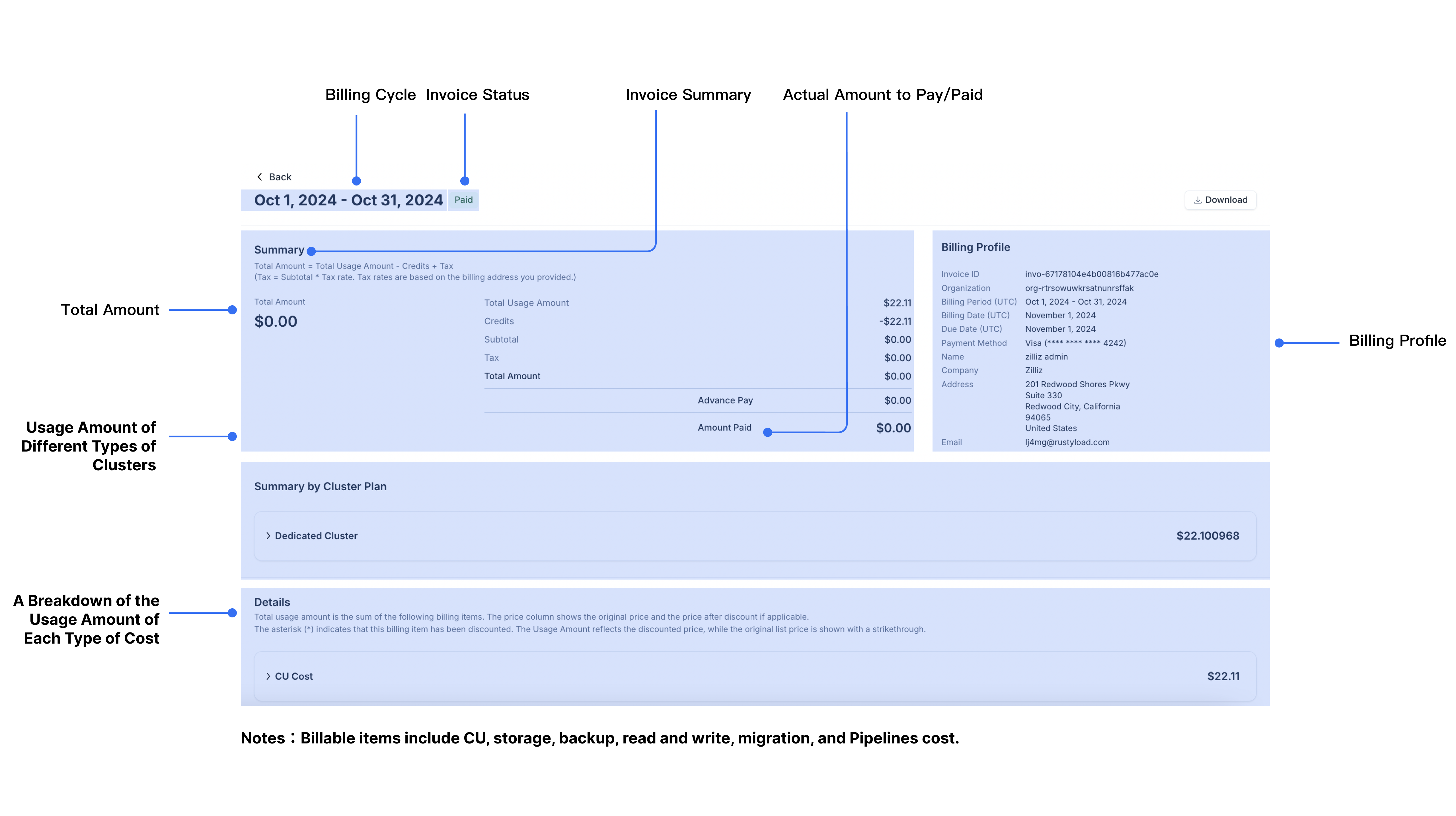
Billing cycle
The billing cycle, displayed at the top of your invoice, shows the period during which charges are calculated, along with the payment due date.
-
Billing Cycle: Typically a month-long period starting at 00:00:00 (UTC) on the first day of the previous month and ending at 23:59:59 (UTC) on the last day of that month. For example, Zilliz Cloud issues the invoice for August on September 1, 2024, with the billing period running from August 1, 2024, at 00:00:00 (UTC) to August 31, 2024, at 23:59:59 (UTC). Charges accumulate for your usage throughout this period and your invoice status remains “unbilled”.
-
Data of Issue: The date your invoice is generated. On this day, the invoice status changes to “unpaid,” and payment can be made. If you have added a payment method (e.g., credit card or marketplace subscription), it will be charged automatically. Upon successful payment, the invoice status updates to “paid”. In case of a failed payment, notification emails will be sent to the Organization Owner(s) and Billing Admin(s).
-
Due Date: The final day to make your payment.
-
Overdue Date: If the payment remains unpaid, the invoice status becomes “overdue”. If an invoice becomes overdue, operations that increase resource usage may be blocked, including creating clusters, increasing query CUs or replicas, and enabling or using autoscaling. It is recommended to pay your invoice promptly.
Invoice status
In Zilliz Cloud, invoice statuses represent different stages in the payment process. The following table explains each possible status:
| Status | Definition |
|---|---|
| Unbilled | Transactions that occur after the billing cycle but before the statement is generated. These amounts are not immediately due but will be included in the next billing cycle. |
| Unpaid | The invoice is billed and is within the due timeframe. |
| Overdue | The invoice is billed but not paid within the due timeframe. |
| Paid | Payment has been completed with no outstanding amounts. |
| Free | All amounts due are paid with credits. |
Invoice summary
The summary section provides a high-level overview of the charges on your invoice.
-
Usage Amount: The monthly total for all billable items (including CU, storage, backup, pipelines, and read and write costs).
-
Credits: Any credits applied toward the payment.
-
Subtotal: Subtotal = Usage Amount - Credits.
-
Tax: Tax = Subtotal x Tax rate. Tax rates are based on the country in your billing address.
-
Total Amount: Total Amount = Subtotal + Tax.
-
Advance Pay: The amount of Advance Pay used to offset the payment.
-
Amount Due/Amount Paid: The final amount you need to pay or have paid.
Summary by cluster plan
Zilliz Cloud offers three cluster types: Free, Serverless, and Dedicated. Charges apply only for Serverless and Dedicated clusters.
-
Dedicated Clusters: Billed based on usage. Charges are calculated as
Cluster Cost = Cluster CU Size x Runtime x Unit Price. Unlike Serverless clusters, for dedicated clusters charges apply even without active read/write operations due to dedicated resource allocation.NotesFor Dedicated cluster cost, runtime is defined as the period during which the cluster status is "Running", "Modifying", "Frozen", etc. Cluster under the following four statuses is not charged: "Creating", "Suspending", "Resuming", or "Suspended."
-
Serverless Clusters: Billed on a pay-as-you-go basis for vCU consumption during read/write operations. The cost is calculated as
Read and Write Cost = vCU Usage x vCU Unit Price. If no operations occur, only storage fees are billed.
Additional charges include:
-
Backup Costs: Calculated as
Backup File Size x Backup Retention Periodand measured in "GB-month", which refers to the usage of 1 GB of backup file retained for 1 month. Backup is billed at a minimum of 1 day, even for shorter retention period. This means if the backup file is created but kept for less than one day, it will still be charged at the rate for one day. -
Storage Costs: Calculated as
Current Storage Size x Cluster Runtimeand measured in "GB-Hour", which refers to the usage of 1 GB of data stored for 1 hour. Storage is billed at a minimum of 1 hour, even for shorter storage durations.NotesFor storage cost, runtime is defined as the period during which the cluster status is "Running", "Modifying", "Frozen", etc. Cluster under the following status is not charged: "Creating".
Invoice details
This section provides a detailed breakdown of charges for each billable item.
Billing profile
Your billing profile includes details about where and to whom invoices are issued. In Zilliz Cloud, relevant billing emails will be sent to Organization Owners, Organization Billing Admins, and the email addresses added in the billing profile. Therefore, to add recipients of invoices, you can add the email address in the billing profile or invite user to join the organization as an Organization Billing Admin.
To edit the billing profile, refer to Update Billing Profile.
Troubleshooting / FAQ
-
What is the start and end time of an invoice?
Explanation: The billing period starts at 00:00:00 (UTC) on the first day of the previous month and ending at 23:59:59 (UTC) on the last day of that month.
Example: Zilliz Cloud issues the invoice for August on September 1, 2024, with the billing period running from August 1, 2024, at 00:00:00 (UTC) to August 31, 2024, at 23:59:59 (UTC).
-
How precise are the amounts displayed in the usage details on Zilliz Cloud?
Zilliz Cloud calculates charges with a precision of 10 decimal places, and all billing is computed to this level of accuracy. Daily charges are first calculated to 10 decimals, then summed and rounded to 10 decimals during the billing process.
-
RESTful API: All numeric values (e.g., Unit Price, Usage, Usage Amount) are always returned with exactly 10 decimal places. If the value has fewer than 10 decimal digits, trailing zeros are padded to reach 10 digits. For more information about how to use the RESTful API, see Query Daily Usage.
-
Web Console UI: The displayed amounts are consistent with the API values, but trailing zeros are omitted for readability. For example,
0.1234000000would be displayed as0.1234in the UI.
-
-
Why haven’t I received my invoice?
Possible Cause: Only Organization Owners or Billing Admins have access to invoices.
Solution: Ensure you have the necessary permissions. Contact your Organization Owner or Billing Admin if you're not able to access invoices.