Quickstart to CLI & Agent Integration
Install Zilliz CLI and the agent integration that matches your local workflow. Zilliz supports agent integration through the Zilliz Plugin for Claude Code and OpenAI Codex, the Zilliz Skill for skill-compatible agents, and the Zilliz CLI for direct terminal or automation workflows.
After setup, you can ask your agent to operate Zilliz Cloud directly, or use the CLI in scripts and terminals.
Installation
Before you start, ensure that you have:
-
Claude Code, if you want to use the Zilliz Claude Code Plugin.
-
Codex, if you want to use the Codex Plugin.
-
Node.js, if you want to install Zilliz Skill.
Install Zilliz Plugin for OpenAI Codex
Use the Zilliz Plugin if you want to operate Zilliz Cloud directly from OpenAI Codex.
Add the marketplace.
codex plugin marketplace add zilliztech/zilliz-plugin
Open /plugins in Codex and install zilliz from the marketplace.
You can also install directly with codex-marketplace as follows.
npx codex-marketplace add zilliztech/zilliz-plugin --plugins
Install Zilliz Plugin for Claude Code
Use the Zilliz Claude Code Plugin if you want to operate Zilliz Cloud directly from Claude Code.
Run Claude Code
> claude
Open the plugin marketplace
/plugin
Find and install the Zilliz Plugin
Go to the Discover tab and search for zilliz. Select the zilliz plugin to install it.
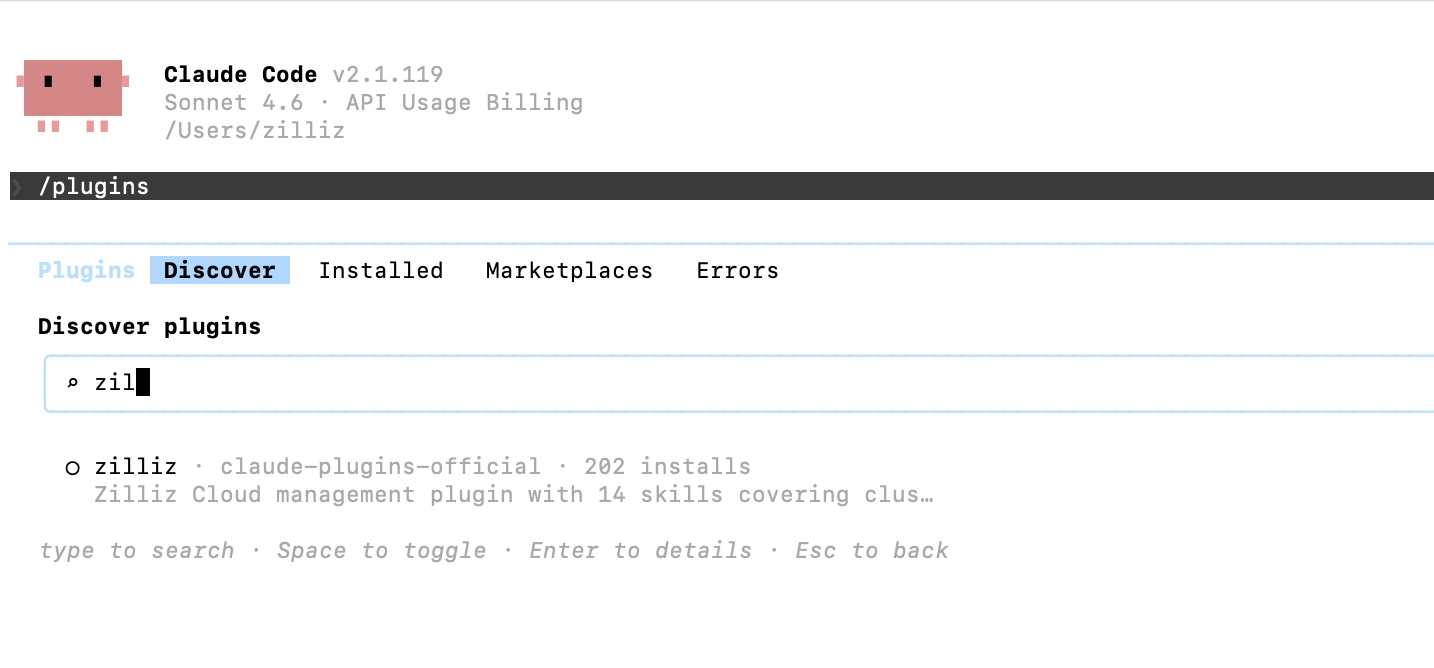
Run the quickstart wizard. The wizard guides you through CLI installation, authentication, cluster connection, and first operations.
/zilliz:quickstart
Install Zilliz Skill for common agent frameworks
If your coding agent, such as Codex, Gemini CLI, Cursor, or another skill-compatible agent, supports agent skills, install Zilliz Skill as follows:
npx skills add zilliztech/zilliz-skill
This command will prompt you to choose the target agent framework and installation scope.
Install Zilliz CLI
The Zilliz CLI is the base command-line tool used by the Plugin and Skill.
Install Zilliz CLI.
- macOS / Linux
- Windows
curl -fsSL https://zilliz.com/cli/install.sh | bash
irm https://zilliz.com/cli/install.ps1 | iex
Verify installation:
zilliz --version
Authenticate.
Authenticate with your Zilliz Cloud account:
zilliz login
This opens a browser for authentication. After login, your credentials are stored locally.
When to use CLI, Plugin, or Skill
Use these tools when you need to:
-
Develop and test manually from your local environment.
-
Write automated operations scripts for repeatable workflows.
-
Enable your agent to call Vector Database or Vector Lakebase services automatically.
Tool comparison
The Claude Code Plugin, Zilliz Skill, and Zilliz CLI should cover the same main capabilities. Choose based on workflow, not feature scope.
| OpenAI Codex plugin | Claude Code Plugin | Zilliz Skill | Zilliz CLI | |
|---|---|---|---|---|
| Best for | Codex natural-language workflows | Claude Code natural-language workflows | Skill-compatible coding agents | Terminal use, scripts, and CI |
| Setup | Guided setup through the quickstart skill | /zilliz:quickstart | npx skills add zilliztech/zilliz-skill | Install script + zilliz login |
| Natural language | Yes | Yes | Yes | No |
| Automation | Agent-assisted | Agent-assisted | Agent-assisted | Script-first |
| Structured output | Agent-readable responses | Agent-readable responses | Agent-readable responses | --output json for scripts |
Supported capabilities
The following table explains the capabilities of the CLI, Plugin and Skill.
| Area | What You Can Do |
|---|---|
| Clusters | Create, delete, suspend, resume, modify |
| Collections | Create with custom schema, load, release, rename, drop |
| Vectors | Search, query, insert, upsert, delete, hybrid search |
| Indexes | Create (AUTOINDEX), list, describe, drop |
| Databases | Create, list, describe, drop |
| Users & Roles | RBAC setup, privilege management |
| Backups | Create, restore, export, policy management |
| Import | Bulk data import from S3/GCS/Azure Blob Storage |
| Partitions | Create, load, release, manage |
| Monitoring | Cluster status, collection stats, load states |
| Projects | Project and region management |
| Billing | Usage queries, invoices |
What you can ask your agent to do
After installation, describe the task directly. Your agent should translate the request into the corresponding Zilliz CLI commands. The following examples show how a natural-language request maps to the CLI commands your agent is expected to run.
-
List my clusters and show which one is currently active.
Expected CLI commands:
bashzilliz cluster listzilliz context current -
Create a collection for product embeddings with a 768-dimensional vector field.
Expected CLI command:
bashzilliz collection create --name product_embeddings --dimension 768 -
Import data from S3 into my collection and check the import job status.
Expected CLI command:
bashzilliz import start --cluster-id <cluster-id> --collection product_embeddings --body '{"files": [["s3://bucket/path/data.json"]]}' -
Create a backup for my production cluster.
Expected CLI command:
bashzilliz backup create --cluster-id <cluster-id> -
Search my collection with a metadata filter and return the top 10 results.
Expected CLI command:
bashzilliz vector search --collection product_embeddings --data '[[0.1, 0.2, 0.3]]' --filter 'age > 20' --limit 10 --output-fields '["name", "age"]' -
Create a role with read-only access to the analytics collection.
Expected CLI commands:
bashzilliz role create --role analytics_readonlyzilliz role grant-privilege --role analytics_readonly --object-type Collection --object-name analytics --privilege Searchzilliz role grant-privilege --role analytics_readonly --object-type Collection --object-name analytics --privilege Query