Create an External Collection
Public PreviewAn external collection is a type of data collection in Zilliz Cloud that accesses data from external storage systems or database tables such as AWS S3 and Iceberg without copying it into Zilliz Cloud. It acts as a query layer over data lakes while maintaining compatibility with Zilliz Cloud query interfaces.
You can create an external collection only in an on-demand compute database. Support for creating external collections in serving Dedicated clusters is coming soon.
Overview
In a typical AI data pipeline, users may already have stored their data in Parquet or other formats on their storage system, such as AWS S3. To make Zilliz Cloud consume this externally stored data, users usually need to import it into Zilliz Cloud's own storage using Extract-Transform-Load (ETL) pipelines.
This bring-your-data-to-Zilliz Cloud workflow creates redundant data that is hard to synchronize and adds to the engineering maintenance burden to ensure data consistency.
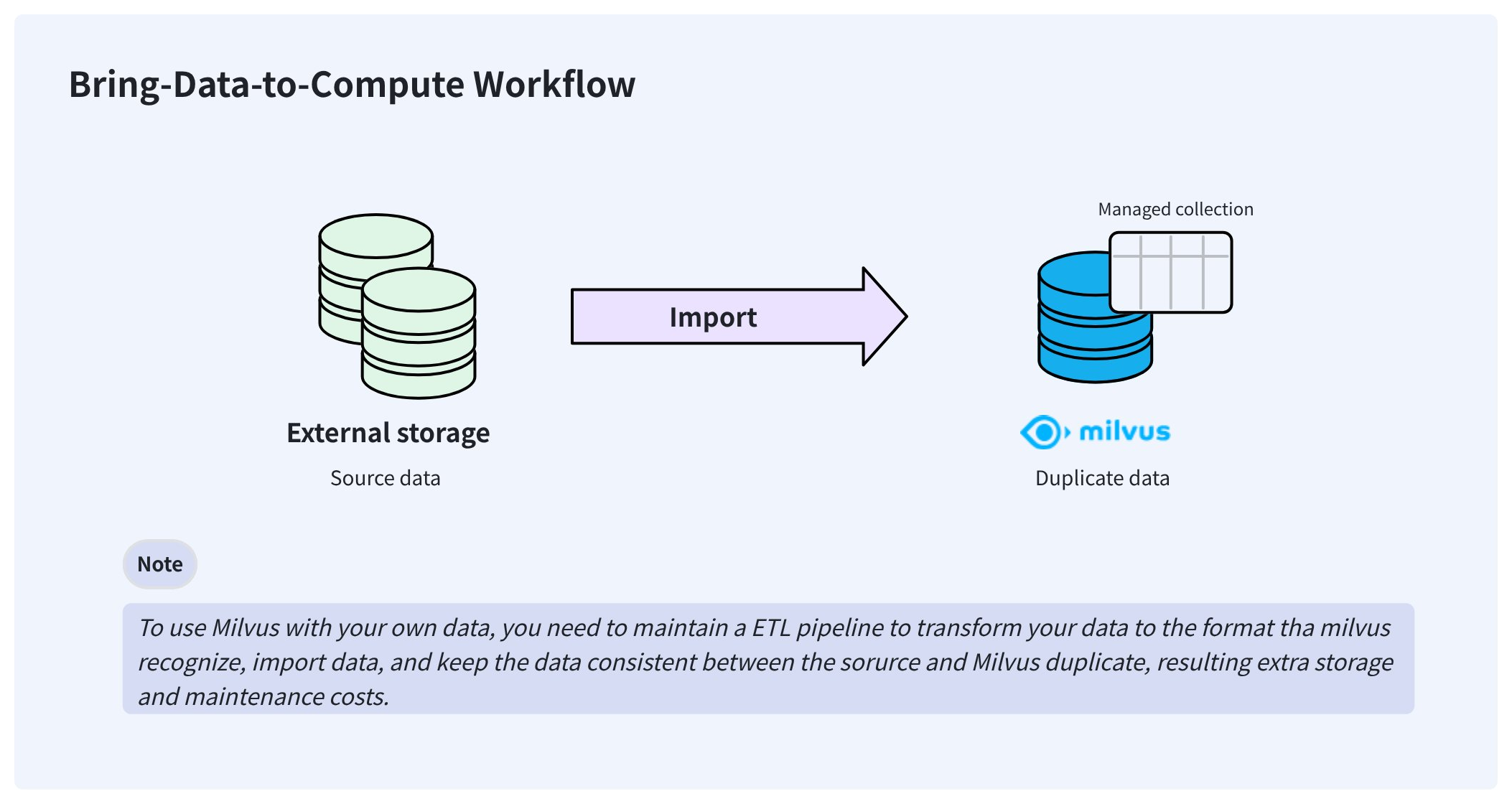
To resolve these issues, Zilliz Cloud delivers external collections that let you access your externally stored data from Zilliz Cloud without worrying about data synchronization and ETL pipelines.
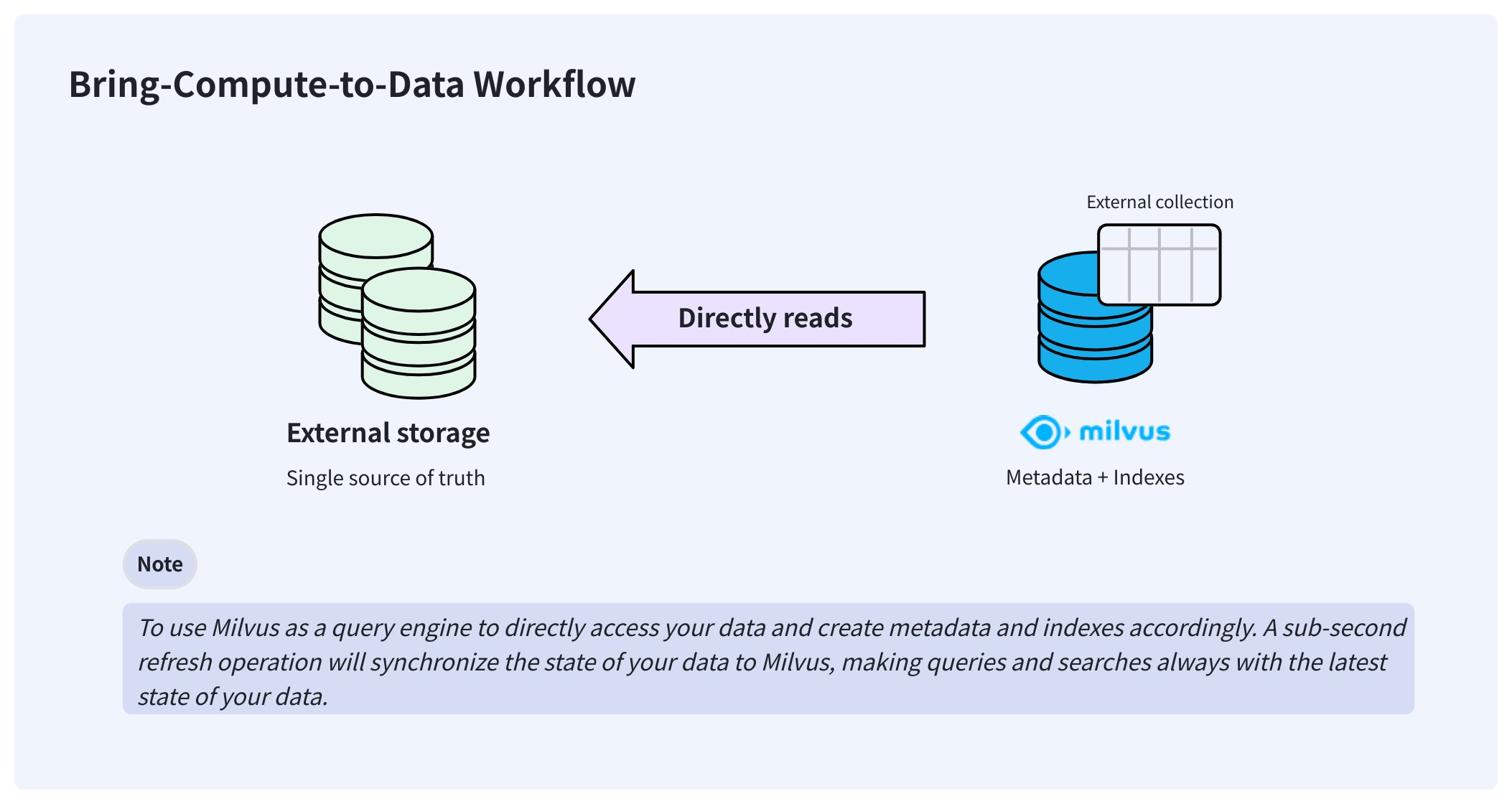
Once created, an external collection can access your data directly and keep it in the same place where you store it. In the background, Zilliz Cloud creates manifest files to record the mappings between the Zilliz Cloud metadata and the rows in external data files. After the manifest files are ready, you can create indexes in the external collection as you would in any managed collection.
When your data changes, manually triggering a sub-second refresh updates the metadata, keeping Zilliz Cloud always up to date.
External collections are available in the databases for on-demand computing.
Step 1: Create schema
As with creating a managed collection, you also need to create a schema before creating an external collection. However, the schema is slightly different from that of a managed collection.
Preparation
-
You have obtained an API key with sufficient permissions to create an external collection in a database for on-demand computing.
For details, refer to API Keys.
-
You have integrated your object storage bucket with Zilliz Cloud.
-
You have created an external volume out of the bucket integration. Ensure that the volume contains the target data files.
For details, refer to External Volumes.
Support data sources
Zilliz Cloud supports the following data sources, and you should provide the corresponding external sources in the format you choose.
-
parquetSet
external_sourceto the folder containing the target Parquet files. -
vortex,Set
external_sourceto the folder containing the Vortex columnar files for version 0.56. -
lance-tableSet
external_sourceto a folder path that contains sub-folders, such as _transactions, _versions, and data. -
iceberg-tableSet
external_sourceto themetadata.jsonfile of the Iceberg table, and pass in the snapshot ID, as inpythonexternal_spec={"format": "iceberg-table","snapshot_id": "473984310232959286"} -
milvus-tableSet
external_sourceto the concrete Milvus snapshot metadata JSON file. For details, refer to Use Snapshot as Data Source.
Set up schema
Once you have an external volume containing the target data files, create the schema to map collection columns to Parquet files (parquet), a lance table (lance-table), an Iceberg table (iceberg-table), or Vortex files of the 0.56.0 format (vortex).
The external source should end with a forward slash (/) to indicate this is a folder.
- Python
- Java
- Go
- Rust
- C++
- NodeJS
- cURL
from pymilvus import MilvusClient, DataType

schema = MilvusClient.create_schema(
    external_source='volume://my_volume/path/to/a/folder/',
    external_spec='{"format": "parquet"}'
)
import com.google.gson.JsonObject;
import io.milvus.v2.service.collection.request.CreateCollectionReq;

JsonObject externalSpec = new JsonObject();
externalSpec.addProperty("format", "parquet");
CreateCollectionReq.CollectionSchema schema = CreateCollectionReq.CollectionSchema.builder()
        .externalSource("volume://my_volume/path/to/a/folder/")
        .externalSpec(externalSpec)
        .build();
import (
    "github.com/milvus-io/milvus/client/v3/entity"

    "github.com/milvus-io/milvus/client/v3/milvusclient"
)

schema := entity.NewSchema().
    WithName("product_embeddings").
    WithExternalSource("volume://my_volume/path/to/a/folder/").
    WithExternalSpec(`{"format": "parquet"}`)
use milvus::v2::prelude::*;
use serde_json::json;

let schema = CollectionSchema::new()
    .enable_dynamic_field(false)
    .external_source("volume://my_volume/path/to/a/folder/")
    .external_spec(json!({"format": "parquet"}));
#include "milvus/MilvusClientV2.h"
milvus::CollectionSchema schema;
schema.SetExternalSource("volume://my_volume/path/to/a/folder/");
schema.SetExternalSpec(nlohmann::json{{"format", "parquet"}});
const external_source = 'volume://my_volume/path/to/a/folder/';
const external_spec = '{"format": "parquet"}';
export fields='[
    {
        "fieldName": "product_id",
        "dataType": "Int64",
        "isPrimary": true
    },
    {
        "fieldName": "embedding",
        "dataType": "FloatVector",
        "elementTypeParams": {
            "dim": "768"
        }
    },
    {
        "fieldName": "product_name",
        "dataType": "VarChar",
        "elementTypeParams": {
            "max_length": 512
        }
    }
]'
Step 2: Add fields
Once the schema is ready, you can add fields as follows:
- Python
- Java
- Go
- Rust
- C++
- NodeJS
- cURL
schema.add_field(
    field_name="product_id",
    datatype=DataType.INT64,
    # highlight-next
    external_field="id" # field name in the external data file
)
schema.add_field(
    field_name="product_name",
    datatype=DataType.VARCHAR,
    max_length=512,
    # highlight-next
    external_field="name"
)
schema.add_field(
    field_name="embedding",
    datatype=DataType.FLOAT_VECTOR,
    dim=768,
    # highlight-next
    external_field="vector"
)
import io.milvus.v2.common.DataType;
import io.milvus.v2.service.collection.request.AddFieldReq;

schema.addField(AddFieldReq.builder()
        .fieldName("product_id")
        .dataType(DataType.Int64)
        .externalField("id")
        .build());
schema.addField(AddFieldReq.builder()
        .fieldName("product_name")
        .dataType(DataType.VarChar)
        .maxLength(512)
        .externalField("name")
        .build());
schema.addField(AddFieldReq.builder()
        .fieldName("embedding")
        .dataType(DataType.FloatVector)
        .dimension(768)
        .externalField("vector")
        .build());
import (
    "github.com/milvus-io/milvus/client/v3/entity"

    "github.com/milvus-io/milvus/client/v3/milvusclient"
)

schema = schema.
    WithField(
        entity.NewField().
            WithName("product_id").
            WithDataType(entity.FieldTypeInt64).
            WithExternalField("id"),
    ).
    WithField(
        entity.NewField().
            WithName("product_name").
            WithDataType(entity.FieldTypeVarChar).
            WithMaxLength(512).
            WithExternalField("name"),
    ).
    WithField(
        entity.NewField().
            WithName("embedding").
            WithDataType(entity.FieldTypeFloatVector).
            WithDim(768).
            WithExternalField("vector"),
    )
use milvus::v2::prelude::*;

let schema = schema
    .add_field(
        FieldSchema::new()
            .name("product_id")
            .data_type(DataType::Int64)
            .primary_key(true)
            .external_field("id"),
    )
    .add_field(
        FieldSchema::new()
            .name("product_name")
            .data_type(DataType::VarChar)
            .max_length(512)
            .external_field("name"),
    )
    .add_field(
        FieldSchema::new()
            .name("embedding")
            .data_type(DataType::FloatVector)
            .dimension(768)
            .external_field("vector"),
    );
#include "milvus/MilvusClientV2.h"
schema.AddField(milvus::FieldSchema("product_id", milvus::DataType::INT64, "").WithExternalField("id"));
schema.AddField(milvus::FieldSchema("product_name", milvus::DataType::VARCHAR, "").WithExternalField("name"));
schema.AddField(milvus::FieldSchema("embedding", milvus::DataType::FLOAT_VECTOR, "").WithExternalField("vector"));
const schema = [
    { name: 'product_id', data_type: 'Int64', external_field: 'id' },
    { name: 'product_name', data_type: 'VarChar', max_length: 512, external_field: 'name' },
    { name: 'embedding', data_type: 'FloatVector', dim: 768, external_field: 'vector' },
];
export schema="{
    \"externalSource\": \"volume://my_volume/path/to/a/folder\",
    \"externalSpec\": \"{\\\"format\\\": \\\"parquet\\\"}\",
    \"fields\": $fields
}"
Step 3: Create a collection
After adding all the fields to the schema, you can create the external collection.
You can create external collections in a database at the project level, which is usually associated with an on-demand cluster.
- Python
- Java
- Go
- Rust
- C++
- NodeJS
- cURL
# connect the database
client = MilvusClient(
    uri="https://{project-id}.{region}.vectordb.zillizcloud.com",
    token="YOUR_API_KEY"
)

client.use_database(
    db_name="my_database"
)
# create the collection
client.create_collection(
    collection_name="test_collection",
    schema=schema
)
import io.milvus.v2.client.ConnectConfig;
import io.milvus.v2.client.MilvusClientV2;
import io.milvus.v2.service.collection.request.CreateCollectionReq;
ConnectConfig connectConfig = ConnectConfig.builder()
        .uri("https://{project-id}.{region}.vectordb.zillizcloud.com")
        .token("YOUR_API_KEY")
        .build();
MilvusClientV2 client = new MilvusClientV2(connectConfig);
CreateCollectionReq createReq = CreateCollectionReq.builder()
        .dbName("my_database")
        .collectionName("test_collection")
        .collectionSchema(schema)
        .build();
client.createCollection(createReq);
import (
    "context"
    "fmt"

    "github.com/milvus-io/milvus/client/v3/entity"
    "github.com/milvus-io/milvus/client/v3/milvusclient"
)

ctx, cancel := context.WithCancel(context.Background())
defer cancel()
milvusAddr := "https://{project-id}.{region}.vectordb.zillizcloud.com"
token := "YOUR_API_KEY"
client, err := milvusclient.New(ctx, &milvusclient.ClientConfig{
    Address: milvusAddr,
    APIKey: token,
})
if err != nil {
    fmt.Println(err.Error())
    // handle error
}
err = client.UseDatabase(ctx, milvusclient.NewUseDatabaseOption("my_database"))
if err != nil {
    fmt.Println(err.Error())
    // handle error
}

err = client.CreateCollection(ctx, milvusclient.NewCreateCollectionOption("test_collection", schema))
if err != nil {
    fmt.Println(err.Error())
    // handle error
}
use milvus::v2::prelude::*;

#[tokio::main]
async fn main() -> Result<()> {
    let client = ClientV2::new(
        &ConnectConfig::new()
            .uri("https://{project-id}.{region}.vectordb.zillizcloud.com")
            .token("YOUR_API_KEY"),
    )
    .await?;

    client.use_database("my_database").await?;

    client
        .create_collection(
            CreateCollectionRequest::builder()
                .collection_name("test_collection")
                .schema(schema)
                .build()?,
        )
        .await?;

    Ok(())
}
#include "milvus/MilvusClientV2.h"
auto client = milvus::MilvusClientV2::Create();
auto status = client->Connect(milvus::ConnectParam("https://{project-id}.{region}.vectordb.zillizcloud.com", "YOUR_API_KEY"));
status = client->UseDatabase("my_database");
status = client->CreateCollection(milvus::CreateCollectionRequest()
    .WithDatabaseName("my_database")
    .WithCollectionName("test_collection")
    .WithCollectionSchema(std::make_shared<milvus::CollectionSchema>(schema)));
import { MilvusClient } from "@zilliz/milvus2-sdk-node";

const client = new MilvusClient({
    address: "https://{project-id}.{region}.vectordb.zillizcloud.com",
    token: "YOUR_API_KEY",
});

await client.useDatabase({ db_name: "my_database" });

await client.createCollection({
    collection_name: "test_collection",
    schema,
    external_source,
    external_spec,
});
export PROJECT_ENDPOINT='https://{project-id}.{region}.vectordb.zillizcloud.com'
curl --request POST \
--url "${PROJECT_ENDPOINT}/v2/vectordb/collections/create" \
--header "Authorization: Bearer ${TOKEN}" \
--header "Content-Type: application/json" \
-d "{
    \"dbName\": \"my_database\",
    \"collectionName\": \"test_collection\",
    \"schema\": $schema
}"
Step 4: Create indexes
You can create indexes for external collection columns as you do in managed collections.
- Python
- Java
- Go
- Rust
- C++
- NodeJS
- cURL
index_params = client.prepare_index_params()
# Add indexes
index_params.add_index(
    field_name="embedding",
    index_type="AUTOINDEX",
    metric_type="COSINE"
)
index_params.add_index(
    field_name="product_name",
    index_type="AUTOINDEX"
)
client.create_index(
    db_name="my_database",
    collection_name="test_collection",
    index_params=index_params
)
import io.milvus.v2.common.IndexParam;
import io.milvus.v2.service.index.request.CreateIndexReq;
import java.util.*;

IndexParam indexParamForIdField = IndexParam.builder()
        .fieldName("product_name")
        .indexType(IndexParam.IndexType.AUTOINDEX)
        .build();
IndexParam indexParamForVectorField = IndexParam.builder()
        .fieldName("embedding")
        .indexType(IndexParam.IndexType.AUTOINDEX)
        .metricType(IndexParam.MetricType.COSINE)
        .build();
List<IndexParam> indexParams = new ArrayList<>();
indexParams.add(indexParamForIdField);
indexParams.add(indexParamForVectorField);
CreateIndexReq createIndexReq = CreateIndexReq.builder()
        .dbName("my_database")
        .collectionName("test_collection")
        .indexParams(indexParams)
        .build();
client.createIndex(createIndexReq);
import (
    "context"
    "fmt"

    "github.com/milvus-io/milvus/client/v3/entity"
    "github.com/milvus-io/milvus/client/v3/index"
    "github.com/milvus-io/milvus/client/v3/milvusclient"
)

collectionName := "test_collection"

indexTask, err := client.CreateIndex(ctx,
    milvusclient.NewCreateIndexOption(collectionName, "embedding", index.NewAutoIndex(entity.COSINE)))
if err != nil {
    fmt.Println(err.Error())
    // handle err
}
err = indexTask.Await(ctx)
if err != nil {
    fmt.Println(err.Error())
    // handle err
}

_, err = client.CreateIndex(ctx,
    milvusclient.NewCreateIndexOption(collectionName, "product_name", index.NewAutoIndex(entity.L2)))
if err != nil {
    fmt.Println(err.Error())
    // handle err
}
use milvus::v2::prelude::*;
client
    .create_index(
        CreateIndexRequest::builder()
            .collection_name("test_collection")
            .index_param(
                IndexParam::new()
                    .field_name("embedding")
                    .index_type(IndexType::AutoIndex)
                    .metric_type(MetricType::Cosine),
            )
            .index_param(
                IndexParam::new()
                    .field_name("product_name")
                    .index_type(IndexType::AutoIndex),
            )
            .build()?,
    )
    .await?;
#include "milvus/MilvusClientV2.h"
milvus::CreateIndexRequest indexRequest;
indexRequest.WithCollectionName("test_collection");
indexRequest.AddIndex(milvus::IndexSchema("embedding", milvus::IndexType::AUTOINDEX, milvus::MetricType::COSINE));
indexRequest.AddIndex(milvus::IndexSchema("product_name", milvus::IndexType::AUTOINDEX));
status = client->CreateIndex(indexRequest);
client.createIndex({
    db_name: "my_database",
    collection_name: "test_collection",
    field_name: "product_name",
    index_type: "AUTOINDEX"
})
client.createIndex({
    db_name: "my_database",
    collection_name: "test_collection",
    field_name: "embedding",
    index_type: "AUTOINDEX",
    metric_type: "COSINE"
})
export indexParams='[
        {
            "fieldName": "embedding",
            "indexName": "my_vector",
            "indexType": "AUTOINDEX"
        },
        {
            "fieldName": "product_name",
            "indexName": "my_id",
            "indexType": "AUTOINDEX"
        }
    ]'

curl --request POST \
--url "${PROJECT_ENDPOINT}/v2/vectordb/indexes/create" \
--header "Authorization: Bearer ${TOKEN}" \
--header "Content-Type: application/json" \
-d "{
    \"dbName\": \"my_database\",
    \"collectionName\": \"test_collection\",
    \"indexParams\": $indexParams
}"
Step 5: Refresh data
Once the collection is ready, refresh it to create the metadata and indexes for your data.
- Python
- Java
- Go
- Rust
- C++
- NodeJS
- cURL
job_id = client.refresh_external_collection(
    db_name="my_database",
    collection_name="test_collection"
)
while True:
    progress = client.get_refresh_external_collection_progress(job_id=job_id)
    print(f"  {progress.state}: {progress.progress}%")
    if progress.state == "RefreshCompleted":
        elapsed = progress.end_time - progress.start_time
        print(f"  Completed in {elapsed}ms")
        break
    elif progress.state == "RefreshFailed":
        print(f"  Failed: {progress.reason}")
        break
    time.sleep(2)
import io.milvus.v2.service.utility.request.GetRefreshExternalCollectionProgressReq;
import io.milvus.v2.service.utility.request.RefreshExternalCollectionReq;
import io.milvus.v2.service.utility.response.GetRefreshExternalCollectionProgressResp;
import io.milvus.v2.service.utility.response.RefreshExternalCollectionJobInfo;
import io.milvus.v2.service.utility.response.RefreshExternalCollectionResp;
import java.util.concurrent.TimeUnit;

RefreshExternalCollectionResp refreshResp = client.refreshExternalCollection(
        RefreshExternalCollectionReq.builder()
                .collectionName("test_collection")
                .build());

long jobId = refreshResp.getJobId();

while (true) {
    GetRefreshExternalCollectionProgressResp resp = client.getRefreshExternalCollectionProgress(
            GetRefreshExternalCollectionProgressReq.builder()
                    .jobId(jobId)
                    .build());
    RefreshExternalCollectionJobInfo jobInfo = resp.getJobInfo();
    if ("RefreshCompleted".equals(jobInfo.getState())) {
        long elapsed = jobInfo.getEndTime() - jobInfo.getStartTime();
        System.out.printf("  Refresh completed in %dms%n", elapsed);
        break;
    } else if ("RefreshFailed".equals(jobInfo.getState())) {
        System.out.printf("  Refresh failed: %s%n", jobInfo.getReason());
    }
    TimeUnit.SECONDS.sleep(2);
}
import (
    "context"
    "fmt"
    "time"

    "github.com/milvus-io/milvus/client/v3/entity"
    "github.com/milvus-io/milvus/client/v3/milvusclient"
)

refreshResult, err := client.RefreshExternalCollection(ctx,
    milvusclient.NewRefreshExternalCollectionOption("test_collection"))
if err != nil {
    fmt.Println(err.Error())
    // handle error
}
jobID := refreshResult.JobID
for {
    progress, err := client.GetRefreshExternalCollectionProgress(ctx,
        milvusclient.NewGetRefreshExternalCollectionProgressOption(jobID))
    if err != nil {
        fmt.Println(err.Error())
        // handle error
    }
    fmt.Printf("State: %s\n", progress.State)
    if progress.State == entity.RefreshStateCompleted {
        fmt.Println("Refresh completed!")
        break
    }
    if progress.State == entity.RefreshStateFailed {
        fmt.Printf("Refresh failed: %s\n", progress.Reason)
        break
    }
    time.Sleep(2 * time.Second)
}
use milvus::v2::prelude::*;
let refresh = client
    .refresh_external_collection(
        RefreshExternalCollectionRequest::builder()
            .collection_name("test_collection")
            .build()?,
    )
    .await?;
loop {
    let progress = client
        .get_refresh_external_collection_progress(
            GetRefreshExternalCollectionProgressRequest::builder()
                .job_id(refresh.job_id())
                .build()?,
        )
        .await?;
    let job_info = progress.job_info();
    println!("  {}: {}%", job_info.get_state().as_str(), job_info.get_progress());
    match job_info.get_state() {
        RefreshExternalCollectionStateCode::Completed => {
            println!("  Completed in {}ms", job_info.get_end_time() - job_info.get_start_time());
            break;
        }
        RefreshExternalCollectionStateCode::Failed => {
            println!("  Failed: {}", job_info.get_reason());
            break;
        }
        _ => tokio::time::sleep(std::time::Duration::from_secs(2)).await,
    }
}
#include "milvus/MilvusClientV2.h"
#include <iostream>
#include <thread>
#include <chrono>
milvus::RefreshExternalCollectionRequest refreshRequest;
refreshRequest.WithCollectionName("test_collection");
milvus::RefreshExternalCollectionResponse refreshResponse;
status = client->RefreshExternalCollection(refreshRequest, refreshResponse);
while (true) {
    milvus::GetRefreshExternalCollectionProgressRequest progressRequest;
    progressRequest.WithJobID(refreshResponse.JobID());
    milvus::GetRefreshExternalCollectionProgressResponse progressResponse;
    status = client->GetRefreshExternalCollectionProgress(progressRequest, progressResponse);
    const auto& jobInfo = progressResponse.JobInfo();
    std::cout << "  progress: " << jobInfo.Progress() << "%" << std::endl;
    if (jobInfo.State() == milvus::RefreshExternalCollectionStateCode::COMPLETED) {
        std::cout << "  Completed in " << (jobInfo.EndTime() - jobInfo.StartTime()) << "ms" << std::endl;
        break;
    } else if (jobInfo.State() == milvus::RefreshExternalCollectionStateCode::FAILED) {
        std::cout << "  Failed: " << jobInfo.Reason() << std::endl;
        break;
    }
    std::this_thread::sleep_for(std::chrono::seconds(2));
}
const job = await client.refreshExternalCollection({
    collection_name: "test_collection",
});
while (true) {
    const progress = await client.getRefreshExternalCollectionProgress({ job_id: job.job_id });
    console.log(`${progress.job_info.state}: ${progress.job_info.progress}%`);
    if (progress.job_info.state === "RefreshCompleted" || progress.job_info.state === "RefreshFailed") break;
    await new Promise((resolve) => setTimeout(resolve, 2000));
}
curl --request POST \
--url "${PROJECT_ENDPOINT}/v2/vectordb/jobs/external_collection/refresh" \
--header "Authorization: Bearer ${TOKEN}" \
--header "Content-Type: application/json" \
-d "{
    \"dbName\": \"my_database\",
    \"collectionName\": \"test_collection\",
    \"externalSource\": \"volume://my_volume/path/to/a/folder\",
    \"externalSpec\": \"{\\\"format\\\": \\\"parquet\\\"}\"
}"
The refresh operation is asynchronous, so you need to set up an iteration to monitor its progress.
-
The refresh operation scans the metadata of the data files and generates the manifest files accordingly. It usually takes 150-250 ms.
-
The manifest files record the mapping between the metadata in Milvus and the rows in external files.
-
If there is an update to your source data, you need to manually call refresh again to keep Zilliz Cloud up to date.
-
A refresh that requires removing all active metadata without any insertions results in a denial.
-
For external collections in a database for on-demand computing, you do not need to load and release them manually.
Follow-ups
Once you have refreshed the external collection, you can perform similarity searches and queries in the external collection as you would in any managed collection, except that collections in a database for on-demand computing must be attached to an on-demand cluster for searches and queries. For details, refer to Create On-Demand Cluster and its sibling pages.
Before conducting DQL operations, such as search, query, get, and hybrid search, you need to create a session to attach the compute resources of an on-demand cluster. For details, refer to On-Demand DQL Operations.
Snapshot as Source
You can create an external collection from a Milvus snapshot by using the snapshot metadata JSON path as `externalsource` and setting `externalspec.format` to `"milvus-table"`. | Cloud