Credits
Credits can be used to cover Zilliz Cloud usage charges. You may receive credits when you register for Zilliz Cloud with a work email, participate in eligible Zilliz Cloud programs or events, or receive credits from Zilliz for a proof of concept (PoC).
Credits help you try Zilliz Cloud or run evaluation workloads before setting up a long-term payment method.
To manage credits and payment method, you must be an Organization Owner or Organization Billing Admin.
How credits work
Credits are applied automatically to usage charges before other payment methods.
If multiple payment methods or balances are available, Zilliz Cloud applies them in the following order:
-
Credits
-
Advance Pay balance
-
Credit card or Marketplace subscription
Credit validity
Credits have an expiration date. Expired credits cannot be used to cover future usage charges.
To avoid losing available credits:
-
Check your remaining credit balance regularly.
-
Check the number of days before your credits expire.
-
Use credits before they expire.
-
Add a valid payment method to extend your credit validity from 30 days to 1 year.
-
Contact Zilliz Support or your account executive if you have questions about credit validity.
Credits and payment methods
Credits can be used together with either a credit card, Advance Pay balance, or a Marketplace subscription.
However, credits are not a replacement for a long-term payment method. If your credits run out or expire and no other valid payment method is available, your organization will lose access to advanced features and will become frozen.
To continue using Zilliz Cloud after credits are used, set up one of the following payment methods:
Apply for credits
If you need more credits for PoC, please contact sales or your account executive.
View credit balance
To view your credit balance:
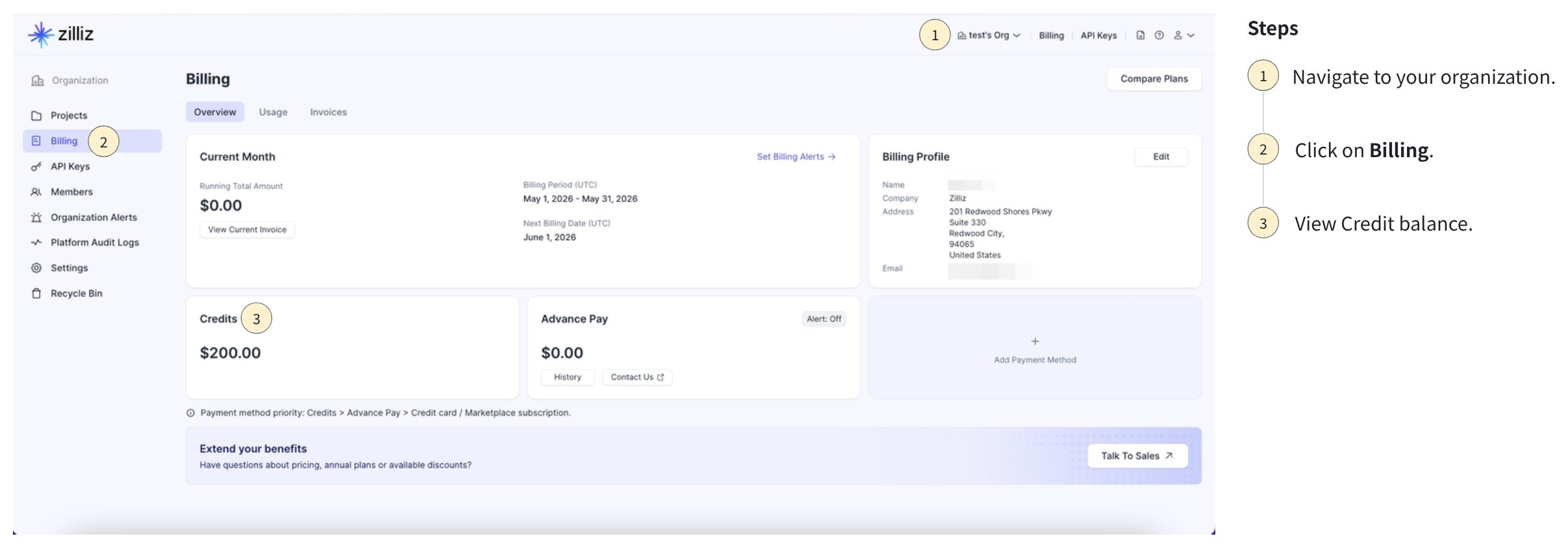
Navigate to your organization on Zilliz Cloud .
Go to Billing.
Check the Credits section for your remaining balance.
Monitor credit alerts
Zilliz Cloud provides billing alerts that help you monitor credits and payment health.
| Metric | Description | Recommended action |
|---|---|---|
| Credit Validity (days) | Number of days before free credits expire. | Use eligible credits before expiry or contact Zilliz sales if you need to extend the credit expiration to fully complete your PoC. |
| Remaining Credits ($) | Remaining credit balance. | Add or configure another payment method before credits run out. You can contact Zilliz sales for more PoC credits. |