Dedicated Cluster Cost
Dedicated clusters in Zilliz Cloud follows a pay-as-you-go model, where you are mainly charged for the compute resources consumed by your clusters. This ensures you only pay for what you actually use, without the need to over-provision resources in advance.
The total cost of a Dedicated cluster is the sum of the following components:
In addition to the two primary billing items above, the following optional add-on charges may apply:
Vector database cost
The vector database cost includes charges for using computing resources of a Dedicated cluster.
Cost calculation
Vector Database Cost = Query CU Unit Price x Total Number of Query CU x Cluster Runtime
-
Query CU Unit Price: Determined by your cluster region, type, and project plan. For detailed rates, see Zilliz Cloud Pricing.
-
Total Number of Query CU: The total number of query CUs in the cluster, factoring in replicas.
plaintextTotal Number of Query CU = Number of Query CU × Replica CountFor example, a cluster with 2 query CUs and 2 replicas has a total of 4 CUs.
-
Cluster Runtime: The total time (in hours) your cluster is in a billable status:
-
Billable statuses: Running, Modifying, Migrating etc.
-
Non-billable statuses: Creating, Suspending, Resuming, Suspended, etc. During non-billable statuses, CU charges stop but storage charges still apply.
NoteDuring a scaling job, Zilliz Cloud continues to bill the cluster based on its previous configuration. The new configuration is used for billing only after the scaling job is completed successfully. This applies to both scale-up and scale-down operations. While the job is still in progress, the cluster continues to serve with the previous available configuration.
-
Example
Suppose your cluster configuration is as follows:
-
Project Plan: Enterprise
-
Cluster Deployment Option: Dedicated
-
Cloud Provider & Region: AWS us-east-1 (Virginia)
-
Cluster Type: Performance-optimized
-
Number of Query CU: 8 CU
-
Replica Count: 2
-
Cluster Runtime: 720 hours (1 month).
With the plan, cloud provider and region, and the cluster type information, you can find on the Pricing Page that the CU Unit Price is $0.248/hour.
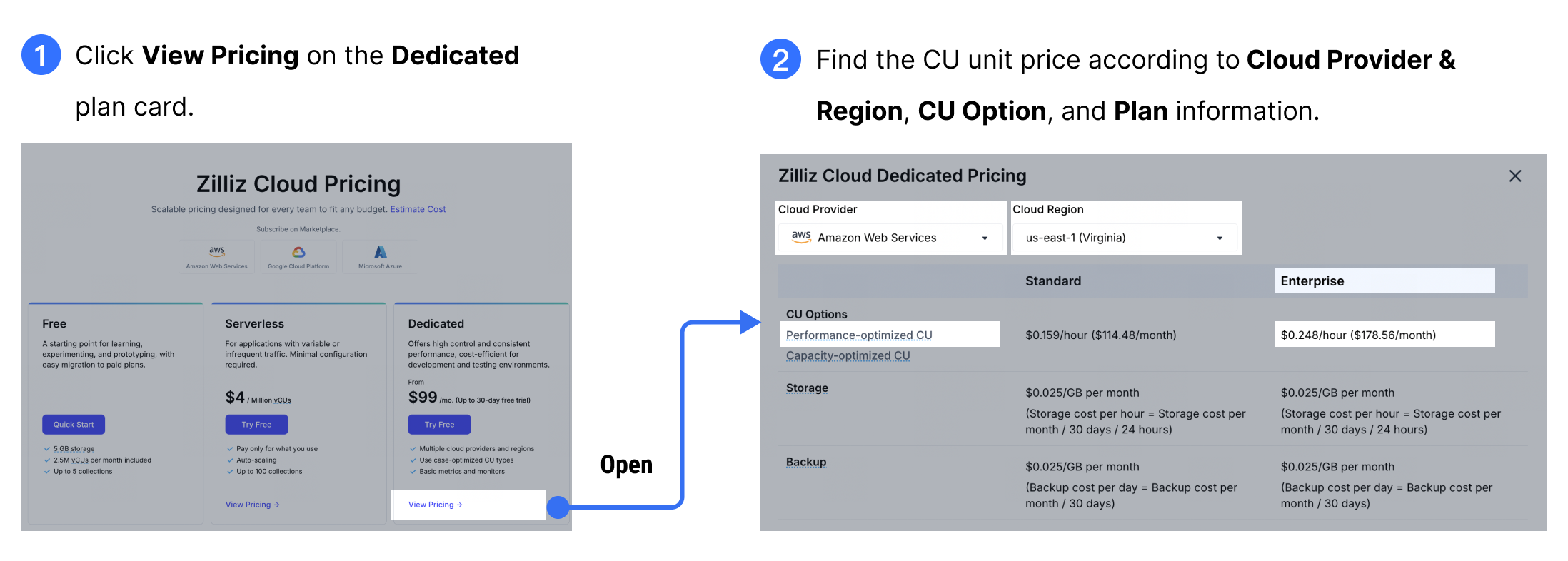
According to the number of query CU and replica count, the total number of query CU is 8 CU x 2 Replica = 16 CU.
The total vector database cost of the example Dedicated cluster is $0.248 x 16 x 720 = $2856.96.
Storage cost
Storage costs are charged separately from CU costs and depend on:
-
Cluster cloud provider and region, type, and plan
-
Storage usage
For details, see Storage.
FAQs
Will I be charged if I suspend my Dedicated cluster?
When your Dedicated cluster is suspended, vector database costs stop, but storage charges continue until you delete the cluster.
Will I be billed during cluster creation or suspension?
No vector database costs are charged while in Creating, Suspending, Resuming, or Suspended status. However, storage costs still apply.
When I scale a Dedicated cluster, am I billed based on the old configuration or the new configuration during scaling?
During scaling, you are billed based on the previous configuration. The new configuration is used for billing only after the scaling job completes successfully.