Function Overview
Zilliz Cloud provides a unified search architecture for building modern retrieval systems, including semantic search, lexical search, hybrid search, and intelligent reranking. Rather than exposing these capabilities as isolated features, Zilliz Cloud organizes them around a single core abstraction: the Function.
What is a Function?
In Zilliz Cloud, a Function is a configurable execution unit that applies a specific operation at a defined stage of the search workflow.
A Function answers three practical questions:
-
When does this operation run? Before search or after search.
-
What input does it operate on? Raw text, vector representations or retrieved candidate results.
-
What output does it produce? Vector embeddings used for retrieval, or reordered results returned to the user.
From a workflow perspective, Functions participate in search in two distinct stages:
-
Pre-search: Functions run before search to convert text into vector representations. These vectors determine which candidates are retrieved.
-
Post-search: Functions run after candidate retrieval to refine the ordering of results without changing the candidate set.
The following diagram provides an abstraction of how Functions work in the search workflow.
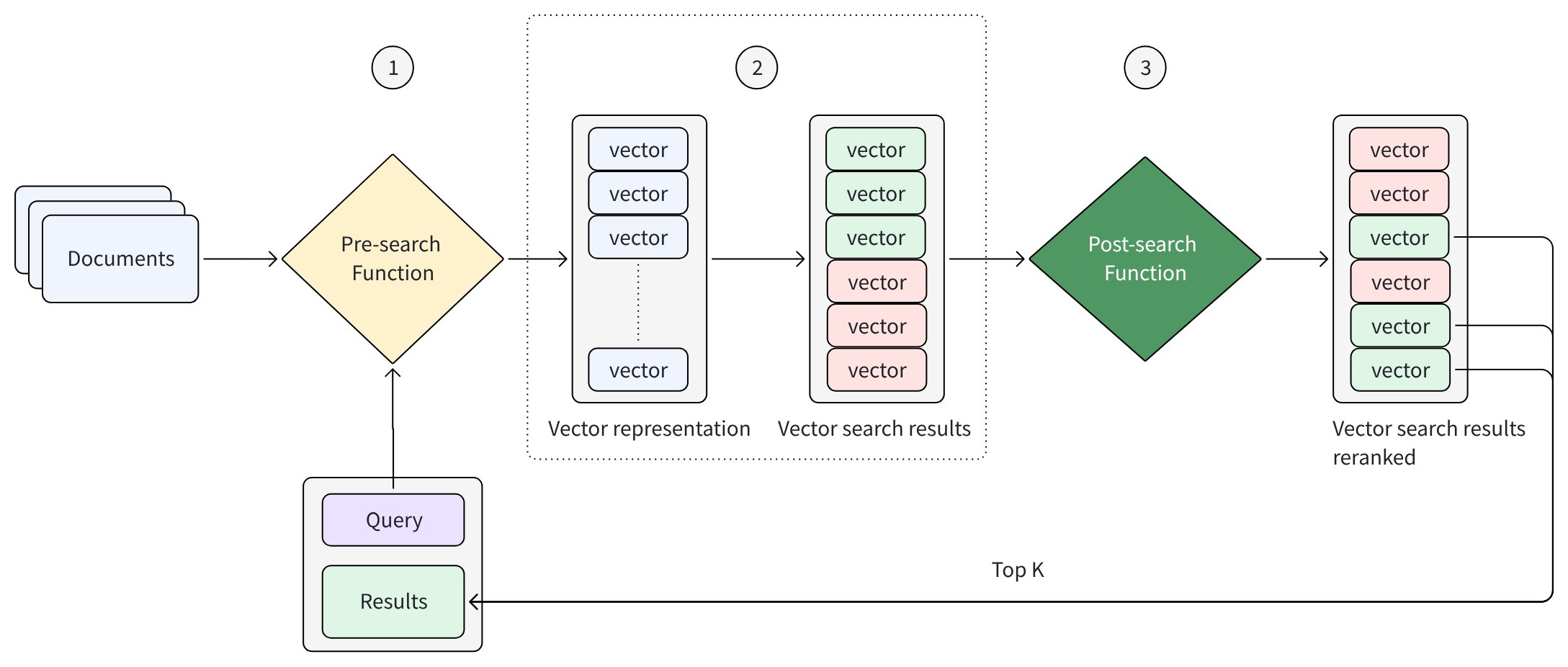
Every search request follows the same high-level flow:
-
The Pre-search Function generates vector representations from input text
-
The search engine retrieves candidate results based on those vectors
-
(Optional) The Post-search Function reranks the retrieved candidates
Function categories
Functions in Zilliz Cloud are categorized based on when they run in the search workflow and what role they play. At a high level, Functions fall into two groups:
-
Pre-search Functions, which convert text into vector embeddings and determine candidate retrieval
-
Post-search Functions, which refine the ordering of retrieved candidates
Pre-search Functions: Convert text to vector embeddings
Pre-search Functions run before candidate retrieval. Their role is to convert raw text—both stored documents and incoming queries—into vector representations that the search engine uses to identify relevant candidates.
Different Pre-search Functions generate different types of embeddings, which directly affects how retrieval is performed.
The table below summarizes the available Pre-search Functions:
| Function Type | Vector Type | Description | Typical Scenarios |
|---|---|---|---|
| BM25 Function | Sparse embeddings | Computes lexical relevance based on term matching, term frequency, and document length normalization. Executes entirely within the database engine as a local mechanism; no model inference required. | Keyword-driven full text search, documentation and code search, and workloads where term matching, low latency, and deterministic behavior are critical. |
| Model-based Embedding Functions | Dense embeddings | Encodes the semantic meaning of text using machine learning models, enabling similarity-based retrieval beyond exact keywords. Requires model inference via hosted models or third-party model services. | Semantic search, natural-language queries, Q&A and RAG pipelines, and use cases where conceptual similarity matters more than literal term overlap. |
All Pre-search Functions are applied consistently to both document data and query text, ensuring retrieval is performed within the same representation space.
Post-search Functions: Rerank candidate results
Post-search Functions are applied after candidate retrieval. Their purpose is to refine the ranking of retrieved candidates without adding or removing items from the candidate set.
These functions operate exclusively on the results returned by the search stage and apply additional ranking logic or relevance signals to improve result quality. They do not affect indexing, retrieval, or filtering behavior—only the final ordering of results.
The table below summarizes the available Post-search Functions:
| Function Type | Operates On | Description | Typical Scenarios |
|---|---|---|---|
| Hybrid Search Rankers | Multiple result sets retrieved from hybrid search | Combine and rebalance results retrieved from different retrieval strategies using methods such as weighted ranking or reciprocal rank fusion (RRF). | Hybrid search scenarios that combine semantic and lexical retrieval and require balanced result fusion. |
| Rule-based Rankers | Candidate results from single-vector or hybrid search | Adjust ranking based on predefined rules or numeric signals, such as boosting or decay-based scoring. | Business-driven ranking logic, recency or popularity boosts, and scenarios requiring predictable, non-ML reranking. |
| Model-based Rankers | Candidate results from single-vector or hybrid search | Use machine learning models to evaluate relevance and reorder results based on learned or semantic signals. | Intelligent reranking, relevance refinement using semantic understanding, and LLM-based relevance evaluation. |
Because Post-search Functions operate only on retrieved candidates, they are refinement steps that affect result order but not retrieval scope.