Hugging Face
Public PreviewUsing a Hugging Face embedding model normally requires your application to manage credentials, call the model separately, and generate embeddings consistently for inserted data and search queries. With a Hugging Face model provider integration and a Text Embedding Function, Zilliz Cloud converts raw text into vectors during insert and search.
How it works
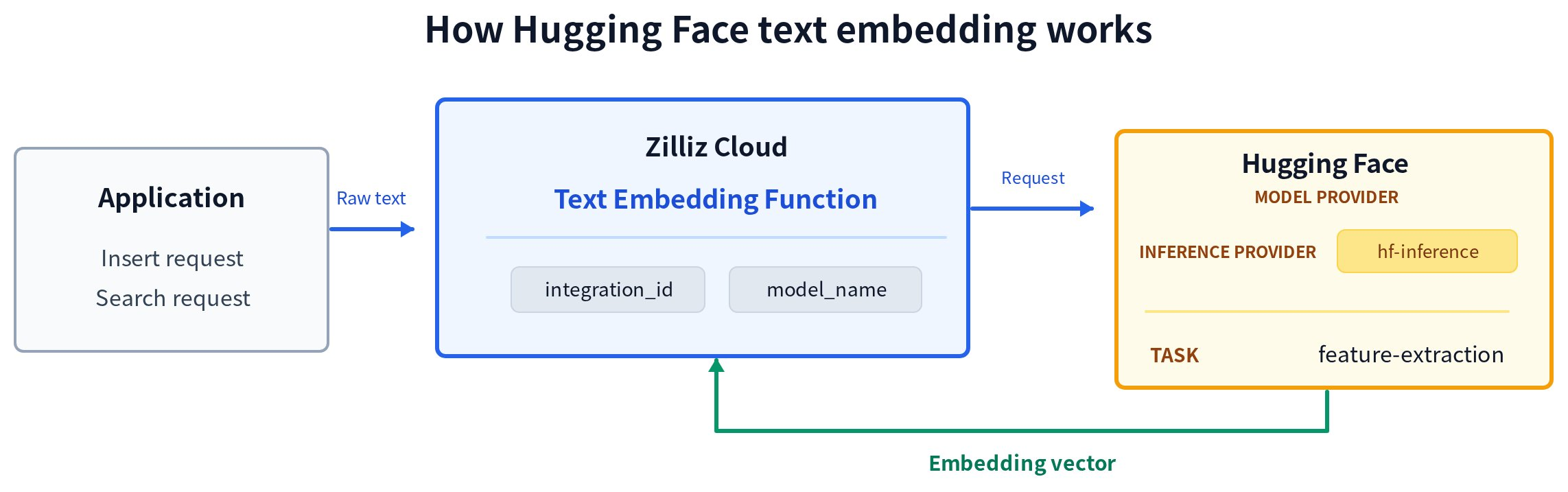
The workflow has three steps:
-
Send raw text. Your application provides raw text in an insert or search request.
-
Generate an embedding. The Text Embedding Function uses
integration_idto reference the Hugging Face model provider integration andmodel_nameto select the model. Zilliz Cloud sends the text to Hugging Face throughhf-inferencefor the Feature Extraction task. -
Use the embedding. Hugging Face returns a floating-point embedding vector. During insert, Zilliz Cloud stores the vector in the Function's output field. During search, Zilliz Cloud uses the vector as the query vector.
The same Function configuration is used for insert and search, which keeps the model and inference parameters consistent across both operations.
Model compatibility
To use a Hugging Face model with the Text Embedding Function, the model must have the Feature Extraction capability and successfully return embeddings through the configured hf-inference integration. The Function output field must be a FLOAT_VECTOR field whose dim matches the model's embedding dimension.
The following models passed compatibility testing with Zilliz Cloud on the listed date.
| Model | Capability | Dimension | Last tested |
|---|---|---|---|
BAAI/bge-m3 | Feature Extraction | 1024 | 2026-07-27 |
BAAI/bge-large-zh-v1.5 | Feature Extraction | 1024 | 2026-07-27 |
BAAI/bge-large-en-v1.5 | Feature Extraction | 1024 | 2026-07-27 |
BAAI/bge-small-en-v1.5 | Feature Extraction | 384 | 2026-07-27 |
dragonkue/snowflake-arctic-embed-l-v2.0-ko | Feature Extraction | 1024 | 2026-07-27 |
upskyy/bge-m3-korean | Feature Extraction | 1024 | 2026-07-27 |
This table is not an exhaustive list of compatible models. Models not listed may still be compatible with the integration.
Compatibility results reflect testing on the listed date. Zilliz Cloud does not control whether a model remains available through hf-inference or meets your stability, latency, and output-quality requirements. Zilliz Cloud does not commit to regularly retesting historical results. Verify the selected model on Hugging Face and evaluate it for your workload before using it in production.
Before you start
Before using Hugging Face text embedding:
-
Create a Hugging Face model provider integration and copy its integration ID. Set Provider to
hf-inference. For instructions, see Integrate with Model Providers. -
Open the model's Hugging Face page and check the Inference Providers section. Verify that
hf-inferencecurrently serves the model for thefeature-extractiontask. -
Check the model's output dimension. The Function output field must be a
FLOAT_VECTORfield whosedimmatches the model output. Custom output dimensions are not supported.
The examples use BAAI/bge-small-en-v1.5, which produces 384-dimensional embeddings through hf-inference at the time of writing. The model is used only to demonstrate the configuration and is not a Zilliz Cloud recommendation or certification.
Use Hugging Face text embedding
Step 1: Create a collection with a text embedding function
Define schema fields
Create a collection schema containing:
-
A primary field that uniquely identifies each entity.
-
A
VARCHARfield that stores the raw text. -
A
FLOAT_VECTORfield whose dimension matches the selected model's output dimension.
The following example uses BAAI/bge-small-en-v1.5, which produces 384-dimensional vectors.
- Python
- Java
- Go
- Rust
- C++
- NodeJS
- cURL
from pymilvus import DataType, Function, FunctionType, MilvusClient

client = MilvusClient(
    uri="YOUR_CLUSTER_ENDPOINT",
    token="YOUR_CLUSTER_TOKEN",
)

schema = client.create_schema()

schema.add_field(
    field_name="id",
    datatype=DataType.INT64,
    is_primary=True,
    auto_id=False,
)

schema.add_field(
    field_name="document",
    datatype=DataType.VARCHAR,
    max_length=9000
,
)

# The vector dimension must match the model's output dimension.
schema.add_field(
    field_name="dense",
    datatype=DataType.FLOAT_VECTOR,
    dim=384,
)
import io.milvus.v2.common.DataType;
import io.milvus.v2.client.ConnectConfig;
import io.milvus.v2.client.MilvusClientV2;
import io.milvus.v2.service.collection.request.AddFieldReq;
import io.milvus.v2.service.collection.request.CreateCollectionReq;

String CLUSTER_ENDPOINT = "YOUR_CLUSTER_ENDPOINT";
String TOKEN = "YOUR_CLUSTER_TOKEN";

ConnectConfig connectConfig = ConnectConfig.builder()
        .uri(CLUSTER_ENDPOINT)
        .token(TOKEN)
        .build();

MilvusClientV2 client = new MilvusClientV2(connectConfig);

CreateCollectionReq.CollectionSchema schema = client.createSchema();

schema.addField(AddFieldReq.builder()
        .fieldName("id")
        .dataType(DataType.Int64)
        .isPrimaryKey(true)
        .autoID(false)
        .build());

schema.addField(AddFieldReq.builder()
        .fieldName("document")
        .dataType(DataType.VarChar)
        .maxLength(9000)
        .build());

schema.addField(AddFieldReq.builder()
        .fieldName("dense")
        .dataType(DataType.FloatVector)
        .dimension(384)
        .build());
import "github.com/milvus-io/milvus/client/v3/entity"

schema := entity.NewSchema().
    WithField(entity.NewField().WithName("id").WithDataType(entity.FieldTypeInt64).WithIsPrimaryKey(true).WithIsAutoID(false)).
    WithField(entity.NewField().WithName("document").WithDataType(entity.FieldTypeVarChar).WithMaxLength(9000)).
    WithField(entity.NewField().WithName("dense").WithDataType(entity.FieldTypeFloatVector).WithDim(384))
use milvus::v2::prelude::*;

let schema = CollectionSchema::new()
    .add_field(FieldSchema::new().name("id").data_type(DataType::Int64).primary_key(true).auto_id(false))
    .add_field(FieldSchema::new().name("document").data_type(DataType::VarChar).max_length(9000))
    .add_field(FieldSchema::new().name("dense").data_type(DataType::FloatVector).dimension(384));
#include "milvus/MilvusClientV2.h"

auto client = milvus::MilvusClientV2::Create();

milvus::ConnectParam connect_param{"YOUR_CLUSTER_ENDPOINT", "YOUR_CLUSTER_TOKEN"};
auto status = client->Connect(connect_param);
if (!status.IsOk()) {
    std::cout << status.Message() << std::endl;
}

milvus::CollectionSchemaPtr schema = std::make_shared<milvus::CollectionSchema>();
schema->AddField({"id", milvus::DataType::INT64, "", true, false});
schema->AddField(milvus::FieldSchema("document", milvus::DataType::VARCHAR).WithMaxLength(9000));
schema->AddField(milvus::FieldSchema("dense", milvus::DataType::FLOAT_VECTOR).WithDimension(384));
import { MilvusClient, DataType } from '@zilliz/milvus2-sdk-node';

const client = new MilvusClient({
  address: 'YOUR_CLUSTER_ENDPOINT',
  token: 'YOUR_CLUSTER_TOKEN',
});

const schema = {
  fields: [
    { name: 'id', data_type: DataType.Int64, is_primary_key: true, autoID: false },
    { name: 'document', data_type: DataType.VarChar, max_length: 9000 },
    { name: 'dense', data_type: DataType.FloatVector, dim: 384 },
  ],
};
# Define the collection schema
SCHEMA='{
  "fields": [
    { "fieldName": "id", "dataType": "Int64", "isPrimary": true },
    { "fieldName": "document", "dataType": "VarChar", "elementTypeParams": { "max_length": "9000" } },
    { "fieldName": "dense", "dataType": "FloatVector", "elementTypeParams": { "dim": "384" } }
  ]
}'
Define the text embedding function
Define a TEXTEMBEDDING Function that converts values from the document field into embeddings and writes them to the dense field.
- Python
- Java
- Go
- Rust
- C++
- NodeJS
- cURL
text_embedding_function = Function(
    name="hugging_face_embedding",
    input_field_names=["document"],
    output_field_names=["dense"],
    function_type=FunctionType.TEXTEMBEDDING,
    params={
        "provider": "huggingface",
        "model_name": "BAAI/bge-small-en-v1.5",
        "integration_id": "YOUR_INTEGRATION_ID",
        "normalize": "true",
        "truncate": "true",
    },
)

schema.add_function(text_embedding_function)
import io.milvus.common.clientenum.FunctionType;
import io.milvus.v2.service.collection.request.CreateCollectionReq.Function;
import java.util.Collections;

Function function = Function.builder()
        .functionType(FunctionType.TEXTEMBEDDING)
        .name("hugging_face_embedding")
        .inputFieldNames(Collections.singletonList("document"))
        .outputFieldNames(Collections.singletonList("dense"))
        .param("provider", "huggingface")
        .param("model_name", "BAAI/bge-small-en-v1.5")
        .param("integration_id", "YOUR_INTEGRATION_ID")
        .param("normalize", "true")
        .param("truncate", "true")
        .build();
schema.addFunction(function);
import "github.com/milvus-io/milvus/client/v3/entity"

function := entity.NewFunction().
    WithName("hugging_face_embedding").
    WithType(entity.FunctionTypeTextEmbedding).
    WithInputFields("document").
    WithOutputFields("dense").
    WithParam("provider", "huggingface").
    WithParam("model_name", "BAAI/bge-small-en-v1.5").
    WithParam("integration_id", "YOUR_INTEGRATION_ID").
    WithParam("normalize", "true").
    WithParam("truncate", "true")

schema.WithFunction(function)
use milvus::v2::prelude::*;
use std::collections::HashMap;

let function = Function::new()
    .name("hugging_face_embedding")
    .function_type(FunctionType::TextEmbedding)
    .input_fields(["document"])
    .output_fields(["dense"])
    .params(HashMap::from([
        ("provider".into(), "huggingface".into()),
        ("model_name".into(), "BAAI/bge-small-en-v1.5".into()),
        ("integration_id".into(), "YOUR_INTEGRATION_ID".into()),
        ("normalize".into(), "true".into()),
        ("truncate".into(), "true".into()),
    ]));

schema.add_function(function);
milvus::FunctionPtr function = std::make_shared<milvus::Function>("hugging_face_embedding", milvus::FunctionType::TEXTEMBEDDING);
function->AddInputFieldName("document");
function->AddOutputFieldName("dense");
function->AddParam("provider", "huggingface");
function->AddParam("model_name", "BAAI/bge-small-en-v1.5");
function->AddParam("integration_id", "YOUR_INTEGRATION_ID");
function->AddParam("normalize", "true");
function->AddParam("truncate", "true");
schema->AddFunction(function);
const hfFunc = {
  name: 'hugging_face_embedding',
  type: 'TextEmbedding',
  input_field_names: ['document'],
  output_field_names: ['dense'],
  params: {
    provider: 'huggingface',
    model_name: 'BAAI/bge-small-en-v1.5',
    integration_id: 'YOUR_INTEGRATION_ID',
    normalize: 'true',
    truncate: 'true',
  },
};
# Define the text embedding function
FUNCTION='{
  "name": "hugging_face_embedding",
  "type": "TextEmbedding",
  "inputFieldNames": ["document"],
  "outputFieldNames": ["dense"],
  "params": {
    "provider": "huggingface",
    "model_name": "BAAI/bge-small-en-v1.5",
    "integration_id": "YOUR_INTEGRATION_ID",
    "normalize": "true",
    "truncate": "true"
  }
}'
The following table describes all supported entries in params. The Hugging Face request options follow the Feature Extraction API specification; provider, model_name, integration_id, and max_client_batch_size configure the Zilliz Cloud integration.
| Parameter | Required | Description |
|---|---|---|
provider | Yes | The Zilliz Cloud model provider. Set this value to huggingface. |
model_name | Yes | The Hugging Face Model ID for a model currently served through hf-inference for the feature-extraction task. |
integration_id | Yes | The ID of the Hugging Face model provider integration. For instructions, see Integrate with Model Providers. |
normalize | No | Whether to request normalized embeddings. If omitted, Zilliz Cloud does not set this option in the Hugging Face request; behavior follows the selected model. |
prompt_name | No | The name of a prompt defined in the selected model's Sentence Transformers configuration. Hugging Face prepends the corresponding prompt text before encoding. If omitted, no prompt is requested. |
truncate | No | Whether to request truncation when an input exceeds the model's supported length. If omitted, Zilliz Cloud does not set this option in the Hugging Face request; behavior follows the selected model. |
truncation_direction | No | The direction from which Hugging Face truncates an input. Supported values are left and right. |
max_client_batch_size | No | The maximum number of input texts sent to Hugging Face in one request. The default value is 128. The value must be greater than 0. |
Configure the index
Configure an index for the output vector field. The following example uses AUTOINDEX and cosine similarity.
- Python
- Java
- Go
- Rust
- C++
- NodeJS
- cURL
index_params = client.prepare_index_params()

index_params.add_index(
    field_name="dense",
    index_type="AUTOINDEX",
    metric_type="COSINE",
)
import io.milvus.v2.common.IndexParam;
import java.util.ArrayList;
import java.util.List;

List<IndexParam> indexes = new ArrayList<>();
indexes.add(IndexParam.builder()
        .fieldName("dense")
        .indexType(IndexParam.IndexType.AUTOINDEX)
        .metricType(IndexParam.MetricType.COSINE)
        .build());
import (
    "github.com/milvus-io/milvus/client/v3/entity"

    "github.com/milvus-io/milvus/client/v3/index"
    "github.com/milvus-io/milvus/client/v3/milvusclient"
)

indexOption := milvusclient.NewCreateIndexOption("hugging_face_demo", "dense", index.NewAutoIndex(entity.COSINE))
use milvus::v2::prelude::*;

let index_params = vec![
    IndexParam::new()
        .field_name("dense")
        .index_type(IndexType::AutoIndex)
        .metric_type(MetricType::Cosine),
];
#include <vector>
#include "milvus/MilvusClientV2.h"

std::vector<milvus::IndexDesc> indexes = {
    milvus::IndexDesc("dense", "", milvus::IndexType::AUTOINDEX, milvus::MetricType::COSINE)
};
const indexParams = {
  field_name: 'dense',
  index_type: 'AUTOINDEX',
  metric_type: 'COSINE',
};
# Define the index parameters
indexParams='{
  "fieldName": "dense",
  "indexName": "dense_index",
  "indexType": "AUTOINDEX",
  "metricType": "COSINE"
}'
Create the collection
Create the collection with the schema and index parameters.
- Python
- Java
- Go
- Rust
- C++
- NodeJS
- cURL
client.create_collection(
    collection_name="hugging_face_demo",
    schema=schema,
    index_params=index_params,
)
import io.milvus.v2.service.collection.request.CreateCollectionReq;

CreateCollectionReq requestCreate = CreateCollectionReq.builder()
        .collectionName("hugging_face_demo")
        .collectionSchema(schema)
        .indexParams(indexes)
        .build();
client.createCollection(requestCreate);
import (
    "log"

    "github.com/milvus-io/milvus/client/v3/milvusclient"
)

err = client.CreateCollection(ctx, milvusclient.NewCreateCollectionOption("hugging_face_demo", schema).WithIndexOptions(indexOption))
if err != nil {
    log.Fatal(err)
}
use milvus::v2::prelude::*;

client
    .create_collection(
        CreateCollectionRequest::builder()
            .collection_name("hugging_face_demo")
            .schema(schema)
            .index_params(index_params)
            .build()?,
    )
    .await?;
#include <iostream>
#include <utility>
#include "milvus/MilvusClientV2.h"

auto status = client->CreateCollection(milvus::CreateCollectionRequest()
                                    .WithCollectionName("hugging_face_demo")
                                    .WithIndexes(std::move(indexes))
                                    .WithCollectionSchema(schema));
if (!status.IsOk()) {
    std::cout << status.Message() << std::endl;
}
await client.createCollection({
  collection_name: 'hugging_face_demo',
  fields: schema.fields,
  functions: [hfFunc],
});

// Create the index on the dense vector field
await client.createIndex({
  collection_name: 'hugging_face_demo',
  ...indexParams,
});
curl --request POST \
  --url "YOUR_CLUSTER_ENDPOINT/v2/vectordb/collections/create" \
  --header "Authorization: Bearer YOUR_CLUSTER_TOKEN" \
  --header "Content-Type: application/json" \
  --data '{
    "collectionName": "hugging_face_demo",
    "schema": {
      "fields": [
        { "fieldName": "id", "dataType": "Int64", "isPrimary": true },
        { "fieldName": "document", "dataType": "VarChar", "elementTypeParams": { "max_length": "9000" } },
        { "fieldName": "dense", "dataType": "FloatVector", "elementTypeParams": { "dim": "384" } }
      ],
      "functions": [
        {
          "name": "hugging_face_embedding",
          "type": "TextEmbedding",
          "inputFieldNames": ["document"],
          "outputFieldNames": ["dense"],
          "params": {
            "provider": "huggingface",
            "model_name": "BAAI/bge-small-en-v1.5",
            "integration_id": "YOUR_INTEGRATION_ID",
            "normalize": "true",
            "truncate": "true"
          }
        }
      ]
    },
    "indexParams": [
      {
        "fieldName": "dense",
        "indexName": "dense_index",
        "indexType": "AUTOINDEX",
        "metricType": "COSINE"
      }
    ]
  }'
The collection is created with a text embedding function that writes 384-dimensional vectors to the dense field.
Step 2: Insert data
Insert raw text without providing vectors. Zilliz Cloud calls the Hugging Face model and writes the generated embeddings to the dense field.
- Python
- Java
- Go
- Rust
- C++
- NodeJS
- cURL
client.insert(
    collection_name="hugging_face_demo",
    data=[
        {
            "id": 1,
            "document": "Milvus simplifies semantic search through embeddings.",
        },
        {
            "id": 2,
            "document": "Vector embeddings convert text into searchable numeric data.",
        },
        {
            "id": 3,
            "document": "Semantic search helps users find relevant information quickly.",
        },
    ],
)
import com.google.gson.Gson;
import com.google.gson.JsonObject;
import io.milvus.v2.service.vector.request.InsertReq;
import java.util.Arrays;
import java.util.List;

Gson gson = new Gson();
List<JsonObject> rows = Arrays.asList(
        gson.fromJson("{\"id\": 1, \"document\": \"Milvus simplifies semantic search through embeddings.\"}", JsonObject.class),
        gson.fromJson("{\"id\": 2, \"document\": \"Vector embeddings convert text into searchable numeric data.\"}", JsonObject.class),
        gson.fromJson("{\"id\": 3, \"document\": \"Semantic search helps users find relevant information quickly.\"}", JsonObject.class)
);

client.insert(InsertReq.builder()
        .collectionName("hugging_face_demo")
        .data(rows)
        .build());
import (
    "log"

    "github.com/milvus-io/milvus/client/v3/milvusclient"
)

_, err = client.Insert(ctx, milvusclient.NewRowBasedInsertOption("hugging_face_demo",
    map[string]any{"id": int64(1), "document": "Milvus simplifies semantic search through embeddings."},
    map[string]any{"id": int64(2), "document": "Vector embeddings convert text into searchable numeric data."},
    map[string]any{"id": int64(3), "document": "Semantic search helps users find relevant information quickly."},
))
if err != nil {
    log.Fatal(err)
}
use milvus::v2::prelude::*;
use serde_json::json;

let rows = vec![
    json!({"id": 1, "document": "Milvus simplifies semantic search through embeddings."}),
    json!({"id": 2, "document": "Vector embeddings convert text into searchable numeric data."}),
    json!({"id": 3, "document": "Semantic search helps users find relevant information quickly."}),
];

client
    .insert(
        InsertRequest::builder()
            .collection_name("hugging_face_demo")
            .rows(rows)
            .build()?,
    )
    .await?;
#include <iostream>
#include <utility>
#include "milvus/MilvusClientV2.h"

milvus::EntityRows data = {
    {{"id", 1}, {"document", "Milvus simplifies semantic search through embeddings."}},
    {{"id", 2}, {"document", "Vector embeddings convert text into searchable numeric data."}},
    {{"id", 3}, {"document", "Semantic search helps users find relevant information quickly."}}
};

milvus::InsertResponse response;
auto status = client->Insert(milvus::InsertRequest()
                                .WithCollectionName("hugging_face_demo")
                                .WithRowsData(std::move(data))
                                , response);
if (!status.IsOk()) {
    std::cout << status.Message() << std::endl;
}
await client.insert({
  collection_name: 'hugging_face_demo',
  fields_data: [
    { id: 1, document: 'Milvus simplifies semantic search through embeddings.' },
    { id: 2, document: 'Vector embeddings convert text into searchable numeric data.' },
    { id: 3, document: 'Semantic search helps users find relevant information quickly.' },
  ],
});
curl --request POST \
  --url "YOUR_CLUSTER_ENDPOINT/v2/vectordb/entities/insert" \
  --header "Authorization: Bearer YOUR_CLUSTER_TOKEN" \
  --header "Content-Type: application/json" \
  --data '{
    "collectionName": "hugging_face_demo",
    "data": [
      { "id": 1, "document": "Milvus simplifies semantic search through embeddings." },
      { "id": 2, "document": "Vector embeddings convert text into searchable numeric data." },
      { "id": 3, "document": "Semantic search helps users find relevant information quickly." }
    ]
  }'
The insert operation stores the raw text and generates one embedding for each entity.
Step 3: Search with text
Search using raw query text. Zilliz Cloud uses the same Function, model, and optional inference parameters to convert the query text into an embedding before running vector search.
- Python
- Java
- Go
- Rust
- C++
- NodeJS
- cURL
results = client.search(
    collection_name="hugging_face_demo",
    data=["How does Milvus handle semantic search?"],
    anns_field="dense",
    limit=3,
    output_fields=["document"],
)

print(results)
import io.milvus.v2.service.vector.request.SearchReq;
import io.milvus.v2.service.vector.request.data.EmbeddedText;
import io.milvus.v2.service.vector.response.SearchResp;
import java.util.Collections;
import java.util.List;

SearchResp searchResp = client.search(SearchReq.builder()
        .collectionName("hugging_face_demo")
        .data(Collections.singletonList(new EmbeddedText("How does Milvus handle semantic search?")))
        .annsField("dense")
        .limit(3)
        .outputFields(Collections.singletonList("document"))
        .build());
List<List<SearchResp.SearchResult>> searchResults = searchResp.getSearchResults();
for (List<SearchResp.SearchResult> results : searchResults) {
    for (SearchResp.SearchResult result : results) {
        System.out.println(result);
    }
}
import (
    "fmt"
    "log"

    "github.com/milvus-io/milvus/client/v3/entity"
    "github.com/milvus-io/milvus/client/v3/milvusclient"
)

searchResults, err := client.Search(ctx, milvusclient.NewSearchOption(
    "hugging_face_demo",
    3,
    []entity.Vector{entity.Text("How does Milvus handle semantic search?")},
).
    WithANNSField("dense").
    WithOutputFields("document"))
if err != nil {
    log.Fatal(err)
}
for _, rs := range searchResults {
    fmt.Println(rs.Fields)
}
use milvus::v2::prelude::*;

let response = client
    .search(
        SearchRequest::builder()
            .collection_name("hugging_face_demo")
            .vector_field("dense")
            .vectors(SearchVectors::EmbeddedText(vec!["How does Milvus handle semantic search?".into()]))
            .limit(3)
            .output_fields(["document"])
            .build()?,
    )
    .await?;
#include <iostream>
#include "milvus/MilvusClientV2.h"

auto request = milvus::SearchRequest()
                   .WithCollectionName("hugging_face_demo")
                   .AddEmbeddedText("How does Milvus handle semantic search?")
                   .WithAnnsField("dense")
                   .WithLimit(3)
                   .AddOutputField("document");

milvus::SearchResponse response;
auto status = client->Search(request, response);
if (!status.IsOk()) {
    std::cout << status.Message() << std::endl;
}
const results = await client.search({
  collection_name: 'hugging_face_demo',
  data: ['How does Milvus handle semantic search?'],
  anns_field: 'dense',
  limit: 3,
  output_fields: ['document'],
});
console.log(results);
curl --request POST \
  --url "YOUR_CLUSTER_ENDPOINT/v2/vectordb/entities/search" \
  --header "Authorization: Bearer YOUR_CLUSTER_TOKEN" \
  --header "Content-Type: application/json" \
  --data '{
    "collectionName": "hugging_face_demo",
    "data": ["How does Milvus handle semantic search?"],
    "annsField": "dense",
    "limit": 3,
    "outputFields": ["document"]
  }'
The search result contains the documents most relevant to the query text, ordered by cosine similarity.
Troubleshooting
The model is unavailable for the feature-extraction task
Open the model page on Hugging Face and check the Inference Providers section. Confirm that hf-inference currently serves the model and that the model supports feature-extraction. If either requirement is not met, select another model and verify it on its model page. The Model compatibility table is not exhaustive, and models not listed may still be compatible. If you change models, make sure that the Function output field dimension matches the replacement model.
The returned vector dimension does not match the schema
Check the model's output dimension and compare it with the dim configured for the Function's FLOAT_VECTOR output field. To use a model with a different dimension, create a compatible vector field or collection. Custom output dimensions are not supported.
Next steps
For general information about Functions, see Function Overview.
To rerank vector-search candidates using Hugging Face Sentence Similarity scores, see Hugging Face Ranker.