Hugging Face Ranker
Public PreviewVector search orders results by vector distance, but the initial order may not reflect how well each candidate's text answers the query. With a Hugging Face model provider integration, Hugging Face Ranker uses scores from the Hugging Face sentence-similarity task to reorder the candidates returned by vector search.
How it works
Hugging Face Ranker reranks candidate entities after vector search. The following diagram shows the general workflow between your application, Zilliz Cloud, and Hugging Face.
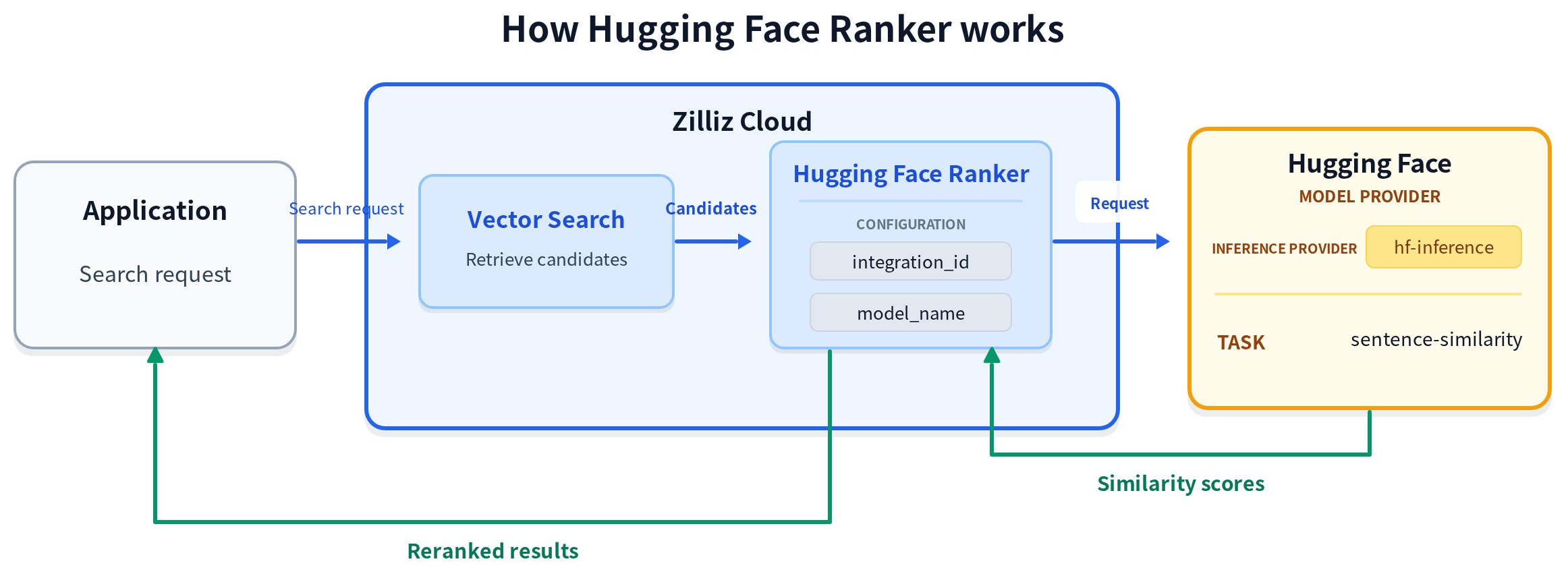
The general workflow has four steps:
-
Retrieve candidate entities. Zilliz Cloud runs vector search against the configured vector field and returns candidate entities.
-
Prepare text for reranking. The Ranker reads the query text from
params.queriesand the candidate text from the non-nullableVARCHARfield specified ininput_field_names. -
Request reranking scores. Zilliz Cloud sends the query and candidate text to Hugging Face and receives a newly calculated similarity score for each candidate.
-
Rerank and return the results. Zilliz Cloud maps the scores to the candidate entities, orders them from highest to lowest score, and returns the reranked results.
How reranking scores are calculated
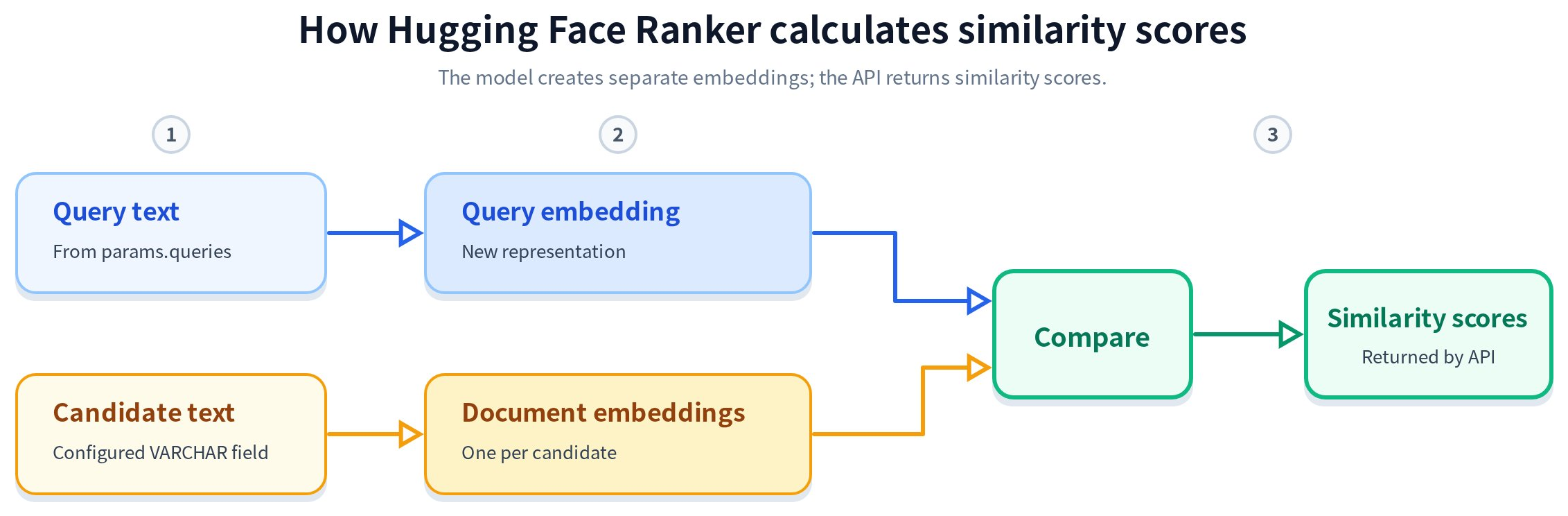
The general workflow above shows where reranking occurs. The following process explains how Hugging Face calculates a new similarity score for each candidate.
-
Prepare the text inputs. The Ranker reads the query text from
params.queriesand the non-empty candidate text from theVARCHARfield specified ininput_field_names. -
Create embeddings. Zilliz Cloud sends the query text as
source_sentenceand the candidate texts assentencesto Hugging Face throughhf-inferencefor the Sentence Similarity task. The model conceptually creates a query embedding and separate embeddings for the candidate texts. -
Calculate and return scores. The model compares the query embedding with each candidate embedding and returns one similarity score per candidate.
The embeddings shown in the diagram are intermediate model processing; the Hugging Face API returns only similarity scores. Vector retrieval and reranking use separate representations and scores. Hugging Face Ranker does not reuse the candidate vectors or retrieval scores. The embedding model used to create the search vectors and the Hugging Face model used for reranking are independent and can be different.
If you insert precomputed vectors, also store the original candidate text in a VARCHAR field so that Hugging Face Ranker can read it during reranking.
Before you start
Before using Hugging Face Ranker:
Zilliz Cloud connects to Hugging Face through hf-inference and uses the sentence-similarity task for Hugging Face Ranker. Zilliz Cloud does not control whether a specific model is currently served by hf-inference, remains available, or meets your stability, latency, and output-quality requirements. Verify the selected model on Hugging Face and evaluate it for your workload before using it in production.
-
Create a Hugging Face model provider integration and copy its integration ID. For instructions, see Integrate with Model Providers.
-
Open the model's Hugging Face page and check the Inference Providers section. Verify that
hf-inferencecurrently serves the model for thesentence-similaritytask. -
Ensure that the collection stores the candidate text in a non-nullable
VARCHARfield. The rerank function must reference exactly one such field ininput_field_names. The collection can contain other text fields.
Use Hugging Face Ranker
Hugging Face Ranker is defined and applied at search time. You can enable, disable, or change the ranker for each search request without changing the collection schema.
Preparations
The following setup creates a collection with three fields: id as the primary key, document as the VARCHAR field that stores the candidate text used for reranking, and dense as the vector field used for the initial search. It also inserts sample data for the search and reranking examples.
Prepare a collection with sample data
- Python
- Java
- Go
- Rust
- C++
- NodeJS
- cURL
from pymilvus import DataType, MilvusClient

client = MilvusClient(
    uri="YOUR_CLUSTER_ENDPOINT",
    token="YOUR_CLUSTER_TOKEN",
)

collection_name = "hugging_face_rerank_demo"

schema = client.create_schema()

schema.add_field("id", DataType.INT64, is_primary=True, auto_id=False)
schema.add_field("document", DataType.VARCHAR, max_length=1000)
schema.add_field("dense", DataType.FLOAT_VECTOR, dim=4)

index_params = client.prepare_index_params()

index_params.add_index(
    field_name="dense",
    index_type="AUTOINDEX",
    metric_type="COSINE",
)

client.create_collection(
    collection_name=collection_name,
    schema=schema,
    index_params=index_params,
)

data = [
    {
        "id": 1,
        "document": "Recent renewable energy developments include improved solar efficiency.",
        "dense": [0.10, 0.20, 0.30, 0.40],
    },
    {
        "id": 2,
        "document": "Climate policy and carbon markets have evolved rapidly in recent years.",
        "dense": [0.11, 0.19, 0.28, 0.39],
    },
    {
        "id": 3,
        "document": "New battery technology helps stabilize wind and solar power generation.",
        "dense": [0.90, 0.10, 0.05, 0.02],
    },
    {
        "id": 4,
        "document": "Vector databases support similarity search for machine learning applications.",
        "dense": [0.01, 0.02, 0.03, 0.04],
    },
]

client.insert(collection_name=collection_name, data=data)
import io.milvus.v2.client.ConnectConfig;
import io.milvus.v2.client.MilvusClientV2;
import io.milvus.v2.common.DataType;
import io.milvus.v2.common.IndexParam;
import io.milvus.v2.service.collection.request.CreateCollectionReq;
import io.milvus.v2.service.index.request.CreateIndexReq;
import io.milvus.v2.service.collection.request.LoadCollectionReq;
import io.milvus.v2.service.vector.request.InsertReq;
import io.milvus.v2.service.vector.response.InsertResp;
import com.google.gson.JsonObject;
import com.google.gson.JsonParser;
import java.util.*;

MilvusClientV2 client = new MilvusClientV2(ConnectConfig.builder()
        .uri("YOUR_CLUSTER_ENDPOINT")
        .token("YOUR_CLUSTER_TOKEN")
        .build());

String collectionName = "hugging_face_rerank_demo";

CreateCollectionReq.CollectionSchema schema = CreateCollectionReq.CollectionSchema.builder()
        .fieldSchemaList(Arrays.asList(
                CreateCollectionReq.FieldSchema.builder().name("id").dataType(DataType.Int64).isPrimaryKey(true).autoID(false).build(),
                CreateCollectionReq.FieldSchema.builder().name("document").dataType(DataType.VarChar).maxLength(1000).build(),
                CreateCollectionReq.FieldSchema.builder().name("dense").dataType(DataType.FloatVector).dimension(4).build()
        ))
        .build();

client.createCollection(CreateCollectionReq.builder()
        .collectionName(collectionName)
        .collectionSchema(schema)
        .build());

client.createIndex(CreateIndexReq.builder()
        .collectionName(collectionName)
        .indexParams(Collections.singletonList(
                IndexParam.builder()
                        .fieldName("dense")
                        .indexType(IndexParam.IndexType.AUTOINDEX)
                        .metricType(IndexParam.MetricType.COSINE)
                        .build()
        ))
        .build());

client.loadCollection(LoadCollectionReq.builder()
        .collectionName(collectionName)
        .build());

JsonObject row1 = new JsonObject();
row1.addProperty("id", 1);
row1.addProperty("document", "Recent renewable energy developments include improved solar efficiency.");
row1.add("dense", JsonParser.parseString("[0.10, 0.20, 0.30, 0.40]"));

JsonObject row2 = new JsonObject();
row2.addProperty("id", 2);
row2.addProperty("document", "Climate policy and carbon markets have evolved rapidly in recent years.");
row2.add("dense", JsonParser.parseString("[0.11, 0.19, 0.28, 0.39]"));

JsonObject row3 = new JsonObject();
row3.addProperty("id", 3);
row3.addProperty("document", "New battery technology helps stabilize wind and solar power generation.");
row3.add("dense", JsonParser.parseString("[0.90, 0.10, 0.05, 0.02]"));

JsonObject row4 = new JsonObject();
row4.addProperty("id", 4);
row4.addProperty("document", "Vector databases support similarity search for machine learning applications.");
row4.add("dense", JsonParser.parseString("[0.01, 0.02, 0.03, 0.04]"));

InsertResp insertResp = client.insert(InsertReq.builder()
        .collectionName(collectionName)
        .data(Arrays.asList(row1, row2, row3, row4))
        .build());
import (
    "context"
    "log"

    "github.com/milvus-io/milvus/client/v3/entity"
    "github.com/milvus-io/milvus/client/v3/index"
    "github.com/milvus-io/milvus/client/v3/milvusclient"
)

ctx := context.Background()

cli, err := milvusclient.New(ctx, &milvusclient.ClientConfig{
    Address: "YOUR_CLUSTER_ENDPOINT",
    APIKey:  "YOUR_CLUSTER_TOKEN",
})
if err != nil {
    log.Fatal(err)
}

collectionName := "hugging_face_rerank_demo"

schema := entity.NewSchema().
    WithField(entity.NewField().WithName("id").WithDataType(entity.FieldTypeInt64).WithIsPrimaryKey(true).WithIsAutoID(false)).
    WithField(entity.NewField().WithName("document").WithDataType(entity.FieldTypeVarChar).WithMaxLength(1000)).
    WithField(entity.NewField().WithName("dense").WithDataType(entity.FieldTypeFloatVector).WithDim(4))

err = cli.CreateCollection(ctx, milvusclient.NewCreateCollectionOption(collectionName, schema))
if err != nil {
    log.Fatal(err)
}

_, err = cli.CreateIndex(ctx, milvusclient.NewCreateIndexOption(collectionName, "dense", index.NewAutoIndex(entity.COSINE)))
if err != nil {
    log.Fatal(err)
}

_, err = cli.LoadCollection(ctx, milvusclient.NewLoadCollectionOption(collectionName))
if err != nil {
    log.Fatal(err)
}

_, err = cli.Insert(ctx, milvusclient.NewRowBasedInsertOption(collectionName,
    map[string]any{"id": int64(1), "document": "Recent renewable energy developments include improved solar efficiency.", "dense": []float32{0.10, 0.20, 0.30, 0.40}},
    map[string]any{"id": int64(2), "document": "Climate policy and carbon markets have evolved rapidly in recent years.", "dense": []float32{0.11, 0.19, 0.28, 0.39}},
    map[string]any{"id": int64(3), "document": "New battery technology helps stabilize wind and solar power generation.", "dense": []float32{0.90, 0.10, 0.05, 0.02}},
    map[string]any{"id": int64(4), "document": "Vector databases support similarity search for machine learning applications.", "dense": []float32{0.01, 0.02, 0.03, 0.04}},
))
if err != nil {
    log.Fatal(err)
}
use milvus::v2::prelude::*;

let client = ClientV2::new(&ConnectConfig::new().uri("YOUR_CLUSTER_ENDPOINT").token("YOUR_CLUSTER_TOKEN")).await?;

let collection_name = "hugging_face_rerank_demo";

let schema = CollectionSchema::new()
    .add_field(FieldSchema::new().name("id").data_type(DataType::Int64).primary_key(true).auto_id(false))
    .add_field(FieldSchema::new().name("document").data_type(DataType::VarChar).max_length(1000))
    .add_field(FieldSchema::new().name("dense").data_type(DataType::FloatVector).dimension(4));

client.create_collection(
    CreateCollectionRequest::builder()
        .collection_name(collection_name)
        .schema(schema)
        .index_params(vec![IndexParam::new()
            .field_name("dense")
            .index_type(IndexType::AutoIndex)
            .metric_type(MetricType::Cosine)])
        .build()?,
)
.await?;

client.load_collection(
    LoadCollectionRequest::builder()
        .collection_name(collection_name)
        .build()?,
)
.await?;

client.insert(
    InsertRequest::builder()
        .collection_name(collection_name)
        .rows(vec![
            serde_json::json!({"id": 1, "document": "Recent renewable energy developments include improved solar efficiency.", "dense": [0.10, 0.20, 0.30, 0.40]}),
            serde_json::json!({"id": 2, "document": "Climate policy and carbon markets have evolved rapidly in recent years.", "dense": [0.11, 0.19, 0.28, 0.39]}),
            serde_json::json!({"id": 3, "document": "New battery technology helps stabilize wind and solar power generation.", "dense": [0.90, 0.10, 0.05, 0.02]}),
            serde_json::json!({"id": 4, "document": "Vector databases support similarity search for machine learning applications.", "dense": [0.01, 0.02, 0.03, 0.04]}),
        ])
        .build()?,
)
.await?;
#include "milvus/MilvusClientV2.h"
#include <iostream>

auto client = milvus::MilvusClientV2::Create();
auto status = client->Connect(milvus::ConnectParam("YOUR_CLUSTER_ENDPOINT").WithToken("YOUR_CLUSTER_TOKEN"));
if (!status.IsOk()) {
    std::cout << status.Message() << std::endl;
}

std::string collection_name = "hugging_face_rerank_demo";

milvus::CollectionSchema schema;
schema.AddField(milvus::FieldSchema("id", milvus::DataType::INT64, "", true, false));
schema.AddField(milvus::FieldSchema("document", milvus::DataType::VARCHAR).WithMaxLength(1000));
schema.AddField(milvus::FieldSchema("dense", milvus::DataType::FLOAT_VECTOR).WithDimension(4));

milvus::CreateCollectionRequest request;
request.WithCollectionName(collection_name).WithCollectionSchema(std::make_shared<milvus::CollectionSchema>(schema));
status = client->CreateCollection(request);
if (!status.IsOk()) {
    std::cout << status.Message() << std::endl;
}

milvus::IndexDesc index_desc("dense", "", milvus::IndexType::AUTOINDEX, milvus::MetricType::COSINE);
milvus::CreateIndexRequest index_request;
index_request.WithCollectionName(collection_name).WithIndexes({index_desc});
status = client->CreateIndex(index_request);
if (!status.IsOk()) {
    std::cout << status.Message() << std::endl;
}

status = client->LoadCollection(milvus::LoadCollectionRequest().WithCollectionName(collection_name));
if (!status.IsOk()) {
    std::cout << status.Message() << std::endl;
}

milvus::InsertRequest insert_request;
insert_request.WithCollectionName(collection_name)
    .AddRowData({{"id", 1}, {"document", "Recent renewable energy developments include improved solar efficiency."}, {"dense", std::vector<float>{0.10f, 0.20f, 0.30f, 0.40f}}})
    .AddRowData({{"id", 2}, {"document", "Climate policy and carbon markets have evolved rapidly in recent years."}, {"dense", std::vector<float>{0.11f, 0.19f, 0.28f, 0.39f}}})
    .AddRowData({{"id", 3}, {"document", "New battery technology helps stabilize wind and solar power generation."}, {"dense", std::vector<float>{0.90f, 0.10f, 0.05f, 0.02f}}})
    .AddRowData({{"id", 4}, {"document", "Vector databases support similarity search for machine learning applications."}, {"dense", std::vector<float>{0.01f, 0.02f, 0.03f, 0.04f}}});

milvus::InsertResponse insert_resp;
status = client->Insert(insert_request, insert_resp);
if (!status.IsOk()) {
    std::cout << status.Message() << std::endl;
}
import { MilvusClient, DataType } from '@zilliz/milvus2-sdk-node';

const client = new MilvusClient({
  address: 'YOUR_CLUSTER_ENDPOINT',
  token: 'YOUR_CLUSTER_TOKEN',
});

const collectionName = 'hugging_face_rerank_demo';

const schema = {
  fields: [
    { name: 'id', data_type: DataType.Int64, is_primary_key: true, autoID: false },
    { name: 'document', data_type: DataType.VarChar, max_length: 1000 },
    { name: 'dense', data_type: DataType.FloatVector, dim: 4 },
  ],
};

await client.createCollection({
  collection_name: collectionName,
  fields: schema.fields,
});

await client.createIndex({
  collection_name: collectionName,
  field_name: 'dense',
  index_type: 'AUTOINDEX',
  metric_type: 'COSINE',
});

await client.loadCollection({
  collection_name: collectionName,
});

const data = [
  { id: 1, document: 'Recent renewable energy developments include improved solar efficiency.', dense: [0.10, 0.20, 0.30, 0.40] },
  { id: 2, document: 'Climate policy and carbon markets have evolved rapidly in recent years.', dense: [0.11, 0.19, 0.28, 0.39] },
  { id: 3, document: 'New battery technology helps stabilize wind and solar power generation.', dense: [0.90, 0.10, 0.05, 0.02] },
  { id: 4, document: 'Vector databases support similarity search for machine learning applications.', dense: [0.01, 0.02, 0.03, 0.04] },
];

await client.insert({
  collection_name: collectionName,
  data: data,
});
# restful
export MILVUS_HOST="YOUR_CLUSTER_ENDPOINT"
export MILVUS_TOKEN="YOUR_CLUSTER_TOKEN"

curl -X POST "http://${MILVUS_HOST}/v2/vectordb/collections/create" \
  -H "Content-Type: application/json" \
  -H "Authorization: Bearer ${MILVUS_TOKEN}" \
  -d '{
    "collectionName": "hugging_face_rerank_demo",
    "schema": {
        "fields": [
            {"fieldName": "id", "dataType": "Int64", "isPrimary": true, "autoId": false},
            {"fieldName": "document", "dataType": "VarChar", "elementTypeParams": {"max_length": 1000}},
            {"fieldName": "dense", "dataType": "FloatVector", "elementTypeParams": {"dim": 4}}
        ]
    },
    "indexParams": [
        {"fieldName": "dense", "indexType": "AUTOINDEX", "metricType": "COSINE"}
    ]
  }'

curl -X POST "http://${MILVUS_HOST}/v2/vectordb/collections/load" \
  -H "Content-Type: application/json" \
  -H "Authorization: Bearer ${MILVUS_TOKEN}" \
  -d '{
    "collectionName": "hugging_face_rerank_demo"
  }'

curl -X POST "http://${MILVUS_HOST}/v2/vectordb/entities/insert" \
  -H "Content-Type: application/json" \
  -H "Authorization: Bearer ${MILVUS_TOKEN}" \
  -d '{
    "collectionName": "hugging_face_rerank_demo",
    "data": [
        {"id": 1, "document": "Recent renewable energy developments include improved solar efficiency.", "dense": [0.10, 0.20, 0.30, 0.40]},
        {"id": 2, "document": "Climate policy and carbon markets have evolved rapidly in recent years.", "dense": [0.11, 0.19, 0.28, 0.39]},
        {"id": 3, "document": "New battery technology helps stabilize wind and solar power generation.", "dense": [0.90, 0.10, 0.05, 0.02]},
        {"id": 4, "document": "Vector databases support similarity search for machine learning applications.", "dense": [0.01, 0.02, 0.03, 0.04]}
    ]
  }'
Define the rerank function
Define a RERANK function that uses the text stored in document to rerank the candidates returned by vector search. The function also specifies the query text, Hugging Face model, and model provider integration.
- Python
- Java
- Go
- Rust
- C++
- NodeJS
- cURL
from pymilvus import Function, FunctionType

hugging_face_ranker = Function(
    name="hugging_face_semantic_ranker",
    # Use the text stored in the "document" VARCHAR field for reranking.
    input_field_names=["document"],
    function_type=FunctionType.RERANK,
    params={
        "reranker": "model",
        "provider": "huggingface",
        "model_name": "sentence-transformers/all-MiniLM-L6-v2",
        "queries": ["renewable energy developments"],
        "integration_id": "YOUR_INTEGRATION_ID",
        "max_client_batch_size": 32,
    },
)
import io.milvus.common.clientenum.FunctionType;
import io.milvus.v2.service.collection.request.CreateCollectionReq;
import java.util.*;

CreateCollectionReq.Function huggingFaceRanker = CreateCollectionReq.Function.builder()
        .functionType(FunctionType.RERANK)
        .name("hugging_face_semantic_ranker")
        // Use the text stored in the "document" VARCHAR field for reranking.
        .inputFieldNames(Collections.singletonList("document"))
        .param("reranker", "model")
        .param("provider", "huggingface")
        .param("model_name", "sentence-transformers/all-MiniLM-L6-v2")
        .param("queries", "[\"renewable energy developments\"]")
        .param("integration_id", "YOUR_INTEGRATION_ID")
        .param("max_client_batch_size", "32")
        .build();
import "github.com/milvus-io/milvus/client/v3/entity"

huggingFaceRanker := entity.NewFunction().
    WithName("hugging_face_semantic_ranker").
    // Use the text stored in the "document" VARCHAR field for reranking.
    WithInputFields("document").
    WithType(entity.FunctionTypeRerank).
    WithParam("reranker", "model").
    WithParam("provider", "huggingface").
    WithParam("model_name", "sentence-transformers/all-MiniLM-L6-v2").
    WithParam("queries", []string{"renewable energy developments"}).
    WithParam("integration_id", "YOUR_INTEGRATION_ID").
    WithParam("max_client_batch_size", 32)
use milvus::v2::prelude::*;

let hugging_face_ranker = Function::new()
    .name("hugging_face_semantic_ranker")
    // Use the text stored in the "document" VARCHAR field for reranking.
    .input_fields(["document"])
    .function_type(FunctionType::Rerank)
    .param("reranker", "model")
    .param("provider", "huggingface")
    .param("model_name", "sentence-transformers/all-MiniLM-L6-v2")
    .param("queries", "[\"renewable energy developments\"]")
    .param("integration_id", "YOUR_INTEGRATION_ID")
    .param("max_client_batch_size", "32");
#include "milvus/MilvusClientV2.h"
#include <vector>

auto hugging_face_ranker = std::make_shared<milvus::ModelRerank>("hugging_face_semantic_ranker");
hugging_face_ranker->AddInputFieldName("document");
// Use the text stored in the "document" VARCHAR field for reranking.
hugging_face_ranker->SetProvider("huggingface");
hugging_face_ranker->AddParam("model_name", "sentence-transformers/all-MiniLM-L6-v2");
hugging_face_ranker->SetQueries({"renewable energy developments"});
hugging_face_ranker->AddParam("integration_id", "YOUR_INTEGRATION_ID");
hugging_face_ranker->AddParam("max_client_batch_size", "32");
import { FunctionType } from '@zilliz/milvus2-sdk-node';

const huggingFaceRanker = {
  name: 'hugging_face_semantic_ranker',
  // Use the text stored in the "document" VARCHAR field for reranking.
  input_field_names: ['document'],
  type: FunctionType.RERANK,
  params: {
    reranker: 'model',
    provider: 'huggingface',
    model_name: 'sentence-transformers/all-MiniLM-L6-v2',
    queries: ['renewable energy developments'],
    integration_id: 'YOUR_INTEGRATION_ID',
    max_client_batch_size: 32,
  },
};
# restful
export RANKER='{
    "name": "hugging_face_semantic_ranker",
    "type": "Rerank",
    "inputFieldNames": ["document"],
    "outputFieldNames": [],
    "params": {
        "reranker": "model",
        "provider": "huggingface",
        "model_name": "sentence-transformers/all-MiniLM-L6-v2",
        "queries": ["renewable energy developments"],
        "integration_id": "YOUR_INTEGRATION_ID",
        "max_client_batch_size": 32
    }
}'
The example uses sentence-transformers/all-MiniLM-L6-v2 only to demonstrate the configuration. The model is not a Zilliz Cloud recommendation or certification.
The following table describes all user-configurable entries in params for Hugging Face Ranker:
| Parameter | Required | Description |
|---|---|---|
reranker | Yes | The reranking implementation. Set this value to model. |
provider | Yes | The Zilliz Cloud model provider. Set this value to huggingface. |
model_name | Yes | The Hugging Face Model ID for a model currently served through hf-inference for the sentence-similarity task. |
queries | Yes | A list of query texts used for reranking. Provide one string for each search query (nq), even when the initial search uses query vectors. |
integration_id | Yes | The ID of the Hugging Face model provider integration. For instructions, see Integrate with Model Providers. |
max_client_batch_size | No | The maximum number of candidate texts sent to Hugging Face in one request. The default value is 32. The value must be greater than 0. |
Do not include the Hugging Face credential in the function definition.
Search with the rerank function
Pass the function to search() through the ranker parameter.
- Python
- Java
- Go
- Rust
- C++
- NodeJS
- cURL
query_vector = [0.12, 0.21, 0.29, 0.41]

results = client.search(
    collection_name=collection_name,
    data=[query_vector],
    anns_field="dense",
    limit=3,
    output_fields=["document"],
    ranker=hugging_face_ranker,
)

print(results)
import io.milvus.v2.service.vector.request.SearchReq;
import io.milvus.v2.service.vector.request.data.FloatVec;
import io.milvus.v2.service.vector.response.SearchResp;
import java.util.Collections;

SearchResp searchResp = client.search(SearchReq.builder()
        .collectionName(collectionName)
        .data(Collections.singletonList(new FloatVec(new float[]{0.12f, 0.21f, 0.29f, 0.41f})))
        .annsField("dense")
        .topK(3)
        .outputFields(Collections.singletonList("document"))
        .ranker(huggingFaceRanker)
        .build());
import (
    "log"

    "github.com/milvus-io/milvus/client/v3/entity"
    "github.com/milvus-io/milvus/client/v3/milvusclient"
)

resultSet, err := cli.Search(ctx, milvusclient.NewSearchOption(collectionName, 3, []entity.Vector{
    entity.FloatVector{0.12, 0.21, 0.29, 0.41},
}).
    WithANNSField("dense").
    WithOutputFields("document").
    WithFunctionReranker(huggingFaceRanker))
if err != nil {
    log.Fatal(err)
}
use milvus::v2::prelude::*;

let query_vector = vec![0.12, 0.21, 0.29, 0.41];

let response = client
    .search(
        SearchRequest::builder()
            .collection_name(collection_name)
            .vector_field("dense")
            .vectors(SearchVectors::Float(vec![query_vector]))
            .limit(3)
            .output_fields(["document"])
            .rerank(FunctionScore::new().add_function(hugging_face_ranker))
            .build()?,
    )
    .await?;
std::vector<float> query_vector = {0.12f, 0.21f, 0.29f, 0.41f};

auto function_score = std::make_shared<milvus::FunctionScore>();
function_score->AddFunction(hugging_face_ranker);

auto search_request = milvus::SearchRequest()
                          .WithCollectionName(collection_name)
                          .WithAnnsField("dense")
                          .WithLimit(3)
                          .WithRerank(function_score)
                          .AddOutputField("document")
                          .AddFloatVector(query_vector);

milvus::SearchResponse search_resp;
status = client->Search(search_request, search_resp);
if (!status.IsOk()) {
    std::cout << status.Message() << std::endl;
}
const queryVector = [0.12, 0.21, 0.29, 0.41];

const results = await client.search({
  collection_name: collectionName,
  data: queryVector,
  anns_field: 'dense',
  limit: 3,
  output_fields: ['document'],
  rerank: huggingFaceRanker,
});

console.log(results);
# restful
curl -X POST "http://${MILVUS_HOST}/v2/vectordb/entities/search" \
  -H "Content-Type: application/json" \
  -H "Request-Timeout: 10" \
  -H "Authorization: Bearer ${MILVUS_TOKEN}" \
  -d '{
    "collectionName": "hugging_face_rerank_demo",
    "data": [[0.12, 0.21, 0.29, 0.41]],
    "annsField": "dense",
    "limit": 3,
    "outputFields": ["document"],
    "functionScore": {
        "functions": [
            {
                "name": "hugging_face_semantic_ranker",
                "type": "Rerank",
                "inputFieldNames": ["document"],
                "outputFieldNames": [],
                "params": {
                    "reranker": "model",
                    "provider": "huggingface",
                    "model_name": "sentence-transformers/all-MiniLM-L6-v2",
                    "queries": ["renewable energy developments"],
                    "integration_id": "YOUR_INTEGRATION_ID",
                    "max_client_batch_size": 32
                }
            }
        ]
    }
  }'
The search first retrieves candidate entities from the dense vector field. Hugging Face Ranker then uses the query text in queries and the document text from each candidate to calculate similarity scores through the sentence-similarity task. Zilliz Cloud returns the candidates in descending score order.
Troubleshooting
The model is unavailable for the sentence-similarity task
Open the model page on Hugging Face and check the Inference Providers section. Confirm that hf-inference currently serves the model and that the model supports sentence-similarity. If either requirement is not met, select another model and verify it on its model page. Zilliz Cloud does not maintain a supported-model catalog for Hugging Face models.
The number of query texts does not match the search request
The number of strings in queries must equal the number of search queries (nq). For a search with one query vector, provide exactly one query string.
Next steps
Hugging Face Ranker can also be used with hybrid search. Search and hybrid search apply the ranker in the same manner: pass the rerank function through the ranker parameter at search time.
For details, see Multi-Vector Hybrid Search.