K-Means Clustering
On RequestThis feature is only available in all applicable AWS regions. It is not available on Google Cloud and Microsoft Azure. To enable it, contact us.
K-Means clustering groups records with similar embeddings into a specified number of clusters. Use this job to explore the distribution of your vector data, organize records into coarse semantic groups, or prepare datasets for sampling, analysis, and other downstream workflows.
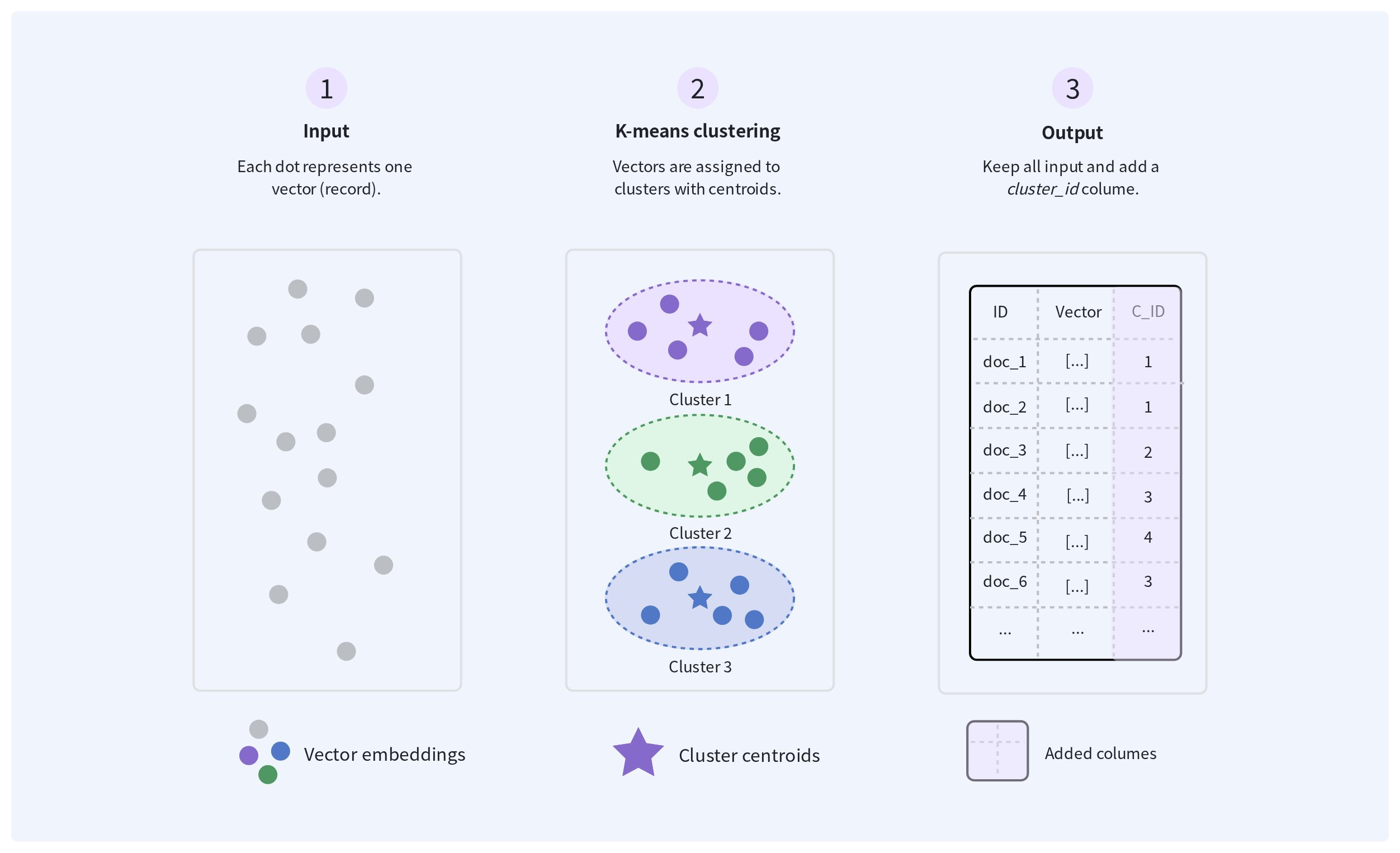
The job retains every input record and adds a cluster_id field that indicates the cluster assigned to each record.
Overview
The following diagram shows how a K-Means clustering job organizes vector data. The job reads the specified vector field, assigns each record to one of the requested clusters, and writes the original record with an additional cluster_id field.
Records assigned the same cluster_id belong to the same cluster. The job does not currently write cluster centroids as separate output files.
Choose the number of clusters
Set numClusters to the number of groups you want the job to produce. A smaller value creates broader clusters, while a larger value creates more fine-grained clusters.
Choose a distance metric
The distance metric determines how vectors are assigned to clusters.
| Metric | How similarity is interpreted | When to use |
|---|---|---|
l2 | Vectors with a smaller Euclidean distance are more similar. | Use this metric when your embedding model or existing workflow uses Euclidean distance. |
cosine | Vectors with a larger cosine similarity are more similar. | Use this metric when vector direction is more important than vector magnitude. |
Understand the output
The output retains all input columns and adds a cluster_id field to each record.
| Field | Description |
|---|---|
cluster_id | The cluster assigned to the record. Records with the same cluster_id belong to the same K-Means cluster. |
The job assigns every valid input vector to one cluster. Cluster IDs identify groups within the output of a single job and should not be treated as stable identifiers across separate runs.
Before you start
Before creating a K-Means clustering job, ensure that:
-
All input files use compatible schemas and contain the vector field to cluster.
-
All vectors in that field use the same type and dimension and were generated using the same embedding model and preprocessing method.
For the general requirements for running Spark batch jobs, including authentication, input files, and output behavior, see Spark Batch Jobs.
Create a K-Means clustering job
Create a K-Means clustering job by specifying the input and output locations, the vector field to cluster, the distance metric, and the number of clusters. The job runs asynchronously and returns a job ID that you can use to monitor its status. After the job succeeds, the output files are available at the configured output path.
Prepare an idempotency key.
An idempotency key is a unique string that remains unchanged when retrying the same job request. For details, refer to Idempotent submission.
Prepare the request payload.
export payload='{
  "description": "clustering product embeddings",
  "regionId": "aws-us-west-2",
  "input": {
    "type": "volume",
    "volumeName": "product-data",
    "path": "input/products.parquet",
    "format": "parquet"
  },
  "output": {
    "type": "volume",
    "volumeName": "product-data",
    "path": "output/products-clustered.parquet",
    "format": "parquet"
  },
  "primaryKeyField": "id",
  "vectorField": "embedding",
  "metric": "l2",
  "numClusters": 100,
  "resourceSize": "MEDIUM",
  "timeoutSeconds": 7200
}'
The following table lists the job-specific parameters:
| Parameter | Required | Description |
|---|---|---|
primaryKeyField | No | The input field used to identify each record and associate it with the assigned cluster_id. If omitted, the job generates an identifier for each record in the output. |
vectorField | Yes | The vector field to cluster. Supported representations include array<float>, numeric arrays, Spark vectors, and comma-separated strings. |
metric | Yes | The metric used to compare vectors. Possible values are cosine and l2. |
numClusters | Yes | The number of clusters to create. The value must be a positive integer. |
For parameters shared by all Spark batch jobs, refer to Request payload.
Submit the payload.
export API_KEY="xxxxxxxxxxxxxxxxxxxxxxxxxxxxxxxxxxxxxxxxxxx"

curl --request POST \
    --url "https://api.cloud.zilliz.com/v2/projects/{projectId}/jobs/kmeans" \
    --header "Authorization: Bearer ${API_KEY}" \
    --header "Idempotency-Key: spark-job-20260730-003" \
    --header "Content-Type: application/json" \
    --data "${payload}"
The request returns after the job is created. The response includes a job ID that you can use to monitor its progress. The following example shows a successful response:
{
  "code": 0,
  "data": {
    "jobId": "job-xxxxxxxx",
    "projectId": "proj-xxxxxxxx",
    "type": "SPARK",
    "description": "clustering product embeddings",
    "status": "PENDING",
    "regionId": "aws-us-west-2",
    "clusterId": "in-xxxxxxxx",
    "createdAt": null,
    "startedAt": null,
    "finishedAt": null,
    "durationSeconds": null
  }
}
Monitor the job
After submitting the request, use the returned job ID to monitor the job until it reaches a terminal state. You can view the job status and details, list existing jobs, or cancel the job while it is still in a cancelable state.
When the job succeeds, verify that the expected output is available at the path specified in the request.
For instructions, job states, and state transitions, see Manage Spark Batch Jobs.
Validate the output
After the job succeeds, verify that:
-
The output files exist at the configured Volume path.
-
All input records and columns are retained.
-
Each record includes a valid
cluster_id. -
The number of distinct cluster IDs does not exceed
numClusters. -
Sampled records from the same cluster are reasonably similar for your intended use.
Next steps
Use the generated cluster_id values to analyze the embedding distribution, sample records from different semantic groups, or organize records for downstream processing. To identify semantically redundant records within these groups, use Vector Similarity Deduplication. To find unusual records that do not fit the broader distribution, use Anomaly Detection.