Manage Spark Batch Jobs
On RequestThis feature is only available in all applicable AWS regions. It is not available on Google Cloud and Microsoft Azure. To enable it, contact us.
Spark batch jobs run asynchronously and move through several states from submission to completion. This page explains the job lifecycle and then shows how to list jobs, retrieve job details, and cancel jobs that are still in a cancelable state.
Understand job states
The following diagram shows the job lifecycle and cancellation flow.
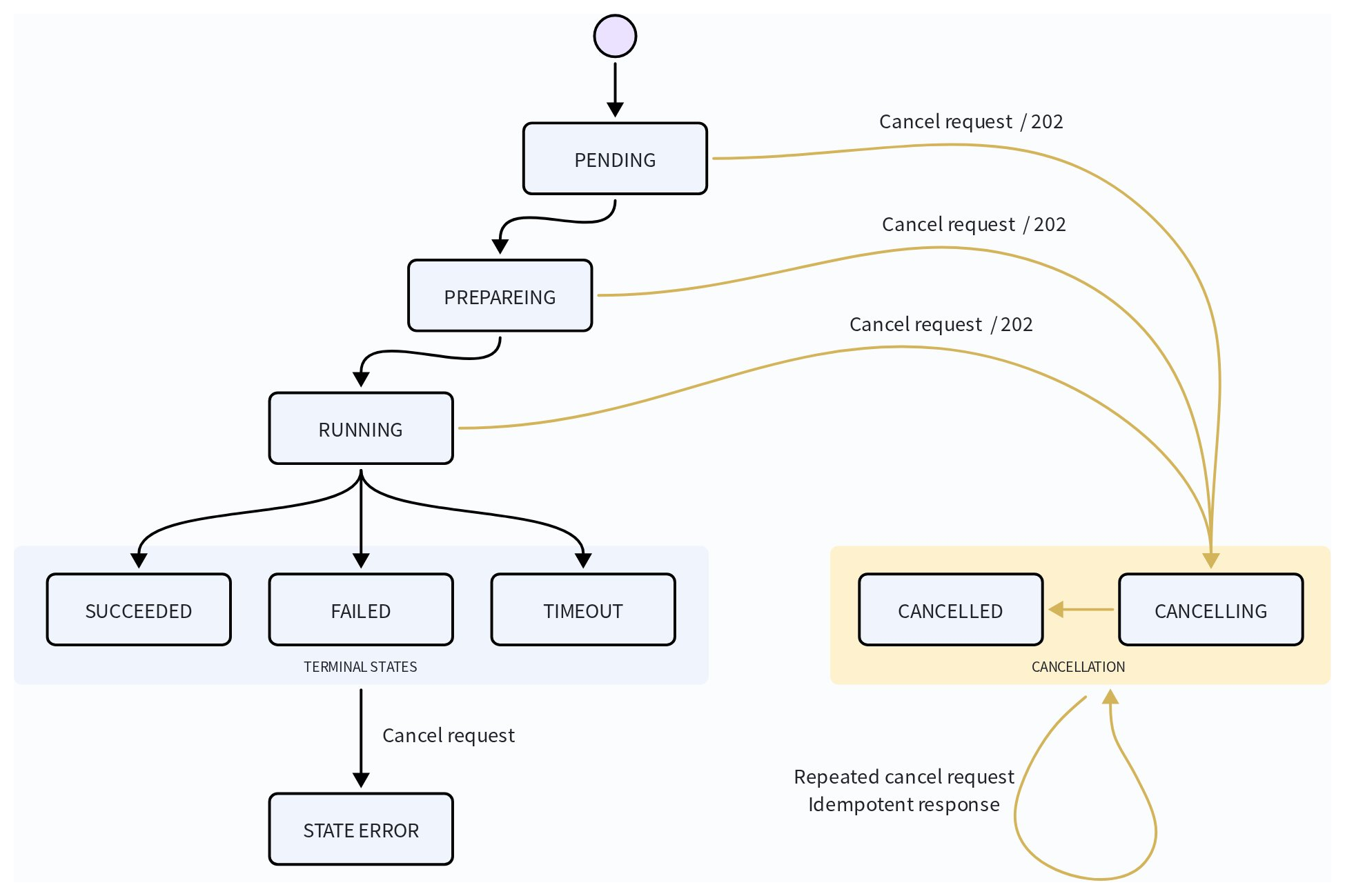
A job normally progresses from PENDING to PREPARING and then to RUNNING, before reaching a terminal state.
Jobs in PENDING, PREPARING, or RUNNING accept cancellation requests, while jobs that have reached SUCCEEDED, FAILED, or TIMEOUT can no longer be canceled. Repeated cancellation requests for jobs already in the cancellation flow are handled idempotently.
List Spark batch jobs in a region
List Spark batch jobs in a specific region to find jobs submitted across projects that you can access. The request requires the region ID and type=SPARK. You can combine optional filters to narrow the results by state, job-name prefix, or creation time.
Request examples
The following example lists all Spark batch jobs across projects that you can access in aws-us-west-2.
export API_KEY="xxxxxxxxxxxxxxxxxxxxxxxxxxxx"
curl --request GET \
--url "https://api.cloud.zilliz.com/v2/jobs?type=SPARK®ionId=aws-us-west-2" \
--header "Authorization: Bearer ${API_KEY}"
To narrow the results, add one or more optional filters. The following example lists running Spark batch jobs in aws-us-west-2 whose names begin with pk-dedup. It returns up to 50 jobs per page.
export API_KEY="xxxxxxxxxxxxxxxxxxxxxxxxxxxx"

curl --request GET \
  --url "https://api.cloud.zilliz.com/v2/jobs" \
  --get \
  --data-urlencode "type=SPARK" \
  --data-urlencode "regionId=aws-us-west-2" \
  --data-urlencode "status=RUNNING" \
  --data-urlencode "pageSize=50" \
  --header "Authorization: Bearer ${API_KEY}"
Filter the results
The following table lists possible filters applicable to the job list requests.
| Parameter | Required | Description |
|---|---|---|
type | Yes | The job type. Set this parameter to SPARK. |
regionId | Yes | The ID of the region in which to list Spark batch jobs. |
status | No | Filters jobs by state, such as PENDING, RUNNING, or SUCCEEDED. |
createdAfter | No | Returns jobs created after the specified ISO 8601 timestamp, such as 2026-07-30T00:00:00Z. |
createdBefore | No | Returns jobs created before the specified ISO 8601 timestamp. |
pageSize | No | The number of jobs to return per page. The default is 20; the valid range is 1 to 100. |
pageToken | No | The pagination token returned as nextPageToken in the previous response. |
Optional filters can be combined in the same request, as shown in the request examples above.
Paginate through the results
If the response includes nextPageToken, pass that value as pageToken in the next request. Continue until nextPageToken is absent or empty.
export API_KEY="xxxxxxxxxxxxxxxxxxxxxxxxxxxx"
export NEXT_PAGE_TOKEN="token-returned-by-the-previous-request"

curl --request GET \
  --url "https://api.cloud.zilliz.com/v2/jobs" \
  --get \
  --data-urlencode "type=SPARK" \
  --data-urlencode "regionId=aws-us-west-2" \
  --data-urlencode "pageSize=20" \
  --data-urlencode "pageToken=${NEXT_PAGE_TOKEN}" \
  --header "Authorization: Bearer ${API_KEY}"
Understand the response
A successful response returns the total number of matching jobs, the jobs on the current page, and a token for retrieving the next page when more results are available.
{
  "code": 0,
  "data": {
    "total": 2,
    "items": [
      {
        "jobId": "job-xxxxxxxx",
        "projectId": "proj-xxxxxxxx",
        "type": "SPARK",
        "description": "backfill product attributes",
        "status": "RUNNING",
        "regionId": "aws-us-west-2",
        "clusterId": "in-xxxxxxxx",
        "createdAt": "2026-08-21T02:00:00Z",
        "startedAt": "2026-08-21T02:01:00Z",
        "finishedAt": null,
        "durationSeconds": null
      }
    ],
    "nextPageToken": "opaque-token"
  }
}
The response includes:
-
total: The total number of jobs that match the request filters. -
items: The Spark batch jobs returned on the current page. -
nextPageToken: The token used to retrieve the next page. This field is absent or empty when there are no more results.
For details about the parameters in the response, refer to the reference page List Spark batch jobs.
View a Spark batch job details in a project
You can obtain the details of a Spark batch job by specifying its job ID and the project ID where the job was submitted.
Request example
export PROJECT_ID="proj-xxxxxxxxxxxxxxxxxxxxxxx"
export JOB_ID="job-xxxxxxxxxxxxxxxxxxxxxxx"
export API_KEY="xxxxxxxxxxxxxxxxxxxxxxxxxxxx"

curl --request GET \
  --url "https://api.cloud.zilliz.com/v2/projects/${PROJECT_ID}/jobs/${JOB_ID}" \
  --header "Authorization: Bearer ${API_KEY}"
Understand the response
The following example shows a successful API response for a failed K-Means clustering job.
{
  "code": 0,
  "data": {
    "jobId": "job-xxxxxxxx",
    "projectId": "proj-xxxxxxxx",
    "type": "SPARK",
    "description": "backfill product attributes",
    "status": "FAILED",
    "regionId": "aws-us-west-2",
    "clusterId": "in-xxxxxxxx",
    "artifact": null,
    "details": {
      "dbName": "default",
      "collectionName": "products",
      "input": {
        "type": "volume",
        "volumeName": "product-data",
        "path": "backfill/products.parquet",
        "format": "parquet"
      },
      "fields": ["title", "price", "embedding"],
      "columnMapping": {
        "source_id": "id",
        "source_title": "title",
        "source_price": "price",
        "source_embedding": "embedding"
      },
      "mode": "coalesce",
      "resourceSize": "SMALL"
    },
    "precheckReport": null,
    "failureReason": {
      "code": "SPARK_EXECUTION_FAILED",
      "message": "The Spark job failed.",
      "retryable": false
    },
    "createdAt": "2026-08-21T02:00:00Z",
    "submittedAt": "2026-08-21T02:00:30Z",
    "startedAt": "2026-08-21T02:01:00Z",
    "finishedAt": "2026-08-21T02:10:00Z",
    "durationSeconds": 540
  }
}
The response includes:
-
Job state and identity:
jobId,jobName,status,regionId, and Spark application identifiers. -
Diagnostics:
failureReason, Spark history links, and the driver log URI when available. -
Output contract: the operator, output format, write mode, whether input columns are preserved, and any columns generated by the job.
-
Timing information: timestamps for job creation, queuing, submission, execution, and completion.
For a failed job, check failureReason first, and then use the Spark history or driver log links for deeper troubleshooting.
Understand the output contract
The following table lists the fields in the outputContract envelope.
| Field | Description |
|---|---|
operator | The built-in operator executed by the Spark batch job, such as kmeans, pk_deduplicate, vector_deduplicate, or anomaly_detection. |
outputFormat | The actual format of the generated output. This usually matches output.format in the job request. |
writeMode | The behavior used when the configured output path already exists. |
preservesInputColumns | Indicates whether the output retains the original columns from the input dataset. |
generatedColumns | The columns added by the job, such as cluster_id for K-Means clustering or outlier_score for anomaly detection. |
For example, a K-Means job with preservesInputColumns set to true and generatedColumns containing cluster_id produces the original dataset with an additional cluster assignment column.
Cancel a Spark batch job
You can submit a cancellation request for a job in PENDING, PREPARING, or RUNNING.
Request example
export PROJECT_ID="proj-xxxxxxxxxxxxxxxxxxxxxxx"
export JOB_ID="job-xxxxxxxxxxxxxxxxxxxxxxx"
export API_KEY="xxxxxxxxxxxxxxxxxxxxxxxxxxxx"

curl --request POST \
  --url "https://api.cloud.zilliz.com/v2/projects/${PROJECT_ID}/jobs/${JOB_ID}/cancel" \
  --header "Authorization: Bearer ${API_KEY}"
Understand the cancel request behaviors
Cancellation behavior depends on the job's current state. A job in a non-terminal state accepts cancel requests. The following table lists job states and the corresponding behaviors when a cancel request is received in these states.
| Current state | Cancel request behavior |
|---|---|
PENDING, PREPARING, RUNNING | Returns 202 Accepted and moves the job into the cancellation flow. |
CANCELLING | Continues the existing cancellation process. |
CANCELED | Returns the current job without starting another cancellation operation. |
SUCCEEDED, FAILED, TIMEOUT | Rejects the request with a state error. |