Range Search
A range search improves search result relevancy by restricting the distance or score of the returned entities within a specific range. This page helps you understand what range search is and the procedures to conduct a range search.
Overview
When executing a Range Search request, Zilliz Cloud uses the most similar vectors to the query vector from the ANN Search results as the center, with the radius specified in the Search request as the outer circle's radius, and the range_filter as the inner circle's radius to draw two concentric circles. All vectors with similarity scores that fall within the annular region formed by these two concentric circles will be returned. Here, the range_filter can be set to 0, indicating that all entities within the specified similarity score (radius) will be returned.
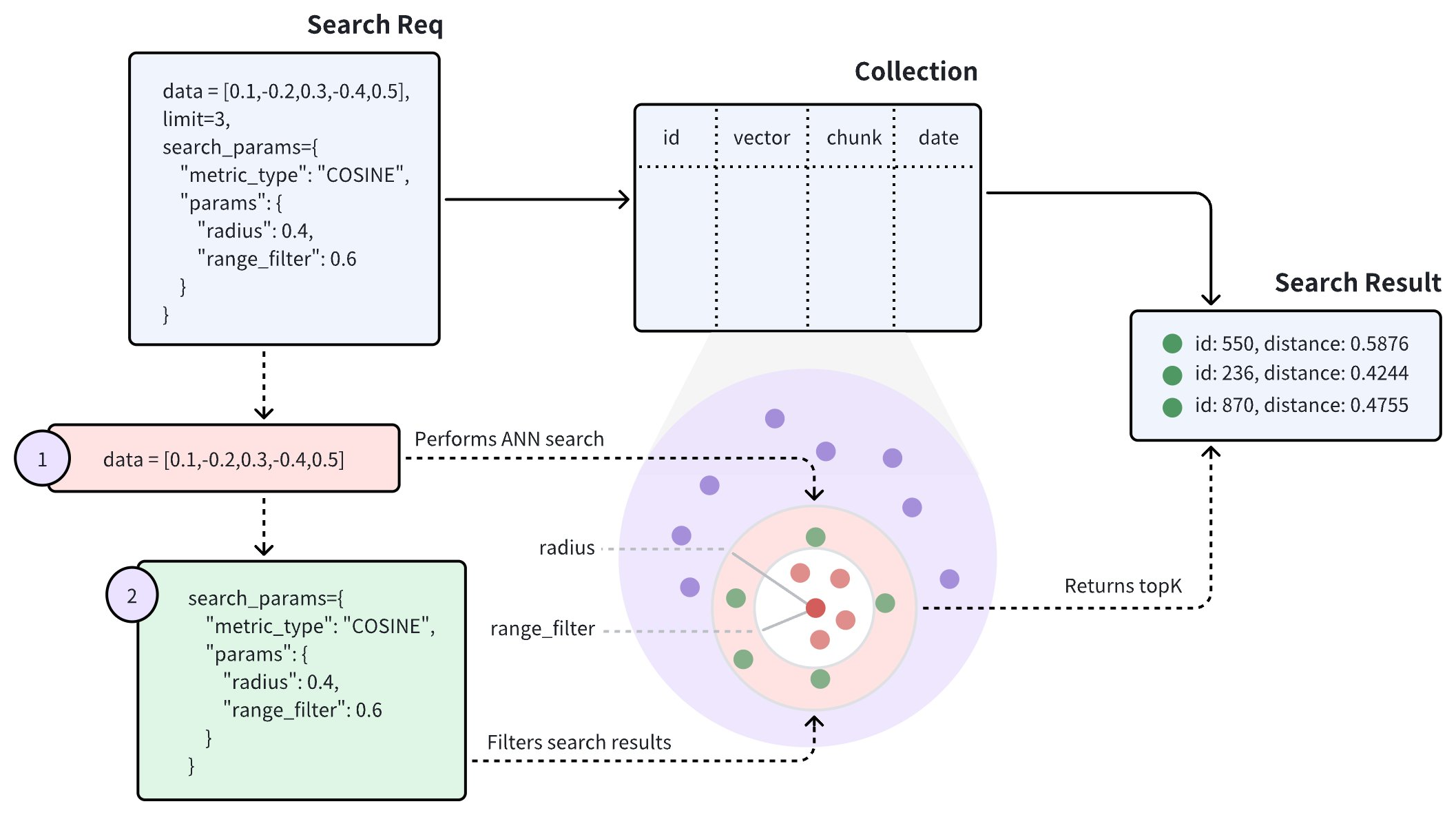
The above diagram shows that a range search request carries two parameters: radius and range_filter. Upon receiving a range search request, Zilliz Cloud does the following:
-
Use the specified metric type (COSINE) to find all vector embeddings most similar to the query vector.
-
Filter the vector embeddings whose distances or scores to the query vector fall within the range specified by the radius and range_filter parameters.
-
Return the top-K entities from the filtered ones.
The way to set radius and range_filter varies with the metric type of the search. The following table lists the requirements for setting these two parameters with different metric types.
| Metric Type | Denotations | Requirements for Setting radius and range_filter |
|---|---|---|
L2 | A smaller L2 distance indicates a higher similarity. | To ignore the most similar vector embeddings, ensure thatrange_filter <= distance < radius |
IP | A greater IP distance indicates a higher similarity. | To ignore the most similar vector embeddings, ensure thatradius < distance <= range_filter |
COSINE | A greater COSINE distance indicates a higher similarity. | To ignore the most similar vector embeddings, ensure thatradius < distance <= range_filter |
JACCARD | A smaller Jaccard distance indicates a higher similarity. | To ignore the most similar vector embeddings, ensure thatrange_filter <= distance < radius |
HAMMING | A smaller Hamming distance indicates a higher similarity. | To ignore the most similar vector embeddings, ensure thatrange_filter <= distance < radius |
Examples
This section demonstrates how to conduct a range search. The search requests in the following code snippets do not carry a metric type, indicating the default metric type COSINE applies. In this case, ensure that the radius value is smaller than the range_filter value.
In the following code snippets, set radius to 0.4 and range_filter to 0.6 so that Zilliz Cloud returns all entities whose distances or scores to the query vector fall within 0.4 to 0.6.
- Python
- Java
- Go
- Rust
- C++
- NodeJS
- CSharp
- cURL
- Zilliz CLI
from pymilvus import MilvusClient

client = MilvusClient(
    uri="YOUR_CLUSTER_ENDPOINT",
    token="YOUR_CLUSTER_TOKEN"
)

query_vector = [0.3580376395471989, -0.6023495712049978, 0.18414012509913835, -0.26286205330961354, 0.9029438446296592]

res = client.search(
    collection_name="my_collection",
    data=[query_vector],
    limit=3,
    search_params={
        "params": {
            "radius": 0.4,
            "range_filter": 0.6
        }
    }
)

for hits in res:
    print("TopK results:")
    for hit in hits:
        print(hit)
import io.milvus.v2.client.ConnectConfig;
import io.milvus.v2.client.MilvusClientV2;
import io.milvus.v2.service.vector.request.SearchReq;
import io.milvus.v2.service.vector.request.data.FloatVec;
import io.milvus.v2.service.vector.response.SearchResp;
import java.util.Collections;
import java.util.HashMap;
import java.util.List;
import java.util.Map;

MilvusClientV2 client = new MilvusClientV2(ConnectConfig.builder()
        .uri("YOUR_CLUSTER_ENDPOINT")
        .token("YOUR_CLUSTER_TOKEN")
        .build());

FloatVec queryVector = new FloatVec(new float[]{0.3580376395471989f, -0.6023495712049978f, 0.18414012509913835f, -0.26286205330961354f, 0.9029438446296592f});
Map<String,Object> extraParams = new HashMap<>();
extraParams.put("radius", 0.4);
extraParams.put("range_filter", 0.6);
SearchReq searchReq = SearchReq.builder()
        .collectionName("my_collection")
        .data(Collections.singletonList(queryVector))
        .topK(5)
        .searchParams(extraParams)
        .build();

SearchResp searchResp = client.search(searchReq);

List<List<SearchResp.SearchResult>> searchResults = searchResp.getSearchResults();
for (List<SearchResp.SearchResult> results : searchResults) {
    System.out.println("TopK results:");
    for (SearchResp.SearchResult result : results) {
        System.out.println(result);
    }
}

// Output
// TopK results:
// SearchResp.SearchResult(entity={}, score=0.5975797, id=4)
// SearchResp.SearchResult(entity={}, score=0.46704385, id=5)
import (
    "context"
    "fmt"

    "github.com/milvus-io/milvus/client/v3/entity"
    "github.com/milvus-io/milvus/client/v3/index"
    "github.com/milvus-io/milvus/client/v3/milvusclient"
)

ctx, cancel := context.WithCancel(context.Background())
defer cancel()

milvusAddr := "YOUR_CLUSTER_ENDPOINT"
client, err := milvusclient.New(ctx, &milvusclient.ClientConfig{
    Address: milvusAddr,
})
if err != nil {
    fmt.Println(err.Error())
    // handle error
}
defer client.Close(ctx)

queryVector := []float32{0.3580376395471989, -0.6023495712049978, 0.18414012509913835, -0.26286205330961354, 0.9029438446296592}

annParam := index.NewCustomAnnParam()
annParam.WithRadius(0.4)
annParam.WithRangeFilter(0.6)
resultSets, err := client.Search(ctx, milvusclient.NewSearchOption(
    "my_collection", // collectionName
    5,               // limit
    []entity.Vector{entity.FloatVector(queryVector)},
).WithConsistencyLevel(entity.ClStrong).
    WithANNSField("vector").
    WithAnnParam(annParam))
if err != nil {
    fmt.Println(err.Error())
    // handle error
}

for _, resultSet := range resultSets {
    fmt.Println("IDs: ", resultSet.IDs.FieldData().GetScalars())
    fmt.Println("Scores: ", resultSet.Scores)
}
use milvus::v2::prelude::*;

let client = ClientV2::new(&ConnectConfig::new().uri("YOUR_CLUSTER_ENDPOINT").token("YOUR_CLUSTER_TOKEN")).await?;

let query_vector = vec![0.3580376395471989, -0.6023495712049978, 0.18414012509913835, -0.26286205330961354, 0.9029438446296592];
let response = client
    .search(
        SearchRequest::builder()
            .collection_name("my_collection")
            .vector_field("vector")
            .vectors(SearchVectors::Float(vec![query_vector]))
            .limit(5)
            .radius(0.4)
            .range_filter(0.6)
            .build()?,
    )
    .await?;

println!("TopK results:");
for result in response.results() {
    for row in result.rows()? {
        println!("{:?}", row.to_entity_row()?);
    }
}
#include "milvus/MilvusClientV2.h"

auto client = milvus::MilvusClientV2::Create();

milvus::ConnectParam connect_param{"YOUR_CLUSTER_ENDPOINT", "YOUR_CLUSTER_TOKEN"};
auto status = client->Connect(connect_param);
if (!status.IsOk()) {
    std::cout << status.Message() << std::endl;
}

std::vector<float> query_vector = {0.3580376395471989, -0.6023495712049978, 0.18414012509913835, -0.26286205330961354, 0.9029438446296592};
auto request = milvus::SearchRequest()
                   .WithCollectionName("my_collection")
                   .AddFloatVector(query_vector)
                   .WithLimit(5)
                   .WithAnnsField("vector")
                   .WithRadius(0.4)
                   .WithRangeFilter(0.6);

milvus::SearchResponse response;
auto status = client->Search(request, response);
if (!status.IsOk()) {
    std::cout << status.Message() << std::endl;
}

for (auto& result : response.Results().Results()) {
    std::cout << "TopK results:" << std::endl;
    milvus::EntityRows output_rows;
    status = result.OutputRows(output_rows);
    for (const auto& row : output_rows) {
        std::cout << "\t" << row << std::endl;
    }
}
import { MilvusClient, DataType } from "@zilliz/milvus2-sdk-node";

const address = "YOUR_CLUSTER_ENDPOINT";
const token = "YOUR_CLUSTER_TOKEN";
const client = new MilvusClient({address, token});

var query_vector = [0.3580376395471989, -0.6023495712049978, 0.18414012509913835, -0.26286205330961354, 0.9029438446296592]

const res = await client.search({
    collection_name: "my_collection",
    data: [query_vector],
    limit: 5,
    params: {
        "radius": 0.4,
        "range_filter": 0.6
    }
})
using Milvus.Client.V2;
using Milvus.Client.V2.Requests.Dql;
using Milvus.Client.V2.Types;

using var client = new MilvusClientV2(new ConnectConfig
{
    Uri = "YOUR_CLUSTER_ENDPOINT",
    ApiKey = "YOUR_CLUSTER_TOKEN"
});
await client.ConnectAsync();

var queryVector = new ReadOnlyMemory<float>(new[] { 0.3580376395471989f, -0.6023495712049978f, 0.18414012509913835f, -0.26286205330961354f, 0.9029438446296592f });

var res = await client.SearchAsync(new SearchReq
{
    CollectionName = "my_collection",
    VectorFieldName = "vector",
    Vectors = new[] { queryVector },
    Limit = 3,
    Parameters = new SearchParameters
    {
        Radius = "0.4",
        RangeFilter = "0.6"
    }
});

var single = res.SingleResults?.FirstOrDefault();
if (single is not null)
{
    for (int i = 0; i < single.Scores.Count; i++)
    {
        Console.WriteLine($"id={single.Ids.LongIds?[i]}, score={single.Scores[i]}");
    }
}
export CLUSTER_ENDPOINT="YOUR_CLUSTER_ENDPOINT"
export TOKEN="YOUR_CLUSTER_TOKEN"

curl --request POST \
--url "${CLUSTER_ENDPOINT}/v2/vectordb/entities/search" \
--header "Authorization: Bearer ${TOKEN}" \
--header "Content-Type: application/json" \
--header "Request-Timeout: 10" \
-d '{
    "collectionName": "my_collection",
    "data": [
        [0.3580376395471989, -0.6023495712049978, 0.18414012509913835, -0.26286205330961354, 0.9029438446296592]
    ],
    "annsField": "vector",
    "limit": 5,
    "searchParams": {
        "params": {
            "radius": 0.4,
            "range_filter": 0.6
        }
    }
}'
# {"code":0,"cost":0,"data":[]}
# Zilliz CLI
# Prerequisite: run zilliz login and select your cluster with zilliz context set.

zilliz vector search \
  --collection my_collection \
  --body '{
    "data": [
        [
            0.3580376395471989,
            -0.6023495712049978,
            0.18414012509913835,
            -0.26286205330961354,
            0.9029438446296592
        ]
    ],
    "annsField": "vector",
    "limit": 3,
    "searchParams": {
        "params": {
            "radius": 0.4,
            "range_filter": 0.6
        }
    }
}' \
  --output json
If the query vectors already exist in the target collection, consider using ids instead of retrieving them before searches. For details, refer to Primary-Key Search.