RRF Ranker
Reciprocal Rank Fusion (RRF) Ranker is a reranking strategy for Zilliz Cloud hybrid search that balances results from multiple vector search paths based on their ranking positions rather than their raw similarity scores. Like a sports tournament that considers players' rankings rather than individual statistics, RRF Ranker combines search results based on how highly each item ranks in different search paths, creating a fair and balanced final ranking.
When to use RRF Ranker
RRF Ranker is specifically designed for hybrid search scenarios where you want to balance results from multiple vector search paths without assigning explicit importance weights. It's particularly effective for:
Use Case | Example | Why RRF Ranker Works Well |
|---|---|---|
Multimodal search with equal importance | Image-text search where both modalities matter equally | Balances results without requiring arbitrary weight assignments |
Ensemble vector search | Combining results from different embedding models | Democratically merges rankings without favoring any particular model's scoring distribution |
Cross-lingual search | Finding documents across multiple languages | Ranks results fairly regardless of language-specific embedding characteristics |
Expert recommendations | Combining recommendations from multiple expert systems | Creates consensus rankings when different systems use incomparable scoring methods |
If your hybrid search application requires balancing multiple search paths democratically without assigning explicit weights, RRF Ranker is your ideal choice.
Mechanism of RRF Ranker
The main workflow of the RRFRanker strategy is as follows:
-
Collect Search Rankings: Collect the rankings of results from each path of vector search (rank_1, rank_2).
-
Merge Rankings: Convert the rankings from each path (rank_rrf_1, rank_rrf_2) according to a formula.
The calculation formula involves N, which represents the number of retrievals. ranki(d) is the ranking position of document d generated by the i(th) retriever. k is a smoothing parameter typically set at 60.
-
Aggregate Rankings: Re-rank the search results based on the combined rankings to produce the final results.
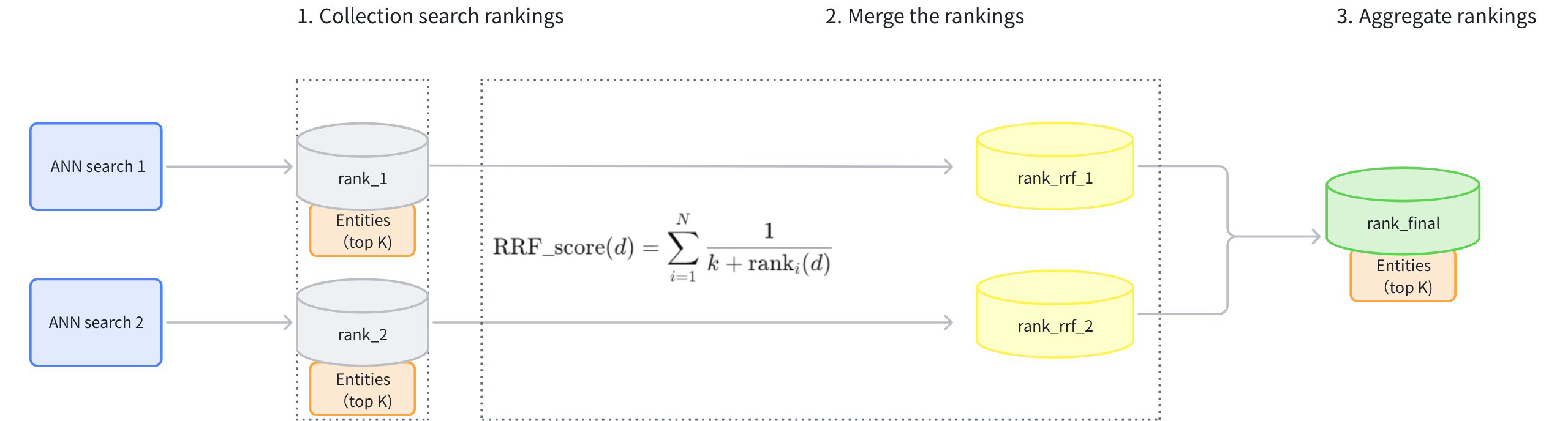
Example of RRF Ranker
This example demonstrates a Hybrid Search (topK=5) on sparse-dense vectors and illustrates how the RRFRanker strategy reranks the results from two ANN searches.
-
Results of ANN search on sparse vectors of texts (topK=5):
ID
Rank (sparse)
101
1
203
2
150
3
198
4
175
5
-
Results of ANN search on dense vectors of texts (topK=5):
ID
Rank (dense)
198
1
101
2
110
3
175
4
250
5
-
Use RRF to rearrange the rankings of the two sets of search results. Assume that the smoothing parameter
kis set at 60.ID
Score (Sparse)
Score (Dense)
Final Score
101
1
2
1/(60+1)+1/(60+2) = 0.03252247
198
4
1
1/(60+4)+1/(60+1) = 0.03201844
175
5
4
1/(60+5)+1/(60+4) = 0.03100962
203
2
N/A
1/(60+2) = 0.01612903
150
3
N/A
1/(60+3) = 0.01587302
110
N/A
3
1/(60+3) = 0.01587302
250
N/A
5
1/(60+5) = 0.01538462
-
The final results after reranking(topK=5):
Rank
ID
Final Score
1
101
0.03252247
2
198
0.03201844
3
175
0.03100962
4
203
0.01612903
5
150
0.01587302
5
110
0.01587302
Usage of RRF Ranker
When using the RRF reranking strategy, you need to configure the parameter k. It is a smoothing parameter that can effectively alter the relative weights of full-text search versus vector search. The default value of this parameter is 60, and it can be adjusted within a range of (0, 16384). The value should be floating-point numbers. The recommended value is between [10, 100]. While k=60 is a common choice, the optimal k value can vary depending on your specific applications and datasets. We recommend testing and adjusting this parameter based on your specific use case to achieve the best performance.
Create an RRF Ranker
After your collection is set up with multiple vector fields, create an RRF Ranker with an appropriate smoothing parameter:
- Python
- Java
- Go
- Rust
- C++
- NodeJS
- CSharp
- cURL
from pymilvus import Function, FunctionType

ranker = Function(
    name="rrf",
    input_field_names=[], # Must be an empty list
    function_type=FunctionType.RERANK,
    params={
        "reranker": "rrf",
        "k": 100  # Optional
    }
)
import io.milvus.common.clientenum.FunctionType;
import io.milvus.v2.service.collection.request.CreateCollectionReq;

CreateCollectionReq.Function rerank = CreateCollectionReq.Function.builder()
        .name("rrf")
        .functionType(FunctionType.RERANK)
        .param("reranker", "rrf")
        .param("k", "100")
        .build();
import "github.com/milvus-io/milvus/client/v3/milvusclient"

rerank := milvusclient.NewRRFReranker().WithK(100)
use milvus::v2::prelude::*;

let rerank = Function::new()
    .name("rrf")
    .function_type(FunctionType::Rerank)
    .param("reranker", "rrf")
    .param("k", "100");
#include <memory>
#include "milvus/MilvusClientV2.h"

auto rerank = std::make_shared<milvus::Function>("rrf", milvus::FunctionType::RERANK);
rerank->AddParam("reranker", "rrf");
rerank->AddParam("k", "100");
import { FunctionType } from "@zilliz/milvus2-sdk-node";

const ranker = {
  name: "rrf",
  input_field_names: [],
  type: FunctionType.RERANK,
  params: {
    reranker: "rrf",
    k: 100,
  },
};
using Milvus.Client.V2.Types;

var rerank = new RrfReranker(100);
functions='[
  {
    "name": "rrf",
    "type": "RERANK",
    "inputFieldNames": [],
    "params": {
      "reranker": "rrf",
      "k": 100
    }
  }
]'
Parameter | Required? | Description | Value/Example |
|---|---|---|---|
| Yes | Unique identifier for this Function |
|
| Yes | List of vector fields to apply the function to (must be empty for RRF Ranker) | [] |
| Yes | The type of Function to invoke; use |
|
| Yes | Specifies the reranking method to use. Must be set to |
|
| No | Smoothing parameter that controls the impact of document ranks; higher For details, refer to Mechanism of RRF Ranker. |
|
Apply to hybrid search
RRF Ranker is designed specifically for hybrid search operations that combine multiple vector fields. Here's how to use it in a hybrid search:
The examples assume an existing collection with a text embedding function for text_vector and a prepared image embedding that matches the dimension of image_vector. Replace the collection name and image embedding with your own values.
- Python
- Java
- Go
- Rust
- C++
- NodeJS
- CSharp
- cURL
from pymilvus import MilvusClient, AnnSearchRequest, RRFRanker

# Connect to Zilliz Cloud server
milvus_client = MilvusClient(
    uri="YOUR_CLUSTER_ENDPOINT",
    token="YOUR_CLUSTER_TOKEN"
)

# Assume you have a collection setup

# Define text vector search request
text_search = AnnSearchRequest(
    data=["modern dining table"],
    anns_field="text_vector",
    param={},
    limit=10
)

# Define image vector search request
image_search = AnnSearchRequest(
    data=[image_embedding],  # Image embedding vector
    anns_field="image_vector",
    param={},
    limit=10
)

# Create an RRF ranker with smoothing parameter k
ranker = RRFRanker(k=100)

# Apply RRF Ranker to product hybrid search
# The smoothing parameter k controls the balance
hybrid_results = milvus_client.hybrid_search(
    collection_name,
    [text_search, image_search],  # Multiple search requests
    ranker=ranker,  # Apply the RRF ranker
    limit=10,
    output_fields=["product_name", "price", "category"]
)
import io.milvus.v2.client.ConnectConfig;
import io.milvus.v2.client.MilvusClientV2;
import io.milvus.v2.service.vector.request.AnnSearchReq;
import io.milvus.v2.service.vector.request.HybridSearchReq;
import io.milvus.v2.service.vector.response.SearchResp;
import io.milvus.v2.service.vector.request.data.EmbeddedText;
import io.milvus.v2.service.vector.request.data.FloatVec;
import io.milvus.v2.service.vector.request.ranker.RRFRanker;
import java.util.ArrayList;
import java.util.Arrays;
import java.util.Collections;
import java.util.List;

MilvusClientV2 client = new MilvusClientV2(ConnectConfig.builder()
        .uri("YOUR_CLUSTER_ENDPOINT")
        .token("YOUR_CLUSTER_TOKEN")
        .build());

List<AnnSearchReq> searchRequests = new ArrayList<>();
searchRequests.add(AnnSearchReq.builder()
        .vectorFieldName("text_vector")
        .vectors(Collections.singletonList(new EmbeddedText("modern dining table")))
        .limit(10)
        .build());
searchRequests.add(AnnSearchReq.builder()
        .vectorFieldName("image_vector")
        .vectors(Collections.singletonList(new FloatVec(imageEmbedding)))
        .limit(10)
        .build());

RRFRanker ranker = RRFRanker.builder()
                .k(100)
                .build();

HybridSearchReq hybridSearchReq = HybridSearchReq.builder()
                .collectionName(COLLECTION_NAME)
                .searchRequests(searchRequests)
                .ranker(ranker)
                .limit(10)
                .outFields(Arrays.asList("product_name", "price", "category"))
                .build();
SearchResp searchResp = client.hybridSearch(hybridSearchReq);
import (
    "context"
    "fmt"

    "github.com/milvus-io/milvus/client/v3/entity"
    "github.com/milvus-io/milvus/client/v3/milvusclient"
)

ctx := context.Background()
client, err := milvusclient.New(ctx, &milvusclient.ClientConfig{
    Address: "YOUR_CLUSTER_ENDPOINT",
    APIKey: "YOUR_CLUSTER_TOKEN",
})
if err != nil {
    panic(err)
}
defer client.Close(ctx)

// Define text vector search request
textSearch := milvusclient.NewAnnRequest("text_vector", 10, entity.Text("modern dining table"))

// Define image vector search request
imageSearch := milvusclient.NewAnnRequest("image_vector", 10, entity.FloatVector(imageEmbedding))

// Apply RRF Ranker to product hybrid search
rerank := milvusclient.NewRRFReranker().WithK(100)
resultSets, err := client.HybridSearch(ctx, milvusclient.NewHybridSearchOption(
    collectionName, 10, textSearch, imageSearch,
).WithReranker(rerank).WithOutputFields("product_name", "price", "category"))
if err != nil {
    panic(err)
}
fmt.Println(resultSets)
use milvus::v2::prelude::*;

let config = ConnectConfig::new()
    .uri("YOUR_CLUSTER_ENDPOINT")
    .token("YOUR_CLUSTER_TOKEN");
let client = ClientV2::new(&config).await?;

// Define text vector search request
let text_search = SubSearchRequest::builder()
    .vector_field("text_vector")
    .vectors(SearchVectors::EmbeddedText(vec!["modern dining table".to_string()]))
    .limit(10)
    .build()?;

// Define image vector search request
let image_search = SubSearchRequest::builder()
    .vector_field("image_vector")
    .vectors(SearchVectors::Float(vec![image_embedding]))
    .limit(10)
    .build()?;

// Apply RRF Ranker to product hybrid search
let hybrid_results = client
    .hybrid_search(
        HybridSearchRequest::builder()
            .collection_name(collection_name)
            .sub_requests(vec![text_search, image_search])
            .rerank(RRFRerank::new().k(100))
            .limit(10)
            .output_fields(["product_name", "price", "category"])
            .build()?,
    )
    .await?;
#include <iostream>
#include <memory>
#include <utility>
#include "milvus/MilvusClientV2.h"

auto client = milvus::MilvusClientV2::Create();
auto connect_status = client->Connect(milvus::ConnectParam{
    "YOUR_CLUSTER_ENDPOINT", "YOUR_CLUSTER_TOKEN"});
if (!connect_status.IsOk()) {
    std::cout << connect_status.Message() << std::endl;
    return;
}

auto text_search = milvus::SubSearchRequest()
                    .WithLimit(10)
                    .WithAnnsField("text_vector")
                    .AddEmbeddedText("modern dining table");

auto image_search = milvus::SubSearchRequest()
                    .WithLimit(10)
                    .WithAnnsField("image_vector")
                    .AddFloatVector(image_embedding);

auto request = milvus::HybridSearchRequest()
                    .WithCollectionName(collection_name)
                    .WithLimit(10)
                    .AddSubRequest(std::make_shared<milvus::SubSearchRequest>(std::move(text_search)))
                    .AddSubRequest(std::make_shared<milvus::SubSearchRequest>(std::move(image_search)))
                    .WithRerank(rerank)
                    .AddOutputField("product_name")
                    .AddOutputField("price")
                    .AddOutputField("category");

milvus::SearchResponse response;
auto status = client->HybridSearch(request, response);
if (!status.IsOk()) {
    std::cout << status.Message() << std::endl;
}
import { MilvusClient, FunctionType } from "@zilliz/milvus2-sdk-node";

const milvusClient = new MilvusClient({
  address: "YOUR_CLUSTER_ENDPOINT",
  token: "YOUR_CLUSTER_TOKEN",
});

const text_search = {
    data: ["modern dining table"],
    anns_field: "text_vector",
    params: {},
    limit: 10,
};

const image_search = {
  data: [image_embedding],
  anns_field: "image_vector",
  params: {},
  limit: 10,
};

const ranker = {
  name: "rrf",
  input_field_names: [],
  type: FunctionType.RERANK,
  params: {
    reranker: "rrf",
    k: 100,
  },
};

const search = await milvusClient.search({
  collection_name: collection_name,
  data: [text_search, image_search],
  output_fields: ["product_name", "price", "category"],
  limit: 10,
  rerank: ranker,
});
using Milvus.Client.V2;
using Milvus.Client.V2.Requests.Dql;
using Milvus.Client.V2.Responses.Dql;
using Milvus.Client.V2.Types;

// Connect to Zilliz Cloud server
var config = new ConnectConfig
{
    Uri = "YOUR_CLUSTER_ENDPOINT",
    ApiKey = "YOUR_CLUSTER_TOKEN"
};
using var client = new MilvusClientV2(config);
await client.ConnectAsync();

// Assume you have a collection setup

// Define text vector search request
var textSearch = new AnnSearchReq
{
    VectorFieldName = "text_vector",
    Texts = ["modern dining table"],
    Limit = 10
};

// Define image vector search request
var imageSearch = new AnnSearchReq
{
    VectorFieldName = "image_vector",
    Vectors = [imageEmbedding], // Image embedding vector
    Limit = 10
};

var rerank = new RrfReranker(100);

// Apply RRF Ranker to product hybrid search
// The smoothing parameter k controls the balance
SearchResp hybridResults = await client.HybridSearchAsync(new HybridSearchReq
{
    CollectionName = collectionName,
    SearchRequests = [textSearch, imageSearch], // Multiple search requests
    Reranker = rerank, // Apply the RRF ranker
    Limit = 10,
    Parameters = new SearchParameters
    {
        OutputFields = { "product_name", "price", "category" }
    }
});
export CLUSTER_ENDPOINT="YOUR_CLUSTER_ENDPOINT"
export TOKEN="YOUR_CLUSTER_TOKEN"

# Set IMAGE_EMBEDDING to your image vector as a JSON array before running this request.
: "${IMAGE_EMBEDDING:?Set IMAGE_EMBEDDING to a JSON array of embedding values}"

curl --request POST \
--url "${CLUSTER_ENDPOINT}/v2/vectordb/entities/hybrid_search" \
--header "Authorization: Bearer ${TOKEN}" \
--header "Content-Type: application/json" \
--data-binary @- <<EOF
{
    "collectionName": "collection_name",
    "search": [
        {
            "data": ["modern dining table"],
            "annsField": "text_vector",
            "limit": 10
        },
        {
            "data": [${IMAGE_EMBEDDING}],
            "annsField": "image_vector",
            "limit": 10
        }
    ],
    "rerank": {
        "strategy": "rrf",
        "params": {
            "k": 100
        }
    },
    "limit": 10,
    "outputFields": ["product_name", "price", "category"]
}
EOF
For more information on hybrid search, refer to Multi-Vector Hybrid Search.