Semantic Highlighter
Semantic Highlighter identifies and highlights the most semantically relevant portions of your search results at the sentence level, helping you extract only what matters from retrieved top K documents.
Assume you have a long document with hundreds of words about AI history (about 75 words):
Artificial intelligence was founded as an academic discipline in 1956 at the Dartmouth Conference. The field experienced several cycles of optimism and disappointment throughout its history. AI research started after World War II with the development of electronic computers. Early researchers explored symbolic methods and problem-solving approaches. The term 'artificial intelligence' was coined by John McCarthy, one of the founders of the discipline. Modern AI has achieved remarkable success in areas such as computer vision, natural language processing, and game playing.
When you search for "When was artificial intelligence founded?", Semantic Highlighter identifies and returns only the semantically relevant sentence:
<mark>Artificial intelligence was founded as an academic discipline in 1956 at the Dartmouth Conference.</mark>
Confidence score: 0.999
Instead of sending the entire 75-word document to your LLM, you get just the 16-word answer, with a confidence score showing how relevant it is to your query.
This feature relies on a hosted highlight model on Zilliz Cloud.
Why semantic highlighting?
In RAG (Retrieval-Augmented Generation) applications, traditional approaches typically send entire retrieved documents to the LLM for processing. This creates two major problems:
-
High token costs: Even when only a small portion of a document is relevant to the query, the entire document must be sent to the LLM, resulting in unnecessary token consumption and costs.
-
Noise interference: Irrelevant information in documents can interfere with the LLM's understanding, reducing answer quality.
Semantic Highlighter helps you:
-
Reduce costs: Send only relevant fragments to the LLM instead of entire documents
-
Improve quality: Reduce noise and let the LLM focus on the most relevant content
-
Enhance user experience: Visually highlight key matching information in search interfaces
How it works
Semantic Highlighter runs after semantic search and only operates on the top K results. The entire workflow combines semantic search for document retrieval and a hosted highlight model for identifying relevant text segments.
The diagram below shows the workflow of Semantic Highlighter:
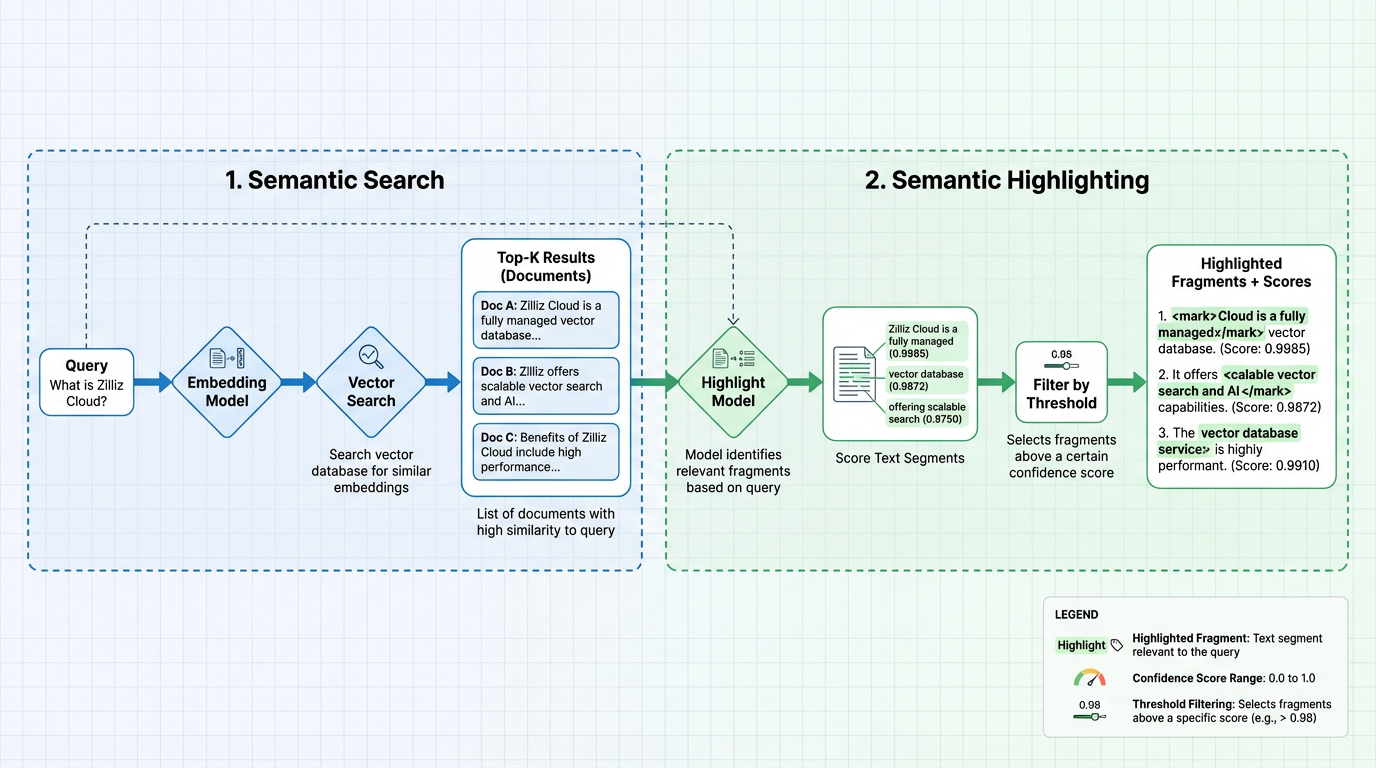
Stage 1: Semantic search
Semantic search retrieves the top K most relevant documents based on vector similarity. You have two options for generating embeddings:
Option 1: Model-based embedding function (Recommended)
Use a Zilliz Cloud model-based embedding function that automatically handles vector conversion. You simply insert raw documents and provide query text—no need to manually manage embeddings:
-
During insertion: The embedding function converts your document text into dense vectors and stores them in the vector field
-
During search: The same embedding function converts your query text into a vector and searches against the vector index to return top K documents based on vector similarity
This approach is used in all examples throughout this document. For more information, see Model-based Embedding Functions.
Option 2: External embedding model
You can also use your own external embedding service to generate embeddings, then insert the vectors directly into your collection and perform semantic search. This gives you full control over the embedding model but requires managing the embedding pipeline yourself.
Stage 2: Semantic highlighting
The highlighting stage is powered by a hosted highlight model deployed on Zilliz Cloud. This model processes the retrieved documents and identifies text segments that are semantically relevant to your query:
-
Score text segments: The highlight model analyzes text content in each document and computes a confidence score (0.0‒1.0) for each segment. Higher scores indicate stronger semantic relevance to the query.
-
Filter by threshold: Segments are filtered based on the configured threshold value. Only fragments with scores at or above the threshold are included.
-
Return highlighted fragments: The output includes text fragments wrapped with configured tags (e.g.,
<mark>and</mark>), along with their confidence scores.
The highlight model is separate from the embedding model, allowing independent control over how documents are retrieved versus how they are highlighted.
Capability overview
Semantic Highlighter adds a dedicated highlight field to each search hit, where semantic matches are returned as highlighted fragments plus confidence scores.
Basic highlighting
Here's a minimal configuration to enable semantic highlighting:
- Python
- NodeJS
- Java
- Go
- cURL
highlighter = SemanticHighlighter(
    queries,                    # Your query text
    ["document"],              # Field to highlight
    pre_tags=["<mark>"],       # Tag to mark the start of highlighted text
    post_tags=["</mark>"],     # Tag to mark the end of highlighted text
    model_deployment_id="YOUR_MODEL_ID",  # Deployment ID of the highlight model
)
// js
import io.milvus.v2.service.vector.request.highlighter.SemanticHighlighter;

SemanticHighlighter highlighter = SemanticHighlighter.builder()
        .queries(queries)
        .inputFields(Collections.singletonList("document"))
        .preTags(Collections.singletonList("<mark>"))
        .postTags(Collections.singletonList("</mark>"))
        .modelDeploymentID("YOUR_MODEL_ID")
        .build();
// go
# restful
With this basic configuration, each search result will include a dedicated highlight field. Here's an example return:
{
    "id": 1,
    "distance": 0.7665,
    "entity": {
        "document": "Artificial intelligence was founded as an academic discipline in 1956."
    },
    "highlight": {
        "document": {
            "fragments": [
                "<mark>Artificial intelligence was founded as an academic discipline in 1956.</mark>"
            ],
            "scores": [0.9985]
        }
    }
}
The dedicated highlight field contains:
-
highlight.<field>.fragments: Text segments that are semantically relevant to the query text, wrapped with the configuredpre_tagsandpost_tags. By default, only the semantically relevant snippets are returned as fragments. -
highlight.<field>.scores: Confidence scores (0.0-1.0) for each fragment, indicating how semantically relevant the text segment is to your query. Higher scores mean stronger relevance. These scores are computed by the deployed highlight model.
Threshold filtering
You can use the threshold parameter to control when a text span is considered a valid semantic highlight.
-
If
thresholdis not setThe default threshold of 0.5 is used. Semantic matches returned by the highlighting model with scores below 0.5 will be filtered out. In this case, the
fragmentsandscoresfields will only contain matching results with scores ≥ 0.5. -
If
thresholdis set Only spans whose semantic score is greater than or equal to the configuredthresholdare returned. Spans below this score are discarded, which may result in an emptyfragments/scoresarray for some entities.
Example configuration:
- Python
- NodeJS
- Java
- Go
- cURL
highlighter = SemanticHighlighter(
    queries,
    ["document"],
    pre_tags=["<mark>"],
    post_tags=["</mark>"],
    threshold=0.8,              # Only return fragments with score >= 0.8
    model_deployment_id="YOUR_MODEL_ID",
)
// js
SemanticHighlighter highlighter = SemanticHighlighter.builder()
        .queries(queries)
        .inputFields(Collections.singletonList("document"))
        .preTags(Collections.singletonList("<mark>"))
        .postTags(Collections.singletonList("</mark>"))
        .modelDeploymentID("YOUR_MODEL_ID")
        .threshold(0.8)
        .build();
// go
# restful
When a fragment's score falls below the threshold, both fragments and scores will be empty for that field:
{
    "id": 2,
    "distance": 0.7043,
    "entity": {
        "document": "The history of artificial intelligence began in the mid-20th century."
    },
    "highlight": {
        "document": {
            "fragments": [],    // Empty because score (0.7206) < threshold (0.8)
            "scores": []
        }
    }
}
Threshold guidelines:
Threshold | Behavior | Use case |
|---|---|---|
Not set | Default threshold of 0.5 is used. Medium and high confidence. | Broader coverage with moderate precision |
0.8 | High confidence | Precision-focused applications |
Before you start
Before using Semantic Highlighter, ensure you have the following configured:
-
Highlight model deployment
Deploy a hosted highlight model on Zilliz Cloud for semantic highlighting:
-
Deploy a highlight model (e.g.,
zilliz/semantic-highlight-bilingual-v1) via Zilliz Cloud. -
Obtain the
model_deployment_idfor use in theSemanticHighlighterconfiguration.
Contact Zilliz Cloud support for available highlight models and deployment instructions.
-
-
Embedding model for semantic search
Semantic Highlighter works with any semantic search setup. Choose one of the following:
Option 1: Model-based embedding function (Recommended)
Integrate with a model-based embedding function that handles embeddings automatically:
-
Third-party model provider: Integrate with a third-party model service provider such as OpenAI, VoyageAI, or Cohere and obtain its
integration_idfrom the Zilliz Cloud console. See Integrate with Model Providers for setup instructions. -
Hosted embedding model: Deploy a hosted embedding model via Zilliz Cloud and obtain its
model_deployment_id. Contact Zilliz Cloud support for available models and deployment instructions.
Option 2: External embedding model
Use your own external embedding service to generate embeddings and insert vectors into your collection. Ensure your collection has:
-
A vector field with appropriate dimensions
-
A vector index configured for search
-
Embeddings generated and inserted for all documents
📘NotesAll code examples in this document use the model-based embedding function approach (Option 1) for simplicity.
-
Get started
Preparation
Before running the examples, set up a collection with semantic search capability.
Prepare your collection
The following example uses a third-party model provider (OpenAI) for the embedding model. If you use a Zilliz Cloud hosted embedding model instead, replace integration_id with model_deployment_id in the Function params.
- Python
- NodeJS
- Java
- Go
- cURL
from pymilvus import (
    MilvusClient,
    Function, DataType, FunctionType, SemanticHighlighter,
)

# Connect to Zilliz Cloud
milvus_client = MilvusClient(
    uri="YOUR_CLUSTER_ENDPOINT",
    token="YOUR_API_KEY"
)

collection_name = "semantic_highlight_demo"

# Drop existing collection if it exists
if milvus_client.has_collection(collection_name):
    milvus_client.drop_collection(collection_name)

# Define schema with text field and dense vector field
schema = milvus_client.create_schema()
schema.add_field("id", DataType.INT64, is_primary=True, auto_id=False)
schema.add_field("document", DataType.VARCHAR, max_length=9000)
schema.add_field("dense", DataType.FLOAT_VECTOR, dim=1536)

# Add text embedding function (using OpenAI integration)
text_embedding_function = Function(
    name="openai",
    function_type=FunctionType.TEXTEMBEDDING,
    input_field_names=["document"],
    output_field_names="dense",
    params={
        "provider": "openai",
        "model_name": "text-embedding-3-small",
        "integration_id": "YOUR_INTEGRATION_ID"  # Integration ID from Zilliz Cloud console
    }
)
schema.add_function(text_embedding_function)

# Create index
index_params = milvus_client.prepare_index_params()
index_params.add_index(
    field_name="dense",
    index_name="dense_index",
    index_type="AUTOINDEX",
    metric_type="IP",
)

# Create collection
milvus_client.create_collection(
    collection_name,
    schema=schema,
    index_params=index_params,
    consistency_level="Strong"
)

# Insert sample documents
docs = [
    {"id": 1, "document": "Artificial intelligence was founded as an academic discipline in 1956."},
    {"id": 2, "document": "The history of artificial intelligence began in the mid-20th century."},
    {"id": 3, "document": "AI research started after World War II with the development of electronic computers."},
    {"id": 4, "document": "Artificial intelligence is widely used in modern technology applications."},
    {"id": 5, "document": "Alan Turing proposed the idea of machine intelligence in 1950."},
    {"id": 6, "document": "Computer science has evolved significantly since its early days."},
]

milvus_client.insert(collection_name, docs)
// js
import com.google.gson.Gson;
import io.milvus.v2.client.ConnectConfig;
import io.milvus.v2.client.MilvusClientV2;
import io.milvus.v2.service.collection.request.AddFieldReq;
import io.milvus.v2.service.collection.request.CreateCollectionReq;
import io.milvus.v2.service.collection.request.CreateCollectionReq.Function;
import io.milvus.v2.service.collection.request.DropCollectionReq;
import io.milvus.v2.service.vector.request.InsertReq;

MilvusClientV2 client = new MilvusClientV2(ConnectConfig.builder()
        .uri("YOUR_CLUSTER_ENDPOINT")
        .token("YOUR_API_KEY")
        .build());

final String COLLECTION_NAME = "semantic_highlight_demo";
client.dropCollection(DropCollectionReq.builder()
        .collectionName(COLLECTION_NAME)
        .build());

CreateCollectionReq.CollectionSchema schema = CreateCollectionReq.CollectionSchema.builder()
        .build();
schema.addField(AddFieldReq.builder()
        .fieldName("id")
        .dataType(DataType.Int64)
        .isPrimaryKey(true)
        .autoID(false)
        .build());
schema.addField(AddFieldReq.builder()
        .fieldName("document")
        .dataType(DataType.VarChar)
        .maxLength(9000)
        .build());
schema.addField(AddFieldReq.builder()
        .fieldName("dense")
        .dataType(DataType.FloatVector)
        .dimension(1536)
        .build());

schema.addFunction(Function.builder()
        .functionType(FunctionType.TEXTEMBEDDING)
        .name("openai")
        .inputFieldNames(Collections.singletonList("document"))
        .outputFieldNames(Collections.singletonList("dense"))
        .param("provider", "openai")
        .param("model_name", "text-embedding-3-small")
        .param("integration_id", "YOUR_INTEGRATION_ID")
        .build());

List<IndexParam> indexes = new ArrayList<>();
indexes.add(IndexParam.builder()
        .fieldName("dense")
        .indexName("dense_index")
        .indexType(IndexParam.IndexType.AUTOINDEX)
        .metricType(IndexParam.MetricType.IP)
        .build());

CreateCollectionReq requestCreate = CreateCollectionReq.builder()
        .collectionName(COLLECTION_NAME)
        .collectionSchema(schema)
        .indexParams(indexes)
        .consistencyLevel(ConsistencyLevel.STRONG)
        .build();
client.createCollection(requestCreate);

Gson gson = new Gson();
List<JsonObject> rows = Arrays.asList(
        gson.fromJson("{\"id\": 1, \"document\": \"Artificial intelligence was founded as an academic discipline in 1956.\"}", JsonObject.class),
        gson.fromJson("{\"id\": 2, \"document\": \"The history of artificial intelligence began in the mid-20th century.\"}", JsonObject.class),
        gson.fromJson("{\"id\": 3, \"document\": \"AI research started after World War II with the development of electronic computers.\"}", JsonObject.class),
        gson.fromJson("{\"id\": 4, \"document\": \"Artificial intelligence is widely used in modern technology applications.\"}", JsonObject.class),
        gson.fromJson("{\"id\": 5, \"document\": \"Alan Turing proposed the idea of machine intelligence in 1950.\"}", JsonObject.class),
        gson.fromJson("{\"id\": 6, \"document\": \"Computer science has evolved significantly since its early days.\"}", JsonObject.class)
);

client.insert(InsertReq.builder()
        .collectionName(COLLECTION_NAME)
        .data(rows)
        .build());
// go
# restful
Example 1: Basic semantic highlighting
This example shows how to add semantic highlighting to a search query. The highlighter identifies text segments that are semantically relevant to the query and wraps them with the specified tags.
Replace YOUR_MODEL_ID in the code below with the deployment ID of your hosted highlight model.
- Python
- NodeJS
- Java
- Go
- cURL
from pymilvus import SemanticHighlighter

# Define the search query
queries = ["When was artificial intelligence founded"]

# Configure semantic highlighter
highlighter = SemanticHighlighter(
    queries,
    ["document"],                           # Fields to highlight
    pre_tags=["<mark>"],                    # Tag before highlighted text
    post_tags=["</mark>"],                  # Tag after highlighted text
    model_deployment_id="YOUR_MODEL_ID",    # Deployed highlight model ID
)

# Perform search with highlighting
results = milvus_client.search(
    collection_name,
    data=queries,
    anns_field="dense",
    search_params={"params": {"nprobe": 10}},
    limit=2,
    output_fields=["document"],
    highlighter=highlighter
)

# Process results
for hits in results:
    for hit in hits:
        highlight = hit.get("highlight", {}).get("document", {})
        print(f"ID: {hit['id']}")
        print(f"Search Score: {hit['distance']:.4f}")      # Vector similarity score
        print(f"Fragments: {highlight.get('fragments', [])}")
        print(f"Highlight Confidence: {highlight.get('scores', [])}")  # Semantic relevance score
        print()
// js
import io.milvus.v2.service.vector.request.highlighter.SemanticHighlighter;
import io.milvus.v2.service.vector.request.SearchReq;
import io.milvus.v2.service.vector.request.data.EmbeddedText;
import io.milvus.v2.service.vector.response.SearchResp;

List<String> queries = Collections.singletonList("When was artificial intelligence founded");
SemanticHighlighter h = SemanticHighlighter.builder()
        .queries(queries)
        .inputFields(Collections.singletonList("document"))
        .preTags(Collections.singletonList("<mark>"))
        .postTags(Collections.singletonList("</mark>"))
        .modelDeploymentID("YOUR_MODEL_ID")
        .build();

SearchResp searchResp = client.search(SearchReq.builder()
        .collectionName(COLLECTION_NAME)
        .data(Collections.singletonList(new EmbeddedText(queries.get(0))))
        .annsField("dense")
        .limit(2)
        .outputFields(Collections.singletonList("document"))
        .highlighter(highlighter)
        .build());

List<List<SearchResp.SearchResult>> searchResults = searchResp.getSearchResults();
for (List<SearchResp.SearchResult> results : searchResults) {
    for (SearchResp.SearchResult result : results) {
        System.out.printf("ID: %d%n", (long)result.getId());
        System.out.printf("Search Score: %.4f%n", result.getScore());
        SearchResp.HighlightResult hresult = result.getHighlightResults().get("document");
        System.out.printf("Fragments: %s%n", hresult.getFragments());
        System.out.printf("Highlight Confidence: %s%n", hresult.getScores());
    }
}
// go
# restful
Expected output
ID: 1
Search Score: 0.7672
Fragments: ['<mark>Artificial intelligence was founded as an academic discipline in 1956.</mark>']
Highlight Confidence: [0.9985]

ID: 2
Search Score: 0.7043
Fragments: ['<mark>The history of artificial intelligence began in the mid-20th century.</mark>']
Highlight Confidence: [0.7206]
Understanding the results:
-
Document 1 (ID: 1) receives a high highlight confidence score (0.9985) because it directly answers the query about when AI was founded.
-
Document 2 (ID: 2) has a moderate highlight confidence score (0.7206) as it discusses AI history but doesn't specifically mention "founded."
-
Document 3 (ID: 5) returns empty fragments because its content about Alan Turing proposing machine intelligence doesn't semantically match the "founded" query, even though it ranks third in the search results.
The Search Score (distance) reflects vector similarity from the semantic search, while Highlight Confidence (scores) reflects how well the text answers the specific query.
Example 2: Threshold filtering
Use the threshold parameter to filter highlights by confidence score. This returns only segments with strong semantic relevance to the query.
Replace YOUR_MODEL_ID in the code below with the deployment ID of your hosted highlight model.
- Python
- NodeJS
- Java
- Go
- cURL
# High threshold - only highly relevant highlights
highlighter = SemanticHighlighter(
    queries,
    ["document"],
    pre_tags=["<mark>"],
    post_tags=["</mark>"],
    threshold=0.8,                          # Only scores >= 0.8
    model_deployment_id="YOUR_MODEL_ID",
)

results = milvus_client.search(
    collection_name,
    data=queries,
    anns_field="dense",
    search_params={"params": {"nprobe": 10}},
    limit=2,
    output_fields=["document"],
    highlighter=highlighter
)

for hits in results:
    for hit in hits:
        highlight = hit.get("highlight", {}).get("document", {})
        print(f"ID: {hit['id']}")
        print(f"Search Score: {hit['distance']:.4f}")      # Vector similarity score
        print(f"Fragments: {highlight.get('fragments', [])}")
        print(f"Highlight Confidence: {highlight.get('scores', [])}")  # Semantic relevance score
        print()
// js
SemanticHighlighter h = SemanticHighlighter.builder()
        .queries(queries)
        .inputFields(Collections.singletonList("document"))
        .preTags(Collections.singletonList("<mark>"))
        .postTags(Collections.singletonList("</mark>"))
        .modelDeploymentID("YOUR_MODEL_ID")
        .threshold(0.8)
        .build();

SearchResp searchResp = client.search(SearchReq.builder()
        .collectionName(COLLECTION_NAME)
        .data(Collections.singletonList(new EmbeddedText(queries.get(0))))
        .annsField("dense")
        .limit(2)
        .outputFields(Collections.singletonList("document"))
        .highlighter(highlighter)
        .build());

List<List<SearchResp.SearchResult>> searchResults = searchResp.getSearchResults();
for (List<SearchResp.SearchResult> results : searchResults) {
    for (SearchResp.SearchResult result : results) {
        System.out.printf("ID: %d%n", (long)result.getId());
        System.out.printf("Search Score: %.4f%n", result.getScore());
        SearchResp.HighlightResult hresult = result.getHighlightResults().get("document");
        System.out.printf("Fragments: %s%n", hresult.getFragments());
        System.out.printf("Highlight Confidence: %s%n", hresult.getScores());
    }
}
// go
# restful
Expected output
With threshold=0.8, only the document with the highest semantic relevance returns a highlight:
ID: 1
Search Score: 0.7672
Fragments: ['<mark>Artificial intelligence was founded as an academic discipline in 1956.</mark>']
Highlight Confidence: [0.9985]

ID: 2
Search Score: 0.7043
Fragments: []
Highlight Confidence: []
Document 2, which had a highlight confidence score of 0.7206 in the previous example, no longer returns a highlight because its score is below the 0.8 threshold.
Example 3: Multi-query highlighting
When searching with multiple queries, each query's results are highlighted independently based on that specific query.
- Python
- NodeJS
- Java
- Go
- cURL
queries = [
    "When was artificial intelligence founded",
    "Where was Alan Turing born"
]

highlighter = SemanticHighlighter(
    queries,
    ["document"],
    pre_tags=["<mark>"],
    post_tags=["</mark>"],
    model_deployment_id="YOUR_MODEL_ID",    # Deployed highlight model ID
)

results = milvus_client.search(
    collection_name,
    data=queries,
    anns_field="dense",
    search_params={"params": {"nprobe": 10}},
    limit=2,
    output_fields=["document"],
    highlighter=highlighter
)

for query, hits in zip(queries, results):
    print(f"Query: {query}")
    for hit in hits:
        highlight = hit.get("highlight", {}).get("document", {})
        print(f"  Fragments: {highlight.get('fragments', [])}")
    print()
// js
List<String> queries = Arrays.asList(
        "When was artificial intelligence founded",
        "Where was Alan Turing born"
);
SemanticHighlighter h = SemanticHighlighter.builder()
        .queries(queries)
        .inputFields(Collections.singletonList("document"))
        .preTags(Collections.singletonList("<mark>"))
        .postTags(Collections.singletonList("</mark>"))
        .modelDeploymentID("YOUR_MODEL_ID")
        .build();

SearchResp searchResp = client.search(SearchReq.builder()
        .collectionName(COLLECTION_NAME)
        .data(Collections.singletonList(new EmbeddedText(queries.get(0))))
        .annsField("dense")
        .limit(2)
        .outputFields(Collections.singletonList("document"))
        .highlighter(highlighter)
        .build());

List<List<SearchResp.SearchResult>> searchResults = searchResp.getSearchResults();
for (int i = 0; i < queries.size(); i++) {
    System.out.println("\nQuery: " + queries.get(i));
    for (SearchResp.SearchResult result : searchResults.get(i)) {
        SearchResp.HighlightResult hresult = result.getHighlightResults().get("document");
        System.out.printf("Fragments: %s%n", hresult.getFragments());
    }
}
// go
# restful
Expected output
Query: When was artificial intelligence founded
  Fragments: ['<mark>Artificial intelligence was founded as an academic discipline in 1956.</mark>']
  Fragments: ['<mark>The history of artificial intelligence began in the mid-20th century.</mark>']

Query: Where was Alan Turing born
  Fragments: []
  Fragments: []
In this sample dataset, there is no text describing Alan Turing's birthplace, so it is expected to see empty fragments for that query.
Each query independently determines which text segments are highlighted in its result set.