Separate Zilliz Cloud Billing on AWS Marketplace
If you need to separate Zilliz Cloud billing on AWS Marketplace by business unit, team, use case, application, or cost center, the recommended pattern is to use one AWS member account, one AWS Marketplace subscription, and one Zilliz Cloud organization per business unit.
AWS provides the billing view. Zilliz Cloud provides the usage view. For AWS-side billing separation, use one Zilliz Cloud organization per business unit and bind it to a Marketplace subscription purchased from the corresponding AWS member account.
Overview
To separate Zilliz Cloud billing on AWS Marketplace, you should map each billing unit to one AWS member account, one AWS Marketplace subscription for Zilliz Cloud, and one Zilliz Cloud organization.
With this setup, AWS Billing and Cost Management shows Marketplace charges under the selected AWS member account. With consolidated billing, the organization receives one bill paid through the management account, while usage and costs remain trackable for each member account.
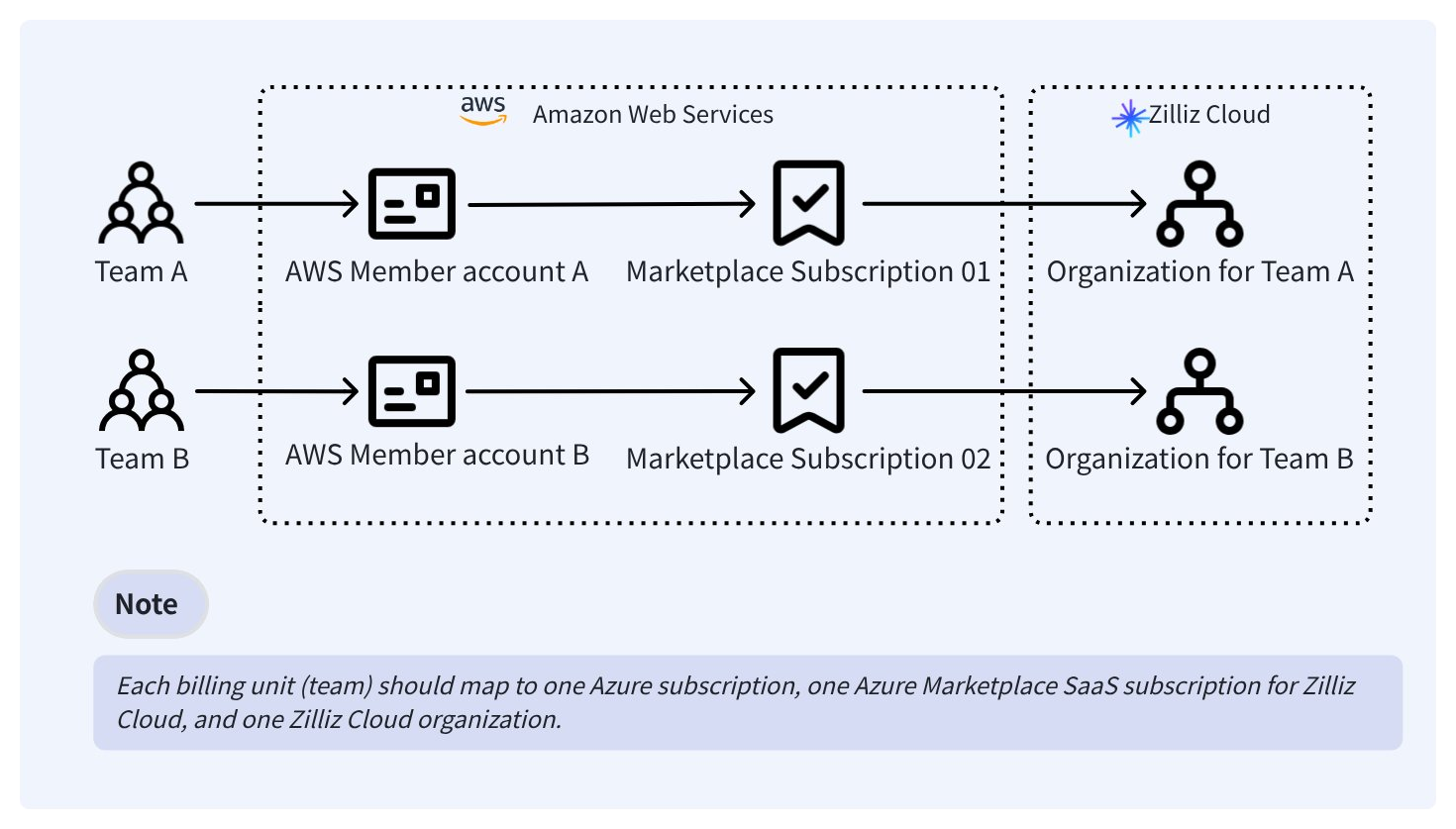
With this setup:
-
The AWS Organizations management account receives and pays the consolidated bill.
-
Each AWS member account remains visible for cost tracking and cost allocation.
-
The AWS Marketplace subscription belongs to the AWS member account that purchases or accepts it.
-
If a private offer is used, make sure the offer is extended to the AWS account that will subscribe. For buyers using AWS Organizations and consolidated billing, AWS allows private offers to be accepted from either the management account or a member account, depending on how the offer is extended and managed.
-
If Private Marketplace is enabled, the product may need to be approved for the relevant account, OU, or organization before the member account can subscribe.
The following is an example of separating billing for 3 different teams.
AWS Organizations management account / consolidated bill
+-- AWS member account: team-a
|   +-- AWS Marketplace SaaS subscription: Zilliz Cloud - team-a
|       +-- Zilliz organization: org-team-a
|           +-- Project: project-team-a
|               +-- Cluster(s)
|
+-- AWS member account: team-b
|   +-- AWS Marketplace SaaS subscription: Zilliz Cloud - team-b
|       +-- Zilliz organization: org-team-b
|           +-- Project: project-team-b
|               +-- Cluster(s)
|
+-- AWS member account: team-c
    +-- AWS Marketplace SaaS subscription: Zilliz Cloud - team-c
        +-- Zilliz organization: org-team-c
            +-- Project: project-team-c
                +-- Cluster(s)
If you only need internal usage separation, a simpler alternative is to use one organization with multiple projects. In that model, Azure Marketplace charges remain combined under one subscription, and the usage split is visible only through Zilliz Cloud usage analysis.
Comparison
| Model | Separates AWS Marketplace charges | Separates Zilliz usage by project or team | Best for |
|---|---|---|---|
| One organization per business unit | Yes | Yes | Teams that need AWS-side cost separation by member account. |
| One organization with multiple projects | No | Yes | Internal usage split only |
Multi-organization setup
Use this model when each business unit needs separate AWS Marketplace billing.
Prepare multiple organizations
A new Zilliz Cloud account registration automatically creates one default organization.
To prepare multiple organizations:
Submit a support ticket so that we can enable the multi-organization feature for you.
Once the feature is enabled, you can manually create new organizations.
Each organization has its own:
-
billing and payment method
-
users and RBAC
-
projects
-
clusters
-
usage analysis data
Bind one Marketplace subscription to each organization
For each business unit:
Sign in to AWS Marketplace using the AWS member account for the target billing unit.
On Zilliz Cloud, Navigate to the corresponding Zilliz Cloud organization for your target billing unit.
On the Zilliz Cloud Billing page, click + Add Payment Method, and then select Marketplace. Click Subscribe Now.
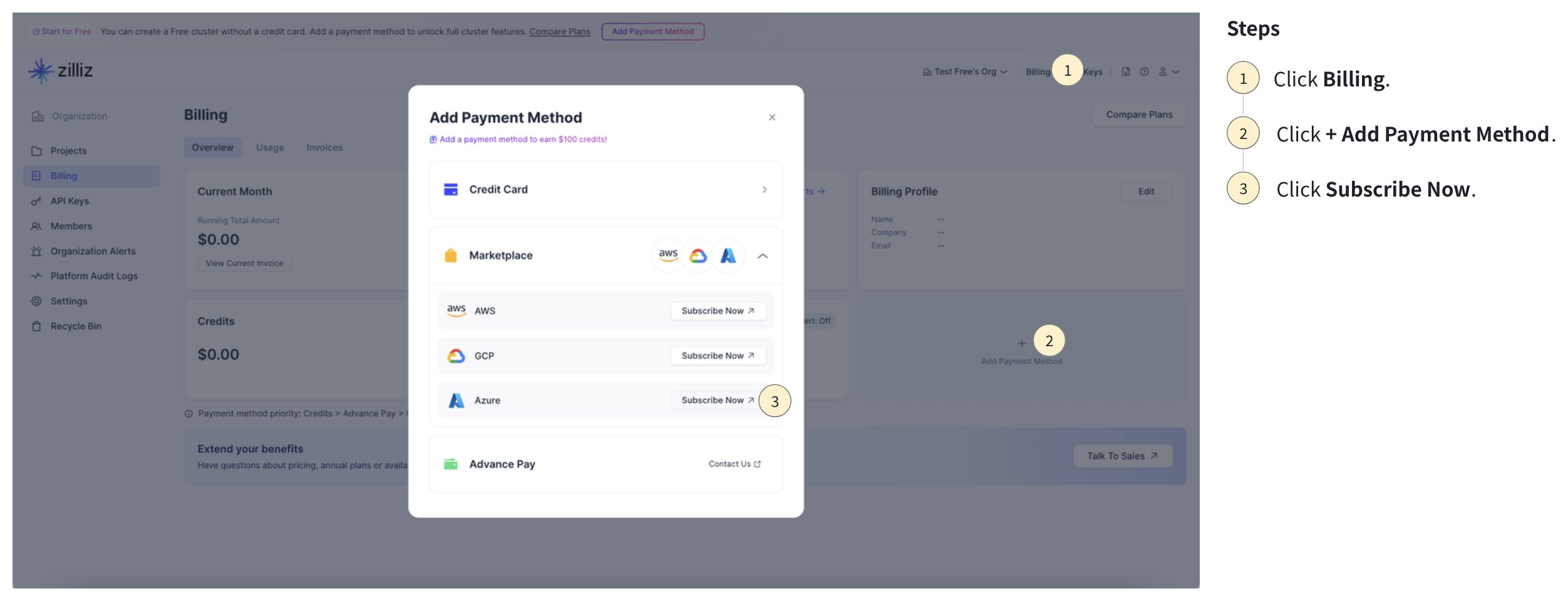
You will be redirected to AWS Marketplace. Complete your purchase there.
For details, see Subscribe on AWS Marketplace.
After you click Set up your account in AWS Marketplace, select the matching Zilliz Cloud organization.
Confirm the organization ID if needed.
Complete authorization.
-
Each Marketplace subscription can be linked to only one Zilliz Cloud organization.
-
To bind a Marketplace subscription to a Zilliz Cloud organization, you must be an Organization Owner or Organization Billing Admin in that organization.
-
The AWS user or role that completes the purchase must have permission to subscribe to AWS Marketplace products. AWS provides Marketplace managed policies such as
AWSMarketplaceManageSubscriptionsandAWSMarketplaceFullAccess.
Receive AWS invoices and view charges Separately
-
Invoices are issued through AWS, not through Zilliz Cloud.
-
AWS Billing and Cost Management shows Marketplace charges under each AWS member account.
-
If the member accounts are in AWS Organizations, the management account receives the consolidated bill and can track charges across member accounts.
-
The Zilliz Cloud spend of each business unit appears under its own AWS Marketplace subscription.
-
AWS Marketplace subscription details include the product, vendor, agreement ID, agreement status, charge summary, and purchase order details if applicable.
-
AWS-side cost allocation can follow the AWS account structure, cost allocation tags, cost categories, and purchase order model.
-
Invoice presentation still depends on your AWS account, AWS Organizations, billing, and Marketplace agreement configuration.
Check usage separately in each organization
Inside each Zilliz Cloud organization, use Zilliz Cloud usage analysis to drill down by:
-
Project
-
Cluster
-
Time range
-
Cost type
-
Region
This provides the detailed usage view that AWS billing does not show.
-
Use AWS Billing and Cost Management for billed Marketplace charges and invoices.
-
Use Zilliz Cloud Usage page for project-level and cluster-level usage inside each organization.
Reconcile AWS Billing and Zilliz Cloud Usage
Use the following components to reconcile the AWS billing view and the Zilliz Cloud usage view:
-
AWS Organizations management account ID
-
AWS member account ID
-
AWS Marketplace subscription or agreement ID
-
Zilliz Cloud organization name and organization ID
-
Zilliz Cloud project name and project ID
-
Zilliz Cloud cluster name and cluster ID
Considerations
-
If AWS-side Marketplace spend must be separated by team, use one AWS member account, one AWS Marketplace subscription, and one Zilliz Cloud organization per business unit.
-
If you only need internal usage separation, one Zilliz Cloud organization with multiple projects is simpler, but it does not separate AWS Marketplace charges.
-
Separate AWS invoice PDFs depend on the AWS account structure, AWS Organizations setup, billing configuration, and Marketplace agreement terms. They are not guaranteed by Zilliz Cloud architecture alone.
-
Commercial terms such as committed spend, private offers, purchase orders, or shared commitments across multiple Marketplace subscriptions should be confirmed with AWS Sales or Marketplace Operations.