Switchover and Failover
This feature is available only on Business Critical (SaaS) and BYOC deployments.
This feature is available in all supported AWS regions. It is also available in Google Cloud regions us-central1 and us-east4 on request. This feature is not available on Microsoft Azure.
A Zilliz Cloud global cluster supports two operations that change which region hosts the primary cluster:
-
Switchover: A planned, zero-data-loss operation that promotes a synchronized secondary cluster to primary.
-
Failover: An emergency recovery operation that promotes a secondary cluster to primary after an outage in the primary region.
This page explains when to use each operation, how to perform them, and what to expect during and after.
Overview
Switchover vs. failover
The following table compares the two operations.
Switchover | Failover | |
|---|---|---|
When to use | Planned operations: regional rotation, compliance requirements, data residency changes. | Unplanned outage or failure in the primary region. |
Trigger | Manually initiated when all primary and secondary clusters are running. | Manually initiated as a recovery action when the primary cluster becomes abnormal |
Data loss (RPO) | 0 — no data loss. Promotion occurs only after full data synchronization. | Equals the synchronization lag at the time of failover. |
Downtime (RTO) | Near zero. The global endpoint re-routes automatically. | Typically about a few minutes. |
Prerequisites |
|
|
Handling of the old primary cluster | Demoted to a secondary cluster. | Discarded and moved to the recycle bin. A new secondary is automatically created. |
Application changes | None if using the global endpoint. Routing updates automatically. For details, see Connect to Global Cluster | None if using the global endpoint. Routing updates automatically. For details, see Connect to Global Cluster |
Cluster status transitions
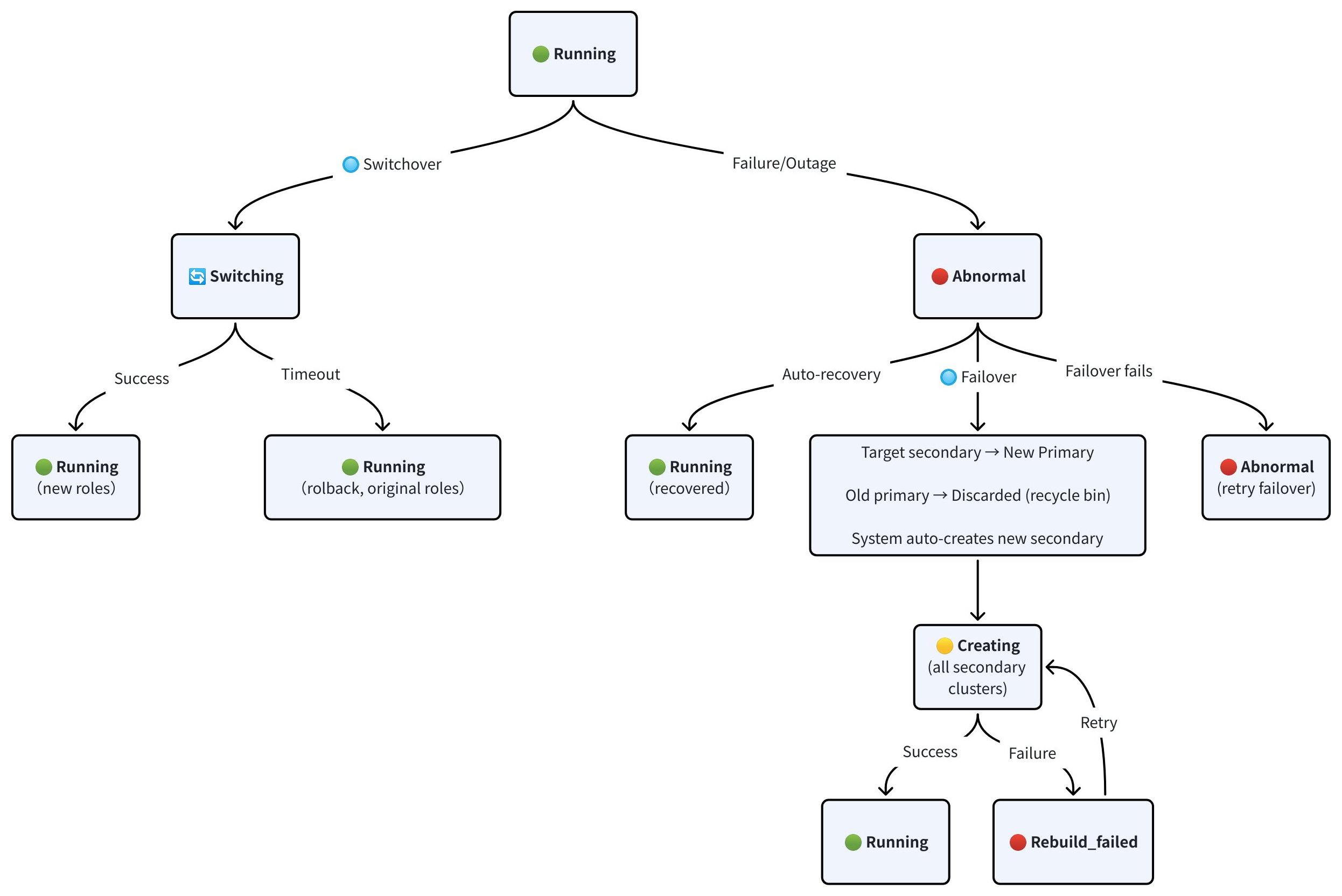
The following diagram shows how cluster statuses change during switchover, failover, and auto-recovery operations.
-
Switchover:
-
A switchover transitions the clusters from RUNNING to SWITCHING while the target secondary synchronizes with the current primary. Once synchronization completes, the target secondary is promoted to the new primary, and the original primary is demoted to a secondary. Both clusters return to RUNNING with their new roles.
-
If synchronization does not complete within the timeout period, the switchover is rolled back. Both clusters return to RUNNING with their original roles preserved.
-
-
Failover:
-
When the primary cluster enters ABNORMAL status due to a failure or outage, you can trigger a failover. The target secondary is promoted to the new primary, and the old primary is discarded and moved to the recycle bin.
-
After the failover completes, Zilliz Cloud automatically creates a new secondary cluster to restore the full topology. The new secondary and all the remaining secondary clusters start in CREATING status and transitions to RUNNING once provisioning and data sync are complete. If creation fails, the cluster enters REBUILD_FAILED status. You can retry the rebuild or contact us for assistance.
-
If the failover itself fails, the cluster remains in ABNORMAL status. You can retry the failover or contact us for assistance.
-
-
Auto-recovery:
If the primary cluster issue resolves on its own, the cluster transitions from ABNORMAL back to RUNNING without manual intervention. In this case, no failover is needed.
Perform a switchover
For planned regional rotation, you can perform a switchover to promote a secondary cluster to the primary role.
Before you start
-
All clusters in the global cluster must be in RUNNING status.
-
Synchronization lag must be ≤ 30 seconds. Switchover is rejected if the lag exceeds this threshold. Check the lag on the Global Topology tab.
-
No Query CU or Replica scaling operation is in progress.
Procedures
-
Via web console
The following demo shows how to perform a switchover.
1Navigate to the Global Cluster page.
2Click Switchover or Failover.
3Select the target secondary cluster to promote.
4Choose Switchover.
5Confirm the operation in the dialog.
Once you initiate the switchover, Zilliz Cloud waits for the target secondary to fully synchronize with the current primary, then promotes it to the new primary.
-
Via RESTful API
The following example performs a switchover so that the cluster
in01-secondarybecomes the new primary cluster. For details about the API, see Switchover Global Cluster.bashcurl --request POST \--url "${BASE_URL}/v2/globalClusters/${globalClusterId}/switchover" \--header "Authorization: Bearer ${TOKEN}" \--header "Content-Type: application/json" \-d '{"newPrimaryClusterId": "in01-secondary"}'The following is an example output.
bash{"code": 0,"data": {"globalClusterId": "glo-xxxxxxxxxxxxxxxx","oldPrimaryClusterId": "in01-primary","newPrimaryClusterId": "in01-secondary","jobId": "job-xxxxxxxxxxxxxxxx"}}
After the switchover
-
The original primary becomes a secondary cluster and begins receiving replicated data from the new primary.
-
The global endpoint routing updates automatically to direct writes to the new primary.
-
You can verify the new Global Topology view. All clusters should return to RUNNING status.
-
Reconfigure your backup policy on the new primary cluster. Backup policies do not automatically transfer to the new primary.
Perform a failover
Use a failover when the primary region experiences an outage and the primary cluster is in ABNORMAL status.
Failover is an emergency operation. Unlike a switchover, it does not wait for full data synchronization. Any writes that were committed on the primary but not yet replicated to the target secondary will be lost. The amount of data loss equals the synchronization lag at the time of failover.
Before you start
-
Confirm that the primary cluster is unreachable and in ABNORMAL status.
-
Identify which secondary cluster to promote. If multiple secondaries are available, choose the one with the lowest synchronization lag (closest to the primary's latest state).
Procedures
-
Via web console
The following demo shows how to perform a failover.
1Navigate to the Global Cluster page.
2Click Switchover or Failover.
3Select the target secondary cluster to promote.
4Choose Failover.
5Confirm the operation in the dialog.
NotesIf the failover fails, the cluster remains in ABNORMAL status. You can retry the failover operation or create a support ticket.
-
Via RESTful API
The following example performs a failover so that the cluster
in01-secondarywas promoted to the primary by force. For details about the API , see Failover Global Cluster.bashcurl --request POST \--url "https://api.cloud.zilliz.com/v2/globalClusters/glo-xxxxxxxxxxxxxxxx/failover" \--header "Authorization: Bearer ${API_KEY}" \--header "Accept: application/json" \--header "Content-Type: application/json" \--data-raw '{"newPrimaryClusterId": "in01-secondary"}'The following is an example output.
bash{"code": 0,"data": {"globalClusterId": "glo-xxxxxxxxxxxxxxxx","oldPrimaryClusterId": "in01-primary","newPrimaryClusterId": "in01-secondary","jobId": "job-xxxxxxxxxxxxxxxx"}}
After the failover
-
The original primary is discarded and moved to the recycle bin. It no longer appears in the Global Topology view.
-
A new secondary cluster is automatically created to restore the full global topology. While the new secondary is being provisioned, it is invisible from the global topology. Instead, a banner appears on the global cluster page: "A new secondary cluster will be created and become available shortly."
-
The remaining secondary clusters also transition to the CREATING status for rebuild and becomes RUNNING once the rebuild completes.
-
The global endpoint updates to direct writes to the new primary.
-
Reconfigure your backup policy on the new primary cluster. Backup policies do not automatically transfer to the new primary.
Routing behavior
The following table summarizes how the global endpoint and public endpoints behave during and after each operation.
Endpoint type | During switchover | During failover | After completion |
|---|---|---|---|
Global endpoint |
|
|
|
Public endpoint |
|
|
|
Impact on in-progress tasks
The following table summarizes how in-progress tasks are handled during switchover and failover.
| Task | During switchover | During failover |
|---|---|---|
| Backup | Task fails. Automatically retried on the new primary after the switchover completes. | Task fails. Automatically retried on the new primary after the failover completes. |
| Query CU scaling | Switchover is blocked while scaling is in progress. | Task fails. Retried after failover completes. |
| Replica scaling | Switchover is blocked while scaling is in progress. | Task fails. Retried after failover completes. |