Zilliz Claude Code Plugin Setup
This guide explains how to install and set up the Zilliz Plugin in Claude Code.
Prerequisites
- You have already installed Claude Code.
Setup Procedure
Run Claude Code
> claude
Open the plugin marketplace
/plugins
Find the Zilliz Plugin
Go to the Discover tab and search for zilliz
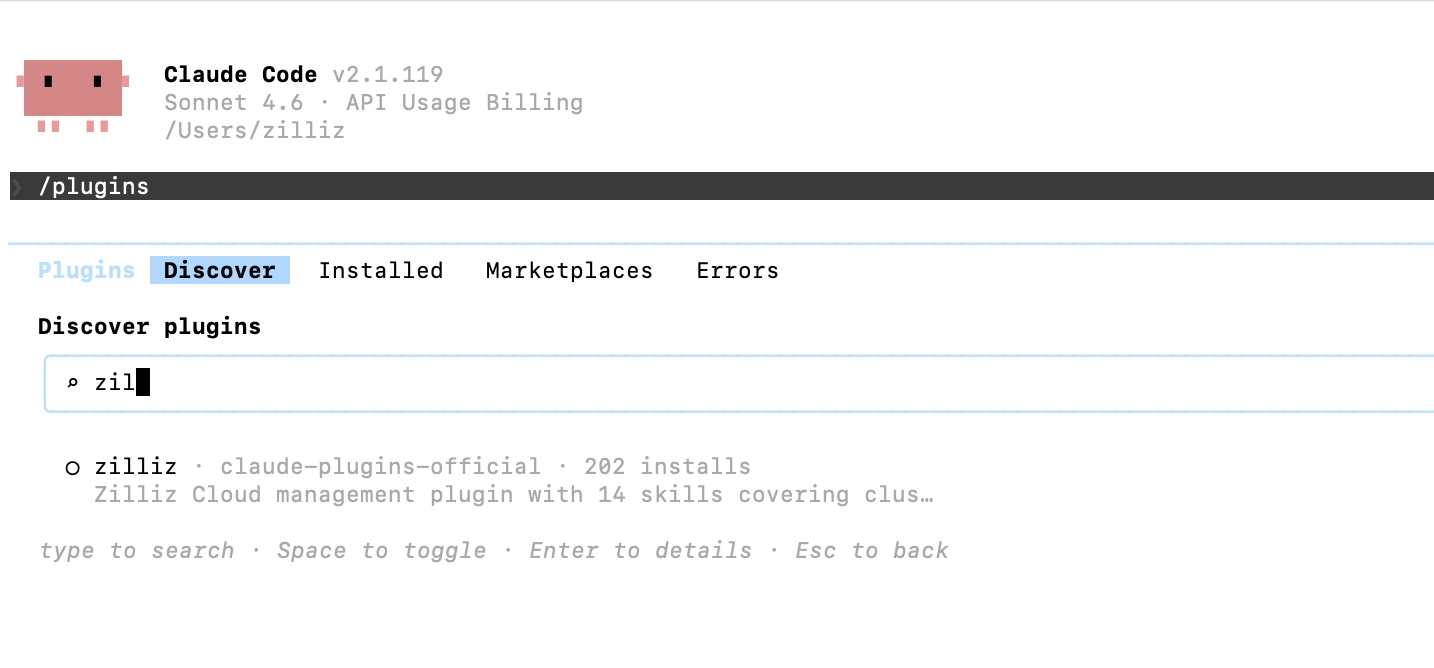
Install the plugin
Select the zilliz plugin from the marketplace to install it.
If your environment does not support marketplace discovery, you may still be able to install the plugin by adding the Zilliz plugin marketplace manually.
Install by adding Zilliz Cloud plugin marketplace
-
Run Claude Code
> claude -
Add the Zilliz Plugin marketplace.
/plugin marketplace add zilliztech/zilliz-plugin -
Install the plugin
/plugin install zilliz@zilliztech/zilliz-plugin
Initial Setup
After installation, run the quickstart wizard:
/zilliz:setup
The wizard will guide you through:
Install Zilliz CLI.
The plugin requires the Zilliz CLI. If not installed, run:
- macOS / Linux
- Windows
curl -fsSL https://zilliz.com/cli/install.sh | bash
irm https://zilliz.com/cli/install.ps1 | iex
Verify installation:
zilliz --version
Authenticate.
Authenticate with your Zilliz Cloud account:
zilliz auth login
This opens a browser for authentication. After login, your credentials are stored locally.
Connect to your cluster.
Configure your default cluster connection:
zilliz context set --cluster-id <your-cluster-id>
Or let the plugin help you select from available clusters.
Verification
Test the plugin with a simple command:
You: "List my clusters"
The plugin should display your Zilliz Cloud clusters.
Troubleshooting
-
Plugin shows "CLI not found"
Solution: Install the Zilliz CLI:
- macOS / Linux
- Windows
curl -fsSL https://zilliz.com/cli/install.sh | bashirm https://zilliz.com/cli/install.ps1 | iex -
Authentication fails
Solution:
-
Check your internet connection
-
Verify your Zilliz Cloud account is active
-
Try logging out and back in:
zilliz logoutzilliz login -
-
"No cluster configured"
Solution: Set a default cluster:
zilliz context set --cluster-id <cluster-id>