グローバルクラスターに接続する
この機能は、Business Critical(SaaS)および BYOC デプロイでのみ利用できます。
この機能は、すべての AWS リージョン、および次の Google Cloud リージョンで利用できます:gcp-us-central1 および gcp-us-east4。Microsoft Azure では利用できません。
グローバルクラスターが稼働したら、エンドポイントと認証トークンを使用して接続します。このページでは、2 種類のエンドポイント、それぞれの使用場面、およびスイッチオーバーとフェイルオーバー時のルーティングの動作について説明します。
エンドポイントタイプを選択する
グローバルクラスターには、次の 2 つの接続方法があります:
-
グローバルエンドポイント経由
-
グローバルクラスター内のプライマリクラスターまたはセカンダリクラスターの パブリックまたはプライベートエンドポイント経由
次の表で、2 つの接続エンドポイントを比較します。
| グローバルエンドポイント | プライマリまたはセカンダリクラスターのエンドポイント | |
|---|---|---|
| 書き込みルーティング | プライマリクラスターに自動的にルーティングされます | プライマリのパブリックエンドポイントのみが書き込みを受け付けます |
| 読み取りルーティング | プライマリクラスターにルーティングされます (レイテンシに基づいて、利用可能な最も近いクラスターへのインテリジェントルーティングが近日中にサポートされる予定です。) | 接続先の特定のクラスターに読み取りがルーティングされます |
| スイッチオーバー / フェイルオーバー | 自動的に再ルーティングされます — コードの変更は不要です | 新しいプライマリを指すように接続を更新する必要があります |
| Private Link | サポートされていません(パブリックインターネットが必要です) | サポートされています。 |
| 最適な用途 | 自動フェイルオーバーとレイテンシに基づくルーティングを必要とする本番アプリケーション | 特定のクラスターへの直接アクセス(例:環境のレプリケーション、テスト、デバッグ) |
本番ワークロードにはグローバルエンドポイントの使用をお勧めします。これにより、スイッチオーバーやフェイルオーバー時にアプリケーションコードでエンドポイントの変更を処理する必要がなくなります。
エンドポイントとトークンを取得する
グローバルクラスターまたはターゲットクラスターに移動します:
-
グローバルエンドポイントの場合:Global Cluster ページに移動します。
-
パブリックエンドポイントの場合:特定のプライマリクラスターまたはセカンダリクラスターの Cluster Details ページに移動します。
Connect カードで、Global Endpoint または Public Endpoint をコピーします。
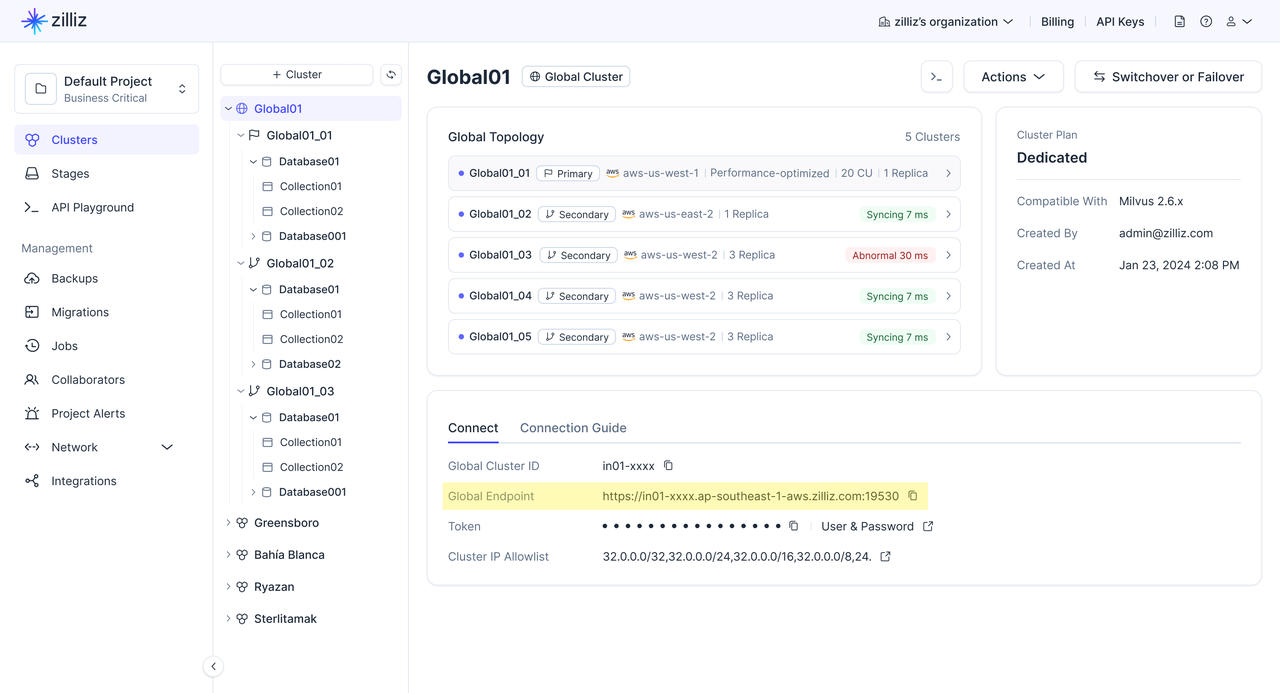
グローバルエンドポイントを使用して接続する
グローバルエンドポイントは、常にグローバルクラスター内の現在のプライマリクラスターにリクエストをルーティングする単一の URL です。
スイッチオーバーまたはフェイルオーバーが発生すると、Zilliz Cloud はグローバルエンドポイントを自動的に更新し、新しいプライマリクラスターを指すようにします。これにより、クラスター URI を手動で変更することなく、アプリケーションは同じエンドポイントを引き続き使用できます。
Zilliz Cloud は、SDK と RESTful API の両方を通じてグローバルエンドポイントへの接続をサポートしています。本番アプリケーションでは、SDK クライアントの使用をお勧めします。
RESTful API 接続よりも SDK 接続が推奨されるのはなぜですか?
SDK クライアントは、エンドポイントリスト、プライマリとセカンダリのロール、クラスターのヘルスなど、グローバルクラスターのトポロジーを取得できます。この情報を利用して、SDK クライアントはプライマリクラスターが変更されたときに迅速に対応できます。SDK クライアントは今後、read/write 分割もサポートする予定で、書き込みリクエストはプライマリクラスターにルーティングされ、対象となる読み取りリクエストはグローバルクラスターのトポロジーに基づいてルーティングされます。
ただし、RESTful API 接続はグローバルクラスターのトポロジー情報を保持しません。その結果、スイッチオーバーまたはフェイルオーバー後に、RESTful API 接続が新しいプライマリクラスターへ切り替わるまでに時間がかかる場合があります。同じ理由で、RESTful API 接続は read/write 分割をサポートできません。
次の表で、SDK 接続と RESTful API 接続を比較します。
| 項目 | SDK 接続 | RESTful API 接続 |
|---|---|---|
| 最適な用途 | ロール変更時の迅速な復旧と将来の read/write 分割を必要とする本番アプリケーション。 | 軽量なスクリプト、シンプルな REST 統合、および単発の管理操作。 |
| トポロジーの認識 | エンドポイントリスト、プライマリとセカンダリのロール、クラスターのヘルスなど、グローバルクラスターのトポロジーを取得します。 | グローバルクラスターのトポロジー情報を保持しません。 |
| プライマリ変更時の処理 | スイッチオーバーまたはフェイルオーバー後にプライマリクラスターが変更されたとき、通常は数秒以内に迅速に対応できます。 | クライアントがトポロジー情報を保持しないため、新しいプライマリへの切り替えに通常は数分かかる場合があります。 |
| read/write 分割 | 近日中にサポートされる予定です。 | サポートされていません |
SDK バージョンを確認する
開始する前に、SDK を インストール 済みであること、および SDK が最小バージョン要件を満たしていることを確認してください。
| SDK | 最小バージョン |
|---|---|
| Python | 2.6.9 |
| Java | 2.6.14 |
接続ガイド
- Python
- Java
- Go
- Rust
- C++
- NodeJS
- cURL
from pymilvus import MilvusClient

# Use the global endpoint for automatic routing
client = MilvusClient(
    uri="YOUR_GLOBAL_ENDPOINT",  # Global endpoint from the console
    token="YOUR_CLUSTER_TOKEN"   # API key or username:password
)
import io.milvus.v2.client.MilvusClientV2;
import io.milvus.v2.client.ConnectConfig;

// Use the global endpoint for automatic routing
ConnectConfig connectConfig = ConnectConfig.builder()
    .uri("YOUR_GLOBAL_ENDPOINT")  // Global endpoint from the console
    .token("YOUR_CLUSTER_TOKEN")  // API key or username:password
    .build();

MilvusClientV2 client = new MilvusClientV2(connectConfig);
import (
    "context"
    "log"

    "github.com/milvus-io/milvus/client/v3/milvusclient"
)

// Use the global endpoint for automatic routing
client, err := milvusclient.New(context.Background(), &milvusclient.ClientConfig{
    Address: "YOUR_GLOBAL_ENDPOINT", // Global endpoint from the console
    APIKey:  "YOUR_CLUSTER_TOKEN",   // API key or username:password
})
if err != nil {
    log.Fatal(err)
}
use milvus::v2::error::Result;
use milvus::v2::prelude::*;

#[tokio::main]
async fn main() -> Result<()> {
    // Use the global endpoint for automatic routing
    let config = ConnectConfig::new().uri("YOUR_GLOBAL_ENDPOINT").token("YOUR_CLUSTER_TOKEN");
    let client = ClientV2::new(&config).await?;
    Ok(())
}
#include "milvus/MilvusClientV2.h"
#include <iostream>

// Use the global endpoint for automatic routing
auto client = milvus::MilvusClientV2::Create();
auto status = client->Connect(milvus::ConnectParam("YOUR_GLOBAL_ENDPOINT").WithToken("YOUR_CLUSTER_TOKEN"));
if (!status.IsOk()) {
    std::cout << status.Message() << std::endl;
}
const { MilvusClient } = require("@zilliz/milvus2-sdk-node");

// Use the global endpoint for automatic routing
const client = new MilvusClient({
    address: "YOUR_GLOBAL_ENDPOINT",  // Global endpoint from the console
    token: "YOUR_CLUSTER_TOKEN"  // API key or username:password
});
curl --request POST \
  --url "${CLUSTER_ENDPOINT}/v2/vectordb/collections/list" \
  --header "Authorization: Bearer ${TOKEN}" \
  --header "Content-Type: application/json" \
  -d '{}'
パブリックエンドポイントを使用して接続する
グローバルクラスター内の各クラスターには、独自のパブリックエンドポイントがあります。特定のクラスターを直接ターゲットにする必要がある場合に使用します。
- Python
- Java
- Go
- Rust
- C++
- NodeJS
- cURL
from pymilvus import MilvusClient

# Connect directly to a specific cluster
client = MilvusClient(
    uri="YOUR_CLUSTER_PUBLIC_ENDPOINT",  # Public endpoint of a specific cluster
    token="YOUR_CLUSTER_TOKEN" # API key or username:password
)
import io.milvus.v2.client.MilvusClientV2;
import io.milvus.v2.client.ConnectConfig;

// Connect directly to a specific cluster
ConnectConfig connectConfig = ConnectConfig.builder()
    .uri("YOUR_CLUSTER_PUBLIC_ENDPOINT")  // Public endpoint of a specific cluster
    .token("YOUR_CLUSTER_TOKEN")  // API key or username:password
    .build();

MilvusClientV2 client = new MilvusClientV2(connectConfig);
import (
    "context"
    "log"

    "github.com/milvus-io/milvus/client/v3/milvusclient"
)

// Connect directly to a specific cluster
client, err := milvusclient.New(context.Background(), &milvusclient.ClientConfig{
    Address: "YOUR_CLUSTER_PUBLIC_ENDPOINT", // Public endpoint of a specific cluster
    APIKey:  "YOUR_CLUSTER_TOKEN",           // API key or username:password
})
if err != nil {
    log.Fatal(err)
}
use milvus::v2::error::Result;
use milvus::v2::prelude::*;

#[tokio::main]
async fn main() -> Result<()> {
    // Connect directly to a specific cluster
    let config = ConnectConfig::new().uri("YOUR_CLUSTER_PUBLIC_ENDPOINT").token("YOUR_CLUSTER_TOKEN");
    let client = ClientV2::new(&config).await?;
    Ok(())
}
#include "milvus/MilvusClientV2.h"
#include <iostream>

// Connect directly to a specific cluster
auto client = milvus::MilvusClientV2::Create();
auto status = client->Connect(milvus::ConnectParam("YOUR_CLUSTER_PUBLIC_ENDPOINT").WithToken("YOUR_CLUSTER_TOKEN"));
if (!status.IsOk()) {
    std::cout << status.Message() << std::endl;
}
const { MilvusClient } = require("@zilliz/milvus2-sdk-node")

// Connect directly to a specific cluster
const client = new MilvusClient({
    address: "YOUR_CLUSTER_PUBLIC_ENDPOINT",  // Public endpoint of a specific cluster
    token: "YOUR_CLUSTER_TOKEN"  // API key or username:password
})
curl --request POST \
  --url "${CLUSTER_ENDPOINT}/v2/vectordb/collections/list" \
  --header "Authorization: Bearer ${TOKEN}" \
  --header "Content-Type: application/json" \
  -d '{}'
パブリックエンドポイントを使用する場合、書き込み操作を受け付けるのはプライマリクラスターのパブリックエンドポイントのみです。セカンダリクラスターのパブリックエンドポイントに書き込むと失敗します。
ルーティングの動作
通常運用時
| リクエストタイプ | グローバルエンドポイント | パブリックエンドポイント |
|---|---|---|
| 書き込み(insert、upsert、delete) | プライマリクラスターにルーティングされます | プライマリクラスターのエンドポイントでのみ受け付けられます |
| 読み取り(search、query) | プライマリクラスターにルーティングされます (レイテンシに基づいて、利用可能な最も近いクラスターへのインテリジェントルーティングが近日中にサポートされる予定です。) | 接続先の特定のクラスターによって処理されます |
スイッチオーバー / フェイルオーバー中およびその後
| シナリオ | グローバルエンドポイント | パブリックエンドポイント |
|---|---|---|
| スイッチオーバー進行中 | 書き込みは一時的に停止し、その後新しいプライマリで再開します。読み取りは継続します。 | エンドポイントに変更はありません。以前のプライマリはセカンダリになります。 |
| フェイルオーバー進行中 | 新しいプライマリが昇格するまで書き込みは利用できません。読み取りはセカンダリで継続します。 | 以前のプライマリのエンドポイントに到達できなくなります。 |
| 完了後 | 新しいプライマリに自動的にルーティングされます。コードの変更は不要です。 | 書き込みには新しいプライマリのパブリックエンドポイントを使用するようにコードを更新します。 |
SDK の自動再接続
グローバルエンドポイントを使用する場合、Zilliz Cloud SDK はスイッチオーバーとフェイルオーバー時のエンドポイント再ルーティングを処理します。アプリケーションは、ルーティング変更自体に対する再試行ロジックを実装する必要はありません。ただし、切り替えの瞬間に実行中だった書き込みでは一時的なエラーが発生する可能性があります — アプリケーションの標準的な再試行ロジックがこれらのケースを処理します。