整合性レベル
分散ベクトルデータベースとして、Zilliz Cloud は読み取りおよび書き込み操作中に各ノードまたはレプリカが同じデータにアクセスできるようにするため、複数の整合性レベルを提供します。現在、サポートされている整合性レベルには Strong、Bounded、Eventually、Session があり、デフォルトで使用される整合性レベルは Bounded です。
概要
Zilliz Cloud は、ストレージと計算を分離したシステムです。このシステムでは、DataNodes がデータの永続化を担い、最終的に MinIO/S3. などの分散オブジェクトストレージに保存します。QueryNodes は Search などの計算タスクを処理します。これらのタスクでは、バッチデータ と ストリーミングデータ の両方を処理します。簡単に言うと、バッチデータはオブジェクトストレージにすでに保存されているデータとして理解でき、ストリーミングデータはまだオブジェクトストレージに保存されていないデータを指します。ネットワーク遅延のため、QueryNodes は最新のストリーミングデータを保持していないことがよくあります。追加の保護対策がない場合、ストリーミングデータに対して Search を直接実行すると、未コミットのデータポイントが多数失われ、検索結果の精度に影響する可能性があります。
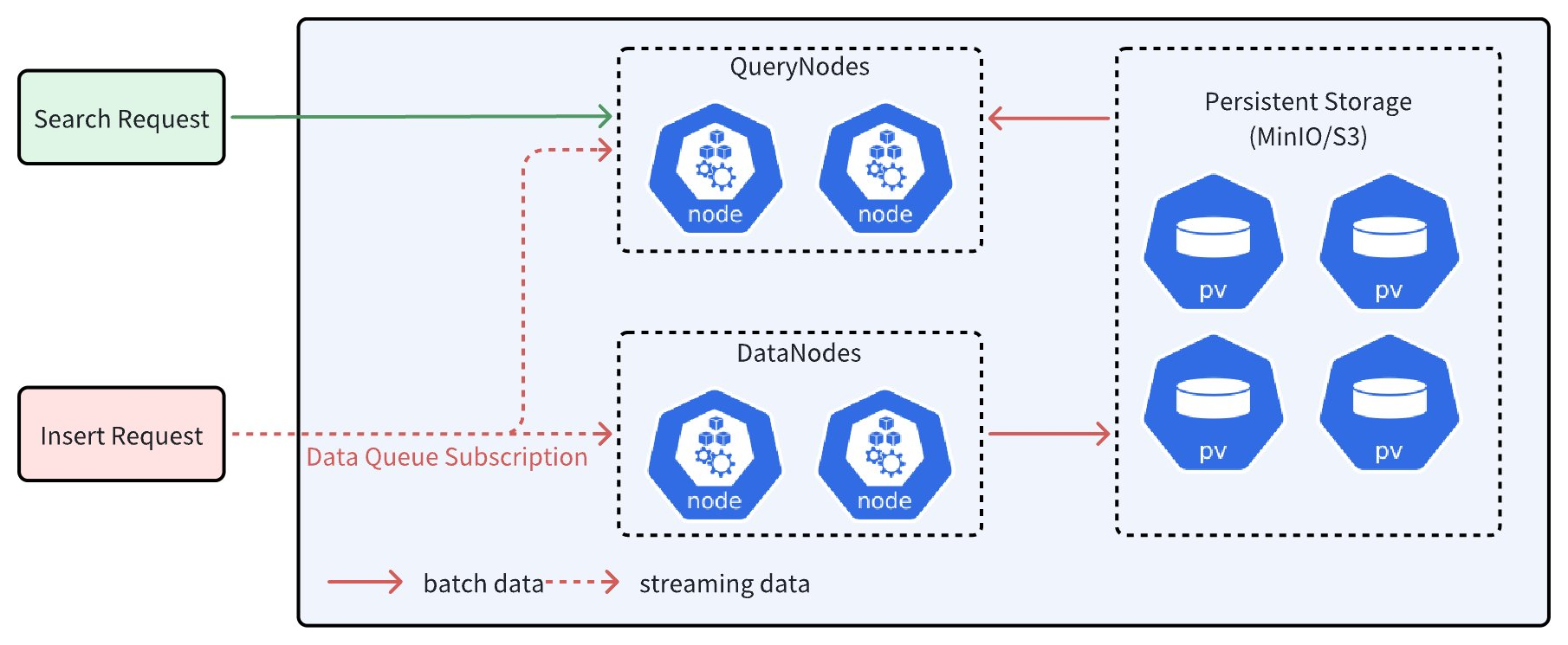
上図に示すように、QueryNodes は Search リクエストを受信すると、ストリーミングデータとバッチデータの両方を同時に受け取ることができます。ただし、ネットワーク遅延のため、QueryNodes が取得するストリーミングデータは不完全な場合があります。
この問題に対処するため、Zilliz Cloud はデータキュー内の各レコードにタイムスタンプを付与し、同期タイムスタンプをデータキューに継続的に挿入します。同期タイムスタンプ(syncTs)を受信するたびに、QueryNodes はそれを ServiceTime として設定します。これは、QueryNodes がその ServiceTime より前のすべてのデータを参照できることを意味します。ServiceTime に基づいて、Zilliz Cloud は、整合性と可用性に関するさまざまなユーザー要件を満たす保証タイムスタンプ(GuaranteeTs)を提供できます。ユーザーは、Search リクエストで GuaranteeTs を指定することにより、指定した時点より前のデータを検索範囲に含める必要があることを QueryNodes に伝えることができます。
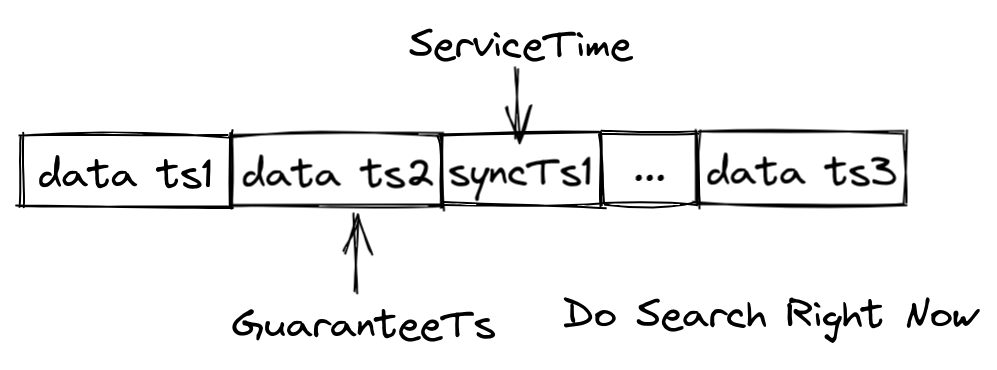
上図に示すように、GuaranteeTs が ServiceTime より小さい場合、指定した時点より前のすべてのデータがディスクに完全に書き込まれていることを意味し、QueryNodes は Search 操作をただちに実行できます。GuaranteeTs が ServiceTime より大きい場合、QueryNodes は ServiceTime が GuaranteeTs を超えるまで待機してから Search 操作を実行する必要があります。
ユーザーは、クエリの精度とクエリのレイテンシーの間でトレードオフを行う必要があります。整合性の要件が高く、クエリのレイテンシーに敏感でない場合は、GuaranteeTs をできるだけ大きな値に設定できます。検索結果をすばやく取得したい場合や、クエリの精度に対してより寛容な場合は、GuaranteeTs をより小さな値に設定できます。
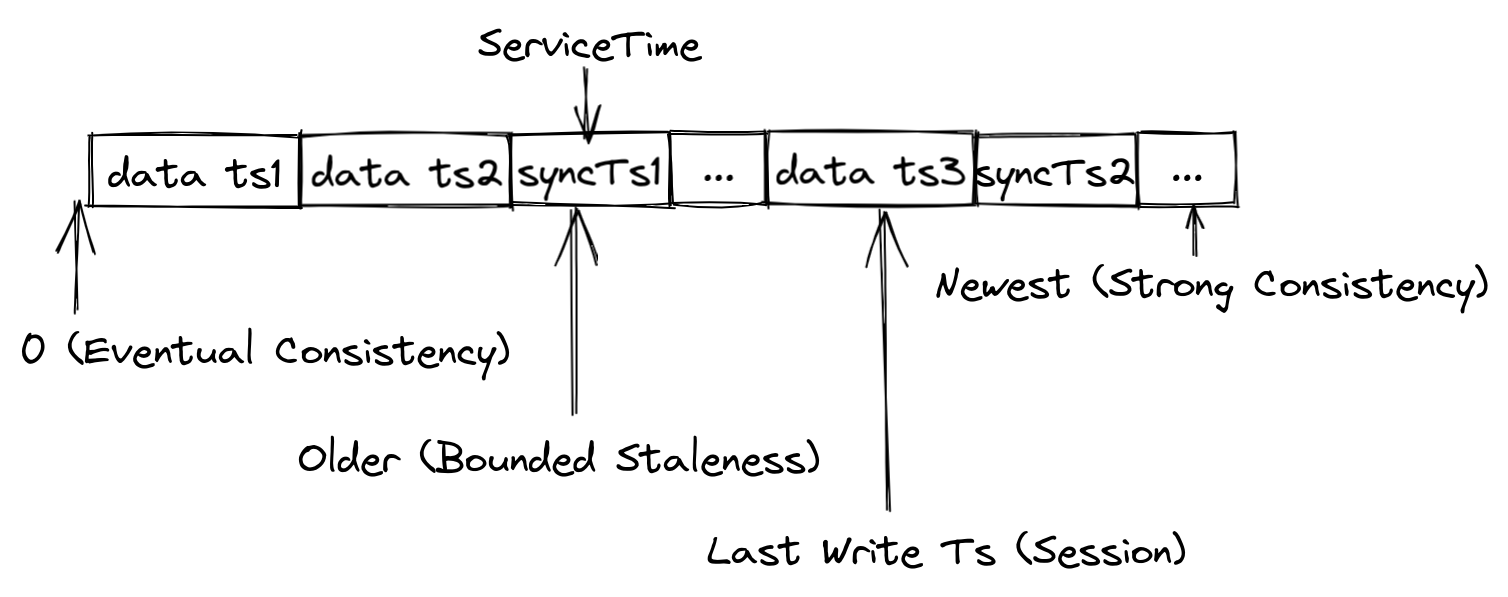
Zilliz Cloud は、GuaranteeTs が異なる 4 種類の整合性レベルを提供します。
-
Strong
最新のタイムスタンプを GuaranteeTs として使用し、QueryNodes は ServiceTime が GuaranteeTs を満たすまで待機してから Search リクエストを実行する必要があります。
-
Eventual
整合性チェックを回避するために、GuaranteeTs は 1 などの極めて小さな値に設定され、QueryNodes はすべてのバッチデータに対して Search リクエストをただちに実行できます。
-
Bounded Staleness
GuaranteeTs は最新のタイムスタンプより前の時点に設定され、QueryNodes が一定のデータ損失を許容して検索を実行できるようにします。
-
Session
クライアントがデータを挿入した最新の時点を GuaranteeTs として使用し、QueryNodes がクライアントによって挿入されたすべてのデータに対して検索を実行できるようにします。
Zilliz Cloud は、デフォルトの整合性レベルとして Bounded Staleness を使用します。GuaranteeTs を指定しない場合、最新の ServiceTime が GuaranteeTs として使用されます。
整合性レベルの設定
コレクションを作成するとき、および検索やクエリを実行するときに、異なる整合性レベルを設定できます。検索またはクエリで整合性レベルを指定しない場合、コレクション作成時に指定した整合性レベルが適用されます。
コレクション作成時に整合性レベルを設定する
コレクションを作成するときに、そのコレクション内での検索およびクエリの整合性レベルを設定できます。以下のコード例では、整合性レベルを Bounded に設定しています。
- Python
- Java
- Go
- Rust
- C++
- NodeJS
- CSharp
- cURL
from pymilvus import MilvusClient, DataType

client = MilvusClient(
    uri="YOUR_CLUSTER_ENDPOINT",
    token="YOUR_CLUSTER_TOKEN"
)

schema = client.create_schema(
    auto_id=False,
    enable_dynamic_field=False,
)

schema.add_field(field_name="id", datatype=DataType.INT64, is_primary=True)
schema.add_field(field_name="vector", datatype=DataType.FLOAT_VECTOR, dim=5)
schema.add_field(field_name="color", datatype=DataType.VARCHAR, max_length=512)

index_params = client.prepare_index_params()
index_params.add_index(
    field_name="vector",
    index_type="AUTOINDEX",
    metric_type="COSINE"
)

client.create_collection(
    collection_name="my_collection",
    schema=schema,
    index_params=index_params,
    consistency_level="Bounded",
)
import io.milvus.v2.client.ConnectConfig;
import io.milvus.v2.client.MilvusClientV2;
import io.milvus.v2.common.ConsistencyLevel;
import io.milvus.v2.common.DataType;
import io.milvus.v2.common.IndexParam;
import io.milvus.v2.service.collection.request.AddFieldReq;
import io.milvus.v2.service.collection.request.CreateCollectionReq;
import java.util.Arrays;
import java.util.List;
import io.milvus.v2.service.vector.request.SearchReq;
import io.milvus.v2.service.vector.request.data.FloatVec;
import io.milvus.v2.service.vector.response.SearchResp;
import java.util.Collections;
import io.milvus.v2.service.vector.request.QueryReq;
import io.milvus.v2.service.vector.response.QueryResp;

String CLUSTER_ENDPOINT = "YOUR_CLUSTER_ENDPOINT";
String TOKEN = "YOUR_CLUSTER_TOKEN";

ConnectConfig connectConfig = ConnectConfig.builder()
    .uri(CLUSTER_ENDPOINT)
    .token(TOKEN)
    .build();

MilvusClientV2 client = new MilvusClientV2(connectConfig);

CreateCollectionReq.CollectionSchema schema = CreateCollectionReq.CollectionSchema.builder().build();
schema.addField(AddFieldReq.builder()
        .fieldName("id")
        .dataType(DataType.Int64)
        .isPrimaryKey(true)
        .autoID(false)
        .build());
schema.addField(AddFieldReq.builder()
        .fieldName("vector")
        .dataType(DataType.FloatVector)
        .dimension(5)
        .build());
schema.addField(AddFieldReq.builder()
        .fieldName("color")
        .dataType(DataType.VarChar)
        .maxLength(512)
        .build());

IndexParam indexParam = IndexParam.builder()
        .fieldName("vector")
        .indexType(IndexParam.IndexType.AUTOINDEX)
        .metricType(IndexParam.MetricType.COSINE)
        .build();

CreateCollectionReq createCollectionReq = CreateCollectionReq.builder()
        .collectionName("my_collection")
        .collectionSchema(schema)
        .indexParams(Arrays.asList(indexParam))
        .consistencyLevel(ConsistencyLevel.BOUNDED)
        .build();

client.createCollection(createCollectionReq);
import (
    "context"
    "fmt"

    "github.com/milvus-io/milvus/client/v3/entity"
    "github.com/milvus-io/milvus/client/v3/index"
    "github.com/milvus-io/milvus/client/v3/milvusclient"
)

ctx, cancel := context.WithCancel(context.Background())
defer cancel()

milvusAddr := "YOUR_CLUSTER_ENDPOINT"
token := "YOUR_CLUSTER_TOKEN"

client, err := milvusclient.New(ctx, &milvusclient.ClientConfig{
    Address: milvusAddr,
    APIKey:  token,
})
if err != nil {
    fmt.Println(err.Error())
    // handle error
}
defer client.Close(ctx)

schema := entity.NewSchema().
    WithField(entity.NewField().WithName("id").WithDataType(entity.FieldTypeInt64).WithIsPrimaryKey(true).WithIsAutoID(false)).
    WithField(entity.NewField().WithName("vector").WithDataType(entity.FieldTypeFloatVector).WithDim(5)).
    WithField(entity.NewField().WithName("color").WithDataType(entity.FieldTypeVarChar).WithMaxLength(512))

indexOptions := []milvusclient.CreateIndexOption{
    milvusclient.NewCreateIndexOption("my_collection", "vector", index.NewAutoIndex(entity.COSINE)),
}

err = client.CreateCollection(ctx,
    milvusclient.NewCreateCollectionOption("my_collection", schema).
        WithIndexOptions(indexOptions...).
        WithConsistencyLevel(entity.ClBounded))
if err != nil {
    fmt.Println(err.Error())
    // handle error
}
use milvus::v2::prelude::*;

let config = ConnectConfig::new()
    .uri("YOUR_CLUSTER_ENDPOINT")
    .token("YOUR_CLUSTER_TOKEN");
let client = ClientV2::new(&config).await?;

let schema = CollectionSchema::new()
    .add_field(
        FieldSchema::new()
            .name("id")
            .data_type(DataType::Int64)
            .primary_key(true),
    )
    .add_field(
        FieldSchema::new()
            .name("vector")
            .data_type(DataType::FloatVector)
            .dimension(5),
    )
    .add_field(
        FieldSchema::new()
            .name("color")
            .data_type(DataType::VarChar)
            .max_length(512),
    );

client.create_collection(
    CreateCollectionRequest::builder()
        .collection_name("my_collection")
        .schema(schema)
        .index_param(
            IndexParam::new()
                .field_name("vector")
                .index_type(IndexType::AutoIndex)
                .metric_type(MetricType::Cosine),
        )
        .consistency_level(ConsistencyLevel::Bounded)
        .build()?,
)
.await?;
#include <iostream>
#include "milvus/MilvusClientV2.h"

auto client = milvus::MilvusClientV2::Create();

milvus::ConnectParam connect_param{"YOUR_CLUSTER_ENDPOINT", "YOUR_CLUSTER_TOKEN"};
auto status = client->Connect(connect_param);
if (!status.IsOk()) {
    std::cout << status.Message() << std::endl;
}

milvus::CollectionSchemaPtr collection_schema = std::make_shared<milvus::CollectionSchema>();
collection_schema->AddField(milvus::FieldSchema("id", milvus::DataType::INT64, "", true, false));
collection_schema->AddField(milvus::FieldSchema("vector", milvus::DataType::FLOAT_VECTOR, "").WithDimension(5));
collection_schema->AddField(milvus::FieldSchema("color", milvus::DataType::VARCHAR, "").WithMaxLength(512));

milvus::IndexParam index_vector{"vector", "vector_index", milvus::IndexType::AUTOINDEX, milvus::MetricType::COSINE};

status = client->CreateCollection(
    milvus::CreateCollectionRequest()
        .WithCollectionName("my_collection")
        .WithCollectionSchema(collection_schema)
        .AddIndexParam(std::move(index_vector))
        .WithConsistencyLevel(milvus::ConsistencyLevel::BOUNDED));
if (!status.IsOk()) {
    std::cout << status.Message() << std::endl;
}
import { MilvusClient, DataType } from "@zilliz/milvus2-sdk-node";

const address = "YOUR_CLUSTER_ENDPOINT";
const token = "YOUR_CLUSTER_TOKEN";
const client = new MilvusClient({address, token});

const fields = [
    {
        name: "id",
        data_type: DataType.Int64,
        is_primary_key: true,
        autoID: false
    },
    {
        name: "vector",
        data_type: DataType.FloatVector,
        dim: 5
    },
    {
        name: "color",
        data_type: DataType.VarChar,
        max_length: 512
    }
];

const index_params = [
    {
        field_name: "vector",
        index_type: "AUTOINDEX",
        metric_type: "COSINE"
    }
];

await client.createCollection({
    collection_name: "my_collection",
    fields,
    index_params,
    consistency_level: "Bounded",
});
using Milvus.Client.V2;
using Milvus.Client.V2.Requests.Collection;
using Milvus.Client.V2.Types;
using Milvus.Client.V2.Requests.Dql;
using Milvus.Client.V2.Responses.Dql;

var config = new ConnectConfig
{
    Uri = "YOUR_CLUSTER_ENDPOINT",
    Username = "root",
    Password = "Milvus"
};
using var client = new MilvusClientV2(config);
await client.ConnectAsync();

var schema = new CollectionSchema
{
    Fields =
    {
        new FieldSchema("id", DataType.Int64, isPrimaryKey: true),
        FieldSchema.CreateFloatVector("vector", dimension: 5),
        FieldSchema.CreateVarchar("color", maxLength: 512)
    }
};

var indexParam = new IndexParam("vector", null, IndexType.AutoIndex, MetricType.Cosine);

await client.CreateCollectionAsync(new CreateCollectionReq
{
    CollectionName = "my_collection",
    Schema = schema,
    Indexes = new[] { indexParam },
    ConsistencyLevel = ConsistencyLevel.Bounded
});
export CLUSTER_ENDPOINT="YOUR_CLUSTER_ENDPOINT"
export TOKEN="YOUR_CLUSTER_TOKEN"

export schema='{
    "autoId": false,
    "enableDynamicField": false,
    "fields": [
        {
            "fieldName": "id",
            "dataType": "Int64",
            "isPrimary": true
        },
        {
            "fieldName": "vector",
            "dataType": "FloatVector",
            "elementTypeParams": {
                "dim": "5"
            }
        },
        {
            "fieldName": "color",
            "dataType": "VarChar",
            "elementTypeParams": {
                "max_length": 512
            }
        }
    ]
}'

export indexParams='[
        {
            "fieldName": "vector",
            "metricType": "COSINE",
            "indexName": "vector",
            "indexType": "AUTOINDEX"
        }
    ]'

export params='{
    "consistencyLevel": "Bounded"
}'

curl --request POST \
--url "${CLUSTER_ENDPOINT}/v2/vectordb/collections/create" \
--header "Authorization: Bearer ${TOKEN}" \
--header "Content-Type: application/json" \
-d "{
    \"collectionName\": \"my_collection\",
    \"schema\": $schema,
    \"indexParams\": $indexParams,
    \"params\": $params
}"
consistency_level パラメーターに指定できる値は、Strong、Bounded、Eventually、Session です。
Search で整合性レベルを設定する
特定の検索について、整合性レベルはいつでも変更できます。以下のコード例では、整合性レベルを Bounded に戻しています。変更は現在の Search リクエストにのみ適用されます。
- Python
- Java
- Go
- Rust
- C++
- NodeJS
- CSharp
- cURL
query_vector = [0.3580376395471989, -0.6023495712049978, 0.18414012509913835, -0.26286205330961354, 0.9029438446296592]

res = client.search(
    collection_name="my_collection",
    data=[query_vector],
    limit=3,
    consistency_level="Bounded",
    # highlight-next
)
List<Float> queryVector = Arrays.asList(0.3580376395471989f, -0.6023495712049978f, 0.18414012509913835f, -0.26286205330961354f, 0.9029438446296592f);

SearchReq searchReq = SearchReq.builder()
        .collectionName("my_collection")
        .data(Collections.singletonList(new FloatVec(queryVector)))
        .topK(3)
        .consistencyLevel(ConsistencyLevel.BOUNDED)
        .build();

SearchResp searchResp = client.search(searchReq);
queryVector := []float32{0.3580376395471989, -0.6023495712049978, 0.18414012509913835, -0.26286205330961354, 0.9029438446296592}

resultSets, err := client.Search(ctx, milvusclient.NewSearchOption(
    "my_collection", // collectionName
    3,               // limit
    []entity.Vector{entity.FloatVector(queryVector)},
).WithConsistencyLevel(entity.ClBounded).
    WithANNSField("vector"))
if err != nil {
    fmt.Println(err.Error())
    // handle error
}
let query_vector: Vec<f32> = vec![0.3580376395471989, -0.6023495712049978, 0.18414012509913835, -0.26286205330961354, 0.9029438446296592];

client.search(
    SearchRequest::builder()
        .collection_name("my_collection")
        .vector_field("vector")
        .vectors(SearchVectors::Float(vec![query_vector]))
        .limit(3)
        .consistency_level(ConsistencyLevel::Bounded)
        .build()?,
)
.await?;
std::vector<float> query_vector = {0.3580376395471989, -0.6023495712049978, 0.18414012509913835, -0.26286205330961354, 0.9029438446296592};
auto request = milvus::SearchRequest()
                           .WithCollectionName("my_collection")
                           .WithLimit(3)
                           .AddFloatVector(std::move(query_vector))
                           .WithConsistencyLevel(milvus::ConsistencyLevel::BOUNDED);

milvus::SearchResponse response;
auto status = client->Search(request, response);
if (!status.IsOk()) {
    std::cout << status.Message() << std::endl;
}
const query_vector = [0.3580376395471989, -0.6023495712049978, 0.18414012509913835, -0.26286205330961354, 0.9029438446296592];

const res = await client.search({
    collection_name: "my_collection",
    data: [query_vector],
    limit: 3,
    consistency_level: "Bounded",
});
var queryVector = new ReadOnlyMemory<float>(new[] { 0.3580376395471989f, -0.6023495712049978f, 0.18414012509913835f, -0.26286205330961354f, 0.9029438446296592f });

SearchResp resp = await client.SearchAsync(new SearchReq
{
    CollectionName = "my_collection",
    VectorFieldName = "vector",
    Vectors = new[] { queryVector },
    Limit = 3,
    MetricType = MetricType.Cosine,
    Parameters = new SearchParameters
    {
        ConsistencyLevel = ConsistencyLevel.Bounded
    }
});
curl --request POST \
--url "${CLUSTER_ENDPOINT}/v2/vectordb/entities/search" \
--header "Authorization: Bearer ${TOKEN}" \
--header "Content-Type: application/json" \
-d '{
    "collectionName": "my_collection",
    "data": [
        [0.3580376395471989, -0.6023495712049978, 0.18414012509913835, -0.26286205330961354, 0.9029438446296592]
    ],
    "limit": 3,
    "consistencyLevel": "Bounded"
}'
このパラメーターは、ハイブリッド検索および search iterator でも使用できます。consistency_level パラメーターに指定できる値は、Strong、Bounded、Eventually、Session です。
Query で整合性レベルを設定する
特定の検索について、整合性レベルはいつでも変更できます。以下のコード例では、整合性レベルを Eventually に設定しています。設定は現在のクエリリクエストにのみ適用されます。
- Python
- Java
- Go
- Rust
- C++
- NodeJS
- CSharp
- cURL
res = client.query(
    collection_name="my_collection",
    filter="color like \"red%\"",
    output_fields=["vector", "color"],
    limit=3,
    consistency_level="Eventually",
    # highlight-next
)
QueryReq queryReq = QueryReq.builder()
        .collectionName("my_collection")
        .filter("color like \"red%\"")
        .outputFields(Arrays.asList("vector", "color"))
        .limit(3)
        .consistencyLevel(ConsistencyLevel.EVENTUALLY)
        .build();

QueryResp getResp = client.query(queryReq);
resultSet, err := client.Query(ctx, milvusclient.NewQueryOption("my_collection").
    WithFilter("color like \"red%\"").
    WithOutputFields("vector", "color").
    WithLimit(3).
    WithConsistencyLevel(entity.ClEventually))
if err != nil {
    fmt.Println(err.Error())
    // handle error
}
client.query(
    QueryRequest::builder()
        .collection_name("my_collection")
        .filter(r#"color like "red%""#)
        .output_fields(["vector", "color"])
        .limit(3)
        .consistency_level(ConsistencyLevel::Eventually)
        .build()?,
)
.await?;
auto request = milvus::QueryRequest()
                       .WithCollectionName("my_collection")
                       .WithFilter(R"(color like "red%")")
                       .WithOutputFields({"vector", "color"})
                       .WithLimit(3)
                       .WithConsistencyLevel(milvus::ConsistencyLevel::EVENTUALLY);

milvus::QueryResponse response;
auto status = client->Query(request, response);
if (!status.IsOk()) {
    std::cout << status.Message() << std::endl;
}
const res = await client.query({
    collection_name: "my_collection",
    filter: 'color like "red%"',
    output_fields: ["vector", "color"],
    limit: 3,
    consistency_level: "Eventually",
});
QueryResp resp = await client.QueryAsync(new QueryReq
{
    CollectionName = "my_collection",
    Expression = "color like \"red%\"",
    Parameters = new QueryParameters
    {
        OutputFields = { "vector", "color" },
        Limit = 3,
        ConsistencyLevel = ConsistencyLevel.Eventually
    }
});
curl --request POST \
--url "${CLUSTER_ENDPOINT}/v2/vectordb/entities/query" \
--header "Authorization: Bearer ${TOKEN}" \
--header "Content-Type: application/json" \
-d '{
    "collectionName": "my_collection",
    "filter": "color like \"red%\"",
    "outputFields": ["vector", "color"],
    "consistencyLevel": "Eventually",
    "limit": 3
}'
このパラメーターは query iterator でも使用できます。consistency_level パラメーターに指定できる値は、Strong、Bounded、Eventually、Session です。