全文検索
全文検索は、テキストデータセット内の特定の用語やフレーズを含むドキュメントを取得し、関連性に基づいて結果をランキングする機能です。この機能は、正確な用語を見落とす可能性があるセマンティック検索の限界を克服し、最も正確で文脈に即した結果を得られるようにします。さらに、生のテキスト入力を受け付けてテキストデータを自動的にスパース埋め込みに変換するため、ベクトル埋め込みを手動で生成することなくベクトル検索を簡素化します。
関連性スコアリングに BM25 アルゴリズムを使用するこの機能は、特定の検索語句に厳密に一致するドキュメントを優先するため、検索拡張生成(RAG)のシナリオで特に役立ちます。
全文検索をセマンティックベースの高密度ベクトル検索と統合すると、検索結果の精度と関連性を高めることができます。詳細については、ハイブリッド検索 を参照してください。
Zilliz Cloud では、プログラムからでも Web コンソールからでも全文検索を有効にできます。このページでは、プログラムで全文検索を有効にする方法について説明します。Web コンソールでの操作の詳細については、コレクションの管理(コンソール) を参照してください。
BM25 の実装
Zilliz Cloud は、情報検索システムで広く採用されているスコアリング関数である BM25 関連性アルゴリズムを基盤とした全文検索を提供しており、Zilliz Cloud はこれを検索ワークフローに統合することで、関連性に基づいてランク付けされた正確なテキスト結果を返します。
Zilliz Cloud の全文検索は、以下のワークフローに従います。
-
生のテキスト入力: プレーンテキストを使用してテキストドキュメントを挿入するか、クエリを指定します。埋め込みモデルは不要です。
-
テキスト分析: Zilliz Cloud は アナライザー を使用してテキストを処理し、インデックスを作成して検索できる意味のある用語に変換します。
-
BM25 関数による処理: 組み込み関数がこれらの用語を、BM25 スコアリングに最適化されたスパースベクトル表現に変換します。
-
コレクションへの格納: Zilliz Cloud は、高速な取得とランキングのために、生成されたスパース埋め込みをコレクションに格納します。
-
BM25 関連性スコアリング: 検索時に、Zilliz Cloud は BM25 スコアリング関数を適用してドキュメントの関連性を計算し、クエリの用語に最も適合する結果をランク付けして返します。
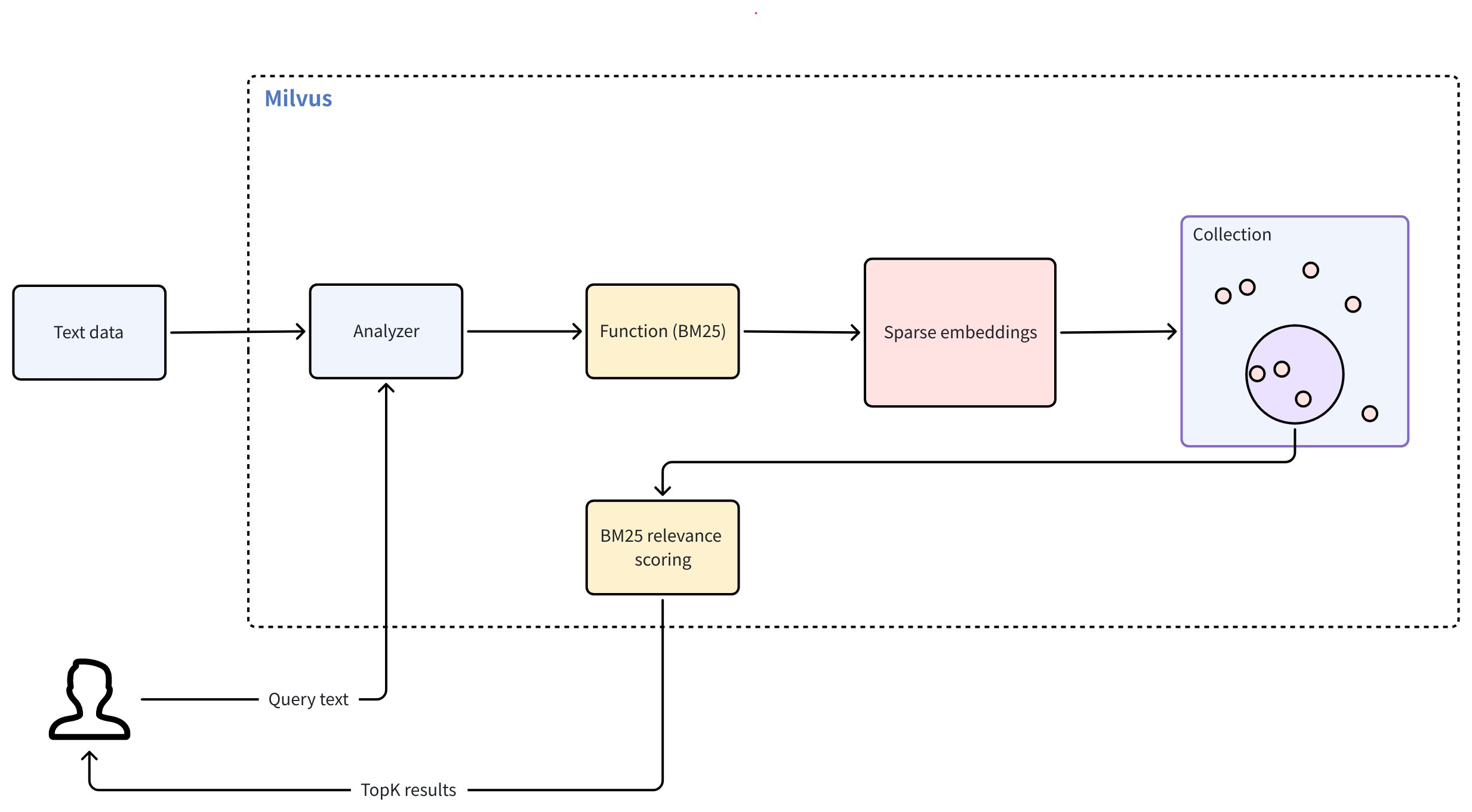
全文検索を使用するには、以下の主要な手順を実行します。
-
コレクションの作成: 必要なフィールドを設定し、生のテキストをスパース埋め込みに変換する BM25 関数を定義します。
-
データの挿入: 生のテキストドキュメントをコレクションに取り込みます。
-
検索の実行: 自然言語のクエリテキストを使用して、BM25 の関連性に基づいてランク付けされた結果を取得します。
BM25 全文検索用のコレクションの作成
BM25 を活用した全文検索を有効にするには、必要なフィールドを備えたコレクションを準備し、スパースベクトルを生成する BM25 関数を定義し、インデックスを構成してから、コレクションを作成する必要があります。
スキーマフィールドの定義
コレクションのスキーマには、少なくとも 3つの必須フィールドを含める必要があります。
-
プライマリフィールド: コレクション内の各エンティティを一意に識別します。
-
文字列フィールド(
VARCHARまたはTEXT): 生のテキストドキュメントを格納します。Zilliz Cloud が BM25 関連性ランキングのためにテキストを処理できるよう、enable_analyzer=Trueを設定する必要があります。デフォルトでは、Zilliz Cloud はテキスト分析にstandardアナライザー を使用します。別のアナライザーを構成する場合は、アナライザーの概要 を参照してください。このページの例ではVARCHARを使用しています。長いテキストの場合は、入力フィールドをTEXTとして定義し、max_lengthを省略できます。完全な例については、テキストフィールド を参照してください。 -
スパースベクトルフィールド(
SPARSE_FLOAT_VECTOR): BM25 関数によって自動生成されたスパース埋め込みを格納します。
- Python
- Java
- Go
- Rust
- C++
- NodeJS
- cURL
- Zilliz CLI
from pymilvus import MilvusClient, DataType, Function, FunctionType

client = MilvusClient(
    uri="YOUR_CLUSTER_ENDPOINT",
    token="YOUR_CLUSTER_TOKEN"
)

schema = client.create_schema()

schema.add_field(field_name="id", datatype=DataType.INT64, is_primary=True, auto_id=True) # Primary field
schema.add_field(field_name="text", datatype=DataType.VARCHAR, max_length=1000, enable_analyzer=True) # Text field
schema.add_field(field_name="sparse", datatype=DataType.SPARSE_FLOAT_VECTOR) # Sparse vector field; no dim required for sparse vectors
import io.milvus.v2.common.DataType;
import io.milvus.v2.service.collection.request.AddFieldReq;
import io.milvus.v2.service.collection.request.CreateCollectionReq;

CreateCollectionReq.CollectionSchema schema = CreateCollectionReq.CollectionSchema.builder()
        .build();
schema.addField(AddFieldReq.builder()
        .fieldName("id")
        .dataType(DataType.Int64)
        .isPrimaryKey(true)
        .autoID(true)
        .build());
schema.addField(AddFieldReq.builder()
        .fieldName("text")
        .dataType(DataType.VarChar)
        .maxLength(1000)
        .enableAnalyzer(true)
        .build());
schema.addField(AddFieldReq.builder()
        .fieldName("sparse")
        .dataType(DataType.SparseFloatVector)
        .build());
import (
    "context"
    "fmt"

    "github.com/milvus-io/milvus/client/v3/column"
    "github.com/milvus-io/milvus/client/v3/entity"
    "github.com/milvus-io/milvus/client/v3/index"
    "github.com/milvus-io/milvus/client/v3/milvusclient"
)

ctx, cancel := context.WithCancel(context.Background())
defer cancel()

milvusAddr := "YOUR_CLUSTER_ENDPOINT"
token := "YOUR_CLUSTER_TOKEN"

client, err := milvusclient.New(ctx, &milvusclient.ClientConfig{
    Address: milvusAddr,
    APIKey:  token,
})
if err != nil {
    fmt.Println(err.Error())
    // handle error
}
defer client.Close(ctx)

schema := entity.NewSchema()
schema.WithField(entity.NewField().
    WithName("id").
    WithDataType(entity.FieldTypeInt64).
    WithIsPrimaryKey(true).
    WithIsAutoID(true),
).WithField(entity.NewField().
    WithName("text").
    WithDataType(entity.FieldTypeVarChar).
    WithEnableAnalyzer(true).
    WithMaxLength(1000),
).WithField(entity.NewField().
    WithName("sparse").
    WithDataType(entity.FieldTypeSparseVector),
)
use milvus::v2::prelude::*;

let schema = CollectionSchema::new()
    .add_field(FieldSchema::new().name("id").data_type(DataType::Int64).primary_key(true).auto_id(true))
    .add_field(FieldSchema::new().name("text").data_type(DataType::VarChar).max_length(1000).enable_analyzer(true))
    .add_field(FieldSchema::new().name("sparse").data_type(DataType::SparseFloatVector));
#include "milvus/MilvusClientV2.h"

auto client = milvus::MilvusClientV2::Create();

milvus::ConnectParam connect_param{"YOUR_CLUSTER_ENDPOINT", "YOUR_CLUSTER_TOKEN"};
auto status = client->Connect(connect_param);
if (!status.IsOk()) {
    std::cout << status.Message() << std::endl;
}

milvus::CollectionSchemaPtr schema = std::make_shared<milvus::CollectionSchema>();
schema->AddField({"id", milvus::DataType::INT64, "", true, true});
schema->AddField(milvus::FieldSchema("text", milvus::DataType::VARCHAR).WithMaxLength(1000).EnableAnalyzer(true));
schema->AddField(milvus::FieldSchema("sparse", milvus::DataType::SPARSE_FLOAT_VECTOR));
import { MilvusClient, DataType } from "@zilliz/milvus2-sdk-node";

const address = "YOUR_CLUSTER_ENDPOINT";
const token = "YOUR_CLUSTER_TOKEN";
const client = new MilvusClient({address, token});
const schema = [
  {
    name: "id",
    data_type: DataType.Int64,
    is_primary_key: true,
  },
  {
    name: "text",
    data_type: "VarChar",
    enable_analyzer: true,
    enable_match: true,
    max_length: 1000,
  },
  {
    name: "sparse",
    data_type: DataType.SparseFloatVector,
  },
];

console.log(schema);
export schema='{
        "autoId": true,
        "enabledDynamicField": false,
        "fields": [
            {
                "fieldName": "id",
                "dataType": "Int64",
                "isPrimary": true
            },
            {
                "fieldName": "text",
                "dataType": "VarChar",
                "elementTypeParams": {
                    "max_length": 1000,
                    "enable_analyzer": true
                }
            },
            {
                "fieldName": "sparse",
                "dataType": "SparseFloatVector"
            }
        ]
    }'
# Zilliz CLI
上記の構成では、
-
id: プライマリキーとして機能し、auto_id=Trueで自動的に生成されます。 -
text: 全文検索操作用の生のテキストデータを格納します。VARCHARはテキストストレージ用の Zilliz Cloud 文字列データ型であるため、データ型はVARCHARである必要があります。 -
sparse: 全文検索操作用に内部で生成されたスパース埋め込みを格納するために予約されたベクトルフィールドです。データ型はSPARSE_FLOAT_VECTORである必要があります。
BM25 関数の定義
BM25 関数は、トークン化されたテキストを BM25 スコアリングをサポートするスパースベクトルに変換します。
関数を定義してスキーマに追加します。
- Python
- Java
- Go
- Rust
- C++
- NodeJS
- cURL
- Zilliz CLI
bm25_function = Function(
    name="text_bm25_emb", # Function name
    input_field_names=["text"], # Name of the VARCHAR field containing raw text data
    output_field_names=["sparse"], # Name of the SPARSE_FLOAT_VECTOR field reserved to store generated embeddings
    function_type=FunctionType.BM25, # Set to `BM25`
)

schema.add_function(bm25_function)
import io.milvus.common.clientenum.FunctionType;
import io.milvus.v2.service.collection.request.CreateCollectionReq.Function;

import java.util.*;

schema.addFunction(Function.builder()
        .functionType(FunctionType.BM25)
        .name("text_bm25_emb")
        .inputFieldNames(Collections.singletonList("text"))
        .outputFieldNames(Collections.singletonList("sparse"))
        .build());
function := entity.NewFunction().
    WithName("text_bm25_emb").
    WithInputFields("text").
    WithOutputFields("sparse").
    WithType(entity.FunctionTypeBM25)
schema.WithFunction(function)
use milvus::v2::prelude::*;

let bm25_function = Function::new()
    .name("text_bm25_emb")
    .function_type(FunctionType::Bm25)
    .input_fields(["text"])
    .output_fields(["sparse"]);

let schema = schema.add_function(bm25_function);
milvus::FunctionPtr function = std::make_shared<milvus::Function>("text_bm25_emb", milvus::FunctionType::BM25);
function->AddInputFieldName("text");
function->AddOutputFieldName("sparse");
schema->AddFunction(function);
const functions = [
    {
      name: 'text_bm25_emb',
      description: 'bm25 function',
      type: FunctionType.BM25,
      input_field_names: ['text'],
      output_field_names: ['sparse'],
      params: {},
    },
];
export schema='{
        "autoId": true,
        "enabledDynamicField": false,
        "fields": [
            {
                "fieldName": "id",
                "dataType": "Int64",
                "isPrimary": true
            },
            {
                "fieldName": "text",
                "dataType": "VarChar",
                "elementTypeParams": {
                    "max_length": 1000,
                    "enable_analyzer": true
                }
            },
            {
                "fieldName": "sparse",
                "dataType": "SparseFloatVector"
            }
        ],
        "functions": [
            {
                "name": "text_bm25_emb",
                "type": "BM25",
                "inputFieldNames": ["text"],
                "outputFieldNames": ["sparse"],
                "params": {}
            }
        ]
    }'
# Zilliz CLI
| パラメーター | 説明 |
|---|---|
name | 関数の名前。この関数は、text フィールドの生のテキストを、sparse フィールドに格納される BM25 互換のスパースベクトルに変換します。 |
input_field_names | テキストからスパースベクトルへの変換が必要な VARCHAR フィールドの名前。FunctionType.BM25 の場合、このパラメーターは 1つのフィールド名のみを受け付けます。 |
output_field_names | 内部で生成されたスパースベクトルが格納されるフィールドの名前。FunctionType.BM25 の場合、このパラメーターは 1つのフィールド名のみを受け付けます。 |
function_type | 使用する関数の種類。FunctionType.BM25 である必要があります。 |
複数の VARCHAR フィールドで BM25 処理が必要な場合は、フィールドごとに 1つの BM25 関数を定義し、それぞれに一意の名前と出力フィールドを指定します。
インデックスの構成
必要なフィールドと組み込み関数を備えたスキーマを定義したら、コレクションのインデックスを設定します。このプロセスを簡素化するには、index_type として AUTOINDEX を使用します。これは、データの構造に基づいて Zilliz Cloud が最適なインデックスタイプを選択して構成できるようにするオプションです。
- Python
- Java
- Go
- Rust
- C++
- NodeJS
- cURL
- Zilliz CLI
index_params = client.prepare_index_params()

index_params.add_index(
    field_name="sparse",
    index_type="AUTOINDEX",
    metric_type="BM25"
)
import io.milvus.v2.common.IndexParam;

Map<String,Object> params = new HashMap<>();
params.put("inverted_index_algo", "DAAT_MAXSCORE");
params.put("bm25_k1", 1.2);
params.put("bm25_b", 0.75);

List<IndexParam> indexes = new ArrayList<>();
indexes.add(IndexParam.builder()
        .fieldName("sparse")
        .indexType(IndexParam.IndexType.SPARSE_INVERTED_INDEX)
        .metricType(IndexParam.MetricType.BM25)
        .extraParams(params)
        .build());
indexOption := milvusclient.NewCreateIndexOption("my_collection", "sparse",
    index.NewSparseInvertedIndex(entity.BM25, 0.05))
indexOption.WithExtraParam("inverted_index_algo", "DAAT_MAXSCORE")
indexOption.WithExtraParam("bm25_k1", 1.2)
indexOption.WithExtraParam("bm25_b", 0.75)
use std::collections::HashMap;

let index_params = IndexParam::new()
    .field_name("sparse")
    .index_type(IndexType::SparseInvertedIndex)
    .metric_type(MetricType::Bm25)
    .extra_params(HashMap::from([
        ("inverted_index_algo".into(), "DAAT_MAXSCORE".into()),
        ("bm25_k1".into(), "1.2".into()),
        ("bm25_b".into(), "0.75".into()),
    ]));
auto index_params = milvus::IndexDesc("sparse", "", milvus::IndexType::SPARSE_INVERTED_INDEX, milvus::MetricType::BM25);
index_params.AddExtraParam("inverted_index_algo", "DAAT_MAXSCORE");
index_params.AddExtraParam("bm25_k1", "1.2");
index_params.AddExtraParam("bm25_b", "0.75");
const index_params = [
  {
    field_name: "sparse",
    metric_type: "BM25",
    index_type: "SPARSE_INVERTED_INDEX",
    params: {
        "inverted_index_algo": "DAAT_MAXSCORE",
        "bm25_k1": 1.2,
        "bm25_b": 0.75
    }
  },
];
export indexParams='[
        {
            "fieldName": "sparse",
            "metricType": "BM25",
            "indexType": "SPARSE_INVERTED_INDEX",
            "params":{
               "inverted_index_algo": "DAAT_MAXSCORE",
               "bm25_k1": 1.2,
               "bm25_b": 0.75
            }
        }
    ]'
# Zilliz CLI
パラメーター | 説明 |
|---|---|
| インデックスを作成するベクトルフィールドの名前。全文検索の場合は、生成されたスパースベクトルを格納するフィールドを指定します。この例では、値を |
| 作成するインデックスの種類。 |
| 全文検索機能では、このパラメーターの値を |
| インデックスに固有の追加パラメーターのディクショナリ。 |
| インデックスの構築とクエリに使用されるアルゴリズム。有効な値:
|
| 用語頻度の飽和を制御します。値が大きいほど、ドキュメントのランキングにおける用語頻度の重要度が高くなります。値の範囲: [1.2, 2.0]。 |
| ドキュメント長が正規化される度合いを制御します。通常は 0 から 1 の間の値が使用され、デフォルト値は 0.75 です。値が 0 の場合は長さの正規化を行わないことを意味し、値が 1 の場合は完全な長さの正規化を意味します。 |
コレクションの作成
次に、定義したスキーマとインデックスパラメーターを使用してコレクションを作成します。
- Python
- Java
- Go
- Rust
- C++
- NodeJS
- cURL
- Zilliz CLI
client.create_collection(
    collection_name='my_collection',
    schema=schema,
    index_params=index_params
)

client.load_collection('my_collection')
import io.milvus.v2.service.collection.request.CreateCollectionReq;
import io.milvus.v2.service.collection.request.LoadCollectionReq;

CreateCollectionReq requestCreate = CreateCollectionReq.builder()
        .collectionName("my_collection")
        .collectionSchema(schema)
        .indexParams(indexes)
        .build();
client.createCollection(requestCreate);
client.loadCollection(LoadCollectionReq.builder()
        .collectionName("my_collection")
        .build());
err = client.CreateCollection(ctx,
    milvusclient.NewCreateCollectionOption("my_collection", schema).
        WithIndexOptions(indexOption))
if err != nil {
    fmt.Println(err.Error())
    // handle error
}

_, err = client.LoadCollection(ctx, milvusclient.NewLoadCollectionOption("my_collection"))
if err != nil {
    fmt.Println(err.Error())
    // handle error
}
use milvus::v2::prelude::*;

client.create_collection(
    CreateCollectionRequest::builder()
        .collection_name("my_collection")
        .schema(schema)
        .index_param(index_params)
        .build()?,
)
.await?;

client.load_collection(LoadCollectionRequest::builder().collection_name("my_collection").build()?).await?;
status = client->CreateCollection(milvus::CreateCollectionRequest()
                                    .WithCollectionName("my_collection")
                                    .WithCollectionSchema(schema)
                                    .AddIndex(std::move(index_params)));
if (!status.IsOk()) {
    std::cout << status.Message() << std::endl;
}

status = client->LoadCollection(milvus::LoadCollectionRequest()
                                    .WithCollectionName("my_collection"));
if (!status.IsOk()) {
    std::cout << status.Message() << std::endl;
}
await client.createCollection({
    collection_name: 'my_collection',
    schema: schema,
    index_params: index_params,
    functions: functions
});

await client.loadCollection({ collection_name: "my_collection" });
export CLUSTER_ENDPOINT="YOUR_CLUSTER_ENDPOINT"
export TOKEN="YOUR_CLUSTER_TOKEN"

curl --request POST \
--url "${CLUSTER_ENDPOINT}/v2/vectordb/collections/create" \
--header "Authorization: Bearer ${TOKEN}" \
--header "Content-Type: application/json" \
--header "Request-Timeout: 10" \
-d "{
    \"collectionName\": \"my_collection\",
    \"schema\": $schema,
    \"indexParams\": $indexParams
}"
curl --request POST \
--url "${CLUSTER_ENDPOINT}/v2/vectordb/collections/load" \
--header "Authorization: Bearer ${TOKEN}" \
--header "Content-Type: application/json" \
--data '{
  "collectionName": "my_collection"
}'
# Zilliz CLI
テキストデータの挿入
コレクションとインデックスを設定したら、テキストデータを挿入する準備が整います。このプロセスでは、生のテキストを指定するだけで済みます。先ほど定義した組み込み関数が、各テキストエントリに対応するスパースベクトルを自動的に生成します。
- Python
- Java
- Go
- Rust
- C++
- NodeJS
- cURL
- Zilliz CLI
client.insert('my_collection', [
    {'text': 'information retrieval is a field of study.'},
    {'text': 'information retrieval focuses on finding relevant information in large datasets.'},
    {'text': 'data mining and information retrieval overlap in research.'},
])
import com.google.gson.Gson;
import com.google.gson.JsonObject;

import io.milvus.v2.service.vector.request.InsertReq;

Gson gson = new Gson();
List<JsonObject> rows = Arrays.asList(
        gson.fromJson("{\"text\": \"information retrieval is a field of study.\"}", JsonObject.class),
        gson.fromJson("{\"text\": \"information retrieval focuses on finding relevant information in large datasets.\"}", JsonObject.class),
        gson.fromJson("{\"text\": \"data mining and information retrieval overlap in research.\"}", JsonObject.class)
);

client.insert(InsertReq.builder()
        .collectionName("my_collection")
        .data(rows)
        .build());
_, err = client.Insert(ctx, milvusclient.NewColumnBasedInsertOption("my_collection").
    WithVarcharColumn("text", []string{
        "information retrieval is a field of study.",
        "information retrieval focuses on finding relevant information in large datasets.",
        "data mining and information retrieval overlap in research.",
    }),
)
if err != nil {
    fmt.Println(err.Error())
    // handle error
}
use milvus::v2::prelude::*;
use serde_json::json;

client.insert(
    InsertRequest::builder()
        .collection_name("my_collection")
        .rows(vec![
            json!({"text": "information retrieval is a field of study."}),
            json!({"text": "information retrieval focuses on finding relevant information in large datasets."}),
            json!({"text": "data mining and information retrieval overlap in research."}),
        ])
        .build()?,
)
.await?;
milvus::EntityRows data = {
    {{"text", "information retrieval is a field of study."}},
    {{"text", "information retrieval focuses on finding relevant information in large datasets."}},
    {{"text", "data mining and information retrieval overlap in research."}}
};

milvus::InsertResponse response;
auto status = client->Insert(milvus::InsertRequest()
                                .WithCollectionName("my_collection")
                                .WithRowsData(std::move(data))
                                , response);
if (!status.IsOk()) {
    std::cout << status.Message() << std::endl;
}
await client.insert({
    collection_name: 'my_collection',
    data: [
        {'text': 'information retrieval is a field of study.'},
        {'text': 'information retrieval focuses on finding relevant information in large datasets.'},
        {'text': 'data mining and information retrieval overlap in research.'},
    ],
});
curl --request POST \
--url "${CLUSTER_ENDPOINT}/v2/vectordb/entities/insert" \
--header "Authorization: Bearer ${TOKEN}" \
--header "Content-Type: application/json" \
--header "Request-Timeout: 10" \
-d '{
    "data": [
        {"text": "information retrieval is a field of study."},
        {"text": "information retrieval focuses on finding relevant information in large datasets."},
        {"text": "data mining and information retrieval overlap in research."}
    ],
    "collectionName": "my_collection"
}'
# Zilliz CLI
全文検索の実行
コレクションにデータを挿入したら、生のテキストクエリを使用して全文検索を実行できます。Zilliz Cloud はクエリを自動的にスパースベクトルに変換し、BM25 アルゴリズムを使用して一致した検索結果をランク付けしてから、topK(limit)の結果を返します。
- Python
- Java
- Go
- Rust
- C++
- NodeJS
- cURL
- Zilliz CLI
search_params = {
    "metric_type": "BM25",  # Metric type must be BM25 for full text search
    'params': {'level': 10},
}

res = client.search(
    collection_name='my_collection',
    data=['whats the focus of information retrieval?'],
    anns_field='sparse',
    output_fields=['text'], # Fields to return in search results; sparse field cannot be output
    limit=3,
    search_params=search_params
)

print(res)
import io.milvus.v2.service.vector.request.SearchReq;
import io.milvus.v2.service.vector.request.data.EmbeddedText;
import io.milvus.v2.service.vector.response.SearchResp;

Map<String,Object> searchParams = new HashMap<>();
searchParams.put("metric_type", "BM25");
searchParams.put("level", 10);
SearchResp searchResp = client.search(SearchReq.builder()
        .collectionName("my_collection")
        .data(Collections.singletonList(new EmbeddedText("whats the focus of information retrieval?")))
        .annsField("sparse")
        .topK(3)
        .searchParams(searchParams)
        .outputFields(Collections.singletonList("text"))
        .build());
annSearchParams := index.NewCustomAnnParam()
annSearchParams.WithExtraParam("metric_type", "BM25")
resultSets, err := client.Search(ctx, milvusclient.NewSearchOption(
    "my_collection", // collectionName
    3,               // limit
    []entity.Vector{entity.Text("whats the focus of information retrieval?")},
).WithConsistencyLevel(entity.ClStrong).
    WithANNSField("sparse").
    WithAnnParam(annSearchParams).
    WithOutputFields("text"))
if err != nil {
    fmt.Println(err.Error())
    // handle error
}

for _, resultSet := range resultSets {
    fmt.Println("IDs: ", resultSet.IDs.FieldData().GetScalars())
    fmt.Println("Scores: ", resultSet.Scores)
    fmt.Println("text: ", resultSet.GetColumn("text").FieldData().GetScalars())
}
use milvus::v2::prelude::*;

let res = client.search(
    SearchRequest::builder()
        .collection_name("my_collection")
        .vector_field("sparse")
        .vectors(SearchVectors::EmbeddedText(vec!["whats the focus of information retrieval?".to_string()]))
        .metric_type(MetricType::Bm25)
        .limit(3)
        .output_fields(["text"])
        .build()?,
)
.await?;

println!("{:?}", res.results());
auto request = milvus::SearchRequest()
                       .WithCollectionName("my_collection")
                       .AddEmbeddedText("whats the focus of information retrieval?")
                       .WithLimit(3)
                       .WithAnnsField("sparse")
                       .AddExtraParam("metric_type", "BM25")
                       .AddOutputField("text");

milvus::SearchResponse response;
auto status = client->Search(request, response);
if (!status.IsOk()) {
    std::cout << status.Message() << std::endl;
}
await client.search({
    collection_name: 'my_collection',
    data: ['whats the focus of information retrieval?'],
    anns_field: 'sparse',
    output_fields: ['text'],
    params: { metric_type: "BM25" },
    limit: 3,
});
curl --request POST \
--url "${CLUSTER_ENDPOINT}/v2/vectordb/entities/search" \
--header "Authorization: Bearer ${TOKEN}" \
--header "Content-Type: application/json" \
--header "Request-Timeout: 10" \
--data-raw '{
    "collectionName": "my_collection",
    "data": [
        "whats the focus of information retrieval?"
    ],
    "annsField": "sparse",
    "limit": 3,
    "outputFields": [
        "text"
    ],
    "searchParams":{
        "metric_type": "BM25",
        "params":{}
    }
}'
# Zilliz CLI
| パラメーター | 説明 |
|---|---|
search_params | 検索パラメーターを含むディクショナリ。 |
params.level | 簡素化された検索最適化を使用して検索精度を制御します。詳細については、再現率の調整 を参照してください。 |
data | 自然言語の生のクエリテキスト。Zilliz Cloud は、BM25 関数を使用してテキストクエリを自動的にスパースベクトルに変換します。事前に計算されたベクトルは指定しないでください。 |
anns_field | 内部で生成されたスパースベクトルを含むフィールドの名前。 |
output_fields | 検索結果で返すフィールド名のリスト。BM25 で生成された埋め込みを含む スパースベクトルフィールドを除く すべてのフィールドをサポートします。一般的な出力フィールドには、プライマリキーフィールド(例: id)と元のテキストフィールド(例: text)があります。詳細については、FAQ を参照してください。 |
limit | 返す上位一致の最大数。 |
FAQ
全文検索で BM25 関数によって生成されるスパースベクトルを出力または参照できますか?
いいえ。BM25 関数によって生成されるスパースベクトルは、全文検索では直接参照したり出力したりすることはできません。詳細は以下の通りです。
-
BM25 関数は、ランキングと取得のためにスパースベクトルを内部的に生成します
-
これらのベクトルはスパースフィールドに格納されますが、
output_fieldsに含めることはできません -
出力できるのは、元のテキストフィールドとメタデータ(
id、textなど)のみです
例:
- Python
- Java
- Go
- Rust
- C++
- NodeJS
- cURL
- Zilliz CLI
# ❌ This throws an error - you cannot output the sparse field
client.search(
    collection_name='my_collection',
    data=['query text'],
    anns_field='sparse',
    output_fields=['text', 'sparse'],  # 'sparse' causes an error
    limit=3,
    search_params=search_params
)

# ✅ This works - output text fields only
client.search(
    collection_name='my_collection',
    data=['query text'],
    anns_field='sparse',
    output_fields=['text'],
    limit=3,
    search_params=search_params
)
// Searching with the sparse field in outputFields throws an error.
// Only output the original text and metadata fields.
SearchResp searchResp = client.search(SearchReq.builder()
        .collectionName("my_collection")
        .data(Collections.singletonList(new EmbeddedText("query text")))
        .annsField("sparse")
        .topK(3)
        .outputFields(Collections.singletonList("text"))
        .build());
// Searching with the sparse field in output_fields throws an error.
// Only output the original text and metadata fields.
resultSets, err := client.Search(ctx, milvusclient.NewSearchOption(
    "my_collection",
    3,
    []entity.Vector{entity.Text("query text")},
).WithConsistencyLevel(entity.ClStrong).
    WithANNSField("sparse").
    WithAnnParam(index.NewCustomAnnParam()).
    WithOutputFields("text"))
use milvus::v2::prelude::*;

// Searching with the sparse field in output_fields throws an error.
// Only output the original text and metadata fields.
let request = SearchRequest::builder()
    .collection_name("my_collection")
    .vector_field("sparse")
    .vectors(SearchVectors::EmbeddedText(vec!["query text".to_string()]))
    .limit(3)
    .output_fields(["text"])
    .build()?;
// Searching with the sparse field in output_fields throws an error.
// Only output the original text and metadata fields.
milvus::SearchRequest request = milvus::SearchRequest()
    .WithCollectionName("my_collection")
    .AddEmbeddedText("query text")
    .WithLimit(3)
    .WithAnnsField("sparse")
    .AddOutputField("text");
// Searching with the sparse field in output_fields throws an error.
// Only output the original text and metadata fields.
await client.search({
    collection_name: 'my_collection',
    data: ['query text'],
    anns_field: 'sparse',
    output_fields: ['text'],
    limit: 3,
});
curl --request POST \
--url "${CLUSTER_ENDPOINT}/v2/vectordb/entities/search" \
--header "Authorization: Bearer ${TOKEN}" \
--header "Content-Type: application/json" \
--header "Request-Timeout: 10" \
--data-raw '{
    "collectionName": "my_collection",
    "data": ["query text"],
    "annsField": "sparse",
    "limit": 3,
    "outputFields": ["text"]
}'
# Zilliz CLI
アクセスできないのに、スパースベクトルフィールドを定義する必要があるのはなぜですか?
スパースベクトルフィールドは、ユーザーが直接操作しないデータベースのインデックスと同様に、内部的な検索インデックスとして機能します。
設計の根拠:
-
関心の分離: ユーザーが扱うのはテキスト (input/output), Milvus が扱うのはベクトル(内部処理)です
-
パフォーマンス: 事前に計算されたスパースベクトルによって、クエリ中の高速な BM25 ランキングが可能になります
-
ユーザーエクスペリエンス: 複雑なベクトル操作をシンプルなテキストインターフェイスの背後に抽象化します
ベクトルへのアクセスが必要な場合:
-
全文検索の代わりに、手動のスパースベクトル操作を使用します
-
カスタムのスパースベクトルワークフロー用に別々のコレクションを作成します
詳細については、スパースベクトル を参照してください。