Linear Decay
Linear decay は、検索結果内で絶対的なゼロ地点に達して終了する直線的な減少を作成します。今後開催されるイベントのカウントダウンのように、イベントが終了するまで関連性が徐々に薄れていくのと同様に、Linear decay は、アイテムが理想的な地点から離れるにつれて、関連性を予測可能かつ一定の割合で低下させ、完全に消えるまで続けます。このアプローチは、明確なカットオフを伴う一貫した減衰率が必要な場合に適しており、特定の境界を超えたアイテムが結果から完全に除外されることを保証します。
他の decay 関数とは次の点が異なります。
-
Gaussian decay は、徐々にゼロに近づくものの、決してゼロには達しないベルカーブに従います。
-
Exponential decay は、最小限の関連性からなる長いテールを維持し、それが無期限に続きます。
Linear decay は明確な終点を一意に作り出すため、自然な境界や締め切りがあるアプリケーションで特に効果を発揮します。
Linear decay を使用する場合
Linear decay は、次のような場合に特に効果を発揮します。
| ユースケース | 例 | Linear が効果的な理由 |
|---|---|---|
| イベント一覧 | コンサートチケットプラットフォーム | 将来あまりに先のイベントに対して明確なカットオフを作成します。 |
| 期間限定オファー | フラッシュセール、プロモーション | 期限切れまたはまもなく期限切れになるオファーが表示されないようにします。 |
| 配達範囲 | フードデリバリー、宅配サービス | 厳格な地理的境界を適用します。 |
| 年齢制限コンテンツ | マッチングプラットフォーム、メディアサービス | 厳格な年齢しきい値を設定します。 |
次のような場合は Linear decay を選択してください。
-
アプリケーションに自然な境界、締め切り、またはしきい値がある
-
特定の地点を超えたアイテムを結果から完全に除外する必要がある
-
予測可能で一貫した関連性の低下率が必要である
-
ユーザーが関連性のあるアイテムと関連性のないアイテムを明確に区別できる
一定の低下の原理
Linear decay は、一定の割合で低下し、正確にゼロに達するまで続く直線的な低下を作成します。このパターンは、カウントダウンタイマー、在庫の減少、締め切りの接近など、関連性に明確な有効期限がある多くの日常的なシナリオに見られます。
すべての時間パラメーター(origin、offset、scale)は、コレクションデータと同じ単位を使用する必要があります。コレクションがタイムスタンプを異なる単位(ミリ秒、マイクロ秒)で保存している場合は、すべてのパラメーターをそれに応じて調整してください。
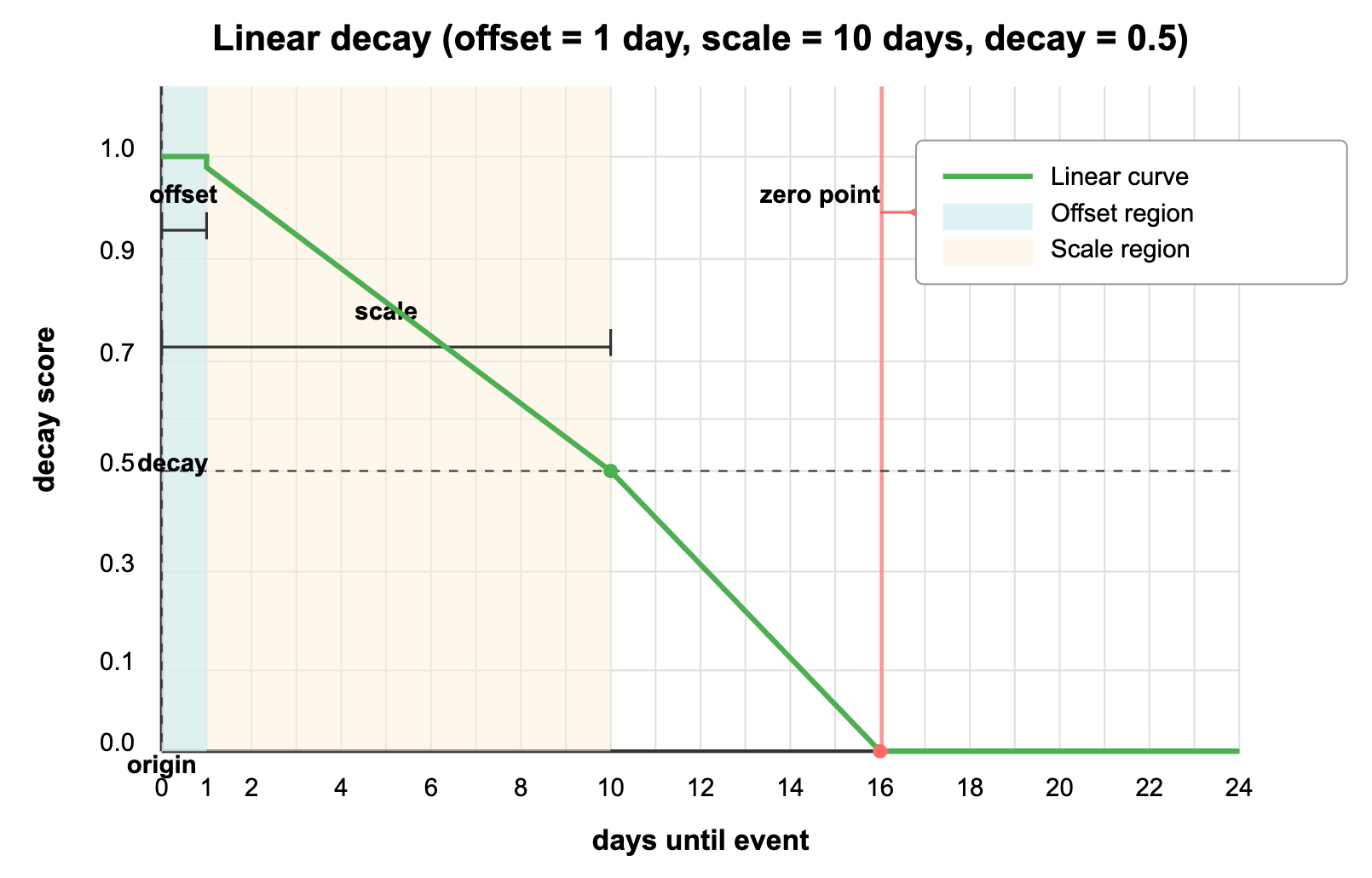
上のグラフは、Linear decay がチケット販売プラットフォームのイベント一覧にどのように影響するかを示しています。
-
origin(現在の日付):現在の時点であり、関連性が最大(1.0)になる地点です。 -
offset(1 日):「直近イベントウィンドウ」です。翌日までに開催されるすべてのイベントは完全な関連性スコア(1.0)を維持するため、非常に差し迫ったイベントがわずかな時間差によって不利益を受けることはありません。 -
decay(0.5):scale 距離におけるスコアです。このパラメーターは関連性の低下率を制御します。 -
scale(10 日):関連性が decay 値まで低下する期間です。10 日先のイベントは関連性スコアが半分(0.5)になります。
直線的なカーブから分かるように、およそ 16 日以上先のイベントは関連性が正確にゼロになり、検索結果にはまったく表示されません。これにより明確な境界が作成され、ユーザーには定義された期間内の関連性のある今後のイベントのみが表示されます。
この動作は、イベント計画が通常どのように機能するかを反映しています。直近のイベントが最も関連性が高く、今後数週間のイベントは重要性が徐々に低下し、将来あまりに先のイベント(またはすでに終了したイベント)はまったく表示されるべきではありません。
数式
Linear decay スコアを計算する数式は次のとおりです。
ここで、
これを平易な言葉で説明すると、次のようになります。
-
フィールド値が origin からどれだけ離れているかを計算します:。
-
offset(存在する場合)を差し引きますが、ゼロ未満にはしません:。
-
scale と decay の値からパラメーター を求めます。
-
調整後の距離を から差し引き、その結果を で割ります。
-
結果がゼロ未満にならないようにします:。
の計算では、scale と decay のパラメーターを、スコアがゼロに達する地点に変換します。たとえば、decay=0.5 かつ scale=7 の場合、スコアは distance=14(scale 値の 2 倍)で正確にゼロに達します。
Linear decay を使用する
Linear decay は、Zilliz Cloud の標準的なベクトル検索とハイブリッド検索の両方の操作に適用できます。以下は、この機能を実装するための主要なコードスニペットです。
decay 関数を使用する前に、まず decay 計算に使用する適切な数値フィールド(タイムスタンプ、距離など)を持つコレクションを作成する必要があります。コレクションのセットアップ、スキーマ定義、データ挿入を含む完全な動作例については、Decay Ranker Tutorial を参照してください。
Decay ranker を作成する
数値フィールド(この例では、現在からの秒数としての event_date)を使ってコレクションをセットアップした後、Linear decay ranker を作成します。
時間単位の一貫性:時間ベースの decay を使用する場合、origin、scale、offset の各パラメーターがコレクションデータと同じ時間単位を使用していることを確認してください。コレクションがタイムスタンプを秒で保存している場合は、すべてのパラメーターに秒を使用してください。ミリ秒を使用している場合は、すべてのパラメーターにミリ秒を使用してください。
- Python
- Java
- Go
- Rust
- C++
- NodeJS
- CSharp
- cURL
from pymilvus import Function, FunctionType
import time

# Calculate current time
current_time = int(time.time())

# Create a linear decay ranker for event listings
# Note: All time parameters must use the same unit as your collection data
rerank = Function(
    name="event_relevance",               # Function identifier
    input_field_names=["event_date"],     # Numeric field to use
    function_type=FunctionType.RERANK,    # Function type. Must be RERANK
    params={
        "reranker": "decay",              # Specify decay reranker
        "function": "linear",             # Choose linear decay
        "origin": current_time,           # Current time (seconds, matching collection data)
        "offset": 12 * 60 * 60,           # 12 hour immediate events window (seconds)
        "decay": 0.5,                     # Half score at scale distance
        "scale": 7 * 24 * 60 * 60         # 7 days (in seconds, matching collection data)
    }
)
import io.milvus.v2.service.vector.request.ranker.DecayRanker;
import java.util.Collections;

DecayRanker rerank = DecayRanker.builder()
        .name("event_relevance")
        .inputFieldNames(Collections.singletonList("event_date"))
        .function("linear")
        .origin(System.currentTimeMillis())
        .offset(12 * 60 * 60)
        .decay(0.5)
        .scale(7 * 24 * 60 * 60)
        .build();
import (
    "time"

    "github.com/milvus-io/milvus/client/v3/entity"
)

currentTime := time.Now().Unix()

rerank := entity.NewFunction().
    WithName("event_relevance").
    WithInputFields("event_date").
    WithType(entity.FunctionTypeRerank).
    WithParam("reranker", "decay").
    WithParam("function", "linear").
    WithParam("origin", currentTime).
    WithParam("scale", 7*24*60*60).
    WithParam("offset", 12*60*60).
    WithParam("decay", 0.5)
use milvus::v2::prelude::*;

let config = ConnectConfig::new().uri("YOUR_CLUSTER_ENDPOINT").token("YOUR_CLUSTER_TOKEN");
let client = ClientV2::new(&config).await?;

let rerank = DecayRerank::new()
    .function(Function::new()
        .name("event_relevance")
        .input_fields(["event_date"])
        .function_type(FunctionType::Rerank)
        .param("reranker", "decay"))
    .decay_function("linear")
    .origin(std::time::SystemTime::now().duration_since(std::time::UNIX_EPOCH).unwrap().as_secs())
    .scale(7 * 24 * 60 * 60)
    .offset(12 * 60 * 60)
    .decay(0.5);
auto rerank = std::make_shared<milvus::DecayRerank>("event_relevance");
rerank->AddInputFieldName("event_date");
rerank->SetFunction("linear");
rerank->SetOrigin(1736870400);
rerank->SetScale(7 * 24 * 60 * 60);
rerank->SetOffset(12 * 60 * 60);
rerank->SetDecay(0.5);
import { FunctionType } from "@zilliz/milvus2-sdk-node";

const rerank = {
  name: "event_relevance",
  input_field_names: ["event_date"],
  type: FunctionType.RERANK,
  params: {
    reranker: "decay",
    function: "linear",
    origin: new Date(2025, 1, 15).getTime(),
    offset: 12 * 60 * 60,
    decay: 0.5,
    scale: 7 * 24 * 60 * 60,
  },
};
using Milvus.Client.V2.Types;

// Calculate current time
long currentTime = DateTimeOffset.UtcNow.ToUnixTimeSeconds();

// Create a linear decay ranker for event listings
// Note: All time parameters must use the same unit as your collection data
var rerank = new DecayRerank("event_relevance") // Function identifier
    .WithInputField("event_date") // Numeric field to use
    .WithFunction("linear") // Choose linear decay
    .WithOrigin(currentTime) // Current time (seconds, matching collection data)
    .WithOffset(12L * 60 * 60) // 12 hour immediate events window (seconds)
    .WithDecay(0.5f) // Half score at scale distance
    .WithScale(7L * 24 * 60 * 60); // 7 days (in seconds, matching collection data)
# Note: The RESTful API does not expose the decay/rerank operation as of Milvus v3.0.x.
標準のベクトル検索に適用する
decay ranker を定義した後、それを ranker パラメーターに渡すことで、検索操作中に適用できます。
- Python
- Java
- Go
- Rust
- C++
- NodeJS
- CSharp
- cURL
# Apply decay ranker to vector search
result = milvus_client.search(
    collection_name,
    data=[your_query_vector],              # Replace with your query vector
    anns_field="dense",                   # Vector field to search
    limit=10,                             # Number of results
    output_fields=["title", "venue", "event_date"], # Fields to return
    ranker=rerank,                        # Apply the decay ranker
    consistency_level="Strong"
)
import io.milvus.v2.common.ConsistencyLevel;
import io.milvus.v2.service.vector.request.FunctionScore;
import io.milvus.v2.service.vector.request.SearchReq;
import io.milvus.v2.service.vector.request.data.FloatVec;
import io.milvus.v2.service.vector.response.SearchResp;
import java.util.Arrays;
import java.util.Collections;

SearchReq searchReq = SearchReq.builder()
        .collectionName(COLLECTION_NAME)
        .data(Collections.singletonList(new FloatVec(embedding)))
        .annsField("dense")
        .limit(10)
        .outputFields(Arrays.asList("title", "venue", "event_date"))
        .functionScore(FunctionScore.builder()
                .addFunction(rerank)
                .build())
        .consistencyLevel(ConsistencyLevel.STRONG)
        .build();
SearchResp searchResp = client.search(searchReq);
import (
    "fmt"

    "github.com/milvus-io/milvus/client/v3/entity"
    "github.com/milvus-io/milvus/client/v3/milvusclient"
)

functionScore := entity.NewFunctionScore().AddFunction(rerank)

resultSets, err := client.Search(ctx, milvusclient.NewSearchOption(
    collection_name, // collection name
    10,              // limit
    []entity.Vector{your_query_vector}, // query vector
).WithANNSField("dense").
    WithFunctionScore(functionScore).
    WithOutputFields("title", "venue", "event_date"))
if err != nil {
    fmt.Println(err.Error())
    // handle error
}
use milvus::v2::prelude::*;

    let function_score = FunctionScore::new().add_function(rerank);
    let request = SearchRequest::builder()
        .collection_name(collection_name)
        .vectors(SearchVectors::Float(vec![your_query_vector]))
        .vector_field("dense")
        .limit(10)
        .output_fields(vec!["title", "venue", "event_date"])
        .rerank(function_score)
        .build()?;
    let resp = client.search(request).await?;
auto function_score = std::make_shared<milvus::FunctionScore>();
function_score->AddFunction(rerank);

auto request = milvus::SearchRequest()
                   .WithCollectionName(collection_name)
                   .WithAnnsField("dense")
                   .WithRerank(function_score)
                   .WithLimit(10)
                   .AddOutputField("title")
                   .AddOutputField("venue")
                   .AddOutputField("event_date")
                   .AddFloatVector(your_query_vector)
                   .WithConsistencyLevel(milvus::ConsistencyLevel::BOUNDED);

milvus::SearchResponse response;
status = client->Search(request, response);
if (!status.IsOk()) {
    std::cout << status.Message() << std::endl;
}
const result = await milvusClient.search({
  collection_name: collection_name,
  data: [your_query_vector], // Replace with your query vector
  anns_field: "dense",
  limit: 10,
  output_fields: ["title", "venue", "event_date"],
  rerank: rerank,
  consistency_level: "Strong",
});
using Milvus.Client.V2.Requests.Dql;
using Milvus.Client.V2.Types;

// Apply decay ranker to vector search
var result = await client.SearchAsync(new SearchReq
{
    CollectionName = collectionName,
    VectorFieldName = "dense", // Vector field to search
    Vectors = new[] { yourQueryVector }, // Replace with your query vector
    Limit = 10, // Number of results
    Parameters = new SearchParameters
    {
        OutputFields = { "title", "venue", "event_date" }, // Fields to return
        FunctionScoreReranker = rerank, // Apply the decay ranker
        ConsistencyLevel = ConsistencyLevel.Strong
    }
});
# Note: The RESTful API does not expose the decay/rerank operation as of Milvus v3.0.x.