フレーズマッチ
フレーズマッチでは、クエリの用語を正確なフレーズとして含むドキュメントを検索できます。既定では、単語は同じ順序で直接隣接して出現する必要があります。たとえば、"robotics machine learning" というクエリは、"…typical robotics machine learning models…" のようなテキストに一致します。この場合、"robotics"、"machine"、"learning" という単語が、間に他の単語を挟まずに順番に出現しています。
ただし、実際のシナリオでは、厳密なフレーズマッチが柔軟性に欠ける場合があります。"…machine learning models widely adopted in robotics…" のようなテキストに一致させたいこともあります。ここでは、同じキーワードが含まれていますが、隣接しておらず、元の順序でもありません。これに対処するため、フレーズマッチは柔軟性を追加する slop パラメーターをサポートしています。slop の値は、フレーズ内の用語間に許可される位置のずれの数を定義します。たとえば、slop が 1 の場合、"machine learning" というクエリは "...machine deep learning..." のようなテキストに一致します。ここでは、1 つの単語("deep")が元の用語を区切っています。
概要
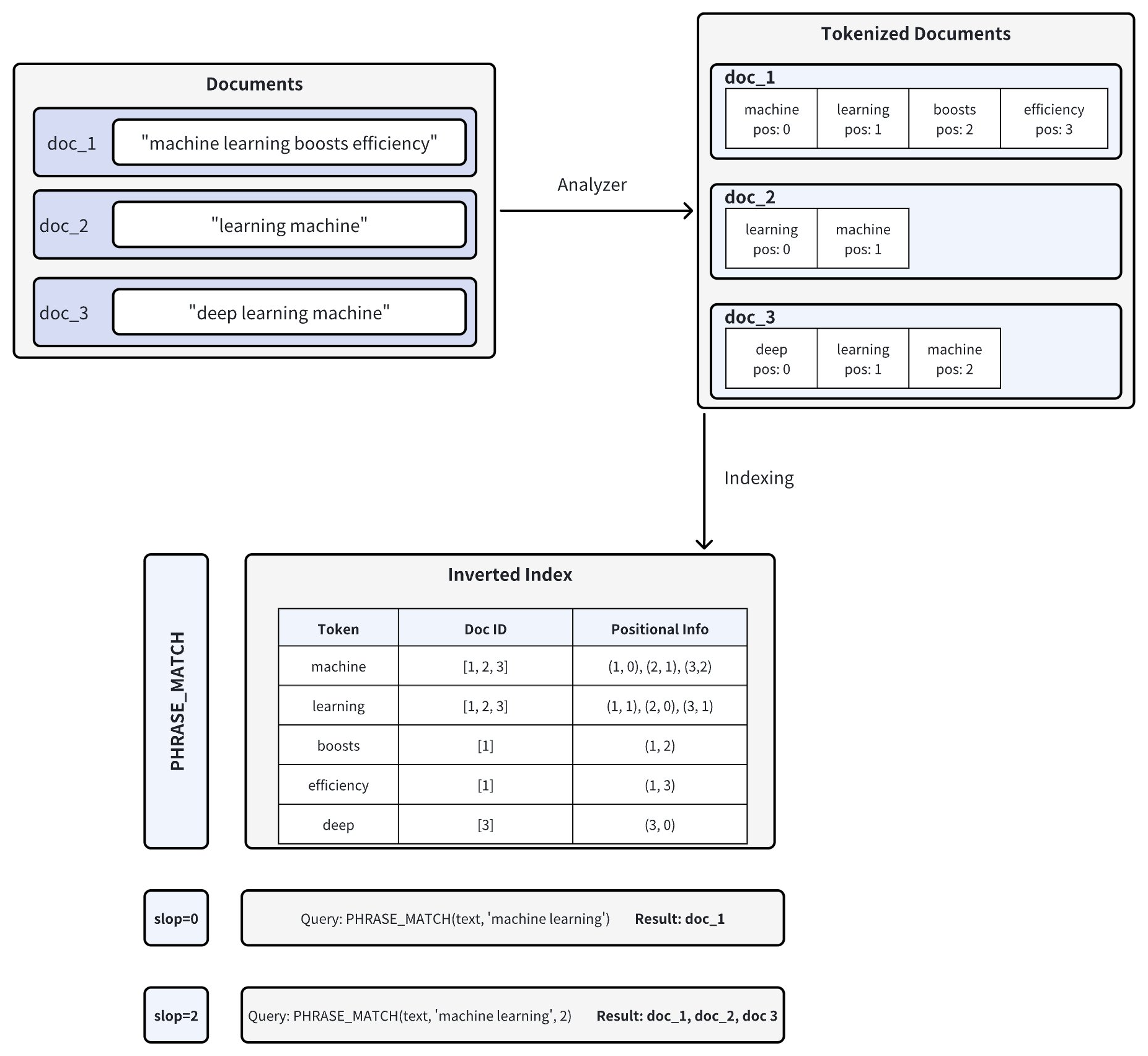
Tantivy 検索エンジンライブラリを基盤として、フレーズマッチはドキュメント内の単語の位置情報を分析することで機能します。以下の図はそのプロセスを示しています。
-
ドキュメントのトークン化: Zilliz Cloud にドキュメントを挿入すると、アナライザーを使用してテキストがトークン(個々の単語または用語)に分割され、各トークンの位置情報が記録されます。たとえば、doc_1 は ["machine" (pos=0), "learning" (pos=1), "boosts" (pos=2), "efficiency" (pos=3)] にトークン化されます。アナライザーの詳細については、アナライザーの概要 を参照してください。
-
転置インデックスの作成: Zilliz Cloud は転置インデックスを構築し、各トークンを、それが出現するドキュメントと、それらのドキュメント内でのトークンの位置にマッピングします。
-
フレーズのマッチング: フレーズクエリが実行されると、Zilliz Cloud は転置インデックスで各トークンを検索し、その位置を確認して、正しい順序と近接性で出現するかどうかを判断します。
slopパラメーターは、一致するトークン間に許可される位置の最大数を制御します:-
slop = 0 は、トークンが正確な順序で直ちに隣接して出現する必要があることを意味します(つまり、間に余分な単語はありません)。
- この例では、doc_1("machine" は pos=0、"learning" は pos=1)のみが完全に一致します。
-
slop = 2 は、一致するトークン間の最大 2 位置の柔軟性または並べ替えを許可します。
-
これにより、逆順("learning machine")や、トークン間の小さな間隔が許可されます。
-
その結果、doc_1、doc_2("learning" は pos=0、"machine" は pos=1)、および doc_3("learning" は pos=1、"machine" は pos=2)がすべて一致します。
-
-
フレーズマッチを有効にする
フレーズマッチは、Zilliz Cloud の文字列データ型である VARCHAR フィールド型で動作します。
フレーズマッチを有効にするには、enable_analyzer と enable_match の両方のパラメーターを True に設定して、コレクションスキーマを構成します。この設定により、テキストがトークン化され、位置情報を含む転置インデックスが構築され、効率的なフレーズ検索が可能になります。
スキーマフィールドを定義する
特定の VARCHAR フィールドでフレーズマッチを有効にするには、フィールドスキーマを定義するときに enable_analyzer と enable_match の両方を True に設定します。
- Python
- Java
- Go
- C++
- NodeJS
- cURL
- Zilliz CLI
from pymilvus import MilvusClient, DataType

# Set up a MilvusClient
CLUSTER_ENDPOINT = "YOUR_CLUSTER_ENDPOINT"
TOKEN = "YOUR_CLUSTER_TOKEN"

client = MilvusClient(
    uri=CLUSTER_ENDPOINT,
    token=TOKEN
)

# Create a schema for a new collection
schema = client.create_schema(enable_dynamic_field=False)

# Add a primary key field
schema.add_field(
    field_name="id",
    datatype=DataType.INT64,
    is_primary=True,
    auto_id=True
)

# Add a VARCHAR field configured for phrase matching
schema.add_field(
    field_name="text",                  # Name of the field
    datatype=DataType.VARCHAR,          # Field data type set as VARCHAR (string)
    max_length=1000,                    # Maximum string length
    enable_analyzer=True,               # Required. Enables text analysis
    enable_match=True,                  # Required. Enables inverted indexing for phrase matching
    # Optional: Use a custom analyzer for better phrase matching in specific languages.
    # analyzer_params = {"type": "english"}     # Example: English analyzer; uncomment to apply custom analyzer
)

# Add a vector field for embeddings
schema.add_field(
    field_name="embeddings",
    datatype=DataType.FLOAT_VECTOR,
    dim=5
)
import io.milvus.v2.common.DataType;
import io.milvus.v2.service.collection.request.AddFieldReq;
import io.milvus.v2.service.collection.request.CreateCollectionReq;

MilvusClientV2 client = new MilvusClientV2(ConnectConfig.builder()
        .uri("YOUR_CLUSTER_ENDPOINT")
        .token("YOUR_CLUSTER_TOKEN")
        .build());

CreateCollectionReq.CollectionSchema schema = CreateCollectionReq.CollectionSchema.builder()
        .build();
schema.addField(AddFieldReq.builder()
        .fieldName("id")
        .dataType(DataType.Int64)
        .isPrimaryKey(true)
        .autoID(true)
        .build());
schema.addField(AddFieldReq.builder()
        .fieldName("text")
        .dataType(DataType.VarChar)
        .maxLength(1000)
        .enableAnalyzer(true)
        .enableMatch(true)
        // Optional: Use a custom analyzer for better phrase matching in specific languages.
        // .analyzerParams(Map.of("type", "english"))     // Example: English analyzer; uncomment to apply custom analyzer
        .build());
schema.addField(AddFieldReq.builder()
        .fieldName("embeddings")
        .dataType(DataType.FloatVector)
        .dimension(5)
        .build());
import (
     "github.com/milvus-io/milvus/client/v3/entity"
)

milvusAddr := "YOUR_CLUSTER_ENDPOINT"
APIKey := "YOUR_API_KEY"

client, err := milvusclient.New(ctx, &milvusclient.ClientConfig{
    Address: milvusAddr,
    APIKey: APIKey
})

schema := entity.NewSchema().WithName(collectionName).
        WithField(entity.NewField().WithName("id").WithDataType(entity.FieldTypeInt64).WithIsPrimaryKey(true)).
        WithField(entity.NewField().WithName("text").WithDataType(entity.FieldTypeVarChar).WithMaxLength(1000).WithEnableMatch(true).WithEnableAnalyzer(true)).
        WithField(entity.NewField().WithName("embeddings").WithDataType(entity.FieldTypeFloatVector).WithDim(5))
#include "milvus/MilvusClientV2.h"

const std::string address = "YOUR_CLUSTER_ENDPOINT";
const std::string token = "YOUR_CLUSTER_TOKEN";

auto client = milvus::MilvusClientV2::Create();

milvus::ConnectParam connect_param{address, token};
auto status = client->Connect(connect_param);
if (!status.IsOk()) {
    std::cout << status.Message() << std::endl;
}

milvus::CollectionSchemaPtr schema = std::make_shared<milvus::CollectionSchema>();
schema->AddField(milvus::FieldSchema("id", milvus::DataType::VARCHAR, "", true, true).WithMaxLength(100));
schema->AddField(milvus::FieldSchema("dense_vector", milvus::DataType::FLOAT_VECTOR).WithDimension(4));
// Set up a MilvusClient
const address = "YOUR_CLUSTER_ENDPOINT"
const token = "YOUR_CLUSTER_TOKEN"

const client = new MilvusClient({address, token})

const schema = {
  collection_name: 'tech_articles',
  fields: [
    {
      name: "id",
      description: "primary id",
      data_type: DataType.Int64,
      is_primary_key: true,
      autoID: true,
    },
    {
      name: "text",
      description: "text field for phrase matching",
      data_type: DataType.VarChar,
      max_length: 1000,
      enable_analyzer: true, // Enables text analysis
      enable_match: true,    // Enables inverted indexing for
    },
    {
      name: "embeddings",
      description: "vector field",
      data_type: DataType.FloatVector,
      dim: 5,
    },
  ],
};
export idField='{
  "fieldName": "id",
  "dataType": "Int64",
  "isPrimary": true,
  "autoID": true
}'

export textField='{
  "fieldName": "text",
  "dataType": "VarChar",
  "elementTypeParams": {
    "max_length": 1000,
    "enable_analyzer": true,
    "enable_match": true
  }
}'

export vectorField='{
  "fieldName": "embeddings",
  "dataType": "FloatVector",
  "elementTypeParams": {
    "dim": 5
  }
}'

export schema="{
  \"autoID\": false,
  \"enableDynamicField\": true,
  \"fields\": [
    $idField,
    $textField,
    $vectorField
  ]
}"
# Zilliz CLI
# Prerequisite: run zilliz login and select your cluster with zilliz context set.

# Create a collection with a VARCHAR field configured for phrase matching
zilliz collection create --collection-name tech_articles --schema '{
  "autoId": true,
  "enabledDynamicField": false,
  "fields": [
    {
      "fieldName": "id",
      "dataType": "Int64",
      "isPrimary": true
    },
    {
      "fieldName": "text",
      "dataType": "VarChar",
      "elementTypeParams": {
        "max_length": 1000,
        "enable_analyzer": true,
        "enable_match": true
      }
    },
    {
      "fieldName": "embeddings",
      "dataType": "FloatVector",
      "elementTypeParams": {
        "dim": 5
      }
    }
  ]
}'
既定では、Zilliz Cloud は standard アナライザー を使用します。このアナライザーは、空白と句読点でテキストをトークン化し、テキストを小文字に変換します。
テキストデータが特定の言語または形式の場合は、analyzer_params パラメーターを使用してカスタムアナライザーを構成できます(例:{ "type": "english" } または { "type": "jieba" })。
詳細については、アナライザーの概要 を参照してください。
コレクションを作成する
必要なフィールドを定義したら、次のコードを使用してコレクションを作成します:
- Python
- Java
- Go
- C++
- NodeJS
- cURL
- Zilliz CLI
# Create the collection
COLLECTION_NAME = "tech_articles" # Name your collection

if client.has_collection(COLLECTION_NAME):
    client.drop_collection(COLLECTION_NAME)

client.create_collection(
    collection_name=COLLECTION_NAME,
    schema=schema
)
String COLLECTION_NAME = "tech_articles"; // Name your collection

if (client.hasCollection(
        HasCollectionReq.builder()
            .collectionName(COLLECTION_NAME)
            .build()
    )) {
    client.dropCollection(
        DropCollectionReq.builder()
            .collectionName(COLLECTION_NAME)
            .build()
    );
}

client.createCollection(
    CreateCollectionReq.builder()
        .collectionName(COLLECTION_NAME)
        .collectionSchema(schema)
        .build()
);
import "github.com/milvus-io/milvus/client/v3/entity"

// Create a schema for a new collection
schema := entity.NewSchema().WithDynamicFieldEnabled(false)
schema.WithField(entity.NewField().
    WithName("id").
    WithDataType(entity.FieldTypeInt64).
    WithIsPrimaryKey(true).
    WithIsAutoID(true),
).WithField(entity.NewField().
    WithName("text").                      // Name of the field
    WithDataType(entity.FieldTypeVarChar). // Field data type set as VARCHAR (string)
    WithMaxLength(1000).                   // Maximum length of the string
    WithEnableAnalyzer(true).              // Enables text analysis (tokenization)
    WithEnableMatch(true),                 // Enables inverted indexing for phrase matching
).WithField(entity.NewField().
    WithName("embeddings").
    WithDataType(entity.FieldTypeFloatVector).
    WithDim(5),
)
const auto collection_name = "tech_articles";

milvus::HasCollectionResponse response;
auto status = client->HasCollection(milvus::HasCollectionRequest().WithCollectionName(collection_name), response);
if (response.Has()) {
    status = client->DropCollection(milvus::DropCollectionRequest().WithCollectionName(collection_name));
}

status = client->CreateCollection(milvus::CreateCollectionRequest()
                                    .WithCollectionName(collection_name)
                                    .WithCollectionSchema(schema));
if (!status.IsOk()) {
    std::cout << status.Message() << std::endl;
}
// Create or recreate the collection if it already exists
const COLLECTION_NAME = "tech_articles"; // Name your collection

const hasCollection = await client.hasCollection({ collection_name: COLLECTION_NAME });

if (hasCollection.value) {
    await client.dropCollection({ collection_name: COLLECTION_NAME });
}

await client.createCollection(schema);
# restful
# check collection exist
export MILVUS_HOST="YOUR_CLUSTER_ENDPOINT"
export COLLECTION_NAME="tech_articles"
curl -X POST "YOUR_CLUSTER_ENDPOINT/v2/vectordb/collections/has" \
  -H "Content-Type: application/json" \
  -H "Request-Timeout: 10" \
  -d "{
    \"collectionName\": \"$COLLECTION_NAME\"
  }"

# drop existing collection
curl -X POST "http://${MILVUS_HOST}/v2/vectordb/collections/drop" \
  -H "Content-Type: application/json" \
  -H "Request-Timeout: 10" \
  -d "{
    \"collectionName\": \"${COLLECTION_NAME}\"
  }"

# create new collection
curl --request POST \
--url "${CLUSTER_ENDPOINT}/v2/vectordb/collections/create" \
--header "Content-Type: application/json" \
--header "Request-Timeout: 10" \
--data "{
    \"collectionName\": \"$COLLECTION_NAME\",
    \"schema\": $schema
}"
# Zilliz CLI
# Prerequisite: run zilliz login and select your cluster with zilliz context set.

# Create a collection with English analyzer for phrase matching
zilliz collection create --collection-name tech_articles --schema '{
  "autoId": true,
  "enabledDynamicField": false,
  "fields": [
    {
      "fieldName": "id",
      "dataType": "Int64",
      "isPrimary": true
    },
    {
      "fieldName": "text",
      "dataType": "VarChar",
      "elementTypeParams": {
        "max_length": 1000,
        "enable_analyzer": true,
        "enable_match": true,
        "analyzer_params": {
          "type": "english"
        }
      }
    },
    {
      "fieldName": "embeddings",
      "dataType": "FloatVector",
      "elementTypeParams": {
        "dim": 5
      }
    }
  ]
}'
コレクションを作成したら、フレーズマッチを使用する 前に、次の必要な手順が実行されていることを確認してください:
-
エンティティがコレクションに挿入されていること。
-
各ベクトルフィールドにインデックスを作成済みであること。
-
コレクションがメモリに読み込まれていること。
サンプルコードを表示
- Python
- Java
- Go
- C++
- NodeJS
- cURL
- Zilliz CLI
# Insert sample data with text containing "machine learning" phrases
sample_data = [
    {
        "text": "Machine learning is a subset of artificial intelligence that focuses on algorithms.",
        "embeddings": [0.1, 0.2, 0.3, 0.4, 0.5]
    },
    {
        "text": "Deep learning machine algorithms require large datasets for training.",
        "embeddings": [0.2, 0.3, 0.4, 0.5, 0.6]
    },
    {
        "text": "The machine learning model showed excellent performance on the test set.",
        "embeddings": [0.3, 0.4, 0.5, 0.6, 0.7]
    },
    {
        "text": "Natural language processing and machine learning go hand in hand.",
        "embeddings": [0.4, 0.5, 0.6, 0.7, 0.8]
    },
    {
        "text": "This article discusses various learning machine techniques and applications.",
        "embeddings": [0.5, 0.6, 0.7, 0.8, 0.9]
    }
]

# Insert the data
client.insert(
    collection_name=COLLECTION_NAME,
    data=sample_data
)

# Index the vector field and load the collection
index_params = client.prepare_index_params()
index_params.add_index(
    field_name="embeddings",
    index_type="AUTOINDEX",
    index_name="embeddings_index",
    metric_type="COSINE"
)

client.create_index(collection_name=COLLECTION_NAME, index_params=index_params)

client.load_collection(collection_name=COLLECTION_NAME)
// Insert sample data with text containing "machine learning" phrases
String COLLECTION_NAME = "tech_articles";

List<JSONObject> data = new ArrayList<>();
data.add(new JSONObject().fluentPut("text", "machine learning boosts efficiency").fluentPut("embeddings", Arrays.asList(0.1f, 0.2f, 0.3f, 0.4f, 0.5f)));
data.add(new JSONObject().fluentPut("text", "learning machine is fun").fluentPut("embeddings", Arrays.asList(0.2f, 0.3f, 0.4f, 0.5f, 0.6f)));
data.add(new JSONObject().fluentPut("text", "machine quickly boosts learning").fluentPut("embeddings", Arrays.asList(0.3f, 0.4f, 0.5f, 0.6f, 0.7f)));
client.insert(InsertReq.builder().collectionName(COLLECTION_NAME).data(data).build());
// Define analyzer parameters for English-language tokenization
analyzerParams := map[string]any{"type": "english"}

// Add the VARCHAR field with the English analyzer enabled
schema.WithField(entity.NewField().
    WithName("text").                      // Name of the field
    WithDataType(entity.FieldTypeVarChar). // Field data type set as VARCHAR
    WithMaxLength(1000).                   // Maximum length of the string
    WithEnableAnalyzer(true).              // Enables text analysis
    WithAnalyzerParams(analyzerParams).    // Specifies the analyzer configuration
    WithEnableMatch(true),                 // Enables inverted indexing for phrase matching
)
milvus::EntityRows data = {
    {{"text", "Machine learning is a subset of artificial intelligence that focuses on algorithms."}, {"embeddings", std::vector<float>{0.1, 0.2, 0.3, 0.4, 0.5}}},
    {{"text", "Deep learning machine algorithms require large datasets for training."}, {"embeddings", std::vector<float>{0.2, 0.3, 0.4, 0.5, 0.6}}},
    {{"text", "The machine learning model showed excellent performance on the test set.", std::vector<float>{0.3, 0.4, 0.5, 0.6, 0.7}}},
    {{"text", "Natural language processing and machine learning go hand in hand."}, {"embeddings", std::vector<float>{0.4, 0.5, 0.6, 0.7, 0.8}}},
    {{"text", "This article discusses various learning machine techniques and applications."}, {"embeddings", std::vector<float>{0.5, 0.6, 0.7, 0.8, 0.9}}}
};

milvus::InsertResponse response;
auto status = client->Insert(milvus::InsertRequest()
                                .WithCollectionName(collection_name)
                                .WithRowsData(std::move(data))
                                , response);
if (!status.IsOk()) {
    std::cout << status.Message() << std::endl;
}

milvus::IndexDesc index_vector("embeddings", "embeddings_index", milvus::IndexType::AUTOINDEX, milvus::MetricType::COSINE);
status = client->CreateIndex(milvus::CreateIndexRequest()
                                    .WithCollectionName(collection_name)
                                    .AddIndex(std::move(index_vector)));
if (!status.IsOk()) {
    std::cout << status.Message() << std::endl;
}

status = client->LoadCollection(milvus::LoadCollectionRequest().WithCollectionName(collection_name));
if (!status.IsOk()) {
    std::cout << status.Message() << std::endl;
}
// Format and insert sample data for "machine learning" phrase matching
const COLLECTION_NAME = "tech_articles";

const sampleData = [
    {
        text: "Machine learning is a subset of artificial intelligence that focuses on algorithms.",
        embeddings: [0.1, 0.2, 0.3, 0.4, 0.5],
    },
    {
        text: "Deep learning machine algorithms require large datasets for training.",
        embeddings: [0.2, 0.3, 0.4, 0.5, 0.6],
    },
    {
        text: "The machine learning model showed excellent performance on the test set.",
        embeddings: [0.3, 0.4, 0.5, 0.6, 0.7],
    },
    {
        text: "Natural language processing and machine learning go hand in hand.",
        embeddings: [0.4, 0.5, 0.6, 0.7, 0.8],
    },
    {
        text: "This article discusses various learning machine techniques and applications.",
        embeddings: [0.5, 0.6, 0.7, 0.8, 0.9],
    },
];

// Insert the data into the collection
await client.insert({
    collection_name: COLLECTION_NAME,
    data: sampleData,
});

// Create an index on the vector field and load the collection
await client.createIndex({
    collection_name: COLLECTION_NAME,
    field_name: "embeddings",
    index_type: "AUTOINDEX",
    index_name: "embeddings_index",
    metric_type: "COSINE",
});

await client.loadCollection({
    collection_name: COLLECTION_NAME,
});
# restful
# Insert the data into the collection
curl -X POST "YOUR_CLUSTER_ENDPOINT/v2/vectordb/entities/insert" \
  -H "Content-Type: application/json" \
  -H "Request-Timeout: 10" \
  -H "Authorization: Bearer <token>" \
  -d '{
    "collectionName": "tech_articles",
    "data": [
      {
        "text": "Machine learning is a subset of artificial intelligence that focuses on algorithms.",
        "embeddings": [0.1, 0.2, 0.3, 0.4, 0.5]
      },
      {
        "text": "Deep learning machine algorithms require large datasets for training.",
        "embeddings": [0.2, 0.3, 0.4, 0.5, 0.6]
      },
      {
        "text": "The machine learning model showed excellent performance on the test set.",
        "embeddings": [0.3, 0.4, 0.5, 0.6, 0.7]
      },
      {
        "text": "Natural language processing and machine learning go hand in hand.",
        "embeddings": [0.4, 0.5, 0.6, 0.7, 0.8]
      },
      {
        "text": "This article discusses various learning machine techniques and applications.",
        "embeddings": [0.5, 0.6, 0.7, 0.8, 0.9]
      }
    ]
  }'
# Create an index on the vector field and load the collection
curl -X POST "YOUR_CLUSTER_ENDPOINT/v2/vectordb/indexes/create" \
  -H "Content-Type: application/json" \
  -H "Authorization: Bearer <token>" \
  -H "Request-Timeout: 10" \
  -d '{
    "collectionName": "tech_articles",
    "indexParams": [
      {
        "fieldName": "embeddings",
        "indexName": "embeddings_index",
        "metricType": "COSINE",
        "indexType": "AUTOINDEX"
      }
    ]
  }'

curl -X POST "YOUR_CLUSTER_ENDPOINT/v2/vectordb/collections/load" \
  -H "Content-Type: application/json" \
  -H "Authorization: Bearer <token>" \
  -H "Request-Timeout: 10" \
  -d '{
    "collectionName": "tech_articles"
  }'
# Zilliz CLI
# Prerequisite: run zilliz login and select your cluster with zilliz context set.

# Use PHRASE_MATCH in a query to filter documents
zilliz collection query --collection-name tech_articles --filter "PHRASE_MATCH(text, 'machine learning')" --output-fields "id,text"
フレーズマッチを使用する
コレクションスキーマで VARCHAR フィールドのマッチを有効にすると、PHRASE_MATCH 式を使用してフレーズマッチを実行できます。
PHRASE_MATCH 式では大文字と小文字が区別されません。PHRASE_MATCH または phrase_match のいずれかを使用できます。
PHRASE_MATCH 式の構文
検索時に、PHRASE_MATCH 式を使用して、フィールド、フレーズ、およびオプションの柔軟性(slop)を指定します。構文は次の通りです:
- Python
- Java
- Go
- C++
- NodeJS
- cURL
- Zilliz CLI
PHRASE_MATCH(field_name, phrase, slop)
String filter = "PHRASE_MATCH(text, 'machine learning')";
PHRASE_MATCH(field_name, phrase, slop)
const auto filter = R"(PHRASE_MATCH(text, 'machine learning'))";
PHRASE_MATCH(field_name, phrase, slop)
# restful
export filter = "PHRASE_MATCH(field_name, phrase, slop)"
# Zilliz CLI
# Prerequisite: run zilliz login and select your cluster with zilliz context set.

# Query documents containing exactly "machine learning"
zilliz collection query --collection-name tech_articles --filter "PHRASE_MATCH(text, 'machine learning')" --output-fields "id,text"
-
field_name: フレーズマッチを実行するVARCHARフィールドの名前です。 -
phrase: 検索する正確なフレーズです。 -
slop(オプション): 一致するトークン間に許可される位置の最大数を指定する整数です。-
0(既定値):完全なフレーズのみに一致します。例:"machine learning" のフィルターは "machine learning" に完全に一致しますが、"machine boosts learning" や "learning machine" には一致しません。 -
1:軽微な変動を許可します。たとえば、余分な用語が 1 つ含まれる場合や、位置がわずかにずれる場合です。例:"machine learning" のフィルターは "machine boosts learning"("machine" と "learning" の間に 1 つのトークン)に一致しますが、"learning machine"(用語が逆順)には一致しません。 -
2:用語の逆順や、間に最大 2 つのトークンを含む場合など、さらに柔軟性を許可します。例:"machine learning" のフィルターは "learning machine"(用語が逆順)または "machine quickly boosts learning"("machine" と "learning" の間に 2 つのトークン)に一致します。
-
フレーズマッチを使用したクエリ
query() メソッドを使用する場合、PHRASE_MATCH はスカラーフィルターとして機能します。指定されたフレーズ(許可された slop の範囲内)を含むドキュメントのみが返されます。
例: slop = 0(完全一致)
この例では、間に余分なトークンを挟まずに正確なフレーズ "machine learning" を含むドキュメントを返します。
- Python
- Java
- Go
- C++
- NodeJS
- cURL
- Zilliz CLI
# Match documents containing exactly "machine learning"
filter = "PHRASE_MATCH(text, 'machine learning')"

result = client.query(
    collection_name=COLLECTION_NAME,
    filter=filter,
    output_fields=["id", "text"]
)

print("Query result: ", result)

# Expected output:
# Query result:  data: ["{'id': 461366973343948097, 'text': 'Machine learning is a subset of artificial intelligence that focuses on algorithms.'}", "{'id': 461366973343948099, 'text': 'The machine learning model showed excellent performance on the test set.'}", "{'id': 461366973343948100, 'text': 'Natural language processing and machine learning go hand in hand.'}"]
import io.milvus.v2.service.vector.request.QueryReq;
import io.milvus.v2.service.vector.response.QueryResp;

String COLLECTION_NAME = "tech_articles";
String filter = "PHRASE_MATCH(text, 'machine learning')";
QueryResp result = client.query(QueryReq.builder()
        .collectionName(COLLECTION_NAME)
        .filter(filter)
        .outputFields(Arrays.asList("id", "text"))
        .build());
// Match documents containing exactly "machine learning"
filter := "PHRASE_MATCH(text, 'machine learning')"

resultSet, err := client.Query(ctx, milvusclient.NewQueryOption("tech_articles").
    WithFilter(filter).
    WithOutputFields("id", "text"))
if err != nil {
    fmt.Println(err.Error())
    // handle error
}
const auto filter = R"(PHRASE_MATCH(text, 'machine learning'))";

auto request = milvus::QueryRequest()
                       .WithCollectionName(collection_name)
                       .WithFilter(filter)
                       .AddOutputField("id")
                       .AddOutputField("text")
                       .WithLimit(100);

milvus::QueryResponse response;
auto status = client->Query(request, response);
if (!status.IsOk()) {
    std::cout << status.Message() << std::endl;
}
const COLLECTION_NAME = "tech_articles";
const filter = "PHRASE_MATCH(text, 'machine learning')";

const result = await client.query({
    collection_name: COLLECTION_NAME,
    filter: filter,
    output_fields: ["id", "text"]
});
# restful
curl -X POST "YOUR_CLUSTER_ENDPOINT/v2/vectordb/entities/query" \
  -H "Content-Type: application/json" \
  -H "Authorization: Bearer <token>" \
  -H "Request-Timeout: 10" \
  -d '{
    "collectionName": "tech_articles",
    "filter": "PHRASE_MATCH(text, '\''machine learning'\'')",
    "outputFields": ["id", "text"],
    "limit": 100
  }'
# Zilliz CLI
# Prerequisite: run zilliz login and select your cluster with zilliz context set.

# Search documents containing "learning machine" with slop=1
zilliz collection search --collection-name tech_articles --vector-field embeddings --vectors '[[0.1,0.2,0.3,0.4,0.5]]' --filter "PHRASE_MATCH(text, 'learning machine', 1)" --limit 10 --output-fields "id,text"
フレーズマッチを使用した検索
検索操作では、PHRASE_MATCH を使用して、ベクトル類似度ランキングを適用する前にドキュメントを事前フィルターします。この 2 段階のアプローチでは、まずテキストマッチングによって候補セットを絞り込み、次にベクトル埋め込みに基づいてそれらの候補を再ランク付けします。
例: slop = 1
ここでは、slop を 1 に設定します。フィルターは、わずかな柔軟性を許容してフレーズ "learning machine" を含むドキュメントに適用されます。
- Python
- Java
- Go
- C++
- NodeJS
- cURL
- Zilliz CLI
# Example: Filter documents containing "learning machine" with slop=1
filter_slop1 = "PHRASE_MATCH(text, 'learning machine', 1)"

result_slop1 = client.search(
    collection_name=COLLECTION_NAME,
    anns_field="embeddings",
    data=[[0.1, 0.2, 0.3, 0.4, 0.5]],
    filter=filter_slop1,
    search_params={},
    limit=10,
    output_fields=["id", "text"]
)

print("Slop 1 result: ", result_slop1)

# Expected output:
# Slop 1 result:  data: [[{'id': 461366973343948098, 'distance': 0.9949367046356201, 'entity': {'text': 'Deep learning machine algorithms require large datasets for training.', 'id': 461366973343948098}}, {'id': 461366973343948101, 'distance': 0.9710607528686523, 'entity': {'text': 'This article discusses various learning machine techniques and applications.', 'id': 461366973343948101}}]]
import io.milvus.v2.service.vector.request.SearchReq;
import io.milvus.v2.service.vector.response.SearchResp;

String COLLECTION_NAME = "tech_articles";
String filterSlop1 = "PHRASE_MATCH(text, 'learning machine', 1)";
List<Float> queryVector = Arrays.asList(0.1f, 0.2f, 0.3f, 0.4f, 0.5f);
SearchResp resultSlop1 = client.search(SearchReq.builder()
        .collectionName(COLLECTION_NAME)
        .annsField("embeddings")
        .data(Collections.singletonList(queryVector))
        .filter(filterSlop1)
        .searchParams(Collections.emptyMap())
        .topK(10)
        .outputFields(Arrays.asList("id", "text"))
        .build());

System.out.println("Slop 1 result: " + resultSlop1);
// Example: Filter documents containing "learning machine" with slop=1
filter := "PHRASE_MATCH(text, 'learning machine', 1)"

resultSets, err := client.Search(ctx, milvusclient.NewSearchOption(
    "tech_articles", // collectionName
    10,              // limit
    []entity.Vector{entity.FloatVector(queryVector)},
).WithANNSField("embeddings").
    WithFilter(filter).
    WithSearchParam("nprobe", "10").
    WithOutputFields("id", "text"))
if err != nil {
    fmt.Println(err.Error())
    // handle error
}
const auto filter = R"(PHRASE_MATCH(text, 'learning machine', 1))";

std::vector<float> query_vector = {0.1, 0.2, 0.3, 0.4, 0.5};
auto request = milvus::SearchRequest()
                   .WithCollectionName(collection_name)
                   .WithAnnsField("embeddings")
                   .WithFilter(filter)
                   .WithLimit(10)
                   .AddOutputField("id")
                   .AddOutputField("text")
                   .AddFloatVector(query_vector);

milvus::SearchResponse response;
auto status = client->Search(request, response);
if (!status.IsOk()) {
    std::cout << status.Message() << std::endl;
}
const COLLECTION_NAME = "tech_articles";
const filter_slop1 = "PHRASE_MATCH(text, 'learning machine', 1)";

const result_slop1 = await client.search({
  collection_name: COLLECTION_NAME,
  anns_field: "embeddings",
  data: [0.1, 0.2, 0.3, 0.4, 0.5],
  filter: filter_slop1,
  limit: 10,
  output_fields: ["id", "text"],
});
# restful
export MILVUS_HOST="YOUR_CLUSTER_ENDPOINT"
export COLLECTION_NAME="tech_articles"
export AUTH_TOKEN="your_token_here"

# Search data
echo "Searching with PHRASE_MATCH filter (slop=1)..."
curl -X POST "http://${MILVUS_HOST}/v2/vectordb/entities/search" \
  -H "Content-Type: application/json" \
  -H "Authorization: Bearer ${AUTH_TOKEN}" \
  -H "Request-Timeout: 10" \
  -d "{
    \"collectionName\": \"${COLLECTION_NAME}\",
    \"annsField\": \"embeddings\",
    \"data\": [[0.1, 0.2, 0.3, 0.4, 0.5]],
    \"filter\": \"PHRASE_MATCH(text, 'learning machine', 1)\",
    \"searchParams\": {},
    \"limit\": 10,
    \"outputFields\": [\"id\", \"text\"]
  }"
# Zilliz CLI
# Prerequisite: run zilliz login and select your cluster with zilliz context set.

# Search documents containing "machine learning" with slop=2
zilliz collection search --collection-name tech_articles --vector-field embeddings --vectors '[[0.1,0.2,0.3,0.4,0.5]]' --filter "PHRASE_MATCH(text, 'machine learning', 2)" --limit 10 --output-fields "id,text"
例: slop = 2
この例では、slop を 2 に設定します。これは、"machine" と "learning" の間に最大 2 つの余分なトークン(または逆順の用語)を許可することを意味します。
- Python
- Java
- Go
- C++
- NodeJS
- cURL
- Zilliz CLI
# Example: Filter documents containing "machine learning" with slop=2
filter_slop2 = "PHRASE_MATCH(text, 'machine learning', 2)"

result_slop2 = client.search(
    collection_name=COLLECTION_NAME,
    anns_field="embeddings",             # Vector field name
    data=[[0.1, 0.2, 0.3, 0.4, 0.5]],                 # Query vector
    filter=filter_slop2,                 # Filter expression
    search_params={},
    limit=10,                            # Maximum results to return
    output_fields=["id", "text"]
)

print("Slop 2 result: ", result_slop2)

# Expected output:
# Slop 2 result:  data: [[{'id': 461366973343948097, 'distance': 0.9999999403953552, 'entity': {'text': 'Machine learning is a subset of artificial intelligence that focuses on algorithms.', 'id': 461366973343948097}}, {'id': 461366973343948098, 'distance': 0.9949367046356201, 'entity': {'text': 'Deep learning machine algorithms require large datasets for training.', 'id': 461366973343948098}}, {'id': 461366973343948099, 'distance': 0.9864400029182434, 'entity': {'text': 'The machine learning model showed excellent performance on the test set.', 'id': 461366973343948099}}, {'id': 461366973343948100, 'distance': 0.9782319068908691, 'entity': {'text': 'Natural language processing and machine learning go hand in hand.', 'id': 461366973343948100}}, {'id': 461366973343948101, 'distance': 0.9710607528686523, 'entity': {'text': 'This article discusses various learning machine techniques and applications.', 'id': 461366973343948101}}]]
// Example: Filter documents containing "machine learning" with slop=2
String filter_slop2 = "PHRASE_MATCH(text, 'machine learning', 2)";
SearchResp searchResp = client.search(SearchReq.builder()
        .collectionName("tech_articles")
        .annsField("embeddings")
        .data(Collections.singletonList(new FloatVec(new float[]{0.1f, 0.2f, 0.3f, 0.4f, 0.5f})))
        .filter(filter_slop2)
        .searchParams(Collections.singletonMap("nprobe", "10"))
        .limit(10)
        .outputFields(Arrays.asList("id", "text"))
        .build());
// Example: Filter documents containing "machine learning" with slop=2
filter := "PHRASE_MATCH(text, 'machine learning', 2)"

resultSets, err := client.Search(ctx, milvusclient.NewSearchOption(
    "tech_articles", // collectionName
    10,              // limit, maximum results to return
    []entity.Vector{entity.FloatVector(queryVector)}, // query vector
).WithANNSField("embeddings"). // vector field name
    WithFilter(filter).        // filter expression
    WithSearchParam("nprobe", "10").
    WithOutputFields("id", "text"))
if err != nil {
    fmt.Println(err.Error())
    // handle error
}
const auto filter = R"(PHRASE_MATCH(text, 'machine learning', 2))";

std::vector<float> query_vector = {0.1, 0.2, 0.3, 0.4, 0.5};
auto request = milvus::SearchRequest()
                   .WithCollectionName(collection_name)
                   .WithAnnsField("embeddings")
                   .WithFilter(filter)
                   .WithLimit(10)
                   .AddOutputField("id")
                   .AddOutputField("text")
                   .AddFloatVector(query_vector);

milvus::SearchResponse response;
auto status = client->Search(request, response);
if (!status.IsOk()) {
    std::cout << status.Message() << std::endl;
}
const COLLECTION_NAME = "tech_articles";
const filter_slop2 = "PHRASE_MATCH(text, 'learning machine', 2)";

const result_slop2 = await client.search({
  collection_name: COLLECTION_NAME,
  anns_field: "embeddings",
  data: [0.1, 0.2, 0.3, 0.4, 0.5],
  filter: filter_slop2,
  limit: 10,
  output_fields: ["id", "text"],
});
#restful
curl -X POST "http://${MILVUS_HOST}/v2/vectordb/entities/search" \
  -H "Content-Type: application/json" \
  -H "Authorization: Bearer ${AUTH_TOKEN}" \
  -H "Request-Timeout: 10" \
  -d "{
    \"collectionName\": \"${COLLECTION_NAME}\",
    \"annsField\": \"embeddings\",
    \"data\": [[0.1, 0.2, 0.3, 0.4, 0.5]],
    \"filter\": \"PHRASE_MATCH(text, 'machine learning', 2)\",
    \"searchParams\": {},
    \"limit\": 10,
    \"outputFields\": [\"id\", \"text\"]
  }"
# Zilliz CLI
# Prerequisite: run zilliz login and select your cluster with zilliz context set.

# Search documents containing "machine learning" with slop=3
zilliz collection search --collection-name tech_articles --vector-field embeddings --vectors '[[0.1,0.2,0.3,0.4,0.5]]' --filter "PHRASE_MATCH(text, 'machine learning', 3)" --limit 10 --output-fields "id,text"
例: slop = 3
この例では、slop を 3 に設定することで、さらに柔軟性が高まります。フィルターは、単語間に最大 3 つのトークン位置を許可して "machine learning" を検索します。
- Python
- Java
- Go
- C++
- NodeJS
- cURL
- Zilliz CLI
# Example: Filter documents containing "machine learning" with slop=3
filter_slop3 = "PHRASE_MATCH(text, 'machine learning', 3)"

result_slop3 = client.search(
    collection_name=COLLECTION_NAME,
    anns_field="embeddings",             # Vector field name
    data=[[0.1, 0.2, 0.3, 0.4, 0.5]],                 # Query vector
    filter=filter_slop3,                 # Filter expression
    search_params={},
    limit=10,                            # Maximum results to return
    output_fields=["id", "text"]
)

print("Slop 3 result: ", result_slop3)

# Expected output:
# Slop 3 result:  data: [[{'id': 461366973343948097, 'distance': 0.9999999403953552, 'entity': {'text': 'Machine learning is a subset of artificial intelligence that focuses on algorithms.', 'id': 461366973343948097}}, {'id': 461366973343948098, 'distance': 0.9949367046356201, 'entity': {'text': 'Deep learning machine algorithms require large datasets for training.', 'id': 461366973343948098}}, {'id': 461366973343948099, 'distance': 0.9864400029182434, 'entity': {'text': 'The machine learning model showed excellent performance on the test set.', 'id': 461366973343948099}}, {'id': 461366973343948100, 'distance': 0.9782319068908691, 'entity': {'text': 'Natural language processing and machine learning go hand in hand.', 'id': 461366973343948100}}, {'id': 461366973343948101, 'distance': 0.9710607528686523, 'entity': {'text': 'This article discusses various learning machine techniques and applications.', 'id': 461366973343948101}}]]
// Example: Filter documents containing "machine learning" with slop=3
String filter_slop3 = "PHRASE_MATCH(text, 'machine learning', 3)";
SearchResp searchResp = client.search(SearchReq.builder()
        .collectionName("tech_articles")
        .annsField("embeddings")
        .data(Collections.singletonList(new FloatVec(new float[]{0.1f, 0.2f, 0.3f, 0.4f, 0.5f})))
        .filter(filter_slop3)
        .searchParams(Collections.singletonMap("nprobe", "10"))
        .limit(10)
        .outputFields(Arrays.asList("id", "text"))
        .build());
// Example: Filter documents containing "machine learning" with slop=3
filter := "PHRASE_MATCH(text, 'machine learning', 3)"

resultSets, err := client.Search(ctx, milvusclient.NewSearchOption(
    "tech_articles", // collectionName
    10,              // limit, maximum results to return
    []entity.Vector{entity.FloatVector(queryVector)}, // query vector
).WithANNSField("embeddings"). // vector field name
    WithFilter(filter).        // filter expression
    WithSearchParam("nprobe", "10").
    WithOutputFields("id", "text"))
if err != nil {
    fmt.Println(err.Error())
    // handle error
}
const auto filter = R"(PHRASE_MATCH(text, 'machine learning', 3))";

std::vector<float> query_vector = {0.1, 0.2, 0.3, 0.4, 0.5};
auto request = milvus::SearchRequest()
                   .WithCollectionName(collection_name)
                   .WithAnnsField("embeddings")
                   .WithFilter(filter)
                   .WithLimit(10)
                   .AddOutputField("id")
                   .AddOutputField("text")
                   .AddFloatVector(query_vector);

milvus::SearchResponse response;
auto status = client->Search(request, response);
if (!status.IsOk()) {
    std::cout << status.Message() << std::endl;
}
const COLLECTION_NAME = "tech_articles";
const filter_slop3 = "PHRASE_MATCH(text, 'learning machine', 3)";

const result_slop3 = await client.search({
  collection_name: COLLECTION_NAME,
  anns_field: "embeddings",
  data: [0.1, 0.2, 0.3, 0.4, 0.5],
  filter: filter_slop3,
  limit: 10,
  output_fields: ["id", "text"],
});
# restful
curl -X POST "http://${MILVUS_HOST}/v2/vectordb/entities/search" \
  -H "Content-Type: application/json" \
  -H "Authorization: Bearer ${AUTH_TOKEN}" \
  -H "Request-Timeout: 10" \
  -d "{
    \"collectionName\": \"${COLLECTION_NAME}\",
    \"annsField\": \"embeddings\",
    \"data\": [[0.1, 0.2, 0.3, 0.4, 0.5]],
    \"filter\": \"PHRASE_MATCH(text, 'machine learning', 3)\",
    \"searchParams\": {},
    \"limit\": 10,
    \"outputFields\": [\"id\", \"text\"]
  }"
# Zilliz CLI
# Prerequisite: run zilliz login and select your cluster with zilliz context set.

# Search documents containing "machine learning" with slop=3
zilliz collection search --collection-name tech_articles --vector-field embeddings --vectors '[[0.1,0.2,0.3,0.4,0.5]]' --filter "PHRASE_MATCH(text, 'machine learning', 3)" --limit 10 --output-fields "id,text"
考慮事項
-
フィールドでフレーズマッチを有効にすると、転置インデックスの作成がトリガーされ、ストレージリソースが消費されます。この機能を有効にするかどうかを判断する際は、テキストのサイズ、一意のトークン、使用するアナライザーによってストレージへの影響が異なるため、その影響を考慮してください。
-
スキーマでアナライザーを定義すると、その設定はそのコレクションに対して永続的になります。別のアナライザーの方がニーズに適していると判断した場合は、既存のコレクションを削除し、目的のアナライザー構成で新しいコレクションを作成することを検討してください。
-
フレーズマッチのパフォーマンスは、テキストがどのようにトークン化されるかに依存します。アナライザーをコレクション全体に適用する前に、
run_analyzerメソッドを使用してトークン化の出力を確認してください。詳細については、アナライザーの概要 を参照してください。 -
filter式のエスケープルール:-
式内で二重引用符または一重引用符で囲まれた文字は、文字列定数として解釈されます。文字列定数にエスケープ文字が含まれる場合、エスケープ文字はエスケープシーケンスで表す必要があります。たとえば、
\\を使用して\を表し、\\tを使用してタブ\tを表し、\\nを使用して改行を表します。 -
文字列定数が一重引用符で囲まれている場合、定数内の一重引用符は
\\'と表し、二重引用符は"または\\"のいずれかで表すことができます。例:'It\\'s milvus'。 -
文字列定数が二重引用符で囲まれている場合、定数内の二重引用符は
\\"と表し、一重引用符は'または\\'のいずれかで表すことができます。例:"He said \\"Hi\\""。
-