CLI とエージェント連携のクイックスタート
ローカルのワークフローに合わせて、Zilliz CLI とエージェント連携をインストールします。Zilliz は、Claude Code と OpenAI Codex 向けの Zilliz Plugin、スキル対応エージェント向けの Zilliz Skill、およびターミナルや自動化ワークフローで直接使用する Zilliz CLI を通じて、エージェント連携をサポートしています。
セットアップ後は、エージェントに Zilliz Cloud の直接操作を依頼したり、スクリプトやターミナルで CLI を使用したりできます。
インストール
開始する前に、以下を満たしていることを確認してください。
-
Zilliz Cloud アカウント があること。
-
Zilliz Claude Code Plugin を使用する場合は、Claude Code があること。
-
Codex Plugin を使用する場合は、Codex があること。
-
Zilliz Skill をインストールする場合は、Node.js があること。
OpenAI Codex 向け Zilliz Plugin をインストールする
OpenAI Codex から Zilliz Cloud を直接操作する場合は、Zilliz Plugin を使用します。
マーケットプレイスを追加します。
codex plugin marketplace add zilliztech/zilliz-plugin
Codex で /plugins を開き、マーケットプレイスから zilliz をインストールします。
次のように、codex-marketplace を使用して直接インストールすることもできます。
npx codex-marketplace add zilliztech/zilliz-plugin --plugins
Claude Code 向け Zilliz Plugin をインストールする
Claude Code から Zilliz Cloud を直接操作する場合は、Zilliz Claude Code Plugin を使用します。
Claude Code を実行します。
> claude
プラグインマーケットプレイスを開きます。
/plugin
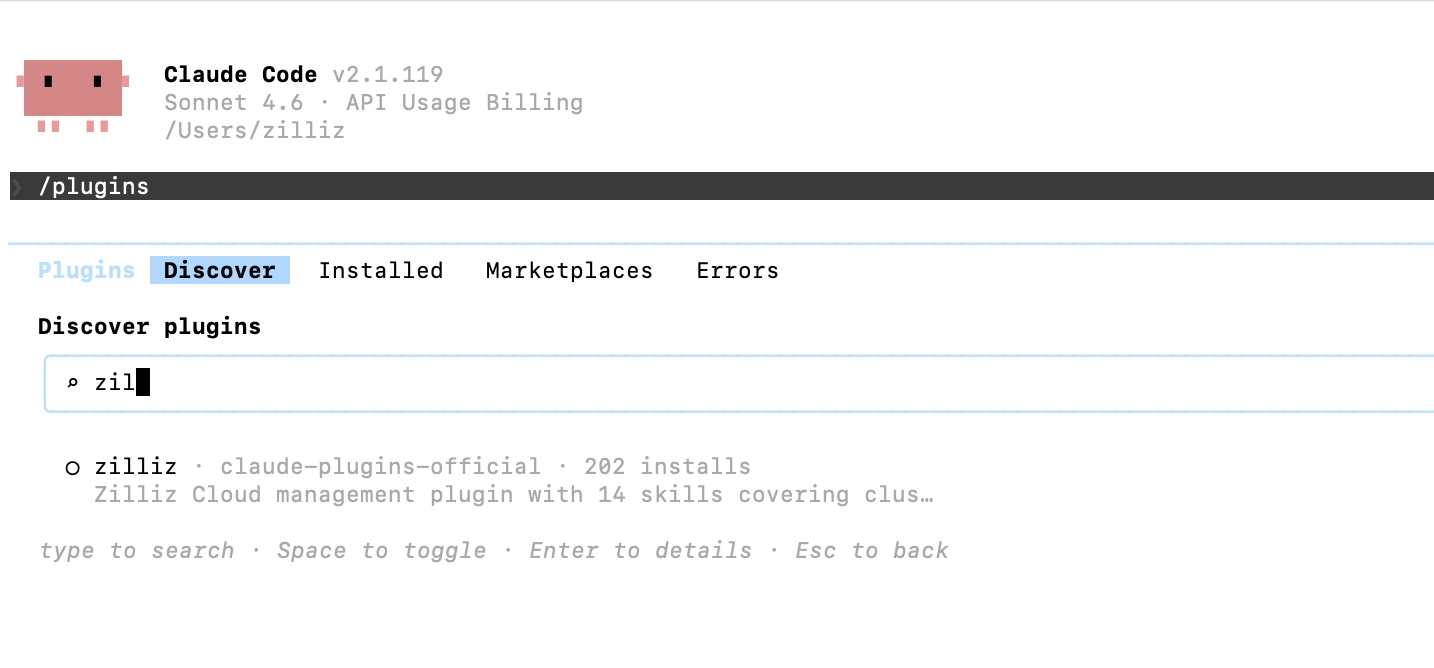
Zilliz Plugin を見つけてインストールします。
Discover タブに移動し、zilliz を検索します。zilliz プラグインを選択してインストールします。
クイックスタートウィザードを実行します。ウィザードでは、CLI のインストール、認証、クラスター接続、最初の操作を順に案内します。
/zilliz:quickstart
一般的なエージェントフレームワーク向けに Zilliz Skill をインストールする
Codex、Gemini CLI、Cursor などのコーディングエージェント、またはその他のスキル対応エージェントがエージェントスキルをサポートしている場合は、次のように Zilliz Skill をインストールします。
npx skills add zilliztech/zilliz-skill
このコマンドでは、対象のエージェントフレームワークとインストールスコープを選択するよう求められます。
Zilliz CLI をインストールする
Zilliz CLI は、Plugin と Skill が使用する基本のコマンドラインツールです。
Zilliz CLI をインストールします。
- macOS / Linux
- Windows
curl -fsSL https://zilliz.com/cli/install.sh | bash
irm https://zilliz.com/cli/install.ps1 | iex
インストールを確認します。
zilliz --version
認証します。
Zilliz Cloud アカウントで認証します。
zilliz login
認証用のブラウザーが開きます。ログイン後、認証情報はローカルに保存されます。
CLI、Plugin、または Skill を使うタイミング
これらのツールは、次のような場合に使用します。
-
ローカル環境から手動で開発およびテストする場合。
-
再現可能なワークフロー向けに自動運用スクリプトを作成する場合。
-
エージェントがベクトルデータベースまたは ベクトル Lakebase サービスを自動的に呼び出せるようにする場合。
ツールの比較
Claude Code Plugin、Zilliz Skill、および Zilliz CLI は、同じ主要な機能をカバーすることを想定しています。機能の範囲ではなく、ワークフローに基づいて選択してください。
| OpenAI Codex plugin | Claude Code Plugin | Zilliz Skill | Zilliz CLI | |
|---|---|---|---|---|
| 最適な用途 | Codex の自然言語ワークフロー | Claude Code の自然言語ワークフロー | スキル対応のコーディングエージェント | ターミナルでの利用、スクリプト、CI |
| セットアップ | quickstart スキルによるガイド付きセットアップ | /zilliz:quickstart | npx skills add zilliztech/zilliz-skill | インストールスクリプト + zilliz login |
| 自然言語 | はい | はい | はい | いいえ |
| 自動化 | エージェント支援 | エージェント支援 | エージェント支援 | スクリプト優先 |
| 構造化出力 | エージェントが読み取れるレスポンス | エージェントが読み取れるレスポンス | エージェントが読み取れるレスポンス | スクリプト向けの --output json |
サポートされる機能
次の表では、CLI、Plugin、および Skill の機能について説明します。
| 領域 | 実行できること |
|---|---|
| クラスター | 作成、削除、一時停止、再開、変更 |
| コレクション | カスタムスキーマでの作成、ロード、リリース、名前変更、削除 |
| ベクトル | 検索、クエリ、挿入、アップサート、削除、ハイブリッド検索 |
| インデックス | 作成(AUTOINDEX)、一覧表示、詳細表示、削除 |
| データベース | 作成、一覧表示、詳細表示、削除 |
| ユーザーとロール | RBAC のセットアップ、権限管理 |
| バックアップ | 作成、復元、エクスポート、ポリシー管理 |
| インポート | S3/GCS/Azure Blob Storage からの一括データインポート |
| パーティション | 作成、ロード、リリース、管理 |
| モニタリング | クラスターのステータス、コレクションの統計情報、ロード状態 |
| プロジェクト | プロジェクトとリージョンの管理 |
| 請求 | 使用量の照会、請求書 |
エージェントに依頼できること
インストール後は、タスクをそのまま伝えてください。エージェントは、リクエストを対応する Zilliz CLI コマンドに変換することが想定されています。次の例は、自然言語のリクエストが、エージェントが実行すると想定される CLI コマンドにどのように対応するかを示しています。
-
自分のクラスターを一覧表示し、現在アクティブなものを表示してください。
想定される CLI コマンド:
bashzilliz cluster listzilliz context current -
768 次元のベクトルフィールドを持つ product embeddings 用のコレクションを作成してください。
想定される CLI コマンド:
bashzilliz collection create --name product_embeddings --dimension 768 -
S3 から自分のコレクションにデータをインポートし、インポートジョブのステータスを確認してください。
想定される CLI コマンド:
bashzilliz import start --cluster-id <cluster-id> --collection product_embeddings --body '{"files": [["s3://bucket/path/data.json"]]}' -
自分の本番クラスターのバックアップを作成してください。
想定される CLI コマンド:
bashzilliz backup create --cluster-id <cluster-id> -
メタデータフィルターを使用して自分のコレクションを検索し、上位 10 件の結果を返してください。
想定される CLI コマンド:
bashzilliz vector search --collection product_embeddings --data '[[0.1, 0.2, 0.3]]' --filter 'age > 20' --limit 10 --output-fields '["name", "age"]' -
analytics コレクションへの読み取り専用アクセス権を持つロールを作成してください。
想定される CLI コマンド:
bashzilliz role create --role analytics_readonlyzilliz role grant-privilege --role analytics_readonly --object-type Collection --object-name analytics --privilege Searchzilliz role grant-privilege --role analytics_readonly --object-type Collection --object-name analytics --privilege Query