グローバルクラスターへの接続
この機能は、Business Critical(SaaS)および BYOC デプロイメントでのみ利用できます。
この機能は、サポートされているすべての AWS リージョンで利用できます。また、リクエストに応じて Google Cloud の us-central1 および us-east4 リージョンでも利用できます。この機能は Microsoft Azure では利用できません。
グローバルクラスターが実行されたら、エンドポイントと認証トークンを使用して接続します。このページでは、2 種類のエンドポイント、それぞれの使用場面、およびスイッチオーバーとフェイルオーバー時のルーティングの動作について説明します。
エンドポイントタイプの選択
グローバルクラスターには、次の 2 つの接続方法があります。
-
グローバルエンドポイント経由
-
グローバルクラスター内のプライマリクラスターまたはセカンダリクラスターの パブリックエンドポイントまたはプライベートエンドポイント経由
次の表は、2 つの接続エンドポイントを比較したものです。
| グローバルエンドポイント | プライマリクラスターまたはセカンダリクラスターのエンドポイント | |
|---|---|---|
| 書き込みルーティング | プライマリクラスターに自動的にルーティングされます | プライマリのパブリックエンドポイントのみが書き込みを受け付けます |
| 読み取りルーティング | プライマリクラスターにルーティングされます (レイテンシーに基づいて利用可能な最も近いクラスターへインテリジェントにルーティングする機能は近日中にサポートされる予定です。) | 読み取りは、接続先の特定のクラスターに送信されます |
| スイッチオーバー / フェイルオーバー | 自動的に再ルーティングされます — コードの変更は不要です | 新しいプライマリを指すように接続を更新する必要があります |
| Private Link | サポートされません(パブリックインターネットが必要です) | サポートされています。 |
| 最適な用途 | 自動フェイルオーバーとレイテンシーベースのルーティングを必要とする本番アプリケーション | 特定のクラスターへの直接アクセス(例:環境の複製、テスト、デバッグ) |
本番ワークロードには、グローバルエンドポイントの使用を推奨します。これにより、スイッチオーバーまたはフェイルオーバー時に、アプリケーションコードでエンドポイントの変更に対応する必要がなくなります。
エンドポイントとトークンの取得
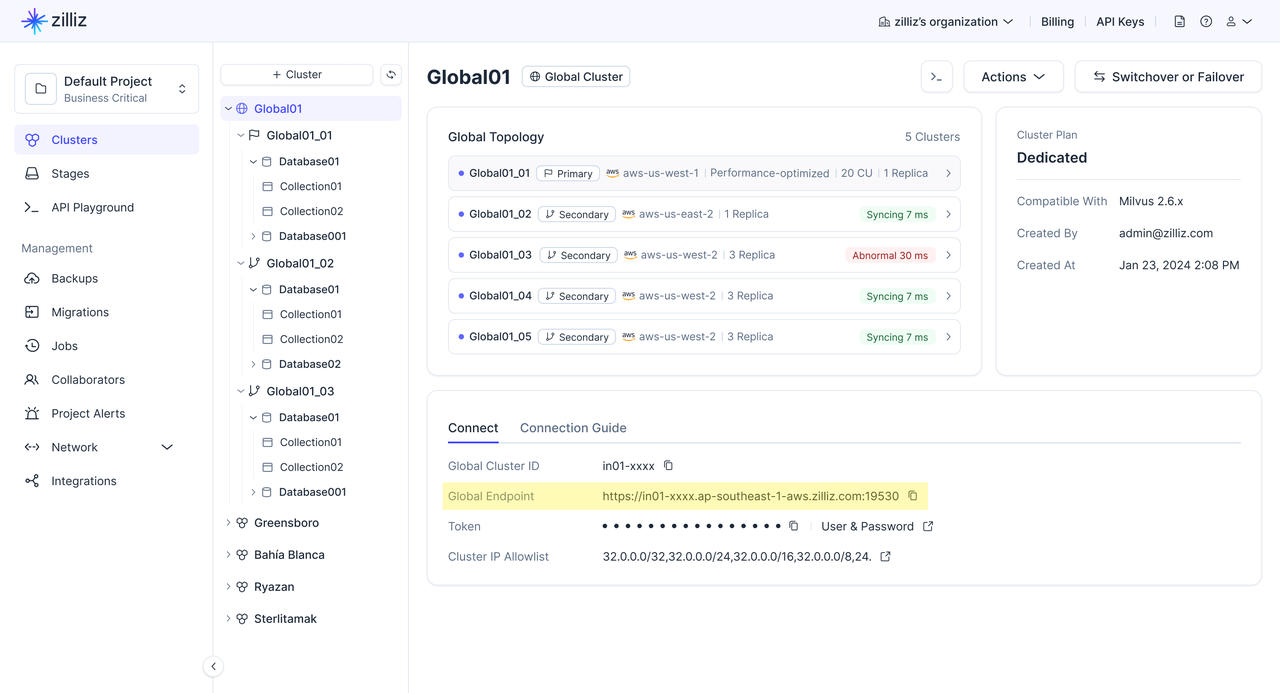
グローバルクラスターまたはターゲットクラスターに移動します。
-
グローバルエンドポイント の場合:グローバルクラスター ページに移動します。
-
パブリックエンドポイント の場合:特定のプライマリクラスターまたはセカンダリクラスターの クラスター詳細 ページに移動します。
Connect カードで、Global Endpoint または Public Endpoint をコピーします。
グローバルエンドポイントを使用した接続
グローバルエンドポイントは、常にグローバルクラスター内の現在のプライマリクラスターにリクエストをルーティングする単一の URL です。
スイッチオーバーまたはフェイルオーバーが発生すると、Zilliz Cloud はグローバルエンドポイントを自動的に更新して新しいプライマリクラスターを指すようにします。これにより、アプリケーションはクラスター URI を手動で変更することなく、同じエンドポイントを引き続き使用できます。
Zilliz Cloud は、SDK と RESTful API の両方を通じてグローバルエンドポイントへの接続をサポートしています。本番アプリケーションには、SDK クライアントの使用を推奨します。
SDK 接続が RESTful API 接続よりも推奨されるのはなぜですか?
SDK クライアントは、エンドポイント一覧、プライマリとセカンダリのロール、クラスターの健全性など、グローバルクラスターのトポロジーを取得できます。この情報により、SDK クライアントはプライマリクラスターが変更されたときに、より迅速に対応できます。SDK クライアントは将来、read/write 分割もサポートする予定です。これは、書き込みリクエストをプライマリクラスターにルーティングし、対象となる読み取りリクエストをグローバルクラスターのトポロジーに基づいてルーティングするものです。
ただし、RESTful API 接続はグローバルクラスターのトポロジー情報を保持しません。そのため、スイッチオーバーまたはフェイルオーバー後に、RESTful API 接続が新しいプライマリクラスターへ切り替わるまでに時間がかかる場合があります。同じ理由で、RESTful API 接続は read/write 分割をサポートできません。
次の表は、SDK 接続と RESTful API 接続を比較したものです。
| 項目 | SDK 接続 | RESTful API 接続 |
|---|---|---|
| 最適な用途 | ロール変更時の迅速な復旧と将来の read/write 分割を必要とする本番アプリケーション。 | 軽量なスクリプト、シンプルな REST 統合、単発の管理操作。 |
| トポロジーの認識 | エンドポイント一覧、プライマリとセカンダリのロール、クラスターの健全性など、グローバルクラスターのトポロジーを取得します。 | グローバルクラスターのトポロジー情報を保持しません。 |
| プライマリ変更時の対応 | スイッチオーバーまたはフェイルオーバー後にプライマリクラスターが変更されたとき、通常は数秒以内と、より迅速に対応できます。 | クライアントがトポロジー情報を保持しないため、新しいプライマリへの切り替えに通常は数分と、より長い時間がかかる場合があります。 |
| read/write 分割 | 近日中にサポートされる予定です。 | サポートされていません |
SDK バージョンの確認
開始する前に、SDK を インストール 済みであること、および SDK が最小バージョン要件を満たしていることを確認してください。
| SDK | 最小バージョン |
|---|---|
| Python | 2.6.9 |
| Java | 2.6.14 |
接続ガイド
- Python
- Java
- Go
- Rust
- C++
- NodeJS
- CSharp
- cURL
from pymilvus import MilvusClient

# Use the global endpoint for automatic routing
client = MilvusClient(
    uri="YOUR_GLOBAL_ENDPOINT",  # Global endpoint from the console
    token="YOUR_CLUSTER_TOKEN"   # API key or username:password
)
import io.milvus.v2.client.MilvusClientV2;
import io.milvus.v2.client.ConnectConfig;

// Use the global endpoint for automatic routing
ConnectConfig connectConfig = ConnectConfig.builder()
    .uri("YOUR_GLOBAL_ENDPOINT")  // Global endpoint from the console
    .token("YOUR_CLUSTER_TOKEN")  // API key or username:password
    .build();

MilvusClientV2 client = new MilvusClientV2(connectConfig);
import (
    "context"
    "log"

    "github.com/milvus-io/milvus/client/v3/milvusclient"
)

// Use the global endpoint for automatic routing
client, err := milvusclient.New(context.Background(), &milvusclient.ClientConfig{
    Address: "YOUR_GLOBAL_ENDPOINT", // Global endpoint from the console
    APIKey:  "YOUR_CLUSTER_TOKEN",   // API key or username:password
})
if err != nil {
    log.Fatal(err)
}
use milvus::v2::error::Result;
use milvus::v2::prelude::*;

#[tokio::main]
async fn main() -> Result<()> {
    // Use the global endpoint for automatic routing
    let config = ConnectConfig::new().uri("YOUR_GLOBAL_ENDPOINT").token("YOUR_CLUSTER_TOKEN");
    let client = ClientV2::new(&config).await?;
    Ok(())
}
#include "milvus/MilvusClientV2.h"
#include <iostream>

// Use the global endpoint for automatic routing
auto client = milvus::MilvusClientV2::Create();
auto status = client->Connect(milvus::ConnectParam("YOUR_GLOBAL_ENDPOINT").WithToken("YOUR_CLUSTER_TOKEN"));
if (!status.IsOk()) {
    std::cout << status.Message() << std::endl;
}
const { MilvusClient } = require("@zilliz/milvus2-sdk-node");

// Use the global endpoint for automatic routing
const client = new MilvusClient({
    address: "YOUR_GLOBAL_ENDPOINT",  // Global endpoint from the console
    token: "YOUR_CLUSTER_TOKEN"  // API key or username:password
});
using Milvus.Client.V2;
using Milvus.Client.V2.Requests.Collection;
using Milvus.Client.V2.Requests.Dml;
using Milvus.Client.V2.Requests.Dql;
using Milvus.Client.V2.Requests.Index;
using Milvus.Client.V2.Types;

// Use the global endpoint for automatic routing
var client = new MilvusClientV2(new ConnectConfig
{
    Uri = "YOUR_GLOBAL_ENDPOINT",  // Global endpoint from the console
    Username = "YOUR_CLUSTER_TOKEN" // API key or username:password
});
curl --request POST \
  --url "${CLUSTER_ENDPOINT}/v2/vectordb/collections/list" \
  --header "Authorization: Bearer ${TOKEN}" \
  --header "Content-Type: application/json" \
  -d '{}'
パブリックエンドポイントを使用した接続
グローバルクラスター内の各クラスターには、独自のパブリックエンドポイントがあります。特定のクラスターを直接対象とする必要がある場合に使用します。
- Python
- Java
- Go
- Rust
- C++
- NodeJS
- CSharp
- cURL
from pymilvus import MilvusClient

# Connect directly to a specific cluster
client = MilvusClient(
    uri="YOUR_CLUSTER_PUBLIC_ENDPOINT",  # Public endpoint of a specific cluster
    token="YOUR_CLUSTER_TOKEN" # API key or username:password
)
import io.milvus.v2.client.MilvusClientV2;
import io.milvus.v2.client.ConnectConfig;

// Connect directly to a specific cluster
ConnectConfig connectConfig = ConnectConfig.builder()
    .uri("YOUR_CLUSTER_PUBLIC_ENDPOINT")  // Public endpoint of a specific cluster
    .token("YOUR_CLUSTER_TOKEN")  // API key or username:password
    .build();

MilvusClientV2 client = new MilvusClientV2(connectConfig);
import (
    "context"
    "log"

    "github.com/milvus-io/milvus/client/v3/milvusclient"
)

// Connect directly to a specific cluster
client, err := milvusclient.New(context.Background(), &milvusclient.ClientConfig{
    Address: "YOUR_CLUSTER_PUBLIC_ENDPOINT", // Public endpoint of a specific cluster
    APIKey:  "YOUR_CLUSTER_TOKEN",           // API key or username:password
})
if err != nil {
    log.Fatal(err)
}
use milvus::v2::error::Result;
use milvus::v2::prelude::*;

#[tokio::main]
async fn main() -> Result<()> {
    // Connect directly to a specific cluster
    let config = ConnectConfig::new().uri("YOUR_CLUSTER_PUBLIC_ENDPOINT").token("YOUR_CLUSTER_TOKEN");
    let client = ClientV2::new(&config).await?;
    Ok(())
}
#include "milvus/MilvusClientV2.h"
#include <iostream>

// Connect directly to a specific cluster
auto client = milvus::MilvusClientV2::Create();
auto status = client->Connect(milvus::ConnectParam("YOUR_CLUSTER_PUBLIC_ENDPOINT").WithToken("YOUR_CLUSTER_TOKEN"));
if (!status.IsOk()) {
    std::cout << status.Message() << std::endl;
}
const { MilvusClient } = require("@zilliz/milvus2-sdk-node")

// Connect directly to a specific cluster
const client = new MilvusClient({
    address: "YOUR_CLUSTER_PUBLIC_ENDPOINT",  // Public endpoint of a specific cluster
    token: "YOUR_CLUSTER_TOKEN"  // API key or username:password
})
using Milvus.Client.V2;
using Milvus.Client.V2.Requests.Collection;
using Milvus.Client.V2.Requests.Dml;
using Milvus.Client.V2.Requests.Dql;
using Milvus.Client.V2.Requests.Index;
using Milvus.Client.V2.Types;

// Connect directly to a specific cluster
var client = new MilvusClientV2(new ConnectConfig
{
    Uri = "YOUR_CLUSTER_PUBLIC_ENDPOINT",  // Public endpoint of a specific cluster
    Username = "YOUR_CLUSTER_TOKEN"        // API key or username:password
});
curl --request POST \
  --url "${CLUSTER_ENDPOINT}/v2/vectordb/collections/list" \
  --header "Authorization: Bearer ${TOKEN}" \
  --header "Content-Type: application/json" \
  -d '{}'
パブリックエンドポイントを使用する場合、書き込み操作を受け付けるのはプライマリクラスターのパブリックエンドポイントのみです。セカンダリクラスターのパブリックエンドポイントへの書き込みは失敗します。
ルーティングの動作
通常運用時
| リクエストタイプ | グローバルエンドポイント | パブリックエンドポイント |
|---|---|---|
| 書き込み(insert、upsert、delete) | プライマリクラスターにルーティングされます | プライマリクラスターのエンドポイントでのみ受け付けられます |
| 読み取り(search、query) | プライマリクラスターにルーティングされます (レイテンシーに基づいて利用可能な最も近いクラスターへインテリジェントにルーティングする機能は近日中にサポートされる予定です。) | 接続先の特定のクラスターによって処理されます |
スイッチオーバー / フェイルオーバー中および後
| シナリオ | グローバルエンドポイント | パブリックエンドポイント |
|---|---|---|
| スイッチオーバー進行中 | 書き込みは一時的に中断され、その後、新しいプライマリで再開されます。読み取りは継続されます。 | エンドポイントに変更はありません。旧プライマリはセカンダリになります。 |
| フェイルオーバー進行中 | 新しいプライマリが昇格するまで書き込みは利用できません。読み取りはセカンダリで継続されます。 | 旧プライマリのエンドポイントに到達できなくなります。 |
| 完了後 | 新しいプライマリに自動的にルーティングされます。コードの変更は不要です。 | 書き込みには新しいプライマリのパブリックエンドポイントを使用するようにコードを更新します。 |
SDK の自動再接続
グローバルエンドポイントを使用する場合、Zilliz Cloud SDK がスイッチオーバーとフェイルオーバー時のエンドポイントの再ルーティングを処理します。アプリケーションは、ルーティング変更自体に対する再試行ロジックを実装する必要はありません。ただし、切り替えの瞬間に実行中だった書き込みは一時的なエラーを受け取る可能性があります — そのような場合は、アプリケーションの標準的な再試行ロジックが処理します。