外部コレクションを作成する
外部コレクションは、AWS S3 や Iceberg などの外部ストレージシステムまたはデータベーステーブルから、Zilliz Cloud にコピーせずにデータへアクセスする、Zilliz Cloud のデータコレクションの一種です。Zilliz Cloud のクエリインターフェースとの互換性を維持しながら、データレイク上のクエリレイヤーとして機能します。
外部コレクションは、オンデマンドコンピューティングのデータベースでのみ作成できます。サービス提供中の Dedicated クラスターでの外部コレクション作成のサポートは近日提供予定です。
概要
一般的な AI データパイプラインでは、ユーザーがすでに AWS S3 などのストレージシステムに Parquet などの形式でデータを保存している場合があります。Zilliz Cloud でこの外部保存データを使用するには、通常、Extract-Transform-Load(ETL)パイプラインを使用して Zilliz Cloud 独自のストレージにインポートする必要があります。
Zilliz Cloud にデータを持ち込むこのワークフローでは、同期が困難な冗長データが作成され、データの一貫性を確保するためのエンジニアリング保守負担が増加します。
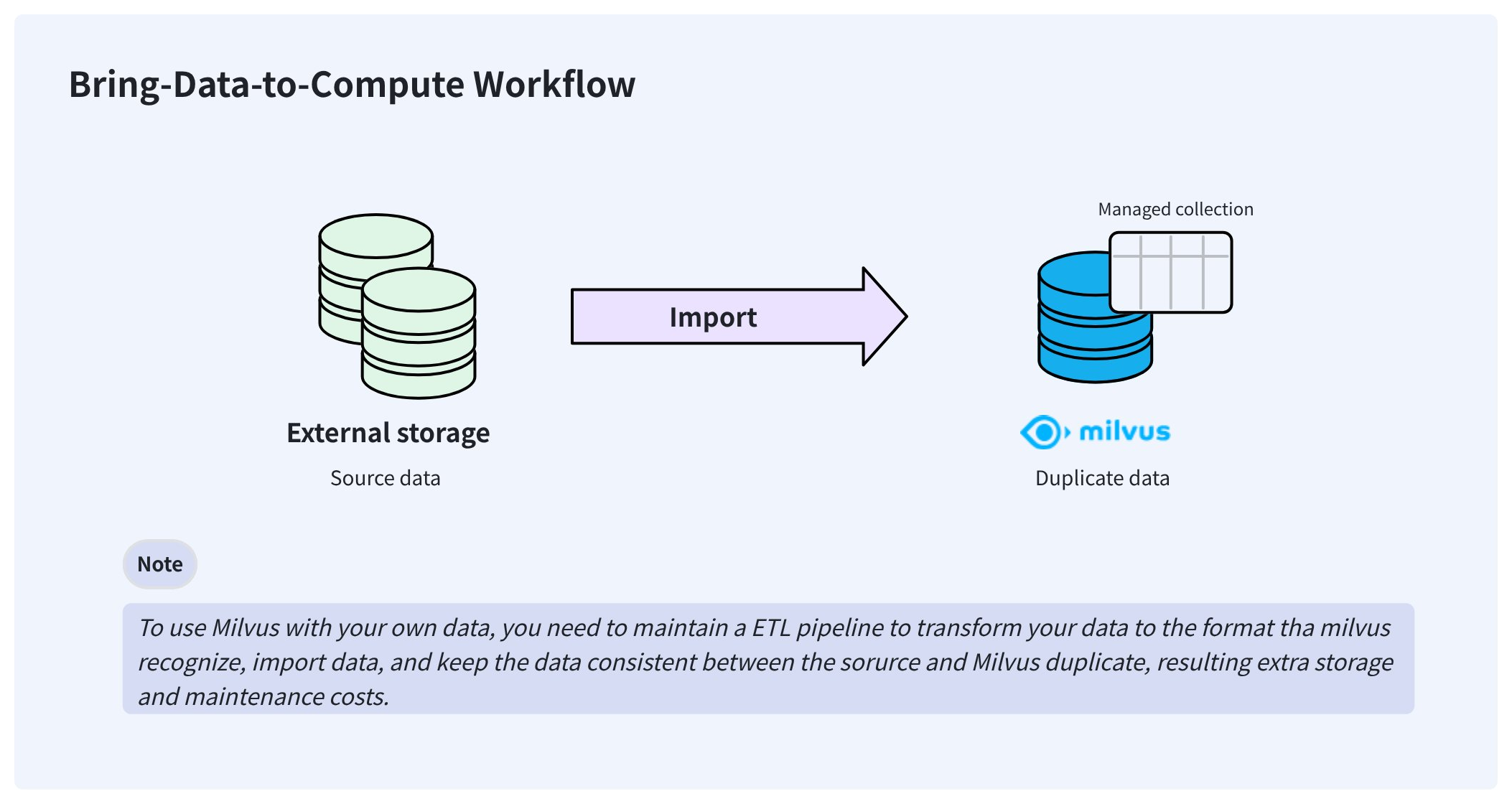
こうした問題を解決するため、Zilliz Cloud は外部コレクションを提供します。外部コレクションを使用すると、データの同期や ETL パイプラインを気にすることなく、Zilliz Cloud から外部保存データへアクセスできます。
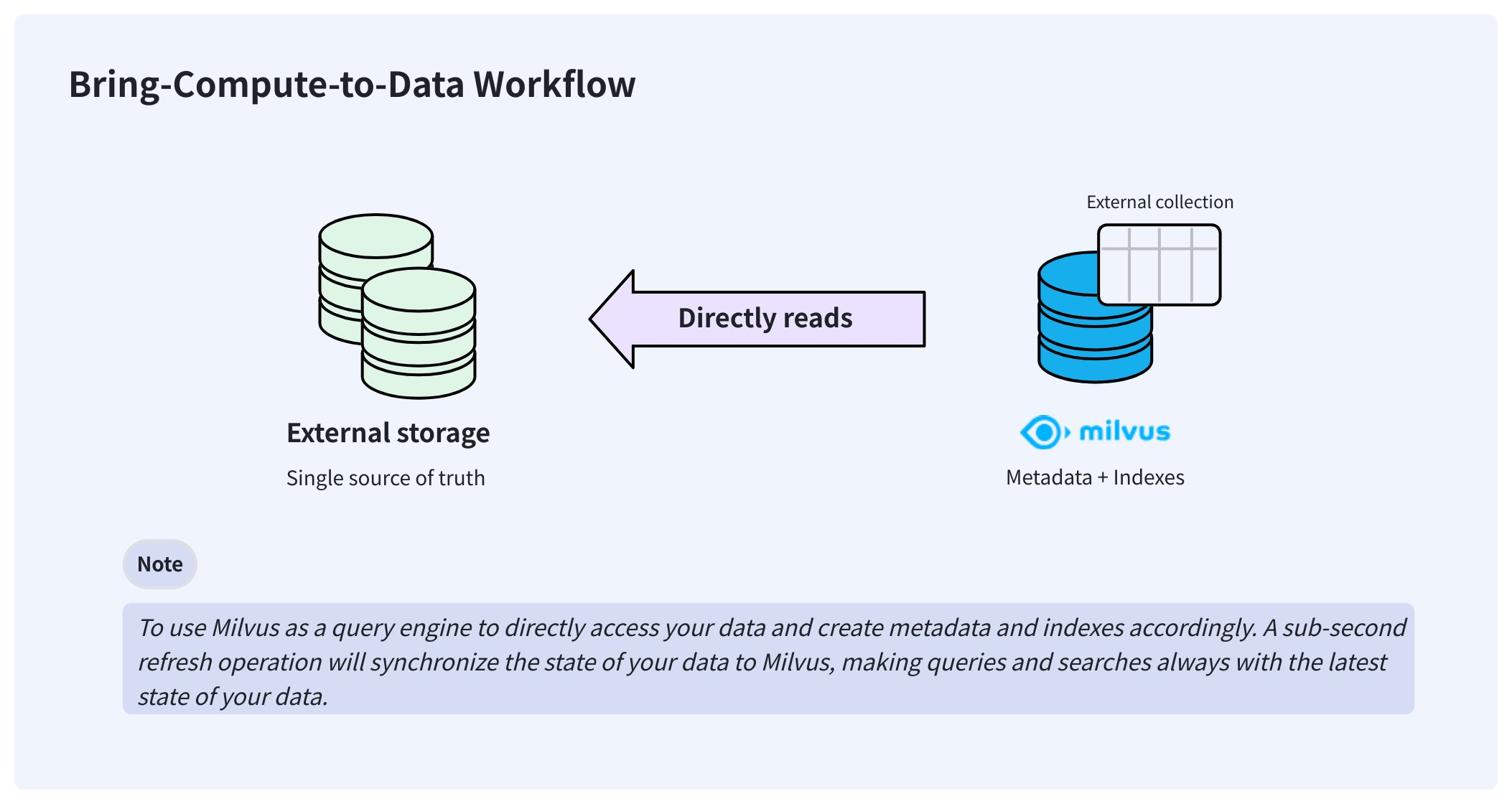
外部コレクションは、作成後、データに直接アクセスし、データを保存している同じ場所にそのまま保持できます。バックグラウンドで、Zilliz Cloud はマニフェストファイルを作成して、Zilliz Cloud メタデータと外部データファイルの行との間のマッピングを記録します。マニフェストファイルの準備ができたら、マネージドコレクションの場合と同じように、外部コレクションにインデックスを作成できます。
データが変更された場合は、手動で更新をトリガーすると 1 秒未満でメタデータが更新され、Zilliz Cloud は常に最新の状態に保たれます。
外部コレクションは、オンデマンドコンピューティングのデータベースで使用できます。
ステップ 1: スキーマを作成する
マネージドコレクションを作成する場合と同様に、外部コレクションを作成する前にスキーマを作成する必要があります。ただし、スキーマはマネージドコレクションのスキーマとは若干異なります。
事前準備
-
オンデマンドコンピューティングのデータベースで外部コレクションを作成するための十分な権限を持つ API キーを取得していること。
詳細は、API キー を参照してください。
-
オブジェクトストレージバケットを Zilliz Cloud と統合していること。
-
バケット統合から外部ボリュームを作成していること。ボリュームに対象のデータファイルが含まれていることを確認してください。
詳細は、外部ボリューム を参照してください。
サポートされるデータソース
Zilliz Cloud は次のデータソースをサポートしており、選択した形式で対応する外部ソースを指定する必要があります。
-
parquetexternal_sourceに対象の Parquet ファイルを含むフォルダーを設定します。 -
vortex,external_sourceに、バージョン 0.56 の Vortex 列指向ファイルを含むフォルダーを設定します。 -
lance-tableexternal_sourceに、_transactions、_versions、data などのサブフォルダーを含むフォルダーパスを設定します。 -
iceberg-tableexternal_sourceに Iceberg テーブルのmetadata.jsonファイルを設定し、次の例のようにスナップショット ID を渡します。pythonexternal_spec={"format": "iceberg-table","snapshot_id": "473984310232959286"} -
milvus-tableexternal_sourceに具体的な Milvus スナップショットメタデータ JSON ファイルを設定します。詳細は、スナップショットをデータソースとして使用する を参照してください。
スキーマを設定する
対象のデータファイルを含む外部ボリュームを用意したら、コレクションの列を Parquet ファイル(parquet)、Lance テーブル(lance-table)、Iceberg テーブル(iceberg-table)、または 0.56.0 形式の Vortex ファイル(vortex)にマッピングするスキーマを作成します。
外部ソースは、フォルダーであることを示すためにスラッシュ (/) で終わる必要があります。
- Python
- Java
- Go
- Rust
- C++
- NodeJS
- cURL
from pymilvus import MilvusClient, DataType

schema = MilvusClient.create_schema(
    external_source='volume://my_volume/path/to/a/folder/',
    external_spec='{"format": "parquet"}'
)
import com.google.gson.JsonObject;
import io.milvus.v2.service.collection.request.CreateCollectionReq;

JsonObject externalSpec = new JsonObject();
externalSpec.addProperty("format", "parquet");
CreateCollectionReq.CollectionSchema schema = CreateCollectionReq.CollectionSchema.builder()
        .externalSource("volume://my_volume/path/to/a/folder/")
        .externalSpec(externalSpec)
        .build();
import (
    "github.com/milvus-io/milvus/client/v3/entity"

    "github.com/milvus-io/milvus/client/v3/milvusclient"
)

schema := entity.NewSchema().
    WithName("product_embeddings").
    WithExternalSource("volume://my_volume/path/to/a/folder/").
    WithExternalSpec(`{"format": "parquet"}`)
use milvus::v2::prelude::*;
use serde_json::json;

let schema = CollectionSchema::new()
    .enable_dynamic_field(false)
    .external_source("volume://my_volume/path/to/a/folder/")
    .external_spec(json!({"format": "parquet"}));
#include "milvus/MilvusClientV2.h"
milvus::CollectionSchema schema;
schema.SetExternalSource("volume://my_volume/path/to/a/folder/");
schema.SetExternalSpec(nlohmann::json{{"format", "parquet"}});
const external_source = 'volume://my_volume/path/to/a/folder/';
const external_spec = '{"format": "parquet"}';
export fields='[
    {
        "fieldName": "product_id",
        "dataType": "Int64",
        "isPrimary": true
    },
    {
        "fieldName": "embedding",
        "dataType": "FloatVector",
        "elementTypeParams": {
            "dim": "768"
        }
    },
    {
        "fieldName": "product_name",
        "dataType": "VarChar",
        "elementTypeParams": {
            "max_length": 512
        }
    }
]'
ステップ 2: フィールドを追加する
スキーマの準備ができたら、次のようにフィールドを追加できます。
- Python
- Java
- Go
- Rust
- C++
- NodeJS
- cURL
schema.add_field(
    field_name="product_id",
    datatype=DataType.INT64,
    # highlight-next
    external_field="id" # field name in the external data file
)
schema.add_field(
    field_name="product_name",
    datatype=DataType.VARCHAR,
    max_length=512,
    # highlight-next
    external_field="name"
)
schema.add_field(
    field_name="embedding",
    datatype=DataType.FLOAT_VECTOR,
    dim=768,
    # highlight-next
    external_field="vector"
)
import io.milvus.v2.common.DataType;
import io.milvus.v2.service.collection.request.AddFieldReq;

schema.addField(AddFieldReq.builder()
        .fieldName("product_id")
        .dataType(DataType.Int64)
        .externalField("id")
        .build());
schema.addField(AddFieldReq.builder()
        .fieldName("product_name")
        .dataType(DataType.VarChar)
        .maxLength(512)
        .externalField("name")
        .build());
schema.addField(AddFieldReq.builder()
        .fieldName("embedding")
        .dataType(DataType.FloatVector)
        .dimension(768)
        .externalField("vector")
        .build());
import (
    "github.com/milvus-io/milvus/client/v3/entity"

    "github.com/milvus-io/milvus/client/v3/milvusclient"
)

schema = schema.
    WithField(
        entity.NewField().
            WithName("product_id").
            WithDataType(entity.FieldTypeInt64).
            WithExternalField("id"),
    ).
    WithField(
        entity.NewField().
            WithName("product_name").
            WithDataType(entity.FieldTypeVarChar).
            WithMaxLength(512).
            WithExternalField("name"),
    ).
    WithField(
        entity.NewField().
            WithName("embedding").
            WithDataType(entity.FieldTypeFloatVector).
            WithDim(768).
            WithExternalField("vector"),
    )
use milvus::v2::prelude::*;

let schema = schema
    .add_field(
        FieldSchema::new()
            .name("product_id")
            .data_type(DataType::Int64)
            .primary_key(true)
            .external_field("id"),
    )
    .add_field(
        FieldSchema::new()
            .name("product_name")
            .data_type(DataType::VarChar)
            .max_length(512)
            .external_field("name"),
    )
    .add_field(
        FieldSchema::new()
            .name("embedding")
            .data_type(DataType::FloatVector)
            .dimension(768)
            .external_field("vector"),
    );
#include "milvus/MilvusClientV2.h"
schema.AddField(milvus::FieldSchema("product_id", milvus::DataType::INT64, "").WithExternalField("id"));
schema.AddField(milvus::FieldSchema("product_name", milvus::DataType::VARCHAR, "").WithExternalField("name"));
schema.AddField(milvus::FieldSchema("embedding", milvus::DataType::FLOAT_VECTOR, "").WithExternalField("vector"));
const schema = [
    { name: 'product_id', data_type: 'Int64', external_field: 'id' },
    { name: 'product_name', data_type: 'VarChar', max_length: 512, external_field: 'name' },
    { name: 'embedding', data_type: 'FloatVector', dim: 768, external_field: 'vector' },
];
export schema="{
    \"externalSource\": \"volume://my_volume/path/to/a/folder\",
    \"externalSpec\": \"{\\\"format\\\": \\\"parquet\\\"}\",
    \"fields\": $fields
}"
ステップ 3: コレクションを作成する
スキーマにすべてのフィールドを追加したら、外部コレクションを作成できます。
外部コレクションは、通常オンデマンドクラスターに関連付けられているプロジェクトレベルのデータベースで作成できます。
- Python
- Java
- Go
- Rust
- C++
- NodeJS
- cURL
# connect the database
client = MilvusClient(
    uri="https://{project-id}.{region}.vectordb.zillizcloud.com",
    token="YOUR_API_KEY"
)

client.use_database(
    db_name="my_database"
)
# create the collection
client.create_collection(
    collection_name="test_collection",
    schema=schema
)
import io.milvus.v2.client.ConnectConfig;
import io.milvus.v2.client.MilvusClientV2;
import io.milvus.v2.service.collection.request.CreateCollectionReq;
ConnectConfig connectConfig = ConnectConfig.builder()
        .uri("https://{project-id}.{region}.vectordb.zillizcloud.com")
        .token("YOUR_API_KEY")
        .build();
MilvusClientV2 client = new MilvusClientV2(connectConfig);
CreateCollectionReq createReq = CreateCollectionReq.builder()
        .dbName("my_database")
        .collectionName("test_collection")
        .collectionSchema(schema)
        .build();
client.createCollection(createReq);
import (
    "context"
    "fmt"

    "github.com/milvus-io/milvus/client/v3/entity"
    "github.com/milvus-io/milvus/client/v3/milvusclient"
)

ctx, cancel := context.WithCancel(context.Background())
defer cancel()
milvusAddr := "https://{project-id}.{region}.vectordb.zillizcloud.com"
token := "YOUR_API_KEY"
client, err := milvusclient.New(ctx, &milvusclient.ClientConfig{
    Address: milvusAddr,
    APIKey: token,
})
if err != nil {
    fmt.Println(err.Error())
    // handle error
}
err = client.UseDatabase(ctx, milvusclient.NewUseDatabaseOption("my_database"))
if err != nil {
    fmt.Println(err.Error())
    // handle error
}

err = client.CreateCollection(ctx, milvusclient.NewCreateCollectionOption("test_collection", schema))
if err != nil {
    fmt.Println(err.Error())
    // handle error
}
use milvus::v2::prelude::*;

#[tokio::main]
async fn main() -> Result<()> {
    let client = ClientV2::new(
        &ConnectConfig::new()
            .uri("https://{project-id}.{region}.vectordb.zillizcloud.com")
            .token("YOUR_API_KEY"),
    )
    .await?;

    client.use_database("my_database").await?;

    client
        .create_collection(
            CreateCollectionRequest::builder()
                .collection_name("test_collection")
                .schema(schema)
                .build()?,
        )
        .await?;

    Ok(())
}
#include "milvus/MilvusClientV2.h"
auto client = milvus::MilvusClientV2::Create();
auto status = client->Connect(milvus::ConnectParam("https://{project-id}.{region}.vectordb.zillizcloud.com", "YOUR_API_KEY"));
status = client->UseDatabase("my_database");
status = client->CreateCollection(milvus::CreateCollectionRequest()
    .WithDatabaseName("my_database")
    .WithCollectionName("test_collection")
    .WithCollectionSchema(std::make_shared<milvus::CollectionSchema>(schema)));
import { MilvusClient } from "@zilliz/milvus2-sdk-node";

const client = new MilvusClient({
    address: "https://{project-id}.{region}.vectordb.zillizcloud.com",
    token: "YOUR_API_KEY",
});

await client.useDatabase({ db_name: "my_database" });

await client.createCollection({
    collection_name: "test_collection",
    schema,
    external_source,
    external_spec,
});
export PROJECT_ENDPOINT='https://{project-id}.{region}.vectordb.zillizcloud.com'
curl --request POST \
--url "${PROJECT_ENDPOINT}/v2/vectordb/collections/create" \
--header "Authorization: Bearer ${TOKEN}" \
--header "Content-Type: application/json" \
-d "{
    \"dbName\": \"my_database\",
    \"collectionName\": \"test_collection\",
    \"schema\": $schema
}"
ステップ 4: インデックスを作成する
マネージドコレクションの場合と同じように、外部コレクションの列にインデックスを作成できます。
- Python
- Java
- Go
- Rust
- C++
- NodeJS
- cURL
index_params = client.prepare_index_params()
# Add indexes
index_params.add_index(
    field_name="embedding",
    index_type="AUTOINDEX",
    metric_type="COSINE"
)
index_params.add_index(
    field_name="product_name",
    index_type="AUTOINDEX"
)
client.create_index(
    db_name="my_database",
    collection_name="test_collection",
    index_params=index_params
)
import io.milvus.v2.common.IndexParam;
import io.milvus.v2.service.index.request.CreateIndexReq;
import java.util.*;

IndexParam indexParamForIdField = IndexParam.builder()
        .fieldName("product_name")
        .indexType(IndexParam.IndexType.AUTOINDEX)
        .build();
IndexParam indexParamForVectorField = IndexParam.builder()
        .fieldName("embedding")
        .indexType(IndexParam.IndexType.AUTOINDEX)
        .metricType(IndexParam.MetricType.COSINE)
        .build();
List<IndexParam> indexParams = new ArrayList<>();
indexParams.add(indexParamForIdField);
indexParams.add(indexParamForVectorField);
CreateIndexReq createIndexReq = CreateIndexReq.builder()
        .dbName("my_database")
        .collectionName("test_collection")
        .indexParams(indexParams)
        .build();
client.createIndex(createIndexReq);
import (
    "context"
    "fmt"

    "github.com/milvus-io/milvus/client/v3/entity"
    "github.com/milvus-io/milvus/client/v3/index"
    "github.com/milvus-io/milvus/client/v3/milvusclient"
)

collectionName := "test_collection"

indexTask, err := client.CreateIndex(ctx,
    milvusclient.NewCreateIndexOption(collectionName, "embedding", index.NewAutoIndex(entity.COSINE)))
if err != nil {
    fmt.Println(err.Error())
    // handle err
}
err = indexTask.Await(ctx)
if err != nil {
    fmt.Println(err.Error())
    // handle err
}

_, err = client.CreateIndex(ctx,
    milvusclient.NewCreateIndexOption(collectionName, "product_name", index.NewAutoIndex(entity.L2)))
if err != nil {
    fmt.Println(err.Error())
    // handle err
}
use milvus::v2::prelude::*;
client
    .create_index(
        CreateIndexRequest::builder()
            .collection_name("test_collection")
            .index_param(
                IndexParam::new()
                    .field_name("embedding")
                    .index_type(IndexType::AutoIndex)
                    .metric_type(MetricType::Cosine),
            )
            .index_param(
                IndexParam::new()
                    .field_name("product_name")
                    .index_type(IndexType::AutoIndex),
            )
            .build()?,
    )
    .await?;
#include "milvus/MilvusClientV2.h"
milvus::CreateIndexRequest indexRequest;
indexRequest.WithCollectionName("test_collection");
indexRequest.AddIndex(milvus::IndexSchema("embedding", milvus::IndexType::AUTOINDEX, milvus::MetricType::COSINE));
indexRequest.AddIndex(milvus::IndexSchema("product_name", milvus::IndexType::AUTOINDEX));
status = client->CreateIndex(indexRequest);
client.createIndex({
    db_name: "my_database",
    collection_name: "test_collection",
    field_name: "product_name",
    index_type: "AUTOINDEX"
})
client.createIndex({
    db_name: "my_database",
    collection_name: "test_collection",
    field_name: "embedding",
    index_type: "AUTOINDEX",
    metric_type: "COSINE"
})
export indexParams='[
        {
            "fieldName": "embedding",
            "indexName": "my_vector",
            "indexType": "AUTOINDEX"
        },
        {
            "fieldName": "product_name",
            "indexName": "my_id",
            "indexType": "AUTOINDEX"
        }
    ]'

curl --request POST \
--url "${PROJECT_ENDPOINT}/v2/vectordb/indexes/create" \
--header "Authorization: Bearer ${TOKEN}" \
--header "Content-Type: application/json" \
-d "{
    \"dbName\": \"my_database\",
    \"collectionName\": \"test_collection\",
    \"indexParams\": $indexParams
}"
ステップ 5: データを更新する
コレクションの準備ができたら、更新してデータのメタデータとインデックスを作成します。
- Python
- Java
- Go
- Rust
- C++
- NodeJS
- cURL
job_id = client.refresh_external_collection(
    db_name="my_database",
    collection_name="test_collection"
)
while True:
    progress = client.get_refresh_external_collection_progress(job_id=job_id)
    print(f"  {progress.state}: {progress.progress}%")
    if progress.state == "RefreshCompleted":
        elapsed = progress.end_time - progress.start_time
        print(f"  Completed in {elapsed}ms")
        break
    elif progress.state == "RefreshFailed":
        print(f"  Failed: {progress.reason}")
        break
    time.sleep(2)
import io.milvus.v2.service.utility.request.GetRefreshExternalCollectionProgressReq;
import io.milvus.v2.service.utility.request.RefreshExternalCollectionReq;
import io.milvus.v2.service.utility.response.GetRefreshExternalCollectionProgressResp;
import io.milvus.v2.service.utility.response.RefreshExternalCollectionJobInfo;
import io.milvus.v2.service.utility.response.RefreshExternalCollectionResp;
import java.util.concurrent.TimeUnit;

RefreshExternalCollectionResp refreshResp = client.refreshExternalCollection(
        RefreshExternalCollectionReq.builder()
                .collectionName("test_collection")
                .build());

long jobId = refreshResp.getJobId();

while (true) {
    GetRefreshExternalCollectionProgressResp resp = client.getRefreshExternalCollectionProgress(
            GetRefreshExternalCollectionProgressReq.builder()
                    .jobId(jobId)
                    .build());
    RefreshExternalCollectionJobInfo jobInfo = resp.getJobInfo();
    if ("RefreshCompleted".equals(jobInfo.getState())) {
        long elapsed = jobInfo.getEndTime() - jobInfo.getStartTime();
        System.out.printf("  Refresh completed in %dms%n", elapsed);
        break;
    } else if ("RefreshFailed".equals(jobInfo.getState())) {
        System.out.printf("  Refresh failed: %s%n", jobInfo.getReason());
    }
    TimeUnit.SECONDS.sleep(2);
}
import (
    "context"
    "fmt"
    "time"

    "github.com/milvus-io/milvus/client/v3/entity"
    "github.com/milvus-io/milvus/client/v3/milvusclient"
)

refreshResult, err := client.RefreshExternalCollection(ctx,
    milvusclient.NewRefreshExternalCollectionOption("test_collection"))
if err != nil {
    fmt.Println(err.Error())
    // handle error
}
jobID := refreshResult.JobID
for {
    progress, err := client.GetRefreshExternalCollectionProgress(ctx,
        milvusclient.NewGetRefreshExternalCollectionProgressOption(jobID))
    if err != nil {
        fmt.Println(err.Error())
        // handle error
    }
    fmt.Printf("State: %s\n", progress.State)
    if progress.State == entity.RefreshStateCompleted {
        fmt.Println("Refresh completed!")
        break
    }
    if progress.State == entity.RefreshStateFailed {
        fmt.Printf("Refresh failed: %s\n", progress.Reason)
        break
    }
    time.Sleep(2 * time.Second)
}
use milvus::v2::prelude::*;
let refresh = client
    .refresh_external_collection(
        RefreshExternalCollectionRequest::builder()
            .collection_name("test_collection")
            .build()?,
    )
    .await?;
loop {
    let progress = client
        .get_refresh_external_collection_progress(
            GetRefreshExternalCollectionProgressRequest::builder()
                .job_id(refresh.job_id())
                .build()?,
        )
        .await?;
    let job_info = progress.job_info();
    println!("  {}: {}%", job_info.get_state().as_str(), job_info.get_progress());
    match job_info.get_state() {
        RefreshExternalCollectionStateCode::Completed => {
            println!("  Completed in {}ms", job_info.get_end_time() - job_info.get_start_time());
            break;
        }
        RefreshExternalCollectionStateCode::Failed => {
            println!("  Failed: {}", job_info.get_reason());
            break;
        }
        _ => tokio::time::sleep(std::time::Duration::from_secs(2)).await,
    }
}
#include "milvus/MilvusClientV2.h"
#include <iostream>
#include <thread>
#include <chrono>
milvus::RefreshExternalCollectionRequest refreshRequest;
refreshRequest.WithCollectionName("test_collection");
milvus::RefreshExternalCollectionResponse refreshResponse;
status = client->RefreshExternalCollection(refreshRequest, refreshResponse);
while (true) {
    milvus::GetRefreshExternalCollectionProgressRequest progressRequest;
    progressRequest.WithJobID(refreshResponse.JobID());
    milvus::GetRefreshExternalCollectionProgressResponse progressResponse;
    status = client->GetRefreshExternalCollectionProgress(progressRequest, progressResponse);
    const auto& jobInfo = progressResponse.JobInfo();
    std::cout << "  progress: " << jobInfo.Progress() << "%" << std::endl;
    if (jobInfo.State() == milvus::RefreshExternalCollectionStateCode::COMPLETED) {
        std::cout << "  Completed in " << (jobInfo.EndTime() - jobInfo.StartTime()) << "ms" << std::endl;
        break;
    } else if (jobInfo.State() == milvus::RefreshExternalCollectionStateCode::FAILED) {
        std::cout << "  Failed: " << jobInfo.Reason() << std::endl;
        break;
    }
    std::this_thread::sleep_for(std::chrono::seconds(2));
}
const job = await client.refreshExternalCollection({
    collection_name: "test_collection",
});
while (true) {
    const progress = await client.getRefreshExternalCollectionProgress({ job_id: job.job_id });
    console.log(`${progress.job_info.state}: ${progress.job_info.progress}%`);
    if (progress.job_info.state === "RefreshCompleted" || progress.job_info.state === "RefreshFailed") break;
    await new Promise((resolve) => setTimeout(resolve, 2000));
}
curl --request POST \
--url "${PROJECT_ENDPOINT}/v2/vectordb/jobs/external_collection/refresh" \
--header "Authorization: Bearer ${TOKEN}" \
--header "Content-Type: application/json" \
-d "{
    \"dbName\": \"my_database\",
    \"collectionName\": \"test_collection\",
    \"externalSource\": \"volume://my_volume/path/to/a/folder\",
    \"externalSpec\": \"{\\\"format\\\": \\\"parquet\\\"}\"
}"
更新操作は非同期であるため、その進行状況を監視する反復処理を設定する必要があります。
-
更新操作はデータファイルのメタデータをスキャンし、それに応じてマニフェストファイルを生成します。通常、150~250 ms かかります。
-
マニフェストファイルには、Milvus のメタデータと外部ファイルの行との間のマッピングが記録されます。
-
ソースデータに更新がある場合は、Zilliz Cloud を最新の状態に保つために、手動で再度更新を呼び出す必要があります。
-
挿入を行わずにすべてのアクティブなメタデータを削除する必要がある更新は、拒否されます。
-
オンデマンドコンピューティングのデータベースにある外部コレクションは、手動でロードおよびリリースする必要はありません。
次のステップ
外部コレクションを更新したら、マネージドコレクションの場合と同じように、外部コレクションで類似検索およびクエリを実行できます。ただし、オンデマンドコンピューティングのデータベースにあるコレクションは、検索およびクエリのためにオンデマンドクラスターに接続する必要があります。詳細は、オンデマンドクラスターを作成する およびその関連ページを参照してください。
search、query、get、ハイブリッド検索などの DQL 操作を実行する前に、オンデマンドクラスターのコンピューティングリソースを接続するセッションを作成する必要があります。詳細は、オンデマンド DQL 操作 を参照してください。
スナップショットをソースとして使用
スナップショットのメタデータ JSON パスを `externalsource` として使用し、`externalspec.format` を `"milvus-table"` に設定すると、Milvus スナップショットから外部コレクションを作成できます。 | Cloud