グローバルクラスターの作成
この機能は、Business Critical (SaaS) および BYOC デプロイメントでのみ利用できます。
この機能は、すべての AWS リージョンおよび Google Cloud の gcp-us-central1 と gcp-us-east4 リージョンで利用可能です。Microsoft Azure では利用できません。
このガイドでは、グローバルクラスターの作成方法について説明します。
既存のクラスターでグローバルクラスター機能を有効にする場合は、クラスターの管理 を参照してください。
事前準備
-
Project Admin 権限を持っていることを確認してください。
-
現在、この機能はすべての AWS リージョンと、Google Cloud の us-central1 および us-east4 リージョンで利用できます。Google Cloud リージョンでグローバルクラスターを作成する場合は、お問い合わせ ください。
-
グローバルクラスターは Milvus 2.6.x にのみ対応しています。
グローバルクラスターの作成
-
Web コンソールを使用する場合
1クラスター設定 で グローバルクラスター の横にあるスイッチをオンにします。
2グローバルクラスターの名前を入力します。
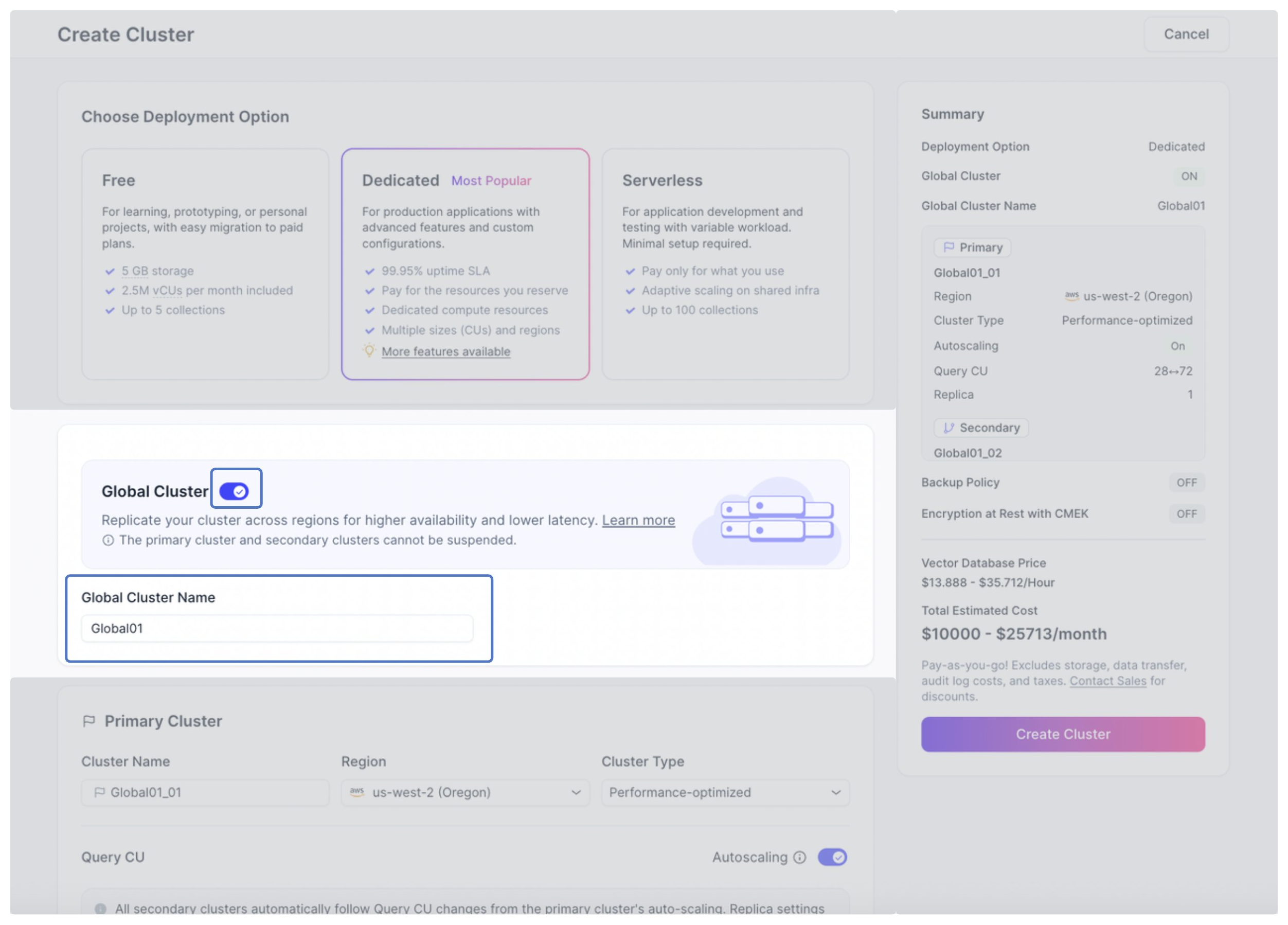 3
3プライマリクラスターを設定します。
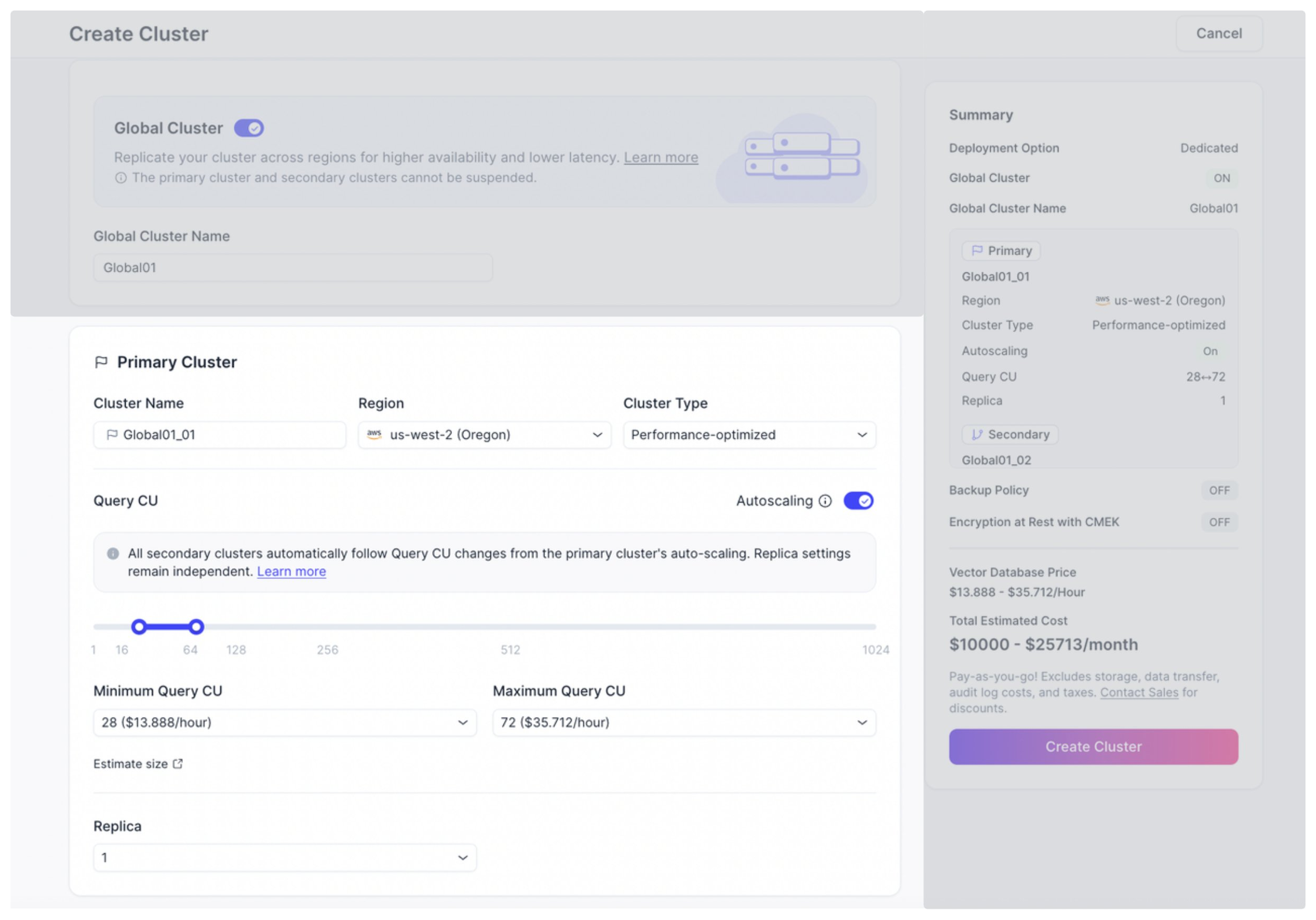
各パラメーターの説明は以下の通りです。
パラメーター 説明 クラスター名 プライマリクラスターの名前です。 リージョン プライマリクラスターをデプロイするリージョンです。 クラスタータイプ プライマリクラスターのクラスタータイプ。すべてのセカンダリクラスターは、プライマリクラスターと同じクラスタータイプを使用します。 Query CU 自動スケーリングはデフォルトで有効です。入力ボックスに値を入力するかスライダーをドラッグして、自動スケーリング時の Query CU の最小値と最大値を設定できます。詳細については、自動スケーリング を参照してください。
自動スケーリングを無効にすることも可能です。
セカンダリクラスターの Query CU 数は、プライマリクラスターの設定に連動します。レプリカ プライマリクラスターのレプリカ数です。プライマリクラスターと各セカンダリクラスターで異なるレプリカ数を設定できます。 4セカンダリクラスターを設定します。セカンダリクラスターは 最大 5 つ まで作成できます。
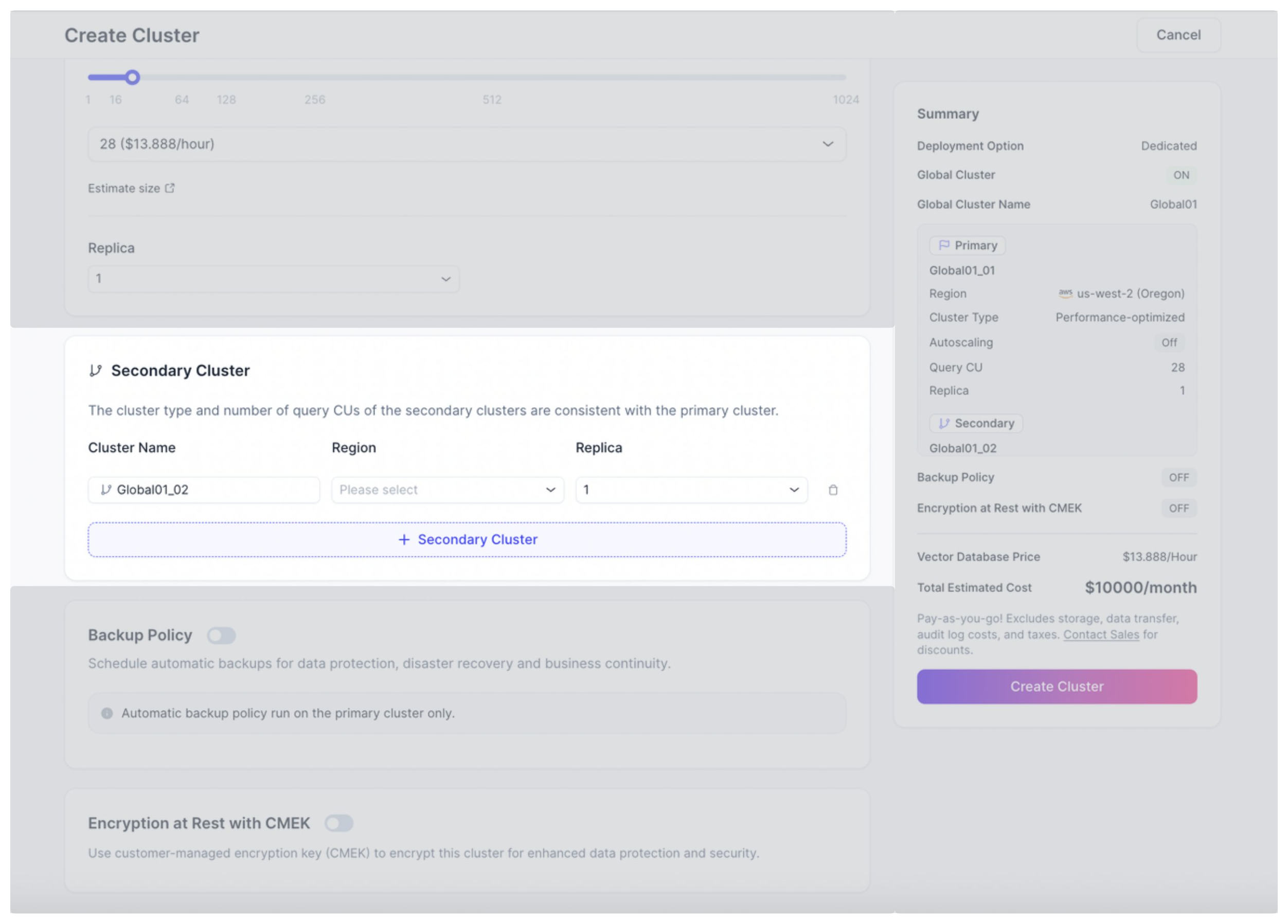
各パラメーターの説明は以下の通りです。
パラメーター 説明 クラスター名 セカンダリクラスターの名前です。 リージョン セカンダリクラスターをデプロイするリージョンです。 レプリカ セカンダリクラスターのレプリカ数です。プライマリクラスターと各セカンダリクラスターで異なるレプリカ数を設定できます。 5作成 をクリックします。
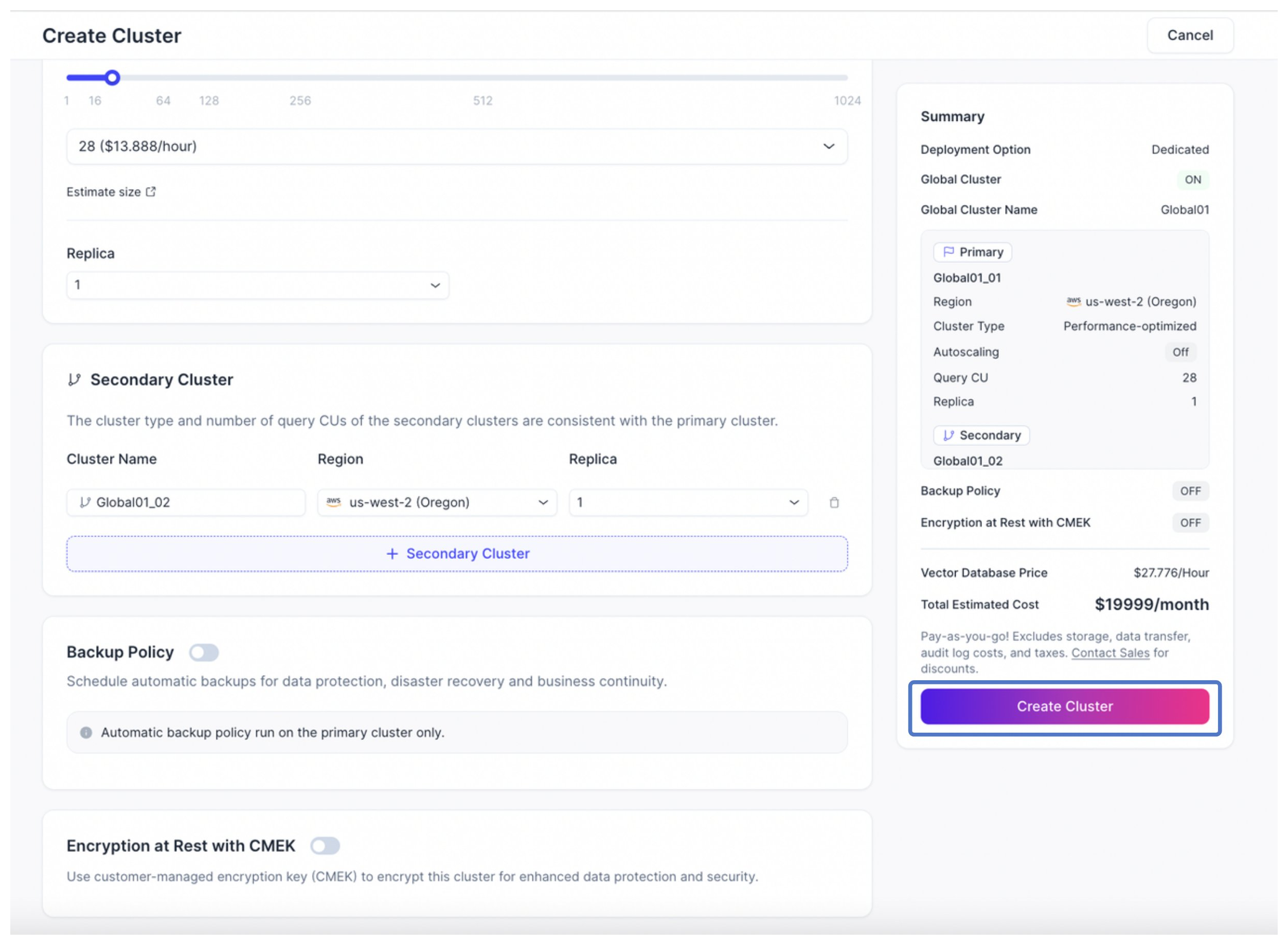
グローバルクラスターを作成すると、Zilliz Cloud が以下の処理を実行します:
-
グローバルクラスター、およびそのプライマリクラスターとセカンダリクラスターのプロビジョニングを開始します。プロビジョニング中、すべてのクラスターは CREATING ステータスで表示されます。
-
プライマリクラスターとセカンダリクラスターの両方のプロビジョニングが完了すると、ステータスが RUNNING に変わり、データレプリケーションが開始されます。
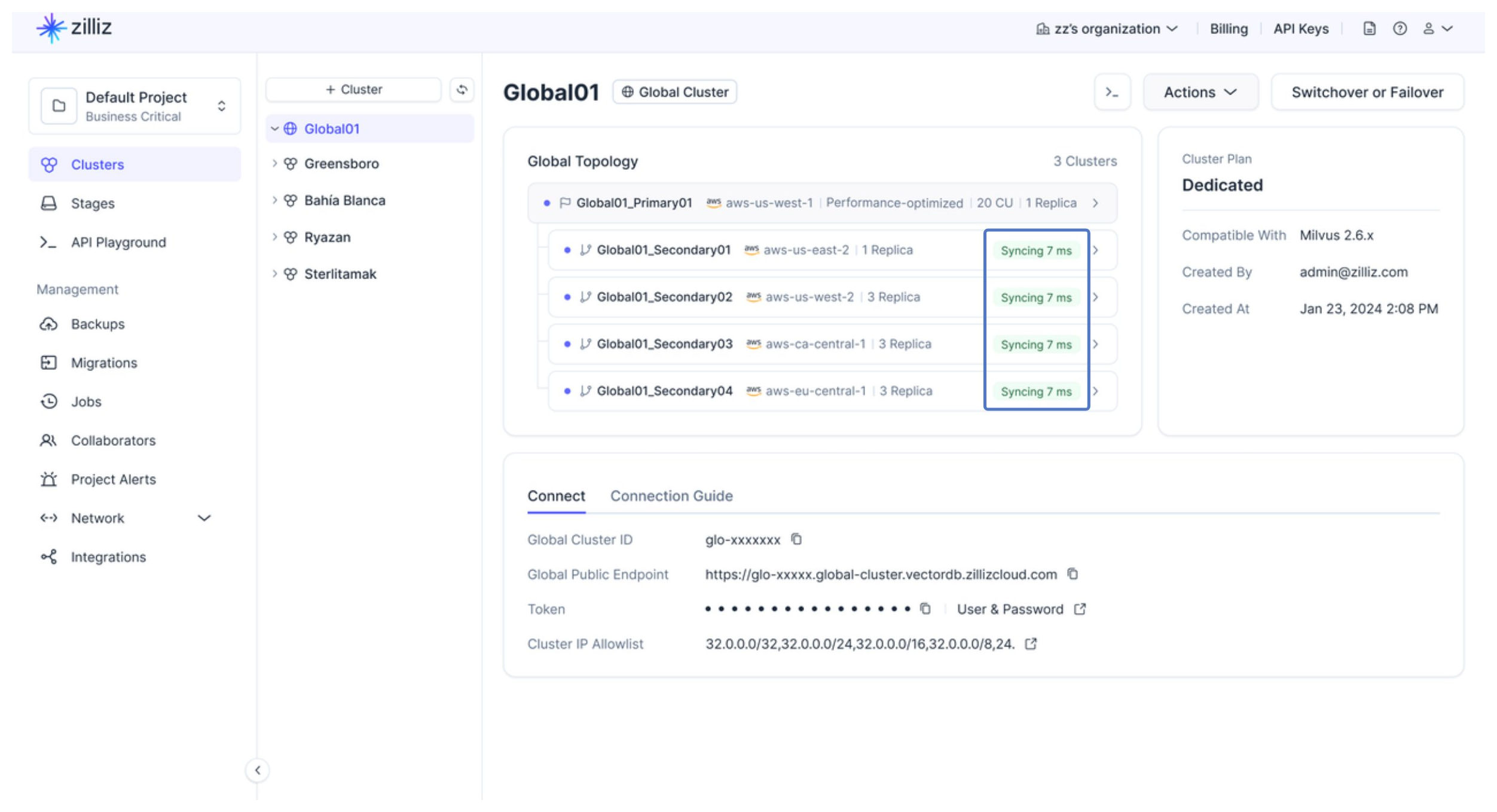
グローバルクラスター ページの グローバルトポロジー タブから、データ同期のステータスと遅延状況を確認できます。
-
-
RESTful API を使用する場合
以下の例では、AWS us-west-2 にプライマリクラスター、AWS eu-west-1 にセカンダリクラスターを配置したグローバルクラスターを作成します。API の詳細については、グローバルクラスターの作成 を参照してください。
bashcurl --request POST \--url "https://api.cloud.zilliz.com/v2/globalClusters/create" \--header "Authorization: Bearer ${API_KEY}" \--header "Accept: application/json" \--header "Content-Type: application/json" \--data-raw '{"globalClusterName": "my-global-cluster","projectId": "proj-xxxxxxxxxxxxxxxxxxxxxx","cuType": "Performance-optimized","cuSize": 4,"primaryCluster": {"clusterName": "primary-cluster","regionId": "aws-us-west-2"},"secondaryClusters": [{"clusterName": "secondary-cluster-eu","regionId": "aws-eu-west-1"}]}'出力例は以下の通りです。
json{"code": 0,"data": {"globalClusterId": "glo-xxxxxxxxxxxxxxxx","username": "db_admin","password": "********","jobId": "job-xxxxxxxxxxxxxxxx"}}グローバルクラスターの作成時に、Query CU の自動スケーリングや、プライマリ・セカンダリクラスターそれぞれのレプリカ数を個別に設定することも可能です。以下に設定例を示します。
bashcurl --request POST \--url "https://api.cloud.zilliz.com/v2/globalClusters/create" \--header "Authorization: Bearer ${API_KEY}" \--header "Accept: application/json" \--header "Content-Type: application/json" \--data-raw '{"globalClusterName": "my-global-cluster","projectId": "proj-xxxxxxxxxxxxxxxxxxxxxx","cuType": "Performance-optimized","autoscaling": {"cu": {"min": 4,"max": 16}},"primaryCluster": {"clusterName": "primary-cluster","regionId": "aws-us-west-2","replica": 2},"secondaryClusters": [{"clusterName": "secondary-cluster-eu","regionId": "aws-eu-west-1","replica": 1}]}