指数減衰
指数減衰では、検索結果の最初に急激な低下が生じ、その後に長いテールが続きます。関連性が最初は急速に低下しながら、一部の記事は時間の経過とともに重要性を保ち続ける速報ニュースサイクルのように、指数減衰は理想的な範囲をわずかに超えたアイテムに強いペナルティを課しながら、遠くのアイテムも引き続き見つけられるようにします。このアプローチは、近接性や新しさを大きく優先しつつ、より遠くの選択肢を完全には排除したくない場合に最適です。
他の減衰関数との違いは次の通りです。
-
ガウス減衰では、より緩やかなベル型の低下が生じます。
-
線形減衰では、正確にゼロに達するまで一定の割合で減少します。
指数減衰は、ペナルティを「前方に集中」させるという独特の特徴があり、関連性の低下の大部分を早期に適用しながら、最小限ではあるもののゼロではない関連性のロングテールを維持します。
指数減衰を使用する場合
指数減衰は、次のような用途で特に効果を発揮します。
| ユースケース | 例 | 指数減衰が適している理由 |
|---|---|---|
| ニュースフィード | 速報ニュースポータル | 古いニュースの関連性をすばやく下げながら、数日前の重要な記事も引き続き表示します。 |
| ソーシャルメディアのタイムライン | アクティビティフィード、ステータス更新 | 新しいコンテンツを重視しつつ、過去に拡散したコンテンツも表示できるようにします。 |
| 通知システム | アラートの優先順位付け | 最近のアラートに緊急性を持たせながら、重要なアラートの表示も維持します。 |
| フラッシュセール | 期間限定オファー | 期限が近づくにつれて表示されやすさを急速に下げます。 |
次のような場合は、指数減衰を選択します。
-
ユーザーが、非常に新しいアイテムまたは近くのアイテムが検索結果を強く占有することを期待している場合。
-
古いアイテムまたは遠いアイテムでも、非常に高い関連性があれば引き続き見つけられるようにする場合。
-
関連性の低下が初期に集中する(最初は急峻で、その後は緩やかになる)場合。
急激な低下の原則
指数減衰では、最初は急速に低下し、その後は徐々に平坦になってゼロに近づくものの決してゼロには達しないロングテールへと変化する曲線が描かれます。この数学的パターンは、放射性崩壊、人口減少、時間の経過に伴う情報の関連性といった自然現象に頻繁に現れます。
すべての時間パラメーター(origin、offset、scale)は、コレクションのデータと同じ単位を使用する必要があります。コレクションがタイムスタンプを別の単位(ミリ秒、マイクロ秒)で保存している場合は、すべてのパラメーターをそれに合わせて調整してください。
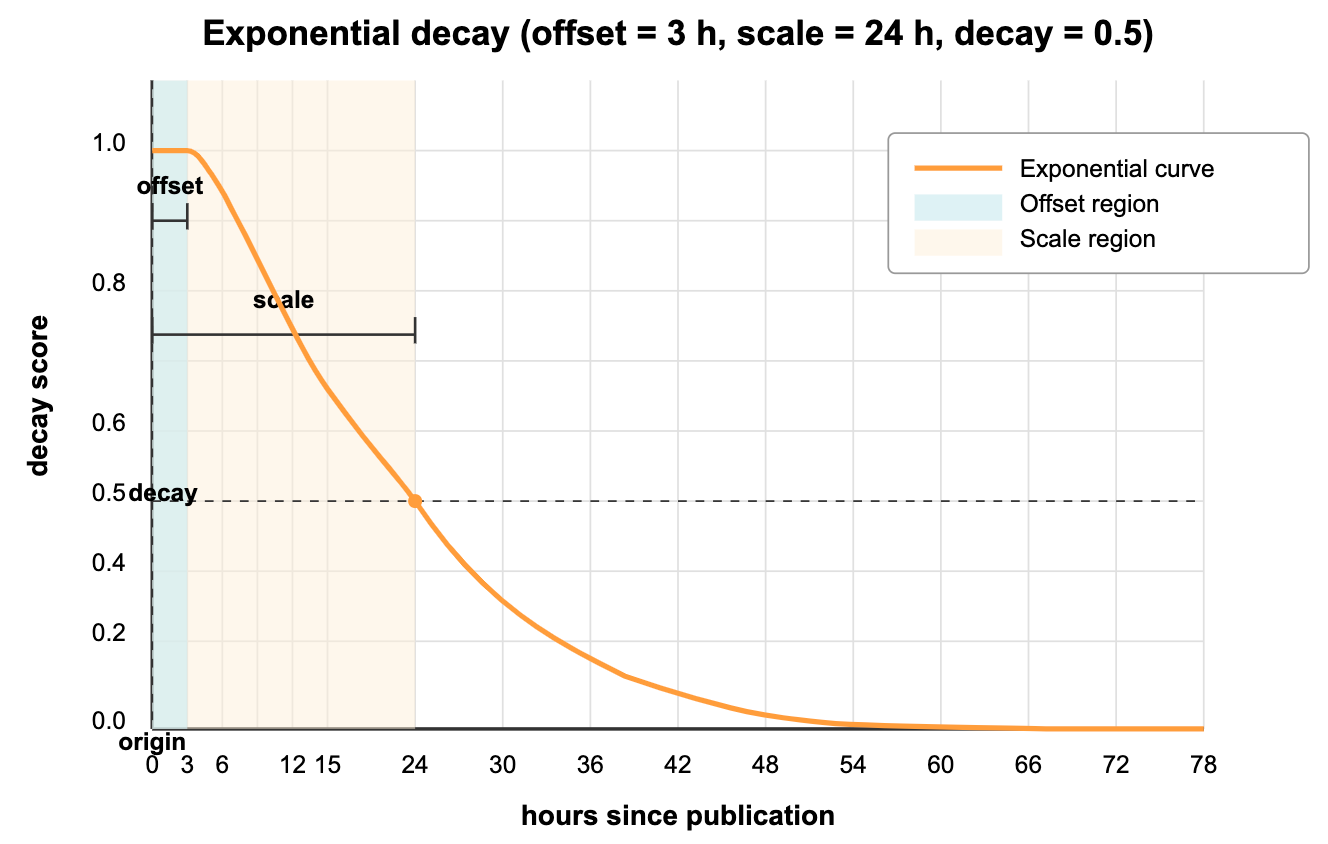
上のグラフは、デジタルニュースプラットフォームのニュース記事ランキングに指数減衰が与える影響を示しています。
-
origin(現在時刻):関連性が最大(1.0)になる現在の時点です。 -
offset(3 時間):「速報ニュースのウィンドウ」です。過去 3 時間以内に公開された記事はすべて完全な関連性スコア(1.0)を維持するため、ごく最近のニュースがわずかな時間差だけで不必要にペナルティを受けることはありません。 -
decay(0.5):スケール距離でのスコアです。このパラメーターは、スコアが時間とともにどれほど大きく減少するかを制御します。 -
scale(24 時間):関連性が減衰値まで下がる期間です。公開からちょうど 24 時間経過したニュース記事の関連性スコアは半分(0.5)になります。
曲線からわかるように、24 時間を超えたニュース記事は関連性が低下し続けますが、ゼロに達することはありません。数日前の記事でも最小限の関連性は維持されるため、重要で古いニュースもフィードに表示されます(ただしランキングは低くなります)。
この動作は、ニュースの関連性が通常どのように機能するかを再現しています。ごく最近の記事が強く優先されますが、ユーザーの関心に非常に強く関連していれば、重要な古い記事も上位に表示される可能性があります。
計算式
指数減衰スコアを計算する数式は次の通りです。
ここで、
これを平易な言葉で分解すると、次のようになります。
-
フィールド値が原点からどれだけ離れているかを計算します:。
-
オフセットがある場合は減算しますが、ゼロを下回らないようにします:。
-
スケールと減衰パラメーターから計算される を掛けます。
-
指数を計算すると、0 から 1 の間の値が得られます:。
の計算では、スケールと減衰パラメーターを指数関数のレートパラメーターに変換します。 がより負の値になると、初期の低下が急峻になります。
指数減衰を使用する
指数減衰は、Zilliz Cloud の標準ベクトル検索とハイブリッド検索の両方の操作に適用できます。以下に、この機能を実装するための主要なコードスニペットを示します。
減衰関数を使用する前に、まず、減衰計算に使用する適切な数値フィールド(タイムスタンプ、距離など)を含むコレクションを作成する必要があります。コレクションの設定、スキーマ定義、データ挿入を含む完全な動作例については、Decay Ranker チュートリアル を参照してください。
減衰ランカーを作成する
コレクションに数値フィールド(この例では publish_time)を設定したら、指数減衰ランカーを作成します。
時間単位の統一:時間ベースの減衰を使用する場合は、origin、scale、offset パラメーターがコレクションデータと同じ時間単位を使用していることを確認してください。コレクションがタイムスタンプを秒単位で保存している場合は、すべてのパラメーターに秒を使用します。ミリ秒単位で保存している場合は、すべてのパラメーターにミリ秒を使用します。
- Python
- Java
- Go
- Rust
- C++
- NodeJS
- CSharp
- cURL
from pymilvus import Function, FunctionType
import datetime

# Create an exponential decay ranker for news recency
# Note: All time parameters must use the same unit as your collection data
rerank = Function(
    name="news_recency",                  # Function identifier
    input_field_names=["publish_time"],   # Numeric field to use
    function_type=FunctionType.RERANK,    # Function type. Must be RERANK
    params={
        "reranker": "decay",              # Specify decay reranker
        "function": "exp",                # Choose exponential decay
        "origin": int(datetime.datetime.now().timestamp()),  # Current time (seconds, matching collection data)
        "offset": 3 * 60 * 60,            # 3 hour breaking news window (seconds)
        "decay": 0.5,                     # Half score at scale distance
        "scale": 24 * 60 * 60             # 24 hours (in seconds, matching collection data)
    }
)
import java.util.Collections;
import io.milvus.v2.service.vector.request.ranker.DecayRanker;

DecayRanker rerank = DecayRanker.builder()
        .name("news_recency")
        .inputFieldNames(Collections.singletonList("publish_time"))
        .function("exp")
        .origin(System.currentTimeMillis() / 1000)  // Current time (seconds, matching collection data)
        .offset(3 * 60 * 60)            // 3 hour breaking news window (seconds)
        .decay(0.5)                     // Half score at scale distance
        .scale(24 * 60 * 60)            // 24 hours (in seconds, matching collection data)
        .build();
import (
    "time"

    "github.com/milvus-io/milvus/client/v3/entity"
)

// Create an exponential decay ranker for news recency
// Note: All time parameters must use the same unit as your collection data
rerank := entity.NewFunction().
    WithName("news_recency").
    WithInputFields("publish_time").
    WithType(entity.FunctionTypeRerank).
    WithParam("reranker", "decay").
    WithParam("function", "exp").
    WithParam("origin", time.Now().Unix()).
    WithParam("offset", 3*60*60).
    WithParam("decay", 0.5).
    WithParam("scale", 24*60*60)
use milvus::v2::prelude::*;

// Create an exponential decay ranker for news recency
// Note: All time parameters must use the same unit as your collection data
let origin = std::time::SystemTime::now()
    .duration_since(std::time::UNIX_EPOCH)
    .unwrap()
    .as_secs();
let rerank = {
    let rerank = DecayRerank::new()
        .name("news_recency")
        .decay_function("exp")
        .origin(origin)
        .offset(3 * 60 * 60)
        .decay(0.5)
        .scale(24 * 60 * 60);
    let value = rerank.get_function().clone().input_fields(["publish_time"]);
    rerank.function(value)
};
#include <ctime>
#include "milvus/MilvusClientV2.h"

auto rerank = std::make_shared<milvus::DecayRerank>("news_recency");
rerank->AddInputFieldName("publish_time");
rerank->SetFunction("exp");
rerank->SetOrigin(std::time(nullptr));  // Current time (seconds, matching collection data)
rerank->SetScale(24 * 60 * 60);
rerank->SetOffset(3 * 60 * 60);
rerank->SetDecay(0.5);
import { FunctionType } from "@zilliz/milvus2-sdk-node";

const rerank = {
  name: "news_recency",
  input_field_names: ["publish_time"],
  type: FunctionType.RERANK,
  params: {
    reranker: "decay",
    function: "exp",
    origin: Math.floor(Date.now() / 1000), // Current time (seconds)
    offset: 3 * 60 * 60,                   // 3 hour breaking news window (seconds)
    decay: 0.5,                            // Half score at scale distance
    scale: 24 * 60 * 60,                   // 24 hours (seconds)
  },
};
using Milvus.Client.V2;
using Milvus.Client.V2.Requests.Collection;
using Milvus.Client.V2.Requests.Dml;
using Milvus.Client.V2.Requests.Dql;
using Milvus.Client.V2.Requests.Index;
using Milvus.Client.V2.Types;

// Create an exponential decay ranker for news recency
// Note: All time parameters must use the same unit as your collection data
var rerank = new DecayRerank("news_recency")  // Function identifier
    .WithInputField("publish_time")           // Numeric field to use
    .WithFunction("exp")                      // Choose exponential decay
    .WithOrigin(DateTimeOffset.UtcNow.ToUnixTimeSeconds())  // Current time (seconds, matching collection data)
    .WithOffset(3 * 60 * 60)                  // 3 hour breaking news window (seconds)
    .WithDecay(0.5f)                          // Half score at scale distance
    .WithScale(24 * 60 * 60);                 // 24 hours (in seconds, matching collection data)
# Note: The RESTful API does not expose a standalone "create a decay ranker"
# endpoint. The decay function is passed inline through the functionScore
# field of the search request (see the next section).
標準ベクトル検索に適用する
減衰ランカーを定義したら、検索操作時に ranker パラメーターに渡すことで適用できます。
- Python
- Java
- Go
- Rust
- C++
- NodeJS
- CSharp
- cURL
# Apply decay ranker to vector search
result = milvus_client.search(
    collection_name,
    data=[your_query_vector],             # Replace with your query vector
    anns_field="dense",                   # Vector field to search
    limit=10,                             # Number of results
    output_fields=["title", "publish_time"], # Fields to return
    ranker=rerank,                        # Apply the decay ranker
    consistency_level="Strong"
)
import java.util.Arrays;
import java.util.Collections;
import io.milvus.v2.common.ConsistencyLevel;
import io.milvus.v2.service.vector.request.FunctionScore;
import io.milvus.v2.service.vector.request.SearchReq;
import io.milvus.v2.service.vector.request.data.FloatVec;
import io.milvus.v2.service.vector.response.SearchResp;

String COLLECTION_NAME = "collection_name";

SearchReq searchReq = SearchReq.builder()
        .collectionName(COLLECTION_NAME)
        .data(Collections.singletonList(new FloatVec(Arrays.asList(0.1f, 0.2f, 0.3f, 0.4f, 0.5f, 0.6f, 0.7f, 0.8f))))  // Replace with your query vector
        .annsField("dense")                    // Vector field to search
        .limit(10)                             // Number of results
        .outputFields(Arrays.asList("title", "publish_time"))  // Fields to return
        .functionScore(FunctionScore.builder()
                .addFunction(rerank)           // Apply the decay ranker
                .build())
        .consistencyLevel(ConsistencyLevel.STRONG)
        .build();
SearchResp searchResp = client.search(searchReq);
import (
    "context"

    "github.com/milvus-io/milvus/client/v3/entity"
    "github.com/milvus-io/milvus/client/v3/milvusclient"
)

// Apply decay ranker to vector search
resultSets, err := cli.Search(ctx, milvusclient.NewSearchOption(
    "collection_name", 10, []entity.Vector{
        entity.FloatVector{0.1, 0.2, 0.3, 0.4, 0.5, 0.6, 0.7, 0.8}, // Replace with your query vector
    }).
    WithANNSField("dense").                    // Vector field to search
    WithOutputFields("title", "publish_time"). // Fields to return
    WithFunctionReranker(rerank).              // Apply the decay ranker
    WithConsistencyLevel(entity.ClStrong))
if err != nil {
    panic(err)
}
use milvus::v2::prelude::*;

// Apply decay ranker to vector search
let response = client.search(
    SearchRequest::builder()
        .collection_name("collection_name")
        .vector_field("dense")                                // Vector field to search
        .vectors(SearchVectors::Float(vec![vec![0.1, 0.2, 0.3, 0.4, 0.5, 0.6, 0.7, 0.8]])) // Replace with your query vector
        .limit(10)                                             // Number of results
        .output_fields(["title", "publish_time"])             // Fields to return
        .rerank(FunctionScore::new().add_function(rerank))    // Apply the decay ranker
        .consistency_level(ConsistencyLevel::Strong)
        .build()?,
).await?;
#include <iostream>
#include "milvus/MilvusClientV2.h"

auto function_score = std::make_shared<milvus::FunctionScore>();
function_score->AddFunction(rerank);

auto request = milvus::SearchRequest()
                   .WithCollectionName(collection_name)
                   .WithAnnsField("dense")
                   .WithRerank(function_score)
                   .WithLimit(10)
                   .AddOutputField("title")
                   .AddOutputField("publish_time")
                   .AddFloatVector(your_query_vector)
                   .WithConsistencyLevel(milvus::ConsistencyLevel::STRONG);

milvus::SearchResponse response;
auto status = client->Search(request, response);
if (!status.IsOk()) {
    std::cout << status.Message() << std::endl;
}
import { MilvusClient } from "@zilliz/milvus2-sdk-node";

const milvusClient = new MilvusClient("YOUR_CLUSTER_ENDPOINT");

const result = await milvusClient.search({
  collection_name: "collection_name",
  data: [[0.1, 0.2, 0.3, 0.4, 0.5, 0.6, 0.7, 0.8]], // Replace with your query vector
  anns_field: "dense",
  limit: 10,
  output_fields: ["title", "publish_time"],
  rerank: rerank, // Apply the decay ranker
  consistency_level: "Strong",
});
using Milvus.Client.V2;
using Milvus.Client.V2.Requests.Collection;
using Milvus.Client.V2.Requests.Dml;
using Milvus.Client.V2.Requests.Dql;
using Milvus.Client.V2.Requests.Index;
using Milvus.Client.V2.Types;

// Apply decay ranker to vector search
var result = await client.SearchAsync(new SearchReq
{
    CollectionName = collectionName,
    VectorFieldName = "dense",                    // Vector field to search
    Vectors = new[] { new ReadOnlyMemory<float>(yourQueryVector) },  // Replace with your query vector
    Limit = 10,                                   // Number of results
    Parameters = new SearchParameters
    {
        OutputFields = { "title", "publish_time" }, // Fields to return
        FunctionScoreReranker = rerank,             // Apply the decay ranker
        ConsistencyLevel = ConsistencyLevel.Strong
    }
});
curl -s YOUR_CLUSTER_ENDPOINT/v2/vectordb/entities/search \
    -H "Authorization: Bearer YOUR_CLUSTER_TOKEN" \
    -H "Content-Type: application/json" \
    -d '{
        "collectionName": "collection_name",
        "data": [[0.1, 0.2, 0.3, 0.4, 0.5, 0.6, 0.7, 0.8]],
        "annsField": "dense",
        "limit": 10,
        "outputFields": ["title", "publish_time"],
        "functionScore": {
            "functions": [{
                "name": "news_recency",
                "type": "Rerank",
                "inputFieldNames": ["publish_time"],
                "outputFieldNames": [],
                "params": {
                    "reranker": "decay",
                    "function": "exp",
                    "origin": 1790872778,
                    "offset": 10800,
                    "decay": 0.5,
                    "scale": 86400
                }
            }],
            "params": {}
        },
        "consistencyLevel": "Strong"
    }'