フィルタリング検索
ANN 検索は、指定したベクトル埋め込みに最も類似するベクトル埋め込みを検索します。ただし、検索結果が常に正しいとは限りません。検索リクエストにフィルタリング条件を含めると、Zilliz Cloud は ANN 検索を実行する前にメタデータフィルタリングを実行するため、検索範囲をコレクション全体から、指定したフィルタリング条件に一致するエンティティのみに絞り込めます。
概要
Zilliz Cloud では、フィルタリング検索は、フィルタリングを適用する段階に応じて、標準フィルタリングと反復フィルタリングの 2 種類に分類されます。
標準フィルタリング
コレクションにベクトル埋め込みとそのメタデータの両方が含まれている場合は、ANN 検索の前にメタデータをフィルタリングして、検索結果の関連性を高めることができます。Zilliz Cloud は、フィルタリング条件を含む検索リクエストを受信すると、指定したフィルタリング条件に一致するエンティティ内に検索範囲を制限します。
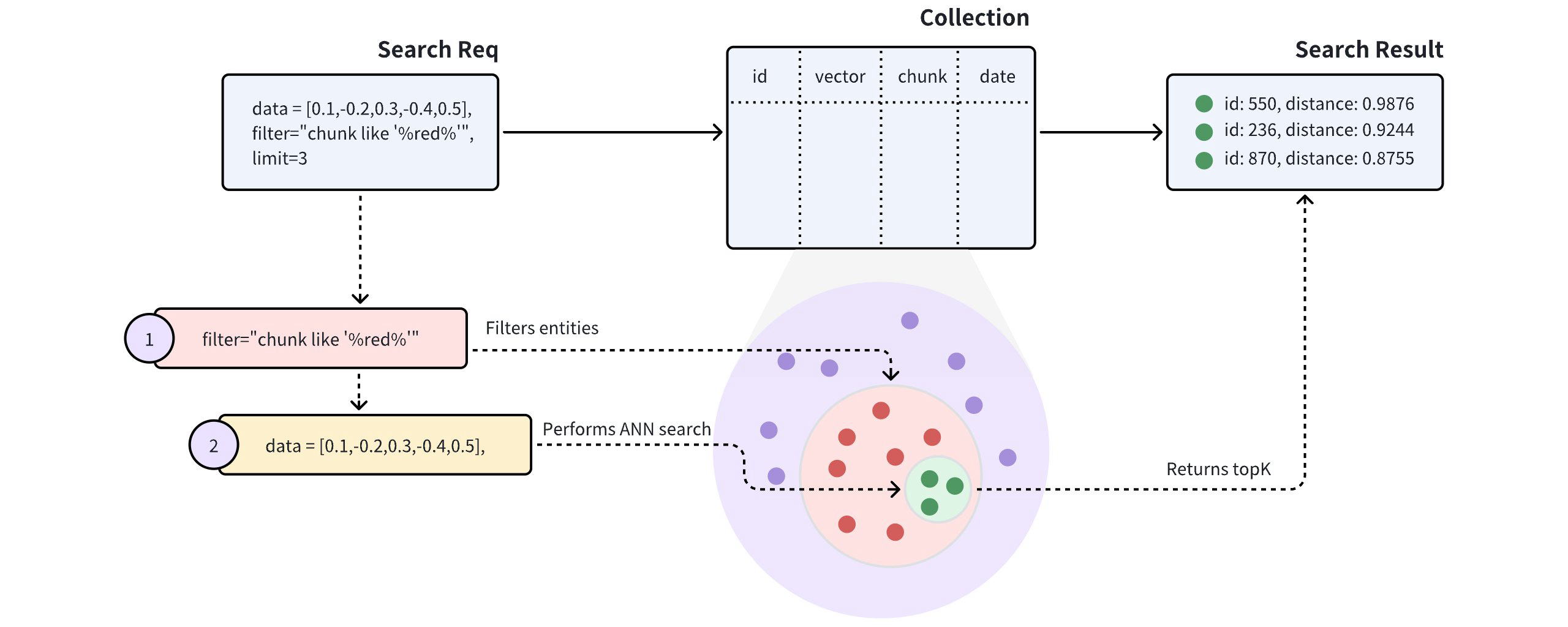
上の図に示すように、検索リクエストにはフィルタリング条件として chunk like "%red%" が含まれており、Zilliz Cloud が chunk フィールドに red という語を含むすべてのエンティティ内で ANN 検索を実行する必要があることを示しています。具体的には、Zilliz Cloud は次の処理を行います。
-
検索リクエストに含まれるフィルタリング条件に一致するエンティティをフィルタリングします。
-
フィルタリングされたエンティティ内で ANN 検索を実行します。
-
top-K 件のエンティティを返します。
反復フィルタリング
標準フィルタリングのプロセスは、検索範囲を効果的に小さな範囲に絞り込みます。ただし、過度に複雑なフィルタリング式を使用すると、検索レイテンシーが非常に高くなる可能性があります。そのような場合には、反復フィルタリングを代替手段として使用でき、スカラーフィルタリングのワークロードを削減できます。
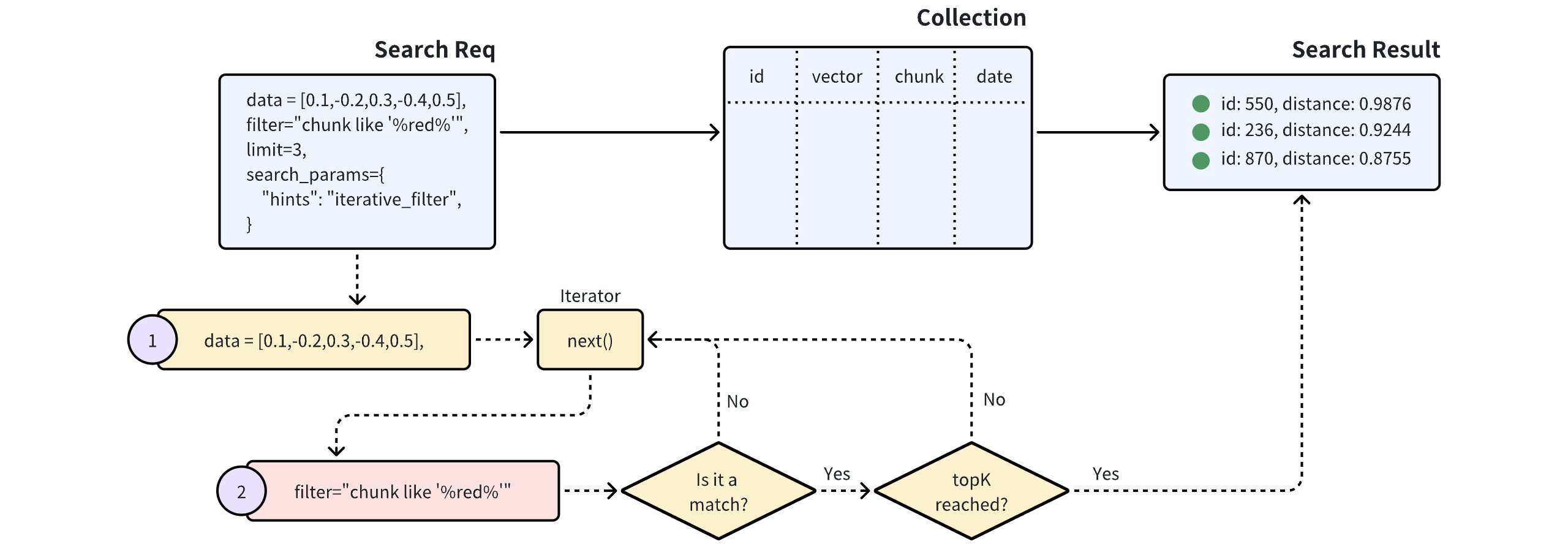
上の図に示すように、反復フィルタリングを使用した検索では、ベクトル検索を反復して実行します。イテレーターが返す各エンティティにはスカラーフィルタリングが適用され、指定した topK 件の結果が得られるまでこのプロセスが続きます。
この方法は、スカラーフィルタリングの対象となるエンティティ数を大幅に削減するため、非常に複雑なフィルタリング式を処理する場合に特に有効です。
ただし、イテレーターがエンティティを 1 つずつ処理することに注意が必要です。この順次処理のアプローチでは、特に多数のエンティティがスカラーフィルタリングの対象となる場合、処理時間が長くなったり、パフォーマンスの問題が発生したりする可能性があります。
例
このセクションでは、フィルタリング検索を実行する方法を説明します。このセクションのコードスニペットは、コレクションに以下のエンティティがすでに含まれていることを前提としています。各エンティティには、id、vector、color、likes の 4つのフィールドがあります。例では、COSINE メトリクスでインデックスが作成された 5 次元の vector フィールドを持つ、ロード済みの my_collection という名前のコレクションを使用します。
[
    {"id": 0, "vector": [0.3580376395471989, -0.6023495712049978, 0.18414012509913835, -0.26286205330961354, 0.9029438446296592], "color": "pink_8682", "likes": 165},
    {"id": 1, "vector": [0.19886812562848388, 0.06023560599112088, 0.6976963061752597, 0.2614474506242501, 0.838729485096104], "color": "red_7025", "likes": 25},
    {"id": 2, "vector": [0.43742130801983836, -0.5597502546264526, 0.6457887650909682, 0.7894058910881185, 0.20785793220625592], "color": "orange_6781", "likes": 764},
    {"id": 3, "vector": [0.3172005263489739, 0.9719044792798428, -0.36981146090600725, -0.4860894583077995, 0.95791889146345], "color": "pink_9298", "likes": 234},
    {"id": 4, "vector": [0.4452349528804562, -0.8757026943054742, 0.8220779437047674, 0.46406290649483184, 0.30337481143159106], "color": "red_4794", "likes": 122},
    {"id": 5, "vector": [0.985825131989184, -0.8144651566660419, 0.6299267002202009, 0.1206906911183383, -0.1446277761879955], "color": "yellow_4222", "likes": 12},
    {"id": 6, "vector": [0.8371977790571115, -0.015764369584852833, -0.31062937026679327, -0.562666951622192, -0.8984947637863987], "color": "red_9392", "likes": 58},
    {"id": 7, "vector": [-0.33445148015177995, -0.2567135004164067, 0.8987539745369246, 0.9402995886420709, 0.5378064918413052], "color": "grey_8510", "likes": 775},
    {"id": 8, "vector": [0.39524717779832685, 0.4000257286739164, -0.5890507376891594, -0.8650502298996872, -0.6140360785406336], "color": "white_9381", "likes": 876},
    {"id": 9, "vector": [0.5718280481994695, 0.24070317428066512, -0.3737913482606834, -0.06726932177492717, -0.6980531615588608], "color": "purple_4976", "likes": 765}
]
クエリベクトルが対象のコレクションにすでに存在する場合は、検索前にクエリベクトルを取得する代わりに ids の使用を検討してください。詳細は、主キー検索 を参照してください。
例では、PyMilvus 3.0.2、Java SDK 3.0.10、Go SDK 3.0.0(client/v3)、Rust SDK 3.0.2、C++ SDK 3.0.4、NodeJS SDK 3.0.6、C# SDK 3.0.0 を使用します。
標準フィルタリングを使用した検索
以下のコードスニペットは、標準フィルタリングを使用した検索を示しています。次のコードスニペットのリクエストには、フィルタリング条件といくつかの出力フィールドが含まれています。
- Python
- Java
- Go
- Rust
- C++
- NodeJS
- CSharp
- cURL
- Zilliz CLI
from pymilvus import MilvusClient

client = MilvusClient(
    uri="YOUR_CLUSTER_ENDPOINT",
    token="YOUR_CLUSTER_TOKEN"
)

query_vector = [0.3580376395471989, -0.6023495712049978, 0.18414012509913835, -0.26286205330961354, 0.9029438446296592]

res = client.search(
    collection_name="my_collection",
    data=[query_vector],
    limit=5,
    filter='color like "red%" and likes > 50',
    output_fields=["color", "likes"]
)

for hits in res:
    print("TopK results:")
    for hit in hits:
        print(hit)
import io.milvus.v2.client.ConnectConfig;
import io.milvus.v2.client.MilvusClientV2;
import io.milvus.v2.service.vector.request.SearchReq;
import io.milvus.v2.service.vector.request.data.FloatVec;
import io.milvus.v2.service.vector.response.SearchResp;

import java.util.Arrays;
import java.util.Collections;
import java.util.List;

MilvusClientV2 client = new MilvusClientV2(ConnectConfig.builder()
        .uri("YOUR_CLUSTER_ENDPOINT")
        .token("YOUR_CLUSTER_TOKEN")
        .build());

FloatVec queryVector = new FloatVec(new float[]{0.3580376395471989f, -0.6023495712049978f, 0.18414012509913835f, -0.26286205330961354f, 0.9029438446296592f});
SearchReq searchReq = SearchReq.builder()
        .collectionName("my_collection")
        .data(Collections.singletonList(queryVector))
        .limit(5)
        .filter("color like \"red%\" and likes > 50")
        .outputFields(Arrays.asList("color", "likes"))
        .build();

SearchResp searchResp = client.search(searchReq);

List<List<SearchResp.SearchResult>> searchResults = searchResp.getSearchResults();
for (List<SearchResp.SearchResult> results : searchResults) {
    System.out.println("TopK results:");
    for (SearchResp.SearchResult result : results) {
        System.out.println(result);
    }
}

// Output
// TopK results:
// SearchResp.SearchResult(entity={color=red_4794, likes=122}, score=0.5975797, id=4)
// SearchResp.SearchResult(entity={color=red_9392, likes=58}, score=-0.24996188, id=6)
import (
    "context"
    "fmt"

    "github.com/milvus-io/milvus/client/v3/entity"
    "github.com/milvus-io/milvus/client/v3/milvusclient"
)

ctx, cancel := context.WithCancel(context.Background())
defer cancel()

milvusAddr := "YOUR_CLUSTER_ENDPOINT"
token := "YOUR_CLUSTER_TOKEN"

client, err := milvusclient.New(ctx, &milvusclient.ClientConfig{
    Address: milvusAddr,
    APIKey:  token,
})
if err != nil {
    panic(err)
}
defer client.Close(ctx)

queryVector := []float32{0.3580376395471989, -0.6023495712049978, 0.18414012509913835, -0.26286205330961354, 0.9029438446296592}

resultSets, err := client.Search(ctx, milvusclient.NewSearchOption(
    "my_collection", // collectionName
    5,               // limit
    []entity.Vector{entity.FloatVector(queryVector)},
).WithConsistencyLevel(entity.ClStrong).
    WithANNSField("vector").
    WithFilter("color like 'red%' and likes > 50").
    WithOutputFields("color", "likes"))
if err != nil {
    panic(err)
}

for _, resultSet := range resultSets {
    fmt.Println("IDs: ", resultSet.IDs.FieldData().GetScalars())
    fmt.Println("Scores: ", resultSet.Scores)
    fmt.Println("color: ", resultSet.GetColumn("color").FieldData().GetScalars())
    fmt.Println("likes: ", resultSet.GetColumn("likes").FieldData().GetScalars())
}
use milvus::v2::error::Result;
use milvus::v2::prelude::*;

let config = ConnectConfig::new().uri("YOUR_CLUSTER_ENDPOINT").token("YOUR_CLUSTER_TOKEN");
let client = ClientV2::new(&config).await?;

let query_vector = vec![0.3580376395471989f32, -0.6023495712049978, 0.18414012509913835, -0.26286205330961354, 0.9029438446296592];

let res = client
    .search(
        SearchRequest::builder()
            .collection_name("my_collection")
            .vector_field("vector")
            .vectors(SearchVectors::Float(vec![query_vector]))
            .limit(5)
            .filter("color like \"red%\" and likes > 50")
            .output_fields(["color", "likes"])
            .build()?,
    )
    .await?;

println!("{:?}", res.results());
#include "milvus/MilvusClientV2.h"
#include <iostream>
#include <stdexcept>
#include <vector>

auto client = milvus::MilvusClientV2::Create();

milvus::ConnectParam connect_param{"YOUR_CLUSTER_ENDPOINT", "YOUR_CLUSTER_TOKEN"};
auto status = client->Connect(connect_param);
if (!status.IsOk()) {
    throw std::runtime_error(status.Message());
}

std::vector<float> query_vector = {0.3580376395471989f, -0.6023495712049978f, 0.18414012509913835f, -0.26286205330961354f, 0.9029438446296592f};
auto request = milvus::SearchRequest()
                   .WithCollectionName("my_collection")
                   .AddFloatVector(query_vector)
                   .WithLimit(5)
                   .WithAnnsField("vector")
                   .WithFilter(R"(color like "red%" and likes > 50)")
                   .AddOutputField("color")
                   .AddOutputField("likes");

milvus::SearchResponse response;
status = client->Search(request, response);
if (!status.IsOk()) {
    throw std::runtime_error(status.Message());
}

for (auto& result : response.Results().Results()) {
    std::cout << "TopK results:" << std::endl;
    milvus::EntityRows output_rows;
    status = result.OutputRows(output_rows);
    if (!status.IsOk()) {
        throw std::runtime_error(status.Message());
    }
    for (const auto& row : output_rows) {
        std::cout << "\t" << row << std::endl;
    }
}
import { MilvusClient } from "@zilliz/milvus2-sdk-node";

const address = "YOUR_CLUSTER_ENDPOINT";
const token = "YOUR_CLUSTER_TOKEN";
const client = new MilvusClient({address, token});

const query_vector = [0.3580376395471989, -0.6023495712049978, 0.18414012509913835, -0.26286205330961354, 0.9029438446296592]

const res = await client.search({
    collection_name: "my_collection",
    data: [query_vector],
    limit: 5,
    filter: 'color like "red%" and likes > 50',
    output_fields: ["color", "likes"]
})
using System;
using System.Linq;
using Milvus.Client.V2;
using Milvus.Client.V2.Requests.Dql;
using Milvus.Client.V2.Responses.Dql;
using Milvus.Client.V2.Types;

var client = new MilvusClientV2(new ConnectConfig
{
    Uri = "YOUR_CLUSTER_ENDPOINT",
    ApiKey = "YOUR_CLUSTER_TOKEN"
});
await client.ConnectAsync();

var queryVector = new ReadOnlyMemory<float>(new[]
{
    0.3580376395471989f, -0.6023495712049978f, 0.18414012509913835f, -0.26286205330961354f, 0.9029438446296592f
});

SearchResp res = await client.SearchAsync(new SearchReq
{
    CollectionName = "my_collection",
    VectorFieldName = "vector",
    Vectors = new[] { queryVector },
    Limit = 5,
    Parameters = new SearchParameters
    {
        Expression = "color like \"red%\" and likes > 50",
        OutputFields = { "color", "likes" }
    }
});
if (res.SingleResults is { } results)
{
    Console.WriteLine(string.Join(", ", results.SelectMany(r => r.Scores)));
}
export CLUSTER_ENDPOINT="YOUR_CLUSTER_ENDPOINT"
export TOKEN="YOUR_CLUSTER_TOKEN"

curl --request POST \
--url "${CLUSTER_ENDPOINT}/v2/vectordb/entities/search" \
--header "Authorization: Bearer ${TOKEN}" \
--header "Content-Type: application/json" \
--header "Request-Timeout: 10" \
-d '{
    "collectionName": "my_collection",
    "data": [
        [0.3580376395471989, -0.6023495712049978, 0.18414012509913835, -0.26286205330961354, 0.9029438446296592]
    ],
    "annsField": "vector",
    "filter": "color like \"red%\" and likes > 50",
    "limit": 5,
    "outputFields": ["color", "likes"]
}'
# Illustrative response; scores and cost can vary.
# {"code":0,"cost":0,"data":[{"color":"red_4794","distance":0.5975796,"id":4,"likes":122},{"color":"red_9392","distance":-0.2499619,"id":6,"likes":58}],"topks":[2]}
# Zilliz CLI
# Prerequisite: run zilliz login and select your cluster with zilliz context set.
zilliz vector search \
  --collection my_collection \
  --body '{
  "data": [
    [
      0.3580376395471989,
      -0.6023495712049978,
      0.18414012509913835,
      -0.26286205330961354,
      0.9029438446296592
    ]
  ],
  "annsField": "vector",
  "filter": "color like \"red%\" and likes > 50",
  "limit": 5,
  "outputFields": [
    "color",
    "likes"
  ]
}' \
  --output json
検索リクエストに含まれるフィルタリング条件は color like "red%" and likes > 50 です。これは and 演算子を使用して 2つの条件を含めています。1つ目は、color フィールドの値が red で始まるエンティティを対象とし、もう一方は、likes フィールドの値が 50 より大きいエンティティを対象としています。これらの条件を満たすエンティティは 2つだけです。top-K を 5 に設定すると、Zilliz Cloud はこれら 2つのエンティティとクエリベクトルとの距離を計算し、検索結果として返します。
次の例は、例示用のコサインスコアを含む Python の結果の形式を示しています。スコアは浮動小数点の精度によって変動する可能性があります。要求した出力フィールドのみが entity に表示されます。REST の例では、これらのフィールドは各ヒットのトップレベルで返されます。
[
    {
        "id": 4,
        "distance": 0.5975796,
        "entity": {
            "color": "red_4794",
            "likes": 122
        }
    },
    {
        "id": 6,
        "distance": -0.2499619,
        "entity": {
            "color": "red_9392",
            "likes": 58
        }
    }
]
メタデータフィルタリングで使用できる演算子の詳細は、フィルタリングの概要 を参照してください。
反復フィルタリングを使用した検索
反復フィルタリングを使用してフィルタリング検索を実行するには、次のようにします。
- Python
- Java
- Go
- Rust
- C++
- NodeJS
- CSharp
- cURL
- Zilliz CLI
from pymilvus import MilvusClient

client = MilvusClient(
    uri="YOUR_CLUSTER_ENDPOINT",
    token="YOUR_CLUSTER_TOKEN"
)

query_vector = [0.3580376395471989, -0.6023495712049978, 0.18414012509913835, -0.26286205330961354, 0.9029438446296592]

res = client.search(
    collection_name="my_collection",
    data=[query_vector],
    limit=5,
    filter='color like "red%" and likes > 50',
    output_fields=["color", "likes"],
    search_params={
        "hints": "iterative_filter"
    }
)

for hits in res:
    print("TopK results:")
    for hit in hits:
        print(hit)
import io.milvus.v2.client.ConnectConfig;
import io.milvus.v2.client.MilvusClientV2;
import io.milvus.v2.service.vector.request.SearchReq;
import io.milvus.v2.service.vector.request.data.FloatVec;
import io.milvus.v2.service.vector.response.SearchResp;

import java.util.Arrays;
import java.util.Collections;
import java.util.List;

MilvusClientV2 client = new MilvusClientV2(ConnectConfig.builder()
        .uri("YOUR_CLUSTER_ENDPOINT")
        .token("YOUR_CLUSTER_TOKEN")
        .build());

FloatVec queryVector = new FloatVec(new float[]{0.3580376395471989f, -0.6023495712049978f, 0.18414012509913835f, -0.26286205330961354f, 0.9029438446296592f});
SearchReq searchReq = SearchReq.builder()
        .collectionName("my_collection")
        .data(Collections.singletonList(queryVector))
        .limit(5)
        .filter("color like \"red%\" and likes > 50")
        .outputFields(Arrays.asList("color", "likes"))
        .searchParams(Collections.<String, Object>singletonMap("hints", "iterative_filter"))
        .build();

SearchResp searchResp = client.search(searchReq);

List<List<SearchResp.SearchResult>> searchResults = searchResp.getSearchResults();
for (List<SearchResp.SearchResult> results : searchResults) {
    System.out.println("TopK results:");
    for (SearchResp.SearchResult result : results) {
        System.out.println(result);
    }
}

// Output
// TopK results:
// SearchResp.SearchResult(entity={color=red_4794, likes=122}, score=0.5975797, id=4)
// SearchResp.SearchResult(entity={color=red_9392, likes=58}, score=-0.24996188, id=6)
import (
    "context"
    "fmt"

    "github.com/milvus-io/milvus/client/v3/entity"
    "github.com/milvus-io/milvus/client/v3/milvusclient"
)

ctx, cancel := context.WithCancel(context.Background())
defer cancel()

milvusAddr := "YOUR_CLUSTER_ENDPOINT"
token := "YOUR_CLUSTER_TOKEN"

client, err := milvusclient.New(ctx, &milvusclient.ClientConfig{
    Address: milvusAddr,
    APIKey:  token,
})
if err != nil {
    panic(err)
}
defer client.Close(ctx)

queryVector := []float32{0.3580376395471989, -0.6023495712049978, 0.18414012509913835, -0.26286205330961354, 0.9029438446296592}

resultSets, err := client.Search(ctx, milvusclient.NewSearchOption(
    "my_collection", // collectionName
    5,               // limit
    []entity.Vector{entity.FloatVector(queryVector)},
).WithConsistencyLevel(entity.ClStrong).
    WithANNSField("vector").
    WithFilter("color like 'red%' and likes > 50").
    WithOutputFields("color", "likes").
    WithSearchParam("hints", "iterative_filter"))
if err != nil {
    panic(err)
}

for _, resultSet := range resultSets {
    fmt.Println("IDs: ", resultSet.IDs.FieldData().GetScalars())
    fmt.Println("Scores: ", resultSet.Scores)
    fmt.Println("color: ", resultSet.GetColumn("color").FieldData().GetScalars())
    fmt.Println("likes: ", resultSet.GetColumn("likes").FieldData().GetScalars())
}
use milvus::v2::error::Result;
use milvus::v2::prelude::*;
use std::collections::HashMap;

let config = ConnectConfig::new().uri("YOUR_CLUSTER_ENDPOINT").token("YOUR_CLUSTER_TOKEN");
let client = ClientV2::new(&config).await?;

let query_vector = vec![0.3580376395471989f32, -0.6023495712049978, 0.18414012509913835, -0.26286205330961354, 0.9029438446296592];

let res = client
    .search(
        SearchRequest::builder()
            .collection_name("my_collection")
            .vector_field("vector")
            .vectors(SearchVectors::Float(vec![query_vector]))
            .limit(5)
            .filter("color like \"red%\" and likes > 50")
            .output_fields(["color", "likes"])
            .extra_params(HashMap::from([("hints".into(), "iterative_filter".into())]))
            .build()?,
    )
    .await?;

println!("{:?}", res.results());
#include "milvus/MilvusClientV2.h"
#include <iostream>
#include <stdexcept>
#include <vector>

auto client = milvus::MilvusClientV2::Create();

milvus::ConnectParam connect_param{"YOUR_CLUSTER_ENDPOINT", "YOUR_CLUSTER_TOKEN"};
auto status = client->Connect(connect_param);
if (!status.IsOk()) {
    throw std::runtime_error(status.Message());
}

std::vector<float> query_vector = {0.3580376395471989f, -0.6023495712049978f, 0.18414012509913835f, -0.26286205330961354f, 0.9029438446296592f};
auto request = milvus::SearchRequest()
                   .WithCollectionName("my_collection")
                   .AddFloatVector(query_vector)
                   .WithLimit(5)
                   .WithAnnsField("vector")
                   .WithFilter(R"(color like "red%" and likes > 50)")
                   .AddExtraParam("hints", "iterative_filter")
                   .AddOutputField("color")
                   .AddOutputField("likes");

milvus::SearchResponse response;
status = client->Search(request, response);
if (!status.IsOk()) {
    throw std::runtime_error(status.Message());
}

for (auto& result : response.Results().Results()) {
    std::cout << "TopK results:" << std::endl;
    milvus::EntityRows output_rows;
    status = result.OutputRows(output_rows);
    if (!status.IsOk()) {
        throw std::runtime_error(status.Message());
    }
    for (const auto& row : output_rows) {
        std::cout << "\t" << row << std::endl;
    }
}
import { MilvusClient } from "@zilliz/milvus2-sdk-node";

const address = "YOUR_CLUSTER_ENDPOINT";
const token = "YOUR_CLUSTER_TOKEN";
const client = new MilvusClient({address, token});

const query_vector = [0.3580376395471989, -0.6023495712049978, 0.18414012509913835, -0.26286205330961354, 0.9029438446296592]

const res = await client.search({
    collection_name: "my_collection",
    data: [query_vector],
    limit: 5,
    filter: 'color like "red%" and likes > 50',
    hints: "iterative_filter",
    output_fields: ["color", "likes"]
})
using System;
using System.Linq;
using Milvus.Client.V2;
using Milvus.Client.V2.Requests.Dql;
using Milvus.Client.V2.Responses.Dql;
using Milvus.Client.V2.Types;

var client = new MilvusClientV2(new ConnectConfig
{
    Uri = "YOUR_CLUSTER_ENDPOINT",
    ApiKey = "YOUR_CLUSTER_TOKEN"
});
await client.ConnectAsync();

var queryVector = new ReadOnlyMemory<float>(new[]
{
    0.3580376395471989f, -0.6023495712049978f, 0.18414012509913835f, -0.26286205330961354f, 0.9029438446296592f
});

var searchParams = new SearchParameters
{
    Expression = "color like \"red%\" and likes > 50",
    Hints = "iterative_filter",
    OutputFields = { "color", "likes" }
};

SearchResp res = await client.SearchAsync(new SearchReq
{
    CollectionName = "my_collection",
    VectorFieldName = "vector",
    Vectors = new[] { queryVector },
    Limit = 5,
    Parameters = searchParams
});
if (res.SingleResults is { } results)
{
    Console.WriteLine(string.Join(", ", results.SelectMany(r => r.Scores)));
}
export CLUSTER_ENDPOINT="YOUR_CLUSTER_ENDPOINT"
export TOKEN="YOUR_CLUSTER_TOKEN"

curl --request POST \
--url "${CLUSTER_ENDPOINT}/v2/vectordb/entities/search" \
--header "Authorization: Bearer ${TOKEN}" \
--header "Content-Type: application/json" \
--header "Request-Timeout: 10" \
-d '{
    "collectionName": "my_collection",
    "data": [
        [0.3580376395471989, -0.6023495712049978, 0.18414012509913835, -0.26286205330961354, 0.9029438446296592]
    ],
    "annsField": "vector",
    "filter": "color like \"red%\" and likes > 50",
    "searchParams": {"hints": "iterative_filter"},
    "limit": 5,
    "outputFields": ["color", "likes"]
}'
# Illustrative response; scores and cost can vary.
# {"code":0,"cost":0,"data":[{"color":"red_4794","distance":0.5975796,"id":4,"likes":122},{"color":"red_9392","distance":-0.2499619,"id":6,"likes":58}],"topks":[2]}
# Zilliz CLI
# Prerequisite: run zilliz login and select your cluster with zilliz context set.
zilliz vector search \
  --collection my_collection \
  --body '{
  "data": [
    [
      0.3580376395471989,
      -0.6023495712049978,
      0.18414012509913835,
      -0.26286205330961354,
      0.9029438446296592
    ]
  ],
  "annsField": "vector",
  "filter": "color like \"red%\" and likes > 50",
  "limit": 5,
  "outputFields": [
    "color",
    "likes"
  ],
  "searchParams": {
    "hints": "iterative_filter"
  }
}' \
  --output json