Hosted ModelsPrivate Preview
Zilliz Cloud は、Zilliz 管理のインフラストラクチャ上で embedding および reranking モデルをホストできます。専用の完全管理型モデルインスタンスをデプロイし、Zilliz Cloud から直接、安定した高性能な推論を利用できます。
管理型モデルインスタンスを使用すると、生データをコレクションに挿入できます。Zilliz Cloud は、取り込み時にデプロイ済みのモデルを使用してベクトル埋め込みを自動生成します。セマンティック検索では、生のクエリテキストのみを提供すればよく、Zilliz Cloud は同じモデルを使用してクエリベクトルを作成し、保存されているベクトルと比較して、最も関連性の高い結果を返します。
次の図は、ホストモデルを使用する手順を示しています。
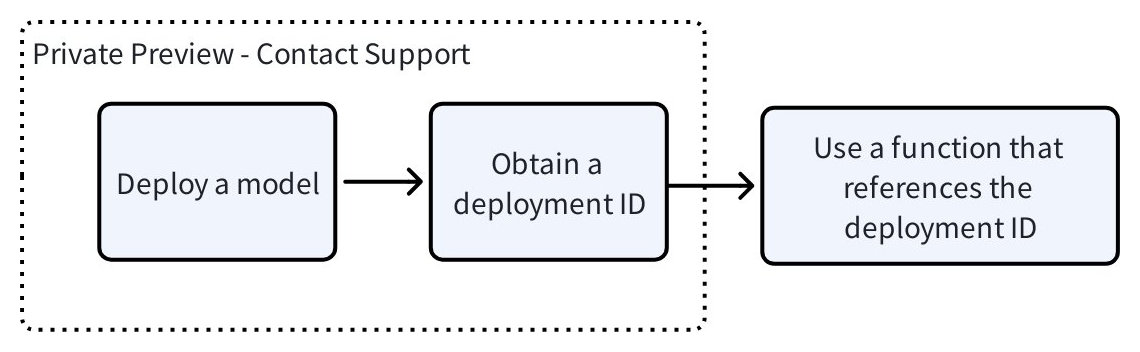
モデルのデプロイ
現在、Zilliz Cloud は以下のリージョン、インスタンスタイプ、およびモデルをサポートしています。
ホストモデルに関する特定の要件がある場合は、お問い合わせください。
サポートされているリージョン
モデルのデプロイメントリージョンは、クラスタのリージョンと一致している必要があります。利用可能なオプションは以下の通りです。
リージョン | ロケーション |
|---|---|
aws-us-west-2 | アメリカ合衆国 オレゴン州 |
サポートされているインスタンスタイプ
インスタンスタイプは、利用可能なコンピューティングリソースを決定します。利用可能なオプションは以下の通りです。
インスタンスタイプ | リソース |
|---|---|
g6.xlarge |
|
サポートされているモデル
利用可能なオプションは以下の通りです。
タイプ | モデル |
|---|---|
Embedding | Qwen/Qwen3-Embedding-0.6B |
Qwen/Qwen3-Embedding-4B | |
Qwen/Qwen3-Embedding-8B | |
BAAI/bge-small-en-v1.5 | |
BAAI/bge-small-zh-v1.5 | |
BAAI/bge-base-en-v1.5 | |
BAAI/bge-base-zh-v1.5 | |
BAAI/bge-large-en-v1.5 | |
BAAI/bge-large-zh-v1.5 | |
Reranking | BAAI/bge-reranker-base |
BAAI/bge-reranker-large | |
Qwen/Qwen3-Reranker-0.6B | |
Qwen/Qwen3-Reranker-4B | |
Qwen/Qwen3-Reranker-8B | |
Semantic ハイライター | zilliz/semantic-highlight-bilingual-v1 |
デプロイメントIDの取得
提供いただいた情報をもとに、Zilliz がモデルをデプロイします。これには約15分かかります。デプロイメントの準備が整うと、Zilliz Cloud サポートから デプロイメントID が返されます。この ID は、embedding または reranking 関数を作成する際に使用します。
"deploymentId": "68f8889be4b01215a275972a"
関数でデプロイ済みモデルを使用する
デプロイメントID を取得したら、埋め込み(embedding)関数またはリランキング(reranking)関数を通じて、そのデプロイ済みモデルを使用するコレクションを作成できます。
埋め込み関数を使用する
-
埋め込み関数付きのコレクションを作成します。
-
生テキスト用に少なくとも1つの
VARCHARフィールドを定義します。 -
モデルによって生成される埋め込みベクトル用に少なくとも1つのベクトルフィールドを定義します。
-
ベクトルフィールドの次元を、モデルの出力次元と一致するように設定します。
schema = milvus_client.create_schema()schema.add_field("id", DataType.INT64, is_primary=True, auto_id=False)schema.add_field("document", DataType.VARCHAR, max_length=9000)schema.add_field("dense", DataType.FLOAT_VECTOR, dim=384) # important, the dimension must be supported by the deployed model.# define embedding functiontext_embedding_function = Function(name="zilliz-bge-small-en-v1.5",function_type=FunctionType.TEXTEMBEDDING,input_field_names=["document"], # Scalar field(s) containing text data to embedoutput_field_names="dense", # Vector field(s) for storing embeddingsparams={"provider": "zilliz","model_deployment_id": "...", # Use the model deployment ID we provide you"truncation": True, # Optional: if true, inputs greater than the max supported input length of the model will be truncated"dimension": "384", # Optional: Shorten the output vector dimension, only if supported by the model})schema.add_function(text_embedding_function)index_params = milvus_client.prepare_index_params()index_params.add_index(field_name="dense",index_name="dense_index",index_type="AUTOINDEX",metric_type="IP",)ret = milvus_client.create_collection(collection_name, schema=schema, index_params=index_params, consistency_level="Strong") -
-
生のテキストデータを挿入します。
生のテキストのみをコレクションに挿入します。Zilliz Cloud は自動的に埋め込み関数を呼び出し、ベクトルフィールドを設定します。
rows = [{"id": 1, "document": "Artificial intelligence was founded as an academic discipline in 1956."},{"id": 2, "document": "Alan Turing was the first person to conduct substantial research in AI."},{"id": 3, "document": "Born in Maida Vale, London, Turing was raised in southern England."},]insert_result = milvus_client.insert(collection_name, rows, progress_bar=True) -
生のテキストデータを使用して類似性検索を実行します。
クエリを生のテキストとして提供します。Zilliz Cloud は同じモデルを使用してクエリベクトルを生成し、類似性検索を実行します。
search_params = {"params": {"nprobe": 10},}queries = ["When was artificial intelligence founded","Where was Alan Turing born?"]result = milvus_client.search(collection_name, data=queries, anns_field="dense", search_params=search_params, limit=3, output_fields=["document"], consistency_level="Strong")
リランキング関数を使用する
検索結果をリランキングするためにデプロイ済みのモデルを使用するリランキング関数を設定することもできます。
import numpy as np
rng = np.random.default_rng(seed=19530)
vectors_to_search = rng.random((1, dim))

# define reranking function
ranker = Function(
    name="model_rerank_fn",
    input_field_names=["document"],
    function_type=FunctionType.RERANK,
    params={
        "reranker": "model",
        "provider": "zilliz",
        "model_deployment_id": "...", # Use the model deployment ID we provide you,
        "queries": ["machine learning for time series"] * len(vectors_to_search),  # Query text, the number of query strings must match exactly the number of queries in your search operation
    }
)

# Use it during search
result = milvus_client.search(collection_name, vectors_to_search, limit=3, output_fields=["*"], ranker=ranker)
セマンティックハイライター関数を使用する
検索中に、ホストされたハイライターモデルを使用して検索結果を後処理し、ユーザーのクエリと意味的に関連するテキストセグメントをハイライト表示できます。
from pymilvus import SemanticHighlighter

# Define the search query
queries = ["When was artificial intelligence founded"]

# Configure semantic highlighter
highlighter = SemanticHighlighter(
    queries,
    ["document"],                           # Fields to highlight
    pre_tags=["<mark>"],                    # Tag before highlighted text
    post_tags=["</mark>"],                  # Tag after highlighted text
    model_deployment_id="YOUR_MODEL_ID",    # Deployed highlight model ID
)

# Perform search with highlighting
results = milvus_client.search(
    collection_name,
    data=queries,
    anns_field="dense",
    search_params={"params": {"nprobe": 10}},
    limit=3,
    output_fields=["document"],
    highlighter=highlighter
)

# Process results
for hits in results:
    for hit in hits:
        highlight = hit.get("highlight", {}).get("document", {})
        print(f"ID: {hit['id']}")
        print(f"Search Score: {hit['distance']:.4f}")      # Vector similarity score
        print(f"Fragments: {highlight.get('fragments', [])}")
        print(f"Highlight Confidence: {highlight.get('scores', [])}")  # Semantic relevance score
        print()
請求
ホストモデルの使用には、関数およびモデルサービスの料金のみが発生します。推論は Zilliz Cloud 内で実行されるため、データはパブリックインターネットを経由せず、データ転送料金は発生しません。
リージョン別のモデル単価については、営業部門にお問い合わせください。
コスト計算
Function and Model Services Cost = Model Unit Price x Usage Time
-
Model 単価: 詳細については、営業にお問い合わせ ください。
-
使用時間: モデルがアクティブに使用されているかどうかに関わらず、モデルデプロイメントが実行されている総時間を時間単位で測定します。