Hugging Face Ranker
ベクトル検索は結果をベクトル距離で並べ替えますが、初期の順序は各候補のテキストがクエリにどの程度適合しているかを反映していない場合があります。Hugging Face モデルプロバイダー統合を使用すると、Hugging Face Ranker は Hugging Face の sentence-similarity タスクのスコアを使用して、ベクトル検索で返された候補を並べ替えます。
仕組み
Hugging Face Ranker は、ベクトル検索後に候補エンティティをリランクします。次の図は、アプリケーション、Zilliz Cloud、Hugging Face 間の一般的なワークフローを示しています。
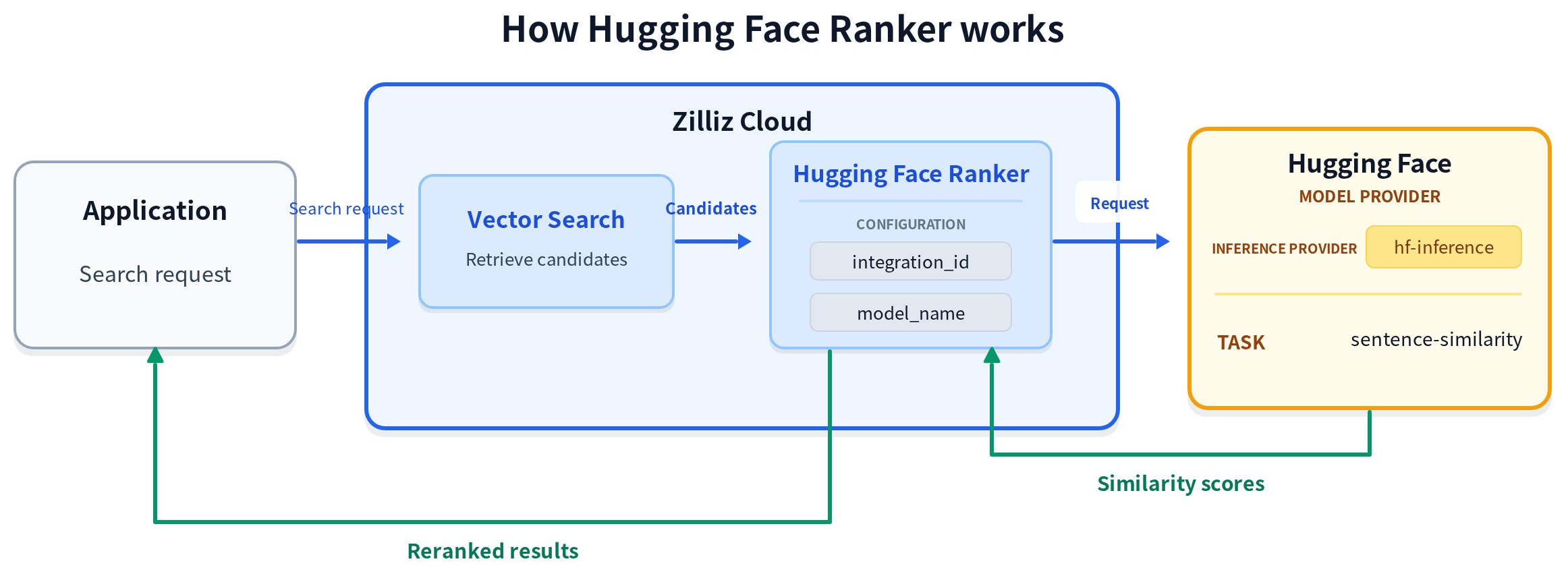
一般的なワークフローは4つのステップで構成されます。
-
候補エンティティを取得します。 Zilliz Cloud は、構成されたベクトルフィールドに対してベクトル検索を実行し、候補エンティティを返します。
-
リランク用のテキストを準備します。 ランカーは、クエリテキストを
params.queriesから、候補テキストをinput_field_namesで指定された null 非許容のVARCHARフィールドから読み取ります。 -
リランクスコアをリクエストします。 Zilliz Cloud はクエリと候補テキストを Hugging Face に送信し、各候補について新たに計算された類似度スコアを受信します。
-
リランクして結果を返します。 Zilliz Cloud はスコアを候補エンティティにマッピングし、スコアの高い順から低い順に並べ替えて、リランクされた結果を返します。
リランクスコアの計算方法
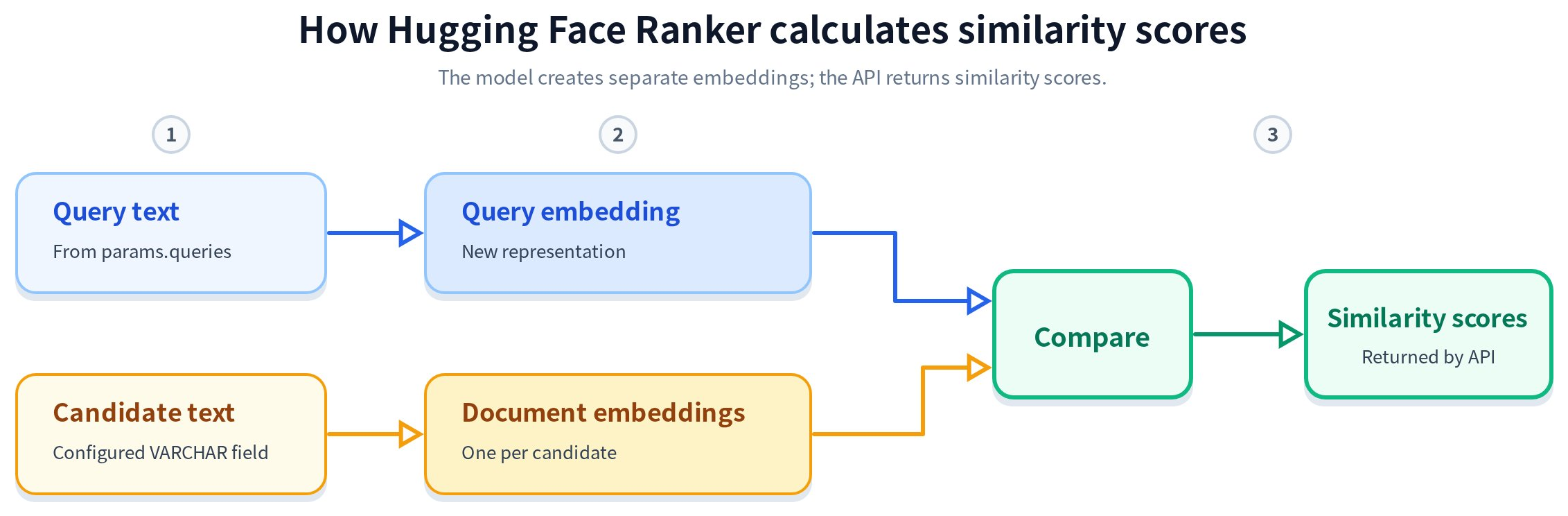
上記の一般的なワークフローは、リランクが行われる場所を示しています。次のプロセスは、Hugging Face が各候補の新しい類似度スコアを計算する方法を説明します。
-
テキスト入力を準備します。 ランカーは、クエリテキストを
params.queriesから、空でない候補テキストをinput_field_namesで指定されたVARCHARフィールドから読み取ります。 -
埋め込みを作成します。 Zilliz Cloud は、クエリテキストを
source_sentenceとして、候補テキストをsentencesとして、hf-inferenceを介して Hugging Face に送信し、Sentence Similarity タスクを実行します。モデルは、概念的にはクエリ埋め込みと候補テキスト用の個別の埋め込みを作成します。 -
スコアを計算して返します。 モデルはクエリ埋め込みを各候補埋め込みと比較し、候補ごとに1つの類似度スコアを返します。
図に示されている埋め込みはモデル処理の中間結果であり、Hugging Face API は類似度スコアのみを返します。ベクトル取得とリランクでは、別々の表現とスコアが使用されます。Hugging Face Ranker は、候補ベクトルや取得スコアを再利用しません。検索ベクトルの作成に使用される埋め込みモデルと、リランクに使用される Hugging Face モデルは独立しており、異なる場合があります。
事前計算されたベクトルを挿入する場合は、Hugging Face Ranker がリランク時に読み取れるよう、元の候補テキストも VARCHAR フィールドに保存してください。
事前準備
Hugging Face Ranker を使用する前に、次の点を確認してください。
Zilliz Cloud は、hf-inference を介して Hugging Face に接続し、Hugging Face Ranker に sentence-similarity タスクを使用します。Zilliz Cloud は、特定のモデルが現在 hf-inference によって提供されているか、引き続き利用可能か、または安定性、レイテンシ、出力品質に関する要件を満たしているかを制御しません。実稼働環境で使用する前に、Hugging Face で選択したモデルを確認し、ワークロードに対して評価してください。
-
Hugging Face モデルプロバイダー統合を作成し、その統合 ID をコピーすること。手順については、Integrate with Model Providers を参照してください。
-
モデルの Hugging Face ページを開き、Inference Providers セクションを確認すること。
hf-inferenceが現在sentence-similarityタスク用にこのモデルを提供していることを確認してください。 -
コレクションが候補テキストを null 非許容の
VARCHARフィールドに保存していることを確認すること。リランク関数は、input_field_namesでそのようなフィールドを正確に1つ参照する必要があります。コレクションには他のテキストフィールドを含めることができます。
Hugging Face Ranker を使用する
Hugging Face Ranker は検索時に定義および適用されます。コレクションスキーマを変更せずに、検索リクエストごとにランカーを有効化、無効化、または変更できます。
準備
次の設定では、id を主キー、document をリランクに使用する候補テキストを保存する VARCHAR フィールド、dense を初期検索に使用するベクトルフィールドとする3つのフィールドを持つコレクションを作成します。また、検索とリランクの例で使用するサンプルデータを挿入します。
サンプルデータを含むコレクションを準備する
- Python
- Java
- Go
- Rust
- C++
- NodeJS
- cURL
from pymilvus import DataType, MilvusClient

client = MilvusClient(
    uri="YOUR_CLUSTER_ENDPOINT",
    token="YOUR_CLUSTER_TOKEN",
)

collection_name = "hugging_face_rerank_demo"

schema = client.create_schema()

schema.add_field("id", DataType.INT64, is_primary=True, auto_id=False)
schema.add_field("document", DataType.VARCHAR, max_length=1000)
schema.add_field("dense", DataType.FLOAT_VECTOR, dim=4)

index_params = client.prepare_index_params()

index_params.add_index(
    field_name="dense",
    index_type="AUTOINDEX",
    metric_type="COSINE",
)

client.create_collection(
    collection_name=collection_name,
    schema=schema,
    index_params=index_params,
)

data = [
    {
        "id": 1,
        "document": "Recent renewable energy developments include improved solar efficiency.",
        "dense": [0.10, 0.20, 0.30, 0.40],
    },
    {
        "id": 2,
        "document": "Climate policy and carbon markets have evolved rapidly in recent years.",
        "dense": [0.11, 0.19, 0.28, 0.39],
    },
    {
        "id": 3,
        "document": "New battery technology helps stabilize wind and solar power generation.",
        "dense": [0.90, 0.10, 0.05, 0.02],
    },
    {
        "id": 4,
        "document": "Vector databases support similarity search for machine learning applications.",
        "dense": [0.01, 0.02, 0.03, 0.04],
    },
]

client.insert(collection_name=collection_name, data=data)
import io.milvus.v2.client.ConnectConfig;
import io.milvus.v2.client.MilvusClientV2;
import io.milvus.v2.common.DataType;
import io.milvus.v2.common.IndexParam;
import io.milvus.v2.service.collection.request.CreateCollectionReq;
import io.milvus.v2.service.index.request.CreateIndexReq;
import io.milvus.v2.service.collection.request.LoadCollectionReq;
import io.milvus.v2.service.vector.request.InsertReq;
import io.milvus.v2.service.vector.response.InsertResp;
import com.google.gson.JsonObject;
import com.google.gson.JsonParser;
import java.util.*;

MilvusClientV2 client = new MilvusClientV2(ConnectConfig.builder()
        .uri("YOUR_CLUSTER_ENDPOINT")
        .token("YOUR_CLUSTER_TOKEN")
        .build());

String collectionName = "hugging_face_rerank_demo";

CreateCollectionReq.CollectionSchema schema = CreateCollectionReq.CollectionSchema.builder()
        .fieldSchemaList(Arrays.asList(
                CreateCollectionReq.FieldSchema.builder().name("id").dataType(DataType.Int64).isPrimaryKey(true).autoID(false).build(),
                CreateCollectionReq.FieldSchema.builder().name("document").dataType(DataType.VarChar).maxLength(1000).build(),
                CreateCollectionReq.FieldSchema.builder().name("dense").dataType(DataType.FloatVector).dimension(4).build()
        ))
        .build();

client.createCollection(CreateCollectionReq.builder()
        .collectionName(collectionName)
        .collectionSchema(schema)
        .build());

client.createIndex(CreateIndexReq.builder()
        .collectionName(collectionName)
        .indexParams(Collections.singletonList(
                IndexParam.builder()
                        .fieldName("dense")
                        .indexType(IndexParam.IndexType.AUTOINDEX)
                        .metricType(IndexParam.MetricType.COSINE)
                        .build()
        ))
        .build());

client.loadCollection(LoadCollectionReq.builder()
        .collectionName(collectionName)
        .build());

JsonObject row1 = new JsonObject();
row1.addProperty("id", 1);
row1.addProperty("document", "Recent renewable energy developments include improved solar efficiency.");
row1.add("dense", JsonParser.parseString("[0.10, 0.20, 0.30, 0.40]"));

JsonObject row2 = new JsonObject();
row2.addProperty("id", 2);
row2.addProperty("document", "Climate policy and carbon markets have evolved rapidly in recent years.");
row2.add("dense", JsonParser.parseString("[0.11, 0.19, 0.28, 0.39]"));

JsonObject row3 = new JsonObject();
row3.addProperty("id", 3);
row3.addProperty("document", "New battery technology helps stabilize wind and solar power generation.");
row3.add("dense", JsonParser.parseString("[0.90, 0.10, 0.05, 0.02]"));

JsonObject row4 = new JsonObject();
row4.addProperty("id", 4);
row4.addProperty("document", "Vector databases support similarity search for machine learning applications.");
row4.add("dense", JsonParser.parseString("[0.01, 0.02, 0.03, 0.04]"));

InsertResp insertResp = client.insert(InsertReq.builder()
        .collectionName(collectionName)
        .data(Arrays.asList(row1, row2, row3, row4))
        .build());
import (
    "context"
    "log"

    "github.com/milvus-io/milvus/client/v3/entity"
    "github.com/milvus-io/milvus/client/v3/index"
    "github.com/milvus-io/milvus/client/v3/milvusclient"
)

ctx := context.Background()

cli, err := milvusclient.New(ctx, &milvusclient.ClientConfig{
    Address: "YOUR_CLUSTER_ENDPOINT",
    APIKey:  "YOUR_CLUSTER_TOKEN",
})
if err != nil {
    log.Fatal(err)
}

collectionName := "hugging_face_rerank_demo"

schema := entity.NewSchema().
    WithField(entity.NewField().WithName("id").WithDataType(entity.FieldTypeInt64).WithIsPrimaryKey(true).WithIsAutoID(false)).
    WithField(entity.NewField().WithName("document").WithDataType(entity.FieldTypeVarChar).WithMaxLength(1000)).
    WithField(entity.NewField().WithName("dense").WithDataType(entity.FieldTypeFloatVector).WithDim(4))

err = cli.CreateCollection(ctx, milvusclient.NewCreateCollectionOption(collectionName, schema))
if err != nil {
    log.Fatal(err)
}

_, err = cli.CreateIndex(ctx, milvusclient.NewCreateIndexOption(collectionName, "dense", index.NewAutoIndex(entity.COSINE)))
if err != nil {
    log.Fatal(err)
}

_, err = cli.LoadCollection(ctx, milvusclient.NewLoadCollectionOption(collectionName))
if err != nil {
    log.Fatal(err)
}

_, err = cli.Insert(ctx, milvusclient.NewRowBasedInsertOption(collectionName,
    map[string]any{"id": int64(1), "document": "Recent renewable energy developments include improved solar efficiency.", "dense": []float32{0.10, 0.20, 0.30, 0.40}},
    map[string]any{"id": int64(2), "document": "Climate policy and carbon markets have evolved rapidly in recent years.", "dense": []float32{0.11, 0.19, 0.28, 0.39}},
    map[string]any{"id": int64(3), "document": "New battery technology helps stabilize wind and solar power generation.", "dense": []float32{0.90, 0.10, 0.05, 0.02}},
    map[string]any{"id": int64(4), "document": "Vector databases support similarity search for machine learning applications.", "dense": []float32{0.01, 0.02, 0.03, 0.04}},
))
if err != nil {
    log.Fatal(err)
}
use milvus::v2::prelude::*;

let client = ClientV2::new(&ConnectConfig::new().uri("YOUR_CLUSTER_ENDPOINT").token("YOUR_CLUSTER_TOKEN")).await?;

let collection_name = "hugging_face_rerank_demo";

let schema = CollectionSchema::new()
    .add_field(FieldSchema::new().name("id").data_type(DataType::Int64).primary_key(true).auto_id(false))
    .add_field(FieldSchema::new().name("document").data_type(DataType::VarChar).max_length(1000))
    .add_field(FieldSchema::new().name("dense").data_type(DataType::FloatVector).dimension(4));

client.create_collection(
    CreateCollectionRequest::builder()
        .collection_name(collection_name)
        .schema(schema)
        .index_params(vec![IndexParam::new()
            .field_name("dense")
            .index_type(IndexType::AutoIndex)
            .metric_type(MetricType::Cosine)])
        .build()?,
)
.await?;

client.load_collection(
    LoadCollectionRequest::builder()
        .collection_name(collection_name)
        .build()?,
)
.await?;

client.insert(
    InsertRequest::builder()
        .collection_name(collection_name)
        .rows(vec![
            serde_json::json!({"id": 1, "document": "Recent renewable energy developments include improved solar efficiency.", "dense": [0.10, 0.20, 0.30, 0.40]}),
            serde_json::json!({"id": 2, "document": "Climate policy and carbon markets have evolved rapidly in recent years.", "dense": [0.11, 0.19, 0.28, 0.39]}),
            serde_json::json!({"id": 3, "document": "New battery technology helps stabilize wind and solar power generation.", "dense": [0.90, 0.10, 0.05, 0.02]}),
            serde_json::json!({"id": 4, "document": "Vector databases support similarity search for machine learning applications.", "dense": [0.01, 0.02, 0.03, 0.04]}),
        ])
        .build()?,
)
.await?;
#include "milvus/MilvusClientV2.h"
#include <iostream>

auto client = milvus::MilvusClientV2::Create();
auto status = client->Connect(milvus::ConnectParam("YOUR_CLUSTER_ENDPOINT").WithToken("YOUR_CLUSTER_TOKEN"));
if (!status.IsOk()) {
    std::cout << status.Message() << std::endl;
}

std::string collection_name = "hugging_face_rerank_demo";

milvus::CollectionSchema schema;
schema.AddField(milvus::FieldSchema("id", milvus::DataType::INT64, "", true, false));
schema.AddField(milvus::FieldSchema("document", milvus::DataType::VARCHAR).WithMaxLength(1000));
schema.AddField(milvus::FieldSchema("dense", milvus::DataType::FLOAT_VECTOR).WithDimension(4));

milvus::CreateCollectionRequest request;
request.WithCollectionName(collection_name).WithCollectionSchema(std::make_shared<milvus::CollectionSchema>(schema));
status = client->CreateCollection(request);
if (!status.IsOk()) {
    std::cout << status.Message() << std::endl;
}

milvus::IndexDesc index_desc("dense", "", milvus::IndexType::AUTOINDEX, milvus::MetricType::COSINE);
milvus::CreateIndexRequest index_request;
index_request.WithCollectionName(collection_name).WithIndexes({index_desc});
status = client->CreateIndex(index_request);
if (!status.IsOk()) {
    std::cout << status.Message() << std::endl;
}

status = client->LoadCollection(milvus::LoadCollectionRequest().WithCollectionName(collection_name));
if (!status.IsOk()) {
    std::cout << status.Message() << std::endl;
}

milvus::InsertRequest insert_request;
insert_request.WithCollectionName(collection_name)
    .AddRowData({{"id", 1}, {"document", "Recent renewable energy developments include improved solar efficiency."}, {"dense", std::vector<float>{0.10f, 0.20f, 0.30f, 0.40f}}})
    .AddRowData({{"id", 2}, {"document", "Climate policy and carbon markets have evolved rapidly in recent years."}, {"dense", std::vector<float>{0.11f, 0.19f, 0.28f, 0.39f}}})
    .AddRowData({{"id", 3}, {"document", "New battery technology helps stabilize wind and solar power generation."}, {"dense", std::vector<float>{0.90f, 0.10f, 0.05f, 0.02f}}})
    .AddRowData({{"id", 4}, {"document", "Vector databases support similarity search for machine learning applications."}, {"dense", std::vector<float>{0.01f, 0.02f, 0.03f, 0.04f}}});

milvus::InsertResponse insert_resp;
status = client->Insert(insert_request, insert_resp);
if (!status.IsOk()) {
    std::cout << status.Message() << std::endl;
}
import { MilvusClient, DataType } from '@zilliz/milvus2-sdk-node';

const client = new MilvusClient({
  address: 'YOUR_CLUSTER_ENDPOINT',
  token: 'YOUR_CLUSTER_TOKEN',
});

const collectionName = 'hugging_face_rerank_demo';

const schema = {
  fields: [
    { name: 'id', data_type: DataType.Int64, is_primary_key: true, autoID: false },
    { name: 'document', data_type: DataType.VarChar, max_length: 1000 },
    { name: 'dense', data_type: DataType.FloatVector, dim: 4 },
  ],
};

await client.createCollection({
  collection_name: collectionName,
  fields: schema.fields,
});

await client.createIndex({
  collection_name: collectionName,
  field_name: 'dense',
  index_type: 'AUTOINDEX',
  metric_type: 'COSINE',
});

await client.loadCollection({
  collection_name: collectionName,
});

const data = [
  { id: 1, document: 'Recent renewable energy developments include improved solar efficiency.', dense: [0.10, 0.20, 0.30, 0.40] },
  { id: 2, document: 'Climate policy and carbon markets have evolved rapidly in recent years.', dense: [0.11, 0.19, 0.28, 0.39] },
  { id: 3, document: 'New battery technology helps stabilize wind and solar power generation.', dense: [0.90, 0.10, 0.05, 0.02] },
  { id: 4, document: 'Vector databases support similarity search for machine learning applications.', dense: [0.01, 0.02, 0.03, 0.04] },
];

await client.insert({
  collection_name: collectionName,
  data: data,
});
# restful
export MILVUS_HOST="YOUR_CLUSTER_ENDPOINT"
export MILVUS_TOKEN="YOUR_CLUSTER_TOKEN"

curl -X POST "http://${MILVUS_HOST}/v2/vectordb/collections/create" \
  -H "Content-Type: application/json" \
  -H "Authorization: Bearer ${MILVUS_TOKEN}" \
  -d '{
    "collectionName": "hugging_face_rerank_demo",
    "schema": {
        "fields": [
            {"fieldName": "id", "dataType": "Int64", "isPrimary": true, "autoId": false},
            {"fieldName": "document", "dataType": "VarChar", "elementTypeParams": {"max_length": 1000}},
            {"fieldName": "dense", "dataType": "FloatVector", "elementTypeParams": {"dim": 4}}
        ]
    },
    "indexParams": [
        {"fieldName": "dense", "indexType": "AUTOINDEX", "metricType": "COSINE"}
    ]
  }'

curl -X POST "http://${MILVUS_HOST}/v2/vectordb/collections/load" \
  -H "Content-Type: application/json" \
  -H "Authorization: Bearer ${MILVUS_TOKEN}" \
  -d '{
    "collectionName": "hugging_face_rerank_demo"
  }'

curl -X POST "http://${MILVUS_HOST}/v2/vectordb/entities/insert" \
  -H "Content-Type: application/json" \
  -H "Authorization: Bearer ${MILVUS_TOKEN}" \
  -d '{
    "collectionName": "hugging_face_rerank_demo",
    "data": [
        {"id": 1, "document": "Recent renewable energy developments include improved solar efficiency.", "dense": [0.10, 0.20, 0.30, 0.40]},
        {"id": 2, "document": "Climate policy and carbon markets have evolved rapidly in recent years.", "dense": [0.11, 0.19, 0.28, 0.39]},
        {"id": 3, "document": "New battery technology helps stabilize wind and solar power generation.", "dense": [0.90, 0.10, 0.05, 0.02]},
        {"id": 4, "document": "Vector databases support similarity search for machine learning applications.", "dense": [0.01, 0.02, 0.03, 0.04]}
    ]
  }'
リランク関数を定義する
ベクトル検索で返された候補をリランクするために、document に保存されたテキストを使用する RERANK 関数を定義します。この関数では、クエリテキスト、Hugging Face モデル、モデルプロバイダー統合も指定します。
- Python
- Java
- Go
- Rust
- C++
- NodeJS
- cURL
from pymilvus import Function, FunctionType

hugging_face_ranker = Function(
    name="hugging_face_semantic_ranker",
    # Use the text stored in the "document" VARCHAR field for reranking.
    input_field_names=["document"],
    function_type=FunctionType.RERANK,
    params={
        "reranker": "model",
        "provider": "huggingface",
        "model_name": "sentence-transformers/all-MiniLM-L6-v2",
        "queries": ["renewable energy developments"],
        "integration_id": "YOUR_INTEGRATION_ID",
        "max_client_batch_size": 32,
    },
)
import io.milvus.common.clientenum.FunctionType;
import io.milvus.v2.service.collection.request.CreateCollectionReq;
import java.util.*;

CreateCollectionReq.Function huggingFaceRanker = CreateCollectionReq.Function.builder()
        .functionType(FunctionType.RERANK)
        .name("hugging_face_semantic_ranker")
        // Use the text stored in the "document" VARCHAR field for reranking.
        .inputFieldNames(Collections.singletonList("document"))
        .param("reranker", "model")
        .param("provider", "huggingface")
        .param("model_name", "sentence-transformers/all-MiniLM-L6-v2")
        .param("queries", "[\"renewable energy developments\"]")
        .param("integration_id", "YOUR_INTEGRATION_ID")
        .param("max_client_batch_size", "32")
        .build();
import "github.com/milvus-io/milvus/client/v3/entity"

huggingFaceRanker := entity.NewFunction().
    WithName("hugging_face_semantic_ranker").
    // Use the text stored in the "document" VARCHAR field for reranking.
    WithInputFields("document").
    WithType(entity.FunctionTypeRerank).
    WithParam("reranker", "model").
    WithParam("provider", "huggingface").
    WithParam("model_name", "sentence-transformers/all-MiniLM-L6-v2").
    WithParam("queries", []string{"renewable energy developments"}).
    WithParam("integration_id", "YOUR_INTEGRATION_ID").
    WithParam("max_client_batch_size", 32)
use milvus::v2::prelude::*;

let hugging_face_ranker = Function::new()
    .name("hugging_face_semantic_ranker")
    // Use the text stored in the "document" VARCHAR field for reranking.
    .input_fields(["document"])
    .function_type(FunctionType::Rerank)
    .param("reranker", "model")
    .param("provider", "huggingface")
    .param("model_name", "sentence-transformers/all-MiniLM-L6-v2")
    .param("queries", "[\"renewable energy developments\"]")
    .param("integration_id", "YOUR_INTEGRATION_ID")
    .param("max_client_batch_size", "32");
#include "milvus/MilvusClientV2.h"
#include <vector>

auto hugging_face_ranker = std::make_shared<milvus::ModelRerank>("hugging_face_semantic_ranker");
hugging_face_ranker->AddInputFieldName("document");
// Use the text stored in the "document" VARCHAR field for reranking.
hugging_face_ranker->SetProvider("huggingface");
hugging_face_ranker->AddParam("model_name", "sentence-transformers/all-MiniLM-L6-v2");
hugging_face_ranker->SetQueries({"renewable energy developments"});
hugging_face_ranker->AddParam("integration_id", "YOUR_INTEGRATION_ID");
hugging_face_ranker->AddParam("max_client_batch_size", "32");
import { FunctionType } from '@zilliz/milvus2-sdk-node';

const huggingFaceRanker = {
  name: 'hugging_face_semantic_ranker',
  // Use the text stored in the "document" VARCHAR field for reranking.
  input_field_names: ['document'],
  type: FunctionType.RERANK,
  params: {
    reranker: 'model',
    provider: 'huggingface',
    model_name: 'sentence-transformers/all-MiniLM-L6-v2',
    queries: ['renewable energy developments'],
    integration_id: 'YOUR_INTEGRATION_ID',
    max_client_batch_size: 32,
  },
};
# restful
export RANKER='{
    "name": "hugging_face_semantic_ranker",
    "type": "Rerank",
    "inputFieldNames": ["document"],
    "outputFieldNames": [],
    "params": {
        "reranker": "model",
        "provider": "huggingface",
        "model_name": "sentence-transformers/all-MiniLM-L6-v2",
        "queries": ["renewable energy developments"],
        "integration_id": "YOUR_INTEGRATION_ID",
        "max_client_batch_size": 32
    }
}'
この例では、構成をデモンストレーションする目的でのみ sentence-transformers/all-MiniLM-L6-v2 を使用しています。このモデルは、Zilliz Cloud による推奨または認定を意味するものではありません。
次の表では、Hugging Face Ranker の params でユーザーが設定できるすべてのエントリについて説明します。
| パラメーター | 必須 | 説明 |
|---|---|---|
reranker | はい | リランクの実装です。この値は model に設定します。 |
provider | はい | Zilliz Cloud のモデルプロバイダーです。この値は huggingface に設定します。 |
model_name | はい | sentence-similarity タスク用に hf-inference を介して現在提供されているモデルの Hugging Face モデル ID です。 |
queries | はい | リランクに使用するクエリテキストのリストです。初期検索でクエリベクトルを使用する場合でも、検索クエリ(nq)ごとに1つの文字列を指定します。 |
integration_id | はい | Hugging Face モデルプロバイダー統合の ID です。手順については、Integrate with Model Providers を参照してください。 |
max_client_batch_size | いいえ | 1回のリクエストで Hugging Face に送信する候補テキストの最大数です。デフォルト値は 32 です。値は 0 より大きい必要があります。 |
Hugging Face の認証情報を関数定義に含めないでください。
リランク関数を使用して検索する
ranker パラメーターを介して関数を search() に渡します。
- Python
- Java
- Go
- Rust
- C++
- NodeJS
- cURL
query_vector = [0.12, 0.21, 0.29, 0.41]

results = client.search(
    collection_name=collection_name,
    data=[query_vector],
    anns_field="dense",
    limit=3,
    output_fields=["document"],
    ranker=hugging_face_ranker,
)

print(results)
import io.milvus.v2.service.vector.request.SearchReq;
import io.milvus.v2.service.vector.request.data.FloatVec;
import io.milvus.v2.service.vector.response.SearchResp;
import java.util.Collections;

SearchResp searchResp = client.search(SearchReq.builder()
        .collectionName(collectionName)
        .data(Collections.singletonList(new FloatVec(new float[]{0.12f, 0.21f, 0.29f, 0.41f})))
        .annsField("dense")
        .topK(3)
        .outputFields(Collections.singletonList("document"))
        .ranker(huggingFaceRanker)
        .build());
import (
    "log"

    "github.com/milvus-io/milvus/client/v3/entity"
    "github.com/milvus-io/milvus/client/v3/milvusclient"
)

resultSet, err := cli.Search(ctx, milvusclient.NewSearchOption(collectionName, 3, []entity.Vector{
    entity.FloatVector{0.12, 0.21, 0.29, 0.41},
}).
    WithANNSField("dense").
    WithOutputFields("document").
    WithFunctionReranker(huggingFaceRanker))
if err != nil {
    log.Fatal(err)
}
use milvus::v2::prelude::*;

let query_vector = vec![0.12, 0.21, 0.29, 0.41];

let response = client
    .search(
        SearchRequest::builder()
            .collection_name(collection_name)
            .vector_field("dense")
            .vectors(SearchVectors::Float(vec![query_vector]))
            .limit(3)
            .output_fields(["document"])
            .rerank(FunctionScore::new().add_function(hugging_face_ranker))
            .build()?,
    )
    .await?;
std::vector<float> query_vector = {0.12f, 0.21f, 0.29f, 0.41f};

auto function_score = std::make_shared<milvus::FunctionScore>();
function_score->AddFunction(hugging_face_ranker);

auto search_request = milvus::SearchRequest()
                          .WithCollectionName(collection_name)
                          .WithAnnsField("dense")
                          .WithLimit(3)
                          .WithRerank(function_score)
                          .AddOutputField("document")
                          .AddFloatVector(query_vector);

milvus::SearchResponse search_resp;
status = client->Search(search_request, search_resp);
if (!status.IsOk()) {
    std::cout << status.Message() << std::endl;
}
const queryVector = [0.12, 0.21, 0.29, 0.41];

const results = await client.search({
  collection_name: collectionName,
  data: queryVector,
  anns_field: 'dense',
  limit: 3,
  output_fields: ['document'],
  rerank: huggingFaceRanker,
});

console.log(results);
# restful
curl -X POST "http://${MILVUS_HOST}/v2/vectordb/entities/search" \
  -H "Content-Type: application/json" \
  -H "Request-Timeout: 10" \
  -H "Authorization: Bearer ${MILVUS_TOKEN}" \
  -d '{
    "collectionName": "hugging_face_rerank_demo",
    "data": [[0.12, 0.21, 0.29, 0.41]],
    "annsField": "dense",
    "limit": 3,
    "outputFields": ["document"],
    "functionScore": {
        "functions": [
            {
                "name": "hugging_face_semantic_ranker",
                "type": "Rerank",
                "inputFieldNames": ["document"],
                "outputFieldNames": [],
                "params": {
                    "reranker": "model",
                    "provider": "huggingface",
                    "model_name": "sentence-transformers/all-MiniLM-L6-v2",
                    "queries": ["renewable energy developments"],
                    "integration_id": "YOUR_INTEGRATION_ID",
                    "max_client_batch_size": 32
                }
            }
        ]
    }
  }'
検索では、まず dense ベクトルフィールドから候補エンティティを取得します。次に、Hugging Face Ranker は queries のクエリテキストと各候補の document テキストを使用して、sentence-similarity タスクを通じて類似度スコアを計算します。Zilliz Cloud は候補をスコアの降順で返します。
トラブルシューティング
sentence-similarity タスクでモデルを利用できない
Hugging Face でモデルページを開き、Inference Providers セクションを確認します。hf-inference が現在このモデルを提供しており、モデルが sentence-similarity をサポートしていることを確認してください。いずれかの要件が満たされていない場合は、別のモデルを選択し、そのモデルページで確認してください。Zilliz Cloud は、Hugging Face モデル用のサポート対象モデルカタログを維持していません。
クエリテキストの数が検索リクエストと一致しない
queries 内の文字列の数は、検索クエリ(nq)の数と等しい必要があります。1つのクエリベクトルを使用する検索では、クエリ文字列を正確に1つ指定してください。
次のステップ
Hugging Face Ranker はハイブリッド検索でも使用できます。検索とハイブリッド検索では、同じ方法でランカーが適用されます。検索時に ranker パラメーターを介してリランク関数を渡します。
詳細については、Multi-ベクトル Hybrid Search を参照してください。