INVERTED
データに対して頻繁にフィルタークエリを実行する必要がある場合、INVERTED インデックスによってクエリパフォーマンスを大幅に向上できます。Zilliz Cloud は、すべてのドキュメントをスキャンする代わりに転置インデックスを使用して、フィルター条件に一致する正確なレコードをすばやく特定します。
INVERTED インデックスを使用する場合
INVERTED インデックスは、次のような場合に使用します。
-
特定の値でフィルタリングする: フィールドが特定の値と等しいすべてのレコードを検索します(例:
category == "electronics") -
テキストコンテンツをフィルタリングする:
VARCHARフィールドに対して効率的な検索を実行します -
JSON フィールドの値をクエリする: JSON 構造内の特定のキーでフィルタリングします
パフォーマンス上の利点: INVERTED インデックスは、コレクション全体のスキャンが不要になるため、大規模なデータセットでクエリ時間を秒単位からミリ秒単位に短縮できます。
INVERTED インデックスの仕組み
Zilliz Cloud の INVERTED インデックスは、各一意のフィールド値(ターム)を、その値が出現するドキュメント ID のセットにマッピングします。この構造により、値が繰り返されるフィールドやカテゴリ型の値を持つフィールドを高速に検索できます。
図に示すように、このプロセスは 2 つのステップで機能します。
-
順方向マッピング(ID → ターム): 各ドキュメント ID は、それが含むフィールド値を指します。
-
転置マッピング(ターム → ID): Zilliz Cloud は一意のタームを収集し、各タームからそのタームを含むすべての ID への逆マッピングを構築します。
たとえば、値 "electronics" は ID 1 と 3 にマッピングされ、"books" は ID 2 と 5 にマッピングされます。
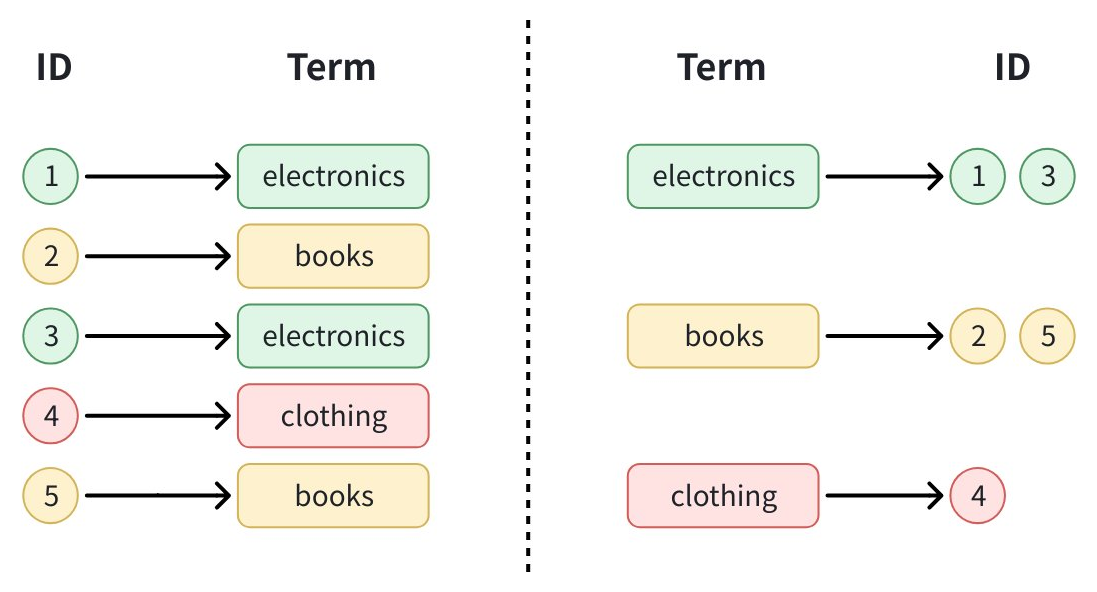
特定の値(例: category == "electronics")でフィルタリングする場合、Zilliz Cloud はインデックス内のタームを検索し、一致する ID を直接取得するだけです。これによりデータセット全体のスキャンが回避され、特にカテゴリ型の値や繰り返される値に対して高速なフィルタリングが可能になります。
INVERTED インデックスは、BOOL、INT8、INT16、INT32、INT64、FLOAT、DOUBLE、VARCHAR、JSON、ARRAY などのすべてのスカラーフィールドタイプをサポートします。ただし、JSON フィールドをインデックス化するためのインデックスパラメーターは、通常のスカラーフィールドとは少し異なります。
JSON 以外のフィールドにインデックスを作成する
JSON 以外のフィールドにインデックスを作成するには、次のステップに従います。
-
インデックスパラメーターを準備します。
- Python
- Java
- Go
- Rust
- C++
- NodeJS
- cURL
pythonfrom pymilvus import MilvusClientclient = MilvusClient(uri="YOUR_CLUSTER_ENDPOINT") # Replace with your server address# Create an empty index parameter objectindex_params = client.prepare_index_params()javaimport io.milvus.v2.client.ConnectConfig;import io.milvus.v2.client.MilvusClientV2;// Initialize Milvus clientMilvusClientV2 client = new MilvusClientV2(ConnectConfig.builder().uri("YOUR_CLUSTER_ENDPOINT") // Replace with your server address.build());goimport ("context""fmt""github.com/milvus-io/milvus/client/v3/milvusclient")ctx, cancel := context.WithCancel(context.Background())defer cancel()// Initialize Milvus clientclient, err := milvusclient.New(ctx, &milvusclient.ClientConfig{Address: "YOUR_CLUSTER_ENDPOINT", // Replace with your server address})if err != nil {fmt.Println(err.Error())// handle error}rustuse milvus::v2::prelude::*;// Initialize Milvus clientlet config = ConnectConfig::new().uri("YOUR_CLUSTER_ENDPOINT"); // Replace with your server addresslet client = ClientV2::new(&config).await?;c++#include "milvus/MilvusClientV2.h"// Initialize Milvus clientauto client = milvus::MilvusClientV2::Create();auto status = client->Connect(milvus::ConnectParam("YOUR_CLUSTER_ENDPOINT")); // Replace with your server addressif (!status.IsOk()) {std::cout << status.Message() << std::endl;}javascriptimport { MilvusClient } from "@zilliz/milvus2-sdk-node";// Initialize Milvus clientconst client = new MilvusClient({address: "YOUR_CLUSTER_ENDPOINT", // Replace with your server address});bashexport CLUSTER_ENDPOINT="YOUR_CLUSTER_ENDPOINT" # Replace with your server addressexport TOKEN="YOUR_CLUSTER_TOKEN" -
INVERTEDインデックスを追加します。- Python
- Java
- Go
- Rust
- C++
- NodeJS
- cURL
pythonindex_params.add_index(field_name="category", # Name of the field to indexindex_type="INVERTED", # Specify INVERTED index typeindex_name="category_index" # Give your index a name)javaimport io.milvus.v2.common.IndexParam;// Add the INVERTED indexIndexParam indexParam = IndexParam.builder().fieldName("category") // Name of the field to index.indexType(IndexParam.IndexType.INVERTED) // Specify INVERTED index type.indexName("category_index") // Give your index a name.build();goimport "github.com/milvus-io/milvus/client/v3/index"// Add the INVERTED indexidx := index.NewInvertedIndex() // Specify INVERTED index typerust// Add the INVERTED indexlet index_params = vec![IndexParam::new().field_name("category") // Name of the field to index.index_type(IndexType::Inverted) // Specify INVERTED index type.index_name("category_index"), // Give your index a name];c++// Add the INVERTED indexmilvus::IndexDesc index_desc("category", "category_index", milvus::IndexType::INVERTED); // field name, index name, index typejavascriptimport { IndexType } from "@zilliz/milvus2-sdk-node";// Add the INVERTED indexconst indexParams = {field_name: "category", // Name of the field to indexindex_type: IndexType.INVERTED, // Specify INVERTED index typeindex_name: "category_index", // Give your index a name};bash# Add the INVERTED indexexport indexParams='[{"fieldName": "category", # Name of the field to index"indexName": "category_index", # Give your index a name"params": {"index_type": "INVERTED" # Specify INVERTED index type}}]' -
インデックスを作成します。
- Python
- Java
- Go
- Rust
- C++
- NodeJS
- cURL
pythonclient.create_index(collection_name="my_collection", # Replace with your collection nameindex_params=index_params)javaimport io.milvus.v2.service.index.request.CreateIndexReq;import java.util.Collections;// Create the indexclient.createIndex(CreateIndexReq.builder().collectionName("my_collection") // Replace with your collection name.indexParams(Collections.singletonList(indexParam)).build());goimport ("fmt""github.com/milvus-io/milvus/client/v3/milvusclient")// Create the index_, err = client.CreateIndex(ctx, milvusclient.NewCreateIndexOption("my_collection", "category", idx).WithIndexName("category_index")) // Replace with your collection nameif err != nil {fmt.Println(err.Error())// handle error}rust// Create the indexclient.create_index(CreateIndexRequest::builder().collection_name("my_collection") // Replace with your collection name.index_params(index_params).build()?,).await?;c++// Create the indexstatus = client->CreateIndex(milvus::CreateIndexRequest().WithCollectionName("my_collection") // Replace with your collection name.WithIndexes({std::move(index_desc)}));if (!status.IsOk()) {std::cout << status.Message() << std::endl;}javascript// Create the indexawait client.createIndex({collection_name: "my_collection", // Replace with your collection namefield_name: indexParams.field_name,index_type: indexParams.index_type,index_name: indexParams.index_name,});bash# Create the indexcurl --request POST \--url "${CLUSTER_ENDPOINT}/v2/vectordb/indexes/create" \--header "Authorization: Bearer ${TOKEN}" \--header "Content-Type: application/json" \-d "{\"collectionName\": \"my_collection\", # Replace with your collection name\"indexParams\": $indexParams}"
JSON フィールドにインデックスを作成する
JSON フィールド内の特定のパスに INVERTED インデックスを作成することもできます。そのためには、JSON パスとデータタイプを指定する追加のパラメーターが必要です。
- Python
- Java
- Go
- Rust
- C++
- NodeJS
- cURL
# Build index params
index_params.add_index(
field_name="metadata", # JSON field name
index_type="INVERTED",
index_name="metadata_category_index",
params={
"json_path": "metadata[\"category\"]", # Path to the JSON key
"json_cast_type": "varchar" # Data type to cast to during indexing
}
)
# Create index
client.create_index(
    collection_name="my_collection", # Replace with your collection name
    index_params=index_params
)
import io.milvus.v2.common.IndexParam;
import io.milvus.v2.service.index.request.CreateIndexReq;
import java.util.Collections;
import java.util.HashMap;
import java.util.Map;

// Build index params
Map<String, Object> extraParams = new HashMap<>();
extraParams.put("json_path", "metadata[\"category\"]"); // Path to the JSON key
extraParams.put("json_cast_type", "varchar"); // Data type to cast to during indexing

IndexParam jsonIndexParam = IndexParam.builder()
        .fieldName("metadata") // JSON field name
        .indexType(IndexParam.IndexType.INVERTED)
        .indexName("metadata_category_index")
        .extraParams(extraParams)
        .build();

// Create index
client.createIndex(CreateIndexReq.builder()
        .collectionName("my_collection") // Replace with your collection name
        .indexParams(Collections.singletonList(jsonIndexParam))
        .build());
import (
    "fmt"

    "github.com/milvus-io/milvus/client/v3/index"
    "github.com/milvus-io/milvus/client/v3/milvusclient"
)

// Build index params
jsonIdx := index.NewJSONPathIndex(index.Inverted, "varchar", "metadata[\"category\"]") // indexType, json_cast_type, json_path
jsonIdx.WithIndexName("metadata_category_index")

// Create index
_, err = client.CreateIndex(ctx, milvusclient.NewCreateIndexOption("my_collection", "metadata", jsonIdx)) // Replace with your collection name
if err != nil {
    fmt.Println(err.Error())
    // handle error
}
use std::collections::HashMap;

// Build index params
let json_index_params = vec![
    IndexParam::new()
        .field_name("metadata") // JSON field name
        .index_type(IndexType::Inverted)
        .index_name("metadata_category_index")
        .extra_params(HashMap::from([
            ("json_path".into(), "metadata[\"category\"]".into()), // Path to the JSON key
            ("json_cast_type".into(), "varchar".into()), // Data type to cast to during indexing
        ])),
];

// Create index
client
    .create_index(
        CreateIndexRequest::builder()
            .collection_name("my_collection") // Replace with your collection name
            .index_params(json_index_params)
            .build()?,
    )
    .await?;
// Build index params
milvus::IndexDesc json_index_desc("metadata", "metadata_category_index", milvus::IndexType::INVERTED); // JSON field name, index name, index type
json_index_desc.AddExtraParam("json_path", "metadata[\"category\"]"); // Path to the JSON key
json_index_desc.AddExtraParam("json_cast_type", "varchar"); // Data type to cast to during indexing

// Create index
status = client->CreateIndex(milvus::CreateIndexRequest()
                                 .WithCollectionName("my_collection") // Replace with your collection name
                                 .WithIndexes({std::move(json_index_desc)}));
if (!status.IsOk()) {
    std::cout << status.Message() << std::endl;
}
import { IndexType } from "@zilliz/milvus2-sdk-node";

// Build index params
await client.createIndex({
    collection_name: "my_collection", // Replace with your collection name
    field_name: "metadata", // JSON field name
    index_type: IndexType.INVERTED,
    index_name: "metadata_category_index",
    params: {
        json_path: "metadata[\"category\"]", // Path to the JSON key
        json_cast_type: "varchar", // Data type to cast to during indexing
    },
});
# Build index params
curl --request POST \
--url "${CLUSTER_ENDPOINT}/v2/vectordb/indexes/create" \
--header "Authorization: Bearer ${TOKEN}" \
--header "Content-Type: application/json" \
-d '{
    "collectionName": "my_collection", # Replace with your collection name
    "indexParams": [
        {
            "fieldName": "metadata", # JSON field name
            "indexName": "metadata_category_index",
            "params": {
                "index_type": "INVERTED",
                "json_path": "metadata[\"category\"]", # Path to the JSON key
                "json_cast_type": "varchar" # Data type to cast to during indexing
            }
        }
    ]
}'
サポートされるパス、データタイプ、制限事項など、JSON フィールドのインデックス作成の詳細については、JSON Indexing を参照してください。
インデックスを削除する
コレクションから既存のインデックスを削除するには、drop_index() メソッドを使用します。
Milvus v2.6.x 互換のクラスターでは、スカラーインデックスが不要になった時点で、コレクションを先に解放する必要なく直接削除できます。
- Python
- Java
- Go
- Rust
- C++
- NodeJS
- cURL
client.drop_index(
    collection_name="my_collection",   # Name of the collection
    index_name="category_index" # Name of the index to drop
)
import io.milvus.v2.client.ConnectConfig;
import io.milvus.v2.client.MilvusClientV2;
import io.milvus.v2.service.index.request.DropIndexReq;

MilvusClientV2 client = new MilvusClientV2(ConnectConfig.builder()
        .uri("YOUR_CLUSTER_ENDPOINT")
        .token("YOUR_CLUSTER_TOKEN")
        .build());

client.dropIndex(DropIndexReq.builder()
        .collectionName("my_collection")
        .indexName("category_index")
        .build());
import (
    "log"

    "github.com/milvus-io/milvus/client/v3/milvusclient"
)

err = client.DropIndex(ctx, milvusclient.NewDropIndexOption("my_collection", "category_index"))
if err != nil {
    log.Fatal(err)
}
use milvus::v2::prelude::*;

let client = ClientV2::new(&ConnectConfig::new().uri("YOUR_CLUSTER_ENDPOINT").token("YOUR_CLUSTER_TOKEN")).await?;

client
    .drop_index(
        DropIndexRequest::builder()
            .collection_name("my_collection")
            .index_name("category_index")
            .build()?,
    )
    .await?;
#include <iostream>
#include "milvus/MilvusClientV2.h"

auto client = milvus::MilvusClientV2::Create();

milvus::ConnectParam connect_param{"YOUR_CLUSTER_ENDPOINT", "YOUR_CLUSTER_TOKEN"};
auto status = client->Connect(connect_param);
if (!status.IsOk()) {
    std::cout << status.Message() << std::endl;
}

status = client->DropIndex(milvus::DropIndexRequest()
                           .WithCollectionName("my_collection")
                           .WithIndexName("category_index"));
if (!status.IsOk()) {
    std::cout << status.Message() << std::endl;
}
import { MilvusClient } from "@zilliz/milvus2-sdk-node";

const client = new MilvusClient({
    address: "YOUR_CLUSTER_ENDPOINT",
    token: "YOUR_CLUSTER_TOKEN"
});

await client.dropIndex({
    collection_name: "my_collection",
    index_name: "category_index"
});
export CLUSTER_ENDPOINT="YOUR_CLUSTER_ENDPOINT"
export TOKEN="YOUR_CLUSTER_TOKEN"

curl --request POST \
--url "${CLUSTER_ENDPOINT}/v2/vectordb/indexes/drop" \
--header "Authorization: Bearer ${TOKEN}" \
--header "Content-Type: application/json" \
-d '{
    "collectionName": "my_collection",
    "indexName": "category_index"
}'
ベストプラクティス
-
データをロードしてからインデックスを作成する: パフォーマンスを向上させるため、すでにデータが含まれているコレクションにインデックスを構築します
-
わかりやすいインデックス名を使用する: フィールドと目的を明確に示す名前を選択します
-
インデックスのパフォーマンスを監視する: インデックスを作成する前後でクエリパフォーマンスを確認します
-
クエリパターンを考慮する: 頻繁にフィルタリングするフィールドにインデックスを作成します
次のステップ
-
AUTOINDEX について学習します。
-
高度な JSON インデックス作成シナリオについては、JSON Indexing を参照してください。