MinHash 関数
MinHash 関数は、生テキストを、ドキュメント間の Jaccard 類似度 を近似するバイナリベクトルに変換します。テキストのシングリングと複数のハッシュ関数を適用して固定長のシグネチャベクトルを生成し、大規模なデータセットで高速な近似重複検出とドキュメントの重複排除を可能にします。
MinHash は組み込み関数として Zilliz Cloud 内で実行され、外部モデルによる推論や前処理は必要ありません。生テキストを挿入すると、Zilliz Cloud が MinHash シグネチャベクトルを自動的に生成します。
制限
-
出力フィールドは
BINARY_VECTORであり、その次元がdim % 32 == 0を満たす必要があります。これは、各 MinHash シグネチャが 32 ビットのハッシュ値であるためです。 -
バイナリベクトルフィールドの
dimは32 * num_hashesと等しくなければなりません。一致しない場合はエラーになります。 -
MinHash 関数の出力に
MINHASH_LSHインデックスを使用する場合、mh_element_bit_widthを32に設定する必要があります。
MinHash の仕組み
展開して仕組みを確認する
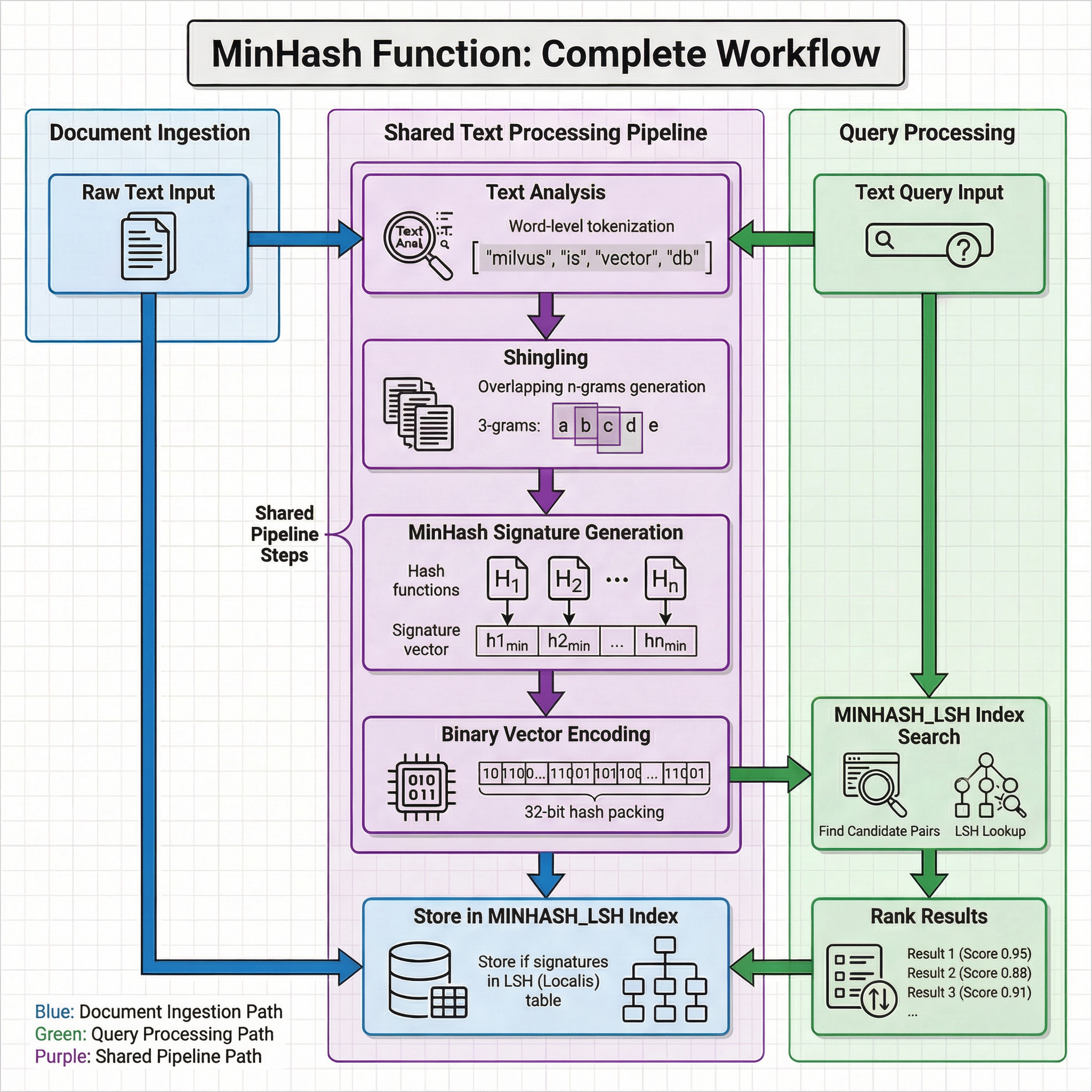
MinHash は、集合間の Jaccard 類似度 を推定する局所性鋭敏型ハッシュ手法です。Zilliz Cloud では、MinHash 関数は次のパイプラインに従います。入力として生テキストを指定すると、Zilliz Cloud が出力としてバイナリベクトルを生成し、すべての中間ステップを内部で処理します。
全体のワークフローは、ドキュメントの取り込みとクエリ処理の両方で使用される共有テキスト処理パイプラインと、それに続く保存および取得のフェーズ固有の操作で構成されます。
共有テキスト処理パイプライン
ドキュメントの取り込みとクエリ処理はどちらも、生テキストを同じ4段階の変換に通します。
-
テキスト分析: テキストは、(
token_levelが"word"の場合は)アナライザー によって処理されるか、(token_levelが"char"の場合は)そのまま使用されます。単語レベルのトークン化では、入力フィールドに設定されたアナライザーを適用してテキストを用語に分割します。たとえば、"milvus is vector db"は["milvus", "is", "vector", "db"]になります。 -
シングリング: トークンは、サイズ
shingle_sizeの重複する n-gram(シングル)に分割されます。たとえば、単語レベルで 3-gram を使用する場合、トークン["information", "retrieval", "is", "a", "field"]は["information retrieval is", "retrieval is a", "is a field"]のようなシングルになります。 -
MinHash シグネチャの生成: 複数のハッシュ関数(H1、H2、...、Hn。ここで n =
num_hashes)がシングルセットに適用されます。各ハッシュ関数について、すべてのシングルの中から最小のハッシュ値が選択されます。これらの最小値のコレクションが MinHash シグネチャを形成します。これは、元のドキュメントの Jaccard 類似度を近似する固定長の表現です。 -
バイナリベクトルエンコーディング: 各シグネチャ値は 32 ビットのハッシュであり、シグネチャ全体が次元
32 * num_hashesのBINARY_VECTORにパックされます。
ドキュメントの取り込み
挿入時、共有パイプラインによって生成されたバイナリベクトルが MINHASH_LSH インデックスに保存されます。このインデックスは、類似したシグネチャを同じバケットにグループ化する LSH(Locality-Sensitive Hashing)テーブルを維持し、クエリ時に高速な候補の取得を可能にします。
クエリ処理
検索時、クエリテキストは同じ共有パイプラインを通ってバイナリベクトルを生成します。このベクトルは MINHASH_LSH インデックスでの LSH ルックアップに使用され、類似している可能性が高い候補ペアが迅速に特定されます。Jaccard リファインメントを使用しない場合、Zilliz Cloud は推定 Jaccard 類似度でランク付けされていない LSH 候補を返します。Jaccard リファインメントを有効にすると、Zilliz Cloud は保存された生の MinHash シグネチャを使用して、候補を推定 Jaccard 類似度でランク付けし、上位 K 件の結果を返します。
両方のパスが同じ変換ロジックを共有するため、内容が大幅に重複する2つのドキュメントは類似した MinHash シグネチャを生成します。これにより、ドキュメントの単語順、書式、または軽微な表現が異なる場合でも、近似重複を見つけるための関数として効果を発揮します。
事前準備
MinHash 関数を使用する前に、コレクションスキーマに以下を含めるよう計画してください。
-
生コンテンツ用のテキストフィールド
コレクションには、生テキストを格納する
VARCHARフィールドを含める必要があります。このフィールドは、MinHash 関数への入力として機能します。 -
テキストフィールド用のアナライザー(単語レベルのトークン化を使用する場合)
token_levelが"word"(デフォルト)に設定されている場合、テキストフィールドでアナライザーを有効にする必要があります。アナライザーは、シングリングの前にテキストをトークン化する方法を定義します。デフォルトでは、Zilliz Cloud はstandardアナライザーを使用します。別のアナライザーを設定するには、ユースケースに適したアナライザーの選択 を参照してください。 -
MinHash 出力用のバイナリベクトルフィールド
コレクションには、MinHash 関数によって生成されたバイナリベクトルを格納する
BINARY_VECTORフィールドを含める必要があります。次元は32 * num_hashesと等しくなければなりません。
ステップ 1: MinHash 関数を使用したコレクションの作成
MinHash 関数を使用するには、コレクションの作成時に定義します。関数はコレクションスキーマの一部となり、データの挿入時および検索時に自動的に適用されます。
スキーマフィールドの定義
コレクションスキーマには、少なくとも3つのフィールドを含める必要があります。
-
プライマリフィールド: コレクション内の各エンティティを一意に識別します。
-
テキストフィールド(
VARCHAR): 生のテキストドキュメントを格納します。Zilliz Cloud が MinHash シグネチャの生成のためにテキストを処理できるよう、enable_analyzer=Trueを設定します。デフォルトでは、Zilliz Cloud はテキスト分析にstandardアナライザーを使用します。別のアナライザーを設定するには、ユースケースに適したアナライザーの選択 を参照してください。 -
バイナリベクトルフィールド(
BINARY_VECTOR): MinHash 関数によって自動的に生成されたバイナリベクトルを格納します。次元は32 * num_hashesと等しくなければなりません。
- Python
- Java
- Go
- Rust
- C++
- NodeJS
- cURL
from pymilvus import MilvusClient, DataType, Function, FunctionType

client = MilvusClient(uri="YOUR_CLUSTER_ENDPOINT", token="YOUR_CLUSTER_TOKEN")

schema = client.create_schema()

schema.add_field(field_name="id", datatype=DataType.INT64, is_primary=True, auto_id=True)
schema.add_field(field_name="document_content", datatype=DataType.VARCHAR, max_length=9000, enable_analyzer=True)
schema.add_field(field_name="binary_vector", datatype=DataType.BINARY_VECTOR, dim=8192)
import io.milvus.v2.client.ConnectConfig;
import io.milvus.v2.client.MilvusClientV2;
import io.milvus.v2.common.DataType;
import io.milvus.v2.service.collection.request.AddFieldReq;
import io.milvus.v2.service.collection.request.CreateCollectionReq;

MilvusClientV2 client = new MilvusClientV2(ConnectConfig.builder()
        .uri("YOUR_CLUSTER_ENDPOINT")
        .token("YOUR_CLUSTER_TOKEN")
        .build());

CreateCollectionReq.CollectionSchema schema = CreateCollectionReq.CollectionSchema.builder().build();
schema.addField(AddFieldReq.builder()
        .fieldName("id")
        .dataType(DataType.Int64)
        .isPrimaryKey(true)
        .autoID(true)
        .build());
schema.addField(AddFieldReq.builder()
        .fieldName("document_content")
        .dataType(DataType.VarChar)
        .maxLength(9000)
        .enableAnalyzer(true)
        .build());
schema.addField(AddFieldReq.builder()
        .fieldName("binary_vector")
        .dataType(DataType.BinaryVector)
        .dimension(8192)
        .build());
import (
    "context"
    "log"

    "github.com/milvus-io/milvus/client/v3/entity"
    "github.com/milvus-io/milvus/client/v3/milvusclient"
)

ctx := context.Background()
client, err := milvusclient.New(ctx, &milvusclient.ClientConfig{
    Address: "YOUR_CLUSTER_ENDPOINT",
    APIKey:  "YOUR_CLUSTER_TOKEN",
})
if err != nil {
    log.Fatal(err)
}

schema := entity.NewSchema().
    WithField(entity.NewField().WithName("id").WithDataType(entity.FieldTypeInt64).WithIsPrimaryKey(true).WithIsAutoID(true)).
    WithField(entity.NewField().WithName("document_content").WithDataType(entity.FieldTypeVarChar).WithMaxLength(9000).WithEnableAnalyzer(true)).
    WithField(entity.NewField().WithName("binary_vector").WithDataType(entity.FieldTypeBinaryVector).WithDim(8192))
use milvus::v2::prelude::*;

let config = ConnectConfig::new().uri("YOUR_CLUSTER_ENDPOINT");
let client = ClientV2::new(&config).await?;

let schema = CollectionSchema::new()
    .add_field(FieldSchema::new().name("id").data_type(DataType::Int64).primary_key(true).auto_id(true))
    .add_field(FieldSchema::new().name("document_content").data_type(DataType::VarChar).max_length(9000).enable_analyzer(true))
    .add_field(FieldSchema::new().name("binary_vector").data_type(DataType::BinaryVector).dimension(8192));
#include "milvus/MilvusClientV2.h"
#include <iostream>

auto client = milvus::MilvusClientV2::Create();
milvus::ConnectParam connect_param{"YOUR_CLUSTER_ENDPOINT"};
auto status = client->Connect(connect_param);
if (!status.IsOk()) {
    std::cout << status.Message() << std::endl;
}

auto schema = std::make_shared<milvus::CollectionSchema>();
schema->AddField(milvus::FieldSchema("id", milvus::DataType::INT64).WithPrimaryKey(true).WithAutoID(true));
schema->AddField(milvus::FieldSchema("document_content", milvus::DataType::VARCHAR).WithMaxLength(9000).EnableAnalyzer(true));
schema->AddField(milvus::FieldSchema("binary_vector", milvus::DataType::BINARY_VECTOR).WithDimension(8192));
import { MilvusClient, DataType, FunctionType, IndexType, MetricType } from "@zilliz/milvus2-sdk-node";

const client = new MilvusClient({ address: "YOUR_CLUSTER_ENDPOINT", token: "YOUR_CLUSTER_TOKEN" });

const fields = [
  { name: "id", data_type: DataType.Int64, is_primary_key: true, autoID: true },
  { name: "document_content", data_type: DataType.VarChar, max_length: 9000, enable_analyzer: true },
  { name: "binary_vector", data_type: DataType.BinaryVector, dim: 8192 },
];
fields='[
  {"fieldName": "id", "dataType": "Int64", "isPrimary": true},
  {"fieldName": "document_content", "dataType": "VarChar", "elementTypeParams": {"max_length": 9000, "enable_analyzer": true}},
  {"fieldName": "binary_vector", "dataType": "BinaryVector", "elementTypeParams": {"dim": 8192}}
]'
MinHash 関数の定義
MinHash 関数は、分析済みのテキストを、ドキュメント間の Jaccard 類似度を近似するバイナリベクトルに変換します。
関数を定義し、スキーマに追加します。
- Python
- Java
- Go
- Rust
- C++
- NodeJS
- cURL
minhash_function = Function(
    name="minhash_function",
    input_field_names=["document_content"], # Name of the VARCHAR field containing raw text
    output_field_names=["binary_vector"], # Name of the BINARY_VECTOR field for generated signatures
    function_type=FunctionType.MINHASH,
    params={
        "num_hashes": 256, # Number of hash functions; produces dim = 32 * 256 = 8192
        "shingle_size": 3, # N-gram size for shingling
    }
)

schema.add_function(minhash_function)
import io.milvus.common.clientenum.FunctionType;
import io.milvus.v2.service.collection.request.CreateCollectionReq;
import java.util.Collections;

schema.addFunction(CreateCollectionReq.Function.builder()
        .name("minhash_function")
        .functionType(FunctionType.MINHASH)
        .inputFieldNames(Collections.singletonList("document_content"))
        .outputFieldNames(Collections.singletonList("binary_vector"))
        .param("num_hashes", "256")
        .param("shingle_size", "3")
        .build());
import "github.com/milvus-io/milvus/client/v3/entity"

function := entity.NewFunction().
    WithName("minhash_function").
    WithType(entity.FunctionTypeMinHash).
    WithInputFields("document_content").
    WithOutputFields("binary_vector").
    WithParam("num_hashes", "256").
    WithParam("shingle_size", "3")

schema = schema.WithFunction(function)
use milvus::v2::prelude::*;

let schema = schema.add_function(
    Function::new()
        .name("minhash_function")
        .function_type(FunctionType::MinHash)
        .input_fields(vec!["document_content"])
        .output_fields(vec!["binary_vector"])
        .param("num_hashes", "256")
        .param("shingle_size", "3"),
);
auto function = std::make_shared<milvus::Function>("minhash_function", milvus::FunctionType::MINHASH);
function->AddInputFieldName("document_content");
function->AddOutputFieldName("binary_vector");
function->AddParam("num_hashes", "256");
function->AddParam("shingle_size", "3");
schema->AddFunction(function);
import { FunctionType } from "@zilliz/milvus2-sdk-node";

const functions = [
  {
    name: "minhash_function",
    type: FunctionType.MINHASH,
    input_field_names: ["document_content"],
    output_field_names: ["binary_vector"],
    params: { num_hashes: 256, shingle_size: 3 },
  },
];
function='{
  "name": "minhash_function",
  "type": "MinHash",
  "inputFieldNames": ["document_content"],
  "outputFieldNames": ["binary_vector"],
  "params": {"num_hashes": 256, "shingle_size": 3}
}'
設定オプション
MinHash 関数の params ディクショナリは、次のパラメーターを受け入れます。すべてのパラメーター名は大文字と小文字を区別しません。
パラメーター | タイプ | デフォルト | 説明 |
|---|---|---|---|
| int |
| シグネチャ生成に使用するハッシュ関数の数です。出力バイナリベクトルの次元は |
| int |
| シングリングに使用する N-gram のサイズです。単語レベルの場合は 1〜3 が一般的です。文字レベルの場合は 2〜6 が一般的です。 |
| str |
| 使用するハッシュ関数です。オプションは次のとおりです。
|
| str |
| トークン化のレベルです。オプションは次のとおりです。
単語レベルでは、より強い意味論と高い効率が得られますが、言語固有のトークン化に依存します。文字レベルは言語に依存しませんが、より高次元のシングルを生成し、意味論は弱くなります。 |
| int |
| MinHash 関数の初期化に使用するランダムシードです。 |
インデックスの設定
MinHash バイナリベクトルに推奨されるインデックスタイプは MINHASH_LSH で、メトリックタイプは MHJACCARD です。
- Python
- Java
- Go
- Rust
- C++
- NodeJS
- cURL
index_params = client.prepare_index_params()

index_params.add_index(
    field_name="binary_vector",
    index_type="MINHASH_LSH",
    metric_type="MHJACCARD",
    params={
        "mh_lsh_band": 128,
        "mh_element_bit_width": 32,
        "with_raw_data": True,
    },
)
import io.milvus.v2.common.IndexParam;
import java.util.HashMap;

IndexParam indexParam = IndexParam.builder()
        .fieldName("binary_vector")
        .indexType(IndexParam.IndexType.MINHASH_LSH)
        .metricType(IndexParam.MetricType.MHJACCARD)
        .extraParams(new HashMap<String, Object>() {{
            put("mh_lsh_band", 128);
            put("mh_element_bit_width", 32);
            put("with_raw_data", true);
        }})
        .build();
import (
    "github.com/milvus-io/milvus/client/v3/entity"

    "github.com/milvus-io/milvus/client/v3/index"
    "github.com/milvus-io/milvus/client/v3/milvusclient"
)

indexOption := milvusclient.NewCreateIndexOption("dedup_collection", "binary_vector", index.NewMinHashLSHIndex(entity.MHJACCARD, 128).
    WithElementBitWidth(32).
    WithRawData(true)).
    WithIndexName("minhash_index")
use milvus::v2::prelude::*;
use std::collections::HashMap;

let index_param = IndexParam::new()
    .field_name("binary_vector")
    .index_name("minhash_index")
    .index_type(IndexType::MinhashLsh)
    .metric_type(MetricType::MhJaccard)
    .extra_params(HashMap::from([
        ("mh_lsh_band".to_string(), "128".to_string()),
        ("mh_element_bit_width".to_string(), "32".to_string()),
        ("with_raw_data".to_string(), "true".to_string()),
    ]));
milvus::IndexDesc index("binary_vector", "minhash_index", milvus::IndexType::MINHASH_LSH, milvus::MetricType::MHJACCARD);
index.AddExtraParam("mh_lsh_band", "128");
index.AddExtraParam("mh_element_bit_width", "32");
index.AddExtraParam("with_raw_data", "true");
import { IndexType, MetricType } from "@zilliz/milvus2-sdk-node";

const indexParam = {
  field_name: "binary_vector",
  index_type: IndexType.MINHASH_LSH,
  metric_type: MetricType.MHJACCARD,
  params: { mh_lsh_band: 128, mh_element_bit_width: 32, with_raw_data: true },
};
indexParams='[
  {"fieldName": "binary_vector", "indexType": "MINHASH_LSH", "metricType": "MHJACCARD", "params": {"mh_lsh_band": 128, "mh_element_bit_width": 32, "with_raw_data": true}}
]'
検索で Jaccard リファインメントを使用する場合は、with_raw_data を True に設定します。LSH ルックアップによって返された候補の推定 Jaccard 類似度を計算するには、生の MinHash シグネチャが必要です。
コレクションの作成
上記で定義したスキーマとインデックスパラメーターを使用して、コレクションを作成します。
- Python
- Java
- Go
- Rust
- C++
- NodeJS
- cURL
client.create_collection(
    collection_name="dedup_collection",
    schema=schema,
    index_params=index_params,
)
import io.milvus.v2.service.collection.request.CreateCollectionReq;
import java.util.Collections;

client.createCollection(CreateCollectionReq.builder()
        .collectionName("dedup_collection")
        .collectionSchema(schema)
        .indexParams(Collections.singletonList(indexParam))
        .build());
import (
    "log"

    "github.com/milvus-io/milvus/client/v3/milvusclient"
)

err = client.CreateCollection(ctx, milvusclient.NewCreateCollectionOption("dedup_collection", schema).
    WithIndexOptions(indexOption))
if err != nil {
    log.Fatal(err)
}
use milvus::v2::prelude::*;

client.create_collection(CreateCollectionRequest::builder()
    .collection_name("dedup_collection")
    .schema(schema)
    .index_params(vec![index_param])
    .build()?)
.await?;
status = client->CreateCollection(milvus::CreateCollectionRequest()
                                 .WithCollectionName("dedup_collection")
                                 .WithCollectionSchema(schema));
if (!status.IsOk()) {
    std::cout << status.Message() << std::endl;
}
await client.createCollection({
  collection_name: "dedup_collection",
  fields: fields,
  functions: functions,
});

await client.createIndex({
  collection_name: "dedup_collection",
  ...indexParam,
});
export CLUSTER_ENDPOINT="YOUR_CLUSTER_ENDPOINT"
export TOKEN="YOUR_CLUSTER_TOKEN"

curl --request POST \
--url "${CLUSTER_ENDPOINT}/v2/vectordb/collections/create" \
--header "Authorization: Bearer ${TOKEN}" \
--header "Content-Type: application/json" \
-d '{
    "collectionName": "dedup_collection",
    "schema": {
        "fields": [
            {"fieldName": "id", "dataType": "Int64", "isPrimary": true},
            {"fieldName": "document_content", "dataType": "VarChar", "elementTypeParams": {"max_length": 9000, "enable_analyzer": true}},
            {"fieldName": "binary_vector", "dataType": "BinaryVector", "elementTypeParams": {"dim": 8192}}
        ],
        "functions": [
            {"name": "minhash_function", "type": "MinHash", "inputFieldNames": ["document_content"], "outputFieldNames": ["binary_vector"], "params": {"num_hashes": 256, "shingle_size": 3}}
        ],
        "autoID": true
    },
    "indexParams": [
        {"fieldName": "binary_vector", "indexType": "MINHASH_LSH", "metricType": "MHJACCARD", "params": {"mh_lsh_band": 128, "mh_element_bit_width": 32, "with_raw_data": true}}
    ]
}'
ステップ 2: ドキュメントの挿入
コレクションを設定したら、テキストデータを挿入します。生テキストを指定するだけで、MinHash 関数が各ドキュメントのバイナリベクトルを自動的に生成します。
- Python
- Java
- Go
- Rust
- C++
- NodeJS
- cURL
client.insert(
    "dedup_collection",
    [
        {"document_content": "information retrieval is a field of study that helps users find relevant information in large datasets"},
        {"document_content": "information retrieval is a research field focused on helping users find relevant data in large collections"},
        {"document_content": "information retrieval is a field of research helping users search for relevant information in large datasets"},
    ],
)
import com.google.gson.JsonObject;
import io.milvus.v2.service.vector.request.InsertReq;
import java.util.ArrayList;
import java.util.List;

List<JsonObject> data = new ArrayList<>();

JsonObject row1 = new JsonObject();
row1.addProperty("document_content", "information retrieval is a field of study that helps users find relevant information in large datasets");
data.add(row1);

JsonObject row2 = new JsonObject();
row2.addProperty("document_content", "information retrieval is a research field focused on helping users find relevant data in large collections");
data.add(row2);

JsonObject row3 = new JsonObject();
row3.addProperty("document_content", "information retrieval is a field of research helping users search for relevant information in large datasets");
data.add(row3);

client.insert(InsertReq.builder()
        .collectionName("dedup_collection")
        .data(data)
        .build());
import (
    "log"

    "github.com/milvus-io/milvus/client/v3/milvusclient"
)

_, err = client.Insert(ctx, milvusclient.NewColumnBasedInsertOption("dedup_collection").
    WithVarcharColumn("document_content", []string{
        "information retrieval is a field of study that helps users find relevant information in large datasets",
        "information retrieval is a research field focused on helping users find relevant data in large collections",
        "information retrieval is a field of research helping users search for relevant information in large datasets",
    }))
if err != nil {
    log.Fatal(err)
}
use milvus::v2::prelude::*;
use serde_json::json;

let insert_req = InsertRequest::builder()
    .collection_name("dedup_collection")
    .rows(vec![
        json!({"document_content": "information retrieval is a field of study that helps users find relevant information in large datasets"}),
        json!({"document_content": "information retrieval is a research field focused on helping users find relevant data in large collections"}),
        json!({"document_content": "information retrieval is a field of research helping users search for relevant information in large datasets"}),
    ])
    .build()?;

client.insert(insert_req).await?;
milvus::EntityRows rows;
rows.emplace_back(milvus::EntityRow{{"document_content", "information retrieval is a field of study that helps users find relevant information in large datasets"}});
rows.emplace_back(milvus::EntityRow{{"document_content", "information retrieval is a research field focused on helping users find relevant data in large collections"}});
rows.emplace_back(milvus::EntityRow{{"document_content", "information retrieval is a field of research helping users search for relevant information in large datasets"}});

milvus::InsertResponse insert_response;
status = client->Insert(milvus::InsertRequest()
                            .WithCollectionName("dedup_collection")
                            .WithRowsData(std::move(rows)),
                        insert_response);
if (!status.IsOk()) {
    std::cout << status.Message() << std::endl;
}
await client.insert({
  collection_name: "dedup_collection",
  data: [
    { document_content: "information retrieval is a field of study that helps users find relevant information in large datasets" },
    { document_content: "information retrieval is a research field focused on helping users find relevant data in large collections" },
    { document_content: "information retrieval is a field of research helping users search for relevant information in large datasets" },
  ],
});
export CLUSTER_ENDPOINT="YOUR_CLUSTER_ENDPOINT"
export TOKEN="YOUR_CLUSTER_TOKEN"

curl --request POST \
--url "${CLUSTER_ENDPOINT}/v2/vectordb/entities/insert" \
--header "Authorization: Bearer ${TOKEN}" \
--header "Content-Type: application/json" \
-d '{
    "collectionName": "dedup_collection",
    "data": [
        {"document_content": "information retrieval is a field of study that helps users find relevant information in large datasets"},
        {"document_content": "information retrieval is a research field focused on helping users find relevant data in large collections"},
        {"document_content": "information retrieval is a field of research helping users search for relevant information in large datasets"}
    ]
}'
ステップ 3: MinHash による検索
データを挿入したら、生テキストのクエリを指定して近似重複ドキュメントを検索します。Zilliz Cloud は各クエリを MinHash バイナリベクトルに自動的に変換します。Jaccard リファインメントを有効にして、推定 Jaccard 類似度によって LSH 候補をランク付けします。
- Python
- Java
- Go
- Rust
- C++
- NodeJS
- cURL
search_params = {
    "metric_type": "MHJACCARD",
    "params": {
        "mh_search_with_jaccard": True,
        "refine_k": 3,
    },
}

results = client.search(
    collection_name="dedup_collection",
    data=["information retrieval is a research field focused on helping users find relevant data in large collections"],
    anns_field="binary_vector",
    limit=3,
    output_fields=["document_content"],
    search_params=search_params,
)

for hits in results:
    for hit in hits:
        print(f"ID: {hit['id']}, Distance: {hit['distance']}")
        print(f"Document: {hit['entity']['document_content']}")
import io.milvus.v2.service.vector.request.SearchReq;
import io.milvus.v2.service.vector.request.data.EmbeddedText;
import io.milvus.v2.service.vector.response.SearchResp;
import io.milvus.v2.common.IndexParam;
import java.util.Arrays;
import java.util.Collections;
import java.util.HashMap;

SearchResp resp = client.search(SearchReq.builder()
        .collectionName("dedup_collection")
        .annsField("binary_vector")
        .data(Collections.singletonList(new EmbeddedText("information retrieval is a research field focused on helping users find relevant data in large collections")))
        .metricType(IndexParam.MetricType.MHJACCARD)
        .searchParams(new HashMap<String, Object>() {{
            put("mh_search_with_jaccard", true);
            put("refine_k", 3);
        }})
        .limit(3)
        .outputFields(Collections.singletonList("document_content"))
        .build());

for (SearchResp.SearchResult hit : resp.getSearchResults().get(0)) {
    System.out.println("ID: " + hit.getEntity().get("id") + ", Distance: " + hit.getScore());
    System.out.println("Document: " + hit.getEntity().get("document_content"));
}
import (
    "fmt"
    "log"

    "github.com/milvus-io/milvus/client/v3/entity"
    "github.com/milvus-io/milvus/client/v3/milvusclient"
)

results, err := client.Search(ctx, milvusclient.NewSearchOption(
    "dedup_collection", 3,
    []entity.Vector{entity.Text("information retrieval is a research field focused on helping users find relevant data in large collections")}).
    WithANNSField("binary_vector").
    WithOutputFields("document_content").
    WithSearchParam("metric_type", "MHJACCARD").
    WithSearchParam("mh_search_with_jaccard", "true").
    WithSearchParam("refine_k", "3"))
if err != nil {
    log.Fatal(err)
}

for _, rs := range results {
    fmt.Printf("ID: %v, Distance: %v\n", rs.IDs, rs.Scores)
}
use milvus::v2::prelude::*;
use std::collections::HashMap;

let search_req = SearchRequest::builder()
    .collection_name("dedup_collection")
    .vector_field("binary_vector")
    .vectors(SearchVectors::EmbeddedText(vec!["information retrieval is a research field focused on helping users find relevant data in large collections".to_string()]))
    .metric_type(MetricType::MhJaccard)
    .extra_params(HashMap::from([
        ("mh_search_with_jaccard".to_string(), "true".to_string()),
        ("refine_k".to_string(), "3".to_string()),
    ]))
    .output_fields(vec!["document_content"])
    .limit(3)
    .build()?;

let res = client.search(search_req).await?;
println!("{:?}", res.results());
milvus::SearchResponse response;
status = client->Search(milvus::SearchRequest()
                            .WithCollectionName("dedup_collection")
                            .WithAnnsField("binary_vector")
                            .AddEmbeddedText("information retrieval is a research field focused on helping users find relevant data in large collections")
                            .WithMetricType(milvus::MetricType::MHJACCARD)
                            .AddExtraParam("mh_search_with_jaccard", "true")
                            .AddExtraParam("refine_k", "3")
                            .WithLimit(3)
                            .AddOutputField("document_content"),
                        response);
if (!status.IsOk()) {
    std::cout << status.Message() << std::endl;
}
const results = await client.search({
  collection_name: "dedup_collection",
  anns_field: "binary_vector",
  data: ["information retrieval is a research field focused on helping users find relevant data in large collections"],
  output_fields: ["document_content"],
  search_params: {
    metric_type: "MHJACCARD",
    topk: 3,
    params: JSON.stringify({ mh_search_with_jaccard: true, refine_k: 3 }),
  },
});
console.log(results);
export CLUSTER_ENDPOINT="YOUR_CLUSTER_ENDPOINT"
export TOKEN="YOUR_CLUSTER_TOKEN"

curl --request POST \
--url "${CLUSTER_ENDPOINT}/v2/vectordb/entities/search" \
--header "Authorization: Bearer ${TOKEN}" \
--header "Content-Type: application/json" \
-d '{
    "collectionName": "dedup_collection",
    "annsField": "binary_vector",
    "data": ["information retrieval is a research field focused on helping users find relevant data in large collections"],
    "limit": 3,
    "outputFields": ["document_content"],
    "searchParams": {"metric_type": "MHJACCARD", "params": {"mh_search_with_jaccard": true, "refine_k": 3}}
}'
Jaccard リファインメントを有効にするには、mh_search_with_jaccard を True に設定します。refine_k は、リファインメントに使用する候補プールの容量を制御します。Zilliz Cloud は max(refine_k, limit) を容量として使用しますが、LSH ルックアップで一致する候補が少ない場合は、リファインメント対象の候補が少なくなることがあります。refine_k を大きくすると、追加の計算コストと引き換えに結果の品質を向上させることができます。
次のステップ
-
Full Text Search: 近似重複検出の代わりに、BM25 を字句関連性のランキングに使用します。
-
アナライザーの概要: テキストのトークン化用にカスタムアナライザーを設定します。
-
MINHASH_LSH インデックス: 再現率とパフォーマンスのために LSH パラメーターを調整する方法について説明します。