RTREE
RTREE インデックスは、Zilliz Cloud の GEOMETRY フィールドに対するクエリを高速化するツリーベースのデータ構造です。コレクションにポイント、ライン、ポリゴンなどの幾何学オブジェクトが Well-known text(WKT) 形式で格納されており、空間フィルタリングを高速化する場合は、RTREE が理想的な選択肢です。
仕組み
Zilliz Cloud は RTREE インデックスを使用してジオメトリデータを効率的に整理およびフィルタリングします。このプロセスは 2 段階で構成されます。
フェーズ 1: インデックスを構築する
-
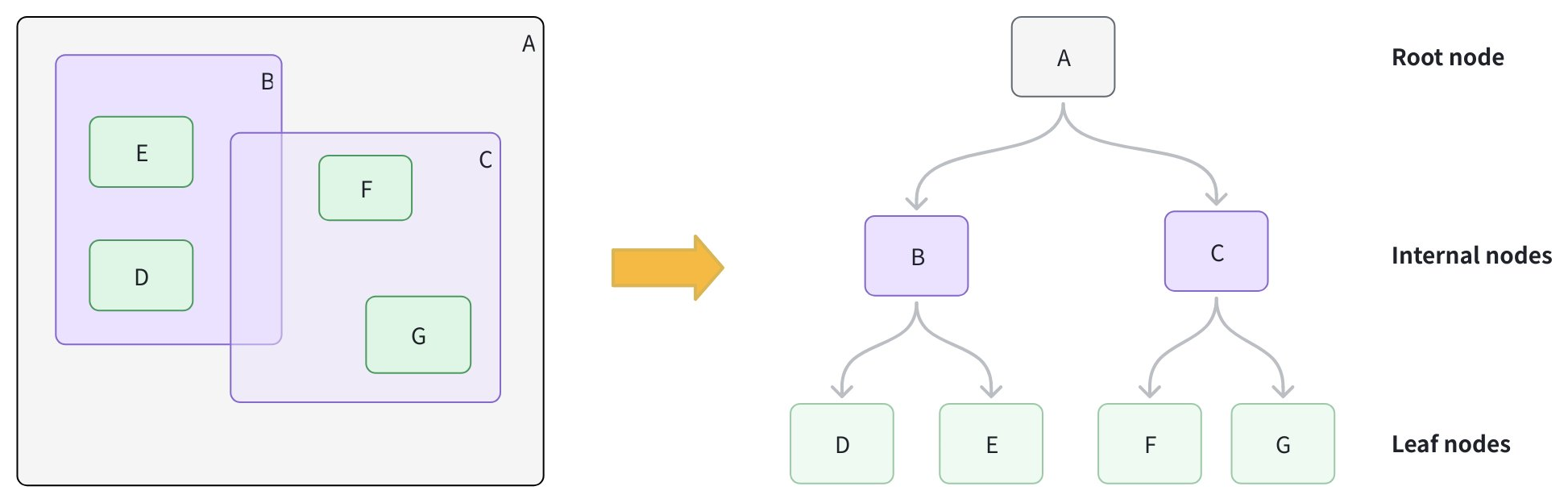
リーフノードを作成する: 各幾何学オブジェクトについて、そのオブジェクトを完全に包含する最小の矩形である 最小外接矩形(MBR)を計算し、リーフノードとして格納します。
-
より大きなボックスにグループ化する: 近接するリーフノードをクラスター化し、各グループを新しい MBR で囲んで内部ノードを形成します。たとえば、グループ B には D と E が含まれ、グループ C には F と G が含まれます。
-
ルートノードを追加する: すべての内部グループを包含する MBR を持つルートノードを追加し、高さのバランスが取れたツリー構造にします。
フェーズ 2: クエリを高速化する
-
クエリ MBR を形成する: クエリジオメトリの MBR を計算します。
-
ブランチを枝刈りする: ルートから開始し、クエリ MBR を各内部ノードと比較します。クエリ MBR と交差しない MBR を持つブランチはスキップします。
-
候補を収集する: 交差するブランチを下って、候補のリーフノードを収集します。
-
完全一致: 各候補について、正確な空間述語を実行して真の一致を判定します。
RTREE インデックスを作成する
コレクションスキーマで定義された GEOMETRY フィールドに RTREE インデックスを作成できます。
- Python
- Java
- Go
- Rust
- C++
- NodeJS
- cURL
from pymilvus import MilvusClient

client = MilvusClient(uri="YOUR_CLUSTER_ENDPOINT") # Replace with your server address

# Assume you have defined a GEOMETRY field named "geo" in your collection schema

# Prepare index parameters
index_params = client.prepare_index_params()

# Add RTREE index on the "geo" field
index_params.add_index(
    field_name="geo",
    index_type="RTREE",      # Spatial index for GEOMETRY
    index_name="rtree_geo",  # Optional, name your index
    params={}                # No extra params needed
)

# Create the index on the collection
client.create_index(
    collection_name="geo_demo",
    index_params=index_params
)
import io.milvus.v2.client.ConnectConfig;
import io.milvus.v2.client.MilvusClientV2;
import io.milvus.v2.common.IndexParam;
import io.milvus.v2.service.index.request.CreateIndexReq;
import java.util.Collections;

MilvusClientV2 client = new MilvusClientV2(ConnectConfig.builder()
        .uri("YOUR_CLUSTER_ENDPOINT")
        .token("YOUR_CLUSTER_TOKEN")
        .build());

IndexParam indexParam = IndexParam.builder()
        .fieldName("geo")
        .indexName("rtree_geo")
        .indexType(IndexParam.IndexType.RTREE)
        .build();

client.createIndex(CreateIndexReq.builder()
        .collectionName("geo_demo")
        .indexParams(Collections.singletonList(indexParam))
        .build());
import (
    "context"
    "fmt"

    "github.com/milvus-io/milvus/client/v3/index"
    "github.com/milvus-io/milvus/client/v3/milvusclient"
)

ctx := context.Background()

cli, err := milvusclient.New(ctx, &milvusclient.ClientConfig{
    Address: "YOUR_CLUSTER_ENDPOINT",
    APIKey:  "YOUR_CLUSTER_TOKEN",
})
if err != nil {
    fmt.Println(err.Error())
    // handle error
}
defer cli.Close(ctx)

_, err = cli.CreateIndex(ctx, milvusclient.NewCreateIndexOption("geo_demo", "geo", index.NewRTreeIndex()).
    WithIndexName("rtree_geo"))
if err != nil {
    fmt.Println(err.Error())
}
use milvus::v2::prelude::*;

let config = ConnectConfig::new().uri("YOUR_CLUSTER_ENDPOINT").token("YOUR_CLUSTER_TOKEN");
let client = ClientV2::new(&config).await?;

let index_params = vec![
    IndexParam::new()
        .field_name("geo")
        .index_name("rtree_geo")
        .index_type(IndexType::Rtree),
];

let create_index_req = CreateIndexRequest::builder()
    .collection_name("geo_demo")
    .index_params(index_params)
    .build()?;

client.create_index(create_index_req).await?;
#include "milvus/MilvusClientV2.h"
#include <iostream>

auto client = milvus::MilvusClientV2::Create();

milvus::ConnectParam connect_param{"YOUR_CLUSTER_ENDPOINT", "YOUR_CLUSTER_TOKEN"};
auto status = client->Connect(connect_param);
if (!status.IsOk()) {
    std::cout << status.Message() << std::endl;
}

milvus::IndexDesc index("geo", "rtree_geo", milvus::IndexType::RTREE);

status = client->CreateIndex(milvus::CreateIndexRequest()
                                 .WithCollectionName("geo_demo")
                                 .WithIndexes({index}));
if (!status.IsOk()) {
    std::cout << status.Message() << std::endl;
}
import { MilvusClient, IndexType } from "@zilliz/milvus2-sdk-node";

const client = new MilvusClient({ address: "YOUR_CLUSTER_ENDPOINT", token: "YOUR_CLUSTER_TOKEN" });

await client.createIndex({
    collection_name: "geo_demo",
    field_name: "geo",
    index_type: IndexType.RTREE,
    index_name: "rtree_geo",
    params: {},
});
export CLUSTER_ENDPOINT="YOUR_CLUSTER_ENDPOINT"
export TOKEN="YOUR_CLUSTER_TOKEN"

curl --request POST \
--url "${CLUSTER_ENDPOINT}/v2/vectordb/indexes/create" \
--header "Authorization: Bearer ${TOKEN}" \
--header "Content-Type: application/json" \
-d '{
    "collectionName": "geo_demo",
    "indexParams": [
        {
            "fieldName": "geo",
            "indexName": "rtree_geo",
            "indexType": "RTREE",
            "metricType": "",
            "params": {}
        }
    ]
}'
RTREE を使用したクエリ
filter 式でジオメトリ演算子を使用してフィルタリングします。対象の GEOMETRY フィールドに RTREE が存在する場合、Zilliz Cloud はそれを使用して候補を自動的に枝刈りします。インデックスがない場合、フィルターはフルスキャンにフォールバックします。
利用可能なジオメトリ固有の演算子の完全なリストについては、ジオメトリ演算子 を参照してください。
例 1: フィルターのみ
指定したポリゴン内にあるすべての幾何学オブジェクトを検索します。
- Python
- Java
- Go
- Rust
- C++
- NodeJS
- cURL
filter_expr = "ST_WITHIN(geo, 'POLYGON ((0 0, 10 0, 10 10, 0 10, 0 0))')"

res = client.query(
    collection_name="geo_demo",
    filter=filter_expr,
    output_fields=["id", "geo"],
    limit=10
)
print(res)   # Expected: a list of rows where geo is entirely inside the polygon
import io.milvus.v2.service.vector.request.QueryReq;
import io.milvus.v2.service.vector.response.QueryResp;
import java.util.Arrays;

String filter_expr = "ST_WITHIN(geo, 'POLYGON ((0 0, 10 0, 10 10, 0 10, 0 0))')";

QueryResp resp = client.query(QueryReq.builder()
        .collectionName("geo_demo")
        .filter(filter_expr)
        .outputFields(Arrays.asList("id", "geo"))
        .limit(10)
        .build());
System.out.println(resp);
import (
    "context"
    "fmt"

    "github.com/milvus-io/milvus/client/v3/milvusclient"
)

filter_expr := "ST_WITHIN(geo, 'POLYGON ((0 0, 10 0, 10 10, 0 10, 0 0))')"

_, err = cli.Query(ctx, milvusclient.NewQueryOption("geo_demo").
    WithFilter(filter_expr).
    WithOutputFields("id", "geo").
    WithLimit(10))
if err != nil {
    fmt.Println(err.Error())
}
use milvus::v2::prelude::*;

let filter_expr = "ST_WITHIN(geo, 'POLYGON ((0 0, 10 0, 10 10, 0 10, 0 0))')";

let query_req = QueryRequest::builder()
    .collection_name("geo_demo")
    .filter(filter_expr)
    .output_fields(vec!["id", "geo"])
    .limit(10)
    .build()?;

let res = client.query(query_req).await?;
println!("{:?}", res.results());
#include <iostream>
#include <string>

std::string filter_expr = "ST_WITHIN(geo, 'POLYGON ((0 0, 10 0, 10 10, 0 10, 0 0))')";

milvus::QueryResponse response;
status = client->Query(milvus::QueryRequest()
                           .WithCollectionName("geo_demo")
                           .WithFilter(filter_expr)
                           .WithOutputFields({"id", "geo"})
                           .WithLimit(10),
                       response);
if (!status.IsOk()) {
    std::cout << status.Message() << std::endl;
}
const filter_expr = "ST_WITHIN(geo, 'POLYGON ((0 0, 10 0, 10 10, 0 10, 0 0))')";

const res = await client.query({
    collection_name: "geo_demo",
    filter: filter_expr,
    output_fields: ["id", "geo"],
    limit: 10,
});
console.log(res);
export CLUSTER_ENDPOINT="YOUR_CLUSTER_ENDPOINT"
export TOKEN="YOUR_CLUSTER_TOKEN"

curl --request POST \
--url "${CLUSTER_ENDPOINT}/v2/vectordb/entities/query" \
--header "Authorization: Bearer ${TOKEN}" \
--header "Content-Type: application/json" \
-d @- <<'EOF'
{
    "collectionName": "geo_demo",
    "filter": "ST_WITHIN(geo, 'POLYGON ((0 0, 10 0, 10 10, 0 10, 0 0))')",
    "outputFields": ["id", "geo"],
    "limit": 10
}
EOF
例 2: ベクトル検索 + 空間フィルター
ラインと交差する最近傍ベクトルを検索します。
- Python
- Java
- Go
- Rust
- C++
- NodeJS
- cURL
# Assume you've also created an index on "vec" and loaded the collection.
query_vec = [[0.1, 0.2, 0.3, 0.4, 0.5]]
filter_expr = "ST_INTERSECTS(geo, 'LINESTRING (1 1, 2 2)')"

hits = client.search(
    collection_name="geo_demo",
    data=query_vec,
    limit=5,
    filter=filter_expr,
    output_fields=["id", "geo"]
)
print(hits)  # Expected: top-k by vector similarity among rows whose geo intersects the line
import io.milvus.v2.service.vector.request.SearchReq;
import io.milvus.v2.service.vector.request.data.FloatVec;
import io.milvus.v2.service.vector.response.SearchResp;
import java.util.Arrays;
import java.util.Collections;

float[] query_vec = {0.1f, 0.2f, 0.3f, 0.4f, 0.5f};
String filter_expr = "ST_INTERSECTS(geo, 'LINESTRING (1 1, 2 2)')";

SearchResp resp = client.search(SearchReq.builder()
        .collectionName("geo_demo")
        .data(Collections.singletonList(new FloatVec(query_vec)))
        .topK(5)
        .filter(filter_expr)
        .outputFields(Arrays.asList("id", "geo"))
        .build());
System.out.println(resp);
import (
    "context"
    "fmt"

    "github.com/milvus-io/milvus/client/v3/entity"
    "github.com/milvus-io/milvus/client/v3/milvusclient"
)

query_vec := []entity.Vector{entity.FloatVector{0.1, 0.2, 0.3, 0.4, 0.5}}
filter_expr := "ST_INTERSECTS(geo, 'LINESTRING (1 1, 2 2)')"

_, err = cli.Search(ctx, milvusclient.NewSearchOption("geo_demo", 5, query_vec).
    WithFilter(filter_expr).
    WithOutputFields("id", "geo"))
if err != nil {
    fmt.Println(err.Error())
}
use milvus::v2::prelude::*;

let query_vec = vec![0.1f32, 0.2, 0.3, 0.4, 0.5];
let filter_expr = "ST_INTERSECTS(geo, 'LINESTRING (1 1, 2 2)')";

let search_req = SearchRequest::builder()
    .collection_name("geo_demo")
    .vector_field("vec")
    .vectors(SearchVectors::Float(vec![query_vec]))
    .filter(filter_expr)
    .output_fields(vec!["id", "geo"])
    .limit(5)
    .build()?;

let res = client.search(search_req).await?;
println!("{:?}", res.results());
#include <iostream>
#include <vector>
#include <string>

std::vector<float> query_vec = {0.1f, 0.2f, 0.3f, 0.4f, 0.5f};
std::string filter_expr = "ST_INTERSECTS(geo, 'LINESTRING (1 1, 2 2)')";

milvus::SearchResponse response;
status = client->Search(milvus::SearchRequest()
                            .WithCollectionName("geo_demo")
                            .WithLimit(5)
                            .WithAnnsField("vec")
                            .WithFilter(filter_expr)
                            .WithOutputFields({"id", "geo"})
                            .AddFloatVector(query_vec),
                        response);
if (!status.IsOk()) {
    std::cout << status.Message() << std::endl;
}
const query_vec = [0.1, 0.2, 0.3, 0.4, 0.5];
const filter_expr = "ST_INTERSECTS(geo, 'LINESTRING (1 1, 2 2)')";

const res = await client.search({
    collection_name: "geo_demo",
    anns_field: "vec",
    data: [query_vec],
    limit: 5,
    filter: filter_expr,
    output_fields: ["id", "geo"],
});
console.log(res);
export CLUSTER_ENDPOINT="YOUR_CLUSTER_ENDPOINT"
export TOKEN="YOUR_CLUSTER_TOKEN"

curl --request POST \
--url "${CLUSTER_ENDPOINT}/v2/vectordb/entities/search" \
--header "Authorization: Bearer ${TOKEN}" \
--header "Content-Type: application/json" \
-d @- <<'EOF'
{
    "collectionName": "geo_demo",
    "annsField": "vec",
    "data": [[0.1, 0.2, 0.3, 0.4, 0.5]],
    "limit": 5,
    "filter": "ST_INTERSECTS(geo, 'LINESTRING (1 1, 2 2)')",
    "outputFields": ["id", "geo"]
}
EOF
GEOMETRY フィールドの使用方法の詳細については、ジオメトリフィールド を参照してください。
インデックスを削除する
コレクションから既存のインデックスを削除するには、drop_index() メソッドを使用します。
Milvus v2.6.x と互換性のあるクラスターでは、不要になったスカラーインデックスを直接削除できます。コレクションを先に解放する必要はありません。
- Python
- Java
- Go
- Rust
- C++
- NodeJS
- cURL
client.drop_index(
    collection_name="geo_demo",   # Name of the collection
    index_name="rtree_geo" # Name of the index to drop
)
import io.milvus.v2.service.index.request.DropIndexReq;

client.dropIndex(DropIndexReq.builder()
        .collectionName("geo_demo")
        .indexName("rtree_geo")
        .build());
import (
    "context"
    "fmt"

    "github.com/milvus-io/milvus/client/v3/milvusclient"
)

err = cli.DropIndex(ctx, milvusclient.NewDropIndexOption("geo_demo", "rtree_geo"))
if err != nil {
    fmt.Println(err.Error())
}
use milvus::v2::prelude::*;

let drop_index_req = DropIndexRequest::builder()
    .collection_name("geo_demo")
    .index_name("rtree_geo")
    .build()?;

client.drop_index(drop_index_req).await?;
status = client->DropIndex(milvus::DropIndexRequest()
                               .WithCollectionName("geo_demo")
                               .WithIndexName("rtree_geo"));
if (!status.IsOk()) {
    std::cout << status.Message() << std::endl;
}
await client.dropIndex({
    collection_name: "geo_demo",
    index_name: "rtree_geo",
});
export CLUSTER_ENDPOINT="YOUR_CLUSTER_ENDPOINT"
export TOKEN="YOUR_CLUSTER_TOKEN"

curl --request POST \
--url "${CLUSTER_ENDPOINT}/v2/vectordb/indexes/drop" \
--header "Authorization: Bearer ${TOKEN}" \
--header "Content-Type: application/json" \
-d '{
    "collectionName": "geo_demo",
    "indexName": "rtree_geo"
}'