Semantic ハイライター
Semantic ハイライター は、検索結果の中から文レベルで最も意味的に関連性の高い部分を特定しハイライト表示することで、取得された上位 K 件のドキュメントから必要な情報のみを抽出するのに役立ちます。
AI の歴史に関する数百語(約75語)からなる長いドキュメントがあると仮定します。
Artificial intelligence was founded as an academic discipline in 1956 at the Dartmouth Conference. The field experienced several cycles of optimism and disappointment throughout its history. AI research started after World War II with the development of electronic computers. Early researchers explored symbolic methods and problem-solving approaches. The term 'artificial intelligence' was coined by John McCarthy, one of the founders of the discipline. Modern AI has achieved remarkable success in areas such as computer vision, natural language processing, and game playing.
「人工知能はいつ創設されたのですか?」 と検索すると、Semantic ハイライター は意味的に関連する文のみを特定して返します。
<mark>Artificial intelligence was founded as an academic discipline in 1956 at the Dartmouth Conference.</mark>
Confidence score: 0.999
LLM に 75 語のドキュメント全体を送信する代わりに、クエリとの関連性を示す信頼度スコア付きの 16 語の回答のみを取得できます。
この機能は、Zilliz Cloud 上でホストされているハイライトモデルに依存しています。
なぜセマンティックハイライトなのか?
RAG(Retrieval-Augmented Generation)アプリケーションでは、従来のアプローチでは通常、取得したドキュメント全体を LLM に送信して処理します。これにより、2 つの大きな問題が生じます。
-
高いトークンコスト: ドキュメントのごく一部がクエリに関連している場合でも、ドキュメント全体を LLM に送信する必要があり、不要なトークン消費とコストが発生します。
-
ノイズの干渉: ドキュメント内の無関係な情報が LLM の理解を妨げ、回答の質を低下させることがあります。
Semantic ハイライター は以下を実現します。
-
コスト削減: ドキュメント全体ではなく、関連する断片のみを LLM に送信
-
質の向上: ノイズを減らし、LLM が最も関連性の高いコンテンツに集中できるようにする
-
ユーザー体験の向上: 検索インターフェースで重要な一致情報を視覚的にハイライト表示
仕組み
Semantic ハイライター は セマンティック検索 の後に実行され、上位 K 件の結果のみを対象とします。全体のワークフローは、ドキュメント取得のための セマンティック検索 と、関連するテキストセグメントを特定するためのホストされたハイライトモデルを組み合わせたものです。
以下の図は、Semantic ハイライター のワークフローを示しています。
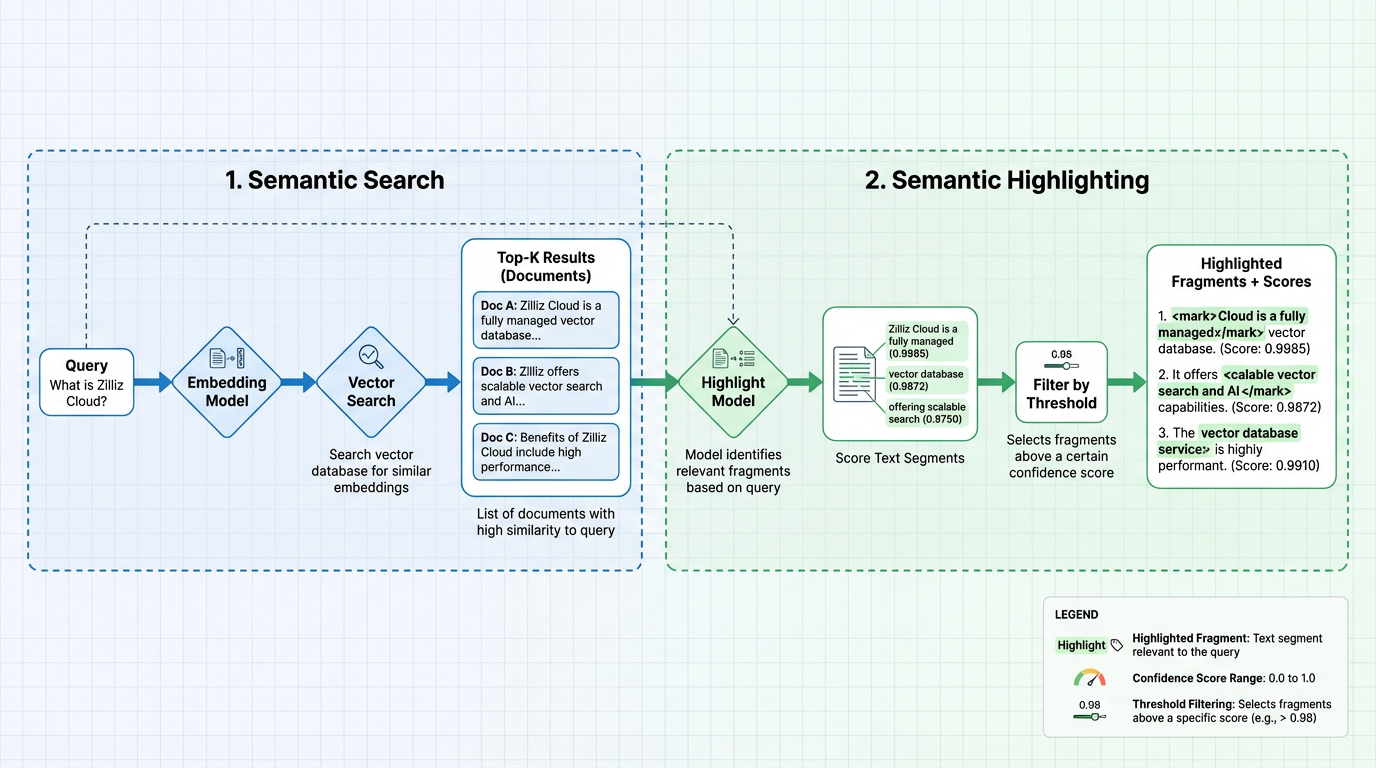
ステージ 1: セマンティック検索
セマンティック検索 は、ベクトル類似性に基づいて上位 K 件の最も関連性の高いドキュメントを取得します。エンベディングの生成には 2 つのオプションがあります。
オプション 1: モデルベースのエンベディング関数(推奨)
Zilliz Cloud のモデルベースのエンベディング関数を使用すると、ベクトル変換が自動的に処理されます。生のドキュメントを挿入し、クエリテキストを提供するだけで、エンベディングを手動で管理する必要はありません。
-
挿入時: エンベディング関数がドキュメントテキストを密ベクトルに変換し、ベクトルフィールドに保存します
-
検索時: 同じエンベディング関数がクエリテキストをベクトルに変換し、ベクトルインデックスに対して検索を実行して、ベクトル類似性に基づく上位 K 件のドキュメントを返します
このアプローチは、このドキュメント全体のすべての例で使用されています。詳細については、モデルベースのエンベディング関数 を参照してください。
オプション 2: 外部エンベディングモデル
独自の外部エンベディングサービスを使用してエンベディングを生成し、ベクトルをコレクションに直接挿入して セマンティック検索 を実行することもできます。これにより、エンベディングモデルを完全に制御できますが、エンベディングパイプラインを自分で管理する必要があります。
ステージ 2: セマンティックハイライト
ハイライト ステージ は、Zilliz Cloud にデプロイされたホスト型ハイライトモデルによって実現されます。このモデルは、取得したドキュメントを処理し、クエリに対してセマンティックに関連するテキストセグメントを特定します。
-
テキストセグメントのスコアリング: ハイライトモデルは各ドキュメントのテキストコンテンツを分析し、各セグメントの信頼度スコア(0.0‒1.0)を計算します。スコアが高いほど、クエリに対するセマンティック関連性が強いことを示します。
-
しきい値によるフィルタリング: セグメントは、設定されたしきい値に基づいてフィルタリングされます。スコアがしきい値以上の断片のみが含まれます。
-
ハイライトされた断片の返却: 出力には、設定されたタグ(例:
<mark>および</mark>)でラップされたテキスト断片と、その信頼度スコアが含まれます。
ハイライトモデルはエンベディングモデルとは別であり、ドキュメントの取得方法とハイライト方法を独立して制御できます。
機能概要
Semantic ハイライター は、各検索ヒットに専用の highlight フィールドを追加し、セマンティック一致がハイライトされた断片と信頼度スコアとして返されます。
基本的なハイライト
セマンティックハイライトを有効にする最小限の構成は以下の通りです。
- Python
- NodeJS
- Java
- Go
- cURL
highlighter = SemanticHighlighter(
    queries,                    # Your query text
    ["document"],              # Field to highlight
    pre_tags=["<mark>"],       # Tag to mark the start of highlighted text
    post_tags=["</mark>"],     # Tag to mark the end of highlighted text
    model_deployment_id="YOUR_MODEL_ID",  # Deployment ID of the highlight model
)
// js
import io.milvus.v2.service.vector.request.highlighter.SemanticHighlighter;

SemanticHighlighter highlighter = SemanticHighlighter.builder()
        .queries(queries)
        .inputFields(Collections.singletonList("document"))
        .preTags(Collections.singletonList("<mark>"))
        .postTags(Collections.singletonList("</mark>"))
        .modelDeploymentID("YOUR_MODEL_ID")
        .build();
// go
# restful
この基本的な設定により、各検索結果には専用の highlight フィールドが含まれます。以下に返却例を示します。
{
    "id": 1,
    "distance": 0.7665,
    "entity": {
        "document": "Artificial intelligence was founded as an academic discipline in 1956."
    },
    "highlight": {
        "document": {
            "fragments": [
                "<mark>Artificial intelligence was founded as an academic discipline in 1956.</mark>"
            ],
            "scores": [0.9985]
        }
    }
}
専用の highlight フィールドには以下が含まれます:
-
highlight.<field>.fragments: クエリテキストと意味的に関連するテキストセグメントで、設定されたpre_tagsおよびpost_tagsで囲まれています。デフォルトでは、意味的に関連するスニペットのみがフラグメントとして返されます。 -
highlight.<field>.scores: 各フラグメントに対する信頼度スコア(0.0~1.0)。このスコアは、テキストセグメントがクエリに対してどの程度意味的に関連しているかを示します。スコアが高いほど、関連性が強いことを意味します。これらのスコアは、デプロイされたハイライトモデルによって計算されます。
スコア閾値によるフィルタリング
threshold パラメータを使用して、テキストスパンが有効なセマンティックハイライトと見なされる条件を制御できます。
-
thresholdが設定されていない場合デフォルトの閾値 0.5 が使用されます。ハイライトモデルによって返されたセマンティックマッチのうち、スコアが 0.5 未満のものはフィルタリングされます。この場合、
fragmentsおよびscoresフィールドにはスコアが 0.5 以上のマッチ結果のみが含まれます。 -
thresholdが設定されている場合設定された
threshold以上 のセマンティックスコアを持つスパンのみが返されます。このスコアを下回るスパンは破棄されるため、一部のエンティティについてはfragments/scores配列が空になる可能性があります。
設定例:
- Python
- NodeJS
- Java
- Go
- cURL
highlighter = SemanticHighlighter(
    queries,
    ["document"],
    pre_tags=["<mark>"],
    post_tags=["</mark>"],
    threshold=0.8,              # Only return fragments with score >= 0.8
    model_deployment_id="YOUR_MODEL_ID",
)
// js
SemanticHighlighter highlighter = SemanticHighlighter.builder()
        .queries(queries)
        .inputFields(Collections.singletonList("document"))
        .preTags(Collections.singletonList("<mark>"))
        .postTags(Collections.singletonList("</mark>"))
        .modelDeploymentID("YOUR_MODEL_ID")
        .threshold(0.8)
        .build();
// go
# restful
フラグメントのスコアがしきい値を下回る場合、そのフィールドのフラグメントとスコアは両方とも空になります。
{
    "id": 2,
    "distance": 0.7043,
    "entity": {
        "document": "The history of artificial intelligence began in the mid-20th century."
    },
    "highlight": {
        "document": {
            "fragments": [],    // Empty because score (0.7206) < threshold (0.8)
            "scores": []
        }
    }
}
しきい値のガイドライン:
しきい値 | 動作 | ユースケース |
|---|---|---|
未設定 | デフォルトのしきい値 0.5 が使用されます。中および高い信頼度。 | 中程度の精度で広いカバレッジ |
0.8 | 高い信頼度 | 精度重視のアプリケーション |
開始する前に
Semantic ハイライター を使用する前に、以下が設定されていることを確認してください:
-
ハイライトモデルのデプロイメント
Zilliz Cloud 上でセマンティックハイライト用のホスト型ハイライトモデルをデプロイします:
-
Zilliz Cloud を介してハイライトモデル(例:
zilliz/semantic-highlight-bilingual-v1)をデプロイします。 -
Semanticハイライター設定で使用するmodel_deployment_idを取得します。
利用可能なハイライトモデルとデプロイメント手順については、Zilliz Cloud サポートにお問い合わせください。
-
-
セマンティック検索用の埋め込みモデル
Semantic ハイライター はあらゆるセマンティック検索の設定で動作します。以下のいずれかを選択してください:
オプション 1: モデルベースの埋め込み関数(推奨)
埋め込みを自動的に処理するモデルベースの埋め込み関数と統合します:
-
サードパーティのモデルプロバイダー: OpenAI、VoyageAI、Cohere などのサードパーティのモデルサービスプロバイダーと統合し、Zilliz Cloud コンソールからその
integration_idを取得します。セットアップ手順については、Integrate with モデルプロバイダー を参照してください。 -
ホスト型埋め込みモデル: Zilliz Cloud を介してホスト型埋め込みモデルをデプロイし、その
model_deployment_idを取得します。利用可能なモデルとデプロイメント手順については、Zilliz Cloud サポートにお問い合わせください。
オプション 2: 外部埋め込みモデル
独自の外部埋め込みサービスを使用して埋め込みを生成し、ベクトルをコレクションに挿入します。コレクションに以下が設定されていることを確認してください:
-
適切な次元数を持つベクトルフィールド
-
検索用に設定されたベクトルインデックス
-
すべてのドキュメントに対して生成および挿入された埋め込み
📘Notesこのドキュメントのすべてのコード例は、簡潔性のためにモデルベースの埋め込み関数アプローチ(オプション 1)を使用しています。
-
はじめに
準備
例を実行する前に、セマンティック検索機能を持つコレクションをセットアップします。
コレクションの準備
以下の例では、埋め込みモデルとしてサードパーティのモデルプロバイダー(OpenAI)を使用しています。代わりに Zilliz Cloud のホスト型埋め込みモデルを使用する場合は、Function パラメータで integration_id を model_deployment_id に置き換えてください。
- Python
- NodeJS
- Java
- Go
- cURL
from pymilvus import (
    MilvusClient,
    Function, DataType, FunctionType, SemanticHighlighter,
)

# Connect to Zilliz Cloud
milvus_client = MilvusClient(
    uri="YOUR_CLUSTER_ENDPOINT",
    token="YOUR_API_KEY"
)

collection_name = "semantic_highlight_demo"

# Drop existing collection if it exists
if milvus_client.has_collection(collection_name):
    milvus_client.drop_collection(collection_name)

# Define schema with text field and dense vector field
schema = milvus_client.create_schema()
schema.add_field("id", DataType.INT64, is_primary=True, auto_id=False)
schema.add_field("document", DataType.VARCHAR, max_length=9000)
schema.add_field("dense", DataType.FLOAT_VECTOR, dim=1536)

# Add text embedding function (using OpenAI integration)
text_embedding_function = Function(
    name="openai",
    function_type=FunctionType.TEXTEMBEDDING,
    input_field_names=["document"],
    output_field_names="dense",
    params={
        "provider": "openai",
        "model_name": "text-embedding-3-small",
        "integration_id": "YOUR_INTEGRATION_ID"  # Integration ID from Zilliz Cloud console
    }
)
schema.add_function(text_embedding_function)

# Create index
index_params = milvus_client.prepare_index_params()
index_params.add_index(
    field_name="dense",
    index_name="dense_index",
    index_type="AUTOINDEX",
    metric_type="IP",
)

# Create collection
milvus_client.create_collection(
    collection_name,
    schema=schema,
    index_params=index_params,
    consistency_level="Strong"
)

# Insert sample documents
docs = [
    {"id": 1, "document": "Artificial intelligence was founded as an academic discipline in 1956."},
    {"id": 2, "document": "The history of artificial intelligence began in the mid-20th century."},
    {"id": 3, "document": "AI research started after World War II with the development of electronic computers."},
    {"id": 4, "document": "Artificial intelligence is widely used in modern technology applications."},
    {"id": 5, "document": "Alan Turing proposed the idea of machine intelligence in 1950."},
    {"id": 6, "document": "Computer science has evolved significantly since its early days."},
]

milvus_client.insert(collection_name, docs)
// js
import com.google.gson.Gson;
import io.milvus.v2.client.ConnectConfig;
import io.milvus.v2.client.MilvusClientV2;
import io.milvus.v2.service.collection.request.AddFieldReq;
import io.milvus.v2.service.collection.request.CreateCollectionReq;
import io.milvus.v2.service.collection.request.CreateCollectionReq.Function;
import io.milvus.v2.service.collection.request.DropCollectionReq;
import io.milvus.v2.service.vector.request.InsertReq;

MilvusClientV2 client = new MilvusClientV2(ConnectConfig.builder()
        .uri("YOUR_CLUSTER_ENDPOINT")
        .token("YOUR_API_KEY")
        .build());

final String COLLECTION_NAME = "semantic_highlight_demo";
client.dropCollection(DropCollectionReq.builder()
        .collectionName(COLLECTION_NAME)
        .build());

CreateCollectionReq.CollectionSchema schema = CreateCollectionReq.CollectionSchema.builder()
        .build();
schema.addField(AddFieldReq.builder()
        .fieldName("id")
        .dataType(DataType.Int64)
        .isPrimaryKey(true)
        .autoID(false)
        .build());
schema.addField(AddFieldReq.builder()
        .fieldName("document")
        .dataType(DataType.VarChar)
        .maxLength(9000)
        .build());
schema.addField(AddFieldReq.builder()
        .fieldName("dense")
        .dataType(DataType.FloatVector)
        .dimension(1536)
        .build());

schema.addFunction(Function.builder()
        .functionType(FunctionType.TEXTEMBEDDING)
        .name("openai")
        .inputFieldNames(Collections.singletonList("document"))
        .outputFieldNames(Collections.singletonList("dense"))
        .param("provider", "openai")
        .param("model_name", "text-embedding-3-small")
        .param("integration_id", "YOUR_INTEGRATION_ID")
        .build());

List<IndexParam> indexes = new ArrayList<>();
indexes.add(IndexParam.builder()
        .fieldName("dense")
        .indexName("dense_index")
        .indexType(IndexParam.IndexType.AUTOINDEX)
        .metricType(IndexParam.MetricType.IP)
        .build());

CreateCollectionReq requestCreate = CreateCollectionReq.builder()
        .collectionName(COLLECTION_NAME)
        .collectionSchema(schema)
        .indexParams(indexes)
        .consistencyLevel(ConsistencyLevel.STRONG)
        .build();
client.createCollection(requestCreate);

Gson gson = new Gson();
List<JsonObject> rows = Arrays.asList(
        gson.fromJson("{\"id\": 1, \"document\": \"Artificial intelligence was founded as an academic discipline in 1956.\"}", JsonObject.class),
        gson.fromJson("{\"id\": 2, \"document\": \"The history of artificial intelligence began in the mid-20th century.\"}", JsonObject.class),
        gson.fromJson("{\"id\": 3, \"document\": \"AI research started after World War II with the development of electronic computers.\"}", JsonObject.class),
        gson.fromJson("{\"id\": 4, \"document\": \"Artificial intelligence is widely used in modern technology applications.\"}", JsonObject.class),
        gson.fromJson("{\"id\": 5, \"document\": \"Alan Turing proposed the idea of machine intelligence in 1950.\"}", JsonObject.class),
        gson.fromJson("{\"id\": 6, \"document\": \"Computer science has evolved significantly since its early days.\"}", JsonObject.class)
);

client.insert(InsertReq.builder()
        .collectionName(COLLECTION_NAME)
        .data(rows)
        .build());
// go
# restful
例1: 基本的なセマンティックハイライト
この例では、検索クエリにセマンティックハイライトを追加する方法を示します。ハイライターは、クエリと意味的に関連のあるテキストセグメントを特定し、指定されたタグで囲みます。
以下のコード中の YOUR_MODEL_ID を、ホストされているハイライトモデルのデプロイメントIDに置き換えてください。
- Python
- NodeJS
- Java
- Go
- cURL
from pymilvus import SemanticHighlighter

# Define the search query
queries = ["When was artificial intelligence founded"]

# Configure semantic highlighter
highlighter = SemanticHighlighter(
    queries,
    ["document"],                           # Fields to highlight
    pre_tags=["<mark>"],                    # Tag before highlighted text
    post_tags=["</mark>"],                  # Tag after highlighted text
    model_deployment_id="YOUR_MODEL_ID",    # Deployed highlight model ID
)

# Perform search with highlighting
results = milvus_client.search(
    collection_name,
    data=queries,
    anns_field="dense",
    search_params={"params": {"nprobe": 10}},
    limit=2,
    output_fields=["document"],
    highlighter=highlighter
)

# Process results
for hits in results:
    for hit in hits:
        highlight = hit.get("highlight", {}).get("document", {})
        print(f"ID: {hit['id']}")
        print(f"Search Score: {hit['distance']:.4f}")      # Vector similarity score
        print(f"Fragments: {highlight.get('fragments', [])}")
        print(f"Highlight Confidence: {highlight.get('scores', [])}")  # Semantic relevance score
        print()
// js
import io.milvus.v2.service.vector.request.highlighter.SemanticHighlighter;
import io.milvus.v2.service.vector.request.SearchReq;
import io.milvus.v2.service.vector.request.data.EmbeddedText;
import io.milvus.v2.service.vector.response.SearchResp;

List<String> queries = Collections.singletonList("When was artificial intelligence founded");
SemanticHighlighter h = SemanticHighlighter.builder()
        .queries(queries)
        .inputFields(Collections.singletonList("document"))
        .preTags(Collections.singletonList("<mark>"))
        .postTags(Collections.singletonList("</mark>"))
        .modelDeploymentID("YOUR_MODEL_ID")
        .build();

SearchResp searchResp = client.search(SearchReq.builder()
        .collectionName(COLLECTION_NAME)
        .data(Collections.singletonList(new EmbeddedText(queries.get(0))))
        .annsField("dense")
        .limit(2)
        .outputFields(Collections.singletonList("document"))
        .highlighter(highlighter)
        .build());

List<List<SearchResp.SearchResult>> searchResults = searchResp.getSearchResults();
for (List<SearchResp.SearchResult> results : searchResults) {
    for (SearchResp.SearchResult result : results) {
        System.out.printf("ID: %d%n", (long)result.getId());
        System.out.printf("Search Score: %.4f%n", result.getScore());
        SearchResp.HighlightResult hresult = result.getHighlightResults().get("document");
        System.out.printf("Fragments: %s%n", hresult.getFragments());
        System.out.printf("Highlight Confidence: %s%n", hresult.getScores());
    }
}
// go
# restful
期待される出力
ID: 1
Search Score: 0.7672
Fragments: ['<mark>Artificial intelligence was founded as an academic discipline in 1956.</mark>']
Highlight Confidence: [0.9985]

ID: 2
Search Score: 0.7043
Fragments: ['<mark>The history of artificial intelligence began in the mid-20th century.</mark>']
Highlight Confidence: [0.7206]
結果の理解:
-
ドキュメント1 (ID: 1) は、AIがいつ創立されたかというクエリに直接回答しているため、ハイライト信頼スコアが非常に高い(0.9985)です。
-
ドキュメント2 (ID: 2) はAIの歴史について述べていますが、「創立された(founded)」という言葉には明確に言及していないため、ハイライト信頼スコアは中程度(0.7206)です。
-
ドキュメント3 (ID: 5) は、Alan Turingが機械知能を提唱した内容を含んでいますが、「創立された(founded)」というクエリとはセマンティック検索で意味的に一致しないため、フラグメントが空になっています。ただし、検索結果では3位にランクインしています。
検索スコア(distance)はセマンティック検索によるベクトル類似度を反映しており、ハイライト信頼度(scores)はテキストが特定のクエリにどの程度適切に回答しているかを反映しています。
例2: しきい値フィルタリング
threshold パラメータを使用して、ハイライトを信頼スコアに基づいてフィルタリングできます。これにより、クエリに対して強いセマンティック関連性を持つセグメントのみが返されます。
以下のコード中の YOUR_MODEL_ID を、ホストされているハイライトモデルのデプロイメントIDに置き換えてください。
- Python
- NodeJS
- Java
- Go
- cURL
# High threshold - only highly relevant highlights
highlighter = SemanticHighlighter(
    queries,
    ["document"],
    pre_tags=["<mark>"],
    post_tags=["</mark>"],
    threshold=0.8,                          # Only scores >= 0.8
    model_deployment_id="YOUR_MODEL_ID",
)

results = milvus_client.search(
    collection_name,
    data=queries,
    anns_field="dense",
    search_params={"params": {"nprobe": 10}},
    limit=2,
    output_fields=["document"],
    highlighter=highlighter
)

for hits in results:
    for hit in hits:
        highlight = hit.get("highlight", {}).get("document", {})
        print(f"ID: {hit['id']}")
        print(f"Search Score: {hit['distance']:.4f}")      # Vector similarity score
        print(f"Fragments: {highlight.get('fragments', [])}")
        print(f"Highlight Confidence: {highlight.get('scores', [])}")  # Semantic relevance score
        print()
// js
SemanticHighlighter h = SemanticHighlighter.builder()
        .queries(queries)
        .inputFields(Collections.singletonList("document"))
        .preTags(Collections.singletonList("<mark>"))
        .postTags(Collections.singletonList("</mark>"))
        .modelDeploymentID("YOUR_MODEL_ID")
        .threshold(0.8)
        .build();

SearchResp searchResp = client.search(SearchReq.builder()
        .collectionName(COLLECTION_NAME)
        .data(Collections.singletonList(new EmbeddedText(queries.get(0))))
        .annsField("dense")
        .limit(2)
        .outputFields(Collections.singletonList("document"))
        .highlighter(highlighter)
        .build());

List<List<SearchResp.SearchResult>> searchResults = searchResp.getSearchResults();
for (List<SearchResp.SearchResult> results : searchResults) {
    for (SearchResp.SearchResult result : results) {
        System.out.printf("ID: %d%n", (long)result.getId());
        System.out.printf("Search Score: %.4f%n", result.getScore());
        SearchResp.HighlightResult hresult = result.getHighlightResults().get("document");
        System.out.printf("Fragments: %s%n", hresult.getFragments());
        System.out.printf("Highlight Confidence: %s%n", hresult.getScores());
    }
}
// go
# restful
期待される出力
threshold=0.8 を指定すると、最も高い意味的関連性を持つドキュメントのみがハイライトを返します:
ID: 1
Search Score: 0.7672
Fragments: ['<mark>Artificial intelligence was founded as an academic discipline in 1956.</mark>']
Highlight Confidence: [0.9985]

ID: 2
Search Score: 0.7043
Fragments: []
Highlight Confidence: []
前の例でハイライトの信頼スコアが 0.7206 だったドキュメント 2 は、そのスコアが 0.8 の閾値を下回るため、ハイライトが返されなくなりました。
例 3: 複数クエリでのハイライト
複数のクエリを使用して検索する場合、各クエリの結果は、その特定のクエリに基づいて個別にハイライトされます。
- Python
- NodeJS
- Java
- Go
- cURL
queries = [
    "When was artificial intelligence founded",
    "Where was Alan Turing born"
]

highlighter = SemanticHighlighter(
    queries,
    ["document"],
    pre_tags=["<mark>"],
    post_tags=["</mark>"],
    model_deployment_id="YOUR_MODEL_ID",    # Deployed highlight model ID
)

results = milvus_client.search(
    collection_name,
    data=queries,
    anns_field="dense",
    search_params={"params": {"nprobe": 10}},
    limit=2,
    output_fields=["document"],
    highlighter=highlighter
)

for query, hits in zip(queries, results):
    print(f"Query: {query}")
    for hit in hits:
        highlight = hit.get("highlight", {}).get("document", {})
        print(f"  Fragments: {highlight.get('fragments', [])}")
    print()
// js
List<String> queries = Arrays.asList(
        "When was artificial intelligence founded",
        "Where was Alan Turing born"
);
SemanticHighlighter h = SemanticHighlighter.builder()
        .queries(queries)
        .inputFields(Collections.singletonList("document"))
        .preTags(Collections.singletonList("<mark>"))
        .postTags(Collections.singletonList("</mark>"))
        .modelDeploymentID("YOUR_MODEL_ID")
        .build();

SearchResp searchResp = client.search(SearchReq.builder()
        .collectionName(COLLECTION_NAME)
        .data(Collections.singletonList(new EmbeddedText(queries.get(0))))
        .annsField("dense")
        .limit(2)
        .outputFields(Collections.singletonList("document"))
        .highlighter(highlighter)
        .build());

List<List<SearchResp.SearchResult>> searchResults = searchResp.getSearchResults();
for (int i = 0; i < queries.size(); i++) {
    System.out.println("\nQuery: " + queries.get(i));
    for (SearchResp.SearchResult result : searchResults.get(i)) {
        SearchResp.HighlightResult hresult = result.getHighlightResults().get("document");
        System.out.printf("Fragments: %s%n", hresult.getFragments());
    }
}
// go
# restful
期待される出力
Query: When was artificial intelligence founded
  Fragments: ['<mark>Artificial intelligence was founded as an academic discipline in 1956.</mark>']
  Fragments: ['<mark>The history of artificial intelligence began in the mid-20th century.</mark>']

Query: Where was Alan Turing born
  Fragments: []
  Fragments: []
このサンプルデータセットには、アラン・チューリングの出生地を説明するテキストが含まれていないため、そのクエリに対して空のフラグメントが返されるのは想定された動作です。
各クエリは、その結果セットにおいてどのテキストセグメントをハイライトするかを独立して決定します。