mmap の使用
メモリマッピング(Mmap)は、ディスク上の大きなファイルへの直接メモリアクセスを可能にし、Zilliz Cloud がインデックスとデータをメモリとハードドライブの両方に保存できるようにします。このアプローチは、アクセス頻度に基づいてデータ配置ポリシーを最適化し、検索パフォーマンスに影響を与えることなくコレクションのストレージ容量を拡張するのに役立ちます。このページでは、Zilliz Cloud が mmap を使用して、高速で効率的なデータの保存と取得を実現する方法を理解できるようにします。
プランが異なるソースクラスターとターゲットクラスターの間でデータを移行または復元する場合、ソースコレクションの mmap 設定はターゲットクラスターに移行されません。ターゲットクラスターで mmap 設定を手動で再構成してください。
Zilliz Cloud では、プログラムまたは Web コンソールを使用して mmap 設定を構成できます。このページでは、プログラムによる mmap の設定方法に焦点を当てます。Web コンソールでの操作の詳細については、コレクションの管理(コンソール) を参照してください。
概要
Zilliz Cloud はコレクションを使用してベクトル埋め込みとそのメタデータを整理し、コレクション内の各行が 1 つのエンティティを表します。以下の左図に示すように、ベクトルフィールドはベクトル埋め込みを格納し、スカラーフィールドはそのメタデータを格納します。特定のフィールドにインデックスを作成してコレクションをロードすると、Zilliz Cloud は作成されたインデックスとすべてのフィールドの生データをメモリにロードします。
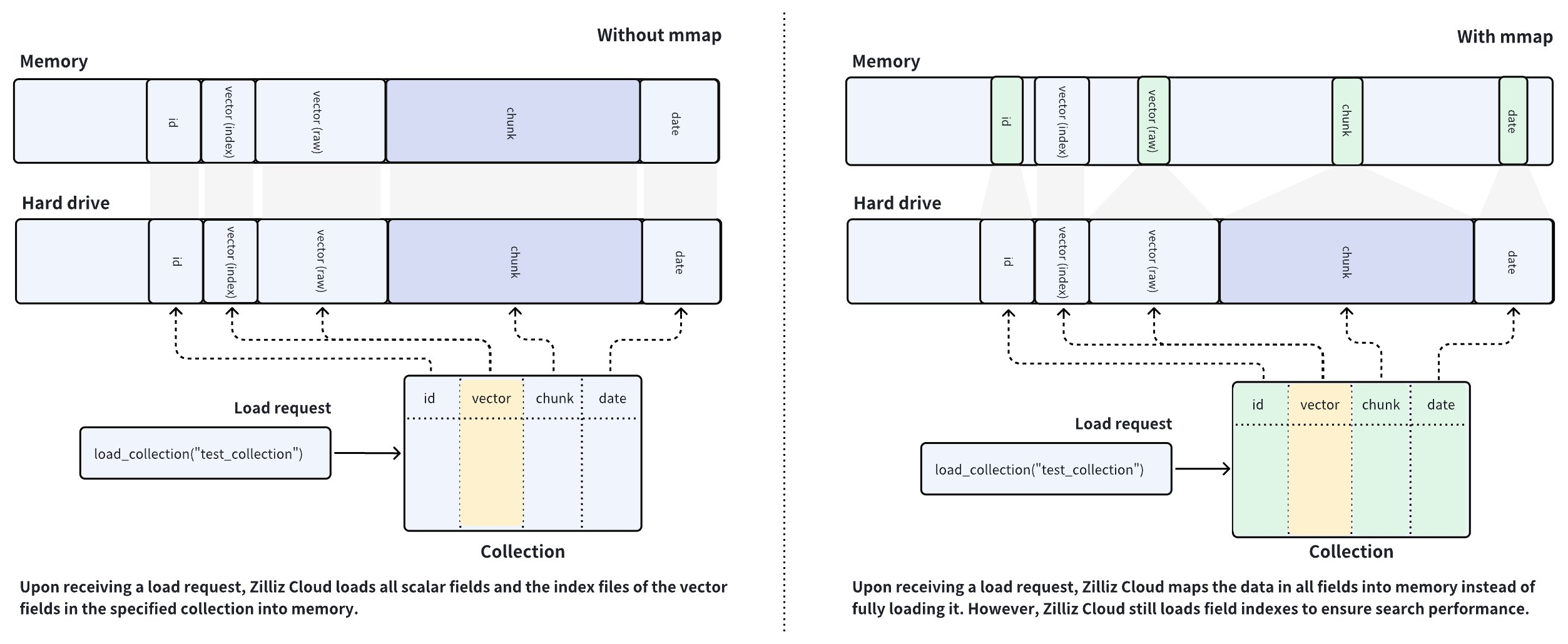
Zilliz Cloud クラスターはメモリ集約型のデータベースシステムであり、使用可能なメモリサイズがコレクションの容量を決定します。大量のデータを含むフィールドをメモリにロードすることは、データサイズがメモリ容量を超える場合には不可能です。これは AI 駆動型アプリケーションでは一般的なケースです。
こうした問題を解決するために、Zilliz Cloud は mmap を導入して、コレクション内のホットデータとコールドデータのロードのバランスを取ります。上の右図に示すように、Capacity-optimized CU を備えた Zilliz Cloud クラスターを使用している場合、コレクションをロードすると、Zilliz Cloud はベクトルインデックスのみをメモリにロードし、すべてのフィールドの生データとスカラーインデックスをメモリマップします。
左右の図のデータ配置手順を比較すると、左図のメモリ使用量が右図よりもはるかに多いことがわかります。mmap を有効にすると、本来メモリにロードされるはずのデータがハードドライブに退避され、オペレーティングシステムのページキャッシュにキャッシュされるため、メモリフットプリントが削減されます。ただし、キャッシュヒットの失敗はパフォーマンスの低下を招く可能性があります。詳細については、こちらの記事 を参照してください。
グローバル mmap 戦略
次の表は、異なる階層のクラスターに対するグローバル mmap 戦略をまとめたものです。
mmap の対象 | Dedicated クラスター | Free クラスター Serverless クラスター | ||
|---|---|---|---|---|
Performance-optimized | Capacity-optimized | Tiered-storage | ||
スカラーフィールドの生データ | 無効・変更可能 | 有効・変更可能 | 有効・変更不可 | |
スカラーフィールドインデックス | 無効・変更可能 | 有効・変更可能 | 有効・変更不可 | |
ベクトルフィールドの生データ | 有効・変更可能 | 有効・変更可能 | 有効・変更不可 | |
ベクトルフィールドインデックス | 無効・変更不可 | 無効・変更不可 | 有効・変更不可 | |
Performance-optimized CU を使用する Dedicated クラスターでは、Zilliz Cloud はベクトルフィールドの生データに対してのみ mmap を有効にし、スカラーフィールドの生データとすべてのフィールドインデックスをメモリにロードします。検索およびクエリ時のメタデータフィルタリングと取得のパフォーマンスを確保するために、グローバル設定を維持することをお勧めします。ただし、メタデータフィルタリングに関与しないフィールドや出力フィールドとして使用されないフィールドについては、引き続き mmap を有効にできます。
Capacity-optimized CU を使用する Dedicated クラスターでは、Zilliz Cloud は自動インデックス作成のためにベクトルフィールドインデックスに対して mmap を無効にし、スカラーフィールドのインデックスとすべてのフィールドの生データをメモリマップして、ストレージ容量を最大限に確保します。メタデータフィルタリング条件で使用されるフィールドや出力フィールドに一覧表示される一部のフィールドの生データが大きすぎ、それらをハードドライブに残すことで応答の遅延やネットワークのジッターが発生する場合は、これらのフィールドに対して mmap を無効にして検索パフォーマンスを向上させることを検討できます。
Free および Serverless クラスター、ならびに Extended-capacity CUs を使用する Dedicated クラスターでは、Zilliz Cloud はすべてのフィールドの生データとインデックスに対して mmap を有効にし、システムキャッシュを最大限に活用して、ホットデータのパフォーマンスを向上させ、コールドデータのコストを削減します。
コレクション固有の mmap 設定
mmap 設定を変更するにはコレクションをリリースする必要があり、変更を有効にするにはコレクションを再度ロードする必要があります。mmap は、特定のフィールド、フィールドインデックス、またはコレクションに対して構成できます。
mmap 設定を変更する際は注意してください。不適切な mmap 設定は、次の問題を引き起こす可能性があります。
-
Performance-optimized の Dedicated クラスターでは、検索およびクエリ時にスカラーフィールドを高速に取得できるように、デフォルトですべてのスカラーフィールドの生データとベクトルインデックスがメモリにロードされます。デフォルトの mmap 設定を変更すると、パフォーマンスが低下する可能性があります。
-
Capacity-optimized の Dedicated クラスターでは、ストレージ容量を最大限に確保するために、デフォルトでベクトルインデックスのみがメモリにロードされます。デフォルトの mmap 設定を変更すると、メモリ不足(OOM)の問題によりロードが失敗する可能性があります。
特定のフィールドの mmap を構成する
小規模な Performance-optimized CU の Dedicated クラスターを使用していて、データセット内のフィールドの生データが大きい場合は、mmap を有効にしたコレクションにそのフィールドを追加することを検討してください。
次の例では、Performance-optimized の Dedicated クラスターに接続することを前提とし、doc_chunk という名前の VarChar フィールドを追加する際に、そのフィールドで mmap を有効にする方法を示します。
- Python
- Java
- Go
- Rust
- C++
- NodeJS
- cURL
from pymilvus import MilvusClient, DataType

CLUSTER_ENDPOINT="YOUR_CLUSTER_ENDPOINT"
TOKEN="YOUR_CLUSTER_TOKEN"

client = MilvusClient(
    uri=CLUSTER_ENDPOINT,
    token=TOKEN
)

schema = MilvusClient.create_schema()
schema.add_field("id", DataType.INT64, is_primary=True, auto_id=False)
schema.add_field("vector", DataType.FLOAT_VECTOR, dim=5)

# Disable mmap on a field upon creating the schema for a collection
schema.add_field(
    field_name="doc_chunk",
    datatype=DataType.VARCHAR,
    max_length=512,
    mmap_enabled=False,
)

client.create_collection(collection_name="my_collection", schema=schema)

# Enable mmap on an existing field
# The following assumes that you have a collection named `my_collection`
client.alter_collection_field(
    collection_name="my_collection",
    field_name="doc_chunk",
    field_params={"mmap.enabled": True}
)
import io.milvus.param.Constant;
import io.milvus.v2.client.ConnectConfig;
import io.milvus.v2.client.MilvusClientV2;
import io.milvus.v2.common.DataType;
import io.milvus.v2.common.IndexParam;
import io.milvus.v2.service.collection.request.*;
import io.milvus.v2.service.index.request.*;

import java.util.*;

String CLUSTER_ENDPOINT = "YOUR_CLUSTER_ENDPOINT";
String TOKEN = "YOUR_CLUSTER_TOKEN";
MilvusClientV2 client = new MilvusClientV2(ConnectConfig.builder()
        .uri(CLUSTER_ENDPOINT)
        .token(TOKEN)
        .build());

CreateCollectionReq.CollectionSchema schema = client.createSchema();

schema.addField(AddFieldReq.builder()
        .fieldName("id")
        .dataType(DataType.Int64)
        .isPrimaryKey(true)
        .autoID(false)
        .build());

schema.addField(AddFieldReq.builder()
        .fieldName("vector")
        .dataType(DataType.FloatVector)
        .dimension(5)
        .build());

Map<String, String> typeParams = new HashMap<String, String>() {{
    put(Constant.MMAP_ENABLED, "false");
}};
schema.addField(AddFieldReq.builder()
        .fieldName("doc_chunk")
        .dataType(DataType.VarChar)
        .maxLength(512)
        .typeParams(typeParams)
        .build());

CreateCollectionReq req = CreateCollectionReq.builder()
        .collectionName("my_collection")
        .collectionSchema(schema)
        .build();
client.createCollection(req);

client.alterCollectionField(AlterCollectionFieldReq.builder()
        .collectionName("my_collection")
        .fieldName("doc_chunk")
        .property(Constant.MMAP_ENABLED, "true")
        .build());
import (
    "context"
    "fmt"

    "github.com/milvus-io/milvus/client/v3/common"
    "github.com/milvus-io/milvus/client/v3/entity"
    "github.com/milvus-io/milvus/client/v3/index"
    "github.com/milvus-io/milvus/client/v3/milvusclient"
)

ctx, cancel := context.WithCancel(context.Background())
defer cancel()

milvusAddr := "YOUR_CLUSTER_ENDPOINT"
client, err := milvusclient.New(ctx, &milvusclient.ClientConfig{
    Address: milvusAddr,
})
if err != nil {
    fmt.Println(err.Error())
    // handle error
}
defer client.Close(ctx)

schema := entity.NewSchema().WithDynamicFieldEnabled(false)
schema.WithField(entity.NewField().
    WithName("id").
    WithDataType(entity.FieldTypeInt64).
    WithIsPrimaryKey(true),
).WithField(entity.NewField().
    WithName("vector").
    WithDataType(entity.FieldTypeFloatVector).
    WithDim(5),
).WithField(entity.NewField().
    WithName("doc_chunk").
    WithDataType(entity.FieldTypeVarChar).
    WithMaxLength(512).
    WithTypeParams(common.MmapEnabledKey, "false"),
)

err = client.CreateCollection(ctx,
    milvusclient.NewCreateCollectionOption("my_collection", schema))
if err != nil {
    fmt.Println(err.Error())
    // handle error
}

err = client.AlterCollectionFieldProperty(ctx, milvusclient.NewAlterCollectionFieldPropertiesOption("my_collection", "doc_chunk").
    WithProperty(common.MmapEnabledKey, "true"))
if err != nil {
    fmt.Println(err.Error())
    // handle error
}
use std::collections::HashMap;

use milvus::v2::prelude::*;

#[tokio::main]
async fn main() -> Result<()> {
    let config = ConnectConfig::new().uri("YOUR_CLUSTER_ENDPOINT").token("YOUR_CLUSTER_TOKEN");
    let client = ClientV2::new(&config).await?;

    let schema = CollectionSchema::new()
        .add_field(FieldSchema::new().name("id").data_type(DataType::Int64).primary_key(true))
        .add_field(FieldSchema::new().name("vector").data_type(DataType::FloatVector).dimension(5))
        .add_field(
            FieldSchema::new()
                .name("doc_chunk")
                .data_type(DataType::VarChar)
                .max_length(512)
                .type_params(HashMap::from([("mmap.enabled".to_string(), "false".to_string())])),
        );

    client
        .create_collection(
            CreateCollectionRequest::builder()
                .collection_name("my_collection")
                .schema(schema)
                .build()?,
        )
        .await?;

    client
        .alter_collection_field_properties(
            AlterCollectionFieldPropertiesRequest::builder()
                .collection_name("my_collection")
                .field_name("doc_chunk")
                .properties(HashMap::from([("mmap.enabled".to_string(), "true".to_string())]))
                .build()?,
        )
        .await?;

    Ok(())
}
#include <iostream>
#include <memory>
#include <string>
#include <utility>

#include "milvus/MilvusClientV2.h"

const std::string CLUSTER_ENDPOINT = "YOUR_CLUSTER_ENDPOINT";
const std::string TOKEN = "YOUR_CLUSTER_TOKEN";

auto client = milvus::MilvusClientV2::Create();

milvus::ConnectParam connect_param{CLUSTER_ENDPOINT, TOKEN};
auto status = client->Connect(connect_param);
if (!status.IsOk()) {
    std::cout << status.Message() << std::endl;
}

milvus::CollectionSchemaPtr schema = std::make_shared<milvus::CollectionSchema>();
schema->AddField({"id", milvus::DataType::INT64, "", true, false});
schema->AddField(milvus::FieldSchema("vector", milvus::DataType::FLOAT_VECTOR).WithDimension(5));
schema->AddField(milvus::FieldSchema("doc_chunk", milvus::DataType::VARCHAR).WithMaxLength(512).AddTypeParam("mmap.enabled", "false"));

status = client->CreateCollection(milvus::CreateCollectionRequest()
    .WithCollectionName("my_collection")
    .WithCollectionSchema(schema));
if (!status.IsOk()) {
    std::cout << status.Message() << std::endl;
}

status = client->AlterCollectionFieldProperties(milvus::AlterCollectionFieldPropertiesRequest()
    .WithCollectionName("my_collection")
    .WithFieldName("doc_chunk")
    .AddProperty("mmap.enabled", "true"));
if (!status.IsOk()) {
    std::cout << status.Message() << std::endl;
}
import { MilvusClient, DataType } from '@zilliz/milvus2-sdk-node';

const CLUSTER_ENDPOINT="YOUR_CLUSTER_ENDPOINT";
const TOKEN="YOUR_CLUSTER_TOKEN";

const client = new MilvusClient({
    address: CLUSTER_ENDPOINT,
    token: TOKEN
});

const schema = [
{
    name: 'id',
    data_type: DataType.Int64,
    is_primary_key: true,
    autoID: false,
},
{
    name: 'vector',
    data_type: DataType.FloatVector,
    dim: 5,
},
{
    name: "doc_chunk",
    data_type: DataType.VarChar,
    max_length: 512,
    'mmap.enabled': false,
}
];

await client.createCollection({
    collection_name: "my_collection",
    schema: schema
});

await client.alterCollectionFieldProperties({
    collection_name: "my_collection",
    field_name: "doc_chunk",
    properties: {"mmap.enabled": true}
});
#restful
export TOKEN="YOUR_CLUSTER_TOKEN"
export CLUSTER_ENDPOINT="YOUR_CLUSTER_ENDPOINT"

export idField='{
    "fieldName": "id",
    "dataType": "Int64",
    "isPrimary": true
}'

export vectorField='{
    "fieldName": "vector",
    "dataType": "FloatVector",
    "elementTypeParams": {
       "dim": 5
    }
}'

export docChunkField='{
    "fieldName": "doc_chunk",
    "dataType": "VarChar",
    "elementTypeParams": {
        "max_length": 512,
        "mmap.enabled": false
    }
}'

export schema="{
    \"autoID\": false,
    \"fields\": [
        $idField,
        $docChunkField,
        $vectorField
    ]
}"

curl --request POST \
--url "${CLUSTER_ENDPOINT}/v2/vectordb/collections/create" \
--header "Authorization: Bearer ${TOKEN}" \
--header "Content-Type: application/json" \
--header "Request-Timeout: 10" \
--data "{
    \"collectionName\": \"my_collection\",
    \"schema\": $schema
}"

curl --request POST \
--url "${CLUSTER_ENDPOINT}/v2/vectordb/collections/fields/alter_properties" \
--header "Authorization: Bearer ${TOKEN}" \
--header "Content-Type: application/json" \
--header "Request-Timeout: 10" \
-d '{
    "collectionName": "my_collection",
    "fieldName": "doc_chunk",
    "fieldParams":{
        "mmap.enabled": true
    }
}'
上記のスキーマを使用して作成したコレクションをロードすると、Zilliz Cloud は doc_chunk フィールドの生データをメモリマップします。フィールドの mmap 設定を変更するにはコレクションをリリースし、変更後にコレクションを再度ロードする必要があることに注意してください。
スカラーインデックスの mmap を構成する
メタデータフィルタリングに関与する、または出力フィールドとして使用されるスカラーフィールドは、他のスカラーフィールドをハードドライブに置いたまま、メモリにロードすることを検討してください。
次の例では、Capacity-optimized の Dedicated クラスターに接続することを前提とし、高速な取得のために title という名前の VarChar フィールドのインデックスで mmap を無効にする方法を示します。
- Python
- Java
- Go
- Rust
- C++
- NodeJS
- cURL
# Add a varchar field
schema.add_field(
    field_name="title",
    datatype=DataType.VARCHAR,
    max_length=512
)

index_params = MilvusClient.prepare_index_params()

# Create index on the varchar field with mmap settings
index_params.add_index(
    field_name="title",
    index_type="AUTOINDEX",
    params={ "mmap.enabled": "false" }
)
client.create_index(collection_name="my_collection", index_params=index_params)

# Change mmap settings for an index
# The following assumes that you have a collection named `my_collection`
client.alter_index_properties(
    collection_name="my_collection",
    index_name="title",
    properties={"mmap.enabled": True}
)
schema.addField(AddFieldReq.builder()
        .fieldName("title")
        .dataType(DataType.VarChar)
        .maxLength(512)
        .build());

List<IndexParam> indexParams = new ArrayList<>();
Map<String, Object> extraParams = new HashMap<String, Object>() {{
    put(Constant.MMAP_ENABLED, false);
}};
indexParams.add(IndexParam.builder()
        .fieldName("title")
        .indexType(IndexParam.IndexType.AUTOINDEX)
        .extraParams(extraParams)
        .build());

client.createIndex(CreateIndexReq.builder()
        .collectionName("my_collection")
        .indexParams(indexParams)
        .build());

client.alterIndexProperties(AlterIndexPropertiesReq.builder()
        .collectionName("my_collection")
        .indexName("title")
        .property(Constant.MMAP_ENABLED, "true")
        .build());
schema.WithField(entity.NewField().
    WithName("title").
    WithDataType(entity.FieldTypeVarChar).
    WithMaxLength(512),
)

indexOption := milvusclient.NewCreateIndexOption("my_collection", "title",
    index.NewInvertedIndex())
indexOption.WithExtraParam(common.MmapEnabledKey, "false")

_, err = client.CreateIndex(ctx, indexOption)
if err != nil {
    fmt.Println(err.Error())
    // handle error
}

err = client.AlterIndexProperties(ctx, milvusclient.NewAlterIndexPropertiesOption("my_collection", "title").
    WithProperty(common.MmapEnabledKey, "true"))
if err != nil {
    fmt.Println(err.Error())
    // handle error
}
let schema = schema.add_field(
    FieldSchema::new().name("title").data_type(DataType::VarChar).max_length(512),
);

client
    .create_index(
        CreateIndexRequest::builder()
            .collection_name("my_collection")
            .index_param(
                IndexParam::new()
                    .field_name("title")
                    .index_type(IndexType::AutoIndex)
                    .extra_params(HashMap::from([("mmap.enabled".to_string(), "false".to_string())])),
            )
            .build()?,
    )
    .await?;

client
    .alter_index_properties(
        AlterIndexPropertiesRequest::builder()
            .collection_name("my_collection")
            .index_name("title")
            .properties(HashMap::from([("mmap.enabled".to_string(), "true".to_string())]))
            .build()?,
    )
    .await?;
schema->AddField(milvus::FieldSchema("title", milvus::DataType::VARCHAR).WithMaxLength(512));

milvus::IndexDesc index("title", "", milvus::IndexType::AUTOINDEX);
index.AddExtraParam("mmap.enabled", "false");
status = client->CreateIndex(milvus::CreateIndexRequest()
                                    .WithCollectionName("my_collection")
                                    .AddIndex(std::move(index)));
if (!status.IsOk()) {
    std::cout << status.Message() << std::endl;
}

status = client->AlterIndexProperties(milvus::AlterIndexPropertiesRequest()
                                    .WithCollectionName("my_collection")
                                    .WithIndexName("title")
                                    .AddProperty("mmap.enabled", "true"));
if (!status.IsOk()) {
    std::cout << status.Message() << std::endl;
}
// Create index on the varchar field with mmap settings
await client.createIndex({
    collection_name: "my_collection",
    field_name: "title",
    index_type: "AUTOINDEX",
    params: { "mmap.enabled": false }
});

// Change mmap settings for an index
// The following assumes that you have a collection named `my_collection`
await client.alterIndexProperties({
    collection_name: "my_collection",
    index_name: "title",
    properties:{"mmap.enabled": true}
});
# restful
export TOKEN="YOUR_CLUSTER_TOKEN"
export CLUSTER_ENDPOINT="YOUR_CLUSTER_ENDPOINT"

curl --request POST \
--url "${CLUSTER_ENDPOINT}/v2/vectordb/indexes/create" \
--header "Authorization: Bearer ${TOKEN}" \
--header "Content-Type: application/json" \
--header "Request-Timeout: 10" \
-d '{
    "collectionName": "my_collection",
    "indexParams": [
        {
            "fieldName": "title",
            "params": {
                "index_type": "AUTOINDEX",
                "mmap.enabled": false
            }
        }
    ]
}'

curl --request POST \
--url "${CLUSTER_ENDPOINT}/v2/vectordb/indexes/alter_properties" \
--header "Authorization: Bearer ${TOKEN}" \
--header "Content-Type: application/json" \
--header "Request-Timeout: 10" \
-d '{
    "collectionName": "my_collection",
    "indexName": "title",
    "properties": {
        "mmap.enabled": true
    }
}'
上記のインデックスパラメーターを使用して作成したコレクションをロードすると、Zilliz Cloud は title フィールドのインデックスをメモリにロードします。フィールドの mmap 設定を変更するにはコレクションをリリースし、変更後にコレクションを再度ロードする必要があることに注意してください。
コレクション内の mmap を構成する
コレクションで mmap 設定を無効にすると、Zilliz Cloud がすべてのフィールドの生データを完全にメモリにロードするようにできます。
次の例では、Performance-optimized の Dedicated クラスターに接続することを前提とし、コレクションを作成するときに mmap を無効にする方法を示します。
- Python
- Java
- Go
- Rust
- C++
- NodeJS
- cURL
# Disable mmap when creating a collection
client.create_collection(
    collection_name="my_collection",
    schema=schema,
    properties={ "mmap.enabled": "false" }
)
CreateCollectionReq req = CreateCollectionReq.builder()
        .collectionName("my_collection")
        .collectionSchema(schema)
        .property(Constant.MMAP_ENABLED, "false")
        .build();
client.createCollection(req);
err = client.CreateCollection(ctx,
    milvusclient.NewCreateCollectionOption("my_collection", schema).
        WithProperty(common.MmapEnabledKey, "false"))
if err != nil {
    fmt.Println(err.Error())
    // handle error
}
client
    .create_collection(
        CreateCollectionRequest::builder()
            .collection_name("my_collection")
            .schema(schema)
            .properties(HashMap::from([("mmap.enabled".to_string(), "false".to_string())]))
            .build()?,
    )
    .await?;
status = client->CreateCollection(milvus::CreateCollectionRequest()
                                          .WithCollectionName("my_collection")
                                          .WithCollectionSchema(schema)
                                          .AddProperty("mmap.enabled", "false"));
if (!status.IsOk()) {
    std::cout << status.Message() << std::endl;
}
await client.createCollection({
    collection_name: "my_collection",
    schema: schema,
    properties: { "mmap.enabled": false }
});
curl --request POST \
--url "${CLUSTER_ENDPOINT}/v2/vectordb/collections/create" \
--header "Authorization: Bearer ${TOKEN}" \
--header "Content-Type: application/json" \
--header "Request-Timeout: 10" \
--data "{
    \"collectionName\": \"my_collection\",
    \"schema\": $schema,
    \"params\": {
        \"mmap.enabled\": \"false\"
    }
}"
次のようにして、既存のコレクションの mmap 設定を変更することもできます。
- Python
- Java
- Go
- Rust
- C++
- NodeJS
- cURL
# Release collection before change mmap settings
client.release_collection("my_collection")

# Ensure that the collection has already been released
# and run the following
client.alter_collection_properties(
    collection_name="my_collection",
    properties={
        "mmap.enabled": False
    }
)

# Load the collection to make the above change take effect
client.load_collection("my_collection")
client.releaseCollection(ReleaseCollectionReq.builder()
        .collectionName("my_collection")
        .build());

client.alterCollectionProperties(AlterCollectionPropertiesReq.builder()
        .collectionName("my_collection")
        .property(Constant.MMAP_ENABLED, "false")
        .build());

client.loadCollection(LoadCollectionReq.builder()
        .collectionName("my_collection")
        .build());
err = client.ReleaseCollection(ctx, milvusclient.NewReleaseCollectionOption("my_collection"))
if err != nil {
    fmt.Println(err.Error())
    // handle error
}

err = client.AlterCollectionProperties(ctx, milvusclient.NewAlterCollectionPropertiesOption("my_collection").
    WithProperty(common.MmapEnabledKey, "false"))
if err != nil {
    fmt.Println(err.Error())
    // handle error
}

_, err = client.LoadCollection(ctx, milvusclient.NewLoadCollectionOption("my_collection"))
if err != nil {
    fmt.Println(err.Error())
    // handle error
}
client.release_collection(ReleaseCollectionRequest::builder().collection_name("my_collection").build()?).await?;

client
    .alter_collection_properties(
        AlterCollectionPropertiesRequest::builder()
            .collection_name("my_collection")
            .properties(HashMap::from([("mmap.enabled".to_string(), "false".to_string())]))
            .build()?,
    )
    .await?;

client.load_collection(LoadCollectionRequest::builder().collection_name("my_collection").build()?).await?;
status = client->ReleaseCollection(milvus::ReleaseCollectionRequest()
                                            .WithCollectionName("my_collection"));
if (!status.IsOk()) {
    std::cout << status.Message() << std::endl;
}

status = client->AlterCollectionProperties(milvus::AlterCollectionPropertiesRequest()
                                            .WithCollectionName("my_collection")
                                            .AddProperty("mmap.enabled", "false"));
if (!status.IsOk()) {
    std::cout << status.Message() << std::endl;
}

status = client->LoadCollection(milvus::LoadCollectionRequest()
                                    .WithCollectionName("my_collection"));
if (!status.IsOk()) {
    std::cout << status.Message() << std::endl;
}
// Release collection before change mmap settings
await client.releaseCollection({
    collection_name: "my_collection"
});

// Ensure that the collection has already been released
// and run the following
await client.alterCollectionProperties({
    collection_name: "my_collection",
    properties: {
        "mmap.enabled": false
    }
});

// Load the collection to make the above change take effect
await client.loadCollection({
    collection_name: "my_collection"
});
# restful
export CLUSTER_ENDPOINT="YOUR_CLUSTER_ENDPOINT"
export TOKEN="YOUR_CLUSTER_TOKEN"

curl --request POST \
--url "${CLUSTER_ENDPOINT}/v2/vectordb/collections/release" \
--header "Authorization: Bearer ${TOKEN}" \
--header "Content-Type: application/json" \
--header "Request-Timeout: 10" \
-d '{
    "collectionName": "my_collection"
}'

curl --request POST \
--url "${CLUSTER_ENDPOINT}/v2/vectordb/collections/alter_properties" \
--header "Authorization: Bearer ${TOKEN}" \
--header "Content-Type: application/json" \
--header "Request-Timeout: 10" \
-d '{
    "collectionName": "my_collection",
    "properties": {
        "mmap.enabled": false
    }
}'

curl --request POST \
--url "${CLUSTER_ENDPOINT}/v2/vectordb/collections/load" \
--header "Authorization: Bearer ${TOKEN}" \
--header "Content-Type: application/json" \
--header "Request-Timeout: 10" \
-d '{
    "collectionName": "my_collection"
}'
コレクションのプロパティを変更するにはコレクションをリリースし、変更を有効にするにはコレクションを再度ロードする必要があります。