ベクトル類似度による重複排除
この機能は、該当するすべての AWS リージョンでのみ利用できます。Google Cloud および Microsoft Azure では利用できません。有効にするには、お問い合わせください。
ベクトル類似度による重複排除は、埋め込みが非常に類似したレコードを識別し、それらを意味的な重複としてグループ化します。このジョブを使用すると、言い換えられたテキスト、わずかに変更された画像、類似コンテンツの複数バージョンなど、意味的な冗長性を削減できます。
プライマリキーによる重複排除 とベクトル類似度による重複排除は、異なる種類の重複に対処します。データクレンジングのワークフローでは、まずプライマリキーが重複するレコードを削除し、その後、残りのデータに対してベクトル類似度による重複排除を実行できます。
概要
次の図は、ベクトル類似度による重複排除が重複グループを識別し、出力データセットを生成する方法を示しています。まずベクトルを K-Means クラスターに分割し、設定されたメトリクスを使用して各クラスター内のレコードを比較します。設定された類似度または距離のしきい値を満たすレコードが接続され、重複グループにマージされます。
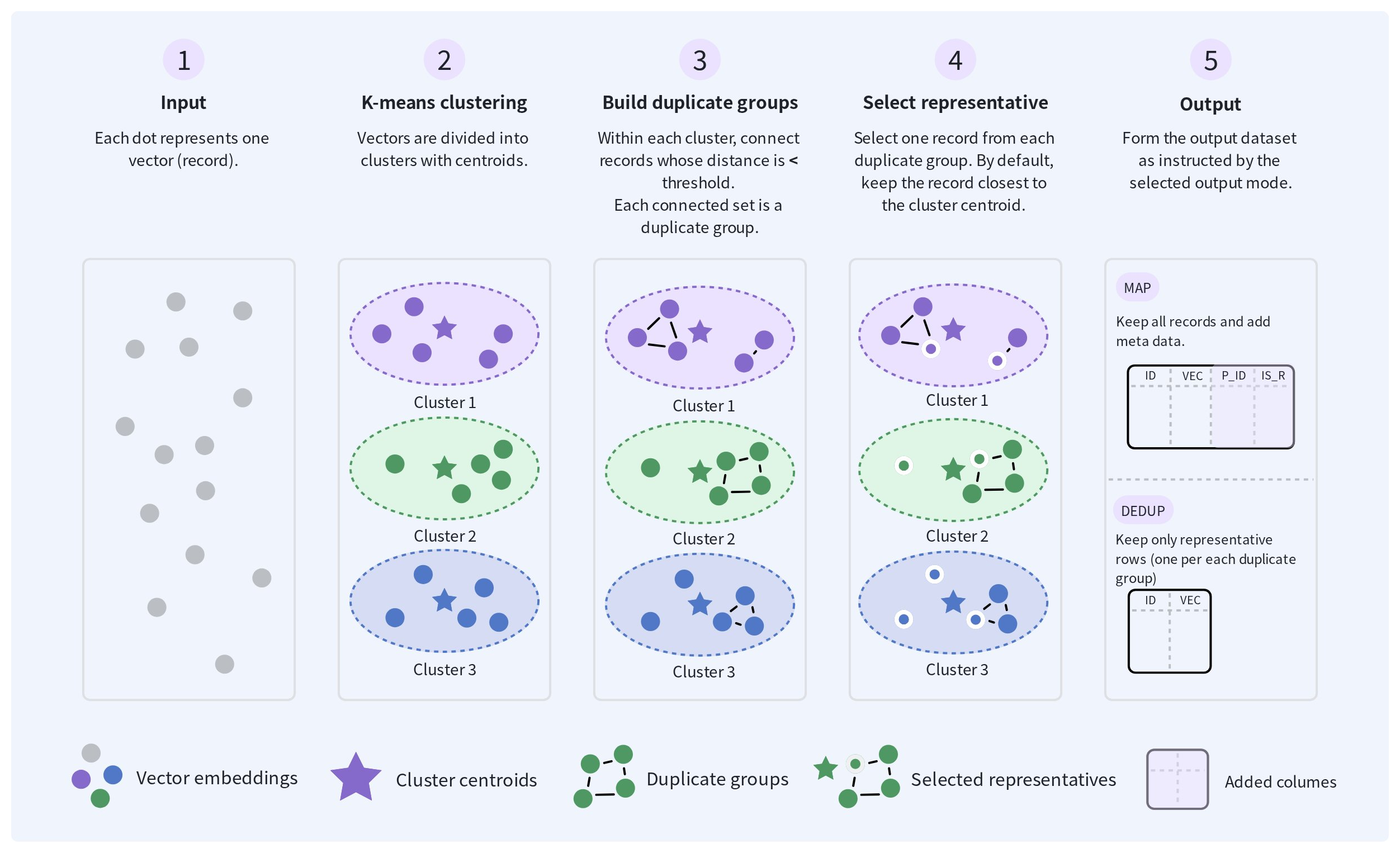
各重複グループについて、1 つのレコードが代表として選択されます。デフォルトでは、K-Means クラスターのセントロイドに最も近いレコードが選択されます。keepBy を使用すると、代わりに別のフィールドに基づいて代表を選択できます。
出力モードに応じて、ジョブは重複グループのメタデータ付きですべてのレコードを保持するか、代表レコードと変更されていないシングルトンレコードを含む重複排除済みデータセットを生成します。
重複と見なす条件を決定する
前述のしきい値(similarityThreshold)の意味と有効範囲は、選択したメトリクスによって異なります。しきい値を直接設定するか、目標の重複排除率を指定するかのいずれかです。両方のパラメーターを未指定のままにすることはできません。
メソッド | 使用する状況 | 動作 |
|---|---|---|
| 適切なしきい値がまだわからない場合。 | 入力データから |
| 類似したデータに対してしきい値をすでに検証済みである場合。 | 指定されたカットオフをそのまま使用します。
|
targetDedupRate を指定すると、ジョブは要求された重複排除率とほぼ同じ結果を生み出すと見込まれる similarityThreshold を自動的に推定します。K-Means クラスタリングの後、ジョブは入力データの約 10% のサンプルに対して複数の候補しきい値を評価し、各しきい値の重複排除率を測定し、線形補間を使用して要求された率に対応するしきい値を推定します。
これにより、適切な similarityThreshold を手動で決定する必要がなくなりますが、重複排除が開始される前にパラメーター推定ステージが追加されます。このステージによって、固定の similarityThreshold を使用する場合と比べて処理時間が約 10% 増加すると見込まれます。
similarityThreshold の意味は、選択したメトリクスによって異なります。
-
cosineの場合、(0, 1]の範囲の類似度の値です。 -
l2の場合、0より大きい距離の値です。
保持するレコードを選択する
デフォルトでは、ジョブは各重複グループの代表として、ベクトルが K-Means クラスターのセントロイドに最も近いレコードを選択します。
クラスターのセントロイドに最も近いレコードが、保持したいレコードでもある場合は、デフォルトの動作を使用します。重複レコードに異なるビジネス上の値が含まれている場合は、keepBy を使用して保持するレコードを定義します。keepBy は <field-name>:<strategy> の形式で設定します。たとえば、timestamp:max は timestamp フィールドの値が最も大きいレコードを保持します。これは通常、最新のレコードを表します。
| primary key | timestamp  | content         | vector       |
|-------------|------------|-----------------|--------------|
| doc-1       | 1710000000 | Earlier version | [0.12, 0.35] | <!-- Removed with timestamp:max -->
| doc-2       | 1720000000 | Latest version  | [0.18, 0.41] | <!-- Retained with timestamp:max -->
| doc-3       | 1715000000 | Similar version | [0.16, 0.39] | <!-- Removed with timestamp:max -->
この例では、3 つのレコードの埋め込みが十分に類似しているため、これらのレコードは同じ重複グループに配置されます。keepBy を指定しない場合、ジョブは K-Means クラスターのセントロイドに最も近いレコードを保持します。keepBy に timestamp:max を設定すると、doc-2 の timestamp 値が最も大きいため、ジョブはこのレコードを保持します。
ジョブは選択されたレコード全体を保持します。重複グループ内の異なるレコードのフィールド値を結合することはありません。
距離メトリクスを選択する
距離メトリクスは、ベクトルがクラスターに割り当てられる方法を決定します。
| メトリクス | 類似度の解釈方法 | 使用する状況 |
|---|---|---|
l2 | ユークリッド距離が小さいベクトルほど類似しています。 | 埋め込みモデルまたは既存のワークフローでユークリッド距離を使用している場合は、このメトリクスを使用します。 |
cosine | コサイン類似度が大きいベクトルほど類似しています。 | ベクトルの大きさよりもベクトルの方向が重要な場合は、このメトリクスを使用します。 |
出力モードを選択する
重複排除の結果を検査するか、クレンジング済みのデータセットを直接生成するかに基づいて、出力モードを選択します。
| モード | 返される内容 | 使用する状況 |
|---|---|---|
map | すべての入力レコードを保持し、各レコードの重複グループへの割り当てと代表ステータスを示す parent_id と is_representative を追加します。 | 重複グループを検査したり、結果を監査したり、新しい targetDedupRate または similarityThreshold を評価したりする場合は、このモードを使用します。 |
deduped_rows | 各重複グループから代表レコードを返し、シングルトンレコードは変更せずに保持します。 | 重複排除の設定を検証した後に、下流での使用向けにクレンジング済みデータセットを生成する場合は、このモードを使用します。 |
outputMode を省略した場合、そのデフォルト値は primaryKeyField が指定されているかどうかによって異なります。
-
primaryKeyFieldが指定されている場合、outputModeのデフォルトはmapです。 -
primaryKeyFieldを省略した場合、outputModeのデフォルトはdeduped_rowsです。
出力モードを明示的に map に設定するには、primaryKeyField も指定する必要があります。指定しない場合、リクエストはパラメーターエラーを返します。
map モードでは、出力に以下の追加フィールドが含まれます。
| フィールド | 説明 |
|---|---|
parent_id | 選択された代表レコードのプライマリキーです。同じ重複グループ内のレコードは同じ parent_id を共有します。シングルトンレコードの場合、parent_id は自身のプライマリキーに設定されます。 |
is_representative | レコードが代表として保持されるかどうかを示します。このフィールドは、各重複グループで選択された代表とシングルトンレコードに対して true です。 |
初回の実行では、map 出力で targetDedupRate を使用し、レコードを削除する前に重複グループを検査します。結果を検証した後は、targetDedupRate の使用を続けるか、再現可能な実行のために固定の similarityThreshold を設定します。
事前準備
ベクトル類似度による重複排除ジョブを作成する前に、以下を確認してください。
-
すべての入力ファイルが互換性のあるスキーマを使用し、比較対象のベクトルフィールドを含んでいること。
-
そのフィールド内のすべてのベクトルが同じ型と次元を使用し、同じ埋め込みモデルと前処理方法を使用して生成されていること。
-
mapモードを使用するには、入力に有効なプライマリキーフィールドが含まれている必要があり、それをprimaryKeyFieldを使用して指定する必要があること。 -
keepByを使用する場合、指定したフィールドがすべての入力ファイルに存在し、選択したストラテジーを使用して比較できる値を含んでいること。
認証、入力ファイル、出力動作など、Spark バッチジョブを実行するための一般的な要件については、Spark バッチジョブ を参照してください。
ベクトル類似度による重複排除ジョブを作成する
入出力の場所、比較するベクトルフィールド、重複検出方法、代表レコードの選択方法、出力モードを指定して、ベクトル類似度による重複排除ジョブを作成します。ジョブは非同期で実行され、ステータスの監視に使用できるジョブ ID を返します。ジョブが成功すると、設定された出力パスで結果を利用できます。
冪等性キーを準備します。
冪等性キーは、同じジョブリクエストを再試行するときに変更されない一意の文字列です。詳細については、冪等な送信 を参照してください。
リクエストペイロードを準備します。
export payload = '{
  "description": "deduplicate by product semantics",
  "regionId": "aws-us-west-2",
  "input": {
    "type": "volume",
    "volumeName": "product-data",
    "path": "input/products.parquet",
    "format": "parquet"
  },
  "output": {
    "type": "volume",
    "volumeName": "product-data",
    "path": "output/products-vector-dedup.parquet",
    "format": "parquet"
  },
  "primaryKeyField": "id",
  "vectorField": "embedding",
  "metric": "cosine",
  "similarityThreshold": 0.95,
  "outputMode": "map",
  "keepBy": "updated_at:max",
  "resourceSize": "MEDIUM",
  "timeoutSeconds": 7200
}
'
次の表に、ジョブ固有のパラメーターを示します。
パラメーター | 必須 | 説明 |
|---|---|---|
| いいえ | レコード識別子として使用されるフィールドです。 |
| はい | 類似度の比較に使用されるベクトルフィールドです。サポートされる値には、 |
| はい | ベクトルの比較に使用されるメトリクスです。指定できる値は |
| いいえ | ほぼ重複するレコードを識別するために使用されるカットオフです。
このパラメーターを |
| いいえ | 出力モードです。指定できる値は |
| いいえ | 重複として識別するレコードの目標割合です。有効範囲は このパラメーターを |
| いいえ | 各重複グループから代表を選択するために使用されるルールです。 |
similarityThreshold と targetDedupRate は相互に排他的です。両方を指定するか、両方とも未指定にすると、エラーになります。
すべての Spark バッチジョブで共有されるパラメーターについては、リクエストペイロード を参照してください。
ジョブを送信します。
export API_KEY="xxxxxxxxxxxxxxxxxxxxxxxxxxxxxxxxxxxxxxxxxxx"

curl --request POST \
    --url "https://api.cloud.zilliz.com/v2/projects/{projectId}/jobs/dedup/vector" \
    --header "Authorization: Bearer ${API_KEY}" \
    --header "Idempotency-Key: spark-job-20260730-002" \
    --header "Content-Type: application/json" \
    --data "${payload}"
リクエストはジョブが作成された後に返ります。レスポンスには、進捗状況の監視に使用できるジョブ ID が含まれます。次の例は、成功したレスポンスを示しています。
{
  "code": 0,
  "data": {
    "jobId": "job-xxxxxxxx",
    "projectId": "proj-xxxxxxxx",
    "type": "SPARK",
    "description": "deduplicate by product semantics",
    "status": "PENDING",
    "regionId": "aws-us-west-2",
    "clusterId": "in-xxxxxxxx",
    "createdAt": null,
    "startedAt": null,
    "finishedAt": null,
    "durationSeconds": null
  }
}
送信時の動作の詳細については、送信レスポンス を参照してください。
ジョブを監視する
リクエストを送信した後、返されたジョブ ID を使用して、ジョブが終了状態に達するまで監視します。ジョブのステータスと詳細の表示、既存のジョブの一覧表示、キャンセル可能な状態のジョブのキャンセルを行うことができます。
ジョブが成功したら、リクエストで指定したパスに期待される出力が存在することを確認します。
手順、ジョブの状態、状態遷移については、Spark バッチジョブの管理 を参照してください。
出力を検証する
ジョブが成功したら、以下を確認してください。
-
設定されたボリュームパスに出力ファイルが存在すること。
-
map出力の場合:-
すべての入力レコードが保持されること。
-
同じ重複グループ内のレコードが同じ
parent_idを共有すること。 -
各重複グループに、
is_representativeがtrueに設定されたレコードがちょうど 1 つ存在すること。 -
シングルトンレコードが自身のプライマリキーを
parent_idとして使用し、is_representativeがtrueに設定されていること。
-
-
deduped_rows出力の場合:-
各重複グループから代表レコードのみが保持されること。
-
シングルトンレコードが変更されないこと。
-
-
keepByを指定した場合、サンプリングされた各重複グループの代表が、設定されたフィールドとストラテジーに一致すること。 -
生成された重複グループのサンプルに、実際にほぼ重複しているレコードが含まれていること。
次のステップ
まだ実施していない場合は、プライマリキーによる重複排除 を使用して、プライマリキーの値が同じレコードを識別してください。モデルトレーニングや大規模なデータ分析には、K-Means クラスタリング を使用して埋め込みの分布を調べ、異常検知 を使用して、さらに確認が必要となる可能性のある異常なレコードを見つけてください。